driver controls GMC SIERRA 2019 Service Manual
[x] Cancel search | Manufacturer: GMC, Model Year: 2019, Model line: SIERRA, Model: GMC SIERRA 2019Pages: 477, PDF Size: 8.7 MB
Page 332 of 477
GMC Sierra/Sierra Denali Owner Manual (GMNA-Localizing-U.S./Canada/
Mexico-1500-11698638) - 2019 - CRC - 5/14/19
Vehicle Care 331
3. PressTon the steering wheel,
or press the trip odometer reset
stem if the vehicle does not
have DIC controls, to move to
the Reset/Disable display area.
Select Reset, then press the
thumbwheel or press the reset
stem for several seconds.
4. Press the thumbwheel or the reset stem to confirm the reset.
Engine Air Cleaner/Filter
The engine air cleaner/filter is on
the driver side of the engine
compartment. See Engine
Compartment Overview 0321.
When to Inspect the Engine Air
Cleaner/Filter
If the vehicle is not equipped with
the engine air filter life system, see
Maintenance Schedule 0420 for
intervals on inspecting and
replacing changing the engine air
cleaner/filter.
How to Inspect/Replace the
Engine Air Cleaner/Filter
Do not start the engine or have the
engine running with the engine air
cleaner/filter housing open. Before
removing the engine air cleaner/
filter, make sure that the engine air
cleaner/filter housing and nearby
components are free of dirt and
debris. Do not clean the engine air
cleaner/filter or components with
water or compressed air. To inspect or replace the engine air
cleaner/filter:
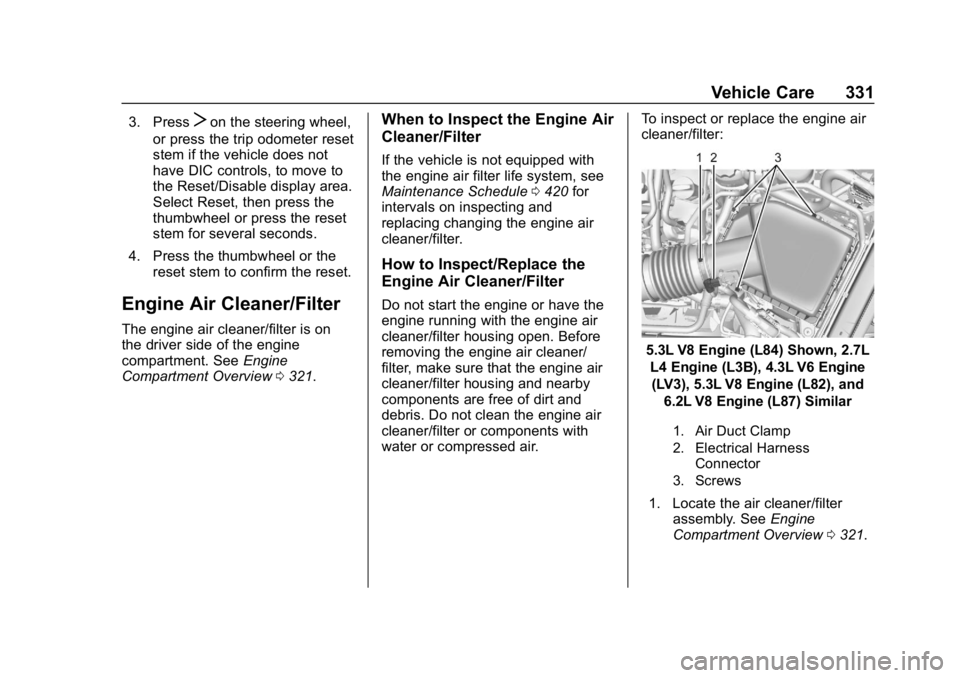
5.3L V8 Engine (L84) Shown, 2.7L
L4 Engine (L3B), 4.3L V6 Engine(LV3), 5.3L V8 Engine (L82), and 6.2L V8 Engine (L87) Similar
1. Air Duct Clamp
2. Electrical Harness Connector
3. Screws
1. Locate the air cleaner/filter assembly. See Engine
Compartment Overview 0321.
Page 379 of 477
GMC Sierra/Sierra Denali Owner Manual (GMNA-Localizing-U.S./Canada/
Mexico-1500-11698638) - 2019 - CRC - 5/14/19
378 Vehicle Care
See your dealer for service or to
purchase a relearn tool. A TPMS
relearn tool can also be purchased.
See Tire Pressure Monitor Sensor
Activation Tool at
www.gmtoolsandequipment.com or
call 1-800-GM TOOLS
(1-800-468-6657).
There are two minutes to match the
first tire/wheel position, and
five minutes overall to match all four
tire/wheel positions. If it takes
longer, the matching process stops
and must be restarted.
The TPMS sensor matching
process is:1. Set the parking brake.
2. Turn the ignition on without starting the vehicle.
3. Uplevel DIC Only: Make sure the Tire Pressure info page
option is turned on. The info
pages on the DIC can be
turned on and off through the Options menu. See
Driver
Information Center (DIC)
(Midlevel and Uplevel) 0163 or
Driver Information Center (DIC)
(Base Level) 0161.
4. If the vehicle has an uplevel DIC, use the DIC controls on
the right side of the steering
wheel to scroll to the Tire
Pressure screen under the DIC
info page.
If the vehicle has a base level
DIC, use the trip odometer
reset stem to scroll to the Tire
Pressure screen.
5. If the vehicle has an uplevel DIC, press and hold the
thumbwheel located in the
center of the DIC controls on
the right side of the steering
wheel.
If the vehicle has a base level
DIC, press and hold the trip
odometer reset stem for about
five seconds. A message
asking if the process should
begin should appear. Select yes and press the trip
odometer reset stem to confirm
the selection.
The horn sounds twice to
signal the receiver is in relearn
mode and the TIRE
LEARNING ACTIVE message
displays on the DIC screen.
6. Start with the driver side front tire.
7. Place the relearn tool against the tire sidewall, near the valve
stem. Then press the button to
activate the TPMS sensor.
A horn chirp confirms that the
sensor identification code has
been matched to this tire and
wheel position.
8. Proceed to the passenger side front tire, and repeat the
procedure in Step 7.
9. Proceed to the passenger side rear tire, and repeat the
procedure in Step 7.
10. Proceed to the driver side rear tire, and repeat the procedure
in Step 7. The horn sounds two
Page 443 of 477
GMC Sierra/Sierra Denali Owner Manual (GMNA-Localizing-U.S./Canada/
Mexico-1500-11698638) - 2019 - CRC - 5/13/19
442 Customer Information
GM Mobility
Reimbursement Program
This program is available to
qualified applicants for cost
reimbursement, up to certain limits,
of eligible aftermarket adaptive
equipment required for the vehicle,
such as hand controls or a
wheelchair/scooter lift for the
vehicle.
To learn about the GM Mobility
program, see www.gmmobility.com
or call the GM Mobility Assistance
Center at 1-800-323-9935. Text
Telephone (TTY) users, call
1-800-833-9935.
General Motors of Canada also has
a Mobility program. See www.gm.ca
or call 1-800-GM-DRIVE
(800-463-7483) for details. TTY
users call 1-800-263-3830.
Roadside Assistance
Program
For U.S.-purchased vehicles, call
1-888-881-3302; (Text Telephone
(TTY): 1-888-889-2438).
For Canadian-purchased vehicles,
call 1-800-268-6800.
Service is available 24 hours a day,
365 days a year.
Calling for Assistance
When calling Roadside Assistance,
have the following information
ready:
.Your name, home address, and
home telephone number
. Telephone number of your
location
. Location of the vehicle
. Model, year, color, and license
plate number of the vehicle
. Odometer reading, Vehicle
Identification Number (VIN), and
delivery date of the vehicle
. Description of the problem
Coverage
Services are provided for the
duration of the vehicle's powertrain
warranty.
In the U.S., anyone driving the
vehicle is covered. In Canada, a
person driving the vehicle without
permission from the owner is not
covered.
Roadside Assistance is not a part of
the New Vehicle Limited Warranty.
General Motors North America and
GMC reserve the right to make any
changes or discontinue the
Roadside Assistance program at
any time without notification.
General Motors North America and
GMC reserve the right to limit
services or payment to an owner or
driver if they decide the claims are
made too often, or the same type of
claim is made many times.
Services Provided
.Emergency Fuel Delivery:
Delivery of enough fuel for the
vehicle to get to the nearest
service station.
Page 468 of 477

GMC Sierra/Sierra Denali Owner Manual (GMNA-Localizing-U.S./Canada/-
Mexico-1500-11698638) - 2019 - CRC - 5/13/19
Index 467
Door (cont'd)Locks . . . . . . . . . . . . . . . . . . . . . . . . . . . 45
Power Locks . . . . . . . . . . . . . . . . . . . . 46
Drive Belt Routing, Engine . . . . . . 437
Driver Assistance Systems . . . . . 258
Driver Information
Center (DIC) . . . . . . . . . . . . . 161, 163
Driver Mode Control . . . . . . . . . . . . 250
Driver Mode Control Light . . . . . . 158
Driving Assistance Systems . . . . . . . . . . 265
Characteristics andTowing Tips . . . . . . . . . . . . . . . . . 281
Defensive . . . . . . . . . . . . . . . . . . . . . 201
Drunk . . . . . . . . . . . . . . . . . . . . . . . . . 201
For Better Fuel Economy . . . . . . . 30
Hill and Mountain Roads . . . . . . 209
If the Vehicle is Stuck . . . . . . . . . .211
Loss of Control . . . . . . . . . . . . . . . 203
Off-Road . . . . . . . . . . . . . . . . . . . . . 203
Off-Road Recovery . . . . . . . . . . . 202
Vehicle Load Limits . . . . . . . . . . . 212
Wet Roads . . . . . . . . . . . . . . . . . . . 208
Winter . . . . . . . . . . . . . . . . . . . . . . . . 210
Dual Automatic Climate Control System . . . . . . . . . . . . . . . . 193E
E85 or FlexFuel . . . . . . . . . . . . . . . . 278
Electric Parking Brake . . . . . . . . . . 245
Electric Parking Brake Light . . . . 154
Electrical Equipment,Add-On . . . . . . . . . . . . . . . . . . . . . . . 311
Electrical System Engine Compartment FuseBlock . . . . . . . . . . . . . . . . . . . . . . . . 355
Fuses and Circuit Breakers . . . 355
Instrument Panel Fuse
Block . . . . . . . . . . . . . . . . . . . 359, 361
Overload . . . . . . . . . . . . . . . . . . . . . 354
Electronic Stability Control
(ESC) Off Light . . . . . . . . . . . . . . . . 157
Emergency OnStar . . . . . . . . . . . . . . . . . . . . . . . 453
Engine Air Cleaner/Filter . . . . . . . . . . . . . 331
Check Light (Malfunction
Indicator) . . . . . . . . . . . . . . . . . . . . 151
Compartment Overview . . . . . . . 321
Coolant Temperature Gauge . . . . . . . . . . . . . . . . . . . . . . 147
Coolant Temperature Warning Light . . . . . . . . . . . . . . . 158
Cooling System . . . . . . . . . . . . . . . 332
Drive Belt Routing . . . . . . . . . . . . 437 Engine (cont'd)
Exhaust . . . . . . . . . . . . . . . . . . . . . . 232
Fan . . . . . . . . . . . . . . . . . . . . . . . . . . . 338
Heater . . . . . . . . . . . . . . . . . . . . . . . . 227
Oil Life System . . . . . . . . . . . . . . . 328
Oil Pressure Gauge . . . . . . . . . . 146
Oil Pressure Light . . . . . . . . . . . . 159
Overheated Protection
Operating Mode . . . . . . . . . . . . . 338
Overheating . . . . . . . . . . . . . . . . . . 336
Power Messages . . . . . . . . . . . . . 169
Running While Parked . . . . . . . . 232
Starting . . . . . . . . . . . . . . . . . . . . . . . 224
Engine Air Filter Life System . . . . 330
Entry Lighting . . . . . . . . . . . . . . . . . . . 187
Equipment, Towing . . . . . . . . . . . . . 290
Event Data Recorders . . . . . . . . . . 450
Exit Lighting . . . . . . . . . . . . . . . . . . . . 187
Extended Parking . . . . . . . . . . . . . . . 231
Extender, Seat Belt . . . . . . . . . . . . . . 85
Exterior Cargo Lamps . . . . . . . . . . 185
Exterior Lamp Controls . . . . . . . . . 179
Exterior Lamps Off Reminder . . . 181
Exterior Lighting Battery
Saver . . . . . . . . . . . . . . . . . . . . . . . . . 188