odometer GMC SIERRA 2019 Owner's Manual
[x] Cancel search | Manufacturer: GMC, Model Year: 2019, Model line: SIERRA, Model: GMC SIERRA 2019Pages: 477, PDF Size: 8.7 MB
Page 24 of 477
GMC Sierra/Sierra Denali Owner Manual (GMNA-Localizing-U.S./Canada/
Mexico-1500-11698638) - 2019 - CRC - 5/13/19
In Brief 23
Vehicle Features
Infotainment System
See the infotainment manual for
information on the radio, audio
players, phone, navigation system,
and voice or speech recognition.
It also includes information on
settings.
Steering Wheel Controls
The infotainment system can be
operated by using the steering
wheel controls. See“Steering Wheel
Controls” in the infotainment
manual.
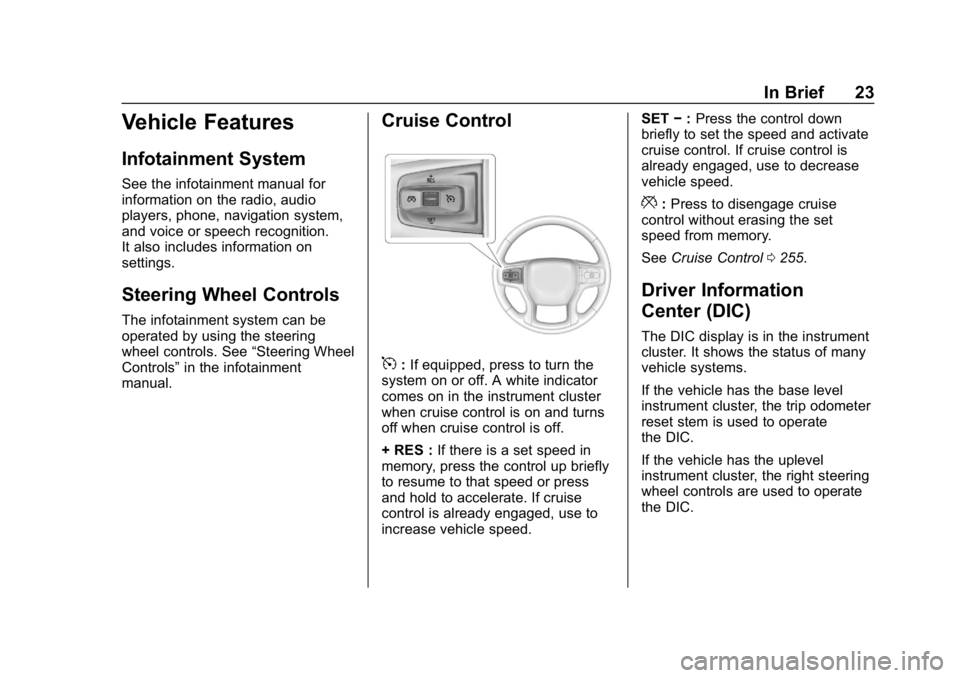
Cruise Control
5: If equipped, press to turn the
system on or off. A white indicator
comes on in the instrument cluster
when cruise control is on and turns
off when cruise control is off.
+ RES : If there is a set speed in
memory, press the control up briefly
to resume to that speed or press
and hold to accelerate. If cruise
control is already engaged, use to
increase vehicle speed. SET
−:Press the control down
briefly to set the speed and activate
cruise control. If cruise control is
already engaged, use to decrease
vehicle speed.
*: Press to disengage cruise
control without erasing the set
speed from memory.
See Cruise Control 0255.
Driver Information
Center (DIC)
The DIC display is in the instrument
cluster. It shows the status of many
vehicle systems.
If the vehicle has the base level
instrument cluster, the trip odometer
reset stem is used to operate
the DIC.
If the vehicle has the uplevel
instrument cluster, the right steering
wheel controls are used to operate
the DIC.
Page 30 of 477
GMC Sierra/Sierra Denali Owner Manual (GMNA-Localizing-U.S./Canada/
Mexico-1500-11698638) - 2019 - CRC - 5/13/19
In Brief 29
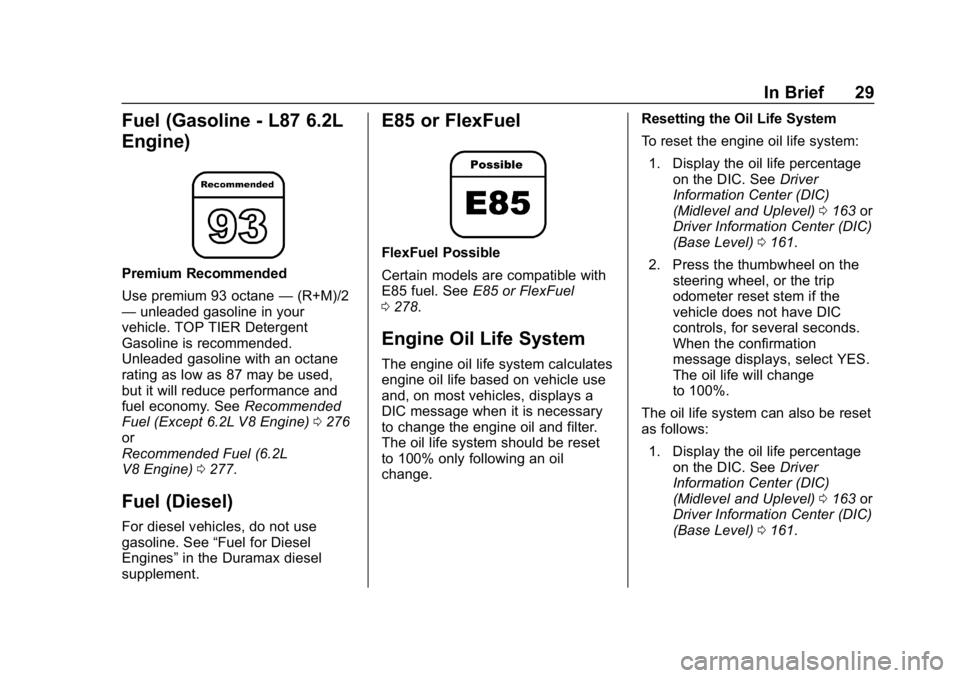
Fuel (Gasoline - L87 6.2L
Engine)
Premium Recommended
Use premium 93 octane—(R+M)/2
— unleaded gasoline in your
vehicle. TOP TIER Detergent
Gasoline is recommended.
Unleaded gasoline with an octane
rating as low as 87 may be used,
but it will reduce performance and
fuel economy. See Recommended
Fuel (Except 6.2L V8 Engine) 0276
or
Recommended Fuel (6.2L
V8 Engine) 0277.
Fuel (Diesel)
For diesel vehicles, do not use
gasoline. See “Fuel for Diesel
Engines” in the Duramax diesel
supplement.
E85 or FlexFuel
FlexFuel Possible
Certain models are compatible with
E85 fuel. See E85 or FlexFuel
0 278.
Engine Oil Life System
The engine oil life system calculates
engine oil life based on vehicle use
and, on most vehicles, displays a
DIC message when it is necessary
to change the engine oil and filter.
The oil life system should be reset
to 100% only following an oil
change. Resetting the Oil Life System
To reset the engine oil life system:
1. Display the oil life percentage on the DIC. See Driver
Information Center (DIC)
(Midlevel and Uplevel) 0163 or
Driver Information Center (DIC)
(Base Level) 0161.
2. Press the thumbwheel on the steering wheel, or the trip
odometer reset stem if the
vehicle does not have DIC
controls, for several seconds.
When the confirmation
message displays, select YES.
The oil life will change
to 100%.
The oil life system can also be reset
as follows: 1. Display the oil life percentage on the DIC. See Driver
Information Center (DIC)
(Midlevel and Uplevel) 0163 or
Driver Information Center (DIC)
(Base Level) 0161.
Page 132 of 477
GMC Sierra/Sierra Denali Owner Manual (GMNA-Localizing-U.S./Canada/
Mexico-1500-11698638) - 2019 - CRC - 5/14/19
Instruments and Controls 131
Instruments and
Controls
Controls
Steering Wheel Adjustment . . . 132
Steering Wheel Controls . . . . . . 133
Heated Steering Wheel . . . . . . . 133
Horn . . . . . . . . . . . . . . . . . . . . . . . . . . 133
Windshield Wiper/Washer . . . . 133
Compass . . . . . . . . . . . . . . . . . . . . . 134
Clock . . . . . . . . . . . . . . . . . . . . . . . . . 134
Power Outlets . . . . . . . . . . . . . . . . 134
Wireless Charging . . . . . . . . . . . . 137
Warning Lights, Gauges, and
Indicators
Warning Lights, Gauges, andIndicators . . . . . . . . . . . . . . . . . . . 139
Instrument Cluster . . . . . . . . . . . . 140
Speedometer . . . . . . . . . . . . . . . . . 144
Odometer . . . . . . . . . . . . . . . . . . . . . 145
Trip Odometer . . . . . . . . . . . . . . . . 145
Tachometer . . . . . . . . . . . . . . . . . . . 145
Fuel Gauge . . . . . . . . . . . . . . . . . . . 145
Engine Oil Pressure Gauge . . . . . . . . . . . . . . . . . . . . . . 146
Engine Coolant Temperature Gauge . . . . . . . . . . . . . . . . . . . . . . 147 Voltmeter Gauge . . . . . . . . . . . . . 148
Seat Belt Reminders . . . . . . . . . 149
Airbag Readiness Light . . . . . . . 149
Passenger Airbag Status
Indicator . . . . . . . . . . . . . . . . . . . . 150
Charging System Light . . . . . . . 151
Malfunction Indicator Lamp (Check Engine Light) . . . . . . . . 151
Brake System Warning Light . . . . . . . . . . . . . . . . . . . . . . . . 153
Electric Parking Brake Light . . . . . . . . . . . . . . . . . . . . . . . . 154
Service Electric Parking Brake Light . . . . . . . . . . . . . . . . . . . . . . . . 154
Antilock Brake System (ABS) Warning Light . . . . . . . . . . . . . . . 155
Four-Wheel-Drive Light . . . . . . . 155
Tow/Haul Mode Light . . . . . . . . . 155
Hill Descent Control Light . . . . 156
Lane Keep Assist (LKA) Light . . . . . . . . . . . . . . . . . . . . . . . . 156
Vehicle Ahead Indicator . . . . . . 156
Pedestrian Ahead Indicator . . . 156
Traction Off Light . . . . . . . . . . . . . 157
Traction Control System (TCS)/ Electronic Stability Control
Light . . . . . . . . . . . . . . . . . . . . . . . . 157
Electronic Stability Control (ESC) Off Light . . . . . . . . . . . . . . 157 Engine Coolant Temperature
Warning Light . . . . . . . . . . . . . . . 158
Driver Mode Control Light . . . . 158
Tire Pressure Light . . . . . . . . . . . 159
Engine Oil Pressure Light (Uplevel Cluster) . . . . . . . . . . . . 159
Low Fuel Warning Light . . . . . . 160
Security Light . . . . . . . . . . . . . . . . . 160
High-Beam On Light . . . . . . . . . . 160
Front Fog Lamp Light . . . . . . . . . 160
Lamps On Reminder . . . . . . . . . 161
Cruise Control Light . . . . . . . . . . 161
Door Ajar Light . . . . . . . . . . . . . . . 161
Information Displays
Driver Information Center (DIC) (Base Level) . . . . . . . . . . . . . . . . 161
Driver Information Center (DIC) (Midlevel and Uplevel) . . . . . . 163
Head-Up Display (HUD) . . . . . . 166
Vehicle Messages
Vehicle Messages . . . . . . . . . . . . 169
Engine Power Messages . . . . . 169
Vehicle Speed Messages . . . . . 170
Vehicle Personalization
Vehicle Personalization . . . . . . . 170
Universal Remote System
Universal Remote System . . . . 175
Page 146 of 477
GMC Sierra/Sierra Denali Owner Manual (GMNA-Localizing-U.S./Canada/
Mexico-1500-11698638) - 2019 - CRC - 5/14/19
Instruments and Controls 145
Odometer
The odometer shows how far the
vehicle has been driven, in either
kilometers or miles. The odometer
displays on the Speed page of the
Driver Information Center (DIC).
Trip Odometer
The trip odometer shows how far
the vehicle has been driven since
the trip odometer was last reset.
The trip odometer is accessed and
reset through the Driver Information
Center (DIC). SeeDriver
Information Center (DIC) (Midlevel
and Uplevel) 0163 or
Driver Information Center (DIC)
(Base Level) 0161.
Tachometer
The tachometer displays the engine
speed in revolutions per
minute (rpm).
For vehicles with the Stop/Start
system, when the ignition is on, the
tachometer indicates the vehicle
status. When pointing to AUTO
STOP, the engine is off but the
vehicle is on and can move. The
engine could auto start at any time.
When the indicator points to OFF,
the vehicle is off.
When the engine is on, the
tachometer will indicate the engine’s
revolutions per minute (rpm). The
tachometer may vary by several
hundred rpm’s, during Auto Stop
mode, when the engine is shutting
off and restarting.
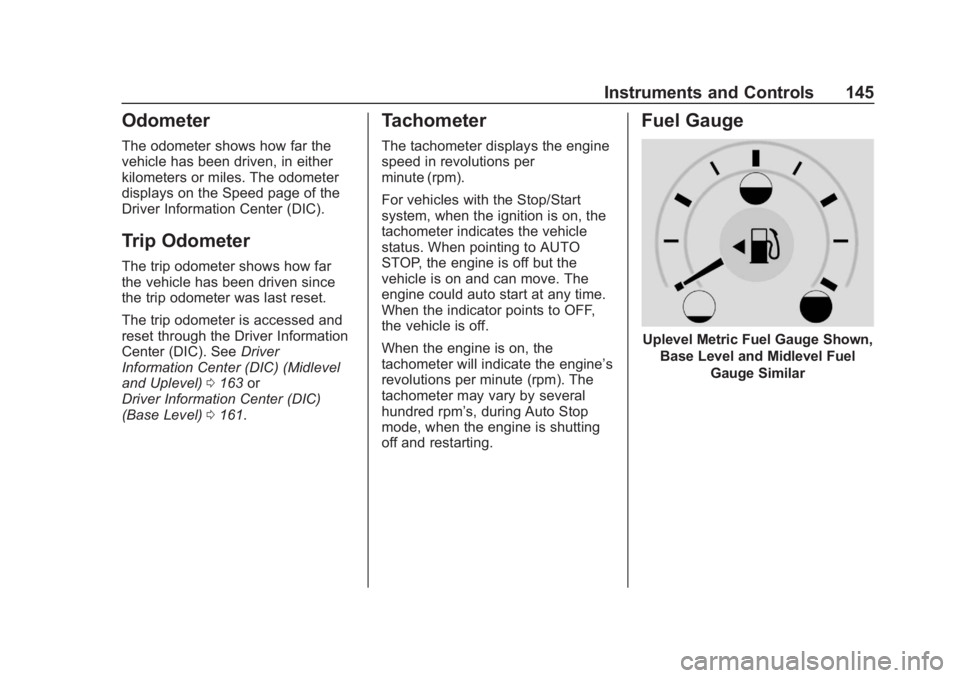
Fuel Gauge
Uplevel Metric Fuel Gauge Shown,
Base Level and Midlevel Fuel Gauge Similar
Page 162 of 477
GMC Sierra/Sierra Denali Owner Manual (GMNA-Localizing-U.S./Canada/
Mexico-1500-11698638) - 2019 - CRC - 5/14/19
Instruments and Controls 161
The light goes out when the fog
lamps are turned off. SeeFog
Lamps 0184.
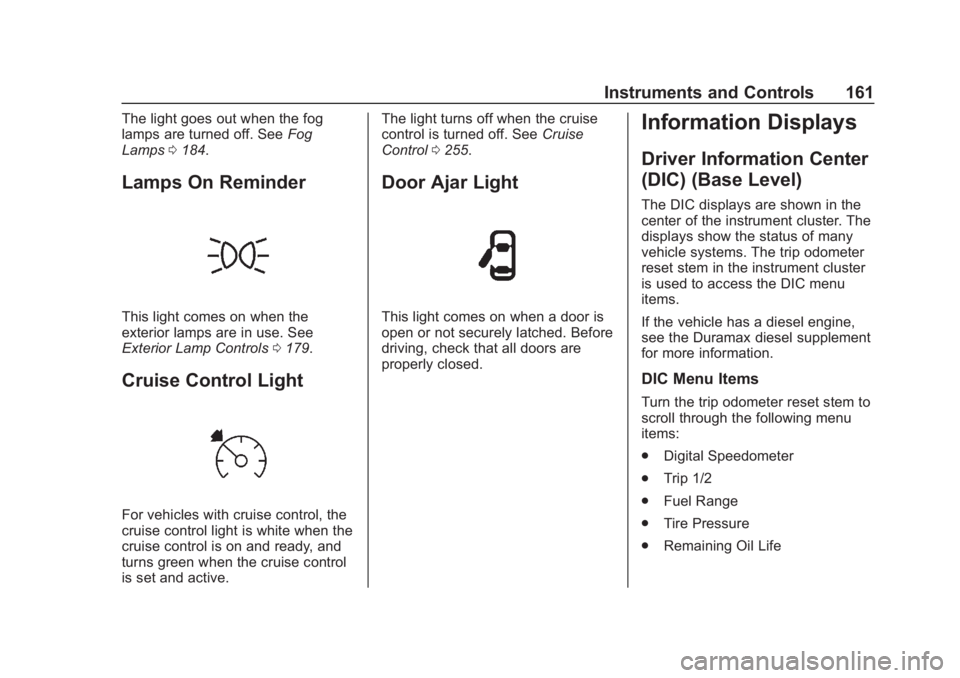
Lamps On Reminder
This light comes on when the
exterior lamps are in use. See
Exterior Lamp Controls 0179.
Cruise Control Light
For vehicles with cruise control, the
cruise control light is white when the
cruise control is on and ready, and
turns green when the cruise control
is set and active. The light turns off when the cruise
control is turned off. See
Cruise
Control 0255.
Door Ajar Light
This light comes on when a door is
open or not securely latched. Before
driving, check that all doors are
properly closed.
Information Displays
Driver Information Center
(DIC) (Base Level)
The DIC displays are shown in the
center of the instrument cluster. The
displays show the status of many
vehicle systems. The trip odometer
reset stem in the instrument cluster
is used to access the DIC menu
items.
If the vehicle has a diesel engine,
see the Duramax diesel supplement
for more information.
DIC Menu Items
Turn the trip odometer reset stem to
scroll through the following menu
items:
.
Digital Speedometer
. Trip 1/2
. Fuel Range
. Tire Pressure
. Remaining Oil Life
Page 163 of 477
GMC Sierra/Sierra Denali Owner Manual (GMNA-Localizing-U.S./Canada/
Mexico-1500-11698638) - 2019 - CRC - 5/14/19
162 Instruments and Controls
.Air Filter Life
. Brake Pad Life
Digital Speedometer
The speedometer shows how fast
the vehicle is moving in either
kilometers per hour (km/h) or miles
per hour (mph). The speedometer
cannot be reset.
Trip 1 or 2 and Average Fuel
Economy
Turn the trip odometer reset stem
until TRIP 1 or TRIP 2 displays. The
current distance traveled, in either
kilometers (km) or miles (mi), since
the last reset for the trip odometer is
shown, as well as the average fuel
economy. The trip odometer and the
average fuel economy can be reset
by pressing and holding the trip
odometer reset stem.
Fuel Range
This display shows the approximate
distance the vehicle can be driven
without refueling. The fuel range
estimate is based on an average of
the vehicle's fuel economy over recent driving history and the
amount of fuel remaining in the fuel
tank. Fuel range cannot be reset.
Tire Pressure
Turn the trip odometer reset stem
until a vehicle with the approximate
pressures of all four tires displays.
Tire pressure is displayed in either
kilopascal (kPa) or in pounds per
square inch (psi).
See
Tire Pressure Monitor System
0 374 and
Tire Pressure Monitor Operation
0 375.
Remaining Oil Life
Turn the trip odometer reset stem
until REMAINING OIL LIFE
displays. An estimate of the oil's
remaining useful life is shown.
REMAINING OIL LIFE 99% means
99% of the current oil life remains.
When the remaining oil life is low,
the CHANGE ENGINE OIL SOON
message will appear on the display.
The oil should be changed as soon
as possible. See Engine Oil0326.
In addition to the engine oil life system monitoring the oil life,
additional maintenance is
recommended. See
Maintenance
Schedule 0420.
The Oil Life display must be reset
after each oil change. It will not
reset itself. Do not reset the Oil Life
display at any time other than when
the oil has just been changed.
It cannot be reset accurately until
the next oil change. To reset the
engine oil life system, see Engine
Oil Life System 0328.
Air Filter Life
Turn the trip odometer reset stem
until AIR FILTER LIFE displays.
This displays an estimate of the
engine air filter ’s remaining useful
life and the state of the system.
Engine Air Filter Life 95% means
95% of the current air filter life
remains. Messages will display
based on the engine air filter life and
the state of the system.
When the REPLACE AT NEXT OIL
CHANGE message displays, the
engine air filter should be replaced
at the time of the next oil change.
Page 165 of 477
GMC Sierra/Sierra Denali Owner Manual (GMNA-Localizing-U.S./Canada/
Mexico-1500-11698638) - 2019 - CRC - 5/14/19
164 Instruments and Controls
odometer is also shown on this
page. If equipped, press the
thumbwheel to open the menu and
select to display speed limit signs.
Trip 1 or Trip 2, and Average Fuel
Economy :Shows the current
distance traveled, in either
kilometers (km) or miles (mi), since
the trip odometer was last reset.
The Average Fuel Economy display
shows the approximate average
liters per 100 kilometers (L/100 km)
or miles per gallon (mpg). This
number is calculated based on the
number of L/100 km (mpg) recorded
since the last time this menu item
was reset. This number reflects only
the approximate average fuel
economy that the vehicle has right
now, and will change as driving
conditions change.
Press the thumbwheel while this
display is active to reset the trip
odometer and the average fuel
economy.
Fuel Range : Shows the
approximate distance the vehicle
can be driven without refueling. LOW will be displayed when the
vehicle is low on fuel. The fuel
range estimate is based on an
average of the vehicle's fuel
economy over recent driving history
and the amount of fuel remaining in
the fuel tank.
Timer :
This display can be used as
a timer. To start the timer, press the
thumbwheel while this display is
active. The display will show the
amount of time that has passed
since the timer was last reset. To
stop the timer, press the
thumbwheel briefly while this display
is active and the timer is running.
Press the thumbwheel while this
display is active to reset the timer.
Oil Life : Shows an estimate of the
oil's remaining useful life.
If REMAINING OIL LIFE 99% is
displayed, that means 99% of the
current oil life remains.
When the remaining oil life is low,
the CHANGE ENGINE OIL SOON
message will appear on the display.
The oil should be changed as soon
as possible. See Engine Oil0326. In addition to the engine oil life
system monitoring the oil life,
additional maintenance is
recommended. See
Maintenance
Schedule 0420.
The Oil Life display must be reset
after each oil change. It will not
reset itself. Do not reset the Oil Life
display at any time other than when
the oil has just been changed.
It cannot be reset accurately until
the next oil change. To reset the
engine oil life system, press the
thumbwheel while the Oil Life
display is active. See Engine Oil
Life System 0328.
Tire Pressure : Shows the
approximate pressures of all four
tires. Tire pressure is displayed in
either kilopascal (kPa) or in pounds
per square inch (psi). If the pressure
is low, the value for that tire is
shown in amber. See Tire Pressure
Monitor System 0374 and
Tire Pressure Monitor Operation
0 375.
Page 330 of 477
GMC Sierra/Sierra Denali Owner Manual (GMNA-Localizing-U.S./Canada/
Mexico-1500-11698638) - 2019 - CRC - 5/14/19
Vehicle Care 329
include engine revolutions, engine
temperature, and miles driven.
Based on driving conditions, the
mileage at which an oil change is
indicated can vary considerably. For
the oil life system to work properly,
the system must be reset every time
the oil is changed.
On some vehicles, when the system
has calculated that oil life has been
diminished, a CHANGE ENGINE
OIL SOON message comes on to
indicate that an oil change is
necessary. Change the oil as soon
as possible within the next 1 000 km
(600 mi). It is possible that, if driving
under the best conditions, the oil life
system might indicate that an oil
change is not necessary for up to a
year. The engine oil and filter must
be changed at least once a year
and, at this time, the system must
be reset. For vehicles without the
CHANGE ENGINE OIL SOON
message, an oil change is needed
when the REMAINING OIL LIFE
percentage is near 0%. Your dealer
has trained service people who will
perform this work and reset the
system. It is also important to checkthe oil regularly over the course of
an oil drain interval and keep it at
the proper level.
If the system is ever reset
accidentally, the oil must be
changed at 5 000 km (3,000 mi)
since the last oil change.
Remember to reset the oil life
system whenever the oil is changed.
How to Reset the Engine Oil
Life System
Reset the system whenever the
engine oil is changed so that the
system can calculate the next
engine oil change. Always reset the
engine oil life to 100% after every oil
change. It will not reset itself. To
reset the engine oil life system:
1. Display the oil life percentage on the DIC. See Driver
Information Center (DIC)
(Midlevel and Uplevel) 0163 or
Driver Information Center (DIC)
(Base Level) 0161.
2. Press the thumbwheel on the steering wheel, or the trip
odometer reset stem if the
vehicle does not have DIC controls, for several seconds.
When the confirmation
message displays, select YES.
The oil life will change
to 100%.
The oil life system can also be reset
as follows:
1. Display the oil life percentage on the DIC. See Driver
Information Center (DIC)
(Midlevel and Uplevel) 0163 or
Driver Information Center (DIC)
(Base Level) 0161.
2. Fully press the accelerator pedal slowly three times within
five seconds.
3. If the display changes to 100%, the system is reset.
If the vehicle has a CHANGE
ENGINE OIL SOON message and it
comes back on when the vehicle is
started and/or the oil life percentage
is near 0%, the engine oil life
system has not been reset. Repeat
the procedure.
Page 332 of 477
GMC Sierra/Sierra Denali Owner Manual (GMNA-Localizing-U.S./Canada/
Mexico-1500-11698638) - 2019 - CRC - 5/14/19
Vehicle Care 331
3. PressTon the steering wheel,
or press the trip odometer reset
stem if the vehicle does not
have DIC controls, to move to
the Reset/Disable display area.
Select Reset, then press the
thumbwheel or press the reset
stem for several seconds.
4. Press the thumbwheel or the reset stem to confirm the reset.
Engine Air Cleaner/Filter
The engine air cleaner/filter is on
the driver side of the engine
compartment. See Engine
Compartment Overview 0321.
When to Inspect the Engine Air
Cleaner/Filter
If the vehicle is not equipped with
the engine air filter life system, see
Maintenance Schedule 0420 for
intervals on inspecting and
replacing changing the engine air
cleaner/filter.
How to Inspect/Replace the
Engine Air Cleaner/Filter
Do not start the engine or have the
engine running with the engine air
cleaner/filter housing open. Before
removing the engine air cleaner/
filter, make sure that the engine air
cleaner/filter housing and nearby
components are free of dirt and
debris. Do not clean the engine air
cleaner/filter or components with
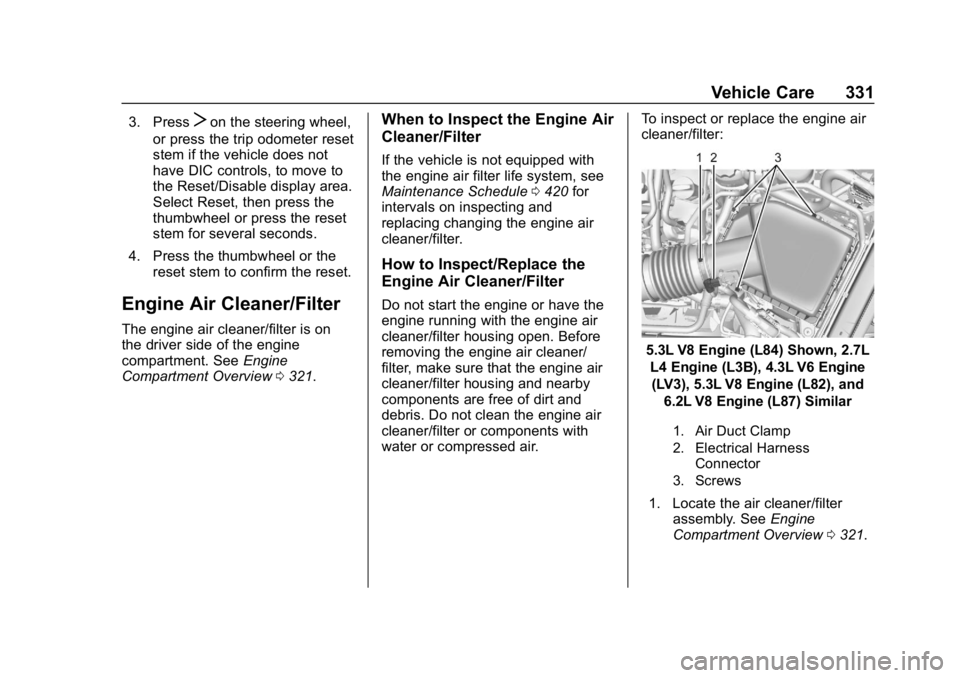
water or compressed air. To inspect or replace the engine air
cleaner/filter:
5.3L V8 Engine (L84) Shown, 2.7L
L4 Engine (L3B), 4.3L V6 Engine(LV3), 5.3L V8 Engine (L82), and 6.2L V8 Engine (L87) Similar
1. Air Duct Clamp
2. Electrical Harness Connector
3. Screws
1. Locate the air cleaner/filter assembly. See Engine
Compartment Overview 0321.
Page 342 of 477
GMC Sierra/Sierra Denali Owner Manual (GMNA-Localizing-U.S./Canada/
Mexico-1500-11698638) - 2019 - CRC - 5/14/19
Vehicle Care 341
turned on after new pads and wear
sensors are installed, a message
will display. Follow the prompts to
reset the system.
The brake pad life system can also
be manually reset:1. Display Brake Pad Life on the DIC. See Driver Information
Center (DIC) (Midlevel and
Uplevel) 0163 or
Driver Information Center (DIC)
(Base Level) 0161.
2. Press the thumbwheel or the trip odometer reset stem if the
vehicle does not have DIC
buttons. Select front or rear
pads as appropriate.
3. Select YES on the confirmation message, or press the trip
odometer reset stem on a base
level DIC. Repeat for pads on
the other axle if they were also
replaced.How to Disable the Brake Pad
Life System
The brake pad life system can be
turned off. This may be necessary if
aftermarket brake pads without wear
sensors are installed. When the
system is turned off, the front and
rear brake pad life percentages will
not display. However, the built-in
wear indicators that make a
high-pitched warning sound when
the brake pads are worn can still
determine when the pads should be
replaced. See Brakes0340.
To turn off the brake pad life system: 1. Display Brake Pad Life on the DIC. See Driver Information
Center (DIC) (Midlevel and
Uplevel) 0163 or
Driver Information Center (DIC)
(Base Level) 0161.
2. Select DISABLE.
To turn the brake pad life system
back on, follow the above steps but
select ENABLE in Step 2.
Brake Fluid
The brake master cylinder reservoir
is filled with GM approved DOT 4
brake fluid as indicated on the
reservoir cap. See Engine
Compartment Overview 0321 for
the location of the reservoir.
Checking Brake Fluid
With the vehicle in P (Park) on a
level surface, the brake fluid level
should be between the minimum
and maximum marks on the brake
fluid reservoir.
There are only two reasons why the
brake fluid level in the reservoir may
go down:
. Normal brake lining wear. When
new linings are installed, the
fluid level goes back up.