trailering GMC SIERRA 2020 Owner's Guide
[x] Cancel search | Manufacturer: GMC, Model Year: 2020, Model line: SIERRA, Model: GMC SIERRA 2020Pages: 502, PDF Size: 8.04 MB
Page 311 of 502
GMC Sierra/Sierra Denali Owner Manual (GMNA-Localizing-U.S./Canada/
Mexico-13337776) - 2020 - CRC - 4/4/19
310 Driving and Operating
Warning (Continued)
.If the trailer brakes are not
operating properly at any
time, or if a DIC message
indicates problems with the
trailer connections or trailer
brakes, carefully pull the
vehicle over to the side of
the road when traffic
conditions allow.
Trailer Tires
Special Trailer (ST) tires differ from
vehicle tires. Trailer tires are
designed with stiff sidewalls to help
prevent sway and to support heavy
loads. These features can make it
difficult to determine if the trailer tire
pressures are low only based on a
visual inspection.
Always check all trailer tire
pressures before each trip when the
tires are cool. Low trailer tire
pressure is a leading cause of trailer
tire blow-outs. If the vehicle is equipped with a
trailer tire pressure monitoring
system, see the trailer tire pressure
monitoring system description and
the trailering app.
Trailer tires deteriorate over time.
The trailer tire sidewall will show the
week and year the tire was
manufactured. Many trailer tire
manufacturers recommend
replacing tires more than six
years old.
Overloading is another leading
cause of trailer tire blow-outs. Never
load your trailer with more weight
than the tires are designed to
support. The load rating is located
on the trailer tire sidewall.
Always know the maximum speed
rating for the trailer tires before
driving. This may be significantly
lower than the vehicle tire speed
rating. The speed rating may be on
the trailer tire sidewall. If the speed
rating is not shown, the default
trailer tire speed rating is 105 km/h
(65 mph).
Trailering App
Trailer Light App
If equipped, the Trailer Lights App is
on the Home Page of the
infotainment display.
Touch Start to cycle the trailer lamps
on and off to determine if they are
working. The test follows this
sequence:
1. The running lights turn on first and remain on throughout the
sequence.
2. The brake lights turn on for about two seconds.
3. The left turn signal light flashes three times.
4. The right turn signal light flashes three times.
5. The reverse lights turn on for about two seconds.
6. Steps 2–5 repeat for approximately one minute and
45 seconds, or until the test
deactivates.
Page 312 of 502
GMC Sierra/Sierra Denali Owner Manual (GMNA-Localizing-U.S./Canada/
Mexico-13337776) - 2020 - CRC - 4/4/19
Driving and Operating 311
Touch Stop to stop the test. The test
will automatically end after
one minute and 45 seconds.
The sequence also deactivates
when any of the following occur:
.The ignition is turned off.
. The transmission is shifted out
of P (Park).
. The brake pedal is pressed.
. The turn signal is activated.
. The hazard warning lights are
activated.
Trailering App
If equipped, the Trailering App is on
the Home Page of the infotainment
display.
If equipped this feature allows
profiles for connected trailers to be
created to view status, to store and
track trailer usage information, and
to set up towing assistance
features.
The Trailering App Preview will
appear when the Trailering App is
opened for the first time from the Home Page. Touch GET STARTED
in the Trailering App to go into
the app.
When a trailer is electrically
connected, there will be an option to
create a profile, use a guest profile,
or cancel. After Cancel is selected a
third time, Don’t Remind Me will
display and touching that will turn off
the trailer detection pop-up. To turn
the Trailer Detection Alert on, select
ON in the Settings tab.
When a trailer is electrically
connected and after a Trailer Profile
has been created, the trailer
detection pop-up will appear with a
list of all of the custom Trailer
Profiles made on the vehicle. To
load an existing Trailer Profile,
select one of the Trailer Profiles
listed, or load the Guest Trailer
Profile by selecting GUEST
TRAILER. Touching Cancel,
Accessory/No trailer, or shifting the
vehicle from P (Park), will select
Accessory/No trailer as the active
Trailer Profile and will dismiss the
pop- up.
Create a Trailer Profile
1. Touch Create Profile on the pop-up or touch + Add Trailer
in the Trailering App.
2. Create a name for the trailer.
3. Select the hitch type. A checklist profile will be
created based on the type
selected.
4. Select the trailer type.
A pop-up will indicate the setup is
complete. Touch DONE to complete
the process or touch TRAILER
FEATURE SETUP to set up the
Tow/Haul Mode reminder, Trailer
Tire Pressure Monitoring System,
if equipped, maintenance reminders,
or towing assistance, if equipped.
Import a Trailer Profile
A trailer profile saved to an OnStar
account can be imported to the
vehicle. 1. Touch Import Profile on the pop-up.
2. Select a trailer profile from the list.
Page 319 of 502
GMC Sierra/Sierra Denali Owner Manual (GMNA-Localizing-U.S./Canada/
Mexico-13337776) - 2020 - CRC - 4/4/19
318 Driving and Operating
associated with Custom Trailer
Profiles in addition to default
checklists.
Trailers View
Touch the Trailers tab to view,
activate, create, edit, or delete
Trailer Profiles.
If a trailer is connected, touch the
Trailer Profile name to activate a
Trailer Profile.
There can be up to five Custom
Trailer Profiles on the vehicle.
The Custom Trailer Profiles and
Guest Trailer are in order of the
most frequently used.
All personalization features are
based on the settings for each
driver in vehicle personalization.
The list of Trailer Profiles is based
on vehicle personalization settings.
Guest Trailer
If the Guest Trailer Profile is the
active Trailer Profile, trailer
detection, connections status, theft,
and the Tow/Haul reminder alerts
can be sent. The system will nottrack total mileage or fuel economy,
but the system will track trip mileage
and fuel economy if the Guest
Trailer Profile is active. The Trailer
Tire Pressure Monitoring System or
maintenance reminders cannot be
set up for a Guest Trailer Profile.
The Guest Trailer Profile cannot be
edited.
Touch
pto learn more about the
Guest Trailer option.
No Trailer Connected
When there is no trailer connected,
Trailer Profiles cannot be activated
but most options can be edited.
Trailer Brake Gain Memory
The system can memorize the brake
gain setting of a Trailer Profile or a
Guest Trailer Profile. When a Trailer
Profile or Guest Trailer Profile is
selected, and a brake gain setting is
set for that Trailer Profile, a quick
notice will appear to indicate that
the system has recalled that
profile’s brake gain setting. If a Trailer Profile is already active
and the brake gain setting had been
set for that Trailer Profile, the quick
notice will trigger whenever the
ignition is turned on.
If there was an error in setting the
brake gain for a Trailer Profile, there
will be a notification. This pop-up
will not appear if the Guest Trailer
Profile is active or if there is no
trailer connected.
Trailer brake gain should be set for
a specific trailering condition and
must be adjusted anytime vehicle
loading, trailer loading, or road
surface conditions change.
Editing a Trailer Profile
Trailer Profile View
Touch to edit any of the following
options in the Trailer Profile view:
.
Trailer Name
. Towing Assistance Setup
. Tire Pressure Setup
. Trailer Maintenance
. Mileage
Page 321 of 502
GMC Sierra/Sierra Denali Owner Manual (GMNA-Localizing-U.S./Canada/
Mexico-13337776) - 2020 - CRC - 4/4/19
320 Driving and Operating
reminder. Touch Cancel to return to
the previous view and nothing will
change.
Edit Reminder
Touch to edit the mileage or time
settings for the reminder. Touch
Save to save the new settings to the
Trailer Profile.
Delete Reminder
Touch to delete the maintenance
reminder. On the pop-up, touch
Delete to delete the reminder or
touch Cancel to return to the
previous view and nothing will
change.
New Maintenance Reminder
Touch + New Maintenance
Reminder to set up a new reminder.
Suggested reminders that were
previously set will have checkmarks
next to them. Suggested reminders
that have not been set will have
empty boxes next to them. The
maximum number of reminders
is 50.Mileage
Touch to edit the Trailer Profile’s
mileage.
Effect on Maintenance Reminders
If the mileage is reset or changed,
and mileage has already
accumulated, any maintenance
reminders that have been set up will
be adjusted accordingly.
Average Fuel Economy
Touch to reset the average fuel
economy for the Trailer Profile.
Touch Reset to change, or touch
Cancel to go back to the
previous view.
Reverse Lights Alert
Turn on to receive failure messages
about the reverse lights. Turn off to
not receive failure messages about
the reverse lights, unless they are
later detected. This setting cannot
be edited when the Trailer Profile is
inactive or when the trailer is
disconnected.
Electric Brakes Alert
Turn on to receive failure messages
about the electric trailer brakes.
Turn off to not receive failure
messages about the electric trailer
brakes, unless they are later
detected. This setting cannot be
edited when the Trailer Profile is
inactive or when the trailer is
disconnected.
Delete Trailer
Touch to delete the Trailer Profile
and all of its settings.
On the pop-up, touch Delete to
delete the Trailer Profile. Touch
Cancel to dismiss the pop-up and
return to the previous view.
Settings View
Within the Trailering App, touch the
Settings tab to modify the following
settings:
.
Trailer Detection Alert
. Maintenance Alerts
. Theft Alert
. Tow/Haul Mode Reminder
Page 322 of 502
GMC Sierra/Sierra Denali Owner Manual (GMNA-Localizing-U.S./Canada/
Mexico-13337776) - 2020 - CRC - 4/4/19
Driving and Operating 321
Trailer Detection Alert
The Trailer Detection Alert setting
will be on by default. Turn it off to
disable the Trailer Detection pop-up
from displaying when a trailer is
connected. The Guest Trailer Profile
will become the active Trailer
Profile, unless another Trailer Profile
is selected manually through the
Trailering App. If this setting is
disabled while a Custom Trailer
Profile is active, that Trailer Profile
will remain the active profile until the
trailer is disconnected.
Maintenance Alerts
Touch Maintenance Alerts to view
the Maintenance Alerts settings
page. These alerts are based on the
Trailer Profile, so the settings for
each Trailer Profile must be turned
on or off. Touch a profile to view
more information or adjust the
setting for that profile.
The setting will be on by default for
each profile. All Maintenance Alerts
for that active Trailer Profile will be
received.Turn a setting off to not receive any
of the Maintenance Alerts when that
Trailer Profile is active.
Theft Alert
A theft alert can be set if a trailer is
connected and the alert is enabled.
When the trailer is disconnected
and the vehicle is off, an alarm will
sound.
Touch Theft Alert in Settings to view
the Theft Alert settings page. These
alerts are based on the Trailer
Profile, so the settings for each
Trailer Profile must be turned on or
off. Touch a profile to view more
information or adjust the setting for
that profile.
This setting will be off by default for
each Trailer Profile, including the
Guest Trailer Profile.
A smartphone will receive a
notification that the trailer related to
the selected Trailer Profile is
disconnected from the vehicle, if the
setting is on for the active Trailer
Profile, the vehicle has an OnStar or
connected service plan and thesmartphone number has been
added to the account for this
notification.
If the setting is turned off for a given
Trailer Profile, the smartphone will
not receive this security notification
even if the Trailer Profile is active.
Tow/Haul Mode Reminder
This is a reminder to turn on the
Tow/Haul Mode when towing a
trailer. See
Tow/Haul Mode 0226.
Touch Tow/Haul Mode Reminder in
Settings to view the Tow/Haul Mode
Reminder settings page. These
alerts are based on the Trailer
Profile, so the settings for each
Trailer Profile must be turned on or
off. Touch a profile to view more
information or to adjust the setting
for that profile.
This setting will default to OFF for
each Trailer Profile, including the
Guest Trailer Profile.
If Tow/Haul Mode is off and this
setting is on for a Trailer Profile,
each time the ignition is turned on a
Page 395 of 502
GMC Sierra/Sierra Denali Owner Manual (GMNA-Localizing-U.S./Canada/
Mexico-13337776) - 2020 - CRC - 4/10/19
394 Vehicle Care
yes and press the trip
odometer reset stem to confirm
the selection.
The horn sounds twice to
signal the receiver is in relearn
mode and the TIRE
LEARNING ACTIVE message
displays on the DIC screen.
6. Start with the driver side front tire.
7. Place the relearn tool against the tire sidewall, near the valve
stem. Then press the button to
activate the TPMS sensor.
A horn chirp confirms that the
sensor identification code has
been matched to this tire and
wheel position.
8. Proceed to the passenger side front tire, and repeat the
procedure in Step 7.
9. Proceed to the passenger side rear tire, and repeat the
procedure in Step 7.
10. Proceed to the driver side rear tire, and repeat the procedure
in Step 7. The horn sounds two times to indicate the sensor
identification code has been
matched to the driver side rear
tire, and the TPMS sensor
matching process is no longer
active. The TIRE LEARNING
ACTIVE message on the DIC
display screen goes off.
11. Turn the vehicle off.
12. Set all four tires to the recommended air pressure
level as indicated on the Tire
and Loading Information label.
Trailer Tire Pressure
Monitoring Operation
If equipped, the Trailer Tire
Pressure Monitoring System
(TTPMS) is designed to monitor the
pressure of the trailer tires and warn
the driver when a low pressure
condition exists. TTPMS sensors for
four tires are provided. The system
can accommodate a trailer with up
to six tires if additional sensors are
purchased from the dealer. Also, the
system can be paired with up to five
individual trailers. Prior to use, the vehicle must learn
the sensors by following the
learning process. See
Trailering App
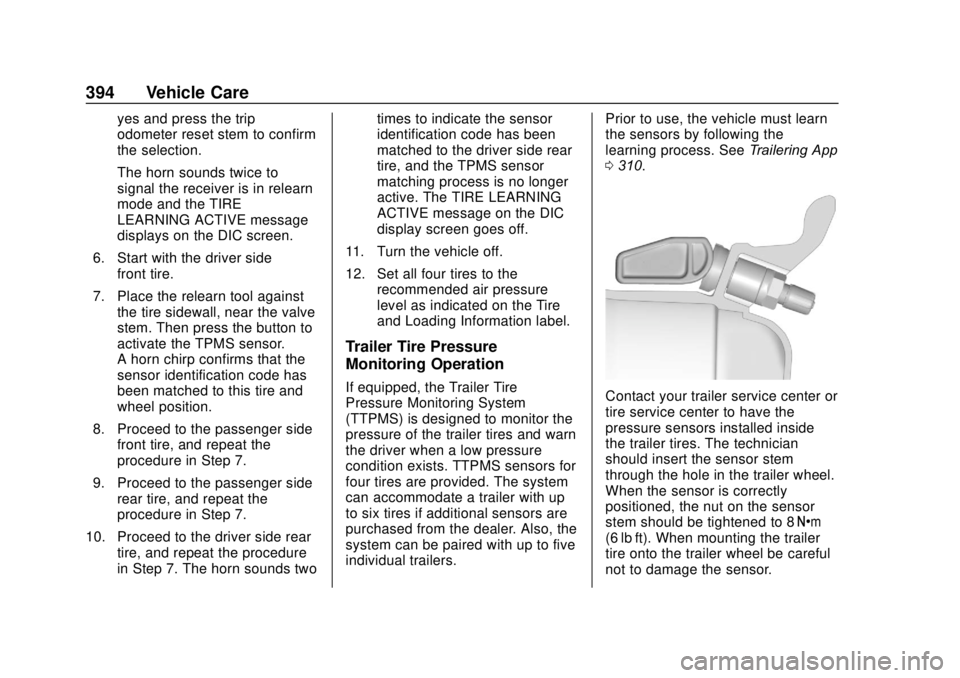
0 310.Contact your trailer service center or
tire service center to have the
pressure sensors installed inside
the trailer tires. The technician
should insert the sensor stem
through the hole in the trailer wheel.
When the sensor is correctly
positioned, the nut on the sensor
stem should be tightened to 8 Y
(6 lb ft). When mounting the trailer
tire onto the trailer wheel be careful
not to damage the sensor.
Page 396 of 502
GMC Sierra/Sierra Denali Owner Manual (GMNA-Localizing-U.S./Canada/
Mexico-13337776) - 2020 - CRC - 4/10/19
Vehicle Care 395
The Trailering App can be used to
view the tire pressures after the
recommended trailer tire pressures
have been entered. Refer to the
trailer tire placard on the trailer or
the trailer tire sidewall for the
recommended tire pressure.
The system is compatible with trailer
tires that have placard pressure
values from 103 - 689 kpa (15 -
100 psi). The hole in the wheel for
the tire stem must be 11.43 mm
(0.453 in) in diameter. Use of the
pressure sensors on a wheel with a
different stem hole size could result
in loss of air from the tire.
If a low trailer tire pressure condition
is detected, the TTPMS displays a
warning message on the DIC. If the
warning message is displayed, stop
as soon as possible and inflate the
tires to the recommended pressure
shown on the tire placard on the
trailer.
In addition, the TTPMS monitors the
temperature of the trailer tires. If the
system detects a high temperature
on one or more of the trailer tires, a
warning message will be displayedon the DIC. If this warning message
is displayed, stop as soon as
possible, and inspect the
overheated trailer tire. Common
causes for high trailer tire
temperature are underinflation,
overloading, or tire damage.
TTPMS Malfunction Message
The TTPMS will not function
properly if one or more of the trailer
tire sensors are missing or
inoperable. If the system detects a
malfunction, a DIC message
indicates that the system requires
service. Some of the conditions that
can cause the service message to
occur are:
.
One of the trailer tires has been
replaced with the spare tire
which does not have a learned
TTPMS sensor. The DIC
message should turn off after the
pressure sensor is installed in
the tire, and the learning process
is performed successfully. See
"TTPMS Sensor Learning
Process" under Trailering App
0 310. .
The TTPMS sensor learning
process was not done or not
completed successfully. The DIC
message should go off after
successfully completing the
sensor learning process. See
"TTPMS Sensor Learning
Process" under Trailering App
0 310.
. One or more TTPMS sensors
are missing or damaged. The
DIC message should go off
when the TTPMS sensors are
installed and the sensor learning
process is performed
successfully. See "TTPMS
Sensor Learning Process" under
Trailering App 0310.
. Operating electronic devices or
being near facilities using radio
wave frequencies similar to the
TTPMS could cause interference
to the TTPMS which could
cause loss of signal reception
from the sensor.
Page 426 of 502
GMC Sierra/Sierra Denali Owner Manual (GMNA-Localizing-U.S./Canada/
Mexico-13337776) - 2020 - CRC - 4/10/19
Vehicle Care 425
dinghy and dolly towing. Dinghy
towing is towing the vehicle with all
four wheels on the ground. Dolly
towing is towing the vehicle with two
wheels on the ground and two
wheels on a dolly.
Here are some important things to
consider before recreational vehicle
towing:
.Before towing the vehicle,
become familiar with the local
laws that apply to recreational
vehicle towing. These laws may
vary by region.
. The towing capacity of the
towing vehicle. Read the tow
vehicle manufacturer's
recommendations.
. How far the vehicle can be
towed. Some vehicles have
restrictions on how far and how
long the vehicle can be towed.
. Whether the vehicle has the
proper towing equipment. See
your dealer or trailering
professional for additional advice
and equipment
recommendations. .
Whether the vehicle is ready to
be towed. Just as preparing the
vehicle for a long trip, make sure
the vehicle is prepared to be
towed.
Follow the tow vehicle
manufacturer ’s instructions.
Caution
Use of a shield mounted in front
of the vehicle grille could restrict
airflow and cause damage to the
transmission. The repairs would
not be covered by the vehicle
warranty. If using a shield, only
use one that attaches to the
towing vehicle.
Dinghy Towing
(Two-Wheel-Drive Vehicles and
Vehicles with a Single-Speed
Transfer Case)
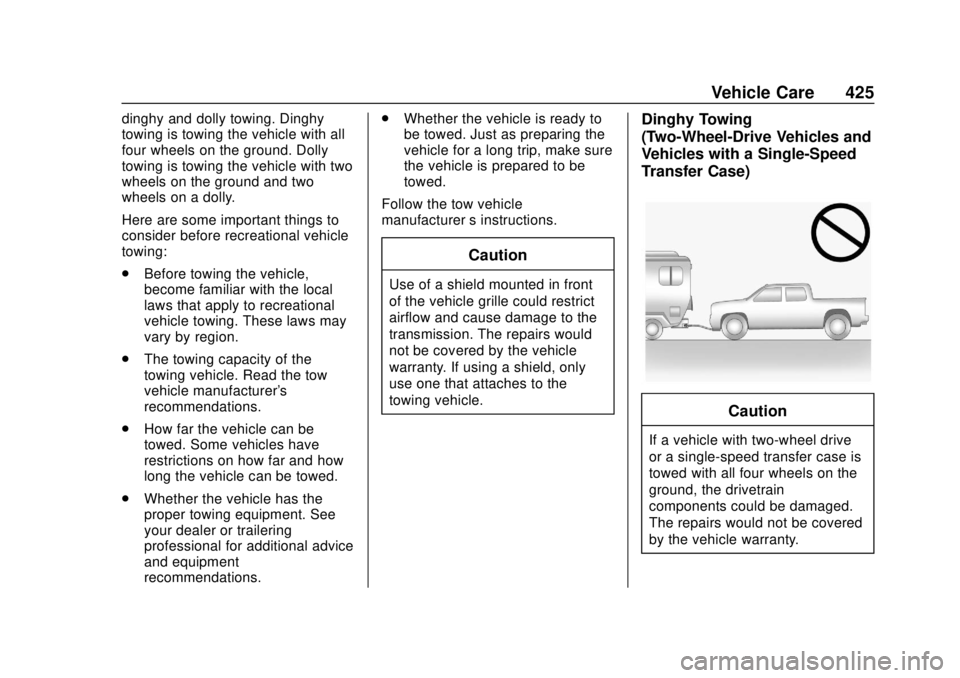
Caution
If a vehicle with two-wheel drive
or a single-speed transfer case is
towed with all four wheels on the
ground, the drivetrain
components could be damaged.
The repairs would not be covered
by the vehicle warranty.
Page 500 of 502

GMC Sierra/Sierra Denali Owner Manual (GMNA-Localizing-U.S./Canada/-
Mexico-13337776) - 2020 - CRC - 4/4/19
Index 499
Traction Control/ElectronicStability Control . . . . . . . . . . . . . . . 235
Trailer Sway Control (TSC) . . . . . . . . . . 308
Tow Mirrors . . . . . . . . . . . . . . . . . . . . . 41
Towing . . . . . . . . . . . . . . . . . . . . . . . . 292
Trailer Towing
App . . . . . . . . . . . . . . . . . . . . . . . . . . . 310
Trailering App . . . . . . . . . . . . . . . . . . 310
Transfer Case . . . . . . . . . . . . . . . . . . 227
Transmission Automatic . . . . . . . . . . . . . . . . . . . . . 221
Fluid, Automatic . . . . . . . . . . . . . . 343
Transportation Program, Courtesy . . . . . . . . . . . . . . . . . . . . . . 469
Trip Odometer . . . . . . . . . . . . . . . . . . 132
Truck-Camper Loading
Information . . . . . . . . . . . . . . . . . . . . 206
Turn and Lane-Change Signals . . . . . . . . . . . . . . . . . . . . . . . . 170
Turn Signal
Bulb Replacement . . . . . . . . . . . . 368U
Underseat Storage . . . . . . . . . . . . . 114
Uniform Tire Quality Grading . . . 401
Universal Remote System . . . . . . 161Operation . . . . . . . . . . . . . . . . . . . . . 164
Programming . . . . . . . . . . . . . . . . . 161
Using This Manual . . . . . . . . . . . . . . . . 2
V
Vehicle Alarm System . . . . . . . . . . . . . . . . . . 37
Canadian Owners . . . . . . . . . . . . . . . 2
Control . . . . . . . . . . . . . . . . . . . . . . . 188
Identification Number (VIN) . . . 458
Load Limits . . . . . . . . . . . . . . . . . . . 200
Messages . . . . . . . . . . . . . . . . . . . . 156
Personalization . . . . . . . . . . . . . . . 157
Remote Start . . . . . . . . . . . . . . . . . . . 24
Security . . . . . . . . . . . . . . . . . . . . . . . . 37
Speed Messages . . . . . . . . . . . . . 156
Towing . . . . . . . . . . . . . . . . . . . . . . . . 424
Vehicle Ahead Indicator . . . . . . . . 143
Vehicle Care Tire Pressure . . . . . . . . . . . . . . . . . 387
Vehicle Data Recording and Privacy . . . . . . . . . . . . . . . . . . . . . . . . 474
Vehicle Security Steering Column Lock . . . . . . . . . . 38 Ventilation, Air . . . . . . . . . . . . . . . . . . 182
Visors . . . . . . . . . . . . . . . . . . . . . . . . . . . 51
Voltmeter Gauge . . . . . . . . . . . . . . . 135
W
Warning
Brake System Light . . . . . . . . . . . 140
Caution and Danger . . . . . . . . . . . . . 3
Lane Departure (LDW) . . . . . . . 276
Warning Lights, Gauges, and Indicators . . . . . . . . . . . . . . . . . . . . . 126
Warnings
Hazard Flashers . . . . . . . . . . . . . . 169
Washer Fluid . . . . . . . . . . . . . . . . . . . 354
Wheels Alignment and Tire Balance . . 403
Different Size . . . . . . . . . . . . . . . . . 401
Replacement . . . . . . . . . . . . . . . . . 403
When It Is Time for New Tires . . . . . . . . . . . . . . . . . . . . . . . . . . 398
Where to Put the Restraint . . . . . . 91
Windows . . . . . . . . . . . . . . . . . . . . . . . . 48
Manual . . . . . . . . . . . . . . . . . . . . . . . . . 49
Power . . . . . . . . . . . . . . . . . . . . . . . . . . 49
Rear . . . . . . . . . . . . . . . . . . . . . . . . . . . . 51
Windshield
Replacement . . . . . . . . . . . . . . . . . 365
Wiper/Washer . . . . . . . . . . . . . . . . 120