wheel GMC SIERRA 2020 Manual Online
[x] Cancel search | Manufacturer: GMC, Model Year: 2020, Model line: SIERRA, Model: GMC SIERRA 2020Pages: 502, PDF Size: 8.04 MB
Page 297 of 502
GMC Sierra/Sierra Denali Owner Manual (GMNA-Localizing-U.S./Canada/
Mexico-13337776) - 2020 - CRC - 4/4/19
296 Driving and Operating
half of the maximum allowable
tongue weight for the vehicle or
227 kg (500 lb), whichever is less.
Rear Gross Axle Weight Rating
(GAWR-RR)
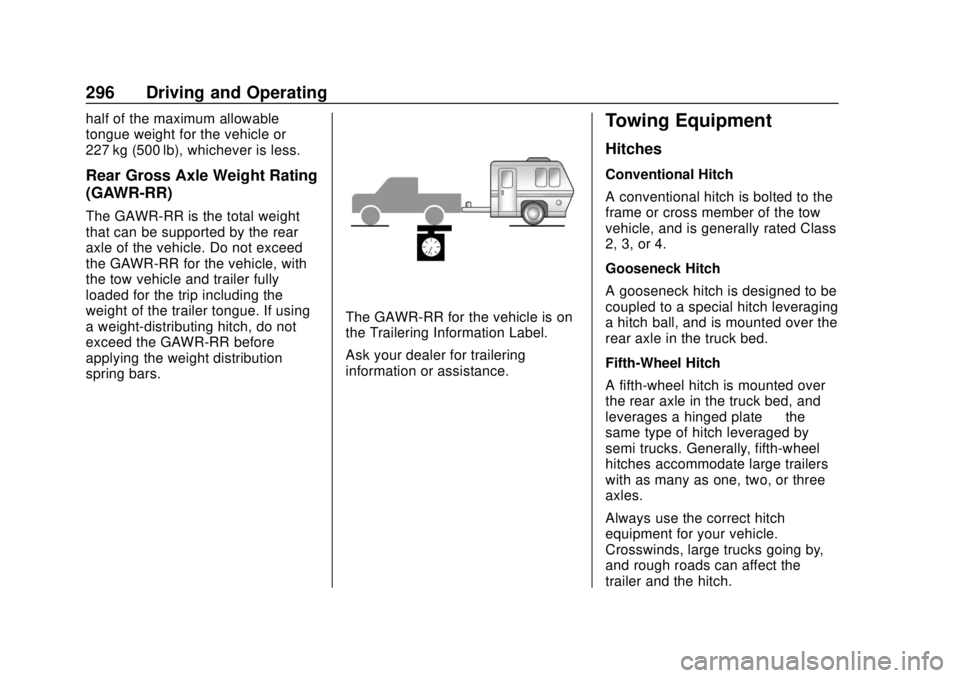
The GAWR-RR is the total weight
that can be supported by the rear
axle of the vehicle. Do not exceed
the GAWR-RR for the vehicle, with
the tow vehicle and trailer fully
loaded for the trip including the
weight of the trailer tongue. If using
a weight-distributing hitch, do not
exceed the GAWR-RR before
applying the weight distribution
spring bars.
The GAWR-RR for the vehicle is on
the Trailering Information Label.
Ask your dealer for trailering
information or assistance.
Towing Equipment
Hitches
Conventional Hitch
A conventional hitch is bolted to the
frame or cross member of the tow
vehicle, and is generally rated Class
2, 3, or 4.
Gooseneck Hitch
A gooseneck hitch is designed to be
coupled to a special hitch leveraging
a hitch ball, and is mounted over the
rear axle in the truck bed.
Fifth-Wheel Hitch
A fifth-wheel hitch is mounted over
the rear axle in the truck bed, and
leverages a hinged plate—the
same type of hitch leveraged by
semi trucks. Generally, fifth-wheel
hitches accommodate large trailers
with as many as one, two, or three
axles.
Always use the correct hitch
equipment for your vehicle.
Crosswinds, large trucks going by,
and rough roads can affect the
trailer and the hitch.
Page 298 of 502
GMC Sierra/Sierra Denali Owner Manual (GMNA-Localizing-U.S./Canada/
Mexico-13337776) - 2020 - CRC - 4/4/19
Driving and Operating 297
Proper hitch equipment for your
vehicle helps maintain control of the
vehicle-trailer combination. Many
trailers can be towed using a
weight-carrying hitch which has a
coupler latched to the hitch ball, or a
tow eye latched to a pintle hook.
Other trailers may require a
weight-distributing hitch that uses
spring bars to distribute the trailer
tongue weight between your vehicle
and trailer axles. Fifth-wheel and
gooseneck hitches may also be
used. See“Maximum Trailer Tongue
Weight ”under Trailer Towing 0292
for weight limits with various hitch
types. Avoid sharp turns when using a
step-bumper hitch to prevent
damage. Make wider turns to
prevent contact between your trailer
and your bumper.
Consider using mechanical sway
controls with any trailer. Ask a
trailering professional about sway
controls or refer to the trailer
manufacturer's recommendations
and instructions.Weight-Distributing Hitch and
Adjustment
A weight-distributing hitch may be
useful with some trailers. Use the
following guidelines to determine if a
weight-distributing hitch should
be used.
Page 299 of 502
GMC Sierra/Sierra Denali Owner Manual (GMNA-Localizing-U.S./Canada/
Mexico-13337776) - 2020 - CRC - 4/4/19
298 Driving and Operating
Vehicle SeriesTrailer WeightWeight-Distributing Hitch
Usage Hitch Distribution
1500 Up to 3 175 kg (7,000 lb) Not Required 50%
1500 Over 3 175 kg (7,000 lb) Required50%
2500/3500 Up to 9 080 kg (20,000 lb) Not Required 25%
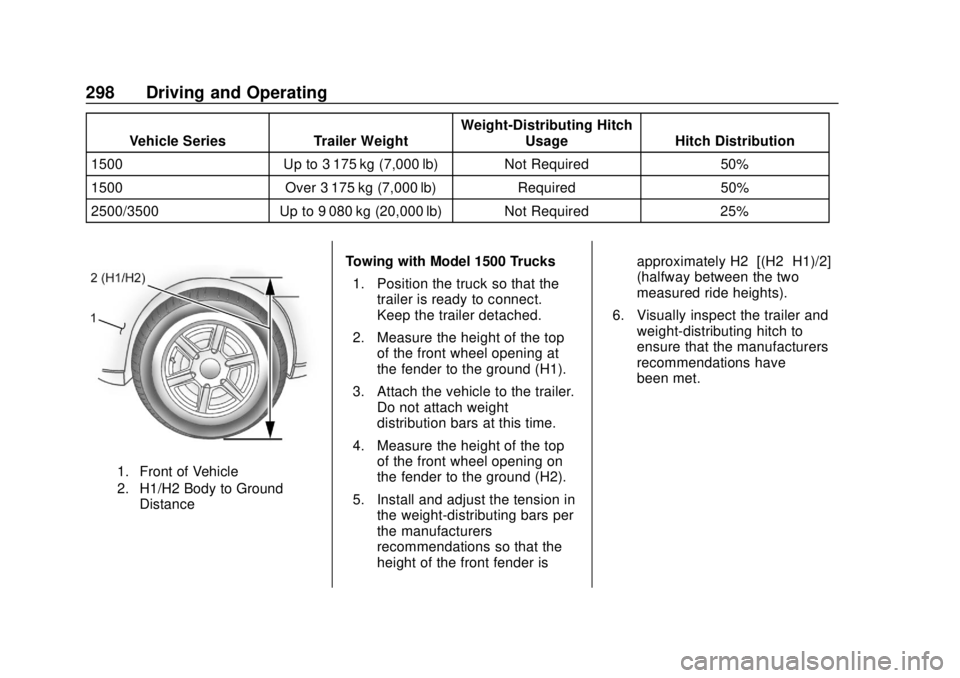
1. Front of Vehicle
2. H1/H2 Body to Ground
Distance
Towing with Model 1500 Trucks
1. Position the truck so that the trailer is ready to connect.
Keep the trailer detached.
2. Measure the height of the top of the front wheel opening at
the fender to the ground (H1).
3. Attach the vehicle to the trailer. Do not attach weight
distribution bars at this time.
4. Measure the height of the top of the front wheel opening on
the fender to the ground (H2).
5. Install and adjust the tension in the weight-distributing bars per
the manufacturers’
recommendations so that the
height of the front fender is approximately H2−[(H2−H1)/2]
(halfway between the two
measured ride heights).
6. Visually inspect the trailer and weight-distributing hitch to
ensure that the manufacturers’
recommendations have
been met.
Page 300 of 502
GMC Sierra/Sierra Denali Owner Manual (GMNA-Localizing-U.S./Canada/
Mexico-13337776) - 2020 - CRC - 4/4/19
Driving and Operating 299
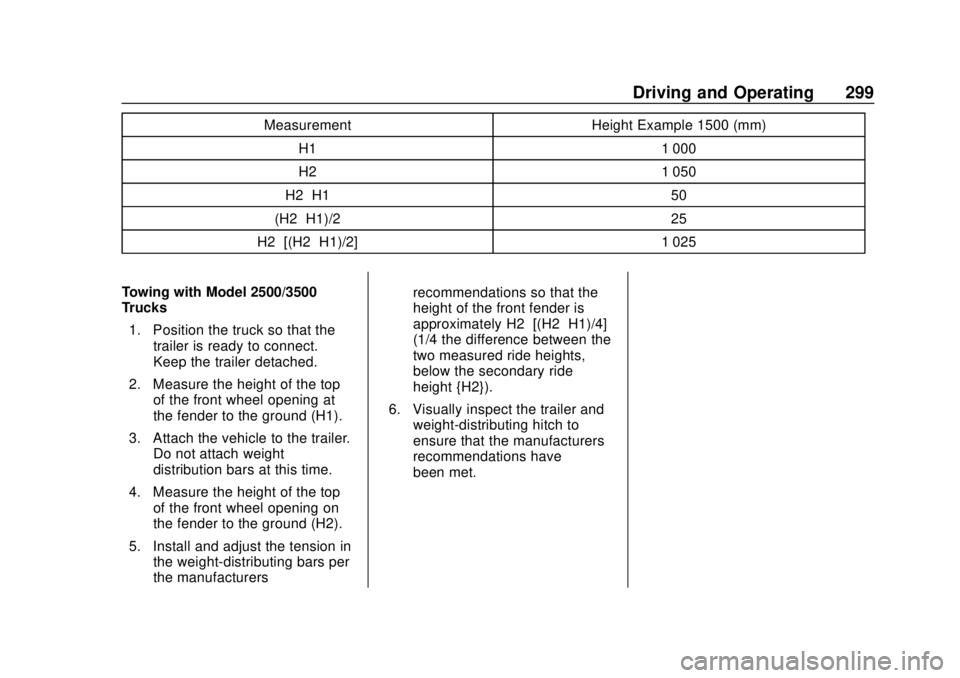
MeasurementHeight Example 1500 (mm)
H1 1 000
H2 1 050
H2−H1 50
(H2−H1)/2 25
H2−[(H2−H1)/2] 1 025
Towing with Model 2500/3500
Trucks 1. Position the truck so that the trailer is ready to connect.
Keep the trailer detached.
2. Measure the height of the top of the front wheel opening at
the fender to the ground (H1).
3. Attach the vehicle to the trailer. Do not attach weight
distribution bars at this time.
4. Measure the height of the top of the front wheel opening on
the fender to the ground (H2).
5. Install and adjust the tension in the weight-distributing bars per
the manufacturers’ recommendations so that the
height of the front fender is
approximately H2−[(H2−H1)/4]
(1/4 the difference between the
two measured ride heights,
below the secondary ride
height {H2}).
6. Visually inspect the trailer and weight-distributing hitch to
ensure that the manufacturers’
recommendations have
been met.
Page 301 of 502
GMC Sierra/Sierra Denali Owner Manual (GMNA-Localizing-U.S./Canada/
Mexico-13337776) - 2020 - CRC - 4/4/19
300 Driving and Operating
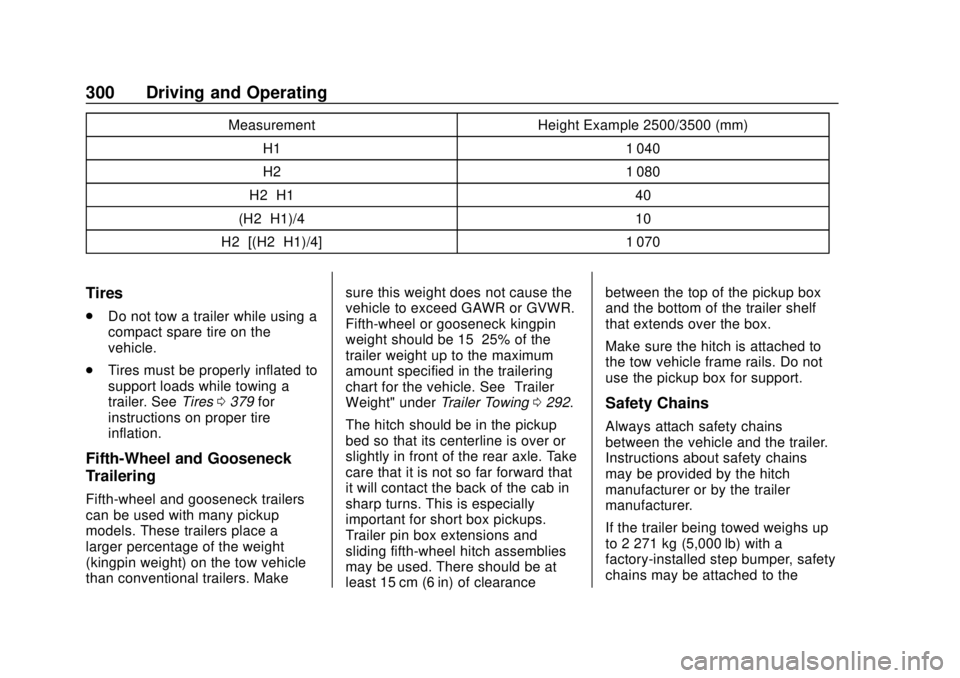
MeasurementHeight Example 2500/3500 (mm)
H1 1 040
H2 1 080
H2−H1 40
(H2−H1)/4 10
H2−[(H2−H1)/4] 1 070
Tires
.
Do not tow a trailer while using a
compact spare tire on the
vehicle.
. Tires must be properly inflated to
support loads while towing a
trailer. See Tires0379 for
instructions on proper tire
inflation.
Fifth-Wheel and Gooseneck
Trailering
Fifth-wheel and gooseneck trailers
can be used with many pickup
models. These trailers place a
larger percentage of the weight
(kingpin weight) on the tow vehicle
than conventional trailers. Make sure this weight does not cause the
vehicle to exceed GAWR or GVWR.
Fifth-wheel or gooseneck kingpin
weight should be 15–25% of the
trailer weight up to the maximum
amount specified in the trailering
chart for the vehicle. See
“Trailer
Weight" under Trailer Towing0292.
The hitch should be in the pickup
bed so that its centerline is over or
slightly in front of the rear axle. Take
care that it is not so far forward that
it will contact the back of the cab in
sharp turns. This is especially
important for short box pickups.
Trailer pin box extensions and
sliding fifth-wheel hitch assemblies
may be used. There should be at
least 15 cm (6 in) of clearance between the top of the pickup box
and the bottom of the trailer shelf
that extends over the box.
Make sure the hitch is attached to
the tow vehicle frame rails. Do not
use the pickup box for support.
Safety Chains
Always attach safety chains
between the vehicle and the trailer.
Instructions about safety chains
may be provided by the hitch
manufacturer or by the trailer
manufacturer.
If the trailer being towed weighs up
to 2 271 kg (5,000 lb) with a
factory-installed step bumper, safety
chains may be attached to the
Page 304 of 502
GMC Sierra/Sierra Denali Owner Manual (GMNA-Localizing-U.S./Canada/
Mexico-13337776) - 2020 - CRC - 4/4/19
Driving and Operating 303
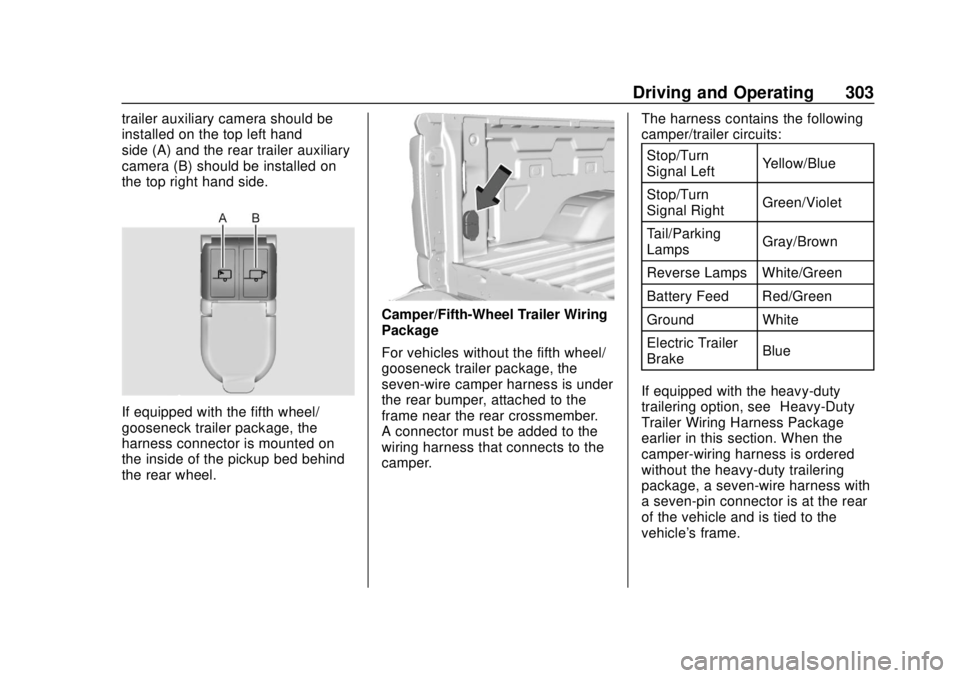
trailer auxiliary camera should be
installed on the top left hand
side (A) and the rear trailer auxiliary
camera (B) should be installed on
the top right hand side.
If equipped with the fifth wheel/
gooseneck trailer package, the
harness connector is mounted on
the inside of the pickup bed behind
the rear wheel.
Camper/Fifth-Wheel Trailer Wiring
Package
For vehicles without the fifth wheel/
gooseneck trailer package, the
seven-wire camper harness is under
the rear bumper, attached to the
frame near the rear crossmember.
A connector must be added to the
wiring harness that connects to the
camper.The harness contains the following
camper/trailer circuits:
Stop/Turn
Signal Left Yellow/Blue
Stop/Turn
Signal Right Green/Violet
Tail/Parking
Lamps Gray/Brown
Reverse Lamps White/Green
Battery Feed Red/Green
Ground White
Electric Trailer
Brake Blue
If equipped with the heavy-duty
trailering option, see “Heavy-Duty
Trailer Wiring Harness Package”
earlier in this section. When the
camper-wiring harness is ordered
without the heavy-duty trailering
package, a seven-wire harness with
a seven-pin connector is at the rear
of the vehicle and is tied to the
vehicle's frame.
Page 306 of 502
GMC Sierra/Sierra Denali Owner Manual (GMNA-Localizing-U.S./Canada/
Mexico-13337776) - 2020 - CRC - 4/4/19
Driving and Operating 305
available power output to the trailer
brakes can be adjusted to a wide
range of trailering situations.
The ITBC system is integrated with
the vehicle’s brake, antilock brake,
and StabiliTrak/Electronic Stability
Control (ESC) systems. In trailering
conditions that cause the vehicle’s
antilock brake or StabiliTrak/ESC
systems to activate, power sent to
the trailer's brakes will be
automatically adjusted to minimize
trailer wheel lock-up. This does not
imply that the trailer has
StabiliTrak/ESC.
If the vehicle’s brake, antilock brake,
or StabiliTrak/ESC systems are not
functioning properly, the ITBC
system may not function fully or at
all. Make sure all of these systems
are fully operational to allow the
ITBC system to function properly.
The ITBC system is powered
through the vehicle's electrical
system. Turning the ignition off will
also turn off the ITBC system. The
ITBC system is fully functional only
when the ignition is in on.{Warning
Connecting a trailer that has an
air brake system may result in
reduced or complete loss of trailer
braking, including increased
stopping distance or trailer
instability which could result in
serious injury, death, or property
damage. Only use the ITBC
system with electric or electric
over hydraulic trailer brake
systems.
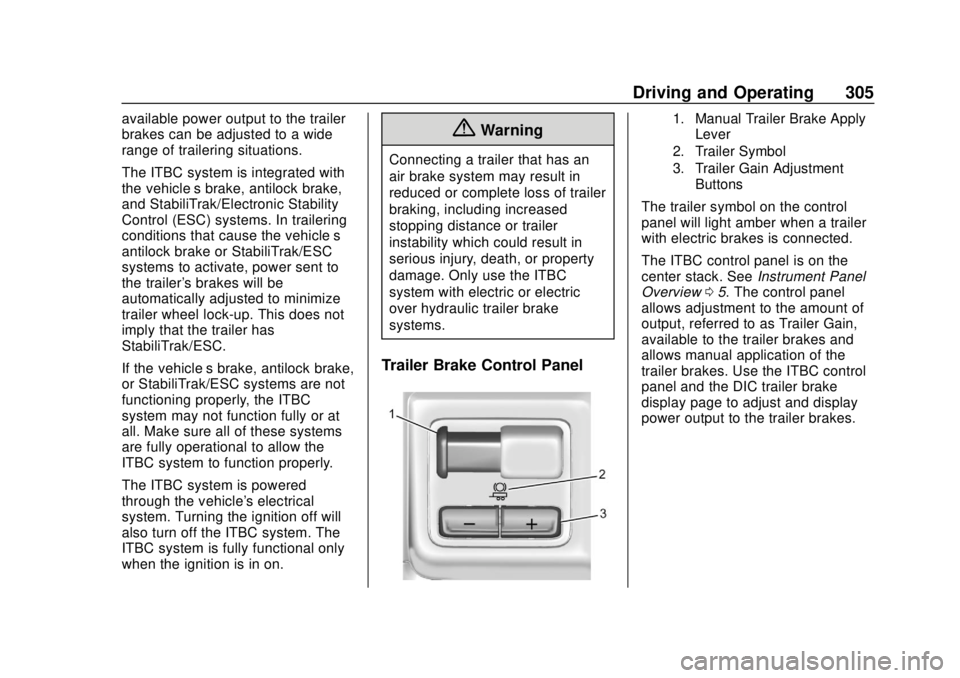
Trailer Brake Control Panel
1. Manual Trailer Brake Apply
Lever
2. Trailer Symbol
3. Trailer Gain Adjustment Buttons
The trailer symbol on the control
panel will light amber when a trailer
with electric brakes is connected.
The ITBC control panel is on the
center stack. See Instrument Panel
Overview 05. The control panel
allows adjustment to the amount of
output, referred to as Trailer Gain,
available to the trailer brakes and
allows manual application of the
trailer brakes. Use the ITBC control
panel and the DIC trailer brake
display page to adjust and display
power output to the trailer brakes.
Page 308 of 502
GMC Sierra/Sierra Denali Owner Manual (GMNA-Localizing-U.S./Canada/
Mexico-13337776) - 2020 - CRC - 4/4/19
Driving and Operating 307
{Warning
Trailer brakes that are
over-gained or under-gained may
not stop the vehicle and the trailer
as intended and can result in a
crash. Always follow the
instructions to set the Trailer Gain
for the proper trailer stopping
performance.
To adjust Trailer Gain for each
towing condition: 1. Drive the vehicle with the trailer attached on a level road
surface representative of the
towing condition and free of
traffic at about 32–40 km/h
(20–25 mph) and fully apply
the Manual Trailer Brake Apply
Lever.
Adjusting Trailer Gain at
speeds lower than 32–40 km/h
(20–25 mph) may result in an
incorrect gain setting. 2. Adjust the Trailer Gain, using
the Trailer Gain (+) or (−)
adjustment buttons, to just
below the point of trailer wheel
lock-up, indicated by trailer
wheel squeal or tire smoke
when a trailer wheel locks.
Trailer wheel lock-up may not
occur if towing a heavily loaded
trailer. Adjust the Trailer Gain
to the highest allowable setting
for the towing condition.
3. Readjust Trailer Gain anytime vehicle loading, trailer loading,
or road surface conditions
change or if trailer wheel
lock-up is noticed at any time
while towing.
Other ITBC-Related DIC
Messages
TRAILER CONNECTED: This
message will briefly display when a
trailer with electric brakes is first
connected to the vehicle. This
message will automatically turn off
in about 10 seconds. This message
can be acknowledged before it
automatically turns off. CHECK TRAILER WIRING: This
message will display if:
.
The ITBC system first
determines connection to a
trailer with electric brakes and
then the trailer harness becomes
disconnected from the vehicle.
If the disconnect occurs while
the vehicle is stationary, this
message will automatically turn
off in about 30 seconds. This
message will also turn off if it is
acknowledged or if the trailer
harness is reconnected.
If the disconnect occurs while
the vehicle is moving, this
message will continue until the
ignition is turned off. This
message will also turn off if it is
acknowledged or if the trailer
harness is reconnected.
. There is an electrical fault in the
wiring to the trailer brakes. This
message will continue as long
as there is an electrical fault in
the trailer wiring. This message
will also turn off if it is
acknowledged.
Page 309 of 502

GMC Sierra/Sierra Denali Owner Manual (GMNA-Localizing-U.S./Canada/
Mexico-13337776) - 2020 - CRC - 4/4/19
308 Driving and Operating
To determine whether the electrical
fault is on the vehicle side or trailer
side of the trailer wiring harness
connection:1. Disconnect the trailer wiring harness from the vehicle.
2. Turn the ignition off.
3. Wait 10 seconds, then turn the ignition back to RUN.
4. If the CHECK TRAILER WIRING message reappears,
the electrical fault is on the
vehicle side.
If the CHECK TRAILER WIRING
message only reappears when
connecting the trailer wiring harness
to the vehicle, the electrical fault is
on the trailer side.
SERVICE TRAILER BRAKE
SYSTEM: This message will display
when there is a problem with the
ITBC system. If this message
continues over multiple ignition
cycles, have the vehicle serviced.
If either the CHECK TRAILER
WIRING or SERVICE TRAILER
BRAKE SYSTEM message displays while driving, the ITBC system may
not be fully functional or may not
function at all. When traffic
conditions allow, carefully pull the
vehicle over to the side of the road
and turn the ignition off. Check the
wiring connection to the trailer and
turn the ignition back on. If either of
these messages continues, either
the vehicle or trailer needs service.
A GM dealer may be able to
diagnose and repair problems with
the trailer. However, any diagnosis
and repair of the trailer is not
covered under the vehicle warranty.
Contact your trailer dealer for
assistance with trailer repairs and
trailer warranty information.
Trailer Sway
Control (TSC)
Vehicles with StabiliTrak/Electronic
Stability Control (ESC) have a
Trailer Sway Control (TSC) feature.
Trailer sway is unintended
side-to-side motion of a trailer while
towing. If the vehicle is towing a
trailer and the TSC detects that
sway is increasing, the vehiclebrakes are selectively applied at
each wheel, to help reduce
excessive trailer sway. If equipped
with the Integrated Trailer Brake
Control (ITBC) system, and the
trailer has an electric brake system,
StabiliTrak/ESC may also apply the
trailer brakes.If TSC is enabled, the Traction
Control System (TCS)/StabiliTrak/
ESC warning light will flash on the
instrument cluster. Reduce vehicle
speed by gradually removing your
foot from the accelerator. If trailer
sway continues, StabiliTrak/ESC
can reduce engine torque to help
Page 318 of 502
GMC Sierra/Sierra Denali Owner Manual (GMNA-Localizing-U.S./Canada/
Mexico-13337776) - 2020 - CRC - 4/4/19
Driving and Operating 317
Cameras
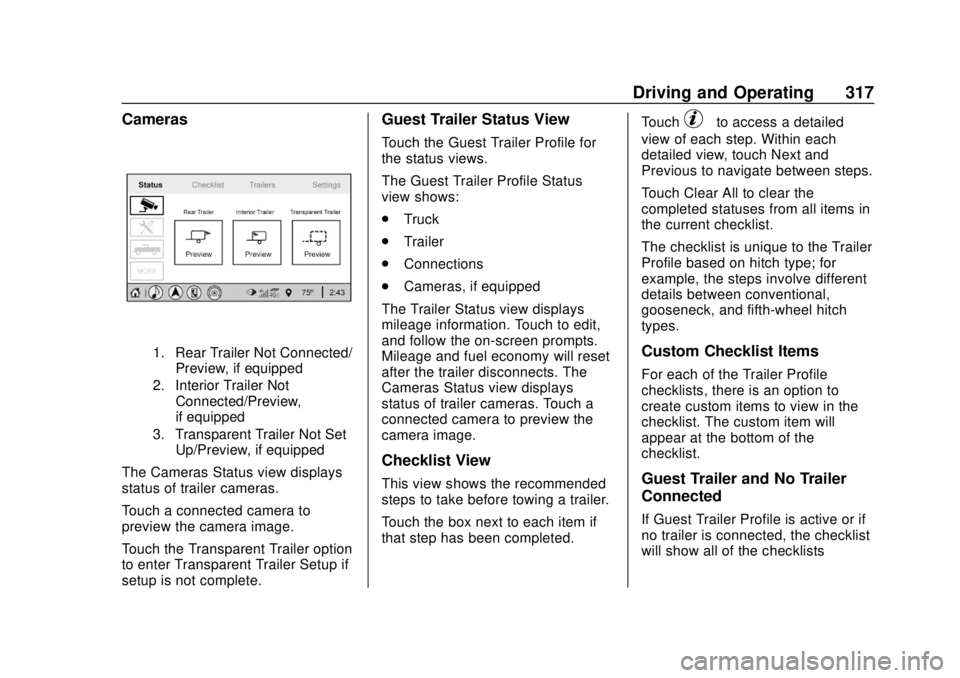
1. Rear Trailer Not Connected/Preview, if equipped
2. Interior Trailer Not Connected/Preview,
if equipped
3. Transparent Trailer Not Set Up/Preview, if equipped
The Cameras Status view displays
status of trailer cameras.
Touch a connected camera to
preview the camera image.
Touch the Transparent Trailer option
to enter Transparent Trailer Setup if
setup is not complete.
Guest Trailer Status View
Touch the Guest Trailer Profile for
the status views.
The Guest Trailer Profile Status
view shows:
.Truck
. Trailer
. Connections
. Cameras, if equipped
The Trailer Status view displays
mileage information. Touch to edit,
and follow the on-screen prompts.
Mileage and fuel economy will reset
after the trailer disconnects. The
Cameras Status view displays
status of trailer cameras. Touch a
connected camera to preview the
camera image.
Checklist View
This view shows the recommended
steps to take before towing a trailer.
Touch the box next to each item if
that step has been completed. Touch
pto access a detailed
view of each step. Within each
detailed view, touch Next and
Previous to navigate between steps.
Touch Clear All to clear the
completed statuses from all items in
the current checklist.
The checklist is unique to the Trailer
Profile based on hitch type; for
example, the steps involve different
details between conventional,
gooseneck, and fifth-wheel hitch
types.
Custom Checklist Items
For each of the Trailer Profile
checklists, there is an option to
create custom items to view in the
checklist. The custom item will
appear at the bottom of the
checklist.
Guest Trailer and No Trailer
Connected
If Guest Trailer Profile is active or if
no trailer is connected, the checklist
will show all of the checklists