keyless entry GMC SIERRA 2022 User Guide
[x] Cancel search | Manufacturer: GMC, Model Year: 2022, Model line: SIERRA, Model: GMC SIERRA 2022Pages: 474, PDF Size: 15.09 MB
Page 37 of 474
GMC Sierra/Sierra Denali 1500 Owner Manual (GMNA-Localizing-U.S./
Canada/Mexico-15883563) - 2022 - CRC - 11/19/21
36 Keys, Doors, and Windows
Resetting the Power Folding Mirrors
Reset the power folding mirrors if:
.The mirrors are accidentally obstructed
while folding.
.The mirrors are accidentally manually
folded/unfolded.
.The mirrors will not stay in the unfolded
position.
.The mirrors vibrate at normal driving
speeds.
Fold and unfold the mirrors one time using
the mirror controls to reset them to their
normal position. A noise may be heard
during the resetting of the power folding
mirrors. This sound is normal after a manual
folding operation.
Remote Mirror Folding
If equipped, press and holdQon the RKE
transmitter for approximately one second to
remotely fold the exterior mirrors. Press and
hold
Kon the RKE transmitter for
approximately one second to unfold. See
Remote Keyless Entry (RKE) System
Operation 014.
This feature can be turned on or off. See
Vehicle Personalization 0137.
Heated Mirrors
If equipped with heated mirrors:
1REAR : Press to heat the outside
mirrors.
See “Rear Window Defogger” underDual
Automatic Climate Control System 0198.
Automatic Dimming Mirror
If equipped, the driver outside mirror
automatically adjusts for the glare of the
headlamps from behind. This feature comes
on when the vehicle is started.
Blind Spot Mirrors
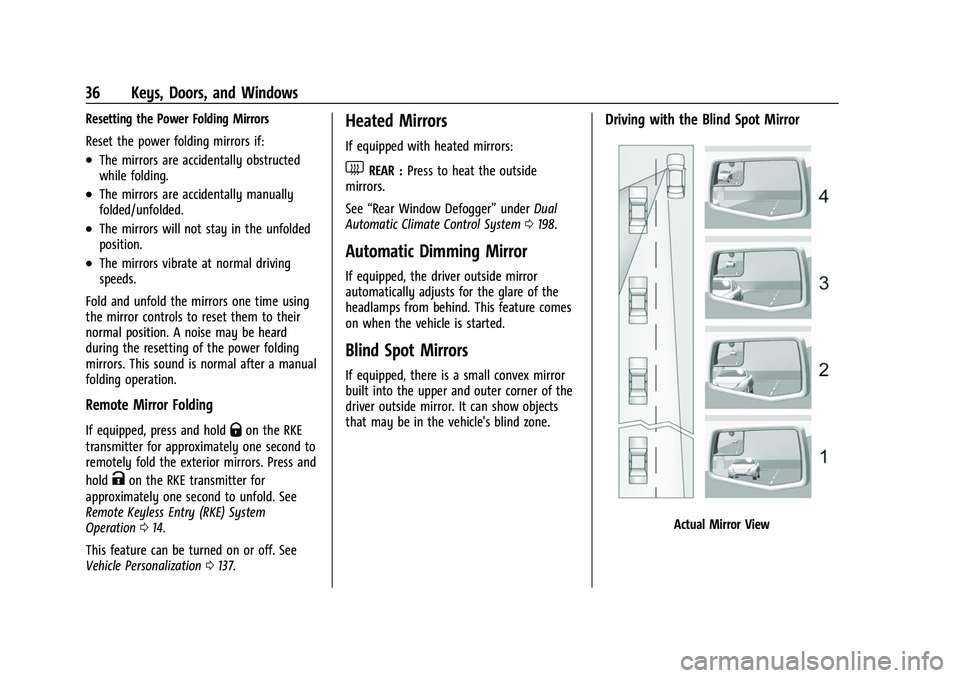
If equipped, there is a small convex mirror
built into the upper and outer corner of the
driver outside mirror. It can show objects
that may be in the vehicle's blind zone.
Driving with the Blind Spot Mirror
Actual Mirror View
Page 41 of 474
GMC Sierra/Sierra Denali 1500 Owner Manual (GMNA-Localizing-U.S./
Canada/Mexico-15883563) - 2022 - CRC - 11/19/21
40 Keys, Doors, and Windows
Windows{
Warning
Never leave a child, a helpless adult, or a
pet alone in a vehicle, especially with the
windows closed in warm or hot weather.
They can be overcome by the extreme
heat and suffer permanent injuries or
even death from heat stroke.
The vehicle aerodynamics are designed to
improve fuel economy performance. This
may result in a pulsing sound when either
rear window is down and the front windows
are up. To reduce the sound, open either a
front window or the sunroof, if equipped.
Manual Windows
If equipped, turn the hand crank on each
door to manually raise or lower the manual
windows.
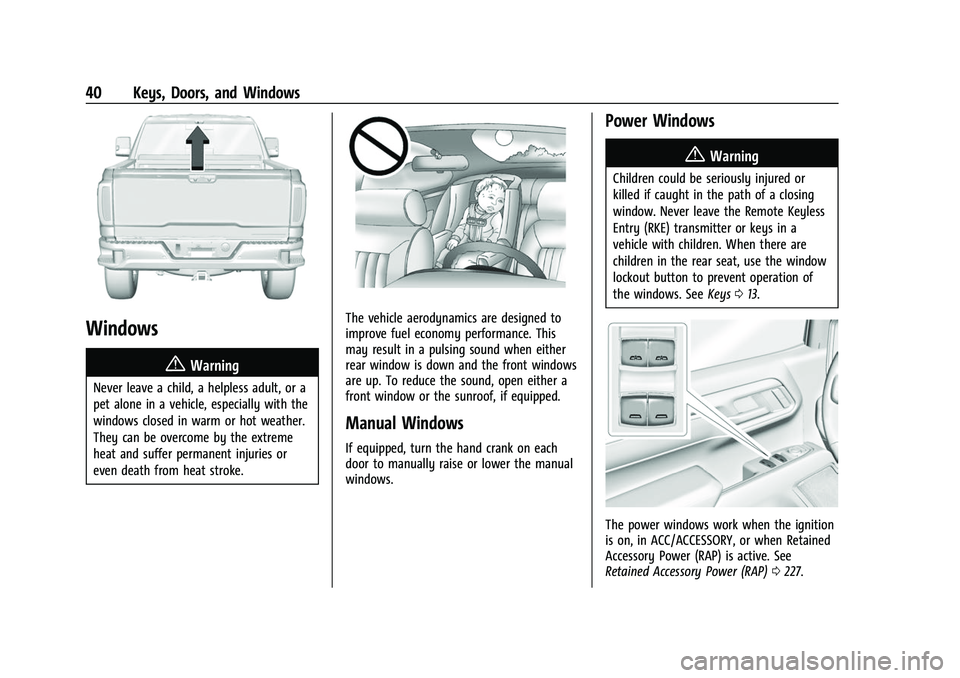
Power Windows
{Warning
Children could be seriously injured or
killed if caught in the path of a closing
window. Never leave the Remote Keyless
Entry (RKE) transmitter or keys in a
vehicle with children. When there are
children in the rear seat, use the window
lockout button to prevent operation of
the windows. See Keys013.
The power windows work when the ignition
is on, in ACC/ACCESSORY, or when Retained
Accessory Power (RAP) is active. See
Retained Accessory Power (RAP) 0227.
Page 141 of 474
GMC Sierra/Sierra Denali 1500 Owner Manual (GMNA-Localizing-U.S./
Canada/Mexico-15883563) - 2022 - CRC - 11/19/21
140 Instruments and Controls
Delayed Door Lock
When on, this feature will delay the locking
of the doors. To override the delay, press
the power door lock switch on the door.
Touch Off or On.
Remote Lock, Unlock, and Start
Touch and the following may display:
.Remote Unlock Light Feedback
.Remote Lock Feedback
.Remote Door Unlock
.Remote Start Auto Cool Seats
.Remote Start Auto Heat Seats
.Remote Window Operation
.Passive Door Unlock
.Passive Door Lock
.Remote Left in Vehicle Alert
.Remote Removed from Vehicle Alert
Remote Unlock Light Feedback
When on, the exterior lamps will flash when
unlocking the vehicle with the Remote Key.
Touch Off or Flash Lights. Remote Lock Feedback
This allows selection of what type of
feedback is given when locking the vehicle
with the Remote Key.
Touch Off, Lights and Horn, Lights Only,
or Horn Only.
Remote Door Unlock
This allows selection of which doors will
unlock when pressing
Kon the
Remote Key.
Touch All Doors or Driver Door.
Remote Start Auto Cool Seats
If equipped and turned on, this feature will
turn on the ventilated seats when using
remote start on warm days. See Heated and
Ventilated Front Seats 052 and
Remote Vehicle Start 020.
Touch Off or On.
Remote Start Auto Heat Seats
If equipped and turned on, this feature will
turn on the heated seats when using remote
start on cold days. See Heated and
Ventilated Front Seats 052 and
Remote Vehicle Start 020. If equipped with Auto Heated Steering
Wheel, this feature will turn on when the
Remote Start Auto Heated Seats turn on.
Touch Off or On.
Remote Window Operation
If equipped, this feature enables remote
operation of the windows with the Remote
Key. See
Remote Keyless Entry (RKE) System
Operation 014.
Touch Off or On.
Passive Door Unlock
This allows the selection of what doors will
unlock when using the button on the driver
door to unlock the vehicle.
Touch Off, All Doors or Driver Door Only.
Passive Door Lock
This allows passive locking to be turned on
or off and selects feedback. See Remote
Keyless Entry (RKE) System Operation 014.
Touch Off, On with Horn Chirp, or On.
Remote Left in Vehicle Alert
This feature sounds an alert when the
Remote Key is left in the vehicle.
Touch Off or On.
Page 154 of 474
GMC Sierra/Sierra Denali 1500 Owner Manual (GMNA-Localizing-U.S./
Canada/Mexico-15883563) - 2022 - CRC - 11/19/21
Lighting 153
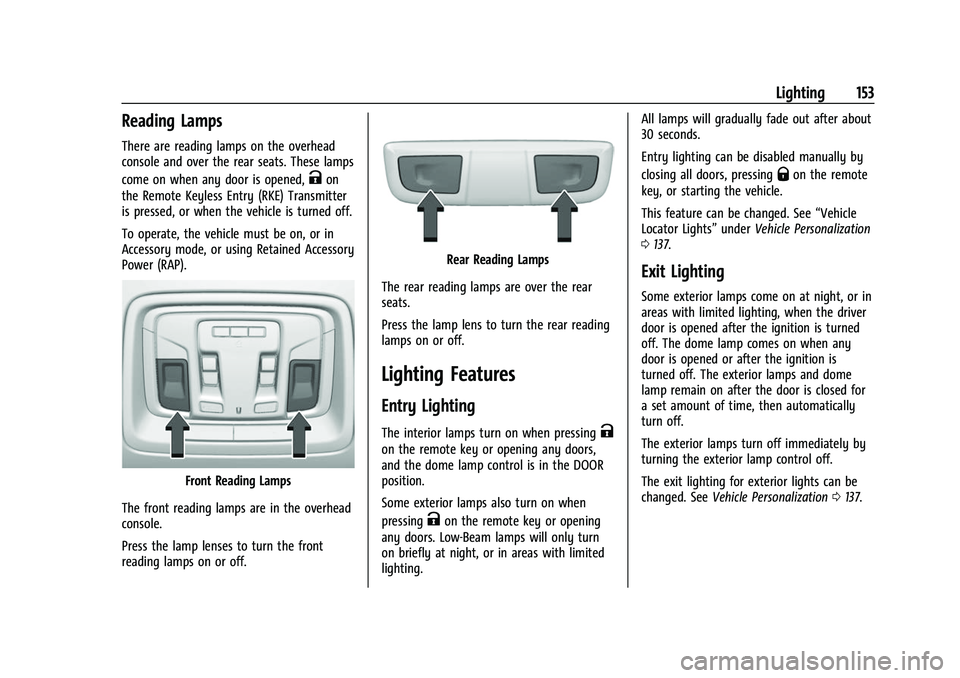
Reading Lamps
There are reading lamps on the overhead
console and over the rear seats. These lamps
come on when any door is opened,
Kon
the Remote Keyless Entry (RKE) Transmitter
is pressed, or when the vehicle is turned off.
To operate, the vehicle must be on, or in
Accessory mode, or using Retained Accessory
Power (RAP).
Front Reading Lamps
The front reading lamps are in the overhead
console.
Press the lamp lenses to turn the front
reading lamps on or off.
Rear Reading Lamps
The rear reading lamps are over the rear
seats.
Press the lamp lens to turn the rear reading
lamps on or off.
Lighting Features
Entry Lighting
The interior lamps turn on when pressingK
on the remote key or opening any doors,
and the dome lamp control is in the DOOR
position.
Some exterior lamps also turn on when
pressing
Kon the remote key or opening
any doors. Low-Beam lamps will only turn
on briefly at night, or in areas with limited
lighting. All lamps will gradually fade out after about
30 seconds.
Entry lighting can be disabled manually by
closing all doors, pressing
Qon the remote
key, or starting the vehicle.
This feature can be changed. See “Vehicle
Locator Lights” underVehicle Personalization
0 137.
Exit Lighting
Some exterior lamps come on at night, or in
areas with limited lighting, when the driver
door is opened after the ignition is turned
off. The dome lamp comes on when any
door is opened or after the ignition is
turned off. The exterior lamps and dome
lamp remain on after the door is closed for
a set amount of time, then automatically
turn off.
The exterior lamps turn off immediately by
turning the exterior lamp control off.
The exit lighting for exterior lights can be
changed. See Vehicle Personalization 0137.
Page 192 of 474
GMC Sierra/Sierra Denali 1500 Owner Manual (GMNA-Localizing-U.S./
Canada/Mexico-15883563) - 2022 - CRC - 11/19/21
Infotainment System 191
Google
Touch and the following may display:
.Manage activity controls
.Autofill with Google
.Google Assistant
.Send feedback to Google
Teen Driver
If equipped, this allows multiple keys to be
registered for beginner drivers to encourage
safe driving habits. When the vehicle is
started with a Teen Driver key, it will
automatically activate certain safety
systems, allow setting of some features, and
limit the use of others. The Report Card will
record vehicle data about driving behavior
that can be viewed later. When the vehicle
is started with a Teen Driver key, the Driver
Information Center (DIC) displays a message
that Teen Driver is active.
To access:1. Touch Settings on the Home Page, then touch Vehicle, and then Teen Driver.
2. Create a Personal Identification Number (PIN) by choosing a four-digit PIN.
Re-enter the PIN to confirm. To change
the PIN, touch Change PIN. The PIN is required to:
.Set up/Add or remove keys.
.Change Teen Driver settings.
.Change or clear the Teen Driver PIN.
.Access or delete Report Card data.
Set up/Add keys to activate Teen Driver and
assign restrictions to the key:
Any vehicle key can be registered, up to a
maximum of eight keys. Label the Teen
Driver key to tell it apart from the
other keys.
For a pushbutton start system: 1. Start the vehicle.
2. For automatic transmissions, the vehicle must be in P (Park). For manual
transmissions, the vehicle must be
stopped with the parking brake set.
3. From the Settings menu, touch Vehicle and then Teen Driver.
4. Enter the PIN.
5. Place the remote key you wish to register in the transmitter pocket. The
key does not need to be the one that
started the vehicle. See Remote Keyless
Entry (RKE) System Operation 014 for
transmitter pocket location. 6. From the Teen Driver menu, touch Setup
Keys or Add/Remove Teen Driver Keys.
.If the remote key has not previously
been registered, the option to add
the key displays. Touch Add and a
confirmation message displays. Teen
Driver restrictions will be applied
whenever this remote key is used to
operate the vehicle.
.If the remote key has already been
registered, the option to remove the
key displays. If Remove is touched,
the remote key is no longer
registered. A confirmation message
displays, and Teen Driver restrictions
will not be applied if this remote key
is used to operate the vehicle.
In vehicles with a pushbutton start system,
if a Teen Driver and a non-Teen Driver
remote key are both present at start up, the
vehicle will recognize the non-Teen Driver
remote key to start the vehicle. The Teen
Driver settings will not be active.
For a keyed ignition system: 1. Start the vehicle.
Page 223 of 474
GMC Sierra/Sierra Denali 1500 Owner Manual (GMNA-Localizing-U.S./
Canada/Mexico-15883563) - 2022 - CRC - 11/19/21
222 Driving and Operating
“Certification/Tire Label”underVehicle
Load Limits 0215. If weight ratings are
exceeded, move or remove items to
bring all weights below the ratings.
See your dealer for more information
on curb weights, cargo weights, Cargo
Weight Rating, and the correct center of
gravity zone.
Starting and Operating
New Vehicle Break-In
Caution
The vehicle does not need an elaborate
break-in. But it will perform better in the
long run if you follow these guidelines:
.Do not drive at any one constant
speed, fast or slow, for the first
800 km (500 mi). Do not make
full-throttle starts. Avoid downshifting
to brake or slow the vehicle.
.Avoid making hard stops for the first
300 km (200 mi) or so. During this
time the new brake linings are not yet
broken in. Hard stops with new linings
(Continued)
Caution (Continued)
can mean premature wear and earlier
replacement. Follow this breaking-in
guideline every time you get new
brake linings.
.Do not tow a trailer during break-in.
See Trailer Towing 0313 for the trailer
towing capabilities of the vehicle and
more information.
Following break-in, engine speed and load
can be gradually increased.
On new vehicles, the various mechanical and
electrical systems experience a “break-in”
period during the first 6 400 km (4,000 mi)
of routine driving. As the vehicle is driven,
the mechanical systems adjust to provide
optimal fuel economy and transmission shift
performance.
Electrical systems will adapt and calibrate
during the break-in period. A one-time
occurrence of clicks and similar vehicle
noises is normal during this process.
Normal driving charges the vehicle’s battery
to achieve the best operation of the vehicle,
including fuel economy and the Stop/Start
System. See Stop/Start System 0225.
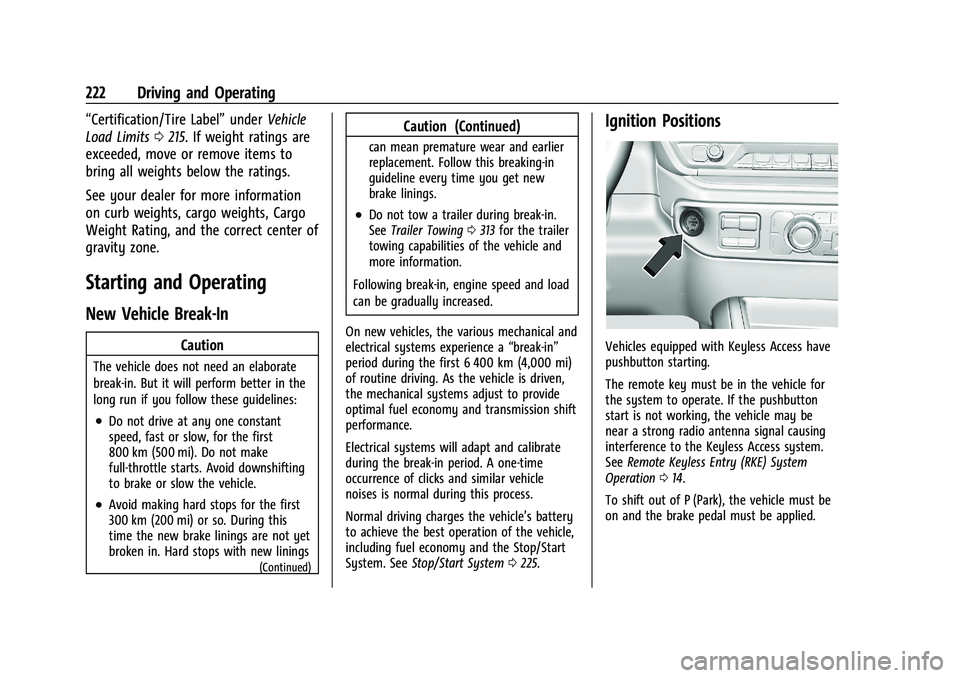
Ignition Positions
Vehicles equipped with Keyless Access have
pushbutton starting.
The remote key must be in the vehicle for
the system to operate. If the pushbutton
start is not working, the vehicle may be
near a strong radio antenna signal causing
interference to the Keyless Access system.
See Remote Keyless Entry (RKE) System
Operation 014.
To shift out of P (Park), the vehicle must be
on and the brake pedal must be applied.
Page 467 of 474
GMC Sierra/Sierra Denali 1500 Owner Manual (GMNA-Localizing-U.S./Cana-
da/Mexico-15883563) - 2022 - CRC - 11/19/21
466 Index
Heated (cont'd)Steering Wheel . . . . . . . . . . . . . . . . . . . . . . . . 102
Heated and Ventilated Front Seats . . . . . . . .52
Heated Mirrors . . . . . . . . . . . . . . . . . . . . . . . . . . . 36
Heater Engine . . . . . . . . . . . . . . . . . . . . . . . . . . . . . . . . . 225
Heating . . . . . . . . . . . . . . . . . . . . . . . . . . . . . 196, 198
High-Beam On Light . . . . . . . . . . . . . . . . . . . . . . 127
Hill and Mountain Roads . . . . . . . . . . . . . . . . . 213
Hill Descent Control (HDC) . . . . . . . . . . . . . . . 249
Hill Descent Control Light . . . . . . . . . . . . . . . . . 122
Hill Start Assist (HSA) . . . . . . . . . . . . . . . . . . . . 247
Hood . . . . . . . . . . . . . . . . . . . . . . . . . . . . . . . . . . . . 343
Horn . . . . . . . . . . . . . . . . . . . . . . . . . . . . . . . . . . . . . 102
How to Wear Seat Belts Properly . . . . . . . . . 56
HVAC . . . . . . . . . . . . . . . . . . . . . . . . . . . . . . . 196, 198
I
Ignition Positions . . . . . . . . . . . . . . . . . . . . . . . . 222
Immobilizer . . . . . . . . . . . . . . . . . . . . . . . . . . . . . . . .32
Indicator Pedestrian Ahead . . . . . . . . . . . . . . . . . . . . . . 123
Vehicle Ahead . . . . . . . . . . . . . . . . . . . . . . . . . 123
Infants and Young Children, Restraints . . . . .73
Information Publication Ordering . . . . . . . . . . . . . . . . . . . 449
Infotainment System . . . . . . . . . . . . . . . . . . . . 452
Instrument Cluster . . . . . . . . . . . . . . . . . . . 109, 110 Instrument Panel Overview . . . . . . . . . . . . . . . . 4
Interior Rearview Mirrors . . . . . . . . . . . . . . . . . .37
Introduction . . . . . . . . . . . . . . . . . . . . . . . . . . . 1, 155
J
Jump Starting - North America . . . . . . . . . . . 407
K
Keyless Entry
Remote (RKE) System . . . . . . . . . . . . . . . . . . . 14
Keys . . . . . . . . . . . . . . . . . . . . . . . . . . . . . . . . . . . . . . . 13
L
Labeling, Tire Sidewall . . . . . . . . . . . . . . . . . . . 379
Lamps Auxiliary Roof Mounted Lamp . . . . . . . . . 150
Daytime Running (DRL) . . . . . . . . . . . . . . . . 147
Dome . . . . . . . . . . . . . . . . . . . . . . . . . . . . . . . . . . 152
Exterior Cargo . . . . . . . . . . . . . . . . . . . . . . . . . . 151
Exterior Controls . . . . . . . . . . . . . . . . . . . . . . . 145
Exterior Lamps Off Reminder . . . . . . . . . . 147
Exterior Lighting Battery Saver . . . . . . . . 154
License Plate . . . . . . . . . . . . . . . . . . . . . . . . . . . 368
Malfunction Indicator (CheckEngine) . . . . . . . . . . . . . . . . . . . . . . . . . . . . . . . 119
On Reminder . . . . . . . . . . . . . . . . . . . . . . . . . . . 127
Reading . . . . . . . . . . . . . . . . . . . . . . . . . . . . . . . . 153
Lane Change Alert (LCA) . . . . . . . . . . . . . . . . . 299
Lane Departure Warning (LDW) . . . . . . . . . . 301 Lane Keep Assist (LKA) . . . . . . . . . . . . . . . . . . . 302
Lane Keep Assist Light . . . . . . . . . . . . . . . . . . . . 123
Lap-Shoulder Belt . . . . . . . . . . . . . . . . . . . . . . . . . 58
LATCH System
Replacing Parts after a Crash . . . . . . . . . . . 89
LATCH, Lower Anchors and Tethers for Children . . . . . . . . . . . . . . . . . . . . . . . . . . . . . . . . . 78
LED Lighting . . . . . . . . . . . . . . . . . . . . . . . . . . . . . 366
Lighting Entry . . . . . . . . . . . . . . . . . . . . . . . . . . . . . . . . . . 153
Exit . . . . . . . . . . . . . . . . . . . . . . . . . . . . . . . . . . . . 153
Illumination Control . . . . . . . . . . . . . . . . . . . 152
LED . . . . . . . . . . . . . . . . . . . . . . . . . . . . . . . . . . . . 366
Task . . . . . . . . . . . . . . . . . . . . . . . . . . . . . . . . . . . 150
Lights Airbag Readiness . . . . . . . . . . . . . . . . . . . . . . . 118
Antilock Brake System (ABS)
Warning . . . . . . . . . . . . . . . . . . . . . . . . . . . . . 122
Brake System Warning . . . . . . . . . . . . . . . . . 121
Charging System . . . . . . . . . . . . . . . . . . . . . . . 119
Check Engine (Malfunction Indicator) . . . . . . . . . . . . . . . . . . . . . . . . . . . . . 119
Cruise Control . . . . . . . . . . . . . . . . . . . . . . . . . 128
Door Ajar . . . . . . . . . . . . . . . . . . . . . . . . . . . . . . 128
Driver Mode Control . . . . . . . . . . . . . . . . . . . 125
Electric Parking Brake . . . . . . . . . . . . . . . . . . . 121
Engine Coolant Temperature Warning . . . . . . . . . . . . . . . . . . . . . . . . . . . . . 125
Page 470 of 474
GMC Sierra/Sierra Denali 1500 Owner Manual (GMNA-Localizing-U.S./Cana-
da/Mexico-15883563) - 2022 - CRC - 11/19/21
Index 469
Publication Ordering Information . . . . . . . . 449
R
Radio Data System (RDS) . . . . . . . . . . . . . . . . 164
Radio Frequency Statement . . . . . . . . . . . . . . 450
Radio Reception . . . . . . . . . . . . . . . . . . . . . . . . . 166
RadiosAM-FM Radio . . . . . . . . . . . . . . . . . . . . . . 161, 163
Satellite . . . . . . . . . . . . . . . . . . . . . . . . . . . . . . . . 164
Reading Lamps . . . . . . . . . . . . . . . . . . . . . . . . . . . 153
Rear Axle . . . . . . . . . . . . . . . . . . . . . . . . . . . . . . . . 363 Locking . . . . . . . . . . . . . . . . . . . . . . . . . . . . . . . . 253
Rear Camera Mirror . . . . . . . . . . . . . . . . . . . . . . . .37
Rear Cross Traffic Alert System . . . . . . . . . . 293
Rear Pedestrian Alert . . . . . . . . . . . . . . . . . . . . 292
Rear Seats . . . . . . . . . . . . . . . . . . . . . . . . . . . . . . . . .53 Heated . . . . . . . . . . . . . . . . . . . . . . . . . . . . . . . . . 54
Rear Storage . . . . . . . . . . . . . . . . . . . . . . . . . . . . . . 97
Rear Vision Camera (RVC) . . . . . . . . . . . . . . . . 283
Rear Windows . . . . . . . . . . . . . . . . . . . . . . . . . . . . 42
Rearview Mirrors . . . . . . . . . . . . . . . . . . . . . . . . . .37 Automatic Dimming . . . . . . . . . . . . . . . . . . . . 37
Reclining Seatbacks . . . . . . . . . . . . . . . . . . . . . . . 47
Recognition Voice . . . . . . . . . . . . . . . . . . . . . . . . . . . . . . . . . . . 172
Recommended
Fuel . . . . . . . . . . . . . . . . . . . . . . . . . . . . . . . 304, 305
Recommended Fluids and Lubricants . . . . . 434 Records
Maintenance . . . . . . . . . . . . . . . . . . . . . . . . . . . 437
Recreational Vehicle Towing . . . . . . . . . . . . . . 411
Reimbursement Program, GM Mobility . . . . . . . . . . . . . . . . . . . . . . . . . . . . . . . 445
Remote Keyless Entry (RKE) System . . . . . . .14
Remote Vehicle Start . . . . . . . . . . . . . . . . . . . . . 20
Replacement Glass . . . . . . . . . . . . . . . . . . . . . . . . . . . . . . . . . . 365
Replacement Parts Airbags . . . . . . . . . . . . . . . . . . . . . . . . . . . . . . . . . . 71
Maintenance . . . . . . . . . . . . . . . . . . . . . . . . . . . 435
Replacing Airbag System . . . . . . . . . . . . . . . . . . . 71
Replacing LATCH System Parts after a Crash . . . . . . . . . . . . . . . . . . . . . . . . . . . . . . . . . . . 89
Replacing Seat Belt System Parts after
a Crash . . . . . . . . . . . . . . . . . . . . . . . . . . . . . . . . . .61
Reporting Safety Defects Canadian Government . . . . . . . . . . . . . . . . . 450
General Motors . . . . . . . . . . . . . . . . . . . . . . . . 451
U.S. Government . . . . . . . . . . . . . . . . . . . . . . . 450
Restraints Where to Put . . . . . . . . . . . . . . . . . . . . . . . . . . . 77
Retained Accessory Power (RAP) . . . . . . . . . 227
Reverse Tilt Mirrors . . . . . . . . . . . . . . . . . . . . . . . .37
Ride Control Systems Enhanced Traction System (ETS) . . . . . . . 252 Roads
Driving, Wet . . . . . . . . . . . . . . . . . . . . . . . . . . . 212
Roadside Assistance Program . . . . . . . . . . . . 445
Roof Sunroof . . . . . . . . . . . . . . . . . . . . . . . . . . . . . . . . . 43
Rotation, Tires . . . . . . . . . . . . . . . . . . . . . . . . . . . 390
Routing, Engine Drive Belt . . . . . . . . . . . . . . . 441
Running the Vehicle While Parked . . . . . . . . 231
S
Safety Defects Reporting Canadian Government . . . . . . . . . . . . . . . . . 450
General Motors . . . . . . . . . . . . . . . . . . . . . . . . 451
U.S. Government . . . . . . . . . . . . . . . . . . . . . . . 450
Safety Locks . . . . . . . . . . . . . . . . . . . . . . . . . . . . . . .22
Safety System Check . . . . . . . . . . . . . . . . . . . . . .61
Satellite Radio . . . . . . . . . . . . . . . . . . . . . . . . . . . 164
Scheduling Appointments . . . . . . . . . . . . . . . . 447
Seat Belts . . . . . . . . . . . . . . . . . . . . . . . . . . . . . . . . . 54 Buckle To Drive . . . . . . . . . . . . . . . . . . . . . . . . . 55
Care . . . . . . . . . . . . . . . . . . . . . . . . . . . . . . . . . . . . 61
Extender . . . . . . . . . . . . . . . . . . . . . . . . . . . . . . . . 61
How to Wear Seat Belts Properly . . . . . . . 56
Lap-Shoulder Belt . . . . . . . . . . . . . . . . . . . . . . . 58
Reminders . . . . . . . . . . . . . . . . . . . . . . . . . . . . . . 117
Replacing after a Crash . . . . . . . . . . . . . . . . . 61
Use During Pregnancy . . . . . . . . . . . . . . . . . . 60