coolant level GMC SIERRA 2022 Owners Manual
[x] Cancel search | Manufacturer: GMC, Model Year: 2022, Model line: SIERRA, Model: GMC SIERRA 2022Pages: 474, PDF Size: 15.09 MB
Page 3 of 474
GMC Sierra/Sierra Denali 1500 Owner Manual (GMNA-Localizing-U.S./
Canada/Mexico-15883563) - 2022 - CRC - 11/19/21
2 Introduction
Helm, Incorporated
Attention: Customer Service
47911 Halyard Drive
Plymouth, MI 48170
USA
Using this Manual
To quickly locate information about the
vehicle, use the Index in the back of the
manual. It is an alphabetical list of what is
in the manual and the page number where
it can be found.
Danger, Warning, and Caution
Warning messages found on vehicle labels
and in this manual describe hazards and
what to do to avoid or reduce them.
{Danger
Danger indicates a hazard with a high
level of risk which will result in serious
injury or death.
{Warning
Warning indicates a hazard that could
result in injury or death.
Caution
Caution indicates a hazard that could
result in property or vehicle damage.
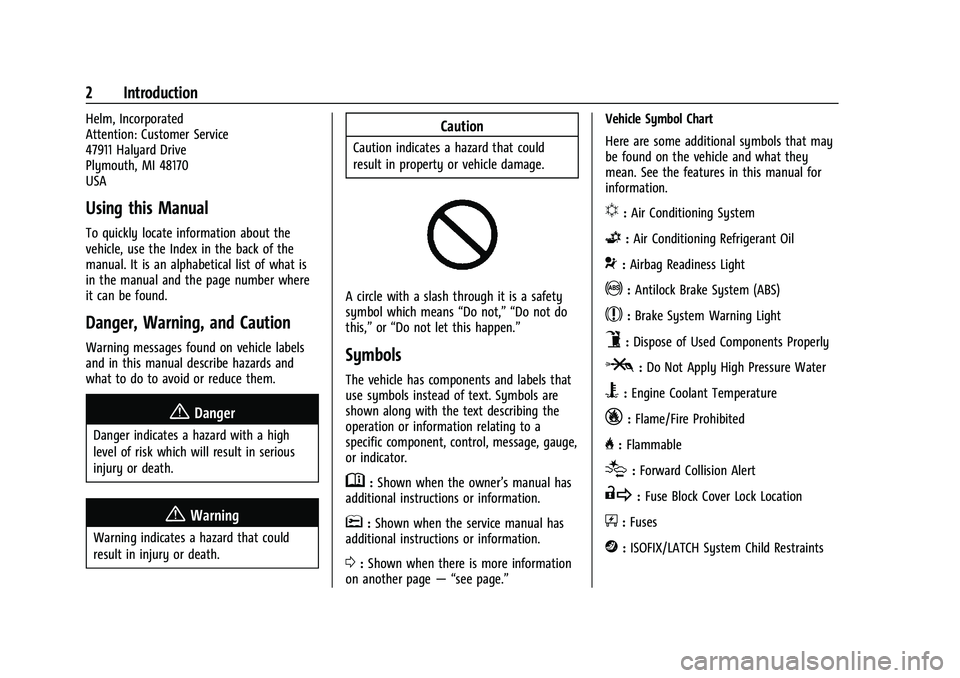
A circle with a slash through it is a safety
symbol which means“Do not,” “Do not do
this,” or“Do not let this happen.”
Symbols
The vehicle has components and labels that
use symbols instead of text. Symbols are
shown along with the text describing the
operation or information relating to a
specific component, control, message, gauge,
or indicator.
M:Shown when the owner’s manual has
additional instructions or information.
*: Shown when the service manual has
additional instructions or information.
0: Shown when there is more information
on another page — “see page.” Vehicle Symbol Chart
Here are some additional symbols that may
be found on the vehicle and what they
mean. See the features in this manual for
information.
u:
Air Conditioning System
G:Air Conditioning Refrigerant Oil
9:Airbag Readiness Light
!:Antilock Brake System (ABS)
$:Brake System Warning Light
9:Dispose of Used Components Properly
P:Do Not Apply High Pressure Water
B:Engine Coolant Temperature
_:Flame/Fire Prohibited
H: Flammable
[:Forward Collision Alert
R:Fuse Block Cover Lock Location
+:Fuses
j:ISOFIX/LATCH System Child Restraints
Page 101 of 474
GMC Sierra/Sierra Denali 1500 Owner Manual (GMNA-Localizing-U.S./
Canada/Mexico-15883563) - 2022 - CRC - 11/19/21
100 Instruments and Controls
Instruments and Controls
Controls
Steering Wheel Adjustment . . . . . . . . . . . . 101
Steering Wheel Controls . . . . . . . . . . . . . . . 101
Heated Steering Wheel . . . . . . . . . . . . . . . . 102
Horn . . . . . . . . . . . . . . . . . . . . . . . . . . . . . . . . . . 102
Windshield Wiper/Washer . . . . . . . . . . . . . 102
Compass . . . . . . . . . . . . . . . . . . . . . . . . . . . . . . . 103
Clock . . . . . . . . . . . . . . . . . . . . . . . . . . . . . . . . . . 103
Power Outlets . . . . . . . . . . . . . . . . . . . . . . . . . 104
Wireless Charging . . . . . . . . . . . . . . . . . . . . . 106
Warning Lights, Gauges, and Indicators
Warning Lights, Gauges, andIndicators . . . . . . . . . . . . . . . . . . . . . . . . . . . . 108
Instrument Cluster (Base Level) . . . . . . . . 109
Instrument Cluster (Uplevel) . . . . . . . . . . . 110
Speedometer . . . . . . . . . . . . . . . . . . . . . . . . . . . 113
Odometer . . . . . . . . . . . . . . . . . . . . . . . . . . . . . . 113
Trip Odometer . . . . . . . . . . . . . . . . . . . . . . . . . 113
Tachometer . . . . . . . . . . . . . . . . . . . . . . . . . . . . 113
Fuel Gauge . . . . . . . . . . . . . . . . . . . . . . . . . . . . . 113
Engine Oil Pressure Gauge . . . . . . . . . . . . . 114
Engine Coolant Temperature Gauge . . . . 115
Transmission Temperature Gauge (Uplevel only) . . . . . . . . . . . . . . . . . . . . . . . . 116
Voltmeter Gauge . . . . . . . . . . . . . . . . . . . . . . 116
Seat Belt Reminders . . . . . . . . . . . . . . . . . . . . 117
Airbag Readiness Light . . . . . . . . . . . . . . . . . 118 Passenger Airbag Status Indicator . . . . . . 118
Charging System Light . . . . . . . . . . . . . . . . . 119
Malfunction Indicator Lamp (Check
Engine Light) . . . . . . . . . . . . . . . . . . . . . . . . . 119
Brake System Warning Light . . . . . . . . . . . 121
Electric Parking Brake Light . . . . . . . . . . . . 121
Service Electric Parking Brake Light . . . . . 121
Antilock Brake System (ABS) Warning
Light . . . . . . . . . . . . . . . . . . . . . . . . . . . . . . . . . 122
Four-Wheel-Drive Light . . . . . . . . . . . . . . . . . 122
Tow/Haul Mode Light . . . . . . . . . . . . . . . . . 122
Hill Descent Control Light . . . . . . . . . . . . . . 122
Lane Keep Assist (LKA) Light . . . . . . . . . . . 123
Automatic Emergency Braking (AEB) Disabled Light . . . . . . . . . . . . . . . . . . . . . . . . 123
Vehicle Ahead Indicator . . . . . . . . . . . . . . . . 123
Pedestrian Ahead Indicator . . . . . . . . . . . . 123
Traction Off Light . . . . . . . . . . . . . . . . . . . . . . 124
StabiliTrak OFF Light . . . . . . . . . . . . . . . . . . . 124
Traction Control System (TCS)/ StabiliTrak Light . . . . . . . . . . . . . . . . . . . . . . 124
Engine Coolant Temperature Warning Light . . . . . . . . . . . . . . . . . . . . . . . . . . . . . . . . . 125
Driver Mode Control Light . . . . . . . . . . . . . 125
Tire Pressure Light . . . . . . . . . . . . . . . . . . . . . 126
Engine Oil Pressure Light (Uplevel Cluster) . . . . . . . . . . . . . . . . . . . . . . . . . . . . . . 126
Low Fuel Warning Light . . . . . . . . . . . . . . . 126
Security Light . . . . . . . . . . . . . . . . . . . . . . . . . . 127
High-Beam On Light . . . . . . . . . . . . . . . . . . . 127 Front Fog Lamp Light . . . . . . . . . . . . . . . . . . 127
Lamps On Reminder . . . . . . . . . . . . . . . . . . . 127
Cruise Control Light . . . . . . . . . . . . . . . . . . . . 128
Door Ajar Light . . . . . . . . . . . . . . . . . . . . . . . . 128
Information Displays
Driver Information Center (DIC) (Base
Level) . . . . . . . . . . . . . . . . . . . . . . . . . . . . . . . . 128
Driver Information Center (DIC) (Uplevel) . . . . . . . . . . . . . . . . . . . . . . . . . . . . . 130
Head-Up Display (HUD) . . . . . . . . . . . . . . . . 132
Vehicle Messages
Vehicle Messages . . . . . . . . . . . . . . . . . . . . . . 136
Engine Power Messages . . . . . . . . . . . . . . . 136
Vehicle Speed Messages . . . . . . . . . . . . . . . 137
Vehicle Personalization
Vehicle Personalization . . . . . . . . . . . . . . . . . 137
Universal Remote System
Universal Remote System . . . . . . . . . . . . . . 142
Universal Remote System Programming . . . . . . . . . . . . . . . . . . . . . . . . 142
Universal Remote System Operation . . . . . . . . . . . . . . . . . . . . . . . . . . . . 144
Page 110 of 474
GMC Sierra/Sierra Denali 1500 Owner Manual (GMNA-Localizing-U.S./
Canada/Mexico-15883563) - 2022 - CRC - 11/19/21
Instruments and Controls 109
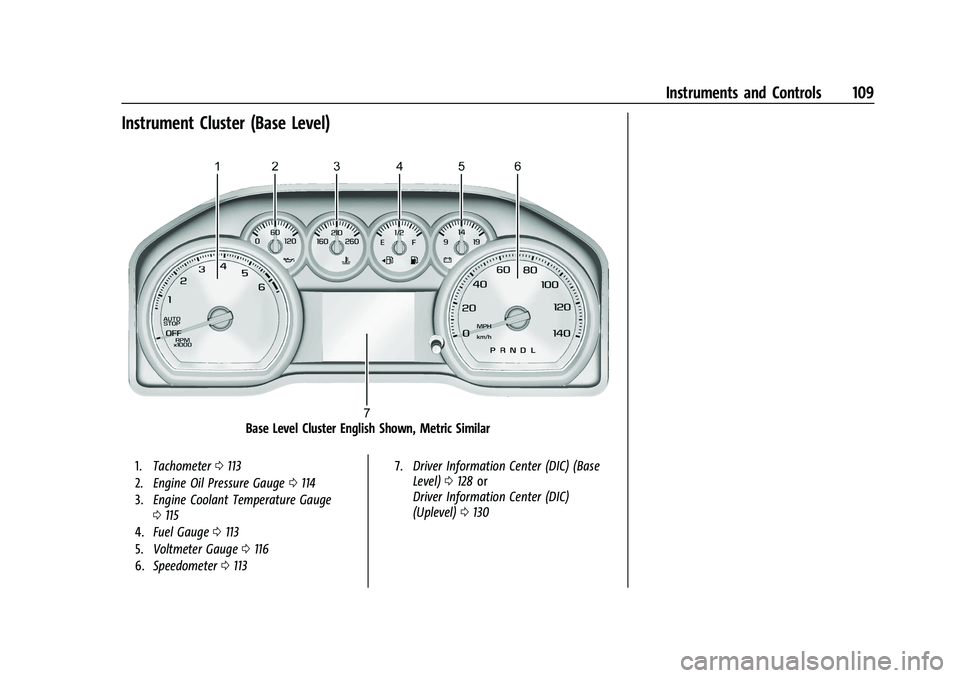
Instrument Cluster (Base Level)
Base Level Cluster English Shown, Metric Similar
1.Tachometer 0113
2. Engine Oil Pressure Gauge 0114
3. Engine Coolant Temperature Gauge
0115
4. Fuel Gauge 0113
5. Voltmeter Gauge 0116
6. Speedometer 0113 7.
Driver Information Center (DIC) (Base
Level) 0128 or
Driver Information Center (DIC)
(Uplevel) 0130
Page 111 of 474
GMC Sierra/Sierra Denali 1500 Owner Manual (GMNA-Localizing-U.S./
Canada/Mexico-15883563) - 2022 - CRC - 11/19/21
110 Instruments and Controls
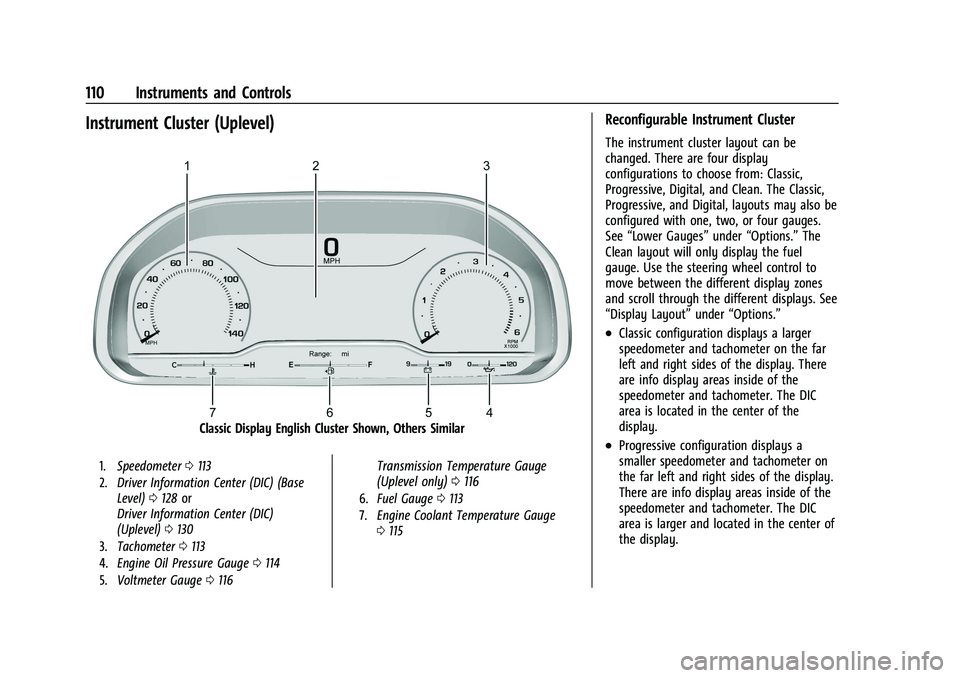
Instrument Cluster (Uplevel)
Classic Display English Cluster Shown, Others Similar
1.Speedometer 0113
2. Driver Information Center (DIC) (Base
Level) 0128 or
Driver Information Center (DIC)
(Uplevel) 0130
3. Tachometer 0113
4. Engine Oil Pressure Gauge 0114
5. Voltmeter Gauge 0116Transmission Temperature Gauge
(Uplevel only) 0116
6. Fuel Gauge 0113
7. Engine Coolant Temperature Gauge
0115
Reconfigurable Instrument Cluster
The instrument cluster layout can be
changed. There are four display
configurations to choose from: Classic,
Progressive, Digital, and Clean. The Classic,
Progressive, and Digital, layouts may also be
configured with one, two, or four gauges.
See “Lower Gauges” under“Options.” The
Clean layout will only display the fuel
gauge. Use the steering wheel control to
move between the different display zones
and scroll through the different displays. See
“Display Layout” under“Options.”
.Classic configuration displays a larger
speedometer and tachometer on the far
left and right sides of the display. There
are info display areas inside of the
speedometer and tachometer. The DIC
area is located in the center of the
display.
.Progressive configuration displays a
smaller speedometer and tachometer on
the far left and right sides of the display.
There are info display areas inside of the
speedometer and tachometer. The DIC
area is larger and located in the center of
the display.
Page 113 of 474
GMC Sierra/Sierra Denali 1500 Owner Manual (GMNA-Localizing-U.S./
Canada/Mexico-15883563) - 2022 - CRC - 11/19/21
112 Instruments and Controls
Audio
Browse music, select from the favorites,
or change the audio source. Use the
thumbwheel to change the station or go to
the next or previous track.
Navigation
If there is an active route, the Turn-by-Turn
directions will appear on the Navigation
Page, if there is no active route a compass
will be displayed.
Phone
If there is no active phone call, view recent
calls, or scroll through contacts. During an
active call, mute the phone or switch to
handset operation.
Options
Use the thumbwheel to scroll through items
in the Options menu.
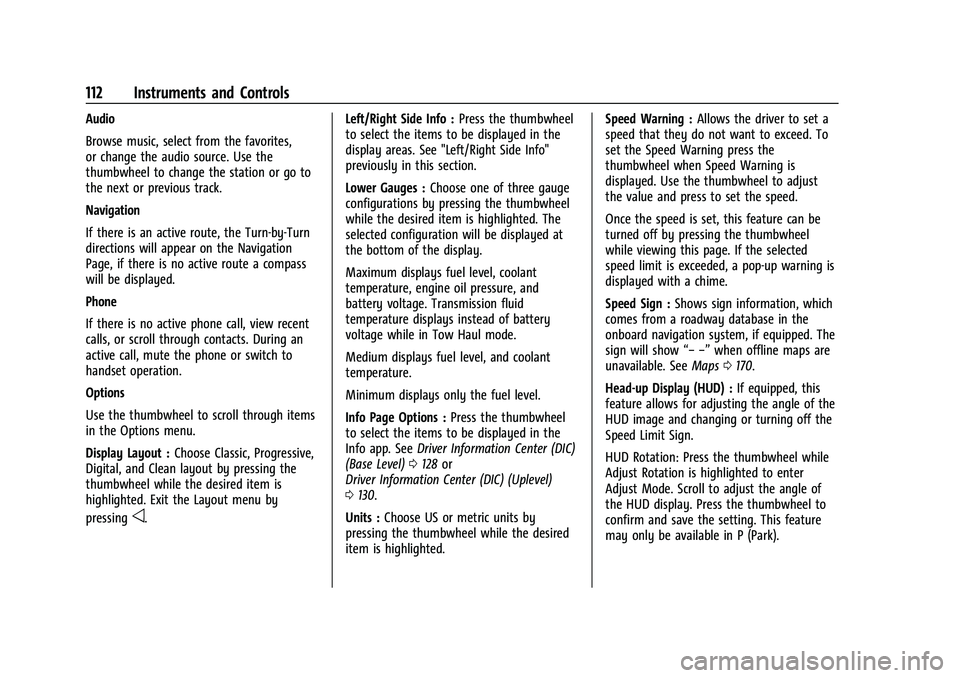
Display Layout :Choose Classic, Progressive,
Digital, and Clean layout by pressing the
thumbwheel while the desired item is
highlighted. Exit the Layout menu by
pressing
o. Left/Right Side Info :
Press the thumbwheel
to select the items to be displayed in the
display areas. See "Left/Right Side Info"
previously in this section.
Lower Gauges : Choose one of three gauge
configurations by pressing the thumbwheel
while the desired item is highlighted. The
selected configuration will be displayed at
the bottom of the display.
Maximum displays fuel level, coolant
temperature, engine oil pressure, and
battery voltage. Transmission fluid
temperature displays instead of battery
voltage while in Tow Haul mode.
Medium displays fuel level, and coolant
temperature.
Minimum displays only the fuel level.
Info Page Options : Press the thumbwheel
to select the items to be displayed in the
Info app. See Driver Information Center (DIC)
(Base Level) 0128 or
Driver Information Center (DIC) (Uplevel)
0 130.
Units : Choose US or metric units by
pressing the thumbwheel while the desired
item is highlighted. Speed Warning :
Allows the driver to set a
speed that they do not want to exceed. To
set the Speed Warning press the
thumbwheel when Speed Warning is
displayed. Use the thumbwheel to adjust
the value and press to set the speed.
Once the speed is set, this feature can be
turned off by pressing the thumbwheel
while viewing this page. If the selected
speed limit is exceeded, a pop-up warning is
displayed with a chime.
Speed Sign : Shows sign information, which
comes from a roadway database in the
onboard navigation system, if equipped. The
sign will show “− −”when offline maps are
unavailable. See Maps0170.
Head-up Display (HUD) : If equipped, this
feature allows for adjusting the angle of the
HUD image and changing or turning off the
Speed Limit Sign.
HUD Rotation: Press the thumbwheel while
Adjust Rotation is highlighted to enter
Adjust Mode. Scroll to adjust the angle of
the HUD display. Press the thumbwheel to
confirm and save the setting. This feature
may only be available in P (Park).
Page 116 of 474
GMC Sierra/Sierra Denali 1500 Owner Manual (GMNA-Localizing-U.S./
Canada/Mexico-15883563) - 2022 - CRC - 11/19/21
Instruments and Controls 115
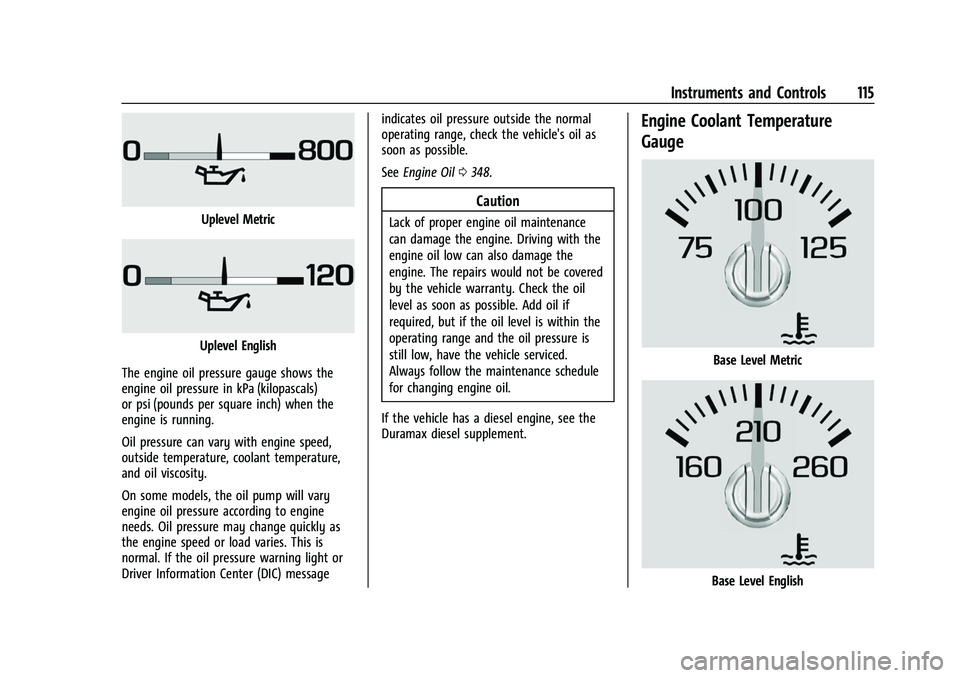
Uplevel Metric
Uplevel English
The engine oil pressure gauge shows the
engine oil pressure in kPa (kilopascals)
or psi (pounds per square inch) when the
engine is running.
Oil pressure can vary with engine speed,
outside temperature, coolant temperature,
and oil viscosity.
On some models, the oil pump will vary
engine oil pressure according to engine
needs. Oil pressure may change quickly as
the engine speed or load varies. This is
normal. If the oil pressure warning light or
Driver Information Center (DIC) message indicates oil pressure outside the normal
operating range, check the vehicle's oil as
soon as possible.
See
Engine Oil 0348.
Caution
Lack of proper engine oil maintenance
can damage the engine. Driving with the
engine oil low can also damage the
engine. The repairs would not be covered
by the vehicle warranty. Check the oil
level as soon as possible. Add oil if
required, but if the oil level is within the
operating range and the oil pressure is
still low, have the vehicle serviced.
Always follow the maintenance schedule
for changing engine oil.
If the vehicle has a diesel engine, see the
Duramax diesel supplement.
Engine Coolant Temperature
Gauge
Base Level Metric
Base Level English
Page 117 of 474
GMC Sierra/Sierra Denali 1500 Owner Manual (GMNA-Localizing-U.S./
Canada/Mexico-15883563) - 2022 - CRC - 11/19/21
116 Instruments and Controls
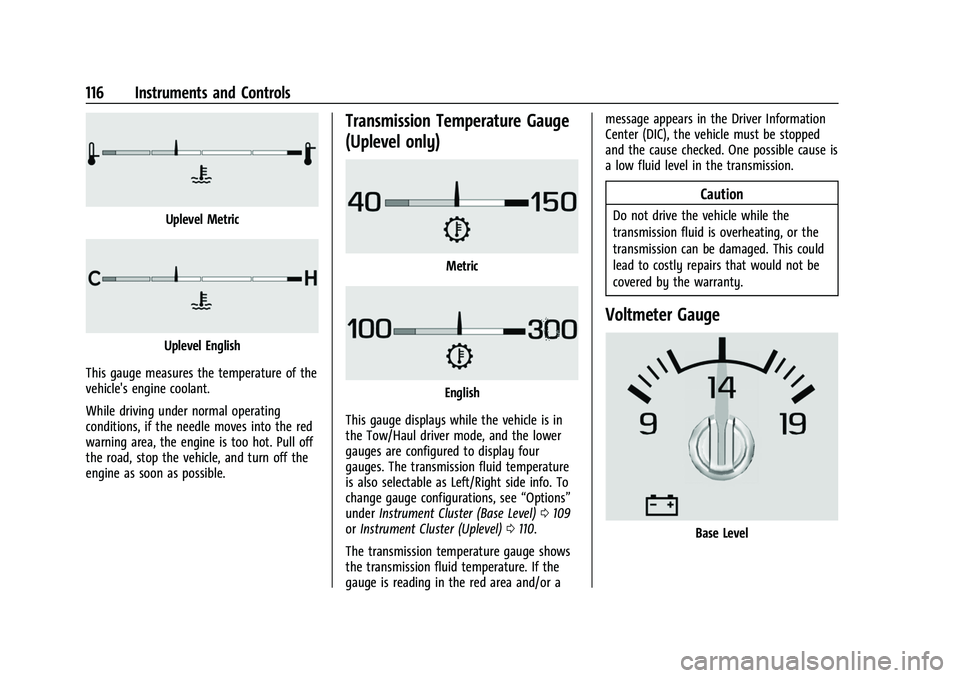
Uplevel Metric
Uplevel English
This gauge measures the temperature of the
vehicle's engine coolant.
While driving under normal operating
conditions, if the needle moves into the red
warning area, the engine is too hot. Pull off
the road, stop the vehicle, and turn off the
engine as soon as possible.
Transmission Temperature Gauge
(Uplevel only)
Metric
English
This gauge displays while the vehicle is in
the Tow/Haul driver mode, and the lower
gauges are configured to display four
gauges. The transmission fluid temperature
is also selectable as Left/Right side info. To
change gauge configurations, see “Options”
under Instrument Cluster (Base Level) 0109
or Instrument Cluster (Uplevel) 0110.
The transmission temperature gauge shows
the transmission fluid temperature. If the
gauge is reading in the red area and/or a message appears in the Driver Information
Center (DIC), the vehicle must be stopped
and the cause checked. One possible cause is
a low fluid level in the transmission.
Caution
Do not drive the vehicle while the
transmission fluid is overheating, or the
transmission can be damaged. This could
lead to costly repairs that would not be
covered by the warranty.
Voltmeter Gauge
Base Level
Page 126 of 474
GMC Sierra/Sierra Denali 1500 Owner Manual (GMNA-Localizing-U.S./
Canada/Mexico-15883563) - 2022 - CRC - 11/19/21
Instruments and Controls 125
The light may also flash when ABS is active.
SeeAntilock Brake System (ABS) 0245.
Trailer Sway Control Light (Uplevel
Cluster)
This light will flash when Trailer Sway
Control is active. See Trailer Sway Control
(TSC) 0327.
Engine Coolant Temperature
Warning Light
This light comes on briefly while starting
the vehicle.
If it does not, have the vehicle serviced by
your dealer. If the system is working
normally the indicator light goes off.
Caution
The engine coolant temperature warning
light indicates that the vehicle has
overheated. Driving with this light on can
damage the engine and it may not be
covered by the vehicle warranty. See
Engine Overheating 0356.
The engine coolant temperature warning
light comes on when the engine has
overheated.
If this happens, pull over and turn off the
engine as soon as possible. See Engine
Overheating 0356.
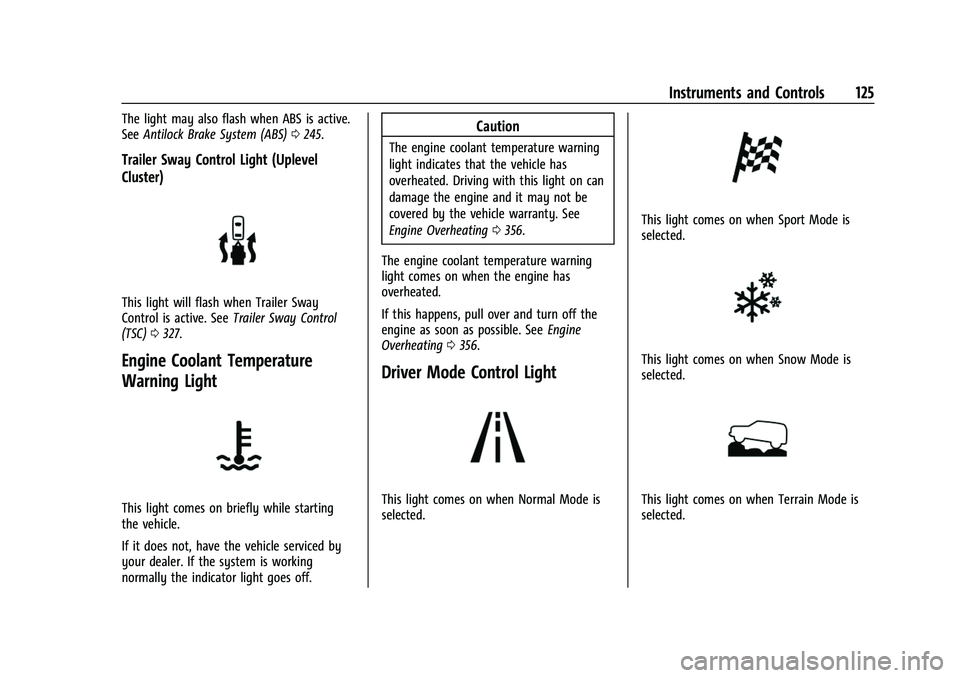
Driver Mode Control Light
This light comes on when Normal Mode is
selected.
This light comes on when Sport Mode is
selected.
This light comes on when Snow Mode is
selected.
This light comes on when Terrain Mode is
selected.
Page 312 of 474
GMC Sierra/Sierra Denali 1500 Owner Manual (GMNA-Localizing-U.S./
Canada/Mexico-15883563) - 2022 - CRC - 11/19/21
Driving and Operating 311
Following Distance
Stay at least twice as far behind the vehicle
ahead as you would when driving without a
trailer. This can help to avoid heavy braking
and sudden turns.
Passing
More passing distance is needed when
towing a trailer. The combination of the
vehicle and trailer will not accelerate as
quickly and is much longer than the vehicle
alone. It is necessary to go much farther
beyond the passed vehicle before returning
to the lane. Pass on level roadways. Avoid
passing on hills if possible.
Backing Up
Hold the bottom of the steering wheel with
one hand. To move the trailer to the left,
move that hand to the left. To move the
trailer to the right, move that hand to the
right. Always back up slowly and, if possible,
have someone guide you.
Making TurnsCaution
Turn more slowly and make wider arcs
when towing a trailer to prevent damage
to your vehicle. Making very sharp turns
could cause the trailer to contact the
vehicle.
Make wider turns than normal when towing,
so the trailer will not go over soft shoulders,
over curbs, or strike road signs, trees,
or other objects. Always signal turns well in
advance. Do not steer or brake suddenly.
Driving on Grades
Reduce speed and shift to a lower gear
before starting down a long or steep
downhill grade. If the transmission is not
shifted down, the brakes may overheat and
result in reduced braking efficiency.
The vehicle can tow in D (Drive). Shift the
transmission to a lower gear if the
transmission shifts too often under heavy
loads and/or hilly conditions. When towing at higher altitudes, engine
coolant will boil at a lower temperature
than at lower altitudes. If the engine is
turned off immediately after towing at high
altitude on steep uphill grades, the vehicle
could show signs similar to engine
overheating. To avoid this, let the engine
run, preferably on level ground, with the
transmission in P (Park) for a few minutes
before turning the engine off. If the
overheat warning comes on, see
Engine
Overheating 0356.
Viewing Systems
If equipped, the viewing systems on the
vehicle can improve visibility while hitching,
backing, and driving with a trailer. See
Driver Assistance Systems 0282.
Parking on Hills
{Warning
To prevent serious injury or death,
always park your vehicle and trailer on a
level surface when possible.
Page 355 of 474
GMC Sierra/Sierra Denali 1500 Owner Manual (GMNA-Localizing-U.S./
Canada/Mexico-15883563) - 2022 - CRC - 11/19/21
354 Vehicle Care
Caution
Do not use anything other than a mix of
DEX-COOL coolant that meets GM
Standard GMW3420 and clean, drinkable
water. Anything else can cause damage
to the engine cooling system and the
vehicle, which would not be covered by
the vehicle warranty.
Never dispose of engine coolant by putting
it in the trash, or by pouring it on the
ground, or into sewers, streams, or bodies of
water. Have the coolant changed by an
authorized service center, familiar with legal
requirements regarding used coolant
disposal. This will help protect the
environment and your health.
Checking Coolant
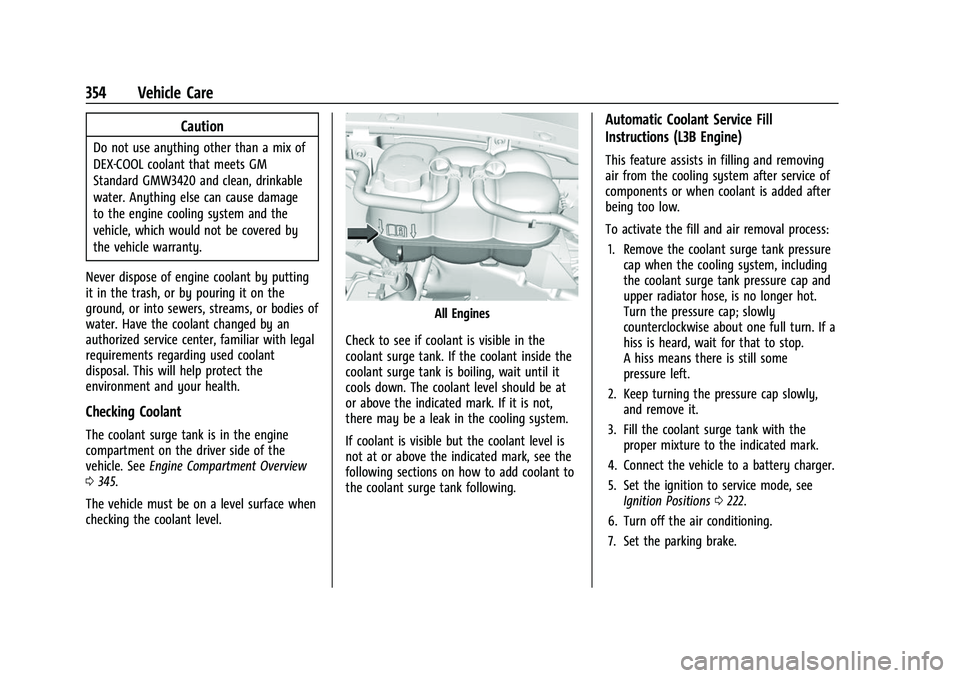
The coolant surge tank is in the engine
compartment on the driver side of the
vehicle. See Engine Compartment Overview
0 345.
The vehicle must be on a level surface when
checking the coolant level.
All Engines
Check to see if coolant is visible in the
coolant surge tank. If the coolant inside the
coolant surge tank is boiling, wait until it
cools down. The coolant level should be at
or above the indicated mark. If it is not,
there may be a leak in the cooling system.
If coolant is visible but the coolant level is
not at or above the indicated mark, see the
following sections on how to add coolant to
the coolant surge tank following.
Automatic Coolant Service Fill
Instructions (L3B Engine)
This feature assists in filling and removing
air from the cooling system after service of
components or when coolant is added after
being too low.
To activate the fill and air removal process: 1. Remove the coolant surge tank pressure cap when the cooling system, including
the coolant surge tank pressure cap and
upper radiator hose, is no longer hot.
Turn the pressure cap; slowly
counterclockwise about one full turn. If a
hiss is heard, wait for that to stop.
A hiss means there is still some
pressure left.
2. Keep turning the pressure cap slowly, and remove it.
3. Fill the coolant surge tank with the proper mixture to the indicated mark.
4. Connect the vehicle to a battery charger.
5. Set the ignition to service mode, see Ignition Positions 0222.
6. Turn off the air conditioning.
7. Set the parking brake.