airbag GMC SIERRA 2023 Owner's Guide
[x] Cancel search | Manufacturer: GMC, Model Year: 2023, Model line: SIERRA, Model: GMC SIERRA 2023Pages: 430, PDF Size: 18.76 MB
Page 224 of 430
GMC Sierra/Sierra Denali 2500 HD/3500 HD Owner Manual (GMNA-
Localizing-U.S./Canada-16504257) - 2023 - CRC - 5/9/22
Driving and Operating 223
Caution
Use the correct key, make sure it is all
the way in—or pushed all the way in
toward the steering column when turning
off the vehicle —and turn it only with
your hand.
1 (ACC/ACCESSORY) : This position allows
features such as the infotainment system to
operate while the vehicle is off. It also
unlocks the steering column, if equipped
with a locking steering column. Use this
position if the vehicle must be pushed or
towed. See Retained Accessory Power (RAP)
0 227.
From ON/RUN, push the key all the way in
toward the steering column, then turn the
key to ACC/ACCESSORY.
If the key is left in ACC/ACCESSORY with the
engine off, the battery could drain and the
vehicle may not start.
A warning chime will sound when the driver
door is opened and the key is in the
ignition.
2 (ON/RUN) : This position can be used to
operate the electrical accessories and to
display some instrument cluster warning
and indicator lights. This position can also be used for service and diagnostics, and to
verify the proper operation of the
malfunction indicator lamp as may be
required for emission inspection purposes.
The switch stays in this position when the
engine is running. The transmission is also
unlocked in this position.
If the key is left in ON/RUN with the engine
off, the battery could drain and the vehicle
may not start.
3 (START) :
This is the position that starts
the engine. When the engine starts, release
the key. The ignition returns to ON/RUN for
driving.
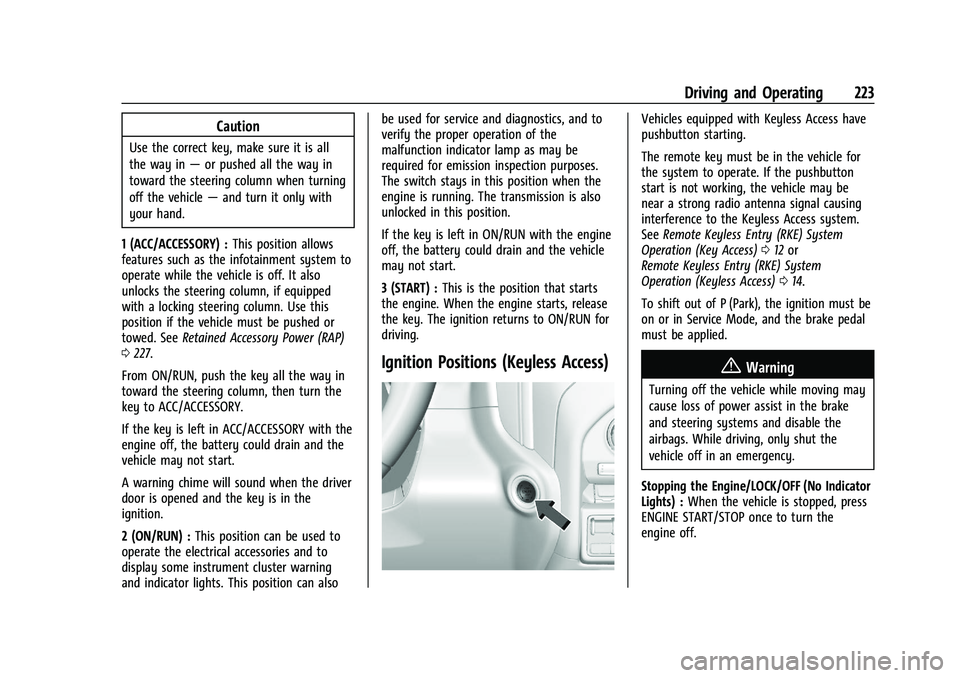
Ignition Positions (Keyless Access)
Vehicles equipped with Keyless Access have
pushbutton starting.
The remote key must be in the vehicle for
the system to operate. If the pushbutton
start is not working, the vehicle may be
near a strong radio antenna signal causing
interference to the Keyless Access system.
See Remote Keyless Entry (RKE) System
Operation (Key Access) 012 or
Remote Keyless Entry (RKE) System
Operation (Keyless Access) 014.
To shift out of P (Park), the ignition must be
on or in Service Mode, and the brake pedal
must be applied.
{Warning
Turning off the vehicle while moving may
cause loss of power assist in the brake
and steering systems and disable the
airbags. While driving, only shut the
vehicle off in an emergency.
Stopping the Engine/LOCK/OFF (No Indicator
Lights) : When the vehicle is stopped, press
ENGINE START/STOP once to turn the
engine off.
Page 225 of 430
GMC Sierra/Sierra Denali 2500 HD/3500 HD Owner Manual (GMNA-
Localizing-U.S./Canada-16504257) - 2023 - CRC - 5/9/22
224 Driving and Operating
If the vehicle is in P (Park), the ignition will
turn off, and Retained Accessory Power (RAP)
will remain active. SeeRetained Accessory
Power (RAP) 0227.
If the vehicle is not in P (Park), the ignition
will return to accessory mode and display
the message SHIFT TO PARK in the Driver
Information Center (DIC). When the vehicle is
shifted into P (Park), the ignition system will
turn off.
The vehicle may have an electric steering
column lock. The lock is activated when the
ignition is turned off and driver door is
opened. A sound may be heard as the lock
actuates or releases. The steering column
lock may not release with the wheels turned
off center. If this happens, the vehicle may
not start. Move the steering wheel from left
to right while attempting to start the
vehicle. If this does not work, the vehicle
needs service.
Unless an emergency exists, do not turn the
engine off when the vehicle is moving. This
will cause a loss of power assist in the brake
and steering systems and disable the
airbags.
If the vehicle must be shut off in an
emergency: 1. If the vehicle cannot be pulled over, and
must be shut off while driving, press and
hold ENGINE START/STOP button for
longer than two seconds, or press twice
in five seconds.
2. Brake using a firm and steady pressure. Do not pump the brakes repeatedly. This
may deplete power assist, requiring
increased brake pedal force.
3. Shift the vehicle to N (Neutral). This can be done while the vehicle is moving.
After shifting to N (Neutral), firmly apply
the brakes and steer the vehicle to a
safe location.
4. Come to a complete stop, shift to P (Park), and make sure engine is off.
The shift lever must be in P (Park) to
turn the ignition off.
5. Set the parking brake. See Electric
Parking Brake 0239.
{Warning
Turning off the vehicle while moving may
cause loss of power assist in the brake
and steering systems and disable the
airbags. While driving, only shut the
vehicle off in an emergency. Accessory Mode (Amber Indicator Light) :
This mode allows some electrical accessories
to be used when the engine is off.
With the ignition off, pressing the button
once without the brake pedal applied will
place the ignition system in accessory mode.
The ignition will switch from accessory
mode to OFF after five minutes to prevent
battery rundown.
ON/RUN/START (Green Indicator Light) :
This
mode is for driving and starting. With the
ignition off, and the brake pedal applied,
pressing ENGINE START/STOP button once
will turn the ignition on. Once engine
cranking begins, release the button. Engine
cranking will continue until the engine
starts. See Starting the Engine 0225.
Service Mode
This power mode is available for service and
diagnostics, and to verify the proper
operation of the malfunction indicator lamp
as may be required for emission inspection
purposes. With the vehicle off, and the
brake pedal not applied, pressing and
holding the ENGINE START/STOP button for
more than five seconds will place the vehicle
in Service Mode. The instruments and audio
systems will operate as they do when the
Page 299 of 430

GMC Sierra/Sierra Denali 2500 HD/3500 HD Owner Manual (GMNA-
Localizing-U.S./Canada-16504257) - 2023 - CRC - 5/9/22
298 Driving and Operating
Caution
Some electrical equipment can damage
the vehicle or cause components to not
work and would not be covered by the
vehicle warranty. Always check with your
dealer before adding electrical equipment.
Add-on equipment can drain the vehicle's
12-volt battery, even if the vehicle is not
operating.
The vehicle has an airbag system. Before
attempting to add anything electrical to the
vehicle, see Servicing the Airbag-Equipped
Vehicle 073 and
Adding Equipment to the Airbag-Equipped
Vehicle 074.
For information on wiring auxiliary switches,
see www.gmupfitter.com or contact your
dealer.
Adding a Snow Plow or Similar
Equipment
Caution
Do not exceed 72 km/h (45 mph) with a
snow plow mounted to the vehicle. The
vehicle could overheat and be damaged.
Before installing a snow plow on the vehicle,
follow these guidelines:
Caution
If the vehicle does not have the snow
plow prep package, RPO VYU, adding a
plow can damage the vehicle, and the
repairs would not be covered by the
vehicle warranty. Unless the vehicle was
built to carry a snow plow, do not add
one to the vehicle. If the vehicle has RPO
VYU, then the payload the vehicle can
carry will be reduced when a snow plow
is installed. The vehicle can be damaged
if either the front or rear axle ratings or
the Gross Vehicle Weight Rating (GVWR)
are exceeded. The plow the vehicle can carry depends on
many things, such as:
.The options the vehicle came with, and
the weight of those options.
.The weight and number of passengers to
be carried.
.The weight of items added to the vehicle,
like a tool box or truck cap.
.The total weight of any additional cargo
to be carried.
To safely carry a snow plow on the vehicle:
.With a snow plow attached, the engine
coolant temperature gauge may show a
higher temperature than while driving
without one. The snow plow could block
the airflow to the radiator. This could be
more noticeable as vehicle speed
increases. At speeds above 72 km/h
(45 mph), this may cause the engine
coolant to overheat. Move or angle the
snow plow blade to allow increased
airflow to the radiator.
.To increase the airflow, move the snow
plow blade position.
.If driving more than 24 km/h (15 mph),
angle the plow blade position.
Page 303 of 430
GMC Sierra/Sierra Denali 2500 HD/3500 HD Owner Manual (GMNA-
Localizing-U.S./Canada-16504257) - 2023 - CRC - 5/18/22
302 Vehicle Care
Towing the Vehicle
Transporting a Disabled Vehicle . . . . . . . 370
Recreational Vehicle Towing . . . . . . . . . . . 371
Appearance Care
Exterior Care . . . . . . . . . . . . . . . . . . . . . . . . . . 374
Interior Care . . . . . . . . . . . . . . . . . . . . . . . . . . . 379
Floor Mats . . . . . . . . . . . . . . . . . . . . . . . . . . . . 382
General Information
For service and parts needs, visit your
dealer. You will receive genuine GM parts
and GM-trained and supported service
people.
Genuine GM parts have one of these marks:
California Perchlorate Materials
Requirements
Certain types of automotive applications,
such as airbag initiators, seat belt
pretensioners, and lithium batteries
contained in electronic keys, may contain
perchlorate materials. Perchlorate Material–
special handling may apply. See
www.dtsc.ca.gov/hazardouswaste/
perchlorate.
Accessories and Modifications
Adding non-dealer accessories or making
modifications to the vehicle can affect
vehicle performance and safety, including
such things as airbags, braking, stability,
ride and handling, emissions systems,
aerodynamics, durability, Driver Assistance
Systems, and electronic systems like antilock
brakes, traction control, and stability control.
These accessories or modifications could
even cause malfunction or damage not
covered by the vehicle warranty.
Page 304 of 430

GMC Sierra/Sierra Denali 2500 HD/3500 HD Owner Manual (GMNA-
Localizing-U.S./Canada-16504257) - 2023 - CRC - 5/18/22
Vehicle Care 303
Damage to suspension components caused
by modifying vehicle height outside of
factory settings will not be covered by the
vehicle warranty.
Damage to vehicle components resulting
from modifications or the installation or use
of non-GM certified parts, including control
module or software modifications, is not
covered under the terms of the vehicle
warranty and may affect remaining
warranty coverage for affected parts.
GM Accessories are designed to complement
and function with other systems on the
vehicle. See your dealer to accessorize the
vehicle using genuine GM Accessories
installed by a dealer technician.
Also, seeAdding Equipment to the
Airbag-Equipped Vehicle 074.Vehicle Checks
Doing Your Own Service Work
{Warning
It can be dangerous to work on your
vehicle if you do not have the proper
knowledge, service manual, tools,
or parts. Always follow owner’s manual
procedures and consult the service
manual for your vehicle before doing any
service work.
If doing some of your own service work, use
the proper service manual. It tells you much
more about how to service the vehicle than
this manual can. To order the proper service
manual, see Publication Ordering
Information 0404.
This vehicle has an airbag system. Before
attempting to do your own service work,
see Servicing the Airbag-Equipped Vehicle
0 73. If equipped with remote vehicle start, open
the hood before performing any service
work to prevent remote starting the vehicle
accidentally. See
Remote Vehicle Start 022.
Keep a record with all parts receipts and list
the mileage and the date of any service
work performed. See Maintenance Records
0 391.
Caution
Even small amounts of contamination can
cause damage to vehicle systems. Do not
allow contaminants to contact the fluids,
reservoir caps, or dipsticks.
Hood
{Warning
Turn the vehicle off before opening the
hood. If the engine is running with the
hood open, you or others could be
injured.
Page 354 of 430
GMC Sierra/Sierra Denali 2500 HD/3500 HD Owner Manual (GMNA-
Localizing-U.S./Canada-16504257) - 2023 - CRC - 5/18/22
Vehicle Care 353
If the vehicle tires must be replaced
with a tire that does not have a TPC
Spec number, make sure they are the
same size, load range, speed rating, and
construction (radial) as the original
tires.
The Tire and Loading Information label
indicates the original equipment tires
on the vehicle. SeeVehicle Load Limits
0 215.
Different Size Tires and Wheels
If wheels or tires are installed that are a
different size than the original equipment
wheels and tires, vehicle performance,
including its braking, ride and handling
characteristics, stability, and resistance to
rollover may be affected. If the vehicle has
electronic systems such as antilock brakes,
rollover airbags, traction control, electronic
stability control, or All-Wheel Drive, the
performance of these systems can also be
affected.
{Warning
If different sized wheels are used, there
may not be an acceptable level of
performance and safety if tires not
recommended for those wheels are
selected. This increases the chance of a
crash and serious injury. Only use GM
specific wheel and tire systems developed
for the vehicle, and have them properly
installed by a GM certified technician.
See Buying New Tires 0352 and
Accessories and Modifications 0302.
Uniform Tire Quality Grading
The following information relates to the
system developed by the United States
National Highway Traffic Safety
Administration (NHTSA), which grades
tires by treadwear, traction, and
temperature performance. This applies
only to vehicles sold in the United
States. The grades are molded on the
sidewalls of most passenger car tires.
The Uniform Tire Quality Grading
(UTQG) system does not apply to deep
tread, winter tires, compact spare tires, tires with nominal rim diameters of
10 to 12 inches (25 to 30 cm), or to some
limited-production tires.
While the tires available on General
Motors passenger cars and light trucks
may vary with respect to these grades,
they must also conform to federal
safety requirements and additional
General Motors Tire Performance
Criteria (TPC) standards.
Quality grades can be found where
applicable on the tire sidewall between
tread shoulder and maximum section
width. For example:Treadwear 200 Traction AA Temperature A
All Passenger Car Tires Must Conform to
Federal Safety Requirements In Addition
To These Grades.
Treadwear
The treadwear grade is a comparative
rating based on the wear rate of the
tire when tested under controlled
conditions on a specified government
test course. For example, a tire graded
150 would wear one and one-half (1½)
Page 404 of 430
GMC Sierra/Sierra Denali 2500 HD/3500 HD Owner Manual (GMNA-
Localizing-U.S./Canada-16504257) - 2023 - CRC - 5/9/22
Customer Information 403
GM vehicle by limiting compensation for
damage repairs through the use of
aftermarket collision parts. Some insurance
companies will not specify aftermarket
collision parts. When purchasing insurance,
we recommend that you ensure that the
vehicle will be repaired with GM original
equipment collision parts. If such insurance
coverage is not available from your current
insurance carrier, consider switching to
another insurance carrier.
If the vehicle is leased, the leasing company
may require you to have insurance that
ensures repairs with Genuine GM Original
Equipment Manufacturer (OEM) parts or
Genuine Manufacturer replacement parts.
Read the lease carefully, as you may be
charged at the end of the lease for poor
quality repairs.
If a Crash Occurs
If there has been an injury, call emergency
services for help. Do not leave the scene of
a crash until all matters have been taken
care of. Move the vehicle only if its position
puts you in danger, or you are instructed to
move it by a police officer.Give only the necessary information to
police and other parties involved in the
crash.
For emergency towing see
Roadside
Assistance Program 0399.
Gather the following information:
.Driver name, address, and telephone
number
.Driver license number
.Owner name, address, and telephone
number
.Vehicle license plate number
.Vehicle make, model, and model year
.Vehicle Identification Number (VIN)
.Insurance company and policy number
.General description of the damage to the
other vehicle
Choose a reputable repair facility that uses
quality replacement parts. See “Collision
Parts” earlier in this section.
If the airbag has inflated, see What Will You
See after an Airbag Inflates? 069.
Managing the Vehicle Damage Repair
Process
In the event that the vehicle requires
damage repairs, GM recommends that you
take an active role in its repair. If you have
a pre-determined repair facility of choice,
take the vehicle there, or have it towed
there. Specify to the facility that any
required replacement collision parts be
original equipment parts, either new
Genuine GM parts or recycled original GM
parts. Remember, recycled parts will not be
covered by the GM vehicle warranty.
Insurance pays the bill for the repair, but
you must live with the repair. Depending on
your policy limits, your insurance company
may initially value the repair using
aftermarket parts. Discuss this with the
repair professional, and insist on Genuine
GM parts. Remember, if the vehicle is
leased, you may be obligated to have the
vehicle repaired with Genuine GM parts,
even if your insurance coverage does not
pay the full cost.
If another party's insurance company is
paying for the repairs, you are not obligated
to accept a repair valuation based on that
insurance company's collision policy repair
limits, as you have no contractual limits
Page 406 of 430
GMC Sierra/Sierra Denali 2500 HD/3500 HD Owner Manual (GMNA-
Localizing-U.S./Canada-16504257) - 2023 - CRC - 5/9/22
Customer Information 405
To contact NHTSA, you may call the
Vehicle Safety Hotline toll-free at
1-888-327-4236 (TTY: 1-800-424-9153); go
to
https://www.safercar.gov;or write to:
Administrator, NHTSA
1200 New Jersey Avenue, S.E.
Washington, D.C. 20590
You can also obtain other information
about motor vehicle safety from
https://www.safercar.gov.
Reporting Safety Defects to the
Canadian Government
If you live in Canada, and you believe
that the vehicle has a safety defect,
notify Transport Canada immediately,
and notify General Motors of Canada
Company. Call Transport Canada at
1-800-333-0510; go to:
www.tc.gc.ca/recalls (English)
www.tc.gc.ca/rappels (French) or write to:
Transport Canada
Motor Vehicle Safety Directorate
Defect Investigations and Recalls
Division
80 Noel Street
Gatineau
,QC J8Z 0A1
Reporting Safety Defects to
General Motors
In addition to notifying NHTSA (or Transport
Canada) in a situation like this, notify
General Motors.
In the U.S., call 1-800-462-8782, or write:
GMC Customer Assistance Center
P.O. Box 33172
Detroit, MI 48232-5172
In Canada, call 1-800-263-3777 (English) or
1-800-263-7854 (French), or write:
Customer Care Centre
General Motors of Canada Company
500 Wentworth Street W
Oshawa, ON L1J 0C5In Mexico, call 800-466-0812 or
800-466-0801.
In other Central America and Caribbean
Countries, call 52-555-901-2369.
Vehicle Data Recording and
Privacy
The vehicle has a number of computers that
record information about the vehicle’s
performance and how it is driven or used.
For example, the vehicle uses computer
modules to monitor and control engine and
transmission performance, to monitor the
conditions for airbag deployment and
deploy them in a crash, and, if equipped, to
provide antilock braking to help the driver
control the vehicle. These modules may
store data to help the dealer technician
service the vehicle or to help GM improve
safety or features. Some modules may also
store data about how the vehicle is
operated, such as rate of fuel consumption
or average speed. These modules may retain
personal preferences, such as radio presets,
seat positions, and temperature settings.
Page 417 of 430
GMC Sierra/Sierra Denali 2500 HD/3500 HD Owner Manual (GMNA-
Localizing-U.S./Canada-16504257) - 2023 - CRC - 5/9/22
416 Index
IndexA
Accessories and Modifications . . . . . . . . . . . 302
Accessory Power . . . . . . . . . . . . . . . . . . . . . . . . . 227
Add-On Electrical Equipment . . . . . . . . . . . . . 297
Adding a Snow Plow or SimilarEquipment . . . . . . . . . . . . . . . . . . . . . . . . . . . . . 298
Additional OnStar Information . . . . . . . . . . . . . . . . . . . . 410
Adjustments Lumbar, Front Seats . . . . . . . . . . . . . . . . . . . . 53
Agreements Trademarks and License . . . . . . . . . . . . . . . 189
Air Cleaner/Filter, Engine . . . . . . . . . . . . . . . . . . 310
Conditioning . . . . . . . . . . . . . . . . . . . . . . . . . . . 197
Filter Life System . . . . . . . . . . . . . . . . . . . . . . 309
Filter, Passenger Compartment . . . . . . . . 201
Vents . . . . . . . . . . . . . . . . . . . . . . . . . . . . . . . . . . 201
Air Conditioning . . . . . . . . . . . . . . . . . . . . . . . . . 196
Airbag System . . . . . . . . . . . . . . . . . . . . . . . . . . . . 65
Check . . . . . . . . . . . . . . . . . . . . . . . . . . . . . . . . . . . 75
How Does an Airbag Restrain? . . . . . . . . . . 69
Passenger Sensing System . . . . . . . . . . . . . . 70
What Makes an Airbag Inflate? . . . . . . . . . 68
What Will You See after an AirbagInflates? . . . . . . . . . . . . . . . . . . . . . . . . . . . . . . 69
When Should an Airbag Inflate? . . . . . . . . 68
Where Are the Airbags? . . . . . . . . . . . . . . . . 67 Airbags
Adding Equipment to the Vehicle . . . . . . . 74
Passenger Status Indicator . . . . . . . . . . . . . . 119
Readiness Light . . . . . . . . . . . . . . . . . . . . . . . . . 119
Replacing System Parts after a
Crash . . . . . . . . . . . . . . . . . . . . . . . . . . . . . . . . . 75
Servicing Airbag-Equipped Vehicles . . . . . . 73
Alarm Vehicle Security . . . . . . . . . . . . . . . . . . . . . . . . 34
Alert Lane Change . . . . . . . . . . . . . . . . . . . . . . . . . . . 261
Rear Cross Traffic . . . . . . . . . . . . . . . . . . . . . . 257
Side Blind Zone (SBZA) . . . . . . . . . . . . . . . . . 260
All-Season Tires . . . . . . . . . . . . . . . . . . . . . . . . . . 338
All-Terrain Tires . . . . . . . . . . . . . . . . . . . . . . . . . . 338
AM-FM Radio . . . . . . . . . . . . . . . . . . . . . . . . . . . . .154
Antenna Fixed Mast . . . . . . . . . . . . . . . . . . . . . . . . . . . . . 158
Multi-band . . . . . . . . . . . . . . . . . . . . . . . . . . . . . 158
Antilock Brake System (ABS) . . . . . . . . . . . . . 238 Warning Light . . . . . . . . . . . . . . . . . . . . . . . . . 123
Appearance Care Exterior . . . . . . . . . . . . . . . . . . . . . . . . . . . . . . . . 374
Interior . . . . . . . . . . . . . . . . . . . . . . . . . . . . . . . . 379
Apple CarPlay and Android Auto . . . . . . . . . . 181
Assistance Program, Roadside . . . . . . . . . . . . 399
Assistance Systems
Driving . . . . . . . . . . . . . . . . . . . . . . . . . . . . . . . . 257
Page 423 of 430
GMC Sierra/Sierra Denali 2500 HD/3500 HD Owner Manual (GMNA-
Localizing-U.S./Canada-16504257) - 2023 - CRC - 5/9/22
422 Index
Lamps (cont'd)Malfunction Indicator (Check
Engine) . . . . . . . . . . . . . . . . . . . . . . . . . . . . . . 120
On Reminder . . . . . . . . . . . . . . . . . . . . . . . . . . 128
Reading . . . . . . . . . . . . . . . . . . . . . . . . . . . . . . . . 146
Lane Change Alert (LCA) . . . . . . . . . . . . . . . . . . . . . 261
Departure Warning (LDW) . . . . . . . . . . . . . 262
Departure Warning Light . . . . . . . . . . . . . . 124
Lap-Shoulder Belt . . . . . . . . . . . . . . . . . . . . . . . . . .61
LATCH System Replacing Parts after a Crash . . . . . . . . . . . 92
LATCH, Lower Anchors and Tethers for Children . . . . . . . . . . . . . . . . . . . . . . . . . . . . . . . . . 82
LED Lighting . . . . . . . . . . . . . . . . . . . . . . . . . . . . . 325
Lighting Entry . . . . . . . . . . . . . . . . . . . . . . . . . . . . . . . . . . 146
Exit . . . . . . . . . . . . . . . . . . . . . . . . . . . . . . . . . . . . 146
Illumination Control . . . . . . . . . . . . . . . . . . . 145
LED . . . . . . . . . . . . . . . . . . . . . . . . . . . . . . . . . . . . 325
Task . . . . . . . . . . . . . . . . . . . . . . . . . . . . . . . . . . . 144
Lights Airbag Readiness . . . . . . . . . . . . . . . . . . . . . . . 119
Antilock Brake System (ABS)Warning . . . . . . . . . . . . . . . . . . . . . . . . . . . . . 123
Brake System Warning . . . . . . . . . . . . . . . . 122
Charging System . . . . . . . . . . . . . . . . . . . . . . 120 Lights (cont'd)
Check Engine (Malfunction
Indicator) . . . . . . . . . . . . . . . . . . . . . . . . . . . . 120
Cruise Control Light . . . . . . . . . . . . . . . . . . . . 128
Door Ajar . . . . . . . . . . . . . . . . . . . . . . . . . . . . . . 128
Driver Mode Control . . . . . . . . . . . . . . . . . . . 125
Electric Parking Brake . . . . . . . . . . . . . . . . . . 122
Electronic Stability Control (ESC), Off . . . . . . . . . . . . . . . . . . . . . . . . . . . . 125
Engine Coolant Temperature Warning . . . . . . . . . . . . . . . . . . . . . . . . . . . . . 125
Engine Oil Pressure . . . . . . . . . . . . . . . . . . . . 126
Four-Wheel-Drive . . . . . . . . . . . . . . . . . . . . . . 123
Front Fog Lamp . . . . . . . . . . . . . . . . . . . . . . . . 128
Gauges and Indicators . . . . . . . . . . . . . . . . . . 111
High-Beam On . . . . . . . . . . . . . . . . . . . . . . . . . . 127
Hill Descent Control . . . . . . . . . . . . . . . . . . . 123
Lane Departure Warning . . . . . . . . . . . . . . . 124
Low Fuel Warning . . . . . . . . . . . . . . . . . . . . . . 127
Seat Belt Reminders . . . . . . . . . . . . . . . . . . . . 118
Security . . . . . . . . . . . . . . . . . . . . . . . . . . . . . . . . . 127
Service Electric Parking Brake . . . . . . . . . . 122
Tire Pressure . . . . . . . . . . . . . . . . . . . . . . . . . . . 126
Traction Control System
(TCS)/Electronic Stability Control
Light . . . . . . . . . . . . . . . . . . . . . . . . . . . . . . . . . 124
Traction Off . . . . . . . . . . . . . . . . . . . . . . . . . . . . 124 Lock
Steering Column . . . . . . . . . . . . . . . . . . . . . . . . 35
Locking Rear Axle . . . . . . . . . . . . . . . . . . . . . . . . 244
Locks Automatic Door . . . . . . . . . . . . . . . . . . . . . . . . . 24
Delayed Locking . . . . . . . . . . . . . . . . . . . . . . . . 24
Door . . . . . . . . . . . . . . . . . . . . . . . . . . . . . . . . . . . . 23
Lockout Protection . . . . . . . . . . . . . . . . . . . . . . 25
Power Door . . . . . . . . . . . . . . . . . . . . . . . . . . . . . 24
Safety . . . . . . . . . . . . . . . . . . . . . . . . . . . . . . . . . . 25
Loss of Control . . . . . . . . . . . . . . . . . . . . . . . . . . 207
Low Fuel Warning Light . . . . . . . . . . . . . . . . . . 127
Lower Anchors and Tethers for
Children (LATCH System) . . . . . . . . . . . . . . . . 82
Lumbar Adjustment . . . . . . . . . . . . . . . . . . . . . . . .53 Front Seats . . . . . . . . . . . . . . . . . . . . . . . . . . . . . 53
M
Maintenance
Records . . . . . . . . . . . . . . . . . . . . . . . . . . . . . . . . 391
Maintenance Schedule . . . . . . . . . . . . . . . . . . . 385
Recommended Fluids andLubricants . . . . . . . . . . . . . . . . . . . . . . . . . . . . 389
Malfunction Indicator Lamp . . . . . . . . . . . . . . 120
Manual Mirrors . . . . . . . . . . . . . . . . . . . . . . . . . . . . . . . . . 37
Mode . . . . . . . . . . . . . . . . . . . . . . . . . . . . . . . . . . 232
Windows . . . . . . . . . . . . . . . . . . . . . . . . . . . . . . . 44