AUTO START GMC SIERRA 2023 Service Manual
[x] Cancel search | Manufacturer: GMC, Model Year: 2023, Model line: SIERRA, Model: GMC SIERRA 2023Pages: 430, PDF Size: 18.76 MB
Page 288 of 430
GMC Sierra/Sierra Denali 2500 HD/3500 HD Owner Manual (GMNA-
Localizing-U.S./Canada-16504257) - 2023 - CRC - 5/9/22
Driving and Operating 287
If the vehicle is equipped with a trailer tire
pressure monitoring system, see the trailer
tire pressure monitoring system description
and the trailering app.
Trailer tires deteriorate over time. The trailer
tire sidewall will show the week and year
the tire was manufactured. Many trailer tire
manufacturers recommend replacing tires
more than six years old.
Overloading is another leading cause of
trailer tire blow-outs. Never load your trailer
with more weight than the tires are
designed to support. The load rating is
located on the trailer tire sidewall.
Always know the maximum speed rating for
the trailer tires before driving. This may be
significantly lower than the vehicle tire
speed rating. The speed rating may be on
the trailer tire sidewall. If the speed rating is
not shown, the default trailer tire speed
rating is 105 km/h (65 mph).
Trailering App
Trailer Lights App
If equipped, the Trailer Lights App is on the
infotainment home screen.Touch Start to cycle the trailer lamps on and
off to determine if they are working. The
test follows this sequence:
1. The running lights turn on first and remain on throughout the sequence.
2. The brake lights turn on for about two seconds.
3. The left turn signal light flashes three times.
4. The right turn signal light flashes three times.
5. The reverse lights turn on for about two seconds.
6. Steps 2–5 repeat for approximately one minute and 45 seconds, or until the
test deactivates.
Touch Stop to stop the test. The test will
automatically end after one minute and
45 seconds.
The sequence also deactivates when any of
the following occur:
.The vehicle is turned off.
.The transmission is shifted out of P (Park).
.The brake pedal is pressed.
.The turn signal is activated.
.The hazard warning lights are activated.
Trailering App
If equipped, this feature allows profiles for
connected trailers to be created to view
status, to store and track trailer usage
information, and to set up towing assistance
features.
The Trailering App Preview will appear when
the Trailering App is opened for the first
time from the Home Page. Touch GET
STARTED in the Trailering App to go into
the app.
When a trailer is electrically connected and
a trailer profile has not been created, there
will be an option to create a profile, use a
guest profile, or select Accessory/No trailer.
After the pop-up is displayed three times,
Don’t Remind Me will display and touching
that will turn off the trailer detection
pop-up. To turn the Trailer Detection Alert
on, select ON in the Settings tab.
When a trailer is electrically connected and
after a Trailer Profile has been created, the
trailer detection pop-up will appear with a
list of all of the custom Trailer Profiles made
on the vehicle. To load an existing Trailer
Profile, select one of the Trailer Profiles
listed, or load the Guest Trailer Profile by
selecting GUEST TRAILER. Touching
Page 293 of 430
GMC Sierra/Sierra Denali 2500 HD/3500 HD Owner Manual (GMNA-
Localizing-U.S./Canada-16504257) - 2023 - CRC - 5/9/22
292 Driving and Operating
The Running Lights connection may not
detect partial outages. Activate the light test
to check all trailer lamps. See“Light Test”
following.
Light Test
Touch Start Light Test to cycle the trailer
lights on and off to determine if they are
working. The test follows this sequence:
1. The running lights turn on first and remain on throughout the sequence.
2. The brake lights turn on for about two seconds.
3. The left turn signal light flashes three times.
4. The right turn signal light flashes three times.
5. The reverse lights turn on for about two seconds.
6. Steps 2–5 repeat for approximately one minute and 45 seconds, or until the
test deactivates.
Touch Stop to stop the test. The test will
automatically end after one minute and
45 seconds.
The sequence also deactivates when any of
the following occur:
.The vehicle is turned off.
.The transmission is shifted out of P (Park).
.The brake pedal is pressed.
.The turn signal is activated.
.The hazard warning lights are activated.
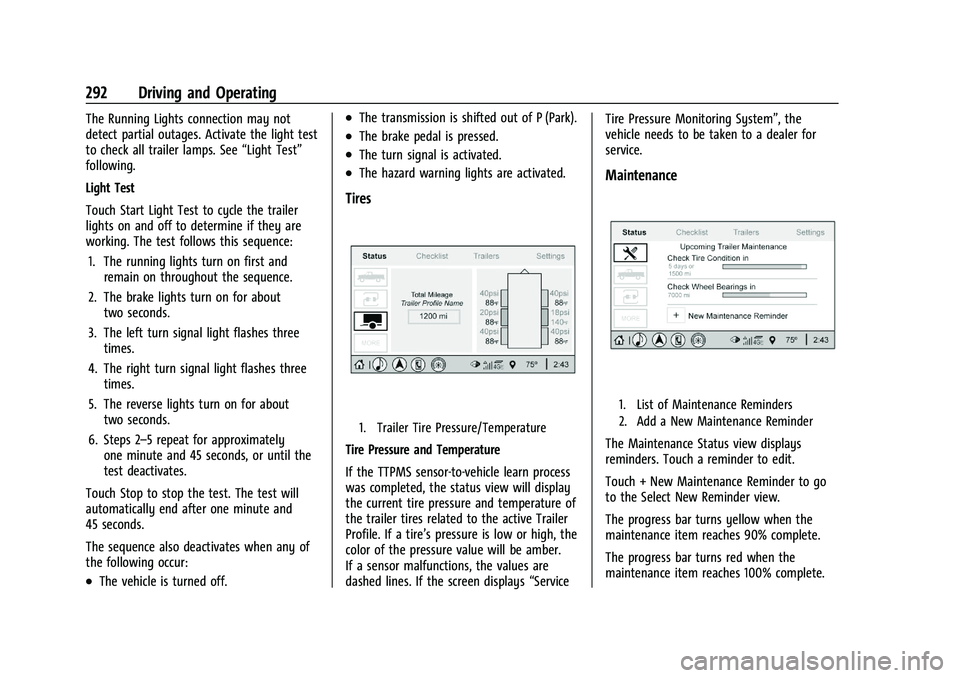
Tires
1. Trailer Tire Pressure/Temperature
Tire Pressure and Temperature
If the TTPMS sensor-to-vehicle learn process
was completed, the status view will display
the current tire pressure and temperature of
the trailer tires related to the active Trailer
Profile. If a tire’s pressure is low or high, the
color of the pressure value will be amber.
If a sensor malfunctions, the values are
dashed lines. If the screen displays “ServiceTire Pressure Monitoring System”, the
vehicle needs to be taken to a dealer for
service.
Maintenance
1. List of Maintenance Reminders
2. Add a New Maintenance Reminder
The Maintenance Status view displays
reminders. Touch a reminder to edit.
Touch + New Maintenance Reminder to go
to the Select New Reminder view.
The progress bar turns yellow when the
maintenance item reaches 90% complete.
The progress bar turns red when the
maintenance item reaches 100% complete.
Page 302 of 430

GMC Sierra/Sierra Denali 2500 HD/3500 HD Owner Manual (GMNA-
Localizing-U.S./Canada-16504257) - 2023 - CRC - 5/18/22
Vehicle Care 301
Vehicle Care
General Information
General Information . . . . . . . . . . . . . . . . . . . 302
California Perchlorate MaterialsRequirements . . . . . . . . . . . . . . . . . . . . . . . . 302
Accessories and Modifications . . . . . . . . . 302
Vehicle Checks
Doing Your Own Service Work . . . . . . . . 303
Hood . . . . . . . . . . . . . . . . . . . . . . . . . . . . . . . . . . 303
Engine Compartment Overview . . . . . . . . 305
Engine Oil . . . . . . . . . . . . . . . . . . . . . . . . . . . . . 306
Engine Oil Life System . . . . . . . . . . . . . . . . 308
Automatic Transmission Fluid . . . . . . . . . 309
Engine Air Filter Life System . . . . . . . . . . 309
Engine Air Cleaner/Filter . . . . . . . . . . . . . . . 310
Cooling System . . . . . . . . . . . . . . . . . . . . . . . . 311
Engine Overheating . . . . . . . . . . . . . . . . . . . . 313
Overheated Engine Protection Operating Mode . . . . . . . . . . . . . . . . . . . . . 315
Engine Fan . . . . . . . . . . . . . . . . . . . . . . . . . . . . . 315
Power Steering Fluid . . . . . . . . . . . . . . . . . . . 315
Washer Fluid . . . . . . . . . . . . . . . . . . . . . . . . . . 316
Brakes . . . . . . . . . . . . . . . . . . . . . . . . . . . . . . . . . 317
Brake Pad Life System . . . . . . . . . . . . . . . . . 317
Brake Fluid . . . . . . . . . . . . . . . . . . . . . . . . . . . . 318
Battery - North America . . . . . . . . . . . . . . . 319
Four-Wheel Drive . . . . . . . . . . . . . . . . . . . . . . 321
Front Axle . . . . . . . . . . . . . . . . . . . . . . . . . . . . . 321 Rear Axle . . . . . . . . . . . . . . . . . . . . . . . . . . . . . . 321
Noise Control System . . . . . . . . . . . . . . . . . . 321
Automatic Transmission Shift Lock
Control Function Check (Mechanical
Shifter) . . . . . . . . . . . . . . . . . . . . . . . . . . . . . . 322
Park Brake and P (Park) Mechanism Check . . . . . . . . . . . . . . . . . . . . . . . . . . . . . . . . 323
Wiper Blade Replacement . . . . . . . . . . . . . 323
Glass Replacement . . . . . . . . . . . . . . . . . . . . . 323
Windshield Replacement . . . . . . . . . . . . . . 324
Gas Strut(s) . . . . . . . . . . . . . . . . . . . . . . . . . . . 324
Headlamp Aiming
Front Headlamp Aiming . . . . . . . . . . . . . . . 325
Bulb Replacement
Bulb Replacement . . . . . . . . . . . . . . . . . . . . . 325
Halogen Bulbs . . . . . . . . . . . . . . . . . . . . . . . . . 325
LED Lighting . . . . . . . . . . . . . . . . . . . . . . . . . . . 325
Headlamps, Front Turn Signal, Sidemarker, and Parking Lamps . . . . . . 325
Taillamps, Turn Signal, Stoplamps, and Back-Up Lamps . . . . . . . . . . . . . . . . . . . . . . 326
Center High-Mounted Stoplamp (CHMSL) and Cargo Lamp . . . . . . . . . . . . 327
License Plate Lamp . . . . . . . . . . . . . . . . . . . . 327
Electrical System
Electrical System Overload . . . . . . . . . . . . . 327
Fuses and Circuit Breakers . . . . . . . . . . . . . 329
Engine Compartment Fuse Block . . . . . . 329 Instrument Panel Fuse Block (Left) . . . . . 333
Instrument Panel Fuse Block (Right) . . . 334
Wheels and Tires
Tires . . . . . . . . . . . . . . . . . . . . . . . . . . . . . . . . . . . 337
All-Season Tires . . . . . . . . . . . . . . . . . . . . . . . . 338
Winter Tires . . . . . . . . . . . . . . . . . . . . . . . . . . . 338
All-Terrain Tires . . . . . . . . . . . . . . . . . . . . . . . . 338
Tire Sidewall Labeling . . . . . . . . . . . . . . . . . 338
Tire Designations . . . . . . . . . . . . . . . . . . . . . . 339
Tire Terminology and Definitions . . . . . 340
Tire Pressure . . . . . . . . . . . . . . . . . . . . . . . . . . 342
Tire Pressure Monitor System . . . . . . . . . 343
Tire Pressure Monitor Operation . . . . . . 344
Tire Inspection . . . . . . . . . . . . . . . . . . . . . . . . 348
Tire Rotation . . . . . . . . . . . . . . . . . . . . . . . . . . 349
When It Is Time for New Tires . . . . . . . . . 351
Buying New Tires . . . . . . . . . . . . . . . . . . . . . . 352
Different Size Tires and Wheels . . . . . . . . 353
Uniform Tire Quality Grading . . . . . . . . . . 353
Wheel Alignment and Tire Balance . . . . 354
Wheel Replacement . . . . . . . . . . . . . . . . . . . 354
Tire Chains . . . . . . . . . . . . . . . . . . . . . . . . . . . . 355
If a Tire Goes Flat . . . . . . . . . . . . . . . . . . . . . 356
Tire Changing . . . . . . . . . . . . . . . . . . . . . . . . . . 357
Full-Size Spare Tire . . . . . . . . . . . . . . . . . . . . 367
Jump Starting
Jump Starting - North America . . . . . . . . 367
Page 310 of 430

GMC Sierra/Sierra Denali 2500 HD/3500 HD Owner Manual (GMNA-
Localizing-U.S./Canada-16504257) - 2023 - CRC - 5/18/22
Vehicle Care 309
The oil life system can also be reset as
follows:1. Display the oil life percentage on the DIC. See Driver Information Center (DIC)
(Base Level) 0128 or
Driver Information Center (DIC) (Midlevel
and Uplevel) 0130.
2. Fully press the accelerator pedal slowly three times within five seconds.
3. If the display changes to 100%, the system is reset.
If the vehicle has a CHANGE ENGINE OIL
SOON message and it comes back on when
the vehicle is started and/or the oil
life percentage is near 0%, the engine oil
life system has not been reset. Repeat the
procedure.
Automatic Transmission Fluid
When to Check and Change Automatic
Transmission Fluid
It is usually not necessary to check the
transmission fluid level. The only reason for
fluid loss is a transmission leak or
overheated transmission. This vehicle is not
equipped with a transmission fluid level
dipstick. There is a special procedure for
checking and changing the transmission fluid in these vehicles. Because this procedure is
difficult, this should be done at the dealer.
Contact the dealer for additional information
or the procedure can be found in the service
manual. See
Publication Ordering
Information 0404.
Caution
Use of the incorrect automatic
transmission fluid may damage the
vehicle, and the damage may not be
covered by the vehicle warranty. Always
use the correct automatic transmission
fluid. See Recommended Fluids and
Lubricants 0389.
Change the fluid and filter at the scheduled
maintenance intervals listed in Maintenance
Schedule 0385. Be sure to use the
transmission fluid listed in Recommended
Fluids and Lubricants 0389.
Engine Air Filter Life System
This feature provides the engine air filter’s
remaining life and best timing for a change.
The timing to change and engine air filter
depends on driving and environmental
conditions.
When to Change Engine Air Filter
When the Driver Information Center (DIC)
displays a message to replace the engine air
filter at the next oil change, follow this
timing.
When the DIC displays a message to replace
the engine air filter soon, replace the engine
air filter at the earliest convenience.
The system must be reset after the engine
air filter is changed.
If the DIC displays a message to check the
engine air filter system, see your dealer.
How to Reset Engine Air Filter Life
System
To reset:
1. Place the vehicle in P (Park).
2. Display the Air Filter Life on the DIC. See Driver Information Center (DIC) (Base
Level) 0128 or
Driver Information Center (DIC) (Midlevel
and Uplevel) 0130.
3. Press
Ton the steering wheel, or press
the trip odometer reset stem if the
vehicle does not have the DIC controls,
to move to the Reset/Disable display
Page 323 of 430

GMC Sierra/Sierra Denali 2500 HD/3500 HD Owner Manual (GMNA-
Localizing-U.S./Canada-16504257) - 2023 - CRC - 5/18/22
322 Vehicle Care
General Motors LLC, and is not limited to
any particular part, component or system of
the vehicle manufactured by General Motors
LLC. Defects in design, assembly or in any
part, component or system of the vehicle as
manufactured by General Motors LLC, which,
at the time it left General Motors LLC’s
control, caused noise emissions to exceed
Federal standards, are covered by this
warranty for the life of the vehicle.
TAMPERING WITH NOISE CONTROL
SYSTEM PROHIBITED
Federal law prohibits the following acts or
the causing thereof:1. The removal or rendering inoperative by any person, other than for purposes of
maintenance, repair, or replacement, of
any device or element of design
incorporated into any new vehicle for
the purpose of noise control prior to its
sale or delivery to the ultimate purchaser
or while it is in use; or
2. the use of the vehicle after such device or element of design has been removed
or rendered inoperative by any person. Among those acts presumed to constitute
tampering are the acts listed below.
Insulation:
Removal of the noise shields or any
undercab insulation.
Engine:
Removal or rendering engine speed
governor, if so equipped, inoperative so as
to allow engine speed to exceed
manufacturer specifications.
Modification of the engine control system or
calibration.
Fan and Drive:
.Removal of fan clutch or rendering clutch
inoperative.
.Removal of the fan shroud.
Air Intake:
.Removal of air cleaner silencer.
.Reversing air cleaner cover.
Exhaust:
.Removal of muffler, catalytic converter,
and/or resonator.
.Removal of exhaust pipes and exhaust
pipe clamps.
Automatic Transmission Shift Lock
Control Function Check
(Mechanical Shifter)
{Warning
When you are doing this inspection, the
vehicle could move suddenly. If the
vehicle moves, you or others could be
injured.
1. Before starting this check, be sure there is enough room around the vehicle.
It should be parked on a level surface.
2. Apply the parking brake. Be ready to apply the regular brake immediately if
the vehicle begins to move.
3. With the engine off, turn the ignition on, but do not start the engine. Without
applying the regular brake, try to move
the shift lever out of P (Park) with
normal effort. If the shift lever moves
out of P (Park), contact your dealer for
service.
Page 370 of 430

GMC Sierra/Sierra Denali 2500 HD/3500 HD Owner Manual (GMNA-
Localizing-U.S./Canada-16504257) - 2023 - CRC - 5/18/22
Vehicle Care 369
If they are, it could cause an unwanted
ground connection. You would not be
able to start your vehicle, and the bad
grounding could damage the electrical
systems.
To avoid the possibility of the vehicles
rolling, set the parking brake firmly on
both vehicles involved in the jump start
procedure. Put the automatic
transmission in P (Park) before setting
the parking brake. If you have a
four-wheel-drive vehicle, be sure the
transfer case is in a drive gear, not in
N (Neutral).
Caution
If any accessories are left on or plugged
in during the jump starting procedure,
they could be damaged. The repairs
would not be covered by the vehicle
warranty. Whenever possible, turn off or
unplug all accessories on either vehicle
when jump starting.
4. Turn the ignition off on both vehicles. Unplug unnecessary accessories plugged
into the accessory power outlets. Turn
off the radio and all the lamps that are not needed. This will avoid sparks and
help save both batteries. And it could
save the radio!
5. Open the hood on the other vehicle and locate the positive (+) and negative (−)
terminal locations on that vehicle.
{Warning
An electric fan can start up even when
the engine is not running and can injure
you. Keep hands, clothing, and tools
away from any underhood electric fan.
{Warning
Using a match near a battery can cause
battery gas to explode. People have been
hurt doing this, and some have been
blinded. Use a flashlight if you need
more light.
Battery fluid contains acid that can burn
you. Do not get it on you. If you
accidentally get it in your eyes or on
your skin, flush the place with water and
get medical help immediately.
{Warning
Fans or other moving engine parts can
injure you badly. Keep your hands away
from moving parts once the engine is
running.
6. Check that the jumper cables do not have loose or missing insulation. If they
do, you could get a shock. The vehicles
could be damaged too.
Before you connect the cables, here are
some basic things you should know.
Positive (+) will go to positive (+) or to a
remote positive (+) terminal if the
vehicle has one. Negative (–) will go to a
heavy, unpainted metal engine part or to
a remote negative (–) terminal if the
vehicle has one.
Do not connect positive (+) to negative
(–) or you will get a short that would
damage the battery and maybe other
parts too. And do not connect the
negative (–) cable to the negative (–)
terminal on the dead battery because
this can cause sparks.
7. Connect one end of the red positive (+) cable to the discharged battery
positive (+) terminal.
Page 410 of 430
GMC Sierra/Sierra Denali 2500 HD/3500 HD Owner Manual (GMNA-
Localizing-U.S./Canada-16504257) - 2023 - CRC - 5/9/22
OnStar 409
.Give OnStar Turn-by-Turn Navigation voice
commands.
.Obtain and customize the Wi-Fi hotspot
name or SSID and password, if equipped.
Press
Qto connect to an Advisor to:
.Verify account information or update
contact information.
.Get driving directions.
.Receive a Diagnostic check of the vehicle's
key operating systems.
.Receive Roadside Assistance.
.Manage Wi-Fi Settings, if equipped.
Press
>to get a priority connection to an
OnStar Advisor available 24/7 to:
.Get help for an emergency.
.Be a Good Samaritan or respond to an
AMBER Alert.
.Get assistance in severe weather or other
crisis situations and find evacuation
routes.
OnStar Services
Emergency
Emergency Services require an active safety
and security plan. With Automatic Crash
Response, built-in sensors can automatically
alert a specially trained OnStar Advisor who
is immediately connected in to the vehicle
to help.
Press
>for a priority connection to an
OnStar Advisor who can contact emergency
service providers, direct them to your exact
location, and relay important information.
With OnStar Crisis Assist, specially trained
Advisors are available 24 hours a day, 7 days
a week, to provide a central point of
contact, assistance, and information during a
crisis.
With Roadside Assistance, Advisors can
locate a nearby service provider to help with
a flat tire, a battery jump, or an empty
gas tank.
Security
If equipped, OnStar provides these services:
.With Stolen Vehicle Assistance, OnStar
Advisors can use GPS to pinpoint the
vehicle and help authorities quickly
recover it.
.With Remote Ignition Block, if equipped,
OnStar can block the vehicle from being
restarted.
.With Stolen Vehicle Slowdown,
if equipped, OnStar can work with law
enforcement to gradually slow the
vehicle down.
Theft Alarm Notification
If equipped, if the doors are locked and the
vehicle alarm sounds, a notification by text,
e-mail, or phone call will be sent. If the
vehicle is stolen, an OnStar Advisor can work
with authorities to recover the vehicle.
Page 415 of 430
GMC Sierra/Sierra Denali 2500 HD/3500 HD Owner Manual (GMNA-
Localizing-U.S./Canada-16504257) - 2023 - CRC - 5/9/22
414 Connected Services
Ensuring Security
.Change the default passwords for the
Wi-Fi hotspot and myGMC mobile
application. Make these passwords
different from each other and use a
combination of letters and numbers to
increase the security.
.Change the default name of the SSID
(Service Set Identifier). This is your
network’s name that is visible to other
wireless devices. Choose a unique name
and avoid family names or vehicle
descriptions.
Wi-Fi Hotspot (If Equipped)
The vehicle may have a built-in Wi-Fi
hotspot that provides access to the Internet
and web content at 4G LTE speed. Up to
seven mobile devices can be connected.
A data plan is required. Use the in-vehicle
controls only when it is safe to do so. 1. To retrieve Wi-Fi hotspot information, press
=to open the OnStar app on the
infotainment display, then select Wi-Fi
Hotspot. On some vehicles, touch Wi-Fi
or Wi-Fi Settings on the screen.
2. The Wi-Fi settings will display the Wi-Fi hotspot name (SSID), password, and on
some vehicles, the connection type (no Internet connection, 3G, 4G, 4G LTE), and
signal quality (poor, good, excellent). The
LTE icon shows connection to Wi-Fi. It is
possible that the icon may not illuminate
even though the vehicle has an active
connection.
3. To change the SSID or password, press
Qor call 1-888-4ONSTAR to connect
with an Advisor. On some vehicles, the
SSID and password can be changed in
the Wi-Fi Hotspot menu.
After initial set-up, your vehicle’s Wi-Fi
hotspot will connect automatically to your
mobile devices. Manage data usage by
turning Wi-Fi on or off on your mobile
device, using the myGMC mobile app, or by
contacting an OnStar Advisor. On some
vehicles, Wi-Fi can also be managed from
the Wi-Fi Hotspot menu.
MyGMC Mobile App (If Available)
Download the myGMC mobile app to
compatible Apple and Android smartphones.
GMC users can access the following services
from a smartphone:
.Remotely start/stop the vehicle,
if factory-equipped.
.Lock/unlock doors, if equipped with
automatic locks.
.Activate the horn and lamps.
.Check the vehicle’s fuel level, oil life,
or tire pressure, if factory-equipped with
the Tire Pressure Monitor System.
.Send destinations to the vehicle.
.Locate the vehicle on a map
(U.S. market only).
.Turn the vehicle's Wi-Fi hotspot on/off,
manage settings, and monitor data
consumption, if equipped.
.Locate a dealer and schedule service.
.Request Roadside Assistance.
.Set a parking reminder with pin drop,
take a photo, make a note, and set a
timer.
.Connect with GMC on social media.
Features are subject to change. For myGMC
mobile app information and compatibility,
see my.gmc.com.
An active OnStar or connected service plan
may be required. A compatible device,
factory-installed remote start, and power
locks are required. Data rates apply. See
www.onstar.com for details and system
limitations.
Page 420 of 430
GMC Sierra/Sierra Denali 2500 HD/3500 HD Owner Manual (GMNA-
Localizing-U.S./Canada-16504257) - 2023 - CRC - 5/9/22
Index 419
DoorAjar Light . . . . . . . . . . . . . . . . . . . . . . . . . . . . . . 128
Delayed Locking . . . . . . . . . . . . . . . . . . . . . . . . 24
Locks . . . . . . . . . . . . . . . . . . . . . . . . . . . . . . . . . . . 23
Power Locks . . . . . . . . . . . . . . . . . . . . . . . . . . . . 24
Drive Belt Routing, Engine . . . . . . . . . . . . . . . 395
Drive Systems Four-Wheel Drive . . . . . . . . . . . . . . . . . . . . . . 321
Driver Assistance Systems . . . . . . . . . . . . . . . . . . . . 246
Information Center (DIC) . . . . . . . . . . . 128, 130
Mode Control . . . . . . . . . . . . . . . . . . . . . . . . . . 243
Mode Control Light . . . . . . . . . . . . . . . . . . . . 125
Teen . . . . . . . . . . . . . . . . . . . . . . . . . . . . . . . . . . . 186
Driving Assistance Systems . . . . . . . . . . . . . . . . . . . . 257
Better Fuel Economy . . . . . . . . . . . . . . . . . . . 204
Characteristics and Towing Tips . . . . . . . . 268
Defensive . . . . . . . . . . . . . . . . . . . . . . . . . . . . . . 205
Distracted . . . . . . . . . . . . . . . . . . . . . . . . . . . . . 204
Hill and Mountain Roads . . . . . . . . . . . . . . 212
If the Vehicle is Stuck . . . . . . . . . . . . . . . . . 214
Impaired . . . . . . . . . . . . . . . . . . . . . . . . . . . . . . . 205
Loss of Control . . . . . . . . . . . . . . . . . . . . . . . . 207
Off-Road . . . . . . . . . . . . . . . . . . . . . . . . . . . . . . . 208
Off-Road Recovery . . . . . . . . . . . . . . . . . . . . . 207
Vehicle Load Limits . . . . . . . . . . . . . . . . . . . . 215
Wet Roads . . . . . . . . . . . . . . . . . . . . . . . . . . . . . . 211 Driving (cont'd)
Winter . . . . . . . . . . . . . . . . . . . . . . . . . . . . . . . . . 212
Dual Automatic Climate Control System . . . . 197
E
E85 or FlexFuel . . . . . . . . . . . . . . . . . . . . . . . . . . 264
ElectricParking Brake . . . . . . . . . . . . . . . . . . . . . . . . . . 239
Parking Brake Light . . . . . . . . . . . . . . . . . . . . 122
Electrical Equipment, Add-On . . . . . . . . . . . . . . . . . . . . 297
System Overload . . . . . . . . . . . . . . . . . . . . . . 327
Electrical System Engine Compartment Fuse Block . . . . . . . 329
Fuses and Circuit Breakers . . . . . . . . . . . . . 329
Instrument Panel Fuse Block . . . . . . 333, 334
Electronic Stability Control (ESC) Off Light . . . . . . . . . . . . . . . . . . . . . . . . . . . . . . . . . . . . 125
Emergency OnStar . . . . . . . . . . . . . . . . . . . . . . . . . . . . . . . . . 409
Engine
Air Cleaner/Filter . . . . . . . . . . . . . . . . . . . . . . 310
Air Filter Life System . . . . . . . . . . . . . . . . . . 309
Check Light (Malfunction Indicator) . . . . 120
Compartment Overview . . . . . . . . . . . . . . . . 305
Coolant Temperature Gauge . . . . . . . . . . . . 117
Coolant Temperature Warning Light . . . 125 Engine (cont'd)
Cooling System . . . . . . . . . . . . . . . . . . . . . . . . . 311
Drive Belt Routing . . . . . . . . . . . . . . . . . . . . . 395
Exhaust . . . . . . . . . . . . . . . . . . . . . . . . . . . . . . . . 229
Fan . . . . . . . . . . . . . . . . . . . . . . . . . . . . . . . . . . . . 315
Heater . . . . . . . . . . . . . . . . . . . . . . . . . . . . . . . . . 226
Oil Life System . . . . . . . . . . . . . . . . . . . . . . . . 308
Oil Pressure Gauge . . . . . . . . . . . . . . . . . . . . . 116
Oil Pressure Light . . . . . . . . . . . . . . . . . . . . . . 126
Overheated Protection
Operating Mode . . . . . . . . . . . . . . . . . . . . . 315
Overheating . . . . . . . . . . . . . . . . . . . . . . . . . . . 313
Power Messages . . . . . . . . . . . . . . . . . . . . . . . 135
Running While Parked . . . . . . . . . . . . . . . . . 230
Starting . . . . . . . . . . . . . . . . . . . . . . . . . . . . . . . . 225
Entry Lighting . . . . . . . . . . . . . . . . . . . . . . . . . . . 146
Equipment, Towing . . . . . . . . . . . . . . . . . . . . . . 276
Event Data Recorders . . . . . . . . . . . . . . . . . . . . 406
Exit Lighting . . . . . . . . . . . . . . . . . . . . . . . . . . . . . 146
Extended Mirrors . . . . . . . . . . . . . . . . . . . . . . . . . .37
Extended Parking . . . . . . . . . . . . . . . . . . . . . . . . 229
Extender, Seat Belt . . . . . . . . . . . . . . . . . . . . . . . 64
Exterior
Cargo Lamps . . . . . . . . . . . . . . . . . . . . . . . . . . . 144
Lamp Controls . . . . . . . . . . . . . . . . . . . . . . . . . 139
Lamps Off Reminder . . . . . . . . . . . . . . . . . . . . 141
Lighting Battery Saver . . . . . . . . . . . . . . . . . 147
Page 422 of 430
GMC Sierra/Sierra Denali 2500 HD/3500 HD Owner Manual (GMNA-
Localizing-U.S./Canada-16504257) - 2023 - CRC - 5/9/22
Index 421
H
Halogen Bulbs . . . . . . . . . . . . . . . . . . . . . . . . . . . 325
Hazard Warning Flashers . . . . . . . . . . . . . . . . .142
HD Radio Technology . . . . . . . . . . . . . . . . . . . . 156
Head Restraints . . . . . . . . . . . . . . . . . . . . . . . . . . . 49
Head-Up Display (HUD) . . . . . . . . . . . . . . . . . . . 132
HeadlampsAiming . . . . . . . . . . . . . . . . . . . . . . . . . . . . . . . . 325
Automatic . . . . . . . . . . . . . . . . . . . . . . . . . . . . . . 141
Bulb Replacement . . . . . . . . . . . . . . . . . . . . . . 325
Daytime Running Lamps (DRL) . . . . . . . . . . 141
Flash-to-Pass . . . . . . . . . . . . . . . . . . . . . . . . . . . . 141
Headlamps, Front Turn Signal,Sidemarker, and Parking Lamps . . . . . . 325
High-Beam On Light . . . . . . . . . . . . . . . . . . . . 127
High/Low Beam Changer . . . . . . . . . . . . . . . 141
Lamps On Reminder . . . . . . . . . . . . . . . . . . . 128
Heated Mirrors . . . . . . . . . . . . . . . . . . . . . . . . . . . . . . . . . 39
Rear Seats . . . . . . . . . . . . . . . . . . . . . . . . . . . . . . 58
Steering Wheel . . . . . . . . . . . . . . . . . . . . . . . . 105
Ventilated Front Seats . . . . . . . . . . . . . . . . . . 56
Heater Engine . . . . . . . . . . . . . . . . . . . . . . . . . . . . . . . . . 226
Heating . . . . . . . . . . . . . . . . . . . . . . . . . . . . . .196, 197
High-Beam On Light . . . . . . . . . . . . . . . . . . . . . . 127 Hill
Descent Control (HDC) . . . . . . . . . . . . . . . . . 242
Descent Control Light . . . . . . . . . . . . . . . . . . 123
Hill and Mountain Roads . . . . . . . . . . . . . . . . . 212
Hill Start Assist (HSA) . . . . . . . . . . . . . . . . . . . . 240
Hood . . . . . . . . . . . . . . . . . . . . . . . . . . . . . . . . . . . . 303
Horn . . . . . . . . . . . . . . . . . . . . . . . . . . . . . . . . . . . . . 106
How to Wear Seat Belts Properly . . . . . . . . . 59
HVAC . . . . . . . . . . . . . . . . . . . . . . . . . . . . . . . .196, 197
I
If the System Needs Service . . . . . . . . . . . . . . 171
Ignition Positions . . . . . . . . . . . . . . . . . . . . 221, 223
Immobilizer . . . . . . . . . . . . . . . . . . . . . . . . . . . . . . . .35
Indicator Vehicle Ahead . . . . . . . . . . . . . . . . . . . . . . . . . 124
Indicators
Warning Lights and Gauges . . . . . . . . . . . . . 111
Infants and Young Children, Restraints . . . . .77
Information Publication Ordering . . . . . . . . . . . . . . . . . . . 404
Infotainment Using the System . . . . . . . . . . . . . . . . . . . . . . 152
Infotainment System . . . . . . . . . . . . . . . . . . . . 407
Inspection Multi-Point Vehicle . . . . . . . . . . . . . . . . . . . . 387
Instrument Cluster . . . . . . . . . . . . . . . . . . . . . . . . 111
Instrument Panel Overview . . . . . . . . . . . . . . . . .5 Interior Rearview Mirrors . . . . . . . . . . . . . . . . . 40
Introduction . . . . . . . . . . . . . . . . . . . . . . . . . . . 2, 148
J
Jack
Auxiliary . . . . . . . . . . . . . . . . . . . . . . . . . . . . . . . 159
Jump
Starting - North America . . . . . . . . . . . . . . . 367
K
Keyless EntryRemote (RKE) System Operation . . . . . 12, 14
Keys . . . . . . . . . . . . . . . . . . . . . . . . . . . . . . . . . . . . 8, 11
L
Labeling, Tire Sidewall . . . . . . . . . . . . . . . . . . . 338
Lamps Auxiliary Roof Mounted Lamp . . . . . . . . . 144
Daytime Running (DRL) . . . . . . . . . . . . . . . . . 141
Dome . . . . . . . . . . . . . . . . . . . . . . . . . . . . . . . . . . 145
Exterior Cargo . . . . . . . . . . . . . . . . . . . . . . . . . 144
Exterior Controls . . . . . . . . . . . . . . . . . . . . . . . 139
Exterior Lamps Off Reminder . . . . . . . . . . . 141
Exterior Lighting Battery Saver . . . . . . . . 147
Flash-to-Pass . . . . . . . . . . . . . . . . . . . . . . . . . . . . 141
Fog . . . . . . . . . . . . . . . . . . . . . . . . . . . . . . . . . . . . 143
High/Low Beam Changer . . . . . . . . . . . . . . . 141
License Plate . . . . . . . . . . . . . . . . . . . . . . . . . . . 327