ECU GMC SIERRA 2023 Owners Manual
[x] Cancel search | Manufacturer: GMC, Model Year: 2023, Model line: SIERRA, Model: GMC SIERRA 2023Pages: 430, PDF Size: 18.76 MB
Page 9 of 430
GMC Sierra/Sierra Denali 2500 HD/3500 HD Owner Manual (GMNA-
Localizing-U.S./Canada-16504257) - 2023 - CRC - 5/9/22
8 Keys, Doors, and Windows
Keys, Doors, and
Windows
Keys and Locks
Keys (Key Access) . . . . . . . . . . . . . . . . . . . . . . . 8
Keys (Keyless Access) . . . . . . . . . . . . . . . . . . . 11
Remote Keyless Entry (RKE) System . . . . 12
Remote Keyless Entry (RKE) SystemOperation (Key Access) . . . . . . . . . . . . . . . . 12
Remote Keyless Entry (RKE) System Operation (Keyless Access) . . . . . . . . . . . . 14
Remote Vehicle Start . . . . . . . . . . . . . . . . . . . 22
Door Locks . . . . . . . . . . . . . . . . . . . . . . . . . . . . . . 23
Power Door Locks . . . . . . . . . . . . . . . . . . . . . . 24
Delayed Locking . . . . . . . . . . . . . . . . . . . . . . . . 24
Automatic Door Locks . . . . . . . . . . . . . . . . . . 24
Lockout Protection . . . . . . . . . . . . . . . . . . . . . . 25
Safety Locks . . . . . . . . . . . . . . . . . . . . . . . . . . . . 25
Doors
Tailgate . . . . . . . . . . . . . . . . . . . . . . . . . . . . . . . . 26
Transporting Items That Can Catch Fire . . . . . . . . . . . . . . . . . . . . . . . . . . . . . 33
Power Assist Steps . . . . . . . . . . . . . . . . . . . . . 33
Vehicle Security
Vehicle Security . . . . . . . . . . . . . . . . . . . . . . . . 34
Vehicle Alarm System . . . . . . . . . . . . . . . . . . 34
Steering Column Lock . . . . . . . . . . . . . . . . . . . 35 Immobilizer . . . . . . . . . . . . . . . . . . . . . . . . . . . . . 35
Immobilizer Operation . . . . . . . . . . . . . . . . . . 35
Exterior Mirrors
Convex Mirrors . . . . . . . . . . . . . . . . . . . . . . . . . 36
Manual Mirrors . . . . . . . . . . . . . . . . . . . . . . . . . 37
Trailer-Tow Mirrors . . . . . . . . . . . . . . . . . . . . . 37
Power Mirrors . . . . . . . . . . . . . . . . . . . . . . . . . . 38
Folding Mirrors . . . . . . . . . . . . . . . . . . . . . . . . . 39
Heated Mirrors . . . . . . . . . . . . . . . . . . . . . . . . . 39
Automatic Dimming Mirror . . . . . . . . . . . . . 39
Blind Spot Mirrors . . . . . . . . . . . . . . . . . . . . . . 39
Reverse Tilt Mirrors . . . . . . . . . . . . . . . . . . . . 40
Interior Mirrors
Interior Rearview Mirrors . . . . . . . . . . . . . . . 40
Manual Rearview Mirror . . . . . . . . . . . . . . . . 41
Automatic Dimming Rearview Mirror . . . 41
Rear Camera Mirror . . . . . . . . . . . . . . . . . . . . . 41
Truck Bed Camera Rearview Mirror . . . . . 43
Windows
Windows . . . . . . . . . . . . . . . . . . . . . . . . . . . . . . . 44
Manual Windows . . . . . . . . . . . . . . . . . . . . . . 44
Power Windows . . . . . . . . . . . . . . . . . . . . . . . . 44
Rear Windows . . . . . . . . . . . . . . . . . . . . . . . . . . 46
Sun Visors . . . . . . . . . . . . . . . . . . . . . . . . . . . . . . 46
Roof
Sunroof . . . . . . . . . . . . . . . . . . . . . . . . . . . . . . . . . 47
Keys and Locks
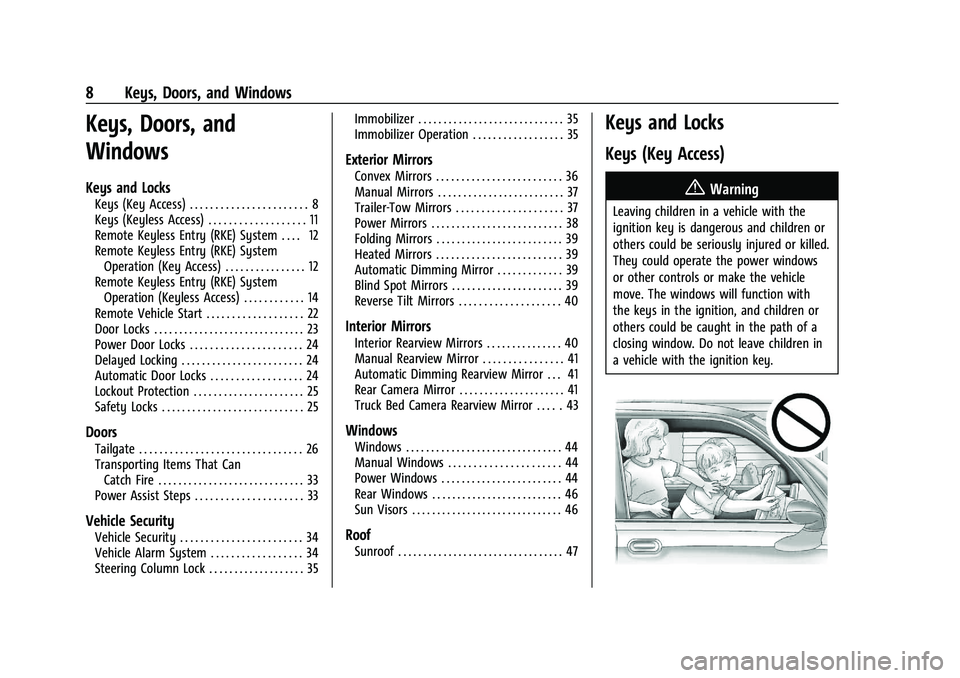
Keys (Key Access)
{Warning
Leaving children in a vehicle with the
ignition key is dangerous and children or
others could be seriously injured or killed.
They could operate the power windows
or other controls or make the vehicle
move. The windows will function with
the keys in the ignition, and children or
others could be caught in the path of a
closing window. Do not leave children in
a vehicle with the ignition key.
Page 11 of 430
GMC Sierra/Sierra Denali 2500 HD/3500 HD Owner Manual (GMNA-
Localizing-U.S./Canada-16504257) - 2023 - CRC - 5/9/22
10 Keys, Doors, and Windows
Programming Keys
Follow these procedures to program up to
eight keys to the vehicle.
Programming with Two Recognized Keys
To program a new key:1. Insert the original, already programmed key in the ignition and turn the
ignition on.
2. Turn the ignition off, and remove the key.
3. Quickly, within five seconds, insert the second original already programmed key
in the ignition and turn the ignition on.
4. Turn the ignition off, and remove the key.
5. Insert the key to be programmed and turn the ignition on within five seconds.
6. After a few seconds, the security light will turn off once the key has been
programmed.
7. Repeat Steps 1–5 if additional keys are to be programmed.
If a key is lost or damaged, see your dealer
to have a new key made. Programming without Recognized Keys
Program a new key to the vehicle when a
recognized key is not available. Canadian
regulations require that owners see their
dealer.
If two currently recognized keys are not
available, follow this procedure to program
the first key.
This procedure will take approximately
30 minutes to complete for the first key.
The vehicle must be off and all of the keys
you wish to program must be with you.
1. Insert the new vehicle key into the ignition.
2. Turn the ignition on. The security light will come on.
3. Wait 10 minutes until the security light turns off.
4. Turn the ignition off.
5. Repeat Steps 2–4 two more times. After the third time, turn the ignition on; the
key is learned and all previously known
keys will no longer work with the
vehicle. 6. To learn a second key, turn the ignition
off, insert the second key to be learned,
and turn the ignition on.
After two keys are learned, the remaining
keys can be learned by following the
procedure in “Programming with Two
Recognized Keys.”
The key has a bar-coded key tag that the
dealer or qualified locksmith can use to
make new keys. Store this information in a
safe place, not in the vehicle.
See your dealer if a replacement key or
additional key is needed.
If it becomes difficult to turn a key, inspect
the key blade for debris. Periodically clean
with a brush or pick.
If locked out of the vehicle, see Roadside
Assistance Program 0399.
With an active OnStar or connected service
plan, an OnStar Advisor may remotely
unlock the vehicle. See OnStar Overview
0 408.
Page 27 of 430
GMC Sierra/Sierra Denali 2500 HD/3500 HD Owner Manual (GMNA-
Localizing-U.S./Canada-16504257) - 2023 - CRC - 5/9/22
26 Keys, Doors, and Windows
When the safety lock is enabled, adults and
older children will not be able to open the
rear door from the inside. Cancel the safety
locks to enable the doors to open from the
inside.
To cancel the safety lock:1. Unlock the door and open it from the outside.
2. Move the lever up to unlock. Do the same for the other door.
Doors
Tailgate
Manual Tailgate
{Warning
It is extremely dangerous to ride on the
tailgate, even when the vehicle is
operated at low speeds. People riding on
the tailgate can easily lose their balance
and fall in response to vehicle maneuvers.
Falling from a moving vehicle may result
in serious injuries or death. Do not allow
people to ride on the tailgate. Be sure
everyone in your vehicle is in a seat and
using a seat belt properly. Use the key to unlock the tailgate.
Open the tailgate by lifting up on its handle
while pulling the tailgate down.
To shut the tailgate, firmly push it upward
until it latches.
After closing the tailgate, pull it back to be
sure it is latched securely.
Some tailgates have an electric latch. If the
battery is disconnected or has low voltage,
the tailgate will not open. The tailgate will
resume operation when the battery is
reconnected or recharged.
Power Release Tailgate
{Warning
Make sure there is no one in the way of
the power tailgate as it is opening and
closing, and keep hands away from the
tailgate hinges when in use. You or
others could be injured if caught in the
path of the power tailgate or tailgate
hinges.
Caution
To avoid damage to the tailgate, make
sure the area behind the tailgate is clear
before opening it.
In the case of a dead battery, the tailgate
can be opened manually. Contact your
dealer or Roadside Assistance.
If equipped, to lock or unlock the tailgate,
use the RKE transmitter or the key. See
Remote Keyless Entry (RKE) System
Operation (Key Access) 012 or
Remote Keyless Entry (RKE) System
Operation (Keyless Access) 014.
The vehicle must be in P (Park).
To open the tailgate:
.Pressxtwice quickly on the RKE
transmitter until the tailgate moves.
Page 28 of 430
GMC Sierra/Sierra Denali 2500 HD/3500 HD Owner Manual (GMNA-
Localizing-U.S./Canada-16504257) - 2023 - CRC - 5/9/22
Keys, Doors, and Windows 27
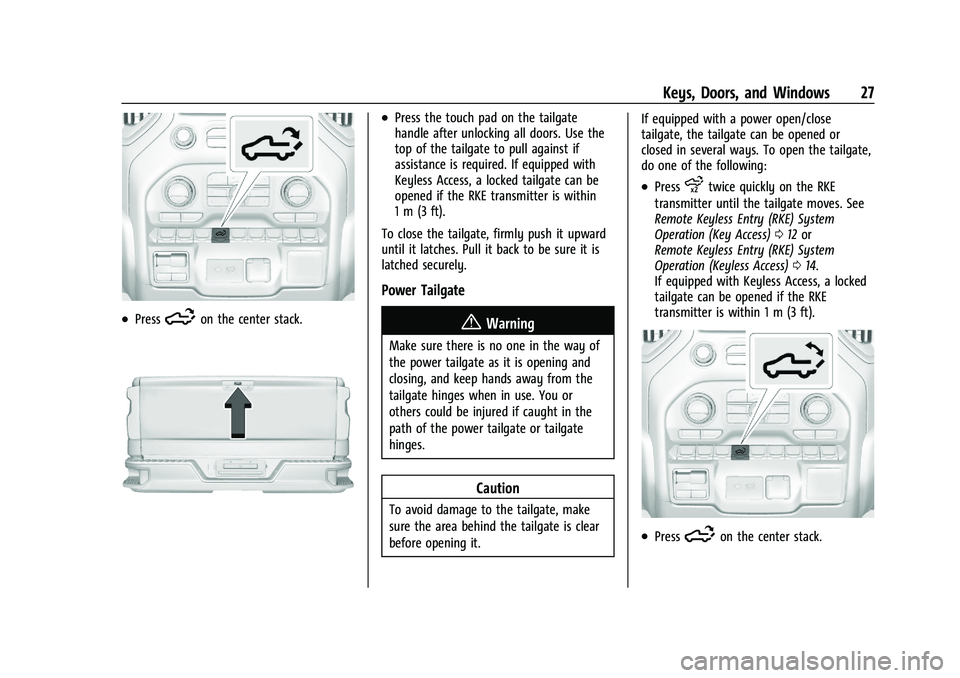
.Press5on the center stack.
.Press the touch pad on the tailgate
handle after unlocking all doors. Use the
top of the tailgate to pull against if
assistance is required. If equipped with
Keyless Access, a locked tailgate can be
opened if the RKE transmitter is within
1 m (3 ft).
To close the tailgate, firmly push it upward
until it latches. Pull it back to be sure it is
latched securely.
Power Tailgate
{Warning
Make sure there is no one in the way of
the power tailgate as it is opening and
closing, and keep hands away from the
tailgate hinges when in use. You or
others could be injured if caught in the
path of the power tailgate or tailgate
hinges.
Caution
To avoid damage to the tailgate, make
sure the area behind the tailgate is clear
before opening it. If equipped with a power open/close
tailgate, the tailgate can be opened or
closed in several ways. To open the tailgate,
do one of the following:
.Pressxtwice quickly on the RKE
transmitter until the tailgate moves. See
Remote Keyless Entry (RKE) System
Operation (Key Access) 012 or
Remote Keyless Entry (RKE) System
Operation (Keyless Access) 014.
If equipped with Keyless Access, a locked
tailgate can be opened if the RKE
transmitter is within 1 m (3 ft).
.Press5on the center stack.
Page 31 of 430
GMC Sierra/Sierra Denali 2500 HD/3500 HD Owner Manual (GMNA-
Localizing-U.S./Canada-16504257) - 2023 - CRC - 5/9/22
30 Keys, Doors, and Windows
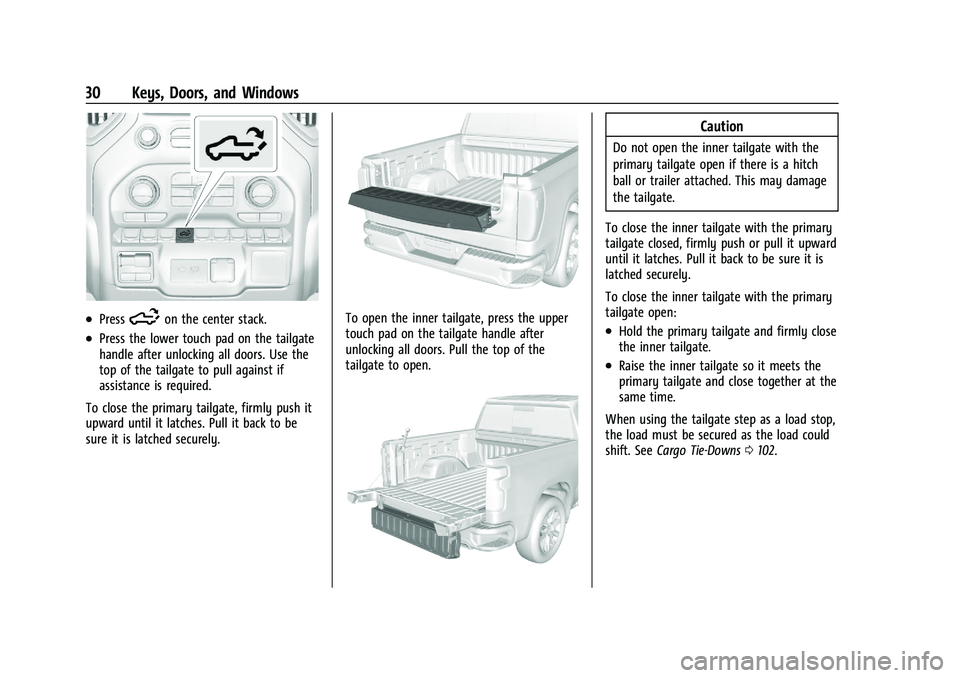
.Press5on the center stack.
.Press the lower touch pad on the tailgate
handle after unlocking all doors. Use the
top of the tailgate to pull against if
assistance is required.
To close the primary tailgate, firmly push it
upward until it latches. Pull it back to be
sure it is latched securely.
To open the inner tailgate, press the upper
touch pad on the tailgate handle after
unlocking all doors. Pull the top of the
tailgate to open.
Caution
Do not open the inner tailgate with the
primary tailgate open if there is a hitch
ball or trailer attached. This may damage
the tailgate.
To close the inner tailgate with the primary
tailgate closed, firmly push or pull it upward
until it latches. Pull it back to be sure it is
latched securely.
To close the inner tailgate with the primary
tailgate open:
.Hold the primary tailgate and firmly close
the inner tailgate.
.Raise the inner tailgate so it meets the
primary tailgate and close together at the
same time.
When using the tailgate step as a load stop,
the load must be secured as the load could
shift. See Cargo Tie-Downs 0102.
Page 33 of 430
GMC Sierra/Sierra Denali 2500 HD/3500 HD Owner Manual (GMNA-
Localizing-U.S./Canada-16504257) - 2023 - CRC - 5/9/22
32 Keys, Doors, and Windows
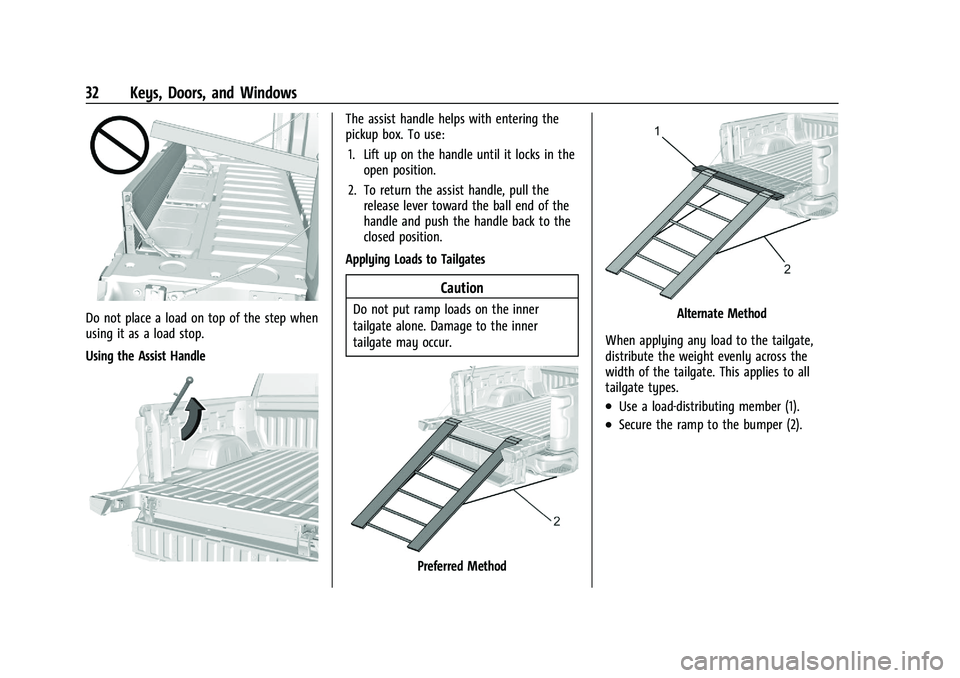
Do not place a load on top of the step when
using it as a load stop.
Using the Assist Handle
The assist handle helps with entering the
pickup box. To use:1. Lift up on the handle until it locks in the open position.
2. To return the assist handle, pull the release lever toward the ball end of the
handle and push the handle back to the
closed position.
Applying Loads to Tailgates
Caution
Do not put ramp loads on the inner
tailgate alone. Damage to the inner
tailgate may occur.
Preferred Method
Alternate Method
When applying any load to the tailgate,
distribute the weight evenly across the
width of the tailgate. This applies to all
tailgate types.
.Use a load-distributing member (1).
.Secure the ramp to the bumper (2).
Page 34 of 430
GMC Sierra/Sierra Denali 2500 HD/3500 HD Owner Manual (GMNA-
Localizing-U.S./Canada-16504257) - 2023 - CRC - 5/9/22
Keys, Doors, and Windows 33
Transporting Items That Can
Catch Fire
{Warning
To avoid personal injury and/or vehicle
damage when transporting items that
can catch fire, such as leaves, mulch, hay,
or cardboard, in the truck bed:
.Make sure items are securely
contained inside the truck bed. Never
allow them to hang over the sides or
fall in between the truck bed and
the cab.
.Never place items between the cab
and the truck bed. They could touch
hot exhaust parts and ignite.
{Warning
Keep cigarettes, sparks, and other ignition
sources away from the area between the
bed of the truck and cab. They could fall
onto the fuel system below and start a
fire. You or others could be injured and/
or the vehicle damaged.
Power Assist Steps
{Warning
To avoid personal injury or property
damage, before entering or exiting the
vehicle, be sure the power assist step is
fully extended. Do not step on the power
assist step while it is moving. Never place
hands or other body parts between the
extended power assist step and the
vehicle.
If equipped, the power assist steps will
deploy when the door is opened and
automatically retract three seconds after the
door is closed. The power assist steps will
retract immediately if the vehicle starts
moving. Check the step position before
exiting the vehicle.
Disable the power assist steps before jacking
or placing any object under the vehicle.
Too much ice buildup may prevent
deployment of the power assist steps. If this
happens, disable the power assist steps,
clear the ice, then enable the assist steps
and confirm normal function prior to use. Keep hands, children, pets, objects, and
clothing clear of the power assist steps
when in motion. The steps will reverse
direction if they encounter an obstruction
when opening or closing. Remove the
obstruction, then open and close the door
on the same side to complete the motion of
the assist steps. If the obstruction is not
cleared, the assist steps remain extended
while driving.
Extend or retract both power assist steps for
cleaning through the vehicle settings menu.
To view available settings from the
infotainment screen, touch Settings >
Vehicle > Comfort and Convenience.
Enable/Disable
The power assist steps can be enabled or
disabled through the vehicle settings menu.
To view available settings from the
infotainment screen, touch Settings >
Vehicle > Comfort and Convenience.
Page 35 of 430
GMC Sierra/Sierra Denali 2500 HD/3500 HD Owner Manual (GMNA-
Localizing-U.S./Canada-16504257) - 2023 - CRC - 5/9/22
34 Keys, Doors, and Windows
Vehicle Security
This vehicle has theft-deterrent features;
however, they do not make the vehicle
impossible to steal.
Vehicle Alarm System
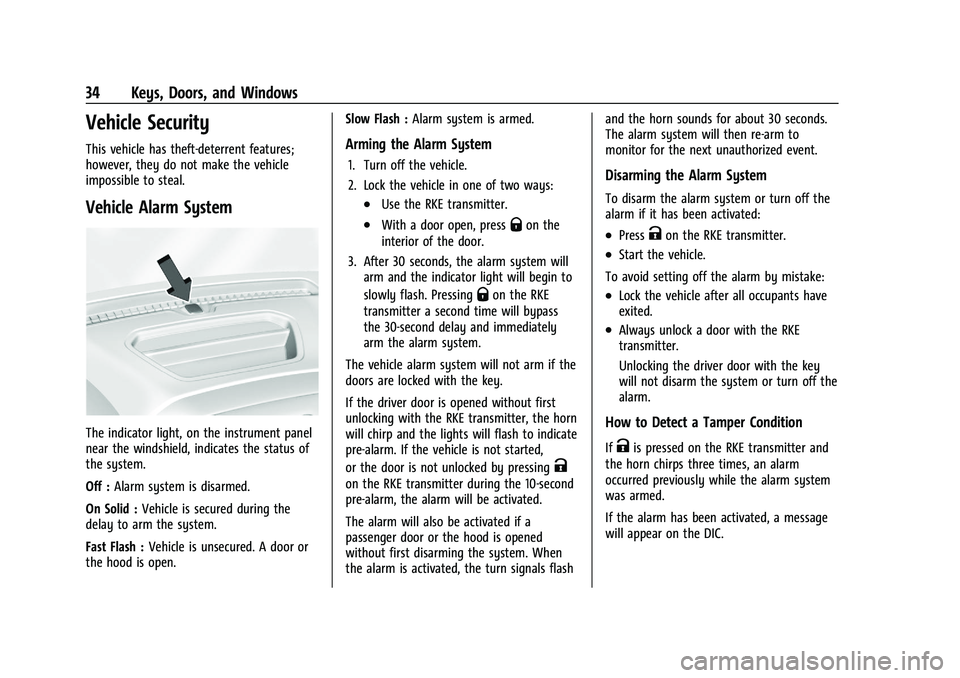
The indicator light, on the instrument panel
near the windshield, indicates the status of
the system.
Off :Alarm system is disarmed.
On Solid : Vehicle is secured during the
delay to arm the system.
Fast Flash : Vehicle is unsecured. A door or
the hood is open. Slow Flash :
Alarm system is armed.
Arming the Alarm System
1. Turn off the vehicle.
2. Lock the vehicle in one of two ways:
.Use the RKE transmitter.
.With a door open, pressQon the
interior of the door.
3. After 30 seconds, the alarm system will arm and the indicator light will begin to
slowly flash. Pressing
Qon the RKE
transmitter a second time will bypass
the 30-second delay and immediately
arm the alarm system.
The vehicle alarm system will not arm if the
doors are locked with the key.
If the driver door is opened without first
unlocking with the RKE transmitter, the horn
will chirp and the lights will flash to indicate
pre-alarm. If the vehicle is not started,
or the door is not unlocked by pressing
K
on the RKE transmitter during the 10-second
pre-alarm, the alarm will be activated.
The alarm will also be activated if a
passenger door or the hood is opened
without first disarming the system. When
the alarm is activated, the turn signals flash and the horn sounds for about 30 seconds.
The alarm system will then re-arm to
monitor for the next unauthorized event.
Disarming the Alarm System
To disarm the alarm system or turn off the
alarm if it has been activated:
.PressKon the RKE transmitter.
.Start the vehicle.
To avoid setting off the alarm by mistake:
.Lock the vehicle after all occupants have
exited.
.Always unlock a door with the RKE
transmitter.
Unlocking the driver door with the key
will not disarm the system or turn off the
alarm.
How to Detect a Tamper Condition
IfKis pressed on the RKE transmitter and
the horn chirps three times, an alarm
occurred previously while the alarm system
was armed.
If the alarm has been activated, a message
will appear on the DIC.
Page 36 of 430
GMC Sierra/Sierra Denali 2500 HD/3500 HD Owner Manual (GMNA-
Localizing-U.S./Canada-16504257) - 2023 - CRC - 5/9/22
Keys, Doors, and Windows 35
Steering Column Lock
If equipped, the steering column lock is a
theft-deterrent device. This feature locks the
steering column when the vehicle is turned
off and the driver door is opened, or when
the driver door is opened and then the
vehicle is turned off. The steering column
unlocks when the vehicle is turned on.
The Driver Information Center (DIC) may
display one of these messages:
.A message to service the steering column
lock indicates that an issue has been
detected with the column lock feature
and the vehicle should be serviced.
.A message that the steering column is
locked indicates that the engine is
running, but the steering column is still
locked. It is normal for the column to be
locked during a remote start, but the
column should unlock after the brake
pedal is pressed and the vehicle is started.
No message will display during a remote
start.
.A message that the steering wheel must
be turned and the vehicle must be started
again indicates that the column lock
mechanism is bound, the column locking
device was unable to unlock the steeringcolumn, and the vehicle did not start.
If this happens, immediately turn the
steering wheel from side to side to
unbind the column lock. If this does not
unlock the steering column, turn the
vehicle off and open the driver door to
reset the system. Then turn the vehicle
on and immediately turn the steering
wheel side to side for about 15 seconds.
In some cases, it may take significant
force to unbind the column.
To keep the steering column from binding,
straighten the front wheels before turning
off the vehicle.
Immobilizer
See Radio Frequency Statement 0404.
Immobilizer Operation
This vehicle has a passive theft-deterrent
system. The system does not have to be manually
armed or disarmed.
The vehicle is automatically immobilized
when the vehicle is turned off.
The system is automatically disarmed when
the ignition is turned from off to on.
The security light, in the instrument cluster,
comes on if there is a problem with arming
or disarming the theft-deterrent system.
The system has one or more RKE
transmitters matched to an immobilizer
control unit in your vehicle. Only a correctly
matched RKE transmitter will start the
vehicle. If the transmitter is ever damaged,
you may not be able to start your vehicle.
When trying to start the vehicle, the
security light may come on briefly when the
ignition is turned on. If the engine does not
start and the security light stays on, there is
a problem with the system. Turn the
ignition off and try again.
If the vehicle will not change ignition modes
(ACC/ACCESSORY, on, off), and the RKE
transmitter appears to be undamaged, try
another transmitter. Or, you may try placing
the transmitter in the transmitter pocket
Page 50 of 430
GMC Sierra/Sierra Denali 2500 HD/3500 HD Owner Manual (GMNA-
Localizing-U.S./Canada-16504257) - 2023 - CRC - 5/9/22
Seats and Restraints 49
Seats and Restraints
Head Restraints
Head Restraints . . . . . . . . . . . . . . . . . . . . . . . . 49
Front Seats
Seat Adjustment . . . . . . . . . . . . . . . . . . . . . . . 50
Center Seat . . . . . . . . . . . . . . . . . . . . . . . . . . . . . 51
Power Seat Adjustment . . . . . . . . . . . . . . . . . 51
Reclining Seatbacks . . . . . . . . . . . . . . . . . . . . . 52
Lumbar Adjustment . . . . . . . . . . . . . . . . . . . . . 53
Memory Seats . . . . . . . . . . . . . . . . . . . . . . . . . . 53
Heated and Ventilated Front Seats . . . . . 56
Rear Seats
Rear Seats . . . . . . . . . . . . . . . . . . . . . . . . . . . . . . 57
Heated Rear Seats . . . . . . . . . . . . . . . . . . . . . . 58
Seat Belts
Seat Belts . . . . . . . . . . . . . . . . . . . . . . . . . . . . . . 58
How to Wear Seat Belts Properly . . . . . . 59
Lap-Shoulder Belt . . . . . . . . . . . . . . . . . . . . . . . 61
Seat Belt Use During Pregnancy . . . . . . . . 64
Seat Belt Extender . . . . . . . . . . . . . . . . . . . . . 64
Safety System Check . . . . . . . . . . . . . . . . . . . 64
Seat Belt Care . . . . . . . . . . . . . . . . . . . . . . . . . . 64
Replacing Seat Belt System Parts after aCrash . . . . . . . . . . . . . . . . . . . . . . . . . . . . . . . . . 65
Airbag System
Airbag System . . . . . . . . . . . . . . . . . . . . . . . . . . 65 Where Are the Airbags? . . . . . . . . . . . . . . . . 67
When Should an Airbag Inflate? . . . . . . . . 68
What Makes an Airbag Inflate? . . . . . . . . 68
How Does an Airbag Restrain? . . . . . . . . . 69
What Will You See after an Airbag
Inflates? . . . . . . . . . . . . . . . . . . . . . . . . . . . . . . 69
Passenger Sensing System . . . . . . . . . . . . . 70
Servicing the Airbag-Equipped Vehicle . . . . . . . . . . . . . . . . . . . . . . . . . . . . . . . . 73
Adding Equipment to the Airbag-Equipped Vehicle . . . . . . . . . . . . . . 74
Airbag System Check . . . . . . . . . . . . . . . . . . . 75
Replacing Airbag System Parts after a Crash . . . . . . . . . . . . . . . . . . . . . . . . . . . . . . . . . 75
Child Restraints
Older Children . . . . . . . . . . . . . . . . . . . . . . . . . . 75
Infants and Young Children . . . . . . . . . . . . . 77
Child Restraint Systems . . . . . . . . . . . . . . . . 79
Where to Put the Restraint . . . . . . . . . . . . 80
Lower Anchors and Tethers for Children(LATCH System) . . . . . . . . . . . . . . . . . . . . . . . 82
Replacing LATCH System Parts After a Crash . . . . . . . . . . . . . . . . . . . . . . . . . . . . . . . . . 92
Securing Child Restraints (With the Seat Belt in the Rear Seat) . . . . . . . . . . . . . . . . . 92
Securing Child Restraints (With the Seat Belt in the Front Passenger Seat) . . . . . 96
Securing Child Restraints (With the Seat Belt in the Center Front Seat) . . . . . . . . 99
Head Restraints
{
Warning
With head restraints that are not
installed and adjusted properly, there is a
greater chance that occupants will suffer
a neck/spinal injury in a crash. Do not
drive until the head restraints for all
occupants are installed and adjusted
properly.
Front Seats
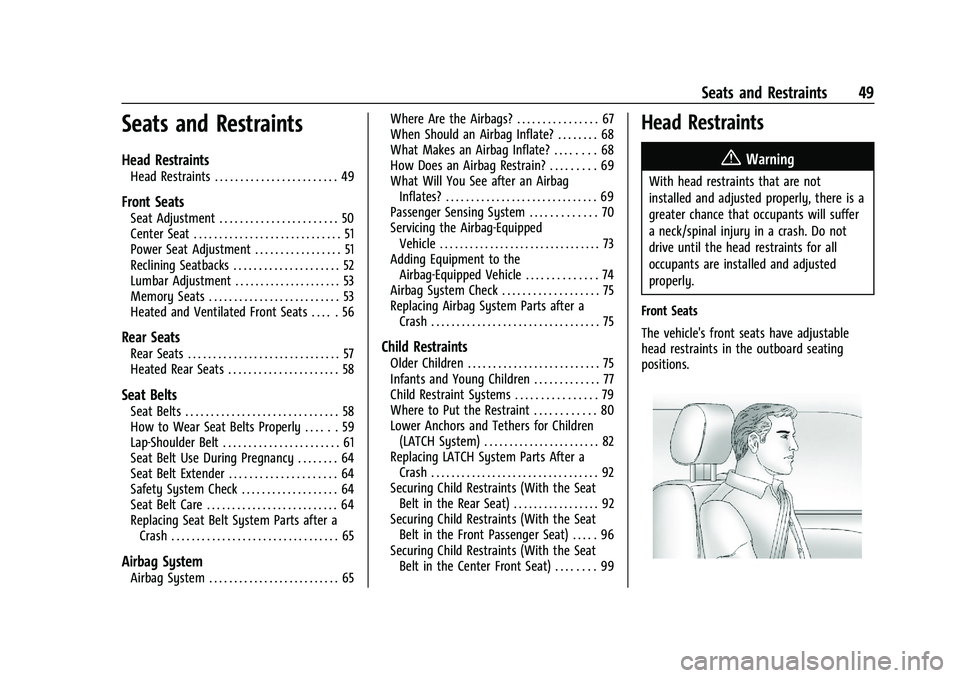
The vehicle's front seats have adjustable
head restraints in the outboard seating
positions.