remote control GMC SIERRA 2024 User Guide
[x] Cancel search | Manufacturer: GMC, Model Year: 2024, Model line: SIERRA, Model: GMC SIERRA 2024Pages: 440, PDF Size: 9.21 MB
Page 152 of 440
GMC Sierra/Sierra Denali 2500 HD/3500 HD Owner Manual (GMNA-
Localizing-U.S./Canada-16908340) - 2024 - CRC - 12/7/22
150 Lighting
Become familiar with and follow all state
and local laws that apply to cargo lamp
operation.
Interior Lighting
Instrument Panel Illumination
Control
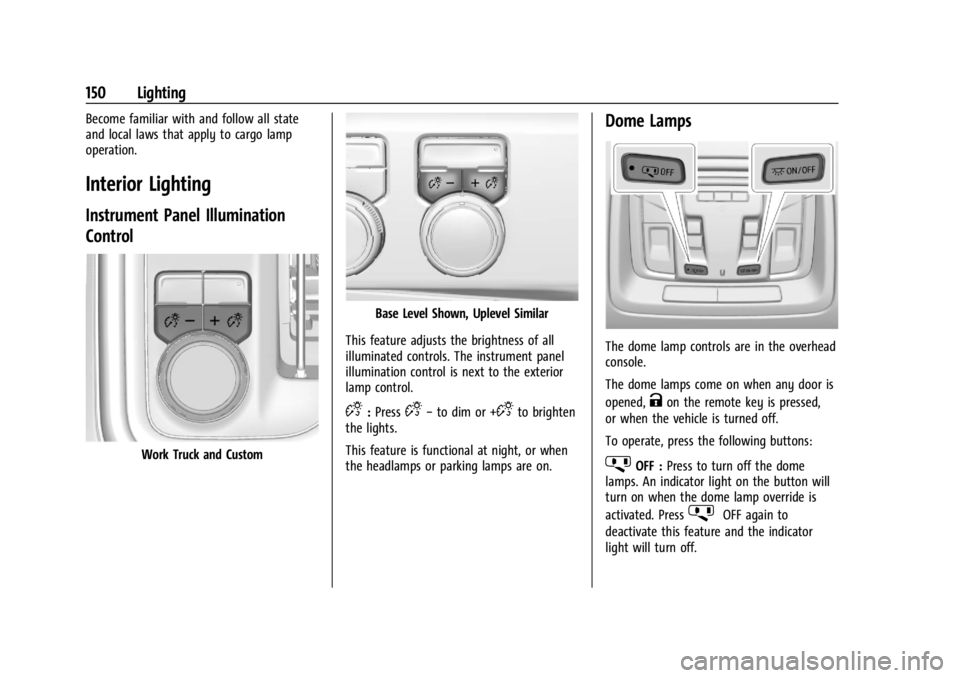
Work Truck and Custom
Base Level Shown, Uplevel Similar
This feature adjusts the brightness of all
illuminated controls. The instrument panel
illumination control is next to the exterior
lamp control.
D: PressD− to dim or +Dto brighten
the lights.
This feature is functional at night, or when
the headlamps or parking lamps are on.
Dome Lamps
The dome lamp controls are in the overhead
console.
The dome lamps come on when any door is
opened,
Kon the remote key is pressed,
or when the vehicle is turned off.
To operate, press the following buttons:
jOFF : Press to turn off the dome
lamps. An indicator light on the button will
turn on when the dome lamp override is
activated. Press
jOFF again to
deactivate this feature and the indicator
light will turn off.
Page 153 of 440
GMC Sierra/Sierra Denali 2500 HD/3500 HD Owner Manual (GMNA-
Localizing-U.S./Canada-16908340) - 2024 - CRC - 12/7/22
Lighting 151
+ON/OFF :Press to turn the dome lamps
on or off manually.
Reading Lamps
There are reading lamps on the overhead
console and over the rear seats. These lamps
come on when any door is opened,
Kon
the remote key is pressed, or when the
vehicle is turned off.
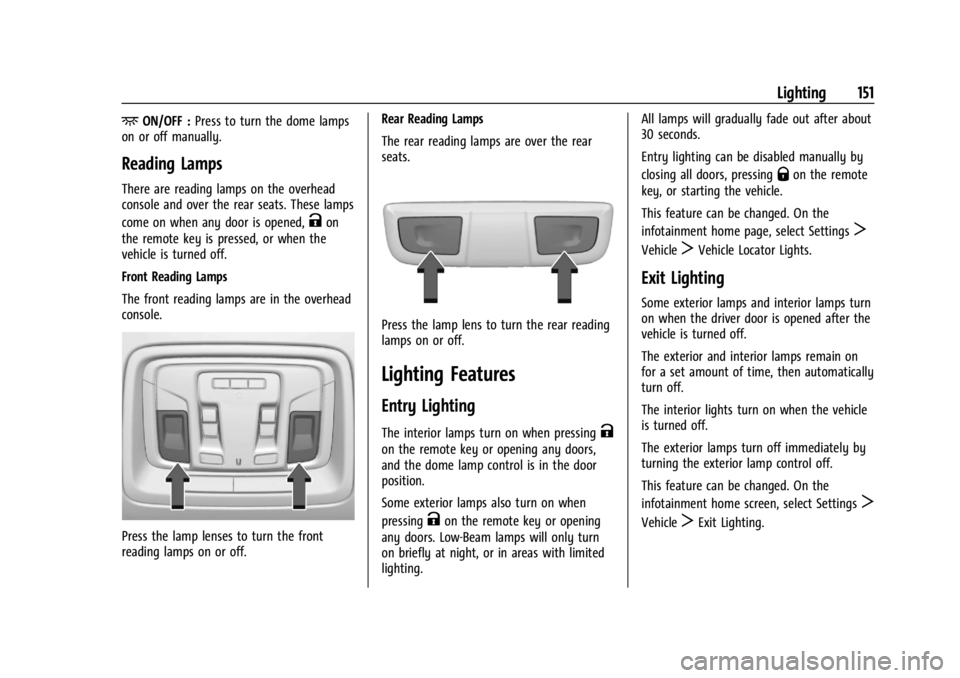
Front Reading Lamps
The front reading lamps are in the overhead
console.
Press the lamp lenses to turn the front
reading lamps on or off. Rear Reading Lamps
The rear reading lamps are over the rear
seats.
Press the lamp lens to turn the rear reading
lamps on or off.
Lighting Features
Entry Lighting
The interior lamps turn on when pressingK
on the remote key or opening any doors,
and the dome lamp control is in the door
position.
Some exterior lamps also turn on when
pressing
Kon the remote key or opening
any doors. Low-Beam lamps will only turn
on briefly at night, or in areas with limited
lighting. All lamps will gradually fade out after about
30 seconds.
Entry lighting can be disabled manually by
closing all doors, pressing
Qon the remote
key, or starting the vehicle.
This feature can be changed. On the
infotainment home page, select Settings
T
VehicleTVehicle Locator Lights.
Exit Lighting
Some exterior lamps and interior lamps turn
on when the driver door is opened after the
vehicle is turned off.
The exterior and interior lamps remain on
for a set amount of time, then automatically
turn off.
The interior lights turn on when the vehicle
is turned off.
The exterior lamps turn off immediately by
turning the exterior lamp control off.
This feature can be changed. On the
infotainment home screen, select Settings
T
VehicleTExit Lighting.
Page 184 of 440
GMC Sierra/Sierra Denali 2500 HD/3500 HD Owner Manual (GMNA-
Localizing-U.S./Canada-16908340) - 2024 - CRC - 12/7/22
182 Infotainment System
Apps
The menu may contain the following:
Android Auto
Allows interacting directly with a mobile
device on the infotainment display. See
Apple CarPlay and Android Auto (Base
Radio)0177 or
Apple CarPlay and Android Auto (Uplevel
Radio) 0179.
Apple CarPlay
This feature allows you to interact directly
with your mobile device on the infotainment
display. See Apple CarPlay and Android Auto
(Base Radio) 0177 or
Apple CarPlay and Android Auto (Uplevel
Radio) 0179.
Audio
Adjusts different audio settings.
Phone
Adjusts different phone settings.
Vehicle
The menu may contain the following:
Rear Seat Reminder
Allows for a chime and a message when the
rear door has been opened before or during
operation of the vehicle.
Climate and Air Quality
Adjusts different climate settings.
Collision/Detection Systems
Adjusts different driver assistance system
settings.
Comfort and Convenience
Adjusts different comfort and convenience
settings.
Lighting
Adjusts different lighting settings.
Power Door Locks
Adjusts different door lock settings.
Remote Lock, Unlock, and Start
Adjusts different remote lock settings.
Ride Height
Adjusts different ride height settings. Power Assist Steps
Adjusts different running board settings.
Seating Position
Adjusts different seat settings.
Suspension
Adjusts different suspension settings.
Trailering
Adjusts different trailering settings.
Teen Driver
See
Teen Driver 0185.
Valet Mode
This will lock the infotainment system and
steering wheel controls. It may also limit
access to vehicle storage locations,
if equipped.
To enable valet mode: 1. Enter a four-digit code on the keypad.
2. Select Enter to go to the confirmation screen.
3. Re-enter the four-digit code.
Touch Lock or Unlock to lock or unlock the
system. Touch Back to go back to the
previous menu.
Page 197 of 440
GMC Sierra/Sierra Denali 2500 HD/3500 HD Owner Manual (GMNA-
Localizing-U.S./Canada-16908340) - 2024 - CRC - 12/7/22
Climate Controls 195
0MAX :Air is directed to the windshield
and the fan runs at a higher speed if not
already above a medium fan speed. This
mode overrides the previous mode selected
and clears fog or frost from the windshield
more quickly. When the control is pressed
again, the system returns to the previous
mode setting and fan speed.
For best results, clear all snow and ice from
the windshield before defrosting.
@: Press to turn on recirculation. An
indicator light comes on. Air is recirculated
to quickly cool the inside of the vehicle.
It can also be used to help reduce outside
air and odors that enter the vehicle.
Avoid using recirculation for long periods of
time in cold or damp conditions. Using
recirculation in cold or damp conditions can
result in window fogging.
A/C : Press to turn the air conditioning on
or off. An indicator light comes on to show
that the air conditioning is enabled. If the
fan is turned off, the air conditioner will not
run. The A/C light will stay on even if the
outside temperatures are below freezing.
Rear Window Defogger
1REAR : If equipped, press to turn the
rear window defogger on or off. An indicator
light on the button comes on to show that
the rear window defogger is on.
The rear window defogger only works when
the engine is running. The defogger can be
turned off by turning the vehicle off or to
accessory mode.
If equipped with heated outside mirrors,
press
fto turn them on or off. See Heated
Mirrors 037.
Caution
Using a razor blade or sharp object to
clear the inside rear window can damage
the rear window defogger. Repairs would
not be covered by the vehicle warranty.
Do not clear the inside rear window with
sharp objects.
Remote Start Climate Control Operation :
If equipped with remote start, the climate
control system may run when the vehicle is
started remotely. If equipped with heated or
ventilated seats or a heated steering wheel,
these features may come on during a remote start. See
Remote Vehicle Start 021,
Heated and Ventilated Front Seats 054, and
Heated Steering Wheel 0105.
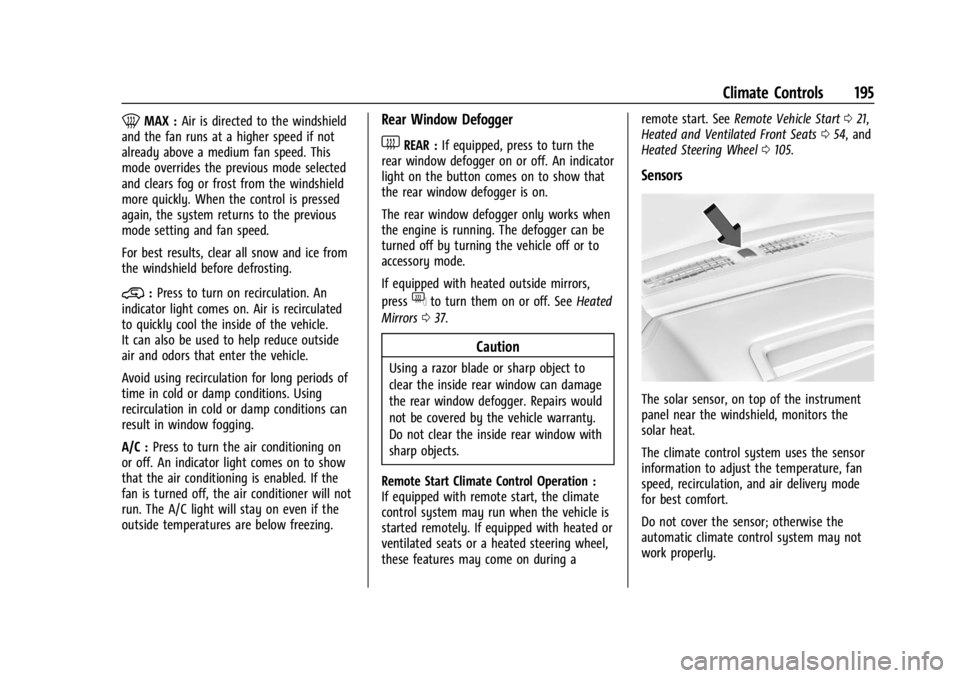
Sensors
The solar sensor, on top of the instrument
panel near the windshield, monitors the
solar heat.
The climate control system uses the sensor
information to adjust the temperature, fan
speed, recirculation, and air delivery mode
for best comfort.
Do not cover the sensor; otherwise the
automatic climate control system may not
work properly.
Page 313 of 440
GMC Sierra/Sierra Denali 2500 HD/3500 HD Owner Manual (GMNA-
Localizing-U.S./Canada-16908340) - 2024 - CRC - 12/7/22
Vehicle Care 311
Caution
When adding accessories or other
equipment after the purchase of your
vehicle, ensure you are not exceeding the
vehicle axle weight ratings or overall
weight ratings. Overloading the vehicle
may cause damage. Repairs would not be
covered by the vehicle warranty. Do not
overload the vehicle. SeeVehicle Load
Limits 0210 and
Trailer Towing 0280 for those specific
weight ratings.
Damage to suspension components caused
by modifying vehicle height outside of
factory settings will not be covered by the
vehicle warranty.
Damage to vehicle components resulting
from modifications or the installation or use
of non-GM certified parts, including control
module or software modifications, is not
covered under the terms of the vehicle
warranty and may affect remaining
warranty coverage for affected parts. GM Accessories are designed to complement
and function with other systems on the
vehicle. See your dealer to accessorize the
vehicle using genuine GM Accessories
installed by a dealer technician.
Also, see
Adding Equipment to the
Airbag-Equipped Vehicle 073.
Vehicle Checks
Doing Your Own Service Work
{Warning
It can be dangerous to work on your
vehicle if you do not have the proper
knowledge, service manual, tools,
or parts. Always follow owner’s manual
procedures and consult the service
manual for your vehicle before doing any
service work. If doing some of your own service work, use
the proper service manual. It tells you much
more about how to service the vehicle than
this manual can. To order the proper service
manual, see
Publication Ordering
Information 0413.
This vehicle has an airbag system. Before
attempting to do your own service work,
see Servicing the Airbag-Equipped Vehicle
0 73.
If equipped with remote vehicle start, open
the hood before performing any service
work to prevent remote starting the vehicle
accidentally. See Remote Vehicle Start 021.
Keep a record with all parts receipts and list
the mileage and the date of any service
work performed. See Maintenance Records
0 400.
Caution
Even small amounts of contamination can
cause damage to vehicle systems. Do not
allow contaminants to contact the fluids,
reservoir caps, or dipsticks.
Page 421 of 440
GMC Sierra/Sierra Denali 2500 HD/3500 HD Owner Manual (GMNA-
Localizing-U.S./Canada-16908340) - 2024 - CRC - 12/7/22
OnStar 419
OnStar Additional
Information
In-Vehicle Audio Messages
Audio messages may play important
information at the following times:
.Prior to vehicle purchase. PressQto set
up an account.
.After change in ownership and at
90 days.
Transferring Service
PressQto request account transfer
eligibility information. The Advisor can
cancel or change account information.
Selling/Transferring the Vehicle
Call 1-888-4ONSTAR (1-888-466-7827)
immediately to terminate your OnStar or
connected services if the vehicle is disposed
of, sold, transferred, or if the lease ends.
Reactivation for Subsequent Owners
PressQand follow the prompts to speak to
an Advisor as soon as possible. The Advisor
will update vehicle records and explain
OnStar or connected service options.
How OnStar Service Works
Automatic Crash Response, Emergency
Services, Crisis Assist, Stolen Vehicle
Assistance, Remote Services, and Roadside
Assistance are available on most vehicles.
Not all OnStar services are available
everywhere or on all vehicles. For more
information, a full description of OnStar
services, system limitations, and OnStar User
Terms, Privacy Statement, and Software
Terms:
.Call 1-888-4ONSTAR (1-888-466-7827).
.See www.onstar.com (U.S.).
.See www.onstar.ca (Canada).
.Call TTY 1-877-248-2080.
.PressQto speak with an Advisor.
OnStar or connected services cannot work
unless the vehicle is in a place where OnStar
has an agreement with a wireless service
provider for service in that area. The
wireless service provider must also have
coverage, network capacity, reception, and
technology compatible with OnStar or
connected services. Service involving location
information about the vehicle cannot work
unless GPS signals are available,
unobstructed, and compatible with the
OnStar hardware. OnStar or connected services may not work if the OnStar
equipment is not properly installed or it has
not been properly maintained. If equipment
or software is added, connected,
or modified, OnStar or connected services
may not work. Other problems beyond the
control of OnStar
—such as hills, tall
buildings, tunnels, weather, electrical system
design and architecture of the vehicle,
damage to the vehicle in a crash, or wireless
phone network congestion or jamming —
may prevent service.
See Radio Frequency Statement 0413.
Services for People with Disabilities
Advisors provide services to help with
physical disabilities and medical conditions.
Press
Qto help:
.Locate a gas station with an attendant to
pump gas.
.Find a hotel, restaurant, etc., that meets
accessibility needs.
.Provide directions to the closest hospital
or pharmacy in urgent situations.
Page 425 of 440

GMC Sierra/Sierra Denali 2500 HD/3500 HD Owner Manual (GMNA-
Localizing-U.S./Canada-16908340) - 2024 - CRC - 12/7/22
Connected Services 423
Ensuring Security
.Change the default passwords for the
Wi-Fi hotspot and myGMC mobile
application. Make these passwords
different from each other and use a
combination of letters and numbers to
increase the security.
.Change the default name of the SSID
(Service Set Identifier). This is your
network’s name that is visible to other
wireless devices. Choose a unique name
and avoid family names or vehicle
descriptions.
Wi-Fi Hotspot (If Equipped)
The vehicle may have a built-in Wi-Fi
hotspot that provides access to the Internet
and web content at 4G LTE speed. Up to
seven mobile devices can be connected.
A data plan is required. Use the in-vehicle
controls only when it is safe to do so. 1. To retrieve Wi-Fi hotspot information, press
=to open the OnStar app on the
infotainment display, then select Wi-Fi
Hotspot. On some vehicles, touch Wi-Fi
or Wi-Fi Settings on the screen. 2. The Wi-Fi settings will display the Wi-Fi
hotspot name (SSID), password, and on
some vehicles, the connection type (no
Internet connection, 3G, 4G, 4G LTE), and
signal quality (poor, good, excellent). The
LTE icon shows connection to Wi-Fi. It is
possible that the icon may not illuminate
even though the vehicle has an active
connection.
3. To change the SSID or password, press
Qor call 1-888-4ONSTAR to connect
with an Advisor. On some vehicles, the
SSID and password can be changed in
the Wi-Fi Hotspot menu.
After initial set-up, your vehicle’s Wi-Fi
hotspot will connect automatically to your
mobile devices. Manage data usage by
turning Wi-Fi on or off on your mobile
device, using the myGMC mobile app, or by
contacting an OnStar Advisor. On some
vehicles, Wi-Fi can also be managed from
the Wi-Fi Hotspot menu. MyGMC Mobile App (If Available)
Download the myGMC mobile app to
compatible Apple and Android smartphones.
GMC users can access the following services
from a smartphone:
.Remotely start/stop the vehicle,
if factory-equipped.
.Lock/unlock doors, if equipped with
automatic locks.
.Activate the horn and lamps.
.Check the vehicle’s fuel level, oil life,
or tire pressure, if factory-equipped with
the Tire Pressure Monitor System.
.Send destinations to the vehicle.
.Locate the vehicle on a map (U.S.
market only).
.Turn the vehicle's Wi-Fi hotspot on/off,
manage settings, and monitor data
consumption, if equipped.
.Locate a dealer and schedule service.
.Request Roadside Assistance.
.Set a parking reminder with pin drop,
take a photo, make a note, and set a
timer.
.Connect with GMC on social media.
Page 432 of 440

GMC Sierra/Sierra Denali 2500 HD/3500 HD Owner Manual (GMNA-
Localizing-U.S./Canada-16908340) - 2024 - CRC - 12/7/22
430 Index
General Information (cont'd)Vehicle Care . . . . . . . . . . . . . . . . . . . . . . . . . . . 310
Glass Replacement . . . . . . . . . . . . . . . . . . . . . . . . 331
Global Positioning System (GPS) . . . . . . . . . 167
Glove Box . . . . . . . . . . . . . . . . . . . . . . . . . . . . . . . . 99
GM Mobility Reimbursement Program . . . . . . . . . . . . . . . . . . . . . . . . . . . . . . . 408
Guidance Problems with the Route . . . . . . . . . . . . . . 168
H
Halogen Bulbs . . . . . . . . . . . . . . . . . . . . . . . . . . . 333
Hazard Warning Flashers . . . . . . . . . . . . . . . . 146
Head Restraints . . . . . . . . . . . . . . . . . . . . . . . . . . . 47
Head-Up Display (HUD) . . . . . . . . . . . . . . . . . . . 135
HeadlampsAiming . . . . . . . . . . . . . . . . . . . . . . . . . . . . . . . . 333
Automatic . . . . . . . . . . . . . . . . . . . . . . . . . . . . . 145
Bulb Replacement . . . . . . . . . . . . . . . . . . . . . . 333
Daytime Running Lamps (DRL) . . . . . . . . . 145
Flash-to-Pass . . . . . . . . . . . . . . . . . . . . . . . . . . . 145
Headlamps, Front Turn Signal,
Sidemarker, and Parking Lamps . . . . . . 333
High-Beam On Light . . . . . . . . . . . . . . . . . . . 130
High/Low Beam Changer . . . . . . . . . . . . . . 145
Lamps On Reminder . . . . . . . . . . . . . . . . . . . 130 Heated
Mirrors . . . . . . . . . . . . . . . . . . . . . . . . . . . . . . . . . 37
Rear Seats . . . . . . . . . . . . . . . . . . . . . . . . . . . . . . 56
Steering Wheel . . . . . . . . . . . . . . . . . . . . . . . . 105
Ventilated Front Seats . . . . . . . . . . . . . . . . . . 54
Heater Engine . . . . . . . . . . . . . . . . . . . . . . . . . . . . . . . . . 219
Heating . . . . . . . . . . . . . . . . . . . . . . . . . . . . . . 191, 193
High-Beam On Light . . . . . . . . . . . . . . . . . . . . . 130
Hill Descent Control (HDC) . . . . . . . . . . . . . . . . . 237
Descent Control Light . . . . . . . . . . . . . . . . . . 126
Hill and Mountain Roads . . . . . . . . . . . . . . . . 207
Hill Start Assist (HSA) . . . . . . . . . . . . . . . . . . . . 235
Hood . . . . . . . . . . . . . . . . . . . . . . . . . . . . . . . . . . . . . 312
Horn . . . . . . . . . . . . . . . . . . . . . . . . . . . . . . . . . . . . . 106
How to Wear Seat Belts Properly . . . . . . . . . 58
HVAC . . . . . . . . . . . . . . . . . . . . . . . . . . . . . . . . 191, 193
I
Ignition Positions . . . . . . . . . . . . . . . . . . . . . . . . 216
Immobilizer . . . . . . . . . . . . . . . . . . . . . . . . . . . . . . . .33
Indicator Pedestrian Ahead . . . . . . . . . . . . . . . . . . . . . . 126
Vehicle Ahead . . . . . . . . . . . . . . . . . . . . . . . . . 126
Indicators
Warning Lights and Gauges . . . . . . . . . . . . . 111
Infants and Young Children, Restraints . . . . 76 Information
Publication Ordering . . . . . . . . . . . . . . . . . . . 413
Infotainment Using the System . . . . . . . . . . . . . . . . . . . . . . . 157
Infotainment System . . . . . . . . . . . . . . . . . . . . 416
Inspection Multi-Point Vehicle . . . . . . . . . . . . . . . . . . . . 396
Instrument Cluster . . . . . . . . . . . . . . . . . . . . 112, 113
Instrument Panel Overview . . . . . . . . . . . . . . . . .5
Interior Rearview Mirrors . . . . . . . . . . . . . . . . . 38
Introduction . . . . . . . . . . . . . . . . . . . . . . . . . . . 2, 153
J
Jump Starting - North America . . . . . . . . . . . . . . . 376
K
Keys . . . . . . . . . . . . . . . . . . . . . . . . . . . . . . . . . . . . . . .14Remote . . . . . . . . . . . . . . . . . . . . . . . . . . . . . . . . . . 15
Remote Operation . . . . . . . . . . . . . . . . . . . . . . . 15
L
Labeling, Tire Sidewall . . . . . . . . . . . . . . . . . . . 346
LampsAuxiliary Roof Mounted Lamp . . . . . . . . . 148
Daytime Running (DRL) . . . . . . . . . . . . . . . . 145
Dome . . . . . . . . . . . . . . . . . . . . . . . . . . . . . . . . . . 150
Exterior Cargo . . . . . . . . . . . . . . . . . . . . . . . . . 149
Exterior Controls . . . . . . . . . . . . . . . . . . . . . . . 143
Page 437 of 440

GMC Sierra/Sierra Denali 2500 HD/3500 HD Owner Manual (GMNA-
Localizing-U.S./Canada-16908340) - 2024 - CRC - 12/7/22
Index 435
Shifting (cont'd)Out of Park . . . . . . . . . . . . . . . . . . . . . . . . . . . . 221
Shutdown, Vehicle . . . . . . . . . . . . . . . . . . . . . . . 220
Signals, Turn and Lane-Change . . . . . . . . . . . .147
Snow Plow . . . . . . . . . . . . . . . . . . . . . . . . . . . . . . 306
Software Updates . . . . . . . . . . . . . . . . . . . . . . . . 159
Special Application Services . . . . . . . . . . . . . . 397
Specifications and Capacities . . . . . . . . . . . . . 402
Speedometer . . . . . . . . . . . . . . . . . . . . . . . . . . . . . 116
Start Assist, Hill . . . . . . . . . . . . . . . . . . . . . . . . . . 235
Start Vehicle, Remote . . . . . . . . . . . . . . . . . . . . . . 21
Starting the Engine . . . . . . . . . . . . . . . . . . . . . . .218
Steering . . . . . . . . . . . . . . . . . . . . . . . . . . . . . . . . . 201 Column Lock . . . . . . . . . . . . . . . . . . . . . . . . . . . . 33
Fluid, Power . . . . . . . . . . . . . . . . . . . . . . . . . . . 323
Heated Wheel . . . . . . . . . . . . . . . . . . . . . . . . . 105
Wheel Adjustment . . . . . . . . . . . . . . . . . . . . . 105
Wheel Controls . . . . . . . . . . . . . . . . . . . . . . . . 156
Steps Power Assist . . . . . . . . . . . . . . . . . . . . . . . . . . . . . 31
Stoplamps and Back-up Lamps
Bulb Replacement . . . . . . . . . . . . . . . . . . . . . . 334
Storage Center Console . . . . . . . . . . . . . . . . . . . . . . . . 101
Compartments . . . . . . . . . . . . . . . . . . . . . . . . . . 99
Cupholders . . . . . . . . . . . . . . . . . . . . . . . . . . . . 100
Floor Console . . . . . . . . . . . . . . . . . . . . . . . . . . 101
Glove Box . . . . . . . . . . . . . . . . . . . . . . . . . . . . . . 99 Storage (cont'd)
Rear . . . . . . . . . . . . . . . . . . . . . . . . . . . . . . . . . . . 100
Underseat . . . . . . . . . . . . . . . . . . . . . . . . . . . . . 100
Struts Gas . . . . . . . . . . . . . . . . . . . . . . . . . . . . . . . . . . . . 332
Stuck Vehicle . . . . . . . . . . . . . . . . . . . . . . . . . . . . 209
Sun Visors . . . . . . . . . . . . . . . . . . . . . . . . . . . . . . . . 44
Sunroof . . . . . . . . . . . . . . . . . . . . . . . . . . . . . . . . . . . 44
Surround Vision System . . . . . . . . . . . . . . . . . . . . . . . . . 254
Symbols . . . . . . . . . . . . . . . . . . . . . . . . . . . . . . . . . . . .3 Navigation . . . . . . . . . . . . . . . . . . . . . . . . . . . . . 166
System Airbag . . . . . . . . . . . . . . . . . . . . . . . . . . . . . . . . . . 64
Brake Pad Life . . . . . . . . . . . . . . . . . . . . . . . . . 325
Engine Air Filter Life . . . . . . . . . . . . . . . . . . . . 317
Global Positioning . . . . . . . . . . . . . . . . . . . . . 167
Infotainment . . . . . . . . . . . . . . . . . . . . . . . . . . . 416
Noise Control . . . . . . . . . . . . . . . . . . . . . . . . . . 329
T
Tachometer . . . . . . . . . . . . . . . . . . . . . . . . . . . . . . . 116
Tailgate . . . . . . . . . . . . . . . . . . . . . . . . . . . . . . . . . . . 24
TaillampsBulb Replacement . . . . . . . . . . . . . . . . . . . . . . 334
Task Lighting . . . . . . . . . . . . . . . . . . . . . . . . . . . . 148
Teen Driver . . . . . . . . . . . . . . . . . . . . . . . . . . . . . . .185
Text Telephone (TTY) Users . . . . . . . . . . . . . . 407 Theft-Deterrent Systems . . . . . . . . . . . . . . . . . . .33
Immobilizer . . . . . . . . . . . . . . . . . . . . . . . . . . . . . 33
Time . . . . . . . . . . . . . . . . . . . . . . . . . . . . . . . . . . . . . 107
Tires . . . . . . . . . . . . . . . . . . . . . . . . . . . . . . . . . . . . . 345 All-Season . . . . . . . . . . . . . . . . . . . . . . . . . . . . . 345
All-Terrain . . . . . . . . . . . . . . . . . . . . . . . . . . . . . 346
Buying New Tires . . . . . . . . . . . . . . . . . . . . . . 360
Chains . . . . . . . . . . . . . . . . . . . . . . . . . . . . . . . . . 363
Changing . . . . . . . . . . . . . . . . . . . . . . . . . . . . . . 365
Designations . . . . . . . . . . . . . . . . . . . . . . . . . . . 347
Different Size . . . . . . . . . . . . . . . . . . . . . . . . . . 361
Full-Size Spare . . . . . . . . . . . . . . . . . . . . . . . . . 375
If a Tire Goes Flat . . . . . . . . . . . . . . . . . . . . . 364
Inspection . . . . . . . . . . . . . . . . . . . . . . . . . . . . . 356
Pressure . . . . . . . . . . . . . . . . . . . . . . . . . . . . . . . 350
Pressure Light . . . . . . . . . . . . . . . . . . . . . . . . . 129
Pressure Monitor Operation . . . . . . . . . . . 351
Pressure Monitor System . . . . . . . . . . . . . . 351
Rotation . . . . . . . . . . . . . . . . . . . . . . . . . . . . . . . 357
Sidewall Labeling . . . . . . . . . . . . . . . . . . . . . . 346
Terminology and Definitions . . . . . . . . . . . 348
Uniform Tire Quality Grading . . . . . . . . . . 361
Wheel Alignment and Tire Balance . . . . 362
Wheel Replacement . . . . . . . . . . . . . . . . . . . . 362
When It Is Time for New Tires . . . . . . . . . 359
Winter . . . . . . . . . . . . . . . . . . . . . . . . . . . . . . . . . 346
Top Tier Fuel . . . . . . . . . . . . . . . . . . . . . . . . . . . . . 271
Page 438 of 440

GMC Sierra/Sierra Denali 2500 HD/3500 HD Owner Manual (GMNA-
Localizing-U.S./Canada-16908340) - 2024 - CRC - 12/7/22
436 Index
Tow/Haul Mode . . . . . . . . . . . . . . . . . . . . . . . . . 227
Tow/Haul Mode Light . . . . . . . . . . . . . . . . . . . . 125
TowingApp . . . . . . . . . . . . . . . . . . . . . . . . . . . . . . . . . . . . 296
Driving Characteristics . . . . . . . . . . . . . . . . . 276
Equipment . . . . . . . . . . . . . . . . . . . . . . . . . . . . . 284
General Information . . . . . . . . . . . . . . . . . . . 276
Recreational Vehicle . . . . . . . . . . . . . . . . . . . 380
Trailer . . . . . . . . . . . . . . . . . . . . . . . . . . . . . . . . . 280
Trailer Sway Control (TSC) . . . . . . . . . . . . . 294
Traction
Control System (TCS)/ElectronicStability Control Light . . . . . . . . . . . . . . . . . 127
Control/Electronic Stability Control . . . . 236
Off Light . . . . . . . . . . . . . . . . . . . . . . . . . . . . . . . . 127
Trademarks and License Agreements . . . . . 188
Trailer
Sway Control (TSC) . . . . . . . . . . . . . . . . . . . . 294
Tow Mirrors . . . . . . . . . . . . . . . . . . . . . . . . . . . . 35
Towing . . . . . . . . . . . . . . . . . . . . . . . . . . . . . . . . 280
Towing App . . . . . . . . . . . . . . . . . . . . . . . . . . . 296
Transfer Case Four-Wheel Drive . . . . . . . . . . . . . . . . . . . . . . 228
Transmission Automatic . . . . . . . . . . . . . . . . . . . . . . . . . . . . . 223
Fluid, Automatic . . . . . . . . . . . . . . . . . . . . . . . . 317
Temperature Gauge . . . . . . . . . . . . . . . . . . . . . 119 Transportation Program, Courtesy . . . . . . . 410
Transporting
a Disabled Vehicle . . . . . . . . . . . . . . . . . . . . . 379
Items That Can Catch Fire . . . . . . . . . . . . . . . 31
Trip Odometer . . . . . . . . . . . . . . . . . . . . . . . . . . . . 116
Truck Bed Camera Rearview Mirror . . . . . . . .41
Truck-Camper Loading Information . . . . . . . .214
TTY Users Customer Assistance . . . . . . . . . . . . . . . . . . . 407
Turn and Lane-Change Signals . . . . . . . . . . . .147
Turn Signal Bulb Replacement . . . . . . . . . . . . . . . . . . . . . . 334
U
Uniform Tire Quality Grading . . . . . . . . . . . . 361
Universal Remote System . . . . . . . . . . . . . . . . 140Operation . . . . . . . . . . . . . . . . . . . . . . . . . . . . . . . 141
Programming . . . . . . . . . . . . . . . . . . . . . . . . . . 140
Updates Software . . . . . . . . . . . . . . . . . . . . . . . . . . . . . . . 159
USB Port . . . . . . . . . . . . . . . . . . . . . . . . . . . . . . . . . 163
Using
Infotainment System . . . . . . . . . . . . . . . . . . . 157
Navigation System . . . . . . . . . . . . . . . . . . . . . 165
This Manual . . . . . . . . . . . . . . . . . . . . . . . . . . . . . 2
V
VehicleAhead Indicator . . . . . . . . . . . . . . . . . . . . . . . . 126
Alarm System . . . . . . . . . . . . . . . . . . . . . . . . . . 32
Canadian Owners . . . . . . . . . . . . . . . . . . . . . . . . 2
Control . . . . . . . . . . . . . . . . . . . . . . . . . . . . . . . . 200
Data Recording and Privacy . . . . . . . . . . . . 415
Identification Number (VIN) . . . . . . . . . . . . 401
Load Limits . . . . . . . . . . . . . . . . . . . . . . . . . . . . 210
Messages . . . . . . . . . . . . . . . . . . . . . . . . . . . . . . 139
Positioning . . . . . . . . . . . . . . . . . . . . . . . . . . . . 167
Remote Start . . . . . . . . . . . . . . . . . . . . . . . . . . . . 21
Security . . . . . . . . . . . . . . . . . . . . . . . . . . . . . . . . . 32
Shutdown . . . . . . . . . . . . . . . . . . . . . . . . . . . . . 220
Speed Messages . . . . . . . . . . . . . . . . . . . . . . . 139
Symbols . . . . . . . . . . . . . . . . . . . . . . . . . . . . . . . . . 3
Vehicle Care Tire Pressure . . . . . . . . . . . . . . . . . . . . . . . . . . . 350
Vehicle Security
Steering Column Lock . . . . . . . . . . . . . . . . . . . 33
Ventilation, Air . . . . . . . . . . . . . . . . . . . . . . . . . . 196
Visors . . . . . . . . . . . . . . . . . . . . . . . . . . . . . . . . . . . . . 44
Voice Recognition . . . . . . . . . . . . . . . . . . . . . . . . 168
Voltmeter Gauge . . . . . . . . . . . . . . . . . . . . . . . . . 119