brakes GMC SIERRA CLASSIC 2007 Owner's Guide
[x] Cancel search | Manufacturer: GMC, Model Year: 2007, Model line: SIERRA CLASSIC, Model: GMC SIERRA CLASSIC 2007Pages: 674, PDF Size: 3.5 MB
Page 460 of 674
Auxiliary Battery
The auxiliary battery provision can be used to
supply electrical power to additional equipment that
you may choose to add, such as a slide-in camper.
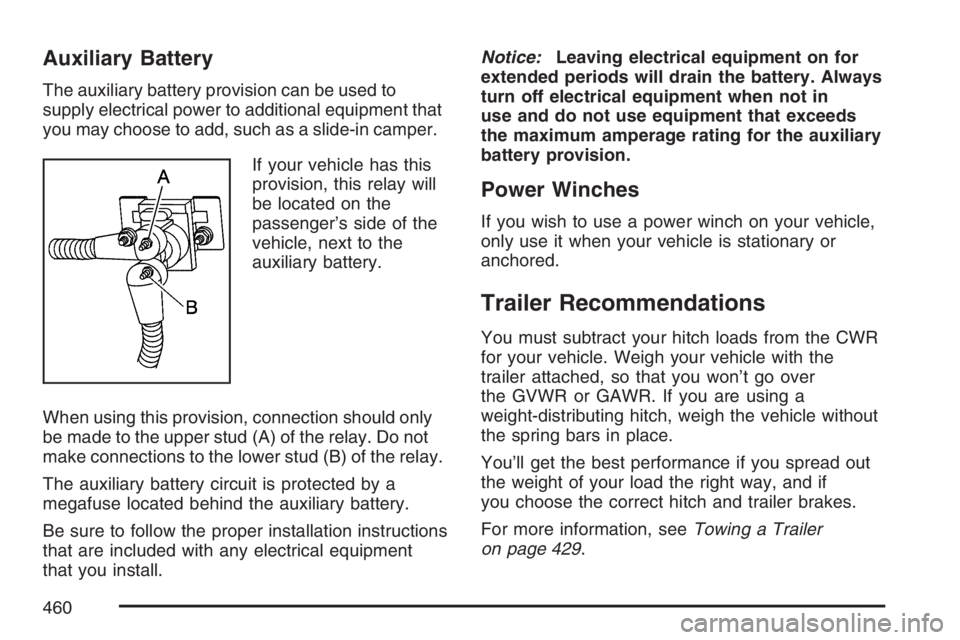
If your vehicle has this
provision, this relay will
be located on the
passenger’s side of the
vehicle, next to the
auxiliary battery.
When using this provision, connection should only
be made to the upper stud (A) of the relay. Do not
make connections to the lower stud (B) of the relay.
The auxiliary battery circuit is protected by a
megafuse located behind the auxiliary battery.
Be sure to follow the proper installation instructions
that are included with any electrical equipment
that you install.Notice:Leaving electrical equipment on for
extended periods will drain the battery. Always
turn off electrical equipment when not in
use and do not use equipment that exceeds
the maximum amperage rating for the auxiliary
battery provision.
Power Winches
If you wish to use a power winch on your vehicle,
only use it when your vehicle is stationary or
anchored.
Trailer Recommendations
You must subtract your hitch loads from the CWR
for your vehicle. Weigh your vehicle with the
trailer attached, so that you won’t go over
the GVWR or GAWR. If you are using a
weight-distributing hitch, weigh the vehicle without
the spring bars in place.
You’ll get the best performance if you spread out
the weight of your load the right way, and if
you choose the correct hitch and trailer brakes.
For more information, seeTowing a Trailer
on page 429.
460
Page 461 of 674
Power Take-Off (PTO)
Before using a Power Take-Off (PTO), if equipped,
refer to the manufacturer’s or installer’s instructions.
To engage a PTO on a vehicle with a manual
transmission do the following:
1. Hold the clutch pedal down.
2. Set the parking brake.
3. Shift the transmission into NEUTRAL.
4. Engage the PTO. Refer to the manufacturer’s
or installer’s for instructions on electrically
engaged PTOs.
5. For mobile operations, shift the transmission
into the gear you want, apply the regular
brakes and release the parking brake.
For stationary operations, leave the parking
brake applied.
6. Release the clutch and regular brakes as you
normally would. When the clutch is released,
the PTO will start.
7. Turn the PTO rotary switch to ON.To engage a PTO on a vehicle with an automatic
transmission do the following:
1. For stationary use shift the transmission into
PARK (P).
2. Turn the PTO rotary switch ON.
3. If the engine speed is below the PTO engage
speed limit, the PTO will start. The blinking
LED on the PTO control switch indicates PTO
engage is requested. When PTO engages the
LED will switch from blinking to a steady light.
To use PTO speed control in Preset Mode (Factory
Setting) do the following:
1. Engage the PTO.
2. Select PARK (P) or NEUTRAL (N) range.
Apply the parking brake if NEUTRAL (N) is
selected. Torque Converter Clutch (TCC)
is not available in NEUTRAL (N) and is
available only in PARK (P) when engine speed
is above 1,100 rpm.
3. Make sure your foot is off the brake pedal
(and off the clutch on vehicles equipped
with a manual transmission).
4. Select the desired engine speed for PTO
operation. Read the following preset mode
information regarding operation.
461
Page 465 of 674
Service........................................................ 468
Accessories and Modications................... 468
California Proposition 65 Warning.............. 469
Doing Your Own Service Work.................. 469
Adding Equipment to the Outside of
Your Vehicle.......................................... 470
Fuel............................................................. 470
Gasoline Octane........................................ 470
Gasoline Specications.............................. 471
California Fuel........................................... 471
Additives................................................... 472
Fuel E85 (85% Ethanol)............................ 473
Fuels in Foreign Countries........................ 474
Filling the Tank......................................... 474
Filling a Portable Fuel Container............... 477
Checking Things Under the Hood.............. 478
Hood Release........................................... 479
Engine Compartment Overview.................. 480
Engine Oil (Gasoline Engine).................... 486
Engine Oil Life System
(Gasoline Engine).................................. 489
Engine Air Cleaner/Filter
(Gasoline Engines)................................. 491Automatic Transmission Fluid
(Allison Transmission®) .......................... 494
Automatic Transmission Fluid
(Except Allison Transmission
®) ............... 497
Manual Transmission Fluid........................ 500
Hydraulic Clutch........................................ 501
Engine Coolant.......................................... 502
Coolant Surge Tank Pressure Cap............ 505
Engine Overheating................................... 505
Overheated Engine Protection
Operating Mode (V8 Engines Only)........ 508
Cooling System......................................... 508
Engine Fan Noise..................................... 514
Power Steering Fluid ................................. 515
Windshield Washer Fluid........................... 516
Brakes...................................................... 517
Battery...................................................... 520
Jump Starting............................................ 521
Rear Axle.................................................... 527
Four-Wheel Drive........................................ 528
Front Axle................................................... 529
Section 5 Service and Appearance Care
465
Page 468 of 674
Service
Your dealer knows your vehicle best and wants
you to be happy with it. We hope you will go
to your dealer for all your service needs. You will
get genuine GM parts and GM-trained and
supported service people.
We hope you will want to keep your GM vehicle all
GM. Genuine GM parts have one of these marks:
Accessories and Modications
When you add non-GM accessories to your vehicle
they can affect your vehicle’s performance and
safety, including such things as, airbags, braking,
stability, ride and handling, emissions systems,
aerodynamics, durability, and electronic systems
like anti-lock brakes, traction control and stability
control. Some of these accessories may even
cause malfunction or damage not covered by
warranty.
GM Accessories are designed to complement and
function with other systems on your vehicle.
Your GM dealer can accessorize your vehicle
using genuine GM Accessories. When you go to
your GM dealer and ask for GM Accessories,
you will know that GM-trained and supported
service technicians will perform the work using
genuine GM Accessories.
468
Page 481 of 674
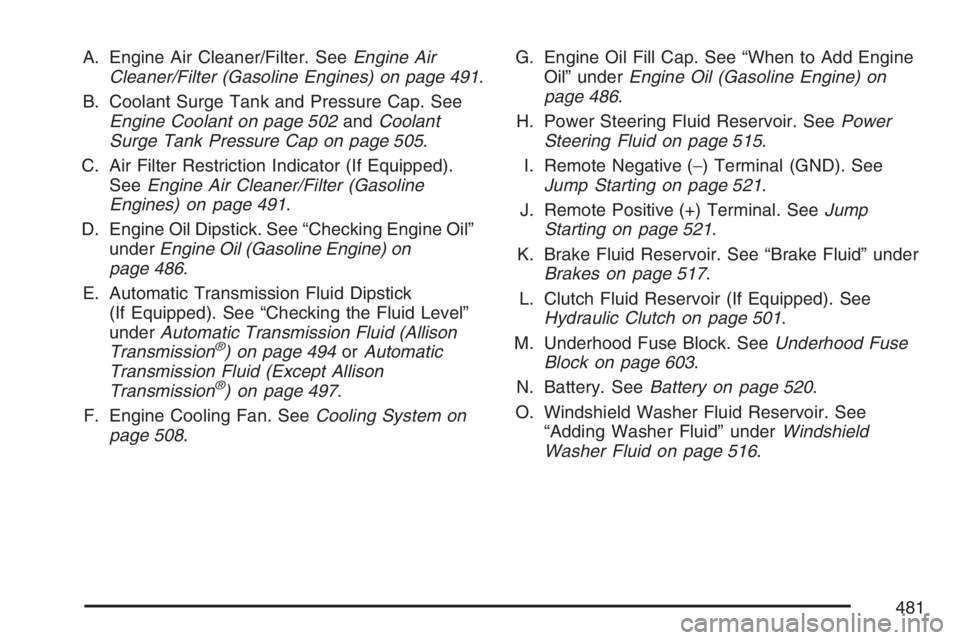
A. Engine Air Cleaner/Filter. SeeEngine Air
Cleaner/Filter (Gasoline Engines) on page 491.
B. Coolant Surge Tank and Pressure Cap. See
Engine Coolant on page 502andCoolant
Surge Tank Pressure Cap on page 505.
C. Air Filter Restriction Indicator (If Equipped).
SeeEngine Air Cleaner/Filter (Gasoline
Engines) on page 491.
D. Engine Oil Dipstick. See “Checking Engine Oil”
underEngine Oil (Gasoline Engine) on
page 486.
E. Automatic Transmission Fluid Dipstick
(If Equipped). See “Checking the Fluid Level”
underAutomatic Transmission Fluid (Allison
Transmission
®) on page 494orAutomatic
Transmission Fluid (Except Allison
Transmission
®) on page 497.
F. Engine Cooling Fan. SeeCooling System on
page 508.G. Engine Oil Fill Cap. See “When to Add Engine
Oil” underEngine Oil (Gasoline Engine) on
page 486.
H. Power Steering Fluid Reservoir. SeePower
Steering Fluid on page 515.
I. Remote Negative (−) Terminal (GND). See
Jump Starting on page 521.
J. Remote Positive (+) Terminal. SeeJump
Starting on page 521.
K. Brake Fluid Reservoir. See “Brake Fluid” under
Brakes on page 517.
L. Clutch Fluid Reservoir (If Equipped). See
Hydraulic Clutch on page 501.
M. Underhood Fuse Block. SeeUnderhood Fuse
Block on page 603.
N. Battery. SeeBattery on page 520.
O. Windshield Washer Fluid Reservoir. See
“Adding Washer Fluid” underWindshield
Washer Fluid on page 516.
481
Page 483 of 674
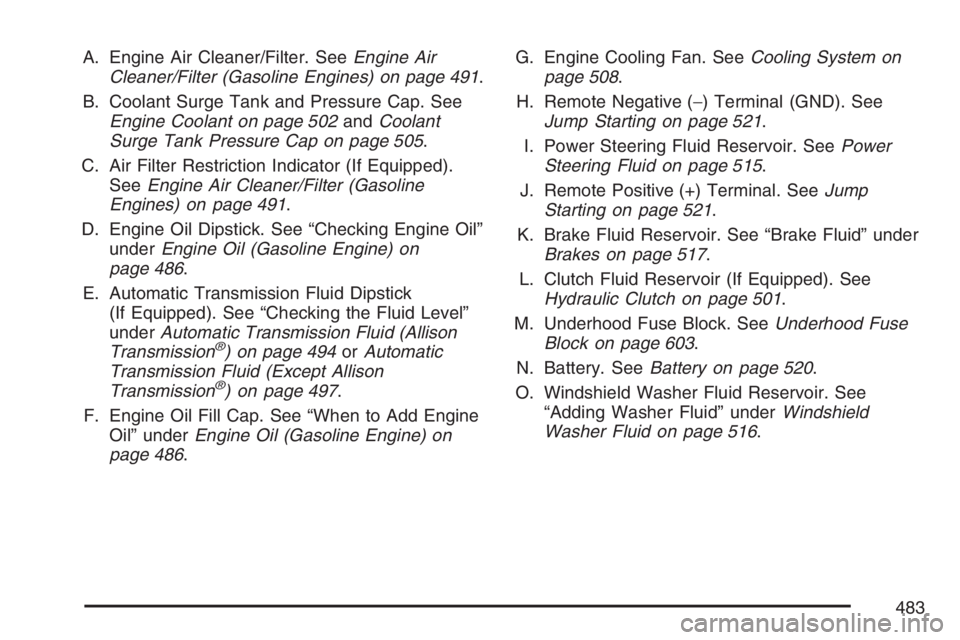
A. Engine Air Cleaner/Filter. SeeEngine Air
Cleaner/Filter (Gasoline Engines) on page 491.
B. Coolant Surge Tank and Pressure Cap. See
Engine Coolant on page 502andCoolant
Surge Tank Pressure Cap on page 505.
C. Air Filter Restriction Indicator (If Equipped).
SeeEngine Air Cleaner/Filter (Gasoline
Engines) on page 491.
D. Engine Oil Dipstick. See “Checking Engine Oil”
underEngine Oil (Gasoline Engine) on
page 486.
E. Automatic Transmission Fluid Dipstick
(If Equipped). See “Checking the Fluid Level”
underAutomatic Transmission Fluid (Allison
Transmission
®) on page 494orAutomatic
Transmission Fluid (Except Allison
Transmission
®) on page 497.
F. Engine Oil Fill Cap. See “When to Add Engine
Oil” underEngine Oil (Gasoline Engine) on
page 486.G. Engine Cooling Fan. SeeCooling System on
page 508.
H. Remote Negative (−) Terminal (GND). See
Jump Starting on page 521.
I. Power Steering Fluid Reservoir. SeePower
Steering Fluid on page 515.
J. Remote Positive (+) Terminal. SeeJump
Starting on page 521.
K. Brake Fluid Reservoir. See “Brake Fluid” under
Brakes on page 517.
L. Clutch Fluid Reservoir (If Equipped). See
Hydraulic Clutch on page 501.
M. Underhood Fuse Block. SeeUnderhood Fuse
Block on page 603.
N. Battery. SeeBattery on page 520.
O. Windshield Washer Fluid Reservoir. See
“Adding Washer Fluid” underWindshield
Washer Fluid on page 516.
483
Page 485 of 674
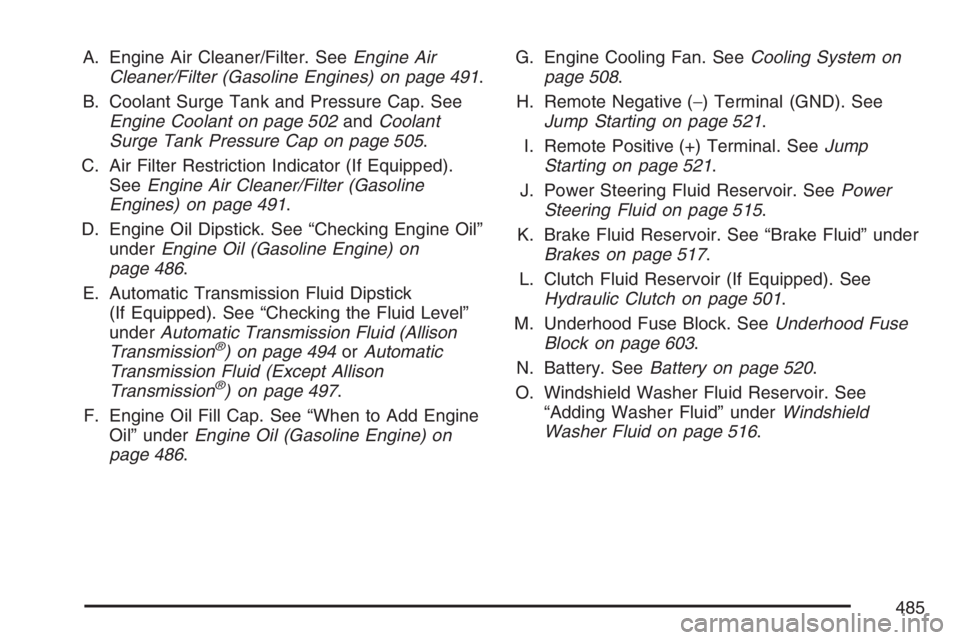
A. Engine Air Cleaner/Filter. SeeEngine Air
Cleaner/Filter (Gasoline Engines) on page 491.
B. Coolant Surge Tank and Pressure Cap. See
Engine Coolant on page 502andCoolant
Surge Tank Pressure Cap on page 505.
C. Air Filter Restriction Indicator (If Equipped).
SeeEngine Air Cleaner/Filter (Gasoline
Engines) on page 491.
D. Engine Oil Dipstick. See “Checking Engine Oil”
underEngine Oil (Gasoline Engine) on
page 486.
E. Automatic Transmission Fluid Dipstick
(If Equipped). See “Checking the Fluid Level”
underAutomatic Transmission Fluid (Allison
Transmission
®) on page 494orAutomatic
Transmission Fluid (Except Allison
Transmission
®) on page 497.
F. Engine Oil Fill Cap. See “When to Add Engine
Oil” underEngine Oil (Gasoline Engine) on
page 486.G. Engine Cooling Fan. SeeCooling System on
page 508.
H. Remote Negative (−) Terminal (GND). See
Jump Starting on page 521.
I. Remote Positive (+) Terminal. SeeJump
Starting on page 521.
J. Power Steering Fluid Reservoir. SeePower
Steering Fluid on page 515.
K. Brake Fluid Reservoir. See “Brake Fluid” under
Brakes on page 517.
L. Clutch Fluid Reservoir (If Equipped). See
Hydraulic Clutch on page 501.
M. Underhood Fuse Block. SeeUnderhood Fuse
Block on page 603.
N. Battery. SeeBattery on page 520.
O. Windshield Washer Fluid Reservoir. See
“Adding Washer Fluid” underWindshield
Washer Fluid on page 516.
485
Page 517 of 674

Brakes
Brake Fluid
Your brake master
cylinder reservoir is
lled with DOT-3 brake
uid. SeeEngine
Compartment Overview
on page 480for the
location of the reservoir.
There are only two reasons why the brake uid
level in the reservoir might go down. The rst
is that the brake uid goes down to an acceptable
level during normal brake lining wear. When
new linings are put in, the uid level goes back
up. The other reason is that uid is leaking out of
the brake system. If it is, you should have your
brake system xed, since a leak means that
sooner or later your brakes will not work well, or
will not work at all.So, it is not a good idea to top off your brake uid.
Adding brake uid will not correct a leak. If you
add uid when your linings are worn, then you will
have too much uid when you get new brake
linings. You should add or remove brake uid,
as necessary, only when work is done on
the brake hydraulic system.
{CAUTION:
If you have too much brake uid, it can
spill on the engine. The uid will burn if
the engine is hot enough. You or others
could be burned, and your vehicle could
be damaged. Add brake uid only when
work is done on the brake hydraulic
system. See “Checking Brake Fluid” in
this section.
Refer to the Maintenance Schedule to determine
when to check your brake uid. SeeScheduled
Maintenance (Gasoline Engine) on page 617.
517
Page 518 of 674
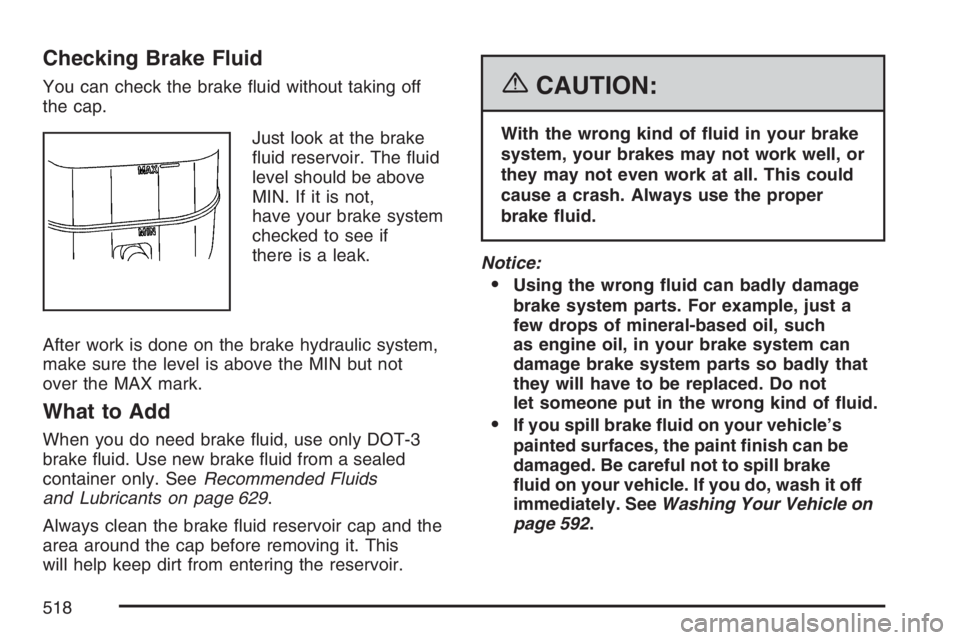
Checking Brake Fluid
You can check the brake uid without taking off
the cap.
Just look at the brake
uid reservoir. The uid
level should be above
MIN. If it is not,
have your brake system
checked to see if
there is a leak.
After work is done on the brake hydraulic system,
make sure the level is above the MIN but not
over the MAX mark.
What to Add
When you do need brake uid, use only DOT-3
brake uid. Use new brake uid from a sealed
container only. SeeRecommended Fluids
and Lubricants on page 629.
Always clean the brake uid reservoir cap and the
area around the cap before removing it. This
will help keep dirt from entering the reservoir.
{CAUTION:
With the wrong kind of uid in your brake
system, your brakes may not work well, or
they may not even work at all. This could
cause a crash. Always use the proper
brake uid.
Notice:
Using the wrong uid can badly damage
brake system parts. For example, just a
few drops of mineral-based oil, such
as engine oil, in your brake system can
damage brake system parts so badly that
they will have to be replaced. Do not
let someone put in the wrong kind of uid.
If you spill brake uid on your vehicle’s
painted surfaces, the paint nish can be
damaged. Be careful not to spill brake
uid on your vehicle. If you do, wash it off
immediately. SeeWashing Your Vehicle on
page 592.
518
Page 519 of 674
Brake Wear
Your vehicle has front disc brakes and may have
rear drum brakes or rear disc brakes.
Disc brake pads have built-in wear indicators that
make a high-pitched warning sound when the
brake pads are worn and new pads are needed.
The sound may come and go or be heard all
the time your vehicle is moving, except when you
are pushing on the brake pedal rmly.
{CAUTION:
The brake wear warning sound means that
soon your brakes will not work well. That
could lead to an accident. When you hear
the brake wear warning sound, have your
vehicle serviced.
Notice:Continuing to drive with worn-out
brake pads could result in costly brake repair.
Some driving conditions or climates may cause
a brake squeal when the brakes are rst applied or
lightly applied. This does not mean something is
wrong with your brakes.Properly torqued wheel nuts are necessary to help
prevent brake pulsation. When tires are rotated,
inspect brake pads for wear and evenly tighten
wheel nuts in the proper sequence to GM torque
specications.
If you have rear drum brakes, they do not have
wear indicators, but if you ever hear a rear brake
rubbing noise, have the rear brake linings
inspected immediately. Rear brake drums should
be removed and inspected each time the tires
are removed for rotation or changing. Drum brakes
have an inspection hole to inspect lining wear
during scheduled maintenance. When you have
the front brake pads replaced, have the rear
brakes inspected, too.
Brake linings should always be replaced as
complete axle sets.
Brake Pedal Travel
See your dealer if the brake pedal does not return
to normal height, or if there is a rapid increase in
pedal travel. This could be a sign of brake trouble.
Brake Adjustment
Every time you make a brake stop, your brakes
adjust for wear.
519