key GMC SIERRA DENALI 2003 User Guide
[x] Cancel search | Manufacturer: GMC, Model Year: 2003, Model line: SIERRA DENALI, Model: GMC SIERRA DENALI 2003Pages: 428, PDF Size: 20.35 MB
Page 94 of 428
Theft-Deterrent Systems
Vehicle theft is big business, especially in some cities.
Although your vehicle has a number of theft-deterrent
features, we know that nothing we put on it can make
it
impossible to steal. However, there are ways you
can help.
Content Theft-Deterrent
Your vehicle is equipped with a content theft-deterrent
alarm system.
With this system, the
security light on the cluster
will flash
as you open
the door
(if your ignition is
off), to let you know
that you are activating the
system. This
message reminds you to activate the theft-deterrent
system. Here’s how to do it:
1. Open the door.
2. Lock the door with the power door lock switch or
the remote keyless entry transmitter. The security light should come on and flash.
If you are using the
remote keyless entry transmitter, the door does
not need to be open.
3. Close all of the doors. The light will stop flashing and
stay solid.The security light should go
off after
approximately
30 seconds. The alarm is not armed
until the security light goes
off. If the delayed locking
feature is active, the alarm will not activate until all
doors are closed and the security light goes
off.
Once the system is armed, if a door is opened without
the key or the remote keyless entry transmitter, the
alarm will go
off. Depending on how you have
programmed the alarm in the secondary information
center, the horn may sound, the headlamps may flash
or both the headlamps and the horn will activate.
Remember, the theft-deterrent system won’t activate
if
you lock the doors with a key or use the manual
door lock. It activates only
if you use a power door lock
switch with the door open, or with the remote keyless
entry transmitter. You should also remember that
you can start your vehicle with the correct ignition key
if
the alarm has been set off.
Page 95 of 428
Here’s how to avoid setting off the alarm by accident:
If you don’t want to activate the theft-deterrent
system, the vehicle should be locked with the door
key after the doors are closed.
Always unlock a door with a key, or use the remote
keyless entry transmitter. Unlocking a door any
other way will set
off the alarm if the system
has been armed.
If you set off the alarm by accident, unlock any door
with the key. You can also turn
off the alarm by pressing
UNLOCK on the remote keyless entry transmitter or
by placing the key in the ignition and turning it to
START.
Testing the Alarm
The alarm can be tested by following these steps:
1. From inside the vehicle, lower the driver’s window
and open the driver’s door.
2. Activate the system by locking the doors with the
power door lock switch while the door is open, or
with the remote keyless entry transmitter.
3. Get out of the vehicle, close the door and wait for
the security message
to go out.
4. Then reach in through the window, unlock the door
with the manual door lock and open the door. This
should set
off the alarm. If the
alarm does not sound and the headlamps do not
flash, you may have the feature turned
off. See DIC
Operation and Displays on page 3-43 for more
information.
Passlock@
Your vehicle is equipped with the
Passlock@ theft-deterrent system.
Passlock@ is a passive theft-deterrent system.
Passlock@ enables fuel
if the ignition lock cylinder is
turned with a valid key.
If a correct key is not used or the
ignition lock cylinder is tampered with, fuel is disabled.
If the engine stalls and the security light flashes,
wait until the light stops flashing before trying to restart
the engine. Remember
to release the key from
START as soon as the engine starts.
If the engine is running and the security light comes on,
you will be able
to restart the engine if you turn the
engine
off. However, your Passlock@ system is
not working properly and must be serviced by your
dealer. Your vehicle is not protected by Passlock@ at this
time. You may also want to check the fuse (see
Fuses and Circuit Breakers on page 5-95.) See your
dealer for service.
In an emergency, call the GM Roadside Assistance
Center. See
Roadside Assistance Program on page 7-5
under Customer Assistance Information.
2-1 4
Page 96 of 428
Starting and Operating Your
Vehicle
New Vehicle Break-In
Notices Your vehicle doesn’t need an elaborate
“break-in.” But
it will perform better in the long run
if you follow these guidelines:
* Keep your speed at 55 mph (88 km/h) or less for
the first
500 miles (805 km).
Don’t drive at any one speed - fast or slow - for
the first
500 miles (805 km). Don’t make
full-throttle starts.
Avoid making hard stops for the first 200 miles
(322 km) or so. During this time your new brake
linings aren’t yet broken
in. Hard stops with new
linings can mean premature wear and earlier
replacement. Follow this breaking-in guideline
every time you get new brake linings.
Don’t tow a trailer during break-in. See “Towing a
Trailer” in the Index for more information.
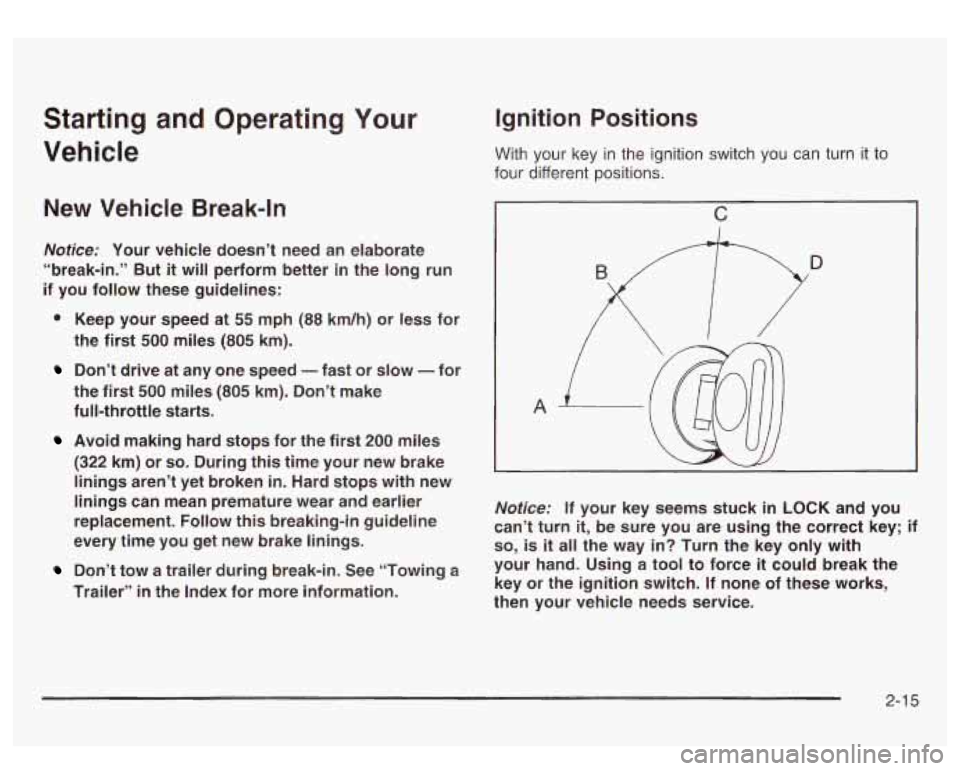
Ignition Positions
With your key in the ignition switch you can turn it to
four different positions.
c
A
~~~ ~
Notice: If your key seems stuck in LOCK and you
can’t turn
it, be sure you are using the correct key; if
so, is it all the way in? Turn the key only with
your hand. Using a tool to force
it could break the
key or the ignition switch. If none of these works,
then your vehicle needs service.
2-1 5
Page 97 of 428
LOCK (A): This position locks your ignition and
transmission. It’s a theft-deterrent feature. You will only
be able to remove your key when the ignition is
turned to
LOCK.
ACCESSORY (B): This position lets you use things like
the radio, power windows and the windshield wipers
when the engine is
off.
RUN (C): This position is for driving.
START
(D): This position starts your engine.
Retained Accessory Power (RAP)
The Retained Accessory Power (RAP) feature will allow
certain features on your vehicle to continue to work
up to
10 minutes after the ignition key is turned to OFF.
Starting Your Engine
Move your shift lever to PARK (P) or NEUTRAL (N).
Your engine won’t start in any other position - that’s a
safety feature. To restart when you’re already moving,
use NEUTRAL (N) only.
Notice: Don’t try to shift to PARK (P) if your
vehicle is moving. If you do, you could damage the
transmission. Shift to PARK (P) only when your
vehicle
is stopped.
1. With your foot off the accelerator pedal, turn the
ignition key to START. When the engine starts,
let go of the key. The idle speed will go down as
your engine gets warm.
Notice: Holding your key in START for longer than
15 seconds at a time will cause your battery to
be drained much sooner. And the excessive heat
can damage your starter motor. Wait about
15
seconds between each try to help avoid draining
your battery or damaging your starter.
2. If it doesn’t start within 10 seconds, push the
accelerator pedal all the way
to the floor, while you
hold the ignition key in START. When the engine
starts, let
go of the key and let up on the accelerator
pedal. Wait about
15 seconds between each try.
2-1 6
Page 98 of 428
When starting your engine in very cold weather (below
0°F or -18"C), do this:
Engine Coolant Heater
1. With your foot off the accelerator pedal, turn the
ignition key to START and hold it there up to
15 seconds. When the engine starts, let go of
the key.
2. If your engine still won't start (or starts but then
stops), it could be flooded with too much gasoline.
Try pushing your accelerator pedal all the way to the
floor and holding
it there as you hold the key in
START for about three seconds. When the engine
starts, let go of the key and accelerator. If the
vehicle starts briefly but then stops again, do the
same thing, but this time keep the pedal down
for five or six seconds. This clears the extra
gasoline from the engine.
Notice: Your engine is designed to work with the
electronics in your vehicle.
If you add electrical
parts or accessories, you could change the way the
engine operates. Before adding electrical equipment,
check with your dealer.
If you don't, your engine
might not perform properly. In
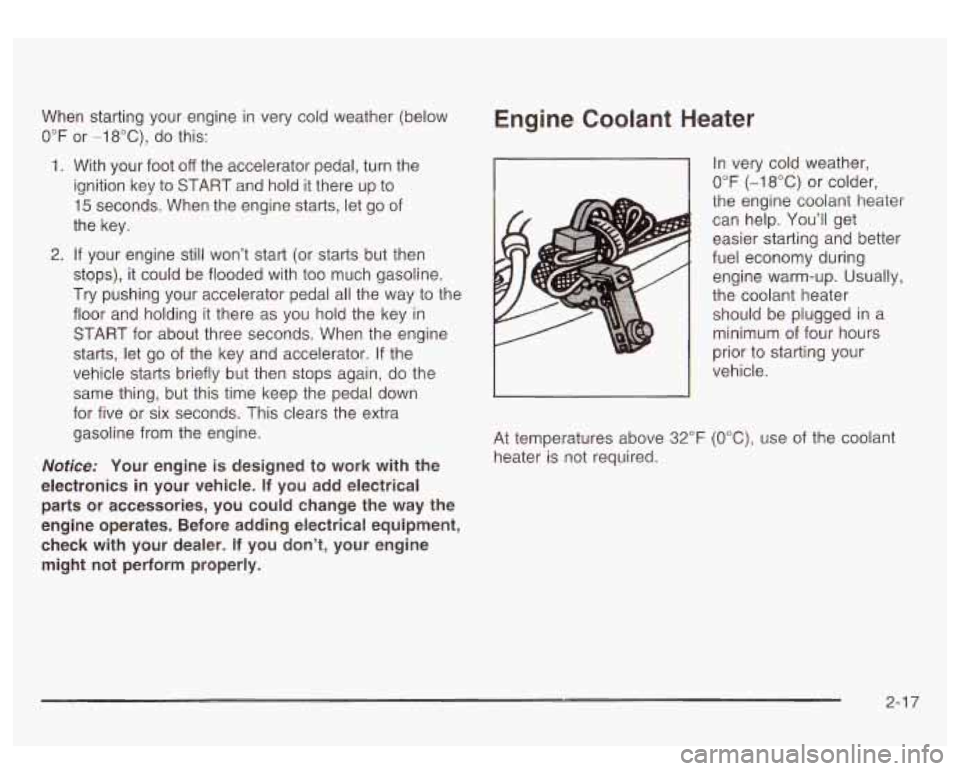
very cold weather,
0°F (-18°C) or colder,
the engine coolant heater
can help. You'll get
easier starting and better
fuel economy during
engine warm-up. Usually,
the coolant heater
should be plugged in a
minimum of four hours
prior to starting your
vehicle.
At temperatures above
32°F (OOC), use of the coolant
heater is not required.
2-1 7
Page 105 of 428
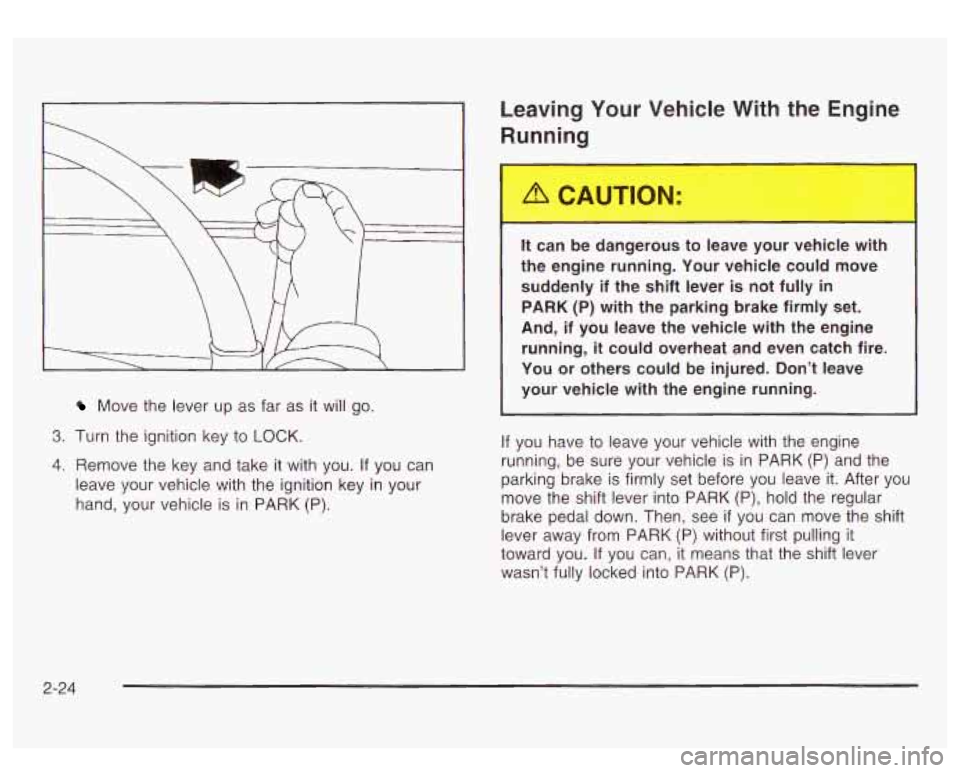
Move the lever up as far as it will go.
3. Turn the ignition key to LOCK.
4. Remove the key and take it with you. If you can
leave your vehicle with the ignition key in your
hand, your vehicle is
in PARK (P).
Leaving Your Vehicle With the Engine
Running
It can be dangerous to leave your vehicle with
the engine running. Your vehicle could move
suddenly if the shift lever is not fully
in
PARK (P) with the parking brake firmly set.
And, if you leave the vehicle with the engine
running,
it could overheat and even catch fire.
You or others could be injured. Don’t leave
your vehicle with the engine running.
If you have to leave your vehicle with the engine
running, be sure your vehicle is in PARK
(P) and the
parking brake
is firmly set before you leave it. After you
move the shift lever into PARK
(P), hold the regular
brake pedal down. Then, see
if you can move the shift
lever away from PARK
(P) without first pulling it
toward you.
If you can, it means that the shift lever
wasn’t fully locked into PARK (P).
2-24
Page 106 of 428
Torque Lock
If you are parking on a hill and you don’t shift your
transmission into PARK
(P) properly, the weight of the
vehicle may put too much force on the parking pawl
in the transmission. You may find it difficult to pull the
shift lever out of PARK
(P). This is called ”torque
lock.” To prevent torque lock, set the parking brake and
then shift into PARK (P) properly before you leave
the driver’s seat.
To find out how, see Shifting lnto
Park
(P) on page 2-23.
When you are ready to drive, move the shift lever out of
PARK
(P) before you release the parking brake.
If torque lock does occur, you may need to have another
vehicle push yours a little uphill to take some of the
pressure from the parking pawl in the transmission,
so
you can pull the shift lever out of PARK (P).
Shifting Out of Park (P)
Your vehicle has an automatic transmission shift lock
control system. You have to fully apply your regular
brakes before you can shift from PARK (P) when the
ignition
is in RUN. See Automatic Transmission
Operation on page
2- 18.
If you cannot shift out of PARK (P), ease pressure on
the shift lever and push the shift lever all the way up into
PARK
(P) as you maintain brake application. Then,
move the shift lever into the gear you want.
If you ever hold the brake pedal down but still can’t shift
out of PARK (P), try this:
1. Turn the key to LOCK.
2. Apply and hold the brake until the end of Step 4.
3. Shift the vehicle to NEUTRAL (N).
4. Start the vehicle and then shift to the drive gear
5. Have the system fixed as soon as you can.
you want.
2-25
Page 123 of 428
Vehicle Personalization
Memory Seat
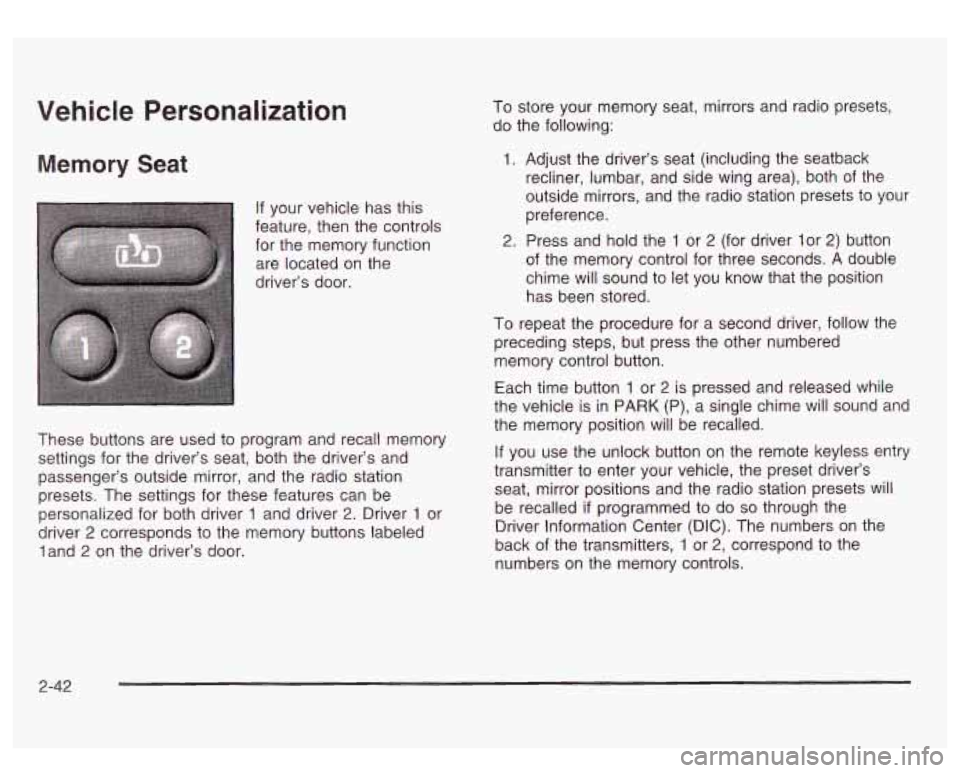
If your vehicle has this
feature, then the controls for the memory function
are located on the
driver’s door.
I
~
These buttons are used to program and recall memory
settings for the driver’s seat, both the driver’s and
passenger’s outside mirror, and the radio station
presets. The settings for these features can be
personalized for both driver
1 and driver 2. Driver 1 or
driver
2 corresponds to the memory buttons labeled
land
2 on the driver’s door. To store
your memory seat, mirrors and radio presets,
do the following:
1. Adjust the driver’s seat (including the seatback
recliner, lumbar, and side wing area), both of the
outside mirrors, and the radio station presets to your
preference.
2. Press and hold the 1 or 2 (for driver lor 2) button
of the memory control for three seconds.
A double
chime will sound to let you know that the position
has been stored.
To repeat the procedure for a second driver, follow the
preceding steps, but press the other numbered
memory control button.
Each time button
1 or 2 is pressed and released while
the vehicle is in PARK (P), a single chime will sound and
the memory position will be recalled.
If you use the unlock button on the remote keyless entry
transmitter to enter your vehicle, the preset driver’s
seat, mirror positions and the radio station presets will
be recalled
if programmed to do so through the
Driver Information Center (DIC). The numbers on the
back of the transmitters,
1 or 2, correspond to the
numbers on the memory controls.
2-42
Page 124 of 428
The seat and mirror positions can also be recalled when
placing the key in the ignition
if programmed to do so
through the Driver Information Center (DIC).
To stop recali movement of the
memory seat feature at
any time, press one of the memory buttons or power
seat controls.
Easy Exit Seat
The controls for this memory function are located on the
driver’s door.
li’)T) This button is used to program and recall the
desired driver’s seat position when exiting/entering the
vehicle. The seat position, can be personalized for
both driver
1 and driver 2.
To store the seat exit position for driver 1 or 2, do the
following:
1. Select the desired driver number by pressing and
releasing the
1 or 2 button. The seat will move to
the stored memory position.
2. Adjust the seat to the desired exit position.
3. Press and hold the exit button of the memory
control for three seconds.
A double chime will sound
to let you know that the position has been stored for the identified driver
(1 or 2).
To use the seat exit position, do one of the following:
Press the exit button on the memory control.
Or, if this feature is enabled (active) in the DIC,
then removing the key from the ignition will
cause the seat to move
to the exit position.
2-43
Page 129 of 428
The hazard warning
flasher button is located at
the top
of the steering
column.
Horn
To sound the horn, press the center pad on the steerin?
wheel.
Your hazard warning flashers work no matter what
position your key is in, and even
if the key isn’t in.
Press the button to make the front and rear turn signal
lamps flash on and
off. Press the button again to
turn the flashers
off.
When the hazard warning flashers are on, your turn
signals won’t work.
Other Warning Devices
If you carry reflective triangles, you can use them to
warn others. Set one up at the side
of the road about
300 feet (100 m) behind your vehicle.
Tilt Wheel
A tilt wheel allows you to adjust the steering wheel
before you drive. You can raise
it to the highest level to
give your legs more room when you exit and enter
your vehicle.
The tilt steering wheel
lever is located on the
lower left side
of the
steering column.
To tilt the wheel, hold the steering wheel and pull the
lever. Then move the steering wheel to a comfortable
position and release the lever to lock the wheel in place.
3-4