cooling GMC SIERRA DENALI 2005 Owner's Manual
[x] Cancel search | Manufacturer: GMC, Model Year: 2005, Model line: SIERRA DENALI, Model: GMC SIERRA DENALI 2005Pages: 428, PDF Size: 2.5 MB
Page 306 of 428
Engine Fan Noise
If your vehicle is equipped with a clutched engine cooling
fan, when the clutch is engaged, the fan spins faster to
provide more air to cool the engine. In most everyday
driving conditions, the fan is spinning slower and the
clutch is not fully engaged. This improves fuel economy
and reduces fan noise. Under heavy vehicle loading,
trailer towing, and/or high outside temperatures, the fan
speed increases as the clutch more fully engages, so you
may hear an increase in fan noise. This is normal and
should not be mistaken as the transmission slipping or
making extra shifts. It is merely the cooling system
functioning properly. The fan will slow down when
additional cooling is not required and the clutch
disengages.
You may also hear this fan noise when you start the
engine. It will go away as the fan clutch partially
disengages.
If your vehicle is equipped with electric cooling fans, you
may hear the fans spinning at low speed during most
everyday driving. The fans may turn off if no cooling is
required. Under heavy vehicle loading, trailer towing,
and/or high outside temperatures, or if you are operating
your air conditioning system, the fans change to high
speed and you may hear an increase in fan noise. This
is normal and indicates that the cooling system is
functioning properly. The fans will change to low speed
when additional cooling is no longer required.
Power Steering Fluid
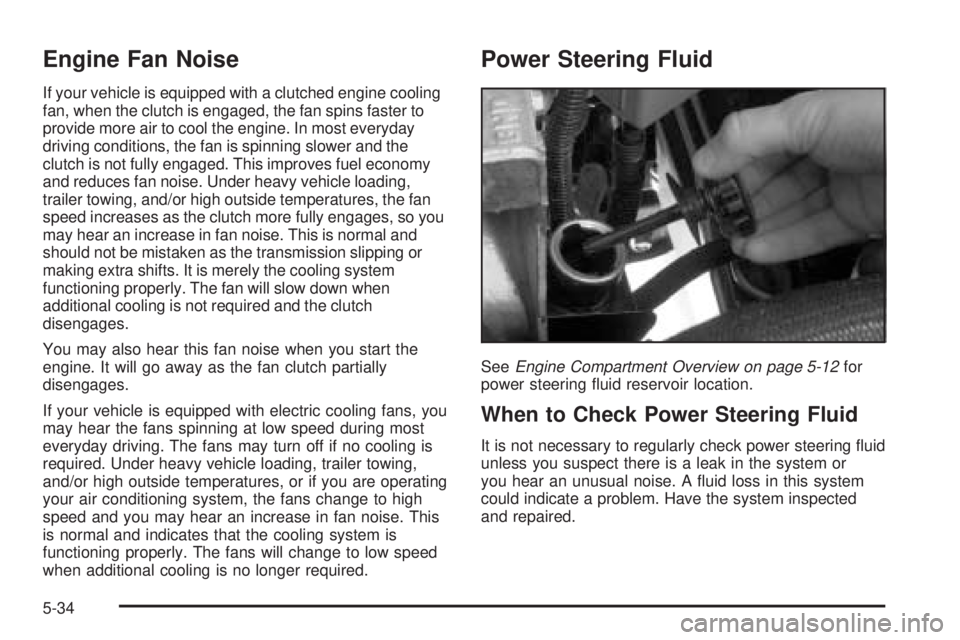
SeeEngine Compartment Overview on page 5-12for
power steering uid reservoir location.
When to Check Power Steering Fluid
It is not necessary to regularly check power steering uid
unless you suspect there is a leak in the system or
you hear an unusual noise. A uid loss in this system
could indicate a problem. Have the system inspected
and repaired.
5-34
Page 341 of 428
Wheel Replacement
Replace any wheel that is bent, cracked, or badly rusted
or corroded. If wheel nuts keep coming loose, the
wheel, wheel bolts and wheel nuts should be replaced.
If the wheel leaks air, replace it (except some
aluminum wheels, which can sometimes be repaired).
See your dealer if any of these conditions exist.
Your dealer will know the kind of wheel you need.
Each new wheel should have the same load-carrying
capacity, diameter, width, offset and be mounted
the same way as the one it replaces.
If you need to replace any of your wheels, wheel bolts
or wheel nuts, replace them only with new GM
original equipment parts. This way, you will be sure to
have the right wheel, wheel bolts and wheel nuts
for your vehicle.{CAUTION:
Using the wrong replacement wheels, wheel
bolts or wheel nuts on your vehicle can be
dangerous. It could affect the braking and
handling of your vehicle, make your tires lose
air and make you lose control. You could have
a collision in which you or others could be
injured. Always use the correct wheel, wheel
bolts and wheel nuts for replacement.
Notice:The wrong wheel can also cause problems
with bearing life, brake cooling, speedometer or
odometer calibration, headlamp aim, bumper height,
vehicle ground clearance and tire clearance to the
body and chassis.
SeeChanging a Flat Tire on page 5-72for more
information.
5-69
Page 383 of 428
Fuses Usage
LO HDLP-RT Headlamp Low Beam-Right
FOG LP Fog Lamp Relay
FOG LP Fog Lamps
HORN Horn Relay
W/S WASHWindshield Washer Pump
Relay
W/S WASH Windshield Washer Pump
INFOOnStar
®/Rear Seat
Entertainment
RADIO AMP Radio Amplier
RH HID Not Used
HORN Horn
EAP Not Used
TREC All-Wheel Drive Module
SBA Supplemental Brake Assist
Auxiliary Electric Cooling Fan Fuse
Block
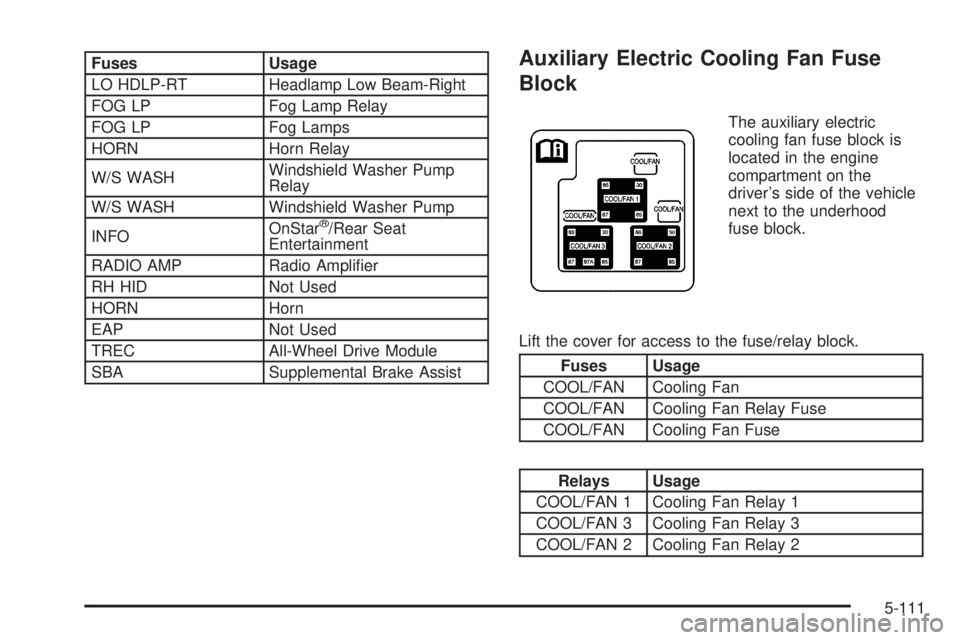
The auxiliary electric
cooling fan fuse block is
located in the engine
compartment on the
driver’s side of the vehicle
next to the underhood
fuse block.
Lift the cover for access to the fuse/relay block.
Fuses Usage
COOL/FAN Cooling Fan
COOL/FAN Cooling Fan Relay Fuse
COOL/FAN Cooling Fan Fuse
Relays Usage
COOL/FAN 1 Cooling Fan Relay 1
COOL/FAN 3 Cooling Fan Relay 3
COOL/FAN 2 Cooling Fan Relay 2
5-111
Page 384 of 428
Capacities and Specications
The following approximate capacities are given in English and metric conversions. SeeRecommended Fluids and
Lubricants on page 6-12.
Capacities and Specications
ApplicationCapacities
English Metric
Air Conditioning Refrigerant R134a 1.6 lbs 0.7 kg
Cooling System
Engine Driven Fan
Electric Engine Cooling Fan16.0 quarts
16.7 quarts15.1 L
15.8 L
Engine Oil with Filter 6.0 quarts 5.7 L
Fuel Tank 26.0 gallons 98.4 L
Wheel Nut Torque 140 ft lb 190Y
All capacities are approximate. When adding, be sure to ll to the approximate level, as recommended in this
manual. Recheck uid level after lling.
Engine Specications
Engine VIN Code Transmission Spark Plug Gap
VORTEC™ 6000 N Automatic 0.040 inches (1.01 mm)
5-112
Page 389 of 428
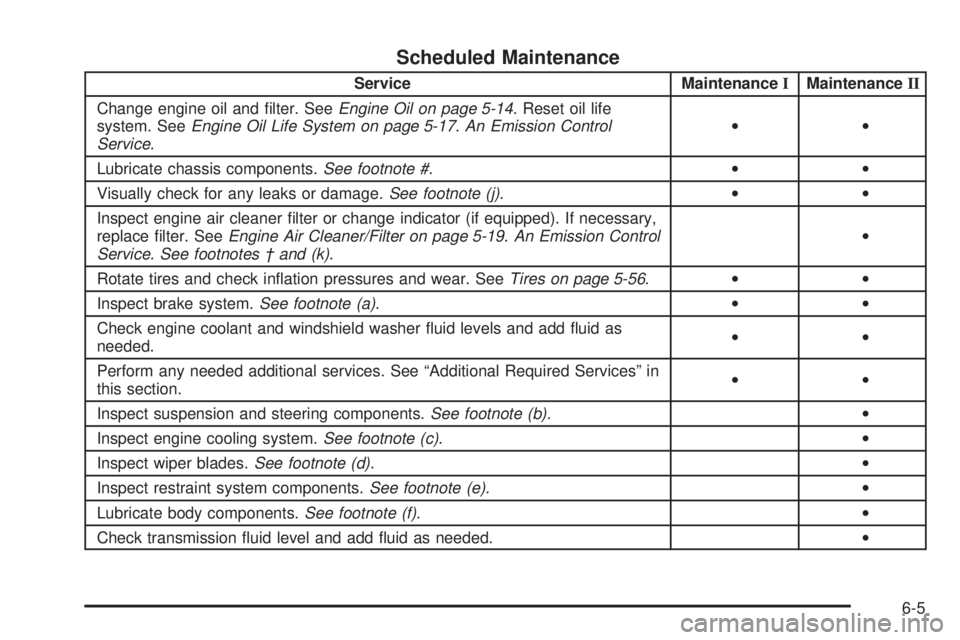
Scheduled Maintenance
Service MaintenanceIMaintenanceII
Change engine oil and lter. SeeEngine Oil on page 5-14. Reset oil life
system. SeeEngine Oil Life System on page 5-17.An Emission Control
Service.••
Lubricate chassis components.See footnote #.••
Visually check for any leaks or damage.See footnote (j).••
Inspect engine air cleaner lter or change indicator (if equipped). If necessary,
replace lter. SeeEngine Air Cleaner/Filter on page 5-19.An Emission Control
Service. See footnotes † and (k).•
Rotate tires and check ination pressures and wear. SeeTires on page 5-56.••
Inspect brake system.See footnote (a).••
Check engine coolant and windshield washer uid levels and add uid as
needed.••
Perform any needed additional services. See “Additional Required Services” in
this section.••
Inspect suspension and steering components.See footnote (b).•
Inspect engine cooling system.See footnote (c).•
Inspect wiper blades.See footnote (d).•
Inspect restraint system components.See footnote (e).•
Lubricate body components.See footnote (f).•
Check transmission uid level and add uid as needed.•
6-5
Page 391 of 428
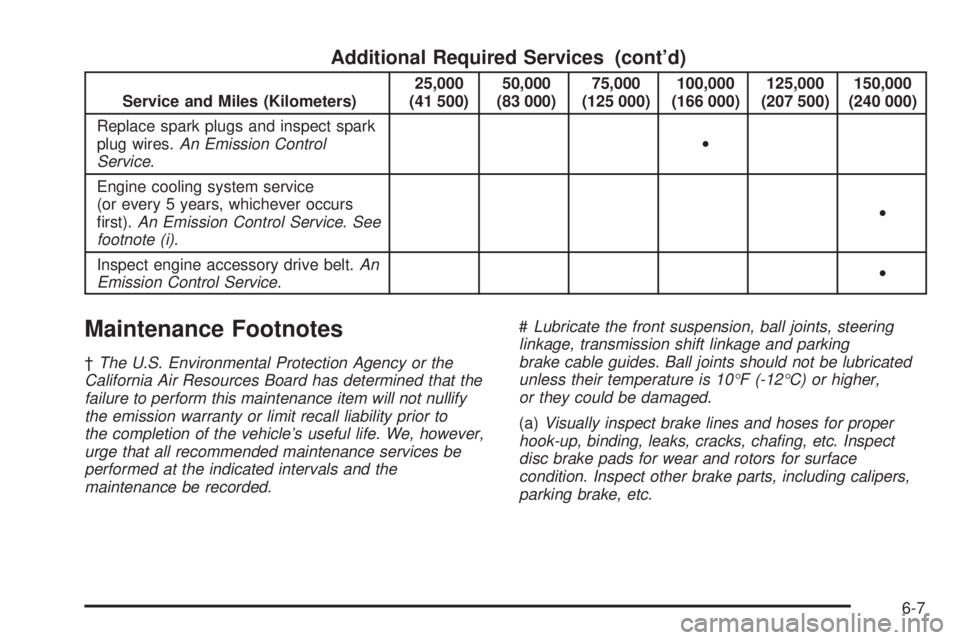
Additional Required Services (cont’d)
Service and Miles (Kilometers)25,000
(41 500)50,000
(83 000)75,000
(125 000)100,000
(166 000)125,000
(207 500)150,000
(240 000)
Replace spark plugs and inspect spark
plug wires.An Emission Control
Service.•
Engine cooling system service
(or every 5 years, whichever occurs
rst).An Emission Control Service. See
footnote (i).•
Inspect engine accessory drive belt.An
Emission Control Service.•
Maintenance Footnotes
†The U.S. Environmental Protection Agency or the
California Air Resources Board has determined that the
failure to perform this maintenance item will not nullify
the emission warranty or limit recall liability prior to
the completion of the vehicle’s useful life. We, however,
urge that all recommended maintenance services be
performed at the indicated intervals and the
maintenance be recorded.#Lubricate the front suspension, ball joints, steering
linkage, transmission shift linkage and parking
brake cable guides. Ball joints should not be lubricated
unless their temperature is 10°F (-12°C) or higher,
or they could be damaged.
(a)Visually inspect brake lines and hoses for proper
hook-up, binding, leaks, cracks, chang, etc. Inspect
disc brake pads for wear and rotors for surface
condition. Inspect other brake parts, including calipers,
parking brake, etc.
6-7
Page 392 of 428
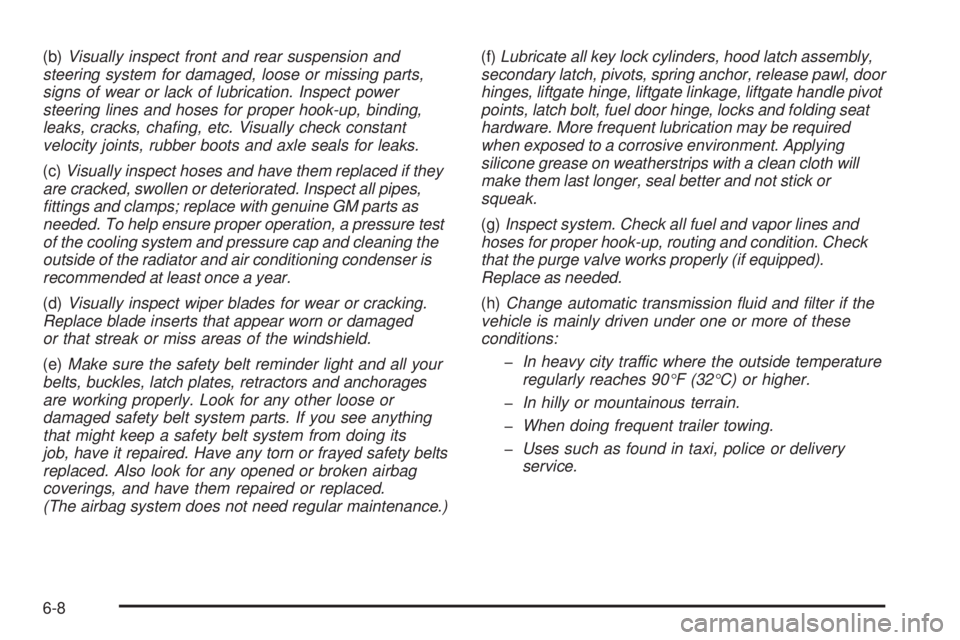
(b)Visually inspect front and rear suspension and
steering system for damaged, loose or missing parts,
signs of wear or lack of lubrication. Inspect power
steering lines and hoses for proper hook-up, binding,
leaks, cracks, chang, etc. Visually check constant
velocity joints, rubber boots and axle seals for leaks.
(c)Visually inspect hoses and have them replaced if they
are cracked, swollen or deteriorated. Inspect all pipes,
ttings and clamps; replace with genuine GM parts as
needed. To help ensure proper operation, a pressure test
of the cooling system and pressure cap and cleaning the
outside of the radiator and air conditioning condenser is
recommended at least once a year.
(d)Visually inspect wiper blades for wear or cracking.
Replace blade inserts that appear worn or damaged
or that streak or miss areas of the windshield.
(e)Make sure the safety belt reminder light and all your
belts, buckles, latch plates, retractors and anchorages
are working properly. Look for any other loose or
damaged safety belt system parts. If you see anything
that might keep a safety belt system from doing its
job, have it repaired. Have any torn or frayed safety belts
replaced. Also look for any opened or broken airbag
coverings, and have them repaired or replaced.
(The airbag system does not need regular maintenance.)(f)Lubricate all key lock cylinders, hood latch assembly,
secondary latch, pivots, spring anchor, release pawl, door
hinges, liftgate hinge, liftgate linkage, liftgate handle pivot
points, latch bolt, fuel door hinge, locks and folding seat
hardware. More frequent lubrication may be required
when exposed to a corrosive environment. Applying
silicone grease on weatherstrips with a clean cloth will
make them last longer, seal better and not stick or
squeak.
(g)Inspect system. Check all fuel and vapor lines and
hoses for proper hook-up, routing and condition. Check
that the purge valve works properly (if equipped).
Replace as needed.
(h)Change automatic transmission uid and lter if the
vehicle is mainly driven under one or more of these
conditions:
In heavy city traffic where the outside temperature
regularly reaches 90°F (32°C) or higher.
In hilly or mountainous terrain.
When doing frequent trailer towing.
Uses such as found in taxi, police or delivery
service.
6-8
Page 393 of 428
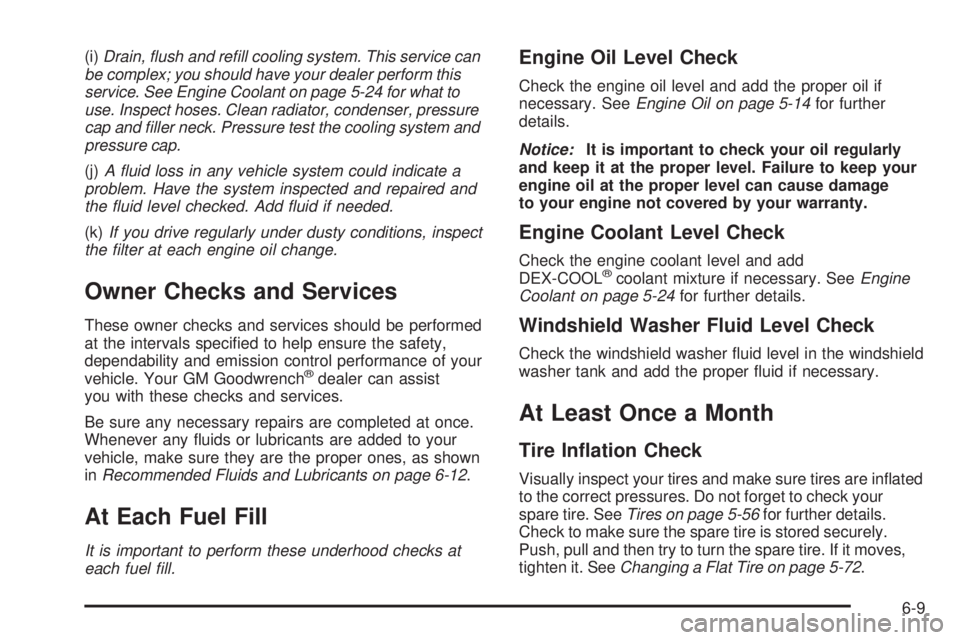
(i)Drain, ush and rell cooling system. This service can
be complex; you should have your dealer perform this
service. See Engine Coolant on page 5-24 for what to
use. Inspect hoses. Clean radiator, condenser, pressure
cap and ller neck. Pressure test the cooling system and
pressure cap.
(j)A uid loss in any vehicle system could indicate a
problem. Have the system inspected and repaired and
the uid level checked. Add uid if needed.
(k)If you drive regularly under dusty conditions, inspect
the lter at each engine oil change.
Owner Checks and Services
These owner checks and services should be performed
at the intervals specied to help ensure the safety,
dependability and emission control performance of your
vehicle. Your GM Goodwrench
®dealer can assist
you with these checks and services.
Be sure any necessary repairs are completed at once.
Whenever any uids or lubricants are added to your
vehicle, make sure they are the proper ones, as shown
inRecommended Fluids and Lubricants on page 6-12.
At Each Fuel Fill
It is important to perform these underhood checks at
each fuel ll.
Engine Oil Level Check
Check the engine oil level and add the proper oil if
necessary. SeeEngine Oil on page 5-14for further
details.
Notice:It is important to check your oil regularly
and keep it at the proper level. Failure to keep your
engine oil at the proper level can cause damage
to your engine not covered by your warranty.
Engine Coolant Level Check
Check the engine coolant level and add
DEX-COOL®coolant mixture if necessary. SeeEngine
Coolant on page 5-24for further details.
Windshield Washer Fluid Level Check
Check the windshield washer uid level in the windshield
washer tank and add the proper uid if necessary.
At Least Once a Month
Tire Ination Check
Visually inspect your tires and make sure tires are inated
to the correct pressures. Do not forget to check your
spare tire. SeeTires on page 5-56for further details.
Check to make sure the spare tire is stored securely.
Push, pull and then try to turn the spare tire. If it moves,
tighten it. SeeChanging a Flat Tire on page 5-72.
6-9
Page 417 of 428
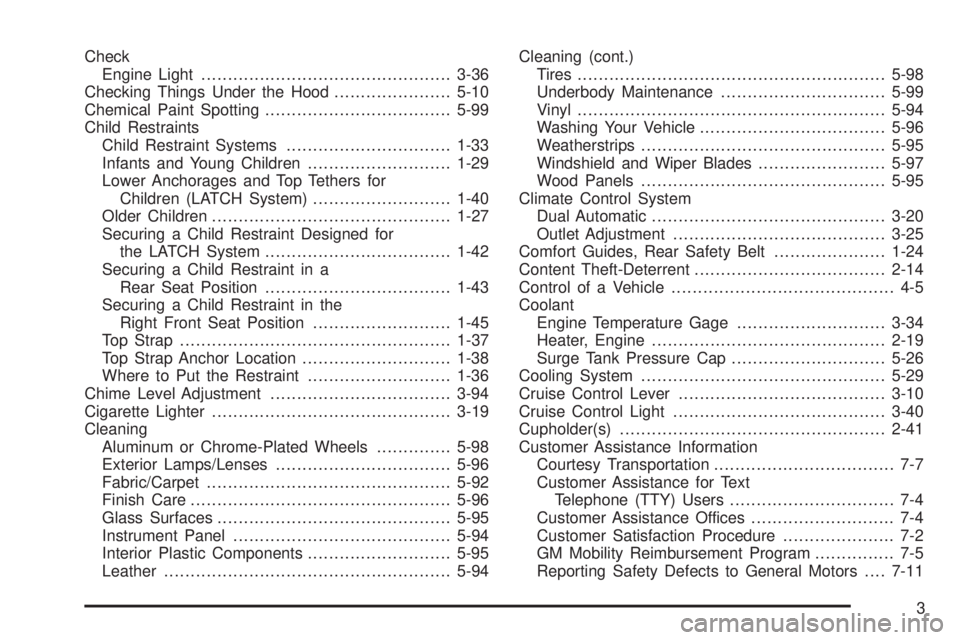
Check
Engine Light...............................................3-36
Checking Things Under the Hood......................5-10
Chemical Paint Spotting...................................5-99
Child Restraints
Child Restraint Systems...............................1-33
Infants and Young Children...........................1-29
Lower Anchorages and Top Tethers for
Children (LATCH System)..........................1-40
Older Children.............................................1-27
Securing a Child Restraint Designed for
the LATCH System...................................1-42
Securing a Child Restraint in a
Rear Seat Position...................................1-43
Securing a Child Restraint in the
Right Front Seat Position..........................1-45
Top Strap...................................................1-37
Top Strap Anchor Location............................1-38
Where to Put the Restraint...........................1-36
Chime Level Adjustment..................................3-94
Cigarette Lighter.............................................3-19
Cleaning
Aluminum or Chrome-Plated Wheels..............5-98
Exterior Lamps/Lenses.................................5-96
Fabric/Carpet..............................................5-92
Finish Care.................................................5-96
Glass Surfaces............................................5-95
Instrument Panel.........................................5-94
Interior Plastic Components...........................5-95
Leather......................................................5-94Cleaning (cont.)
Tires..........................................................5-98
Underbody Maintenance...............................5-99
Vinyl..........................................................5-94
Washing Your Vehicle...................................5-96
Weatherstrips..............................................5-95
Windshield and Wiper Blades........................5-97
Wood Panels..............................................5-95
Climate Control System
Dual Automatic............................................3-20
Outlet Adjustment........................................3-25
Comfort Guides, Rear Safety Belt.....................1-24
Content Theft-Deterrent....................................2-14
Control of a Vehicle.......................................... 4-5
Coolant
Engine Temperature Gage............................3-34
Heater, Engine............................................2-19
Surge Tank Pressure Cap.............................5-26
Cooling System..............................................5-29
Cruise Control Lever.......................................3-10
Cruise Control Light........................................3-40
Cupholder(s)..................................................2-41
Customer Assistance Information
Courtesy Transportation.................................. 7-7
Customer Assistance for Text
Telephone (TTY) Users............................... 7-4
Customer Assistance Offices........................... 7-4
Customer Satisfaction Procedure..................... 7-2
GM Mobility Reimbursement Program............... 7-5
Reporting Safety Defects to General Motors....7-11
3