lights GMC SIERRA DENALI 2010 Owner's Manual
[x] Cancel search | Manufacturer: GMC, Model Year: 2010, Model line: SIERRA DENALI, Model: GMC SIERRA DENALI 2010Pages: 550, PDF Size: 4.17 MB
Page 241 of 550
AUTO DOOR UNLOCK
This feature allows you to select whether or not to turn
off the automatic door unlocking feature. It also allows
you to select which doors and when the doors will
automatically unlock. SeeProgrammable Automatic
Door Locks
on page 3‑11for more information.
Press the customization button until AUTO DOOR
UNLOCK appears on the DIC display. Press the set/
reset button once to access the settings for this feature.
Then press the customization button to scroll through
the following settings:
OFF : None of the doors will automatically unlock.
DRIVER AT KEY OUT : Only the driver's door will
unlock when the key is taken out of the ignition.
DRIVER IN PARK : Only the driver's door will unlock
when the vehicle is shifted into P (Park).
ALL AT KEY OUT : All of the doors will unlock when
the key is taken out of the ignition.
ALL IN PARK (default) : All of the doors will unlock
when the vehicle is shifted into P (Park).
NO CHANGE : No change will be made to this feature.
The current setting will remain.
To select a setting, press the set/reset button while the
desired setting is displayed on the DIC.
REMOTE DOOR LOCK
This feature allows you to select the type of feedback
you will receive when locking the vehicle with the
Remote Keyless Entry (RKE) transmitter. You will not
receive feedback when locking the vehicle with the RKE
transmitter if the doors are open. See Remote Keyless
Entry (RKE) System Operation
on page 3‑4for more
information.
Press the customization button until REMOTE DOOR
LOCK appears on the DIC display. Press the set/reset
button once to access the settings for this feature. Then
press the customization button to scroll through the
following settings:
OFF : There will be no feedback when you press the
lock button on the RKE transmitter.
LIGHTS ONLY : The exterior lamps will flash when you
press the lock button on the RKE transmitter.
HORN ONLY : The horn will sound on the second press
of the lock button on the RKE transmitter.
HORN & LIGHTS (default) : The exterior lamps will
flash when you press the lock button on the RKE
transmitter, and the horn will sound when the lock
button is pressed again within five seconds of the
previous command.
4-69
Page 242 of 550
NO CHANGE :No change will be made to this feature.
The current setting will remain.
To select a setting, press the set/reset button while the
desired setting is displayed on the DIC.
REMOTE DOOR UNLOCK
This feature allows you to select the type of feedback
you will receive when unlocking the vehicle with the
Remote Keyless Entry (RKE) transmitter. You will not
receive feedback when unlocking the vehicle with the
RKE transmitter if the doors are open. See Remote
Keyless Entry (RKE) System Operation
on page 3‑4for more information.
Press the customization button until REMOTE DOOR
UNLOCK appears on the DIC display. Press the set/
reset button once to access the settings for this feature.
Then press the customization button to scroll through
the following settings:
LIGHTS OFF : The exterior lamps will not flash when
you press the unlock button on the RKE transmitter.
LIGHTS ON (default) : The exterior lamps will flash
when you press the unlock button on the RKE
transmitter.
NO CHANGE : No change will be made to this feature.
The current setting will remain.
To select a setting, press the set/reset button while the
desired setting is displayed on the DIC.
DELAY DOOR LOCK
On vehicles with a crew cab, this feature allows you to
select whether or not the locking of the vehicle's doors
will be delayed. When locking the doors with the power
door lock switch and a door is open, this feature will
delay locking the doors until five seconds after the last
door is closed. You will hear three chimes to signal that
the delayed locking feature is in use. The key must be
out of the ignition for this feature to work. You can
temporarily override delayed locking by pressing the
power door lock switch twice. See Delayed Locking
on
page 3‑11for more information.
Press the customization button until DELAY DOOR
LOCK appears on the DIC display. Press the set/reset
button once to access the settings for this feature. Then
press the customization button to scroll through the
following settings:
OFF : There will be no delayed locking of the vehicle's
doors.
ON (default) : The doors will not lock until five seconds
after the last door is closed.
NO CHANGE : No change will be made to this feature.
The current setting will remain.
To select a setting, press the set/reset button while the
desired setting is displayed on the DIC.
4-70
Page 243 of 550
EXIT LIGHTING
This feature allows you to select the amount of time you
want the exterior lamps to remain on when it is dark
enough outside. This happens after the key is turned
from ON/RUN to LOCK/OFF.
Press the customization button until EXIT LIGHTING
appears on the DIC display. Press the set/reset button
once to access the settings for this feature. Then press
the customization button to scroll through the following
settings:
OFF :The exterior lamps will not turn on.
30 SECONDS (default) : The exterior lamps will stay on
for 30 seconds.
1 MINUTE : The exterior lamps will stay on for
one minute.
2 MINUTES : The exterior lamps will stay on for
two minutes.
NO CHANGE : No change will be made to this feature.
The current setting will remain.
To select a setting, press the set/reset button while the
desired setting is displayed on the DIC.
APPROACH LIGHTING
This feature allows you to select whether or not to have
the exterior lights turn on briefly during low light periods
after unlocking the vehicle using the Remote Keyless
Entry (RKE) transmitter.
Press the customization button until APPROACH
LIGHTING appears on the DIC display. Press the
set/reset button once to access the settings for this
feature. Then press the customization button to scroll
through the following settings:
OFF : The exterior lights will not turn on when you
unlock the vehicle with the RKE transmitter.
ON (default) : If it is dark enough outside, the exterior
lights will turn on briefly when you unlock the vehicle
with the RKE transmitter.
The lights will remain on for 20 seconds or until the lock
button on the RKE transmitter is pressed, or the vehicle
is no longer off. See Remote Keyless Entry (RKE)
System Operation
on page 3‑4for more information.
NO CHANGE : No change will be made to this feature.
The current setting will remain.
To select a setting, press the set/reset button while the
desired setting is displayed on the DIC.
4-71
Page 316 of 550
Avoid needless heavy braking. Some people drive in
spurts, heavy acceleration followed by heavy braking,
rather than keeping pace with traffic. This is a mistake.
The brakes might not have time to cool between hard
stops. The brakes will wear out much faster with a lot of
heavy braking. Keeping pace with the traffic and
allowing realistic following distances eliminates a lot of
unnecessary braking. That means better braking and
longer brake life.
If the engine ever stops while the vehicle is being
driven, brake normally but do not pump the brakes.
If the brakes are pumped, the pedal could get harder to
push down. If the engine stops, there will still be some
power brake assist but it will be used when the brake is
applied. Once the power assist is used up, it can take
longer to stop and the brake pedal will be harder
to push.
Adding non‐dealer/non‐retailer accessories can affect
vehicle performance. SeeAccessories and
Modifications on page 6‑4.Antilock Brake System (ABS)
This vehicle has the Antilock Brake System (ABS), an
advanced electronic braking system that helps prevent
a braking skid.
When the engine is started and the vehicle begins to
drive away, ABS checks itself. A momentary motor or
clicking noise might be heard while this test is going on.
This is normal.
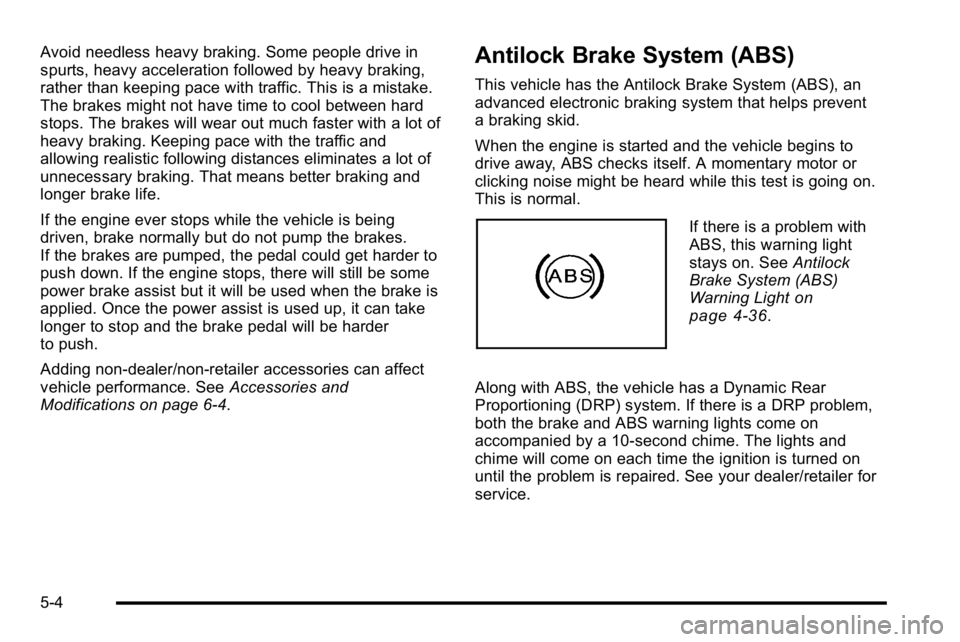
If there is a problem with
ABS, this warning light
stays on. See Antilock
Brake System (ABS)
Warning Light
on
page 4‑36.
Along with ABS, the vehicle has a Dynamic Rear
Proportioning (DRP) system. If there is a DRP problem,
both the brake and ABS warning lights come on
accompanied by a 10‐second chime. The lights and
chime will come on each time the ignition is turned on
until the problem is repaired. See your dealer/retailer for
service.
5-4
Page 320 of 550
Traction Control Operation
The traction control system is part of the StabiliTrak
system. Traction control limits wheel spin by reducing
engine power to the wheels (engine speed
management) and by applying brakes to each individual
wheel (brake-traction control) as necessary.
The traction control system is enabled automatically
when the vehicle is started. It will activate and the
StabiliTrak light will flash if it senses that any of the
wheels are spinning or beginning to lose traction while
driving. If traction control is turned off, only the
brake-traction control portion of traction control will
work. The engine speed management will be disabled.
In this mode, engine power is not reduced automatically
and the driven wheels can spin more freely. This can
cause the brake-traction control to activate constantly.
Notice:If the wheel(s) of one axle is allowed to spin
excessively while the StabiliTrak, ABS and brake
warning lights and any relevant DIC messages are
displayed, the transfer case could be damaged. The
repairs would not be covered by the vehicle
warranty. Reduce engine power and do not spin the
wheel(s) excessively while these lights and
messages are displayed. The traction control system may activate on dry or
rough roads or under conditions such as heavy
acceleration while turning or abrupt upshifts/downshifts
of the transmission. When this happens, a reduction in
acceleration may be noticed, or a noise or vibration may
be heard. This is normal.
If cruise control is being used when the system
activates, the StabiliTrak light will flash and cruise
control will automatically disengage. Cruise control may
be reengaged when road conditions allow. See
Cruise
Control on page 4‑7.
StabiliTrak may also turn off automatically if it
determines that a problem exists with the system. If the
problem does not clear itself after restarting the vehicle,
see your dealer/retailer for service.
Locking Rear Axle
Vehicles with a locking rear axle can give more traction
on snow, mud, ice, sand or gravel. It works like a
standard axle most of the time, but when traction is low,
this feature will allow the rear wheel with the most
traction to move the vehicle.
5-8
Page 329 of 550
When driving over obstacles or rough terrain, keep a
firm grip on the steering wheel. Ruts, troughs, or other
surface features can jerk the wheel out of your hands.
When driving over bumps, rocks, or other obstacles, the
wheels can leave the ground. If this happens, even with
one or two wheels, you cannot control the vehicle as
well or at all.
Because you will be on an unpaved surface, it is
especially important to avoid sudden acceleration,
sudden turns, or sudden braking.
Off-roading requires a different kind of alertness from
driving on paved roads and highways. There are no
road signs, posted speed limits, or signal lights. Use
good judgment about what is safe and what is not.Driving on Hills
Off-road driving often takes you up, down, or across a
hill. Driving safely on hills requires good judgment and
an understanding of what the vehicle can and cannot
do. There are some hills that simply cannot be driven,
no matter how well built the vehicle.
{WARNING:
Many hills are simply too steep for any vehicle.
If you drive up them, you will stall. If you drive
down them, you cannot control your speed. If you
drive across them, you will roll over. You could be
seriously injured or killed. If you have any doubt
about the steepness, do not drive the hill.
5-17
Page 494 of 550
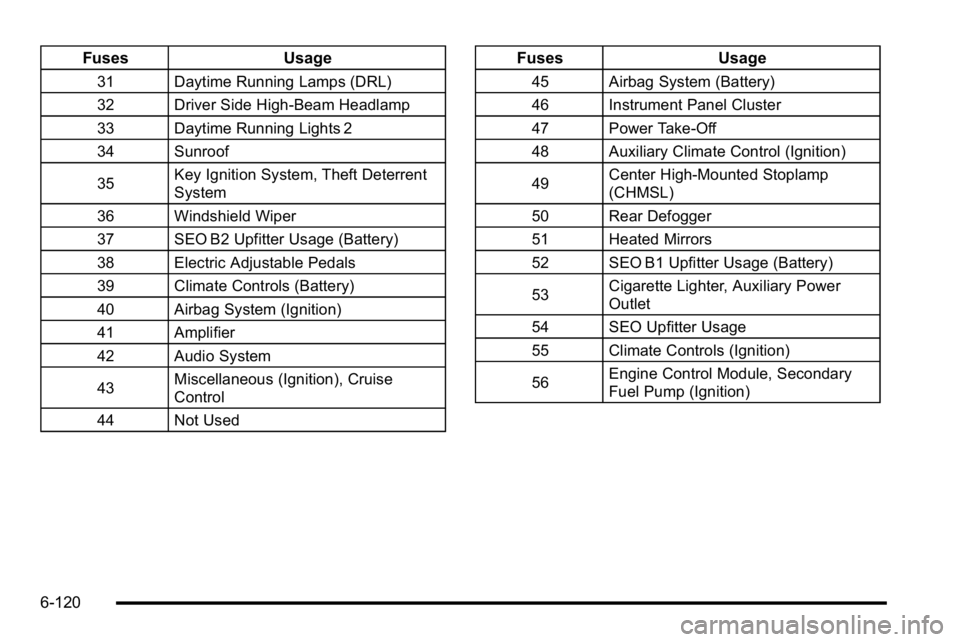
FusesUsage
31 Daytime Running Lamps (DRL)
32 Driver Side High-Beam Headlamp
33 Daytime Running Lights 2
34 Sunroof
35Key Ignition System, Theft Deterrent
System
36 Windshield Wiper
37 SEO B2 Upfitter Usage (Battery)
38 Electric Adjustable Pedals
39 Climate Controls (Battery)
40 Airbag System (Ignition)
41 Amplifier
42 Audio System
43 Miscellaneous (Ignition), Cruise
Control
44 Not Used
Fuses Usage
45 Airbag System (Battery)
46 Instrument Panel Cluster
47 Power Take-Off
48 Auxiliary Climate Control (Ignition)
49Center High-Mounted Stoplamp
(CHMSL)
50 Rear Defogger
51 Heated Mirrors
52 SEO B1 Upfitter Usage (Battery)
53 Cigarette Lighter, Auxiliary Power
Outlet
54 SEO Upfitter Usage
55 Climate Controls (Ignition)
56 Engine Control Module, Secondary
Fuel Pump (Ignition)
6-120
Page 543 of 550

L
Labeling, Tire Sidewall . . . . . . . . . . . . . . . . . . . . . . . . . . . . . 6-63
LampsCargo . . . . . . . . . . . . . . . . . . . . . . . . . . . . . . . . . . . . . . . . . . . . . 4-14
Daytime Running (DRL) . . . . . . . . . . . . . . . . . . . . . . . . . . 4-11
Dome . . . . . . . . . . . . . . . . . . . . . . . . . . . . . . . . . . . . . . . . . . . . . 4-13
Dome Lamp Override . . . . . . . . . . . . . . . . . . . . . . . . . . . . . 4-14
License Plate . . . . . . . . . . . . . . . . . . . . . . . . . . . . . . . . . . . . . 6-60
Malfunction Indicator . . . . . . . . . . . . . . . . . . . . . . . . . . . . . 4-38
Puddle . . . . . . . . . . . . . . . . . . . . . . . . . . . . . . . . . . . . . . . . . . . . 4-13
Reading . . . . . . . . . . . . . . . . . . . . . . . . . . . . . . . . . . . . . . . . . . 4-14
Lap Belt . . . . . . . . . . . . . . . . . . . . . . . . . . . . . . . . . . . . . . . . . . . 2-31
Lap-Shoulder Belt . . . . . . . . . . . . . . . . . . . . . . . . . . . . . . . . . 2-25
LATCH System for Child Restraints . . . . . . . . . . . . . . . . 2-43
Lighting Entry . . . . . . . . . . . . . . . . . . . . . . . . . . . . . . . . . . . . . . . . . . . . . 4-14
Exit . . . . . . . . . . . . . . . . . . . . . . . . . . . . . . . . . . . . . . . . . . . . . . . 4-14
Lights Airbag Readiness . . . . . . . . . . . . . . . . . . . . . . . . . . . . . . . . . 4-31
Antilock Brake System (ABS) Warning . . . . . . . . . . . . 4-36
Brake System Warning . . . . . . . . . . . . . . . . . . . . . . . . . . . 4-34
Charging System . . . . . . . . . . . . . . . . . . . . . . . . . . . . . . . . . 4-33
Cruise Control . . . . . . . . . . . . . . . . . . . . . . . . . . . . . . . . . . . . 4-42
Exterior Lamps . . . . . . . . . . . . . . . . . . . . . . . . . . . . . . . . . . . 4-10 Lights (cont.)
Flash-to-Pass . . . . . . . . . . . . . . . . . . . . . . . . . . . . . . . . . . . . . . 4-5
Fog Lamps . . . . . . . . . . . . . . . . . . . . . . . . . . . . . . . . . . . . . . . 4-42
High/Low Beam Changer . . . . . . . . . . . . . . . . . . . . . . . . . . 4-5
Highbeam On . . . . . . . . . . . . . . . . . . . . . . . . . . . . . . . . . . . . . 4-42
Oil Pressure . . . . . . . . . . . . . . . . . . . . . . . . . . . . . . . . . . . . . . 4-41
On Reminder . . . . . . . . . . . . . . . . . . . . . . . . . . . . . . . . . . . . . 4-11
Passenger Airbag Status Indicator . . . . . . . . . . . . . . . . 4-32
Safety Belt Reminders . . . . . . . . . . . . . . . . . . . . . . . . . . . . 4-30
Security . . . . . . . . . . . . . . . . . . . . . . . . . . . . . . . . . . . . . . . . . . 4-42
StabiliTrak
®Indicator . . . . . . . . . . . . . . . . . . . . . . . . . . . . . 4-36
Tire Pressure . . . . . . . . . . . . . . . . . . . . . . . . . . . . . . . . . . . . . 4-37
Tow/Haul Mode . . . . . . . . . . . . . . . . . . . . . . . . . . . . . . . . . . . 4-43
Loading Your Vehicle . . . . . . . . . . . . . . . . . . . . . . . . . . . . . . 5-31
Locking Rear Axle . . . . . . . . . . . . . . . . . . . . . . . . . . . . . . . . . . .5-8
Locks
Delayed Locking . . . . . . . . . . . . . . . . . . . . . . . . . . . . . . . . . . 3-11
Door . . . . . . . . . . . . . . . . . . . . . . . . . . . . . . . . . . . . . . . . . . . . . . 3-10
Lockout Protection . . . . . . . . . . . . . . . . . . . . . . . . . . . . . . . . 3-13
Power Door . . . . . . . . . . . . . . . . . . . . . . . . . . . . . . . . . . . . . . . 3-11
Programmable Automatic Door Locks . . . . . . . . . . . . 3-11
Rear Door Security Locks . . . . . . . . . . . . . . . . . . . . . . . . 3-12
Loss of Control . . . . . . . . . . . . . . . . . . . . . . . . . . . . . . . . . . . . 5-11
Lower Anchors and Tethers for Children . . . . . . . . . . . 2-43
Lumbar
Power Controls . . . . . . . . . . . . . . . . . . . . . . . . . . . . . . . . . . . . 2-4
i - 9
Page 550 of 550

V
VehicleControl . . . . . . . . . . . . . . . . . . . . . . . . . . . . . . . . . . . . . . . . . . . . 5-3
Loading . . . . . . . . . . . . . . . . . . . . . . . . . . . . . . . . . . . . . . . . . . . 5-31
Remote Start . . . . . . . . . . . . . . . . . . . . . . . . . . . . . . . . . . . . . . 3-7
Running While Parked . . . . . . . . . . . . . . . . . . . . . . . . . . . . 3-38
Symbols . . . . . . . . . . . . . . . . . . . . . . . . . . . . . . . . . . . . . . . . . . . . . iv
Vehicle Customization, DIC . . . . . . . . . . . . . . . . . . . . . . . . 4-67
Vehicle Data Recording and Privacy . . . . . . . . . . . . . . . 8-18
Vehicle Identification Number (VIN) . . . . . . . . . . . . . . . . . . . . . . . . . . . . . . . . . . . . 6-113
Service Parts Identification Label . . . . . . . . . . . . . . . . 6-113
Ventilation Adjustment . . . . . . . . . . . . . . . . . . . . . . . . . . . . . 4-27
Visors . . . . . . . . . . . . . . . . . . . . . . . . . . . . . . . . . . . . . . . . . . . . . 3-17
Voltmeter Gage . . . . . . . . . . . . . . . . . . . . . . . . . . . . . . . . . . . . 4-33
W
Warning Lights, Gages, and Indicators . . . . . . . . . . . . 4-27
Warnings DIC Warnings and Messages . . . . . . . . . . . . . . . . . . . . . 4-57
Hazard Flashers . . . . . . . . . . . . . . . . . . . . . . . . . . . . . . . . . . . 4-3
Safety and Symbols . . . . . . . . . . . . . . . . . . . . . . . . . . . . . . . . . iv Wheels
Alignment and Tire Balance . . . . . . . . . . . . . . . . . . . . . . 6-84
Different Size . . . . . . . . . . . . . . . . . . . . . . . . . . . . . . . . . . . . . 6-82
Replacement . . . . . . . . . . . . . . . . . . . . . . . . . . . . . . . . . . . . . 6-84
When It Is Time for New Tires . . . . . . . . . . . . . . . . . . . . . 6-79
Where to Put the Child Restraint . . . . . . . . . . . . . . . . . . . 2-42
Windows . . . . . . . . . . . . . . . . . . . . . . . . . . . . . . . . . . . . . . . . . . 3-15 Manual . . . . . . . . . . . . . . . . . . . . . . . . . . . . . . . . . . . . . . . . . . . 3-16
Power . . . . . . . . . . . . . . . . . . . . . . . . . . . . . . . . . . . . . . . . . . . . 3-16
Sliding Rear . . . . . . . . . . . . . . . . . . . . . . . . . . . . . . . . . . . . . . 3-17
Windshield
Washer . . . . . . . . . . . . . . . . . . . . . . . . . . . . . . . . . . . . . . . . . . . . 4-6
Washer Fluid . . . . . . . . . . . . . . . . . . . . . . . . . . . . . . . . . . . . . 6-39
Wiper Blade Replacement . . . . . . . . . . . . . . . . . . . . . . . . 6-61
Wiper Blades, Cleaning . . . . . . . . . . . . . . . . . . . . . . . . . . 6-110
Wiper Fuses . . . . . . . . . . . . . . . . . . . . . . . . . . . . . . . . . . . . . 6-114
Wipers . . . . . . . . . . . . . . . . . . . . . . . . . . . . . . . . . . . . . . . . . . . . . 4-6
Winter Driving . . . . . . . . . . . . . . . . . . . . . . . . . . . . . . . . . . . . . 5-27
X
XM Radio Messages . . . . . . . . . . . . . . . . . . . . . . . . . . . . . 4-114
XM™ Satellite Radio
Antenna . . . . . . . . . . . . . . . . . . . . . . . . . . . . . . . . . . . . . . . . .4-140
i - 16