instrument panel GMC SIERRA DENALI 2010 Repair Manual
[x] Cancel search | Manufacturer: GMC, Model Year: 2010, Model line: SIERRA DENALI, Model: GMC SIERRA DENALI 2010Pages: 550, PDF Size: 4.17 MB
Page 408 of 550
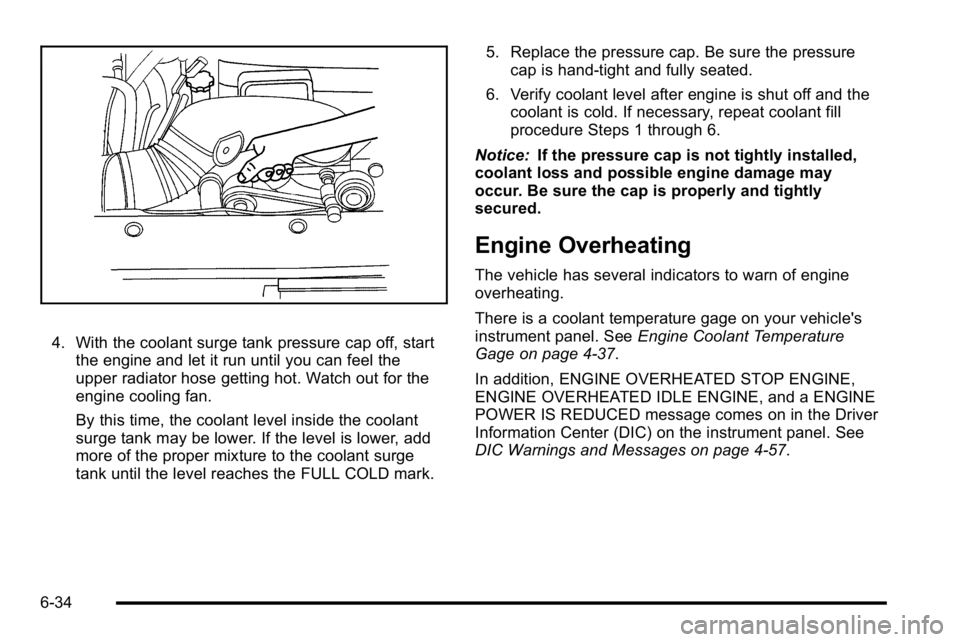
4. With the coolant surge tank pressure cap off, startthe engine and let it run until you can feel the
upper radiator hose getting hot. Watch out for the
engine cooling fan.
By this time, the coolant level inside the coolant
surge tank may be lower. If the level is lower, add
more of the proper mixture to the coolant surge
tank until the level reaches the FULL COLD mark. 5. Replace the pressure cap. Be sure the pressure
cap is hand-tight and fully seated.
6. Verify coolant level after engine is shut off and the coolant is cold. If necessary, repeat coolant fill
procedure Steps 1 through 6.
Notice: If the pressure cap is not tightly installed,
coolant loss and possible engine damage may
occur. Be sure the cap is properly and tightly
secured.
Engine Overheating
The vehicle has several indicators to warn of engine
overheating.
There is a coolant temperature gage on your vehicle's
instrument panel. See Engine Coolant Temperature
Gage on page 4‑37.
In addition, ENGINE OVERHEATED STOP ENGINE,
ENGINE OVERHEATED IDLE ENGINE, and a ENGINE
POWER IS REDUCED message comes on in the Driver
Information Center (DIC) on the instrument panel. See
DIC Warnings and Messages on page 4‑57.
6-34
Page 448 of 550
When the malfunction indicator is illuminated, the
system may not be able to detect or signal low tire
pressure as intended. TPMS malfunctions may occur
for a variety of reasons, including the installation of
replacement or alternate tires or wheels on the vehicle
that prevent the TPMS from functioning properly.
Always check the TPMS malfunction telltale after
replacing one or more tires or wheels on your vehicle to
ensure that the replacement or alternate tires and
wheels allow the TPMS to continue to function properly.
SeeTire Pressure Monitor Operation
on page 6‑74for
additional information.
Federal Communications Commission
(FCC) and Industry and Science Canada
See Radio Frequency Statementon page 8‑20for
information regarding Part 15 of the Federal
Communications Commission (FCC) Rules and
RSS-210/211 of Industry and Science Canada.
Tire Pressure Monitor Operation
This vehicle may have a Tire Pressure Monitor System
(TPMS). The TPMS is designed to warn the driver when
a low tire pressure condition exists. TPMS sensors are
mounted onto each tire and wheel assembly, excluding
the spare tire and wheel assembly. The TPMS sensors
monitor the air pressure in the vehicle's tires and
transmits the tire pressure readings to a receiver
located in the vehicle.
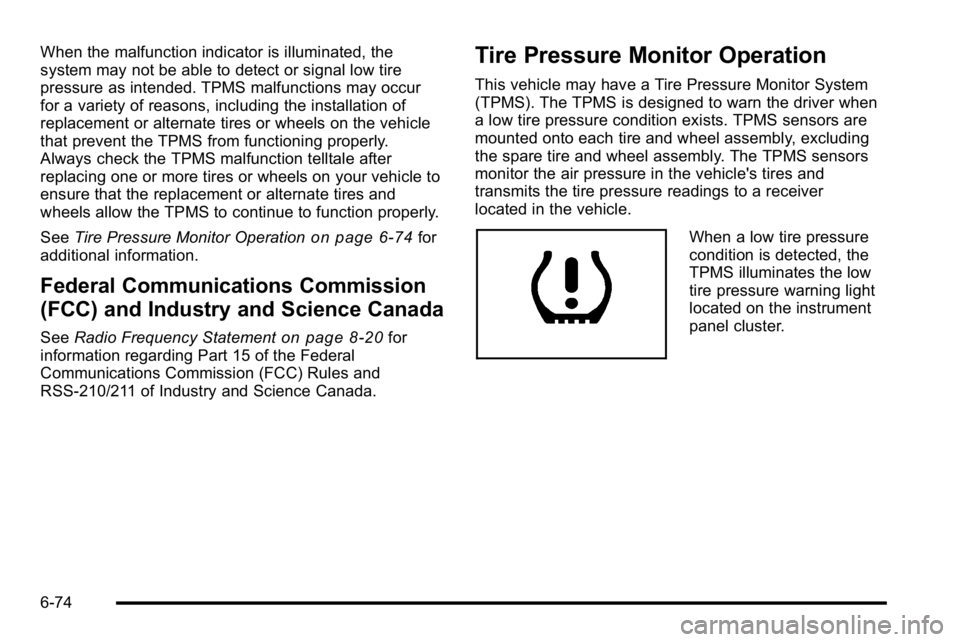
When a low tire pressure
condition is detected, the
TPMS illuminates the low
tire pressure warning light
located on the instrument
panel cluster.
6-74
Page 481 of 550
Leather
A soft cloth dampened with water can be used to
remove dust. If a more thorough cleaning is necessary,
a soft cloth dampened with a mild soap solution can be
used. Allow the leather to dry naturally. Do not use heat
to dry. Never use steam to clean leather. Never use
spot lifters or spot removers on leather. Many
commercial leather cleaners and coatings that are sold
to preserve and protect leather may permanently
change the appearance and feel of the leather and are
not recommended. Do not use silicone or wax-based
products, or those containing organic solvents to clean
the vehicle's interior because they can alter the
appearance by increasing the gloss in a non-uniform
manner. Never use shoe polish on leather.
Instrument Panel, Vinyl, and Other
Plastic Surfaces
A soft cloth dampened with water may be used to
remove dust. If a more thorough cleaning is necessary,
a clean soft cloth dampened with a mild soap solution
can be used to gently remove dust and dirt. Never use
spot lifters or removers on plastic surfaces. Many
commercial cleaners and coatings that are sold to
preserve and protect soft plastic surfaces may
permanently change the appearance and feel of the
interior and are not recommended. Do not use silicone
or wax-based products, or those containing organic
solvents to clean the vehicle's interior because they can
alter the appearance by increasing the gloss in a
non-uniform manner.
Some commercial products may increase gloss on the
instrument panel. The increase in gloss may cause
annoying reflections in the windshield and even make it
difficult to see through the windshield under certain
conditions.
6-107
Page 487 of 550
Vehicle Identification
Vehicle Identification Number (VIN)
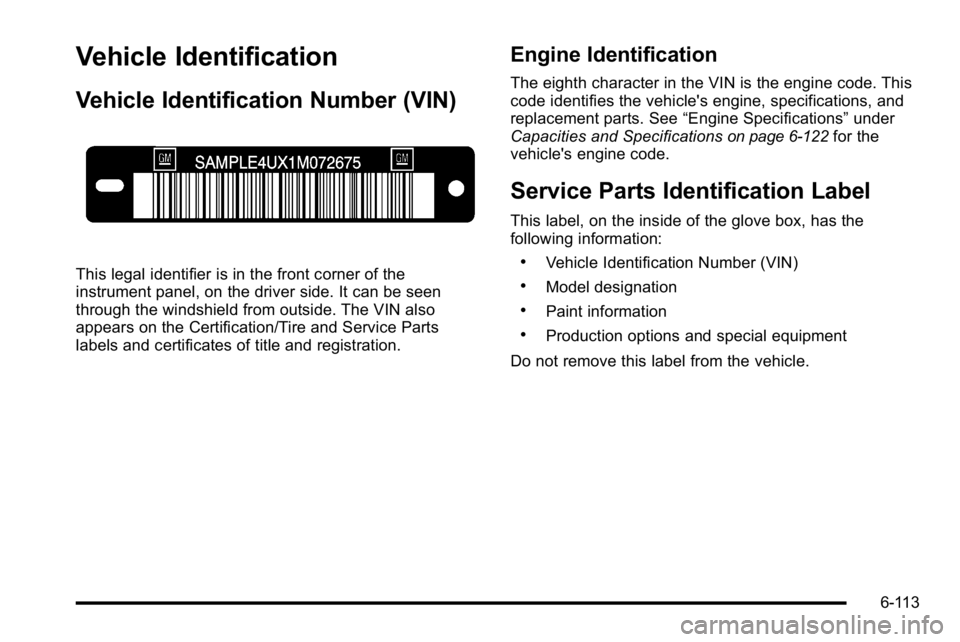
This legal identifier is in the front corner of the
instrument panel, on the driver side. It can be seen
through the windshield from outside. The VIN also
appears on the Certification/Tire and Service Parts
labels and certificates of title and registration.
Engine Identification
The eighth character in the VIN is the engine code. This
code identifies the vehicle's engine, specifications, and
replacement parts. See“Engine Specifications”under
Capacities and Specifications
on page 6‑122for the
vehicle's engine code.
Service Parts Identification Label
This label, on the inside of the glove box, has the
following information:
.Vehicle Identification Number (VIN)
.Model designation
.Paint information
.Production options and special equipment
Do not remove this label from the vehicle.
6-113
Page 489 of 550
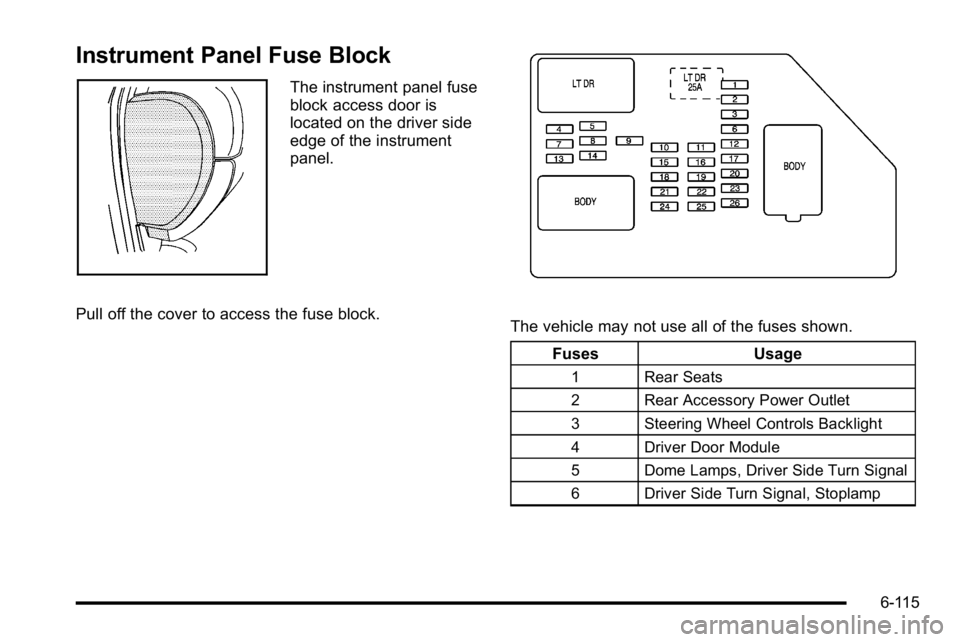
Instrument Panel Fuse Block
The instrument panel fuse
block access door is
located on the driver side
edge of the instrument
panel.
Pull off the cover to access the fuse block.
The vehicle may not use all of the fuses shown. Fuses Usage
1 Rear Seats
2 Rear Accessory Power Outlet
3 Steering Wheel Controls Backlight
4 Driver Door Module
5 Dome Lamps, Driver Side Turn Signal
6 Driver Side Turn Signal, Stoplamp
6-115
Page 490 of 550
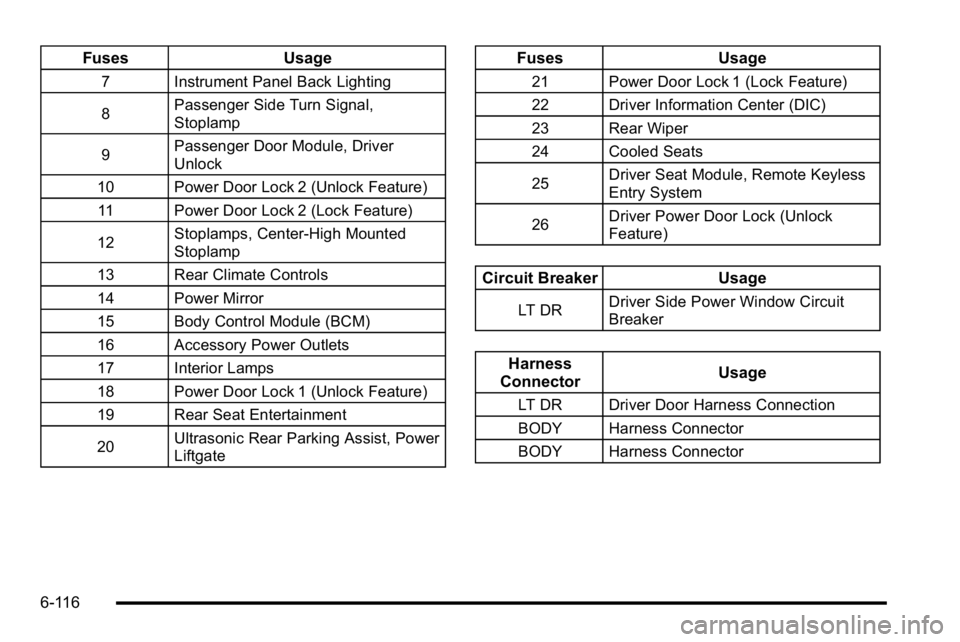
FusesUsage
7 Instrument Panel Back Lighting
8Passenger Side Turn Signal,
Stoplamp
9 Passenger Door Module, Driver
Unlock
10 Power Door Lock 2 (Unlock Feature) 11 Power Door Lock 2 (Lock Feature)
12 Stoplamps, Center-High Mounted
Stoplamp
13 Rear Climate Controls
14 Power Mirror
15 Body Control Module (BCM)
16 Accessory Power Outlets
17 Interior Lamps
18 Power Door Lock 1 (Unlock Feature)
19 Rear Seat Entertainment
20 Ultrasonic Rear Parking Assist, Power
Liftgate
Fuses
Usage
21 Power Door Lock 1 (Lock Feature)
22 Driver Information Center (DIC)
23 Rear Wiper
24 Cooled Seats
25Driver Seat Module, Remote Keyless
Entry System
26 Driver Power Door Lock (Unlock
Feature)
Circuit Breaker
Usage
LT DRDriver Side Power Window Circuit
Breaker
Harness
Connector Usage
LT DR Driver Door Harness Connection
BODY Harness Connector
BODY Harness Connector
6-116
Page 491 of 550
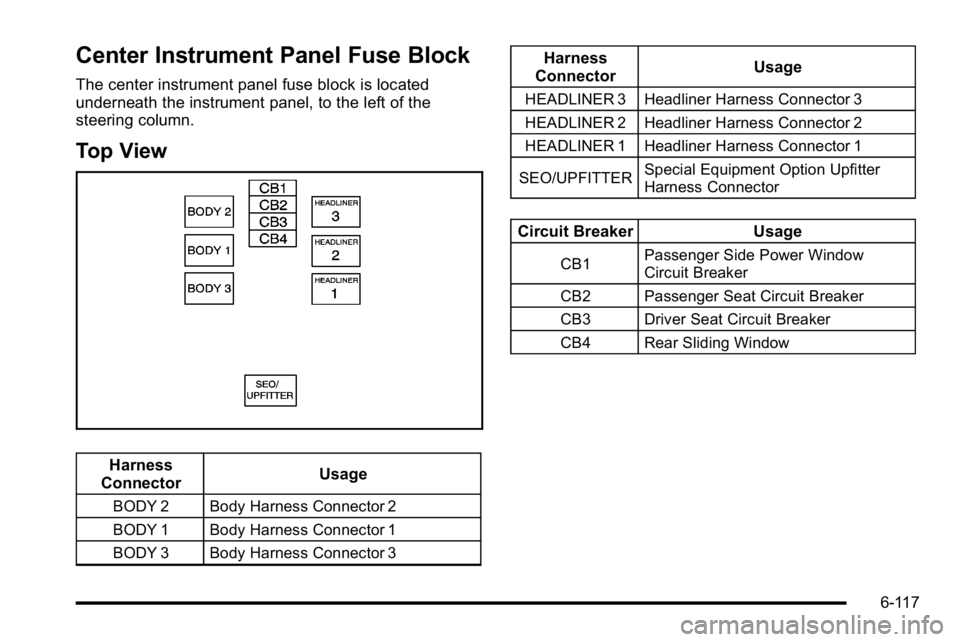
Center Instrument Panel Fuse Block
The center instrument panel fuse block is located
underneath the instrument panel, to the left of the
steering column.
Top View
Harness
Connector Usage
BODY 2 Body Harness Connector 2
BODY 1 Body Harness Connector 1
BODY 3 Body Harness Connector 3
Harness
Connector Usage
HEADLINER 3 Headliner Harness Connector 3
HEADLINER 2 Headliner Harness Connector 2
HEADLINER 1 Headliner Harness Connector 1
SEO/UPFITTER Special Equipment Option Upfitter
Harness Connector
Circuit Breaker
Usage
CB1Passenger Side Power Window
Circuit Breaker
CB2 Passenger Seat Circuit Breaker
CB3 Driver Seat Circuit Breaker
CB4 Rear Sliding Window
6-117
Page 494 of 550
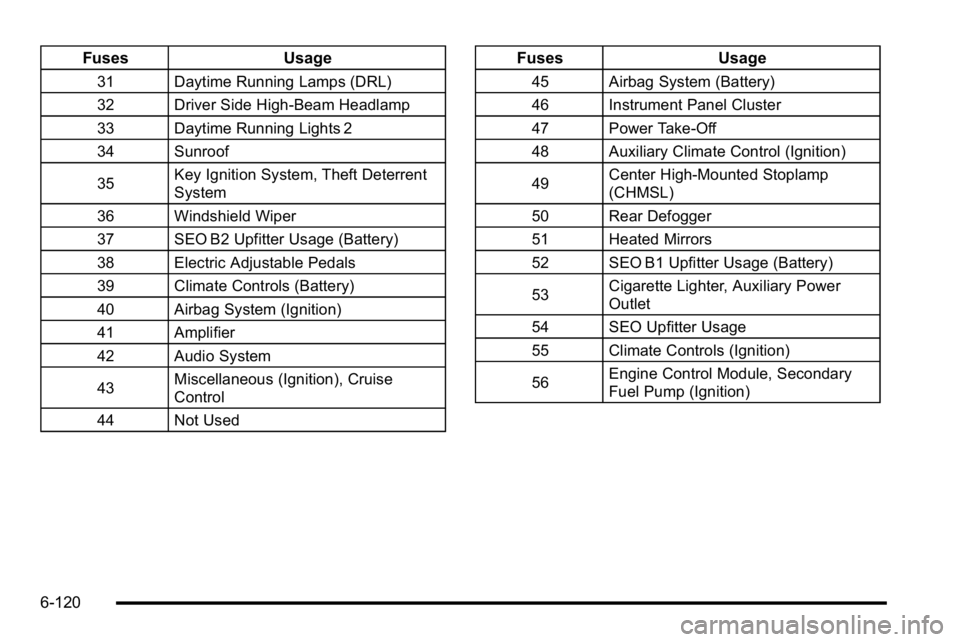
FusesUsage
31 Daytime Running Lamps (DRL)
32 Driver Side High-Beam Headlamp
33 Daytime Running Lights 2
34 Sunroof
35Key Ignition System, Theft Deterrent
System
36 Windshield Wiper
37 SEO B2 Upfitter Usage (Battery)
38 Electric Adjustable Pedals
39 Climate Controls (Battery)
40 Airbag System (Ignition)
41 Amplifier
42 Audio System
43 Miscellaneous (Ignition), Cruise
Control
44 Not Used
Fuses Usage
45 Airbag System (Battery)
46 Instrument Panel Cluster
47 Power Take-Off
48 Auxiliary Climate Control (Ignition)
49Center High-Mounted Stoplamp
(CHMSL)
50 Rear Defogger
51 Heated Mirrors
52 SEO B1 Upfitter Usage (Battery)
53 Cigarette Lighter, Auxiliary Power
Outlet
54 SEO Upfitter Usage
55 Climate Controls (Ignition)
56 Engine Control Module, Secondary
Fuel Pump (Ignition)
6-120
Page 516 of 550
Customer Assistance and
Information
Customer Satisfaction Procedure
Your satisfaction and goodwill are important to your
dealer and to GMC. Normally, any concerns with the
sales transaction or the operation of the vehicle will be
resolved by the dealer's sales or service departments.
Sometimes, however, despite the best intentions of all
concerned, misunderstandings can occur. If your
concern has not been resolved to your satisfaction, the
following steps should be taken:
STEP ONE :Discuss your concern with a member of
dealership management. Normally, concerns can be
quickly resolved at that level. If the matter has already
been reviewed with the sales, service or parts manager,
contact the owner of the dealership or the general
manager. STEP TWO :
If after contacting a member of dealership
management, it appears your concern cannot be
resolved by the dealership without further help, in the
U.S., call the GMC Consumer Relations Manager at
1-800-GMC-8782 (1-800-462-8782, Customer
Assistance prompt). In Canada, call General Motors of
Canada Customer Communication at 1-800-263-3777
(English) or 1-800-263-7854 (French).
We encourage you to call the toll-free number in order
to give your inquiry prompt attention. Have the following
information available to give the Customer Assistance
Representative:
.Vehicle Identification Number (VIN). This is
available from the vehicle registration or title, or the
plate at the top left of the instrument panel and
visible through the windshield.
.Dealership name and location.
.Vehicle delivery date and present mileage.
When contacting GMC, remember that your concern will
likely be resolved at a dealer's facility. That is why we
suggest following Step One first.
8-2
Page 535 of 550

A
Accessories and Modifications . . . . . . . . . . . . . . . . . . . . . . .6-4
Accessory Power . . . . . . . . . . . . . . . . . . . . . . . . . . . . . . . . . . 3-24
Accessory Power Outlets . . . . . . . . . . . . . . . . . . . . . . . . . . 4-16
Active Fuel Management™. . . . . . . . . . . . . . . . . . . . . . . . 3-27
Add-On Electrical Equipment . . . . . . . . . . . . . . . . . . . . . 6-114
Additives, Fuel . . . . . . . . . . . . . . . . . . . . . . . . . . . . . . . . . . . . . . .6-8
Adjustable Throttle and Brake Pedal . . . . . . . . . . . . . . . 3-26
Air Cleaner/Filter, Engine . . . . . . . . . . . . . . . . . . . . . . . . . . 6-22
Air Conditioning . . . . . . . . . . . . . . . . . . . . . . . . . . . . . 4-17, 4-20
Airbag Adding Equipment to Your Airbag-EquippedVehicle . . . . . . . . . . . . . . . . . . . . . . . . . . . . . . . . . . . . . . . . . . 2-72
Airbag System How Does an Airbag Restrain? . . . . . . . . . . . . . . . . . . . 2-63
Passenger Sensing System . . . . . . . . . . . . . . . . . . . . . . 2-66
Servicing Your Airbag-Equipped Vehicle . . . . . . . . . . 2-71
What Makes an Airbag Inflate? . . . . . . . . . . . . . . . . . . . 2-63
What Will You See After an Airbag Inflates? . . . . . . 2-64
When Should an Airbag Inflate? . . . . . . . . . . . . . . . . . . 2-61
Where Are the Airbags? . . . . . . . . . . . . . . . . . . . . . . . . . . 2-58 Airbags
Passenger Status Indicator . . . . . . . . . . . . . . . . . . . . . . . 4-32
Readiness Light . . . . . . . . . . . . . . . . . . . . . . . . . . . . . . . . . . 4-31
System Check . . . . . . . . . . . . . . . . . . . . . . . . . . . . . . . . . . . . 2-56
All-Wheel Drive . . . . . . . . . . . . . . . . . . . . . . . . . . . . . . . . . . . . 6-49
All-Wheel-Drive (AWD) System . . . . . . . . . . . . . . . . . . . . . .5-9
Antenna Fixed Mast . . . . . . . . . . . . . . . . . . . . . . . . . . . . . . . . . . . . . .4-140
Antenna, XM™ Satellite Radio Antenna
System . . . . . . . . . . . . . . . . . . . . . . . . . . . . . . . . . . . . . . . . . . 4-140
Antilock Brake System (ABS) . . . . . . . . . . . . . . . . . . . . . . . .5-4
Warning Light . . . . . . . . . . . . . . . . . . . . . . . . . . . . . . . . . . . . . 4-36
Appearance Care Aluminum or Chrome-Plated Wheels . . . . . . . . . . . . 6-110
Care of Safety Belts . . . . . . . . . . . . . . . . . . . . . . . . . . . . .6-108
Chemical Paint Spotting . . . . . . . . . . . . . . . . . . . . . . . . . 6-112
Cleaning Exterior Lamps/Lenses . . . . . . . . . . . . . . . .6-109
Fabric/Carpet . . . . . . . . . . . . . . . . . . . . . . . . . . . . . . . . . . . .6-106
Finish Care . . . . . . . . . . . . . . . . . . . . . . . . . . . . . . . . . . . . . .6-109
Finish Damage . . . . . . . . . . . . . . . . . . . . . . . . . . . . . . . . . . 6-112
Instrument Panel, Vinyl, and Other PlasticSurfaces . . . . . . . . . . . . . . . . . . . . . . . . . . . . . . . . . . . . . . .6-107
Interior Cleaning . . . . . . . . . . . . . . . . . . . . . . . . . . . . . . . . .6-105
i - 1