ECO mode GMC SIERRA DENALI 2015 User Guide
[x] Cancel search | Manufacturer: GMC, Model Year: 2015, Model line: SIERRA DENALI, Model: GMC SIERRA DENALI 2015Pages: 439, PDF Size: 4.68 MB
Page 143 of 439
Black plate (34,1)GMC 2015i Sierra Denali Owner Manual (GMNA-Localizing-U.S./Canada/
Mexico-8431500) - 2015 - crc - 6/20/14
5-34 Instruments and Controls
Engine Oil Messages CHANGE ENGINE OIL SOON This message displays when the
engine oil needs to be changed.
When you change the engine oil, be
sure to reset the CHANGE ENGINE
OIL SOON message. See Engine
Oil Life System on page 10-11 for
information on how to reset the
message. See Engine Oil on
page 10-8 and Maintenance
Schedule on page 11-3 .
ENGINE OIL LOW ADD OIL On some vehicles, this message
displays when the engine oil level
may be too low. Check the oil level
before filling to the recommended
level. If the oil is not low and this
message remains on, take the
vehicle to your dealer for service.
See Engine Oil on page 10-8 . ENGINE OIL HOT IDLE
ENGINE This message displays when the
engine oil becomes hotter than the
normal operating temperature. Stop
and allow the vehicle to idle until it
cools down. See Engine Coolant
Temperature Gauge on page 5-13 .
OIL PRESSURE LOW STOP
ENGINE This message displays if low oil
pressure levels occur. Stop the
vehicle as soon as safely possible
and do not operate it until the cause
of the low oil pressure has been
corrected. Check the oil as soon as
possible and have the vehicle
serviced by your dealer. See Engine
Oil on page 10-8 .
Engine Power Messages ENGINE POWER IS REDUCED
This message displays and a chime
may sound when the cooling system
temperature gets too hot and the engine further enters the engine
coolant protection mode. See
Engine Overheating on page 10-21
for more information.
This message also displays when
the vehicle's engine power is
reduced. Reduced engine power
can affect the vehicle's ability to
accelerate. If this message is on,
but there is no reduction in
performance, proceed to your
destination. The performance may
be reduced the next time the vehicle
is driven. The vehicle may be driven
at a reduced speed while this
message is on, but acceleration and
speed may be reduced. Anytime
this message stays on, the vehicle
should be taken to your dealer for
service as soon as possible.
Page 147 of 439
Black plate (38,1)GMC 2015i Sierra Denali Owner Manual (GMNA-Localizing-U.S./Canada/
Mexico-8431500) - 2015 - crc - 6/20/14
5-38 Instruments and Controls If this happens, remove the object
from the seat or buckle the
safety belt.
If the driver or front outboard
passenger unbuckles their safety
belt while driving, the safety belt
reminder chime and light(s) will
come on. See Safety Belt
Reminders on page 5-15 .
SHIFTER UNLOCKED. BRAKE
TO SHIFT This message displays when the
Safety Belt Assurance System times
out and allows the vehicle to be
shifted out of P (Park) after
30 seconds following brake apply.
See “ Safety Belts ” and “ Child
Restraints ” in the Index for
information about the importance of
proper restraint use.
This system may not function
properly if the airbag readiness light
is on. See Airbag Readiness Light
on page 5-16 . Security Messages SERVICE THEFT DETERRENT
SYSTEM This message displays when there
is a problem with the theft-deterrent
system. The vehicle may or may not
restart, so you may want to take the
vehicle to your dealer before turning
off the engine. See Immobilizer
Operation on page 2-13 .
Steering System
Messages STEERING ASSIST IS
REDUCED DRIVE WITH CARE This message may display if a
problem occurs with the electric
power steering system. If this
message appears, steering effort
may be slightly higher than normal.
The vehicle is still safe to drive. Use
caution while in reduced assist
mode. If this message is persistent or appears repeatedly, take the
vehicle to your dealer for service.
See Steering on page 9-4 .
SERVICE POWER STEERING This message displays when there
is a problem with electric power
steering. Take the vehicle to your
dealer for service. See Steering on
page 9-4 .
Tire Messages SERVICE TIRE MONITOR
SYSTEM If equipped with the Tire Pressure
Monitor System (TPMS), this
message displays if a part on the
system is not working properly. The
tire pressure light also flashes and
then remains on during the same
ignition cycle. See Tire Pressure
Light on page 5-25 . Several
conditions may cause this message
to appear. See Tire Pressure
Monitor Operation on page 10-62 .
Page 150 of 439
Black plate (41,1)GMC 2015i Sierra Denali Owner Manual (GMNA-Localizing-U.S./Canada/
Mexico-8431500) - 2015 - crc - 6/20/14
Instruments and Controls 5-41TRANSMISSION HOT IDLE
ENGINE This message displays and a chime
may sound if the transmission fluid
in the vehicle gets hot. Driving with
the transmission fluid temperature
high can cause damage to the
vehicle. Stop the vehicle and let it
idle to allow the transmission to
cool. This message clears and the
chime stops when the fluid
temperature reaches a safe level.
When towing, use Tow/Haul Mode
to prevent damage to the engine or
transmission. See Tow/Haul Mode
on page 9-39 .
VEHICLE IN 4WD LOW This message will display if the
vehicle is driven in 4
n for about
10 minutes above 72 km/h (45 mph). Vehicle Reminder
Messages CHECK TRAILER WIRING On vehicles with the Integrated
Trailer Brake Control (ITBC) system,
this message may display and a
chime may sound when one of the
following conditions exists: .
A trailer with electric brakes
becomes disconnected from the
vehicle.
‐ If the disconnect occurs while
the vehicle is stopped, this
message clears itself after a
short time.
‐ If the disconnect occurs while
the vehicle is moving, this
message stays on until the
ignition is turned off. .
There is a short in the wiring to
the electric trailer brakes.
When this message displays, power
is no longer available to the trailer
brakes. As soon as it is safe to do so,
carefully pull the vehicle over to the
side of the road and turn the ignition
off. Check the wiring connection to
the trailer and turn the ignition back
on. This message clears if the trailer
is reconnected. This message also
clears if you acknowledge it. If this
message still displays, either the
vehicle or the trailer needs service.
See your dealer.
See “ Integrated Trailer Brake
Control System ” under Towing
Equipment on page 9-78 .
ICE POSSIBLE DRIVE
WITH CARE This message displays when ice
conditions are possible.
TRAILER CONNECTED
On vehicles with the Integrated
Trailer Brake Control (ITBC) system,
this message displays briefly when
a trailer with electric or electric over
hydraulic brakes is first connected
to the vehicle.
Page 152 of 439
Black plate (43,1)GMC 2015i Sierra Denali Owner Manual (GMNA-Localizing-U.S./Canada/
Mexico-8431500) - 2015 - crc - 6/20/14
Instruments and Controls 5-43Personalization Menus
The following list of menu items may
be available: .
Time and Date .
Language (Language) .
Valet Mode .
Teen Driver .
Radio .
Vehicle .
Bluetooth .
Voice .
Display .
Rear Camera .
Return to Factory Settings .
Software Information
Detailed information for each menu
follows.
Time and Date
Manually set the time and date. See
Clock on page 5-4 . Language (Language) Select Language, then select from
the available language(s).
The selected language will display
on the system, and voice
recognition will reflect the selected
language.
Valet Mode (If Equipped) This will lock the infotainment
system and steering wheel controls.
It may also limit top speed, power,
and access to vehicle storage
locations (if equipped).
To enable valet mode:
1. Enter a four-digit code on the
keypad.
2. Press Enter to go to the
confirmation screen.
3. Re-enter the four-digit code.
Press LOCK or UNLOCK to lock or
unlock the system. Press Back to go
back to the previous menu. Teen Driver (If Equipped) Press and the following may
display: .
View Report Card .
Manage Settings .
Change PIN .
Key Registration .
Clear All Teen Keys/PIN
View Report Card
This allows the driver ’ s driving
habits to be viewed. See “ Teen
Driver ” in “ Settings ” in the
infotainment manual.
Manage Settings
Press and the following may
display: .
Audio Volume Limit .
Teen Driver Speed Limiter .
Teen Driver Speed Warning
Page 159 of 439
Black plate (50,1)GMC 2015i Sierra Denali Owner Manual (GMNA-Localizing-U.S./Canada/
Mexico-8431500) - 2015 - crc - 6/20/14
5-50 Instruments and Controls Do not use the Universal Remote
system with any garage door opener
that does not have the stop and
reverse feature. This includes any
garage door opener model
manufactured before April 1, 1982.
Read the instructions completely
before programming the Universal
Remote system. It may help to have
another person assist with the
programming process.
Keep the original hand-held
transmitter for use in other vehicles
as well as for future programming.
Erase the programming when
vehicle ownership is terminated.
See “ Erasing Universal Remote
System Buttons ” later in this
section.
To program a garage door opener,
park outside directly in line with and
facing the garage door opener
receiver. Clear all people and
objects near the garage door. Make sure the hand-held transmitter
has a new battery for quick and
accurate transmission of the
radio-frequency signal.
Programming the Universal
Remote System For questions or help programming
the Universal Remote system, call
1-800-355-3515 or see
www.homelink.com.
Programming involves
time-sensitive actions, and may time
out causing the procedure to be
repeated.
To program up to three devices:
1. Hold the end of the hand-held
transmitter about 3 to 8 cm (1 to
3 in) away from the Universal
Remote system buttons with the
indicator light in view. The
hand-held transmitter was
supplied by the manufacturer of
the garage door opener receiver. 2. At the same time, press and
hold both the hand-held
transmitter button and one of the
three Universal Remote system
buttons to be used to operate
the garage door. Do not release
either button until the indicator
light goes from a slow to a rapid
flashing light. Then release both
buttons.
Some garage door openers may
require substitution of Step 2
with the procedure under “ Radio
Signals for Canada and Some
Gate Operators ” later in this
section.
3. Press and hold the newly
programmed Universal Remote
system button for five seconds
while watching the indicator light
and garage door activation. .
If the indicator light stays on
continuously or the garage
door moves when the
button is pressed, then
Page 165 of 439
Black plate (4,1)GMC 2015i Sierra Denali Owner Manual (GMNA-Localizing-U.S./Canada/
Mexico-8431500) - 2015 - crc - 6/20/14
6-4 Lighting When it is bright enough outside,
the headlamps will turn off or may
change to Daytime Running
Lamps (DRL).
The automatic headlamp system
turns off when the exterior lamp
control is turned to
O or the ignition
is off.
Lights On with Wipers If the windshield wipers are
activated in daylight with the engine
on, and the exterior lamp control is
in AUTO, the headlamps, parking
lamps, and other exterior lamps
come on. The transition time for the
lamps coming on varies based on
wiper speed. When the wipers are
not operating, these lamps turn off.
Move the exterior lamp control to
Oor
; to disable this feature. Hazard Warning Flashers
| (Hazard Warning Flashers):
Press this button to make the front
and rear turn signal lamps flash on
and off. Press again to turn the
flashers off.
When the hazard warning flashers
are on, the vehicle's turn signals will
not work. Turn and Lane-Change
Signals
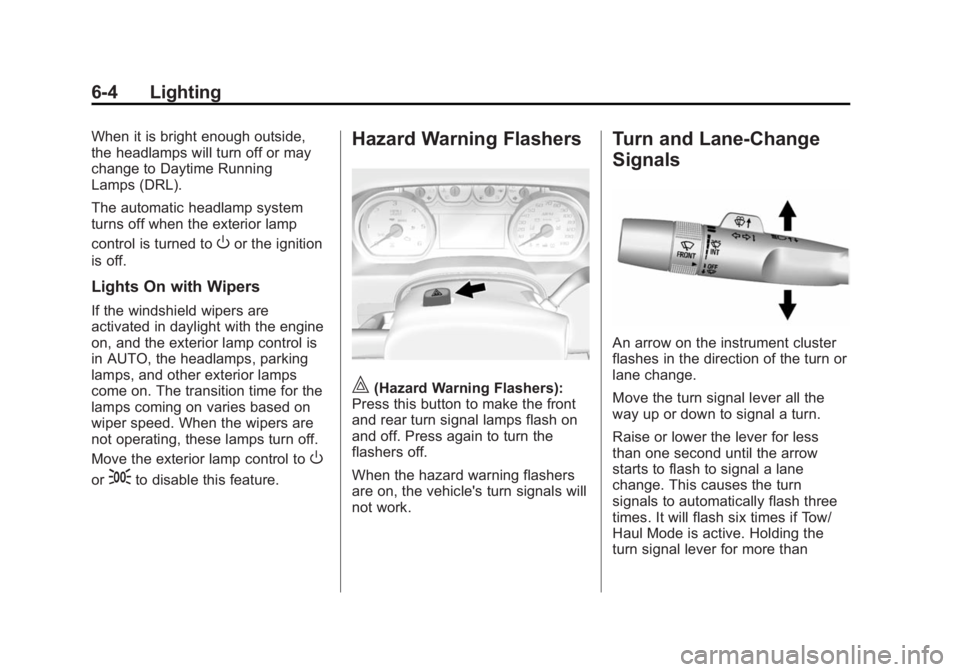
An arrow on the instrument cluster
flashes in the direction of the turn or
lane change.
Move the turn signal lever all the
way up or down to signal a turn.
Raise or lower the lever for less
than one second until the arrow
starts to flash to signal a lane
change. This causes the turn
signals to automatically flash three
times. It will flash six times if Tow/
Haul Mode is active. Holding the
turn signal lever for more than
Page 176 of 439
Black plate (3,1)GMC 2015i Sierra Denali Owner Manual (GMNA-Localizing-U.S./Canada/
Mexico-8431500) - 2015 - crc - 6/20/14
Climate Controls 8-3Changing the mode cancels the
automatic operation and the system
goes into manual mode. Press
AUTO to return to automatic
operation.
Y (Vent): Air is directed to the
instrument panel outlets.
\ (Bi-Level): Air is divided
between the instrument panel and
floor outlets. Some air is directed
toward the windshield and side
window outlets.
[ (Floor): Air is directed to the
floor outlets, with some to the
windshield, side window outlets, and
second row floor outlets.
- (Defog): This mode clears the
windows of fog or moisture. Air is
directed to the windshield, floor
outlets, and side window vents. The
system automatically forces outside
air into the vehicle and the air
conditioning compressor will run,
unless the outside temperature is
close to freezing. 0 (Defrost): Press to clear the
windshield of fog or frost more
quickly. Air is directed to the
windshield and the side window
vents. The air conditioning
compressor also comes on, unless
the outside temperature is below
freezing.
Do not drive the vehicle until all
windows are clear.
See Air Vents on page 8-4 .
A/C (Air Conditioning): Press to
turn the air conditioning system on
or off. An indicator light comes on to
show that the air conditioning is
enabled. If the fan is turned off, the
air conditioner will not run. The A/C
light will stay on even if the outside
temperatures are below freezing.
@ (Recirculation): Press to turn
on recirculation. An indicator light
comes on. Air is recirculated to
quickly cool the inside of the
vehicle. It can also be used to help
reduce outside air and odors that enter the vehicle. The air
conditioning compressor also comes
on when this mode is activated.
Rear Window Defogger The rear window defogger uses a
warming grid to remove fog from the
rear window.
K (Rear Window Defogger):
Press to turn the rear window
defogger on or off. An indicator light
on the button comes on to show that
the rear window defogger is on.
The rear window defogger only
works when the ignition is in ON/
RUN. The defogger turns off if the
ignition is turned to ACC/
ACCESSORY or LOCK/OFF.
{ Caution
Using a razor blade or sharp
object to clear the inside rear
window can damage the rear
window defogger. Repairs would
(Continued)
Page 180 of 439
Black plate (1,1)GMC 2015i Sierra Denali Owner Manual (GMNA-Localizing-U.S./Canada/
Mexico-8431500) - 2015 - crc - 6/20/14
Driving and Operating 9-1
Driving and
Operating Driving Information Distracted Driving . . . . . . . . . . . . . 9-2
Defensive Driving . . . . . . . . . . . . . 9-3
Drunk Driving . . . . . . . . . . . . . . . . . 9-3
Control of a Vehicle . . . . . . . . . . . 9-3
Braking . . . . . . . . . . . . . . . . . . . . . . . 9-3
Steering . . . . . . . . . . . . . . . . . . . . . . . 9-4
Off-Road Recovery . . . . . . . . . . . . 9-5
Loss of Control . . . . . . . . . . . . . . . . 9-5
Off-Road Driving . . . . . . . . . . . . . . 9-6
Driving on Wet Roads . . . . . . . . 9-11
Hill and Mountain Roads . . . . . 9-11
Winter Driving . . . . . . . . . . . . . . . 9-12
If the Vehicle Is Stuck . . . . . . . . 9-14
Vehicle Load Limits . . . . . . . . . . 9-15
Truck-Camper Loading
Information . . . . . . . . . . . . . . . . . 9-21
Starting and Operating New Vehicle Break-In . . . . . . . . 9-23
Adjustable Throttle and Brake
Pedal . . . . . . . . . . . . . . . . . . . . . . . 9-23
Ignition Positions . . . . . . . . . . . . 9-24
Starting the Engine . . . . . . . . . . 9-26 Fast Idle System . . . . . . . . . . . . . 9-27
Engine Heater . . . . . . . . . . . . . . . 9-28
Retained Accessory
Power (RAP) . . . . . . . . . . . . . . . 9-29
Shifting Into Park . . . . . . . . . . . . 9-30
Shifting out of Park . . . . . . . . . . 9-31
Parking over Things
That Burn . . . . . . . . . . . . . . . . . . 9-32
Active Fuel Management ®
. . . 9-32
Engine Exhaust Engine Exhaust . . . . . . . . . . . . . . 9-32
Running the Vehicle While
Parked . . . . . . . . . . . . . . . . . . . . . 9-33
Automatic Transmission Automatic Transmission . . . . . 9-33
Manual Mode . . . . . . . . . . . . . . . . 9-36
Tow/Haul Mode . . . . . . . . . . . . . . 9-39
Drive Systems Four-Wheel Drive . . . . . . . . . . . . 9-40
Brakes Antilock Brake
System (ABS) . . . . . . . . . . . . . . 9-46
Parking Brake . . . . . . . . . . . . . . . 9-47
Brake Assist . . . . . . . . . . . . . . . . . 9-48
Hill Start Assist (HSA) . . . . . . . 9-48 Ride Control Systems Traction Control/Electronic
Stability Control . . . . . . . . . . . . 9-49
Hill Descent
Control (HDC) . . . . . . . . . . . . . . 9-51
Locking Rear Axle . . . . . . . . . . . 9-52
Cruise Control Cruise Control . . . . . . . . . . . . . . . 9-52
Driver Assistance Systems Driver Assistance
Systems . . . . . . . . . . . . . . . . . . . . 9-55
Assistance Systems for
Parking or Backing . . . . . . . . . 9-56
Assistance Systems for
Driving . . . . . . . . . . . . . . . . . . . . . 9-59
Forward Collision Alert (FCA)
System . . . . . . . . . . . . . . . . . . . . . 9-59
Lane Departure
Warning (LDW) . . . . . . . . . . . . . 9-61
Fuel Fuel . . . . . . . . . . . . . . . . . . . . . . . . . 9-63
California Fuel
Requirements . . . . . . . . . . . . . . 9-64
Fuels in Foreign Countries . . . 9-64
Fuel Additives . . . . . . . . . . . . . . . 9-64
Page 211 of 439
Black plate (32,1)GMC 2015i Sierra Denali Owner Manual (GMNA-Localizing-U.S./Canada/
Mexico-8431500) - 2015 - crc - 6/20/14
9-32 Driving and Operating
Parking over Things
That Burn
{ WarningThings that can burn could touch
hot exhaust parts under the
vehicle and ignite. Do not park
over papers, leaves, dry grass,
or other things that can burn.
Active Fuel Management ®
Vehicles with V8 engines may have
Active Fuel Management. This
system allows the engine to operate
on either all or half of its cylinders,
depending on the driving conditions. When less power is required, such
as cruising at a constant vehicle
speed, the system will operate in
the half cylinder mode, allowing the
vehicle to achieve better fuel
economy. When greater power
demands are required, such as
accelerating from a stop, passing,
or merging onto a freeway, the
system will maintain full-cylinder
operation.
If the vehicle has an Active Fuel
Management indicator, see Driver
Information Center (DIC) on
page 5-27 for more information on
using this display. Engine Exhaust
{ WarningEngine exhaust contains carbon
monoxide (CO) which cannot be
seen or smelled. Exposure to CO
can cause unconsciousness and
even death.
Exhaust may enter the vehicle if: .
The vehicle idles in areas
with poor ventilation (parking
garages, tunnels, deep snow
that may block underbody
airflow or tail pipes). .
The exhaust smells or
sounds strange or different. .
The exhaust system leaks
due to corrosion or damage. .
The vehicle exhaust system
has been modified, damaged,
or improperly repaired.
(Continued)
Page 214 of 439
Black plate (35,1)GMC 2015i Sierra Denali Owner Manual (GMNA-Localizing-U.S./Canada/
Mexico-8431500) - 2015 - crc - 6/20/14
Driving and Operating 9-35
{ CautionShifting out of P (Park) or
N (Neutral) with the engine
running at high speed may
damage the transmission. The
repairs would not be covered by
the vehicle warranty. Be sure the
engine is not running at high
speed when shifting the vehicle.
D (Drive): This position is for
normal driving. It provides the best
fuel economy. If you need more
power for passing, and you are: .
Going less than about 55 km/h
(35 mph), push the accelerator
pedal about halfway down. .
Going about 55 km/h (35 mph) or
more, push the accelerator all
the way down.
By doing this, the vehicle shifts
down to the next gear and has
more power. Use D (Drive) and Tow/Haul Mode
when towing a trailer, carrying a
heavy load, driving on steep hills,
or driving off-road. Shift the
transmission to a lower gear
selection if the transmission shifts
too often.
Downshifting the transmission in
slippery road conditions could result
in skidding. See “ Skidding ” under
Loss of Control on page 9-5 .
The vehicle has a shift stabilization
feature that adjusts the transmission
shifting to the current driving
conditions in order to reduce rapid
upshifts and downshifts. This shift
stabilization feature is designed to
determine, before making an
upshift, if the engine is able to
maintain vehicle speed by analyzing
things such as vehicle speed,
throttle position, and vehicle load.
If the shift stabilization feature
determines that a current vehicle
speed cannot be maintained, the
transmission does not upshift and
instead holds the current gear. In some cases, this could appear to
be a delayed shift, however the
transmission is operating normally.
The transmission uses adaptive
shift controls. The adaptive shift
control process continually
compares key shift parameters to
pre-programmed ideal shifts stored
in the transmission ’ s computer. The
transmission constantly makes
adjustments to improve vehicle
performance according to how the
vehicle is being used, such as with
a heavy load or when the
temperature changes. During this
adaptive shift control process,
shifting might feel different as the
transmission determines the best
settings.
When temperatures are very cold,
the transmission's gear shifting
could be delayed providing more
stable shifts until the engine warms
up. Shifts could be more noticeable
with a cold transmission. This
difference in shifting is normal.