air condition GMC SIERRA DENALI 2017 User Guide
[x] Cancel search | Manufacturer: GMC, Model Year: 2017, Model line: SIERRA DENALI, Model: GMC SIERRA DENALI 2017Pages: 511, PDF Size: 6.88 MB
Page 111 of 511
GMC Sierra/Sierra Denali Owner Manual (GMNA-Localizing-U.S./Canada/
Mexico-9955992) - 2017 - crc - 4/18/17
110 Seats and Restraints removed. See your dealer for
assistance with removal, and store
the removed headrest in a secure
place. When the child restraint is
removed, reinstall the headrest
before the seating position is used.
For reinstallation instructions, see
“ Headrest Removal and
Reinstallation ” under Lower Anchors
and Tethers for Children (LATCH
System) 0 95 .
Securing Child Restraints
(With the Safety Belt in
the Center Front Seat)
{ Warning
A child in a child restraint in the
center front seat can be badly
injured or killed by the frontal
airbags if they inflate. Never
secure a child restraint in the
center front seat. It is always
better to secure a child restraint in
a rear seat.
Do not use child restraints in the
center front seat position. Securing Child Restraints
(With the Safety Belt in
the Front
Passenger Seat) With Passenger Sensing
System This vehicle has airbags. A rear
seat is a safer place to secure a
forward-facing child restraint. See
Where to Put the Restraint 0 93 .
In addition, the vehicle may have a
passenger sensing system which is
designed to turn off the front
outboard passenger frontal airbag
under certain conditions.
See Passenger Sensing System
0 81 and Passenger Airbag Status
Indicator 0 143 for more information
on this, including important safety
information.
Never put a rear-facing child seat in
the front. This is because the risk to
the rear-facing child is so great,
if the airbag deploys. { WarningA child in a rear-facing child
restraint can be seriously injured
or killed if the front outboard
passenger airbag inflates. This is
because the back of the
rear-facing child restraint would
be very close to the inflating
airbag. A child in a forward-facing
child restraint can be seriously
injured or killed if the front
outboard passenger airbag
inflates and the passenger seat is
in a forward position.
The vehicle may have a
passenger sensing system which
is designed to turn off the front
outboard passenger frontal airbag
under certain conditions.
Even if the passenger sensing
system, if equipped, has turned
off the front outboard passenger
frontal airbag, no system is
fail-safe. No one can guarantee
that an airbag will not deploy
(Continued)
Page 139 of 511
GMC Sierra/Sierra Denali Owner Manual (GMNA-Localizing-U.S./Canada/
Mexico-9955992) - 2017 - crc - 4/18/17
138 Instruments and Controls PRESSURE LOW STOP ENGINE ”
under Engine Oil Messages 0 159
and Engine Oil 0 364 .
CautionLack of proper engine oil
maintenance can damage the
engine. Driving with the engine oil
low can also damage the engine.
The repairs would not be covered
by the vehicle warranty. Check
the oil level as soon as possible.
Add oil if required, but if the oil
level is within the operating range
and the oil pressure is still low,
have the vehicle serviced. Always
follow the maintenance schedule
for changing engine oil.
If the vehicle has a diesel engine,
see the Duramax diesel
supplement. Engine Coolant
Temperature Gauge
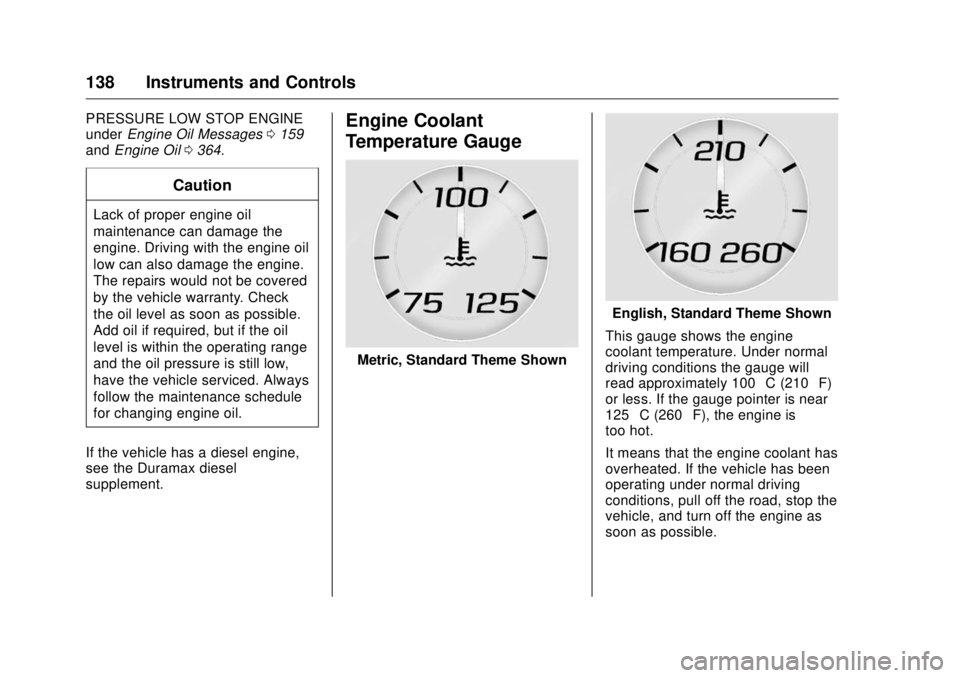
Metric, Standard Theme Shown English, Standard Theme Shown
This gauge shows the engine
coolant temperature. Under normal
driving conditions the gauge will
read approximately 100 °C (210 °F)
or less. If the gauge pointer is near
125 °C (260 °F), the engine is
too hot.
It means that the engine coolant has
overheated. If the vehicle has been
operating under normal driving
conditions, pull off the road, stop the
vehicle, and turn off the engine as
soon as possible.
Page 141 of 511
GMC Sierra/Sierra Denali Owner Manual (GMNA-Localizing-U.S./Canada/
Mexico-9955992) - 2017 - crc - 4/18/17
140 Instruments and Controls When the engine is running, this
gauge shows the condition of the
charging system. The gauge can
transition from a higher to lower or a
lower to higher reading. This is
normal. If the vehicle is operating
outside the normal operating range,
the charging system light comes on.
See Charging System Light 0 143
for more information. The voltmeter
gauge may also read lower when in
fuel economy mode. This is normal.
Readings outside the normal
operating range can also occur
when a large number of electrical
accessories are operating in the
vehicle and the engine is left idling
for an extended period. This
condition is normal since the
charging system is not able to
provide full power at engine idle. As
engine speeds are increased, this
condition should correct itself as
higher engine speeds allow the
charging system to create maximum
power.
The vehicle can only be driven for a
short time with the readings outside
the normal operating range. If the
vehicle must be driven, turn off all accessories, such as the radio and
air conditioner and unplug all
chargers and accessories.
Readings outside the normal
operating range indicate a possible
problem in the electrical system.
Have the vehicle serviced as soon
as possible.
Safety Belt Reminders Driver Safety Belt Reminder
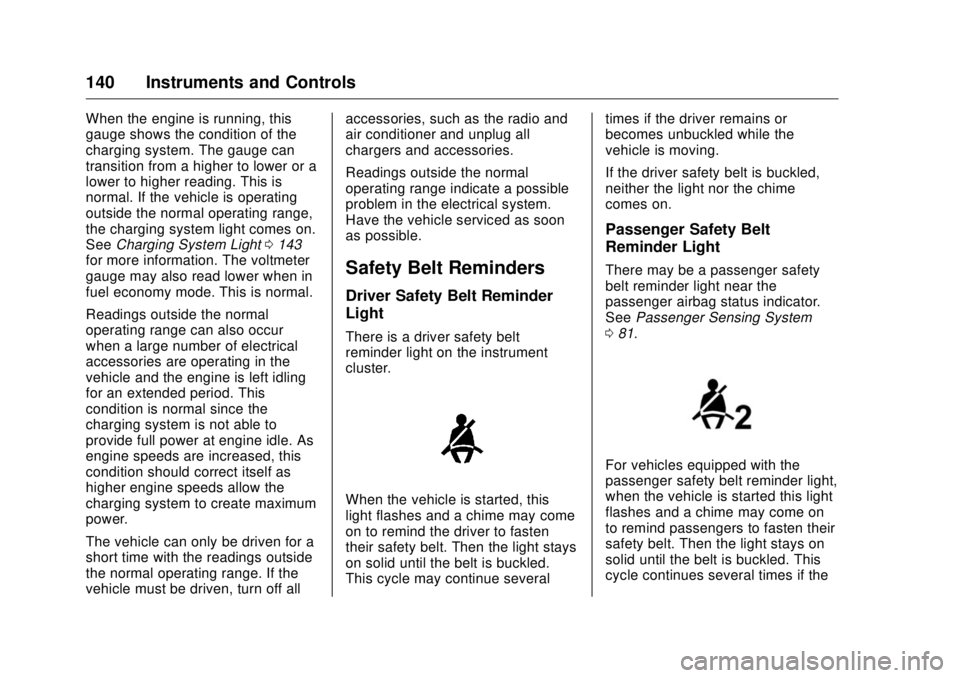
Light There is a driver safety belt
reminder light on the instrument
cluster.
When the vehicle is started, this
light flashes and a chime may come
on to remind the driver to fasten
their safety belt. Then the light stays
on solid until the belt is buckled.
This cycle may continue several times if the driver remains or
becomes unbuckled while the
vehicle is moving.
If the driver safety belt is buckled,
neither the light nor the chime
comes on.
Passenger Safety Belt
Reminder Light There may be a passenger safety
belt reminder light near the
passenger airbag status indicator.
See Passenger Sensing System
0 81 .
For vehicles equipped with the
passenger safety belt reminder light,
when the vehicle is started this light
flashes and a chime may come on
to remind passengers to fasten their
safety belt. Then the light stays on
solid until the belt is buckled. This
cycle continues several times if the
Page 145 of 511
GMC Sierra/Sierra Denali Owner Manual (GMNA-Localizing-U.S./Canada/
Mexico-9955992) - 2017 - crc - 4/18/17
144 Instruments and Controls system. Have it checked by your
dealer. Driving while this light is on
could drain the battery.
When this light comes on, or is
flashing, the Driver Information
Center (DIC) also displays a
message.
See Battery Voltage and Charging
Messages 0 157 .
If a short distance must be driven
with the light on, be sure to turn off
all accessories, such as the radio
and air conditioner.
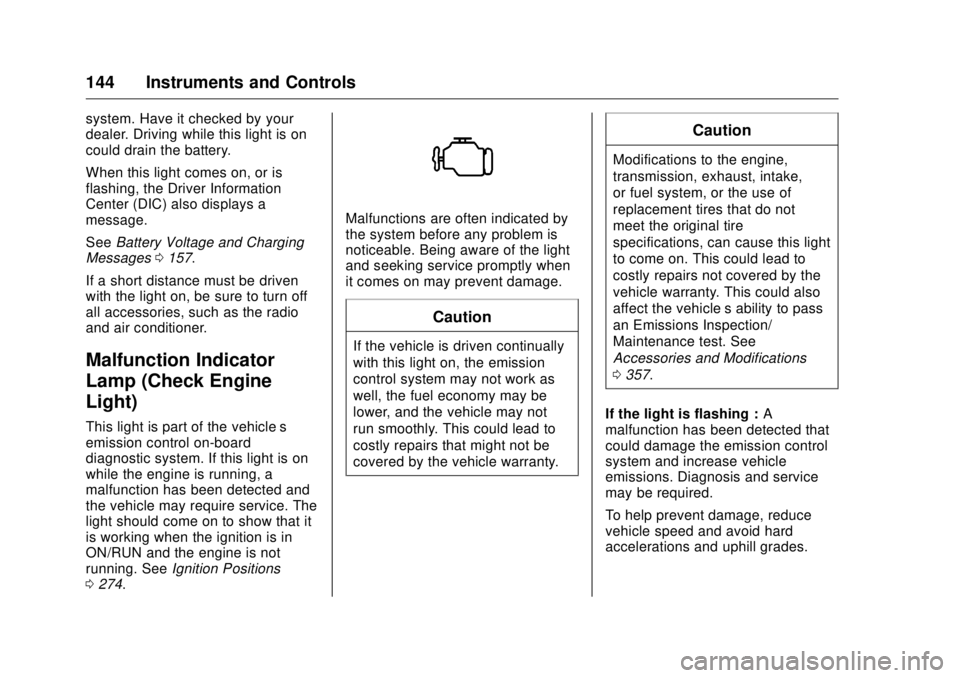
Malfunction Indicator
Lamp (Check Engine
Light) This light is part of the vehicle ’ s
emission control on-board
diagnostic system. If this light is on
while the engine is running, a
malfunction has been detected and
the vehicle may require service. The
light should come on to show that it
is working when the ignition is in
ON/RUN and the engine is not
running. See Ignition Positions
0 274 . Malfunctions are often indicated by
the system before any problem is
noticeable. Being aware of the light
and seeking service promptly when
it comes on may prevent damage.
CautionIf the vehicle is driven continually
with this light on, the emission
control system may not work as
well, the fuel economy may be
lower, and the vehicle may not
run smoothly. This could lead to
costly repairs that might not be
covered by the vehicle warranty. CautionModifications to the engine,
transmission, exhaust, intake,
or fuel system, or the use of
replacement tires that do not
meet the original tire
specifications, can cause this light
to come on. This could lead to
costly repairs not covered by the
vehicle warranty. This could also
affect the vehicle ’ s ability to pass
an Emissions Inspection/
Maintenance test. See
Accessories and Modifications
0 357 .
If the light is flashing : A
malfunction has been detected that
could damage the emission control
system and increase vehicle
emissions. Diagnosis and service
may be required.
To help prevent damage, reduce
vehicle speed and avoid hard
accelerations and uphill grades.
Page 160 of 511
GMC Sierra/Sierra Denali Owner Manual (GMNA-Localizing-U.S./Canada/
Mexico-9955992) - 2017 - crc - 4/18/17
Instruments and Controls 159obstructions, and close the door
again. Check to see if the message
still appears on the DIC.
HOOD OPEN This message displays and a chime
may sound if the hood is not fully
closed. Stop and turn off the
vehicle, check the hood for
obstructions, and close the hood
again. Check to see if the message
still appears on the DIC.
Engine Cooling System
Messages A/C OFF DUE TO HIGH
ENGINE TEMP This message displays when the
engine coolant becomes hotter than
the normal operating temperature.
See Engine Coolant Temperature
Gauge 0 138 . To avoid added strain
on a hot engine, the air conditioning
compressor automatically turns off.
When the coolant temperature
returns to normal, the air
conditioning compressor turns back
on. You can continue to drive your
vehicle. If this message continues to appear,
have the system repaired by your
dealer as soon as possible to avoid
damage to the engine.
ENGINE OVERHEATING IDLE
ENGINE This message displays when the
engine coolant temperature is too
hot. Stop and allow the vehicle to
idle until it cools down. See Engine
Coolant Temperature Gauge 0 138 .
When towing, use Tow/Haul mode
to prevent damage to the engine or
transmission. See Tow/Haul Mode
0 288 .
ENGINE OVERHEATED STOP
ENGINE This message displays and a chime
may sound if the engine cooling
system reaches unsafe
temperatures for operation. Stop
and turn off the vehicle as soon as it
is safe to do so to avoid severe
damage. This message clears when
the engine has cooled to a safe
operating temperature. Engine Oil Messages CHANGE ENGINE OIL SOON This message displays when the
engine oil needs to be changed.
When you change the engine oil, be
sure to reset the CHANGE ENGINE
OIL SOON message. See Engine
Oil Life System 0 367 for
information on how to reset the
message.
See Engine Oil 0 364 and
Maintenance Schedule 0 455 .
ENGINE OIL LOW ADD OIL On some vehicles, this message
displays when the engine oil level
may be too low. Check the oil level
before filling to the recommended
level. If the oil is not low and this
message remains on, take the
vehicle to your dealer for service.
See Engine Oil 0 364 .
ENGINE OIL HOT IDLE
ENGINE
This message displays when the
engine oil becomes hotter than the
normal operating temperature. Stop
Page 163 of 511
GMC Sierra/Sierra Denali Owner Manual (GMNA-Localizing-U.S./Canada/
Mexico-9955992) - 2017 - crc - 4/18/17
162 Instruments and Controls SERVICE TRACTION
CONTROL This message displays when there
is a problem with the Traction
Control System (TCS). When this
message displays, the system will
not limit wheel spin. Adjust your
driving accordingly. See your dealer
for service. See Traction Control/
Electronic Stability Control 0 299 .
STABILITRAK INITIALIZING This message may come on if the
StabiliTrak system has not fully
initialized because of road
conditions or the incorrect tire size.
When the StabiliTrak system is fully
initialized, the message will turn off.
See Traction Control/Electronic
Stability Control 0 299 . If this
message continues to be displayed
for multiple ignition cycles and on
different road surfaces, see your
dealer for service.
TRACTION CONTROL OFF
This message displays when the
traction control has been turned off.
See Traction Control/Electronic
Stability Control 0 299 . TRACTION CONTROL ON This message displays when the
traction control is active. See
Traction Control/Electronic Stability
Control 0 299 .
STABILITRAK OFF This message displays when the
StabiliTrak system has been turned
off. Adjust your driving accordingly.
To limit wheel spin and realize the
full benefits of the stability
enhancement system, you should
normally leave StabiliTrak on. See
Traction Control/Electronic Stability
Control 0 299 .
STABILITRAK OFF may also
display when the stability control
has been automatically disabled.
The following conditions can cause
this message to appear:
.
The system is overheating,
which could occur if StabiliTrak
activates continuously for an
extended period of time.
.
The brake system warning light
is on. See Brake System
Warning Light 0 145 . .
The stability system takes longer
than usual to complete its
diagnostic checks due to driving
conditions.
.
An engine or vehicle-related
problem has been detected and
the vehicle needs service. See
your dealer.
.
The transfer case is in
Four-Wheel Drive Low.
The message turns off as soon as
the conditions that caused the
message to be displayed are no
longer present.
Airbag System Messages SERVICE AIRBAG This message displays if there is a
problem with the airbag system.
Take the vehicle to your dealer for
service.
Page 165 of 511
GMC Sierra/Sierra Denali Owner Manual (GMNA-Localizing-U.S./Canada/
Mexico-9955992) - 2017 - crc - 4/18/17
164 Instruments and Controls SERVICE POWER STEERING
(2500/3500 Series) This message displays when there
is a problem with the power steering
assist system. If this message
displays the vehicle can be driven
but should be repaired as soon as
possible. See your dealer. See
Steering 0 255 .
Tire Messages SERVICE TIRE MONITOR
SYSTEM If equipped with the Tire Pressure
Monitor System (TPMS), this
message displays if a part on the
system is not working properly. The
tire pressure light also flashes and
then remains on during the same
ignition cycle. See Tire Pressure
Light 0 150 . Several conditions may
cause this message to appear. See
Tire Pressure Monitor Operation
0 411 . If the warning comes on and
stays on, there may be a problem
with the TPMS. See your dealer. TIRE LEARNING ACTIVE If equipped with the Tire Pressure
Monitor System (TPMS), this
message displays when the system
is relearning the tire positions on
your vehicle. The tire positions must
be relearned after rotating the tires
or after replacing a tire or sensor.
See Tire Inspection 0 414 , Tire
Rotation 0 415 , Tire Pressure
Monitor System 0 410 , and Tire
Pressure 0 408 .
TIRE PRESSURE LOW ADD
AIR TO TIRE If equipped with the Tire Pressure
Monitor System (TPMS), this
message displays when the
pressure in one or more of the
vehicle's tires is low. This message
also displays with a vehicle picture
to indicate the location of the low
tire. The low tire pressure warning
light will also come on. See Tire
Pressure Light 0 150 . You can
receive more than one tire pressure
message at a time. If a tire pressure
message appears on the DIC, stop
as soon as you can. Have the tire
pressures checked and set to those shown on the Tire and Loading
Information label. See Tires 0 400 ,
Vehicle Load Limits 0 265 , and Tire
Pressure 0 408 . The DIC also
shows the tire pressure values.
See Driver Information Center (DIC)
(Base Level Cluster) 0 152 or Driver
Information Center (DIC) (Uplevel
and Denali Cluster) 0 154 .
Transmission Messages 4WD OFF If equipped with four-wheel drive,
this message displays when the
four-wheel-drive system is
temporarily disabled due to an
overheated condition. The vehicle
will run in two-wheel drive when this
message is present. Once the
four-wheel-drive system cools down,
the message turns off and the
four-wheel-drive system returns to
normal operation.
4WD SHIFT IN PROGRESS
This message will display while the
four-wheel-drive system is shifting.
Page 181 of 511
GMC Sierra/Sierra Denali Owner Manual (GMNA-Localizing-U.S./Canada/
Mexico-9955992) - 2017 - crc - 4/18/17
180 Lighting The high-beam headlamps remain
on, under the automatic control,
until one of the following situations
occurs:
.
The system detects an
approaching vehicle's
headlamps.
.
The system detects a preceding
vehicle's taillamps.
.
The outside light is bright
enough that high-beam
headlamps are not required.
.
The vehicle's speed drops below
20 km/h (12 mph).
.
The IntelliBeam system can be
disabled by the high/low-beam
changer or the flash-to-pass
feature. If this happens, the high/
low-beam changer must be
activated on then off within
five seconds to reactivate the
IntelliBeam system. The
instrument cluster light will come
on to indicate the IntelliBeam is
reactivated.
See Headlamp High/Low-Beam
Changer 0 180 and
Flash-to-Pass 0 181 . The high beams may not turn off
automatically if the system cannot
detect another vehicle's lamps
because of any of the following:
.
The other vehicle's lamps are
missing, damaged, obstructed
from view, or otherwise
undetected.
.
The other vehicle's lamps are
covered with dirt, snow, and/or
road spray.
.
The other vehicle's lamps cannot
be detected due to dense
exhaust, smoke, fog, snow, road
spray, mist, or other airborne
obstructions.
.
The vehicle's windshield is dirty,
cracked, or obstructed by
something that blocks the view
of the light sensor.
.
The vehicle is loaded such that
the front end points upward,
causing the light sensor to aim
high and not detect headlamps
and taillamps.
.
Driving on winding or hilly roads. The automatic high-beam
headlamps may need to be disabled
if any of the above conditions exist.
Exterior Lamps Off
Reminder A reminder chime sounds when the
headlamps or parking lamps are
manually turned on, the ignition is
off, and a door is open. To disable
the chime, turn the lamps off.
Headlamp High/
Low-Beam Changer Push the turn signal lever toward
the instrument panel to change the
headlamps from low to high beam.
Pull the turn signal lever toward you
and release it to return to low-beam
headlamps.
Page 244 of 511
GMC Sierra/Sierra Denali Owner Manual (GMNA-Localizing-U.S./Canada/
Mexico-9955992) - 2017 - crc - 4/18/17
Climate Controls 243
Climate Controls Climate Control Systems Climate Control Systems (with
Heater Only) . . . . . . . . . . . . . . . . 243
Climate Control Systems (with
Air Conditioning) . . . . . . . . . . . . 245
Dual Automatic Climate
Control System . . . . . . . . . . . . . 246
Air Vents Air Vents . . . . . . . . . . . . . . . . . . . . . 250
Maintenance Passenger Compartment Air
Filter . . . . . . . . . . . . . . . . . . . . . . . . 250
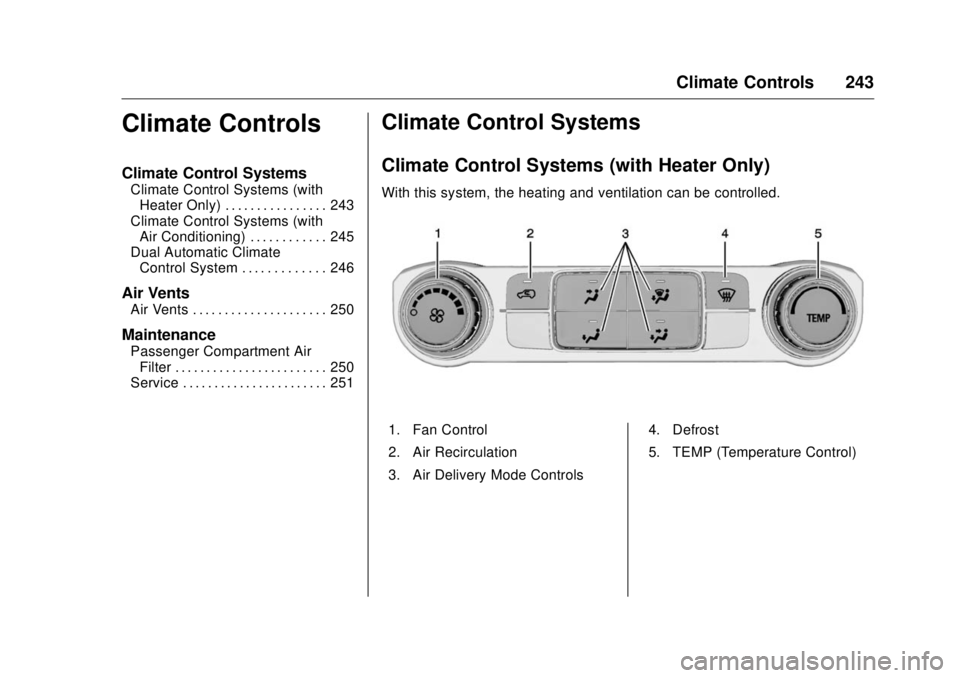
Service . . . . . . . . . . . . . . . . . . . . . . . 251 Climate Control Systems Climate Control Systems (with Heater Only) With this system, the heating and ventilation can be controlled.
1. Fan Control
2. Air Recirculation
3. Air Delivery Mode Controls 4. Defrost
5. TEMP (Temperature Control)
Page 246 of 511
GMC Sierra/Sierra Denali Owner Manual (GMNA-Localizing-U.S./Canada/
Mexico-9955992) - 2017 - crc - 4/18/17
Climate Controls 245
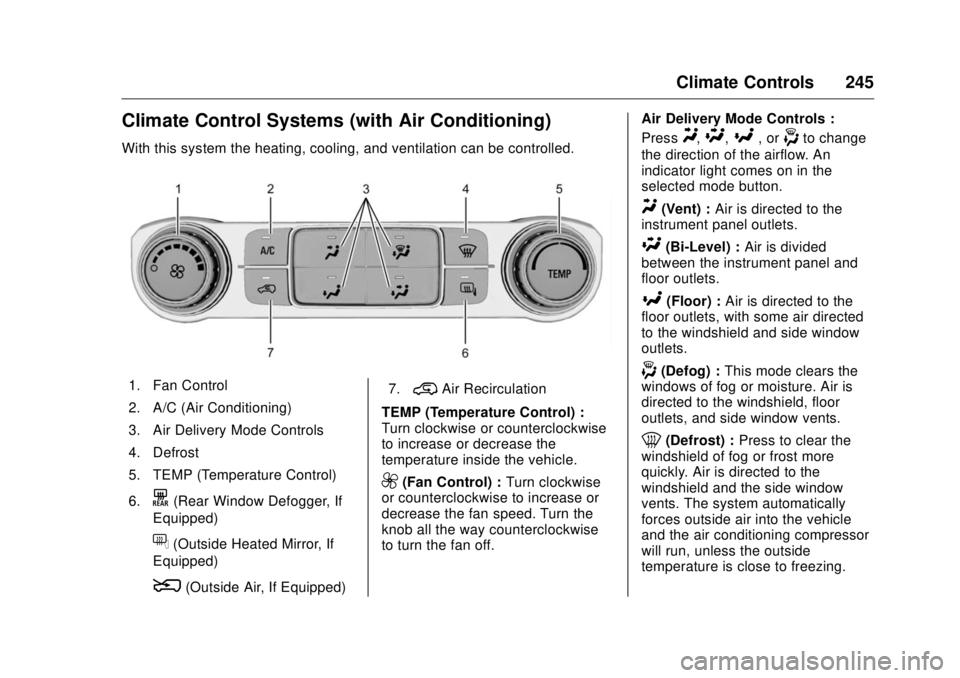
Climate Control Systems (with Air Conditioning) With this system the heating, cooling, and ventilation can be controlled.
1. Fan Control
2. A/C (Air Conditioning)
3. Air Delivery Mode Controls
4. Defrost
5. TEMP (Temperature Control)
6.
K (Rear Window Defogger, If
Equipped)
f (Outside Heated Mirror, If
Equipped)
8 (Outside Air, If Equipped) 7.
@ Air Recirculation
TEMP (Temperature Control) :
Turn clockwise or counterclockwise
to increase or decrease the
temperature inside the vehicle.
9 (Fan Control) : Turn clockwise
or counterclockwise to increase or
decrease the fan speed. Turn the
knob all the way counterclockwise
to turn the fan off. Air Delivery Mode Controls :
Press
Y ,
\ ,
[ , or
- to change
the direction of the airflow. An
indicator light comes on in the
selected mode button.
Y (Vent) : Air is directed to the
instrument panel outlets.
\ (Bi-Level) : Air is divided
between the instrument panel and
floor outlets.
[ (Floor) : Air is directed to the
floor outlets, with some air directed
to the windshield and side window
outlets.
- (Defog) : This mode clears the
windows of fog or moisture. Air is
directed to the windshield, floor
outlets, and side window vents.
0 (Defrost) : Press to clear the
windshield of fog or frost more
quickly. Air is directed to the
windshield and the side window
vents. The system automatically
forces outside air into the vehicle
and the air conditioning compressor
will run, unless the outside
temperature is close to freezing.