fuel GMC SIERRA DENALI 2017 Owner's Manual
[x] Cancel search | Manufacturer: GMC, Model Year: 2017, Model line: SIERRA DENALI, Model: GMC SIERRA DENALI 2017Pages: 511, PDF Size: 6.88 MB
Page 157 of 511
GMC Sierra/Sierra Denali Owner Manual (GMNA-Localizing-U.S./Canada/
Mexico-9955992) - 2017 - crc - 4/18/17
156 Instruments and Controls system monitoring the oil life,
additional maintenance is
recommended in the Maintenance
Schedule. See Maintenance
Schedule 0 455 .
The Oil Life display must be reset
after each oil change. It will not
reset itself. Do not to reset the Oil
Life display at any time other than
when the oil has just been changed.
It cannot be reset accurately until
the next oil change. To reset the
engine oil life system, press and
hold
V for several seconds while
the Oil Life display is active. See
Engine Oil Life System 0 367 .
Tire Pressure : Shows the
approximate pressures of all four
tires. Tire pressure is displayed in
either kilopascal (kPa) or in pounds
per square inch (psi). If the pressure
is low, the value for that tire is
shown in amber.
See Tire Pressure Monitor System
0 410 and Tire Pressure Monitor
Operation 0 411 . Best Fuel Economy : Displays
average fuel economy, the best fuel
economy over the selected
distance, and a bar graph showing
instantaneous fuel economy.
Press
p to change the selected
distance. Press and hold
V while
this display is active to reset the
best fuel economy and average fuel
economy. This display can also be
reset by selecting reset in the menu.
Top Consumers : Shows a list of
the features that are currently
impacting the fuel economy, in order
from highest to lowest. If a feature is
turned off, it will be removed from
the list.
Economy Trend : Shows history of
the Average Fuel Economy from the
last 50 km (30 mi). Each bar
represents about 5 km (3 mi) of
driving. During driving the bars will
shift to always reflect the most
recent distance on the right side.
Press and hold
V to clear the graph
or press
p to reset through
the menu. ECO Index : The bar graph
provides feedback on the efficiency
of current driving behavior. The
graph shows a value that is based
on current fuel consumption
compared to what is expected from
the vehicle with good and bad
driving habits. It also shows if the
Active Fuel Management is active
and in V4 mode, or inactive and in
V8 mode. See Active Fuel
Management 0 281 .
Engine Hours : Shows the total
number of hours the engine has run.
This display also shows the engine
idle hours.
Trailer Brake : On vehicles with the
Integrated Trailer Brake Control
(ITBC) system, the trailer brake
display appears in the DIC.
TRAILER GAIN shows the trailer
gain setting. This setting can be
adjusted from 0.0 to 10.0 with either
a trailer connected or disconnected.
OUTPUT shows the power output to
the trailer any time a trailer with
electric brakes is connected. Output
is displayed as a bar graph. Dashes
may appear in the OUTPUT display.
Page 161 of 511
GMC Sierra/Sierra Denali Owner Manual (GMNA-Localizing-U.S./Canada/
Mexico-9955992) - 2017 - crc - 4/18/17
160 Instruments and Controls and allow the vehicle to idle until it
cools down. See Engine Coolant
Temperature Gauge 0 138 .
OIL PRESSURE LOW STOP
ENGINE This message displays if low oil
pressure levels occur. Stop the
vehicle as soon as safely possible
and do not operate it until the cause
of the low oil pressure has been
corrected. Check the oil as soon as
possible and have the vehicle
serviced by your dealer. See Engine
Oil 0 364 .
Engine Power Messages ENGINE POWER IS REDUCED This message displays and a chime
may sound when the cooling system
temperature gets too hot and the
engine further enters the engine
coolant protection mode. See
Engine Overheating 0 376 for more
information.
This message also displays when
the vehicle's engine power is
reduced. Reduced engine power
can affect the vehicle's ability to accelerate. If this message is on,
but there is no reduction in
performance, proceed to your
destination. The performance may
be reduced the next time the vehicle
is driven. The vehicle may be driven
at a reduced speed while this
message is on, but acceleration and
speed may be reduced. Anytime
this message stays on, or displays
repeatedly, the vehicle should be
taken to your dealer for service as
soon as possible.
Fuel System Messages FUEL LEVEL LOW This message displays and a chime
may sound if the fuel level is low.
Refuel as soon as possible.
See Fuel Gauge 0 136 and Fuel
0 315 .
TIGHTEN GAS CAP
This message may display along
with the malfunction indicator lamp
on the instrument cluster if the
vehicle's fuel cap is not tightened
properly. See Malfunction Indicator
Lamp (Check Engine Light) 0 144 . Reinstall the fuel cap fully. See
Filling the Tank 0 317 . The
diagnostic system can determine if
the fuel cap has been left off or
improperly installed. A loose or
missing fuel cap allows fuel to
evaporate into the atmosphere.
A few driving trips with the cap
properly installed should turn this
light and message off.
Key and Lock Messages REPLACE BATTERY IN
REMOTE KEY This message displays if a Remote
Keyless Entry (RKE) transmitter
battery is low. The battery needs to
be replaced in the transmitter. See
“ Battery Replacement ” under
Remote Keyless Entry (RKE)
System Operation 0 36 .
Lamp Messages TURN SIGNAL ON
This message displays and a chime
sounds if a turn signal is left on for
1.2 km (0.75 mi). Move the turn
signal lever to the off position.
Page 248 of 511
GMC Sierra/Sierra Denali Owner Manual (GMNA-Localizing-U.S./Canada/
Mexico-9955992) - 2017 - crc - 4/18/17
Climate Controls 247
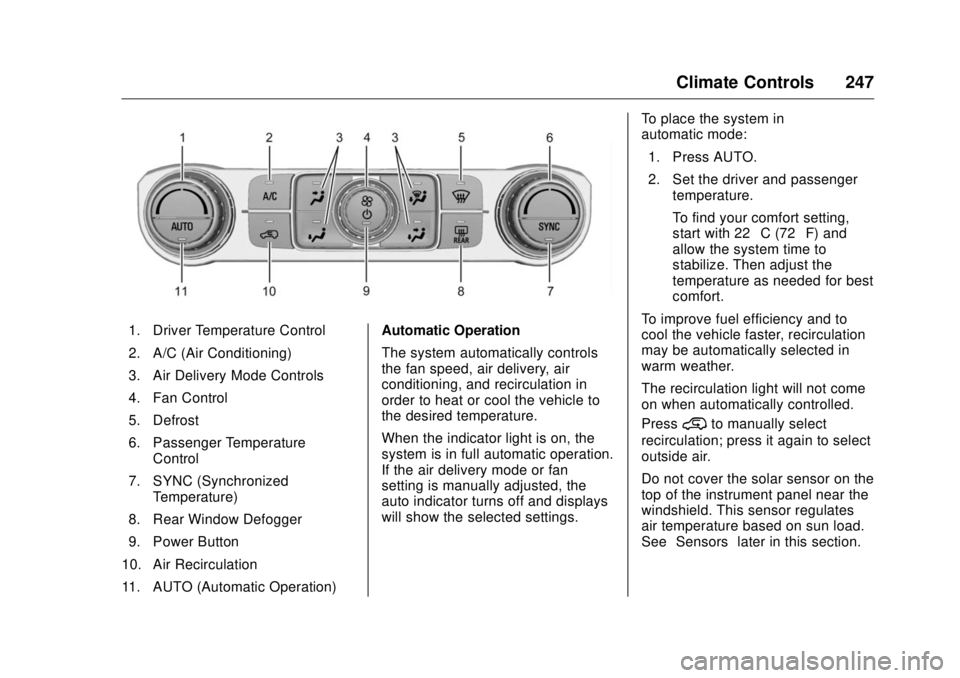
1. Driver Temperature Control
2. A/C (Air Conditioning)
3. Air Delivery Mode Controls
4. Fan Control
5. Defrost
6. Passenger Temperature
Control
7. SYNC (Synchronized
Temperature)
8. Rear Window Defogger
9. Power Button
10. Air Recirculation
11. AUTO (Automatic Operation) Automatic Operation
The system automatically controls
the fan speed, air delivery, air
conditioning, and recirculation in
order to heat or cool the vehicle to
the desired temperature.
When the indicator light is on, the
system is in full automatic operation.
If the air delivery mode or fan
setting is manually adjusted, the
auto indicator turns off and displays
will show the selected settings. To place the system in
automatic mode:
1. Press AUTO.
2. Set the driver and passenger
temperature.
To find your comfort setting,
start with 22 °C (72 °F) and
allow the system time to
stabilize. Then adjust the
temperature as needed for best
comfort.
To improve fuel efficiency and to
cool the vehicle faster, recirculation
may be automatically selected in
warm weather.
The recirculation light will not come
on when automatically controlled.
Press
@ to manually select
recirculation; press it again to select
outside air.
Do not cover the solar sensor on the
top of the instrument panel near the
windshield. This sensor regulates
air temperature based on sun load.
See “ Sensors ” later in this section.
Page 253 of 511
GMC Sierra/Sierra Denali Owner Manual (GMNA-Localizing-U.S./Canada/
Mexico-9955992) - 2017 - crc - 4/18/17
252 Driving and Operating
Driving and
Operating Driving Information Distracted Driving . . . . . . . . . . . . 253
Defensive Driving . . . . . . . . . . . . . 254
Drunk Driving . . . . . . . . . . . . . . . . . 254
Control of a Vehicle . . . . . . . . . . . 254
Braking . . . . . . . . . . . . . . . . . . . . . . . 254
Steering . . . . . . . . . . . . . . . . . . . . . . 255
Off-Road Recovery . . . . . . . . . . . 256
Loss of Control . . . . . . . . . . . . . . . 256
Off-Road Driving . . . . . . . . . . . . . 257
Driving on Wet Roads . . . . . . . . 261
Hill and Mountain Roads . . . . . 262
Winter Driving . . . . . . . . . . . . . . . . 263
If the Vehicle Is Stuck . . . . . . . . 264
Vehicle Load Limits . . . . . . . . . . . 265
Truck-Camper Loading
Information . . . . . . . . . . . . . . . . . . 271
Starting and Operating New Vehicle Break-In . . . . . . . . . 273
Adjustable Throttle and Brake
Pedal . . . . . . . . . . . . . . . . . . . . . . . 273
Ignition Positions . . . . . . . . . . . . . 274
Starting the Engine . . . . . . . . . . . 275
Fast Idle System . . . . . . . . . . . . . 276 Retained Accessory
Power (RAP) . . . . . . . . . . . . . . . . 277
Engine Coolant Heater . . . . . . . 278
Shifting Into Park . . . . . . . . . . . . . 279
Shifting out of Park . . . . . . . . . . . 280
Parking over Things
That Burn . . . . . . . . . . . . . . . . . . . 281
Active Fuel Management . . . . . 281
Engine Exhaust Engine Exhaust . . . . . . . . . . . . . . 282
Running the Vehicle While
Parked . . . . . . . . . . . . . . . . . . . . . . 282
Automatic Transmission Automatic Transmission . . . . . . 283
Manual Mode . . . . . . . . . . . . . . . . . 286
Tow/Haul Mode . . . . . . . . . . . . . . . 288
Drive Systems Four-Wheel Drive . . . . . . . . . . . . . 289
Brakes Antilock Brake
System (ABS) . . . . . . . . . . . . . . . 297
Parking Brake . . . . . . . . . . . . . . . . 297
Brake Assist . . . . . . . . . . . . . . . . . . 298
Hill Start Assist (HSA) . . . . . . . . 298
Ride Control Systems
Traction Control/Electronic
Stability Control . . . . . . . . . . . . . 299 Hill Descent Control (HDC) . . . 301
Locking Rear Axle . . . . . . . . . . . . 302
Cruise Control Cruise Control . . . . . . . . . . . . . . . . 302
Driver Assistance Systems Driver Assistance Systems . . . 305
Assistance Systems for
Parking or Backing . . . . . . . . . . 306
Assistance Systems for
Driving . . . . . . . . . . . . . . . . . . . . . . 308
Forward Collision Alert (FCA)
System . . . . . . . . . . . . . . . . . . . . . . 308
Forward Automatic
Braking (FAB) . . . . . . . . . . . . . . . 310
Lane Departure Warning
(LDW) (2500/3500
Series) . . . . . . . . . . . . . . . . . . . . . . 312
Lane Keep Assist (LKA) (1500
Series) . . . . . . . . . . . . . . . . . . . . . . 313
Fuel Fuel . . . . . . . . . . . . . . . . . . . . . . . . . . 315
California Fuel
Requirements . . . . . . . . . . . . . . . 316
Fuels in Foreign Countries . . . 316
Fuel Additives . . . . . . . . . . . . . . . . 316
E85 or FlexFuel . . . . . . . . . . . . . . 317
Filling the Tank . . . . . . . . . . . . . . . 317
Filling a Portable Fuel
Container . . . . . . . . . . . . . . . . . . . 319
Page 258 of 511
GMC Sierra/Sierra Denali Owner Manual (GMNA-Localizing-U.S./Canada/
Mexico-9955992) - 2017 - crc - 4/18/17
Driving and Operating 257The vehicle may straighten out.
Be ready for a second skid if it
occurs.
.
Slow down and adjust your
driving according to weather
conditions. Stopping distance
can be longer and vehicle
control can be affected when
traction is reduced by water,
snow, ice, gravel, or other
material on the road. Learn to
recognize warning clues — such
as enough water, ice, or packed
snow on the road to make a
mirrored surface — and slow
down when you have any doubt.
.
Try to avoid sudden steering,
acceleration, or braking,
including reducing vehicle speed
by shifting to a lower gear. Any
sudden changes could cause
the tires to slide.
Remember: Antilock brakes help
avoid only the braking skid.
Off-Road Driving Four-wheel-drive vehicles can be
used for off-road driving. Vehicles
without four-wheel drive and vehicles not equipped with All
Terrain (AT) or On-Off Road (OOR)
tires must not be driven off-road
except on a level, solid surface. For
contact information about the
original equipment tires, see the
warranty manual.
One of the best ways for successful
off-road driving is to control the
speed.
{ WarningWhen driving off-road, bouncing
and quick changes in direction
can easily throw you out of
position. This could cause you to
lose control and crash. You and
your passengers should always
wear safety belts.
Before Driving Off-Road
.
Have all necessary maintenance
and service work completed.
.
Fuel the vehicle, fill fluid levels,
and check inflation pressure in
all tires, including the spare,
if equipped. .
Read all the information about
four-wheel-drive vehicles in this
manual.
.
Remove any underbody air
deflector, if equipped. Re-attach
the air deflector after off-road
driving.
.
See Hill Descent Control (HDC)
0 301
.
Know the local laws that apply to
off-road driving.
To gain more ground clearance if
needed, it may be necessary to
remove the front fascia lower air
dam. However, driving without the
air dam reduces fuel economy.
Caution
Operating the vehicle for
extended periods without the front
fascia lower air dam installed can
cause improper airflow to the
engine. Reattach the front fascia
air dam after off-road driving.
Page 262 of 511
GMC Sierra/Sierra Denali Owner Manual (GMNA-Localizing-U.S./Canada/
Mexico-9955992) - 2017 - crc - 4/18/17
Driving and Operating 261Traction is reduced on hard packed
snow and ice and it is easy to lose
control. Reduce vehicle speed when
driving on hard packed snow
and ice.
{ WarningDriving on frozen lakes, ponds,
or rivers can be dangerous. Ice
conditions vary greatly and the
vehicle could fall through the ice;
you and your passengers could
drown. Drive your vehicle on safe
surfaces only.
Driving in Water
{ Warning
Driving through rushing water can
be dangerous. Deep water can
sweep your vehicle downstream
and you and your passengers
could drown. If it is only shallow
water, it can still wash away the
ground from under your tires.
(Continued) Warning (Continued) Traction could be lost, and the
vehicle could roll over. Do not
drive through rushing water.
CautionDo not drive through standing
water if it is deep enough to cover
the wheel hubs, axles, or exhaust
pipe. Deep water can damage the
axle and other vehicle parts.
If the standing water is not too deep,
drive slowly through it. At faster
speeds, water splashes and the
vehicle can stall. When going
through water, the brakes get wet
and it may take longer to stop. See
“ Driving on Wet Roads ” later in this
section. After Off-Road Driving Remove any brush or debris that
has collected on the underbody or
chassis, or under the hood. These
accumulations can be a fire hazard.
After operation in mud or sand,
have the brake linings cleaned and
checked. These substances can
cause glazing and uneven braking.
Check the body structure, steering,
suspension, wheels, tires, and
exhaust system for damage and
check the fuel lines and cooling
system for any leakage.
More frequent maintenance service
is required. See the Maintenance
Schedule 0 455 .
Driving on Wet Roads Rain and wet roads can reduce
vehicle traction and affect your
ability to stop and accelerate.
Always drive slower in these types
of driving conditions and avoid
driving through large puddles and
deep-standing or flowing water.
Page 265 of 511
GMC Sierra/Sierra Denali Owner Manual (GMNA-Localizing-U.S./Canada/
Mexico-9955992) - 2017 - crc - 4/18/17
264 Driving and Operating Warning (Continued).
Clear snow from the base of
the vehicle, especially any
blocking the exhaust pipe.
.
Open a window about 5 cm
(2 in) on the vehicle side
that is away from the wind,
to bring in fresh air.
.
Fully open the air outlets on
or under the instrument
panel.
.
Adjust the climate control
system to circulate the air
inside the vehicle and set
the fan speed to the highest
setting. See “ Climate
Control Systems. ”
For more information about CO,
see Engine Exhaust 0 282 .
To save fuel, run the engine for
short periods to warm the vehicle
and then shut the engine off and
partially close the window. Moving
about to keep warm also helps. If it takes time for help to arrive,
when running the engine, push the
accelerator pedal slightly so the
engine runs faster than the idle
speed. This keeps the battery
charged to restart the vehicle and to
signal for help with the headlamps.
Do this as little as possible, to
save fuel.
If the Vehicle Is Stuck Slowly and cautiously spin the
wheels to free the vehicle when
stuck in sand, mud, ice, or snow.
See “ Rocking the Vehicle to Get It
Out ” later in this section.
The Traction Control System (TCS)
can often help to free a stuck
vehicle. See Traction Control/
Electronic Stability Control 0 299 .
If TCS cannot free the vehicle, see
“ Rocking the Vehicle to Get it Out ”
following. { WarningIf the vehicle's tires spin at high
speed, they can explode, and you
or others could be injured. The
vehicle can overheat, causing an
engine compartment fire or other
damage. Spin the wheels as little
as possible and avoid going
above 56 km/h (35 mph).
For information about using tire
chains on the vehicle, see Tire
Chains 0 422 .
Rocking the Vehicle to Get
It Out Turn the steering wheel left and
right to clear the area around the
front wheels. For four-wheel-drive
vehicles, shift into Four-Wheel Drive
High. Turn the TCS off. Shift back
and forth between R (Reverse) and
a forward gear, spinning the wheels
as little as possible. To prevent
transmission wear, wait until the
wheels stop spinning before shifting
gears. Slowly spinning the wheels in
the forward and reverse directions
Page 269 of 511
GMC Sierra/Sierra Denali Owner Manual (GMNA-Localizing-U.S./Canada/
Mexico-9955992) - 2017 - crc - 4/18/17
268 Driving and Operating
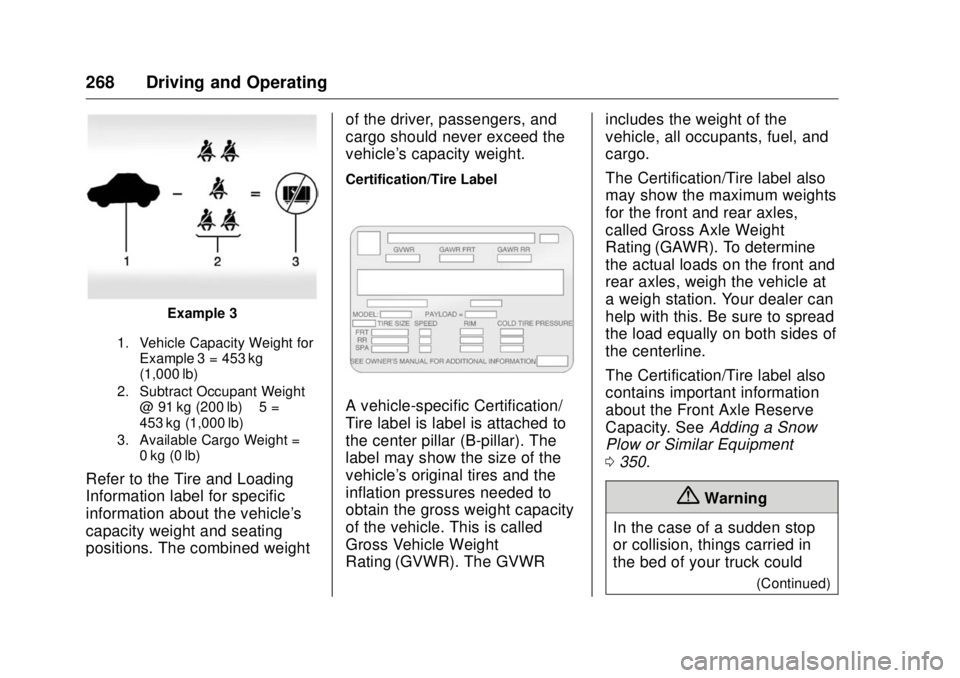
Example 3
1. Vehicle Capacity Weight for
Example 3 = 453 kg
(1,000 lb)
2. Subtract Occupant Weight
@ 91 kg (200 lb) × 5 =
453 kg (1,000 lb)
3. Available Cargo Weight =
0 kg (0 lb)
Refer to the Tire and Loading
Information label for specific
information about the vehicle's
capacity weight and seating
positions. The combined weight of the driver, passengers, and
cargo should never exceed the
vehicle's capacity weight. Certification/Tire Label
A vehicle-specific Certification/
Tire label is label is attached to
the center pillar (B-pillar). The
label may show the size of the
vehicle's original tires and the
inflation pressures needed to
obtain the gross weight capacity
of the vehicle. This is called
Gross Vehicle Weight
Rating (GVWR). The GVWR includes the weight of the
vehicle, all occupants, fuel, and
cargo.
The Certification/Tire label also
may show the maximum weights
for the front and rear axles,
called Gross Axle Weight
Rating (GAWR). To determine
the actual loads on the front and
rear axles, weigh the vehicle at
a weigh station. Your dealer can
help with this. Be sure to spread
the load equally on both sides of
the centerline.
The Certification/Tire label also
contains important information
about the Front Axle Reserve
Capacity. See Adding a Snow
Plow or Similar Equipment
0 350 .
{ Warning
In the case of a sudden stop
or collision, things carried in
the bed of your truck could
(Continued)
Page 277 of 511
GMC Sierra/Sierra Denali Owner Manual (GMNA-Localizing-U.S./Canada/
Mexico-9955992) - 2017 - crc - 4/18/17
276 Driving and Operating CautionDo not try to shift to P (Park) if the
vehicle is moving. If you do, you
could damage the transmission.
Shift to P (Park) only when the
vehicle is stopped.
Starting Procedure 1. Turn the ignition key to START.
When the engine starts, let go
of the key. The idle speed will
go down as the engine gets
warm. Do not race the engine
immediately after starting it.
Operate the engine and
transmission gently to allow the
oil to warm up and lubricate all
moving parts.
When the low fuel warning light
is on and the FUEL LEVEL
LOW message is displayed in
the Driver Information Center
(DIC), hold the ignition switch
in the START position to
continue engine cranking. CautionCranking the engine for long
periods of time, by returning the
ignition to the START position
immediately after cranking has
ended, can overheat and damage
the cranking motor, and drain the
battery. Wait at least 15 seconds
between each try, to let the
cranking motor cool down.
2. If the engine does not start
after five to 10 seconds,
especially in very cold weather
(below − 18 °C or 0 °F), it could
be flooded with too much
gasoline. Try pushing the
accelerator pedal all the way to
the floor and holding it there
while holding the key in START
for up to 15 seconds. Wait at
least 15 seconds between each
try, to allow the cranking motor
to cool down. When the engine
starts, let go of the key and
accelerator. If the vehicle starts
briefly but then stops again, do
the same thing. This clears the extra gasoline from the engine.
Do not race the engine
immediately after starting it.
Operate the engine and
transmission gently until the oil
warms up and lubricates all
moving parts.
Fast Idle System If equipped, this feature is available
only with cruise control. The manual
fast idle switch is operated using the
cruise control buttons on the left
side of the steering wheel.
This system can be used to
increase engine idle speed
whenever the following conditions
are met:
.
The parking brake is set.
.
The brake pedal is not pressed.
.
The vehicle must not be moving
and the accelerator must not be
pressed.
Page 279 of 511
GMC Sierra/Sierra Denali Owner Manual (GMNA-Localizing-U.S./Canada/
Mexico-9955992) - 2017 - crc - 4/18/17
278 Driving and Operating
Engine Coolant Heater The engine heater can provide
easier starting and better fuel
economy during engine warm-up in
cold weather conditions at or below
− 18 °C (0 °F). Vehicles with an
engine heater should be plugged in
at least four hours before starting.
An internal thermostat in the
plug-end of the cord may exist,
which will prevent engine coolant
heater operation at temperatures
above − 18 °C (0 °F).
If the vehicle has a diesel engine,
see the Duramax diesel
supplement.
{ Warning
Do not plug in the engine block
heater while the vehicle is parked
in a garage or under a carport.
Property damage or personal
injury may result. Always park the
vehicle in a clear open area away
from buildings or structures. To Use the Engine Coolant
Heater 1. Turn off the engine.
2. Open the hood and unwrap the
electrical cord. The cord is
secured to the driver side
fender with a clip, next to the
engine compartment fuse
block. Carefully remove the
wire tie that bundles the
electrical plug. Do not cut the
electrical cord.
Check the heater cord for
damage. If it is damaged, do
not use it. See your dealer for
a replacement. Inspect the
cord for damage yearly.
3. Plug the cord into a normal,
grounded 110-volt AC outlet. { WarningImproper use of the heater cord
or an extension cord can damage
the cord and may result in
overheating and fire.
.
Plug the cord into a
three-prong electrical utility
receptacle that is protected
by a ground fault detection
function. An ungrounded
outlet could cause an
electric shock.
.
Use a weatherproof,
heavy-duty, 15 amp-rated
extension cord if needed.
Failure to use the
recommended extension
cord in good operating
condition, or using a
damaged heater or
extension cord, could make
(Continued)