towing GMC SIERRA DENALI 2017 Owner's Manual
[x] Cancel search | Manufacturer: GMC, Model Year: 2017, Model line: SIERRA DENALI, Model: GMC SIERRA DENALI 2017Pages: 511, PDF Size: 6.88 MB
Page 291 of 511
GMC Sierra/Sierra Denali Owner Manual (GMNA-Localizing-U.S./Canada/
Mexico-9955992) - 2017 - crc - 4/18/17
290 Driving and Operating N (Neutral) : Use only when the
vehicle needs to be towed.
See Recreational Vehicle Towing
0 440 or Towing the Vehicle 0 439 .
2
m (Two-Wheel Drive High) : Use
this setting for driving on most
streets and highways. The front axle
is not engaged. This setting
provides the best fuel economy.
4
n (Four-Wheel Drive Low) : This
setting also engages the front axle
and delivers extra torque. Choose
4
n if driving off-road in deep sand,
deep mud, or deep snow, and while
climbing or descending steep hills.
When engaged, keep vehicle speed
below 72 km/h (45 mph).
4
m (Four-Wheel Drive High) : Use
this setting when extra traction is
needed. The front axle engages and
helps when driving on snowy or icy
roads, when off-roading, or when
plowing snow. The vehicle can be shifted between
2
m and 4
m while the vehicle is
moving. In extremely cold weather,
it may be necessary to stop or slow
the vehicle to shift into 4
m .
Using the Manual Transfer Case
.
Use quick motions to shift into or
out of 4
n or N (Neutral).
.
Shifting may be harder when the
vehicle is cold, but will return to
normal once warmed up.
.
Four-wheel drive reduces fuel
economy.
Shifting from 2
m to 4
m.
Shifts can be made at any
vehicle speed.
.
Shift in one continuous motion.
.
Shifting while the vehicle is in
motion may require that
moderate force be applied to the
shift lever before 4
m can be
engaged, especially in cold
weather. .
In extremely cold weather, it may
be necessary to slow or stop the
vehicle to shift.
.
While in 4
m , the vehicle can be
driven at any posted legal speed
limit.
Shifting In or Out of 4
n CautionShifting the transfer case into 4
n while moving at speeds faster
than 5 km/h (3 mph) may cause
premature wear to the transfer
case, and may cause the gears to
grind.
1. If possible, shift with the
vehicle moving 5 km/h (3 mph)
or less.
2. Shift the transmission into
N (Neutral).
3. Shift the transfer case shift
lever in one continuous motion.
Page 292 of 511
GMC Sierra/Sierra Denali Owner Manual (GMNA-Localizing-U.S./Canada/
Mexico-9955992) - 2017 - crc - 4/18/17
Driving and Operating 2914. Shifting with the vehicle at a
stop may be more difficult. It is
possible that the shift will not
complete and the transfer case
will remain in N (Neutral). This
is normal. To complete the
shift, with the engine running,
shift the transmission to
D (Drive) and back to
N (Neutral), and reattempt the
transfer case shift.
Shifting In or Out of N (Neutral)
1. Have the engine running.
2. Set the parking brake. Press
and hold the brake pedal. See
Parking Brake 0 297 .
3. Place the transmission into
N (Neutral).
4. Shift the transfer case lever in
one continuous motion into or
out of N (Neutral). Electronic Transfer Case
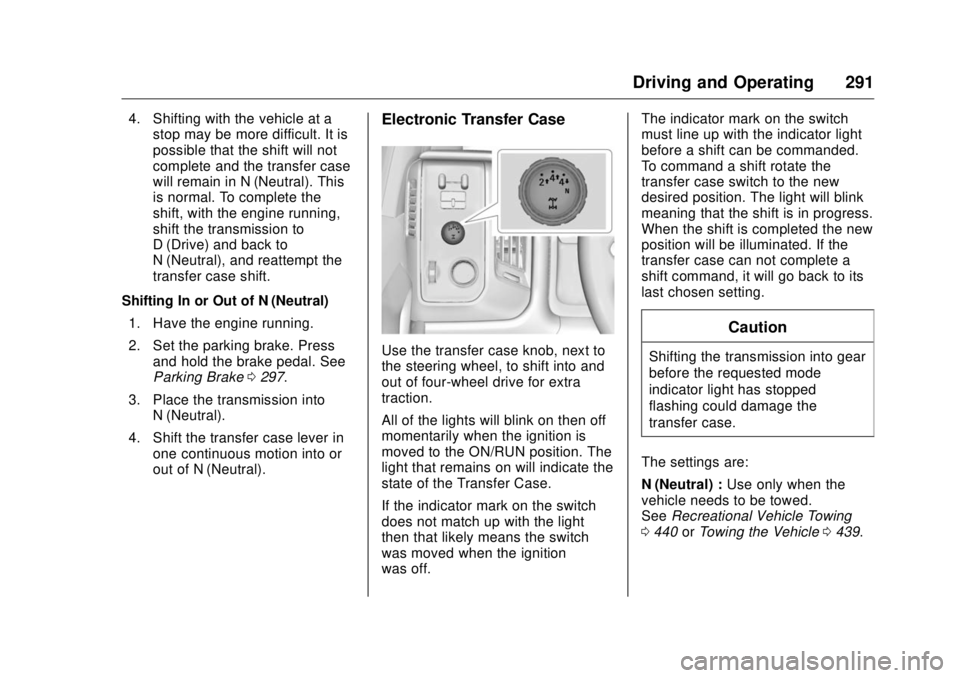
Use the transfer case knob, next to
the steering wheel, to shift into and
out of four-wheel drive for extra
traction.
All of the lights will blink on then off
momentarily when the ignition is
moved to the ON/RUN position. The
light that remains on will indicate the
state of the Transfer Case.
If the indicator mark on the switch
does not match up with the light
then that likely means the switch
was moved when the ignition
was off. The indicator mark on the switch
must line up with the indicator light
before a shift can be commanded.
To command a shift rotate the
transfer case switch to the new
desired position. The light will blink
meaning that the shift is in progress.
When the shift is completed the new
position will be illuminated. If the
transfer case can not complete a
shift command, it will go back to its
last chosen setting.
CautionShifting the transmission into gear
before the requested mode
indicator light has stopped
flashing could damage the
transfer case.
The settings are:
N (Neutral) : Use only when the
vehicle needs to be towed.
See Recreational Vehicle Towing
0 440 or Towing the Vehicle 0 439 .
Page 294 of 511
GMC Sierra/Sierra Denali Owner Manual (GMNA-Localizing-U.S./Canada/
Mexico-9955992) - 2017 - crc - 4/18/17
Driving and Operating 2932. Turn the knob to 4
m or 2
m .
Wait for the 4
m or 2
m indicator
light to stop flashing before
shifting the transmission
into gear.
If the transmission is in gear and/or
moving more than 5 km/h (3 mph),
the 4
m or 2
m indicator light will flash
for 30 seconds, but will not complete
the shift. With the vehicle moving
less than 5 km/h (3 mph), and the
transmission in N (Neutral), attempt
the shift again.
Shifting Into N (Neutral)
To shift:
1. Park the vehicle on a level
surface.
2. Set the parking brake and
press and hold the brake
pedal. See Parking Brake
0 297 .
3. Start the vehicle or turn the
ignition to ON/RUN.
4. Shift the transmission to
N (Neutral). 5. Shift the transfer case to 2
m .
6. Turn the transfer case knob
clockwise to N (Neutral) until it
stops and hold it there until the
N (Neutral) light starts blinking.
This will take at least
10 seconds. Then slowly
release the dial to the 4
nposition. The N (Neutral) light
will come on when the transfer
case shift to N (Neutral) is
complete.
7. With the engine running, verify
that the transfer case is in
N (Neutral) by shifting the
transmission to R (Reverse),
then to D (Drive). There should
be no movement of the vehicle
while shifting the transmission.
8. Turn the engine off, and the
ignition to ACC/ACCESSORY.
9. Place the transmission shift
lever in P (Park). See
Recreational Vehicle Towing
0 440 .
10. Turn the ignition to LOCK/OFF. Shifting Out of N (Neutral)
To shift:
1. Set the parking brake and
apply the brake pedal.
2. Turn the ignition to ON/RUN
with the engine off.
3. Shift the transmission to
N (Neutral).
4. Turn the transfer case knob to
2
m .
After the transfer case has
shifted out of N (Neutral), the
N (Neutral) light will go out.
5. Release the parking brake.
Caution
Shifting the transmission into gear
before the requested mode
indicator light has stopped
flashing could damage the
transfer case.
6. Start the engine and shift the
transmission to the
desired gear.
Page 295 of 511
GMC Sierra/Sierra Denali Owner Manual (GMNA-Localizing-U.S./Canada/
Mexico-9955992) - 2017 - crc - 4/18/17
294 Driving and Operating Automatic Transfer Case
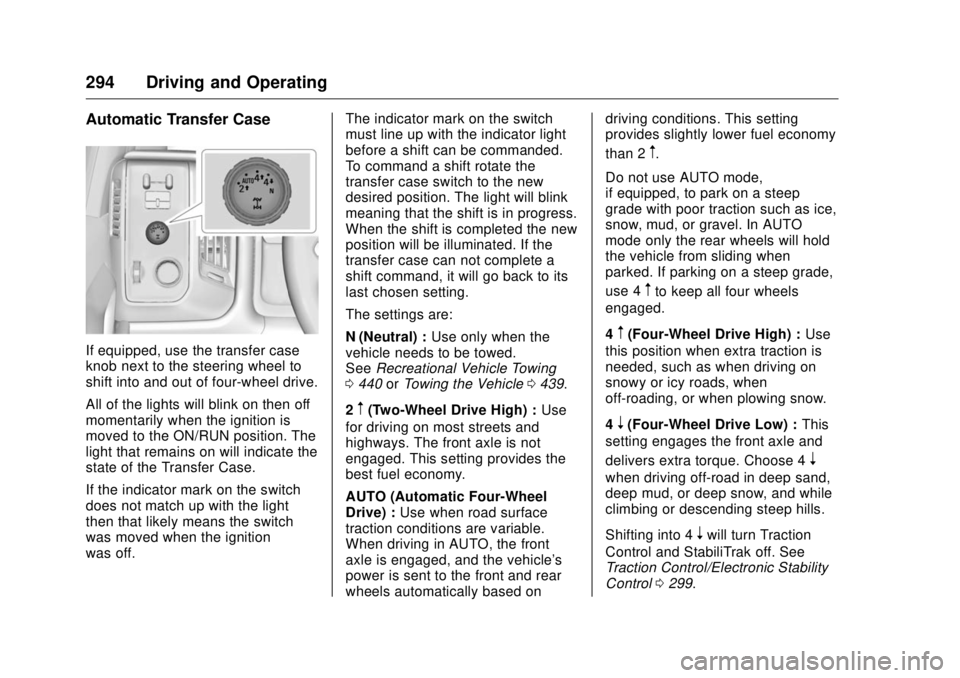
If equipped, use the transfer case
knob next to the steering wheel to
shift into and out of four-wheel drive.
All of the lights will blink on then off
momentarily when the ignition is
moved to the ON/RUN position. The
light that remains on will indicate the
state of the Transfer Case.
If the indicator mark on the switch
does not match up with the light
then that likely means the switch
was moved when the ignition
was off. The indicator mark on the switch
must line up with the indicator light
before a shift can be commanded.
To command a shift rotate the
transfer case switch to the new
desired position. The light will blink
meaning that the shift is in progress.
When the shift is completed the new
position will be illuminated. If the
transfer case can not complete a
shift command, it will go back to its
last chosen setting.
The settings are:
N (Neutral) : Use only when the
vehicle needs to be towed.
See Recreational Vehicle Towing
0 440 or Towing the Vehicle 0 439 .
2
m (Two-Wheel Drive High) : Use
for driving on most streets and
highways. The front axle is not
engaged. This setting provides the
best fuel economy.
AUTO (Automatic Four-Wheel
Drive) : Use when road surface
traction conditions are variable.
When driving in AUTO, the front
axle is engaged, and the vehicle's
power is sent to the front and rear
wheels automatically based on driving conditions. This setting
provides slightly lower fuel economy
than 2
m .
Do not use AUTO mode,
if equipped, to park on a steep
grade with poor traction such as ice,
snow, mud, or gravel. In AUTO
mode only the rear wheels will hold
the vehicle from sliding when
parked. If parking on a steep grade,
use 4
m to keep all four wheels
engaged.
4
m (Four-Wheel Drive High) : Use
this position when extra traction is
needed, such as when driving on
snowy or icy roads, when
off-roading, or when plowing snow.
4
n (Four-Wheel Drive Low) : This
setting engages the front axle and
delivers extra torque. Choose 4
nwhen driving off-road in deep sand,
deep mud, or deep snow, and while
climbing or descending steep hills.
Shifting into 4
n will turn Traction
Control and StabiliTrak off. See
Traction Control/Electronic Stability
Control 0 299 .
Page 297 of 511
GMC Sierra/Sierra Denali Owner Manual (GMNA-Localizing-U.S./Canada/
Mexico-9955992) - 2017 - crc - 4/18/17
296 Driving and Operating If the transmission is in gear and/or
moving more than 5 km/h (3 mph),
the 4
m , AUTO, or 2
m indicator light
will flash for 30 seconds but will not
complete the shift. With the vehicle
moving less than 5 km/h (3 mph),
and the transmission in N (Neutral),
attempt the shift again.
Shifting Into N (Neutral)
To shift into N (Neutral):
1. Park the vehicle on a level
surface.
2. Set the parking brake and
press and hold the brake
pedal. See Parking Brake
0 297 .
3. Start the vehicle or turn the
ignition to ON/RUN.
4. Shift the transmission to
N (Neutral).
5. Shift the transfer case to 2
m . 6. Turn the transfer case knob
clockwise to N (Neutral) until it
stops and hold it there until the
N (Neutral) light starts blinking.
This will take at least
10 seconds. Then slowly
release the dial to the 4
nposition. The N (Neutral) light
will come on when the transfer
case shift to N (Neutral) is
complete.
7. With the engine running, verify
that the transfer case is in
N (Neutral) by shifting the
transmission to R (Reverse),
then shift the transmission to
D (Drive). There should be no
movement of the vehicle while
shifting the transmission.
8. Turn the engine off, and the
ignition to ACC/ACCESSORY.
9. Place the transmission shift
lever in P (Park). See
Recreational Vehicle Towing
0 440 .
10. Turn the ignition to LOCK/OFF. Shifting Out of N (Neutral)
To shift out of N (Neutral):
1. Set the parking brake and
apply the brake pedal.
2. Turn the ignition to ON/RUN
with the engine off.
3. Shift the transmission to
N (Neutral).
4. Turn the transfer case knob to
the desired setting.
After the transfer case has
shifted out of N (Neutral), the
N (Neutral) light will go out.
5. Release the parking brake.
6. Start the engine and shift the
transmission to the
desired gear.
Page 299 of 511
GMC Sierra/Sierra Denali Owner Manual (GMNA-Localizing-U.S./Canada/
Mexico-9955992) - 2017 - crc - 4/18/17
298 Driving and Operating Set the parking brake by holding the
regular brake pedal down, then
pushing down the parking brake
pedal.
If the ignition is on, the brake
system warning light will come on.
See Brake System Warning Light
0 145 .
CautionDriving with the parking brake on
can overheat the brake system
and cause premature wear or
damage to brake system parts.
Make sure that the parking brake
is fully released and the brake
warning light is off before driving.
To release the parking brake, hold
the regular brake pedal down, then
push down momentarily on the
parking brake pedal until you feel
the pedal release. Slowly pull your
foot up off the parking brake pedal.
If the parking brake is not released
when you begin to drive, the brake system warning light will flash and a
chime will sound warning you that
the parking brake is still on.
If you are towing a trailer and are
parking on a hill, see Driving
Characteristics and Towing Tips
0 320 .
Brake Assist The Brake Assist feature is
designed to assist the driver in
stopping or decreasing vehicle
speed in emergency driving
conditions. This feature uses the
stability system hydraulic brake
control module to supplement the
power brake system under
conditions where the driver has
quickly and forcefully applied the
brake pedal in an attempt to quickly
stop or slow down the vehicle. The
stability system hydraulic brake
control module increases brake
pressure at each corner of the
vehicle until the ABS activates.
Minor brake pedal pulsation or
pedal movement during this time is
normal and the driver should
continue to apply the brake pedal as the driving situation dictates. The
Brake Assist feature will
automatically disengage when the
brake pedal is released or brake
pedal pressure is quickly
decreased.
Hill Start Assist (HSA) This vehicle has a Hill Start Assist
(HSA) feature, which may be useful
when the vehicle is stopped on a
grade. This feature is designed to
prevent the vehicle from rolling,
either forward or rearward, during
vehicle drive off. After you
completely stop and hold the vehicle
in a complete standstill on a grade,
HSA will automatically activate.
During the transition period between
when you release the brake pedal
and start to accelerate to drive off
on a grade, HSA holds the braking
pressure for a maximum of
two seconds to ensure that there is
no rolling. The brakes will
automatically release when the
accelerator pedal is applied within
the two-second window. If the
vehicle is equipped with the
Integrated Trailer Brake Control
Page 309 of 511
GMC Sierra/Sierra Denali Owner Manual (GMNA-Localizing-U.S./Canada/
Mexico-9955992) - 2017 - crc - 4/18/17
308 Driving and Operating When an object is first detected in
the rear, one beep will be heard
from the rear, or both sides of the
Safety Alert Seat will pulse two
times. When an object is very close
(<0.6 m (2 ft) in the vehicle rear,
or <0.3 m (1 ft) in the vehicle front),
a continuous beep will sound from
the front or rear, or both sides of the
Safety Alert Seat will pulse five
times. Beeps for FPA are higher
pitched than for RPA.
Turning the Features On or Off Press
X on the center stack to
turn the Front and Rear Parking
Assist on or off. The indicator light in
the button comes on when the
features are on and turns off when
the features have been disabled.
Front and Rear Parking Assist can
be turned off, on, or on with towbar
through vehicle personalization. See
“ Park Assist ” under Vehicle
Personalization 0 167 . If the parking
assist is turned off through vehicle
personalization, the parking assist
button on the center stack will be
disabled. To turn the parking assist
on again, select On in vehicle personalization. The On with Towbar
setting allows for the parking assist
to work properly with an attached
trailer hitch. Turn off parking assist
when towing a trailer.
To turn the rear parking assist
symbols or guidance lines on or off,
see “ Rear Camera ” under Vehicle
Personalization 0 167 .
Assistance Systems for
Driving If equipped, when driving the
vehicle in a forward gear, Forward
Collision Alert (FCA), Lane
Departure Warning (LDW), and/or
Lane Keep Assist (LKA) can help to
avoid a crash or reduce crash
damage.
Forward Collision Alert
(FCA) System If equipped, the FCA system may
help to avoid or reduce the harm
caused by front-end crashes. When
approaching a vehicle ahead too
quickly, FCA provides a red flashing
alert on the windshield and rapidly beeps or pulses the driver seat.
FCA also lights an amber visual
alert if following another vehicle
much too closely.
FCA detects vehicles within a
distance of approximately 60 m
(197 ft) and operates at speeds
above 40 km/h (25 mph).
{ WarningFCA is a warning system and
does not apply the brakes. When
approaching a slower-moving or
stopped vehicle ahead too rapidly,
or when following a vehicle too
closely, FCA may not provide a
warning with enough time to help
avoid a crash. It also may not
provide any warning at all. FCA
does not warn of pedestrians,
animals, signs, guardrails,
bridges, construction barrels,
or other objects. Be ready to take
action and apply the brakes. See
Defensive Driving 0 254 .
Page 313 of 511
GMC Sierra/Sierra Denali Owner Manual (GMNA-Localizing-U.S./Canada/
Mexico-9955992) - 2017 - crc - 4/18/17
312 Driving and Operating Warning (Continued)flow of traffic. If this occurs, take
your foot off the brake pedal and
then apply the brakes as needed.
FAB and IBA can be disabled
through vehicle personalization. See
“ Collision/Detection Systems ” under
Vehicle Personalization 0 167 .
{ WarningUsing FAB or IBA while towing a
trailer could cause you to lose
control of the vehicle and crash.
Turn the system to Alert or Off
when towing a trailer.
Lane Departure Warning
(LDW) (2500/3500 Series) If equipped, LDW may help avoid
crashes due to unintentional lane
departures. It may provide an alert if
the vehicle is crossing a lane
marking without using a turn signal
in that direction. LDW uses a camera sensor to detect the lane
markings at speeds of 56 km/h
(35 mph) or greater.
{ WarningThe LDW system does not steer
the vehicle. The LDW system
may not:
.
Provide enough time to
avoid a crash.
.
Detect lane markings under
poor weather or visibility
conditions. This can occur if
the windshield or
headlamps are blocked by
dirt, snow, or ice; if they are
not in proper condition; or if
the sun shines directly into
the camera.
.
Detect road edges.
.
Detect lanes on winding or
hilly roads.
If LDW only detects lane
markings on one side of the road,
it will only warn you when
(Continued) Warning (Continued) departing the lane on the side
where it has detected a lane
marking. Always keep your
attention on the road and
maintain proper vehicle position
within the lane, or vehicle
damage, injury, or death could
occur. Always keep the
windshield, headlamps, and
camera sensors clean and in
good repair. Do not use LDW in
bad weather conditions.
How the System Works The LDW camera sensor is on the
windshield ahead of the rearview
mirror.
To turn LDW on and off, press
@ on
the center stack. The control
indicator will light when LDW is on.
Page 315 of 511
GMC Sierra/Sierra Denali Owner Manual (GMNA-Localizing-U.S./Canada/
Mexico-9955992) - 2017 - crc - 4/18/17
314 Driving and Operating Warning (Continued).
Detect lanes on winding or
hilly roads.
If LKA only detects lane markings
on one side of the road, it will
only assist or provide an LDW
alert when approaching the lane
on the side where it has detected
a lane marking. Even with LKA
and LDW, you must steer the
vehicle. Always keep your
attention on the road and
maintain proper vehicle position
within the lane, or vehicle
damage, injury, or death could
occur. Always keep the
windshield, headlamps, and
camera sensors clean and in
good repair. Do not use LKA in
bad weather conditions. { WarningUsing LKA while towing a trailer
or on slippery roads could cause
loss of control of the vehicle and
a crash. Turn the system off.
How the System Works The LKA camera sensor is on the
windshield ahead of the rearview
mirror.
To turn LKA on and off, press
Aon the center stack.
When on,
A is green if LKA is
available to assist and provide LDW
alerts. It may assist by gently
turning the steering wheel and
display
A as amber if the vehicle
approaches a detected lane marking
without using a turn signal in that
direction. It may also provide an
LDW alert by flashing
A amber
as the lane marking is crossed.
Additionally, there may be three
beeps, or the driver seat may pulse three times, on the right or left,
depending on the lane departure
direction.
Take Steering
The LKA system does not
continuously steer the vehicle.
If LKA does not detect active driver
steering, an alert, chime, or DIC
message may be provided. Move
the steering wheel to dismiss.
When the System Does Not
Seem to Work Properly The system performance may be
affected by:
.
Close vehicles ahead.
.
Sudden lighting changes, such
as when driving through tunnels.
.
Banked roads.
.
Roads with poor lane markings,
such as two-lane roads.
If the LKA system is not functioning
properly when lane markings are
clearly visible, cleaning the
windshield may help.
Page 321 of 511
GMC Sierra/Sierra Denali Owner Manual (GMNA-Localizing-U.S./Canada/
Mexico-9955992) - 2017 - crc - 4/18/17
320 Driving and Operating
Trailer Towing General Towing
Information Only use towing equipment that has
been designed for the vehicle.
Contact your dealer or trailering
dealer for assistance with preparing
the vehicle for towing a trailer. Read
the entire section before towing a
trailer.
For towing a disabled vehicle, see
Towing the Vehicle 0 439 . For
towing the vehicle behind another
vehicle such as a motor home, see
Recreational Vehicle Towing 0 440 .
Driving Characteristics
and Towing Tips Driving with a Trailer
When towing a trailer:
.
Become familiar with the state
and local laws that apply to
trailer towing. .
The trailer must be equipped
with brakes adequate for the
intended use. A loaded trailer
weighing more than 900 kg
(2,000 lb) must be equipped with
its own brake system, with
brakes working on all axles.
Trailer braking equipment
conforming to Canadian
Standards Association (CSA)
requirement CAN3-D313, or its
equivalent, is recommended.
.
Do not tow a trailer during the
first 800 km (500 mi) to prevent
damage to the engine, axle,
or other parts.
.
Then during the first 800 km
(500 mi) of trailer towing, do not
drive over 80 km/h (50 mph) and
do not make starts at full throttle.
.
Vehicles can tow in D (Drive).
The Tow/Haul Mode may be
used if the transmission shifts
too often. See Tow/Haul Mode
0 288 .
.
Turn off Park Assist when
towing. { WarningWhen towing a trailer, exhaust
gases may collect at the rear of
the vehicle and enter if the
liftgate, trunk/hatch, or rear-most
window is open.
When towing a trailer:
.
Do not drive with the
liftgate, trunk/hatch,
or rear-most window open.
.
Fully open the air outlets on
or under the instrument
panel.
.
Also adjust the climate
control system to a setting
that brings in only outside
air. See “ Climate Control
Systems ” in the Index.
For more information about
carbon monoxide, see Engine
Exhaust 0 282 .
Towing a trailer requires a certain
amount of experience. The
combination you are driving is
longer and not as responsive as the