ad blue GMC SIERRA DENALI 2017 Owner's Guide
[x] Cancel search | Manufacturer: GMC, Model Year: 2017, Model line: SIERRA DENALI, Model: GMC SIERRA DENALI 2017Pages: 511, PDF Size: 6.88 MB
Page 237 of 511
GMC Sierra/Sierra Denali Owner Manual (GMNA-Localizing-U.S./Canada/
Mexico-9955992) - 2017 - crc - 4/18/17
236 Infotainment System .
e will appear on the screen if
the stereo headset is
successfully connected.
.
The sound played by the
Bluetooth device is delivered
through the infotainment system.
.
Bluetooth music can be played
only when a Bluetooth device
has been connected. To play
Bluetooth music, connect the
Bluetooth phone to the
infotainment system.
.
If the Bluetooth device is
disconnected while playing
phone music, the music is
discontinued. The audio
streaming function may not be
supported in some Bluetooth
phones. Only one function can
be used at a time between the
Bluetooth hands-free or Phone
music function. For example,
if you convert to Bluetooth
hands-free while playing Phone
music, the music is
discontinued. Playing music from
the car is not possible when
there are no music files stored in
the cell phone. Playing Bluetooth Music
1. Press
{ .
2. Touch AUDIO.
3. Touch Source.
4. Touch Bluetooth.
Pause
Touch
j to pause.
Touch
r to resume.
Playing the Next Song
Touch
l .
Playing the Previous Song
Touch
g within two seconds of
playback time to play the
previous song.
Returning to the Beginning of the
Current Song
Touch
g after two seconds of
playback time.
Search
Touch and hold
g or
l to rewind
or fast forward. Playing Music Randomly
Touch
Z during playback. Touch
again to return to normal play.
This function may not be supported
depending on the bluetooth device.
Do not change the track too quickly
when playing Bluetooth music.
Conditions that may occur when
playing Bluetooth music:
.
It takes time to transmit data
from the bluetooth device to the
infotainment system.
.
If the cell phone or Bluetooth
device is not in the waiting
screen mode, it may not
automatically play.
.
The infotainment system
transmits the order to play from
the bluetooth device in the
Bluetooth music play mode.
If this is done in a different
mode, then the device transmits
the order to stop. Depending on
the bluetooth device options, this
order to play/stop may take time
to activate.
Page 238 of 511
GMC Sierra/Sierra Denali Owner Manual (GMNA-Localizing-U.S./Canada/
Mexico-9955992) - 2017 - crc - 4/18/17
Infotainment System 237.
If the Bluetooth music playback
is not functioning, then check to
see if the bluetooth device is in
the waiting screen mode.
.
Sounds may be cut off during
the Bluetooth music playback.
.
The infotainment system outputs
the audio from the cell phone or
Bluetooth device as it is
transmitted.
Apple CarPlay and
Android Auto If equipped, Android Auto ™ and/or
Apple CarPlay ™ capability may be
available through a compatible
smartphone. If available, a
PROJECTION icon will appear on
the Home Page of the infotainment
display.
To use Android Auto and/or Apple
CarPlay:
1. Download the Android Auto
app to your phone from the
Google ™ Play store. There is
no app required for Apple
CarPlay. 2. Connect your Android phone or
Apple iPhone by using the
compatible phone USB cable
and plugging into a USB data
port. For best performance, use
the device ’ s factory-provided
USB cable. Aftermarket or
third-party cables may
not work.
The PROJECTION icon on the
Home Page will change to
ANDROID AUTO or APPLE
CARPLAY depending on the phone.
Android Auto and/or Apple CarPlay
may automatically launch upon USB
connection. If not, press the
ANDROID AUTO and/or APPLE
CARPLAY icon on the Home Page
to launch.
For further information on how to set
up Android Auto and Apple CarPlay
in the vehicle, see my. gmc.com or
see Customer Assistance Offices
0 476 .
Android Auto is provided by Google
and is subject to Google ’ s terms
and privacy policy. CarPlay is
provided by Apple and is subject to
Apple ’ s terms and privacy policy. For Android Auto support see
https://support.google.com/
androidauto or Apple CarPlay
support at https://www.apple.com/
ios/carplay/ for more information.
Apple or Google may change or
suspend availability at any time.
Android Auto is a trademark of
Google Inc.; Apple CarPlay is a
trademark of Apple Inc.
Page 240 of 511
GMC Sierra/Sierra Denali Owner Manual (GMNA-Localizing-U.S./Canada/
Mexico-9955992) - 2017 - crc - 4/18/17
Infotainment System 239General Requirements:
1. A License Agreement from
SiriusXM is required for any
product that incorporates
SiriusXM Technology and/or for
use of any of the SiriusXM
marks to be manufactured,
distributed, or marketed in the
SiriusXM Service Area.
2. For products to be distributed,
marketed, and/or sold in
Canada, a separate agreement
is required with Canadian
Satellite Radio Inc. (operating
as SiriusXM Canada).
Other Information The Bluetooth word mark and logos
are owned by the Bluetooth SIG,
Inc. and any use of such marks by
General Motors is under license.
Other trademarks and trade names
are those of their respective owners. Schedule I: Gracenote EULA
Music recognition technology and
related data are provided by
Gracenote. Gracenote is the
industry standard in music
recognition technology and related
content delivery. For more
information visit
www.gracenote.com.
Music-related data from Gracenote,
Inc., copyright 2000 to present
Gracenote. Gracenote Software,
copyright 2000 to present
Gracenote. One or more patents
owned by Gracenote may apply to
this product and service. See the
Gracenote website for a
non-exhaustive list of applicable
Gracenote patents. Gracenote,
CDDB, MusicID, MediaVOCS, the
Gracenote logo and logotype, and
the "Powered by Gracenote" logo are either registered trademarks or
trademarks of Gracenote in the
United States and/or other
countries.
Gracenote Terms of Use
This application or device contains
software from Gracenote, Inc. of
Emeryville, California ("Gracenote").
The software from Gracenote (the
"Gracenote Software") enables this
application to do disc or file
identification and obtain
music-related information, including
name, artist, track, and title
information ("Gracenote Data") from
online servers or embedded
databases (collectively, "Gracenote
Servers") and to perform other
functions. You may use Gracenote
Data only by means of the intended
End-User functions of this
application or device.
This application or device may
contain content belonging to
Gracenote ’ s providers. If so, all of
the restrictions set forth herein with
respect to Gracenote Data shall
also apply to such content and such
content providers shall be entitled to
Page 344 of 511
GMC Sierra/Sierra Denali Owner Manual (GMNA-Localizing-U.S./Canada/
Mexico-9955992) - 2017 - crc - 4/18/17
Driving and Operating 343Use only a round, seven-wire
connector with flat blade terminals
meeting SAE J2863 specifications
for proper electrical connectivity.
For vehicles not equipped with
heavy-duty trailering, the harness is
secured to the vehicle's frame
behind the spare tire mount. The
harness requires the installation of a
trailer connector, which is available
through your dealer.
Heavy-Duty Trailer Wiring Harness
Package
For vehicles equipped with
heavy-duty trailering, the harness
connector is mounted in the bumper. For vehicles with the fifth wheel/
gooseneck trailer package, the
harness connector is mounted on
the inside of the pickup bed behind
the rear wheel.
The seven-wire harness contains
the following trailer circuits:
.
Green/Violet: Right Stop/Turn
Signal
.
Yellow/Gray: Left Stop/Turn
Signal
.
Gray/Brown: Taillamps/Parking
Lamps
.
White: Ground
.
White/Green: Back-up Lamps .
Red/Green: Battery Feed
.
Dark Blue: Trailer Brake
To help charge a remote
(non-vehicle) battery, press the Tow/
Haul Mode button at the end of the
shift lever. If the trailer is too light for
Tow/Haul Mode, turn on the
headlamps to help charge the
battery.
Camper/Fifth-Wheel Trailer Wiring
Package
For vehicles without the fifth wheel/
gooseneck tralier package,
seven-wire camper harness is under
the rear bumper, attached to the
frame near the rear crossmember.
A connector must be added to the
wiring harness that connects to the
camper.
The harness contains the following
camper/trailer circuits:
.
Green/Violet: Right Stop/Turn
Signal
.
Yellow/Gray: Left Stop/Turn
Signal
.
Gray/Brown: Taillamps/Parking
Lamps
Page 345 of 511
GMC Sierra/Sierra Denali Owner Manual (GMNA-Localizing-U.S./Canada/
Mexico-9955992) - 2017 - crc - 4/18/17
344 Driving and Operating .
White: Ground
.
White/Green: Back-up Lamps
.
Red/Green: Battery Feed
.
Dark Blue: Trailer Brake
If the vehicle is equipped with the
heavy-duty trailering option, see
“ Heavy-Duty Trailer Wiring Harness
Package ” earlier in this section.
When the camper-wiring harness is
ordered without the heavy-duty
trailering package, a seven-wire
harness with a seven-pin connector
is at the rear of the vehicle and is
tied to the vehicle's frame.
Electric Brake Control Wiring
Provisions These wiring provisions are
included with the vehicle as part of
the trailer wiring package. These
provisions are for an electric brake
controller.
The harness should be installed by
your dealer or a qualified service
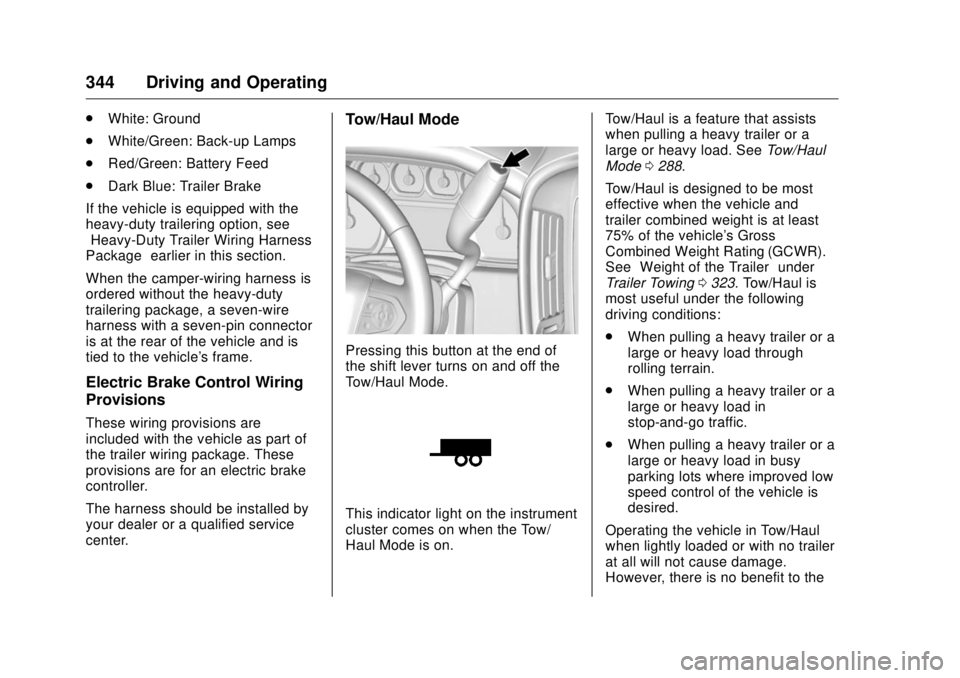
center. Tow/Haul Mode
Pressing this button at the end of
the shift lever turns on and off the
Tow/Haul Mode.
This indicator light on the instrument
cluster comes on when the Tow/
Haul Mode is on. Tow/Haul is a feature that assists
when pulling a heavy trailer or a
large or heavy load. See Tow/Haul
Mode 0 288 .
Tow/Haul is designed to be most
effective when the vehicle and
trailer combined weight is at least
75% of the vehicle's Gross
Combined Weight Rating (GCWR).
See “ Weight of the Trailer ” under
Trailer Towing 0 323 . Tow/Haul is
most useful under the following
driving conditions:
.
When pulling a heavy trailer or a
large or heavy load through
rolling terrain.
.
When pulling a heavy trailer or a
large or heavy load in
stop-and-go traffic.
.
When pulling a heavy trailer or a
large or heavy load in busy
parking lots where improved low
speed control of the vehicle is
desired.
Operating the vehicle in Tow/Haul
when lightly loaded or with no trailer
at all will not cause damage.
However, there is no benefit to the
Page 489 of 511
GMC Sierra/Sierra Denali Owner Manual (GMNA-Localizing-U.S./Canada/
Mexico-9955992) - 2017 - crc - 4/18/17
488 OnStar
OnStar OnStar Overview OnStar Overview . . . . . . . . . . . . . 488
OnStar Services Emergency . . . . . . . . . . . . . . . . . . . 489
Security . . . . . . . . . . . . . . . . . . . . . . 489
Navigation . . . . . . . . . . . . . . . . . . . . 490
Connections . . . . . . . . . . . . . . . . . . 491
Diagnostics . . . . . . . . . . . . . . . . . . . 492
OnStar Additional Information OnStar Additional
Information . . . . . . . . . . . . . . . . . . 493 OnStar Overview
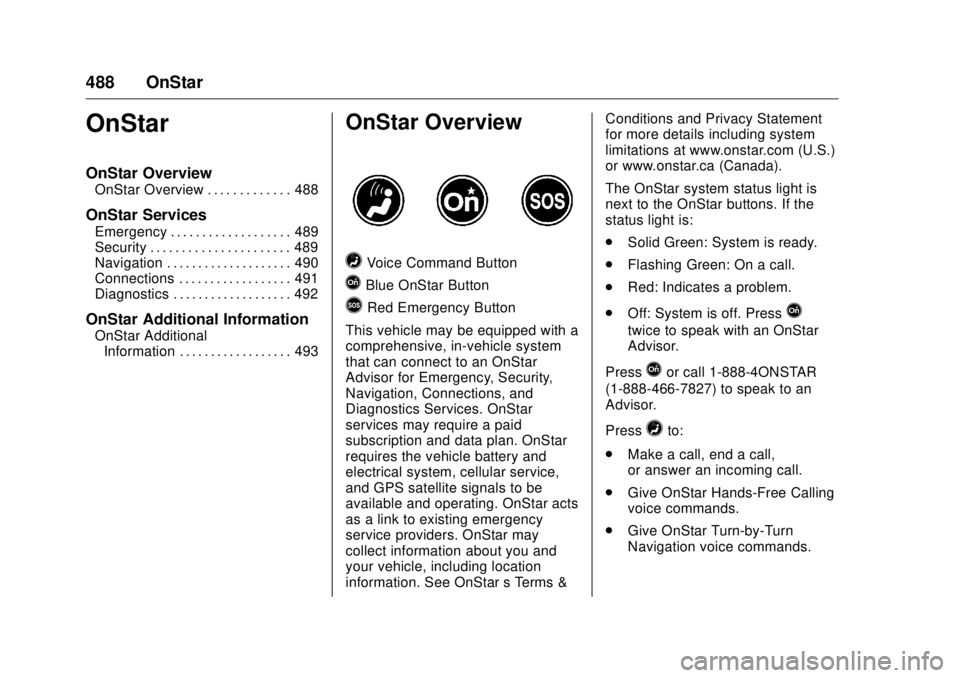
= Voice Command Button
Q Blue OnStar Button
> Red Emergency Button
This vehicle may be equipped with a
comprehensive, in-vehicle system
that can connect to an OnStar
Advisor for Emergency, Security,
Navigation, Connections, and
Diagnostics Services. OnStar
services may require a paid
subscription and data plan. OnStar
requires the vehicle battery and
electrical system, cellular service,
and GPS satellite signals to be
available and operating. OnStar acts
as a link to existing emergency
service providers. OnStar may
collect information about you and
your vehicle, including location
information. See OnStar ’ s Terms & Conditions and Privacy Statement
for more details including system
limitations at www.onstar.com (U.S.)
or www.onstar.ca (Canada).
The OnStar system status light is
next to the OnStar buttons. If the
status light is:
.
Solid Green: System is ready.
.
Flashing Green: On a call.
.
Red: Indicates a problem.
.
Off: System is off. Press
Q twice to speak with an OnStar
Advisor.
Press
Q or call 1-888-4ONSTAR
(1-888-466-7827) to speak to an
Advisor.
Press
= to:
.
Make a call, end a call,
or answer an incoming call.
.
Give OnStar Hands-Free Calling
voice commands.
.
Give OnStar Turn-by-Turn
Navigation voice commands.
Page 500 of 511

GMC Sierra/Sierra Denali Owner Manual (GMNA-Localizing-U.S./Canada/
Mexico-9955992) - 2017 - crc - 4/18/17
Index 499Antilock Brake System
(ABS) (cont'd)
Warning Light . . . . . . . . . . . . . . . . . 146
Appearance Care
Exterior . . . . . . . . . . . . . . . . . . . . . . . 444
Interior . . . . . . . . . . . . . . . . . . . . . . . . 449
Apple CarPlay and
Android Auto . . . . . . . . . . . . . . . . . . 237
Assistance Program,
Roadside . . . . . . . . . . . . . . . . . . . . . . 478
Assistance Systems for
Driving . . . . . . . . . . . . . . . . . . . . . . . . 308
Assistance Systems for
Parking and Backing . . . . . . . . . . 306
Audio
Bluetooth . . . . . . . . . . . . . . . . . . . . . 215
Theft-Deterrent Feature . . . . . . . 189
Audio Players
CD . . . . . . . . . . . . . . . . . . . . . . . . . . . 203
Automatic
Dimming Mirrors . . . . . . . . . . . . . . . . 49
Door Locks . . . . . . . . . . . . . . . . . . . . . 40
Forward Braking . . . . . . . . . . . . . . 310
Headlamp System . . . . . . . . . . . . 181
Transmission . . . . . . . . . . . . . . . . . 283
Transmission Fluid . . . . . . 368, 371
Automatic Transmission
Manual Mode . . . . . . . . . . . . . . . . . 286 Automatic Transmission (cont'd)
Shift Lock Control Function
Check . . . . . . . . . . . . . . . . . . . . . . . 387
Auxiliary
Roof Mounted Lamp . . . . . . . . . . 183
Auxiliary Jack . . . . . . . . . . . . . . . . . . . 214
Axle, Front . . . . . . . . . . . . . . . . . . . . . . 384
Axle, Rear . . . . . . . . . . . . . . . . . . . . . . 385
B Battery
Load Management . . . . . . . . . . . . 186
Power Protection . . . . . . . . . . . . . 187
Voltage and Charging
Messages . . . . . . . . . . . . . . . . . . . 157
Battery - North America . . . . 383, 435
Blade Replacement, Wiper . . . . . 388
Blind Spot Mirrors . . . . . . . . . . . . . . . 49
Bluetooth
Overview . . . . . . . . 222, 224,
228, 233
Bluetooth Audio . . . . . . . . . . . . . . . . 215
Brake
Pedal and Adjustable
Throttle . . . . . . . . . . . . . . . . . . . . . . 273
System Warning Light . . . . . . . . 145
Brakes . . . . . . . . . . . . . . . . . . . . . . . . . . 381
Antilock . . . . . . . . . . . . . . . . . . . . . . . 297
Assist . . . . . . . . . . . . . . . . . . . . . . . . . 298 Brakes (cont'd)
Fluid . . . . . . . . . . . . . . . . . . . . . . . . . . 381
Parking . . . . . . . . . . . . . . . . . . . . . . . 297
System Messages . . . . . . . . . . . . 158
Braking . . . . . . . . . . . . . . . . . . . . . . . . . 254
Automatic Forward . . . . . . . . . . . 310
Break-In, New Vehicle . . . . . . . . . . 273
Bulb Replacement . . . . . . . . . . . . . . 392
Center High-Mounted
Stoplamp (CHMSL) and
Cargo Lamp . . . . . . . . . . . . . . . . . 391
Halogen Bulbs . . . . . . . . . . . . . . . . 389
Headlamp Aiming . . . . . . . . . . . . . 389
Headlamps . . . . . . . . . . . . . . . . . . . 389
High Intensity Discharge
(HID) Lighting . . . . . . . . . . . . . . . 390
Taillamps, Turn Signal,
Stoplamps, and Back-up
Lamps . . . . . . . . . . . . . . . . . . . . . . 390
Buying New Tires . . . . . . . . . . . . . . . 418
C Calibration . . . . . . . . . . . . . . . . . . . . . . 126
California
Fuel Requirements . . . . . . . . . . . 316
Page 507 of 511

GMC Sierra/Sierra Denali Owner Manual (GMNA-Localizing-U.S./Canada/
Mexico-9955992) - 2017 - crc - 4/18/17
506 Index OnStar ®
Overview . . . . . . . . . . . . . . 488
OnStar ®
Security . . . . . . . . . . . . . . . 489
Operating Mode
Overheated Engine
Protection . . . . . . . . . . . . . . . . . . . 378
Operation
Fog Lamps . . . . . . . . . . . . . . . . . . . 183
Ordering
Service Publications . . . . . . . . . . 483
Outlets
Power . . . . . . . . . . . . . . . . . . . . . . . . 128
Overheated Engine
Protection Operating Mode . . . . 378
Overheating, Engine . . . . . . . . . . . . 376
Overview . . . . . . . . . . . . . . . . . . 189, 193
P Park
Shifting Into . . . . . . . . . . . . . . . . . . . 279
Shifting Out of . . . . . . . . . . . . . . . . 280
Parking
Brake . . . . . . . . . . . . . . . . . . . . . . . . . 297
Brake and P (Park)
Mechanism Check . . . . . . . . . . 388
Over Things That Burn . . . . . . . 281
Parking Assist . . . . . . . . . . . . . . . . . . 306
Parking or Backing
Assistance Systems . . . . . . . . . . 306 Passenger Airbag Status
Indicator . . . . . . . . . . . . . . . . . . . . . . 143
Passenger Compartment Air
Filter . . . . . . . . . . . . . . . . . . . . . . . . . . 250
Passenger Sensing System . . . . . 81
Perchlorate Materials
Requirements, California . . . . . . 357
Personalization
Vehicle . . . . . . . . . . . . . . . . . . . . . . . 167
Phone
Apple CarPlay and
Android Auto . . . . . . . . . . . . . . . . 237
Bluetooth . . . . . . . . 222, 224,
228, 233
Pickup Conversion to
Chassis Cab . . . . . . . . . . . . . . . . . . 354
Port
USB . . . . . . . . . . . . . . . . . . . . . 206, 208
Power
Door Locks . . . . . . . . . . . . . . . . . . . . . 40
Mirrors . . . . . . . . . . . . . . . . . . . . . . . . . . 47
Outlets . . . . . . . . . . . . . . . . . . . . . . . 128
Protection, Battery . . . . . . . . . . . . 187
Retained Accessory (RAP) . . . 277
Seat Adjustment . . . . . . . . . . . . . . . . 58
Steering Fluid . . . . . . . . . . . . . . . . . 379
Windows . . . . . . . . . . . . . . . . . . . . . . . 51
Power Assist Steps . . . . . . . . . . . . . . 42 Pregnancy, Using Safety Belts . . . 70
Privacy
Vehicle Data Recording . . . . . . . 485
Program
Courtesy Transportation . . . . . . 480
Proposition
65 Warning,
California . . . . . . . . . . . .357, 383, 435
R Radio Frequency Statement . . . . 484
Radio Reception . . . . . . . . . . . . . . . . 202
Radios
AM-FM Radio . . . . . . . . . . . . 197, 199
Satellite . . . . . . . . . . . . . . . . . . 200, 201
Reading Lamps . . . . . . . . . . . . . . . . . 185
Rear Axle . . . . . . . . . . . . . . . . . . . . . . . 385
Locking . . . . . . . . . . . . . . . . . . . . . . . 302
Rear Seats . . . . . . . . . . . . . . . . . . 63, 64
Rear Vision Camera (RVC) . . . . . 306
Rear Windows . . . . . . . . . . . . . . . . . . . 53
Rearview Mirrors . . . . . . . . . . . . . . . . 50
Automatic Dimming . . . . . . . . . . . . . 50
Reclining Seatbacks . . . . . . . . . . . . . 59
Recognition
Voice . . . . . . . . . . . . . . . . . . . . . . . . . 216
Recommended Fluids and
Lubricants . . . . . . . . . . . . . . . . . . . . . 464