display GMC SIERRA DENALI 2018 User Guide
[x] Cancel search | Manufacturer: GMC, Model Year: 2018, Model line: SIERRA DENALI, Model: GMC SIERRA DENALI 2018Pages: 505, PDF Size: 8.27 MB
Page 67 of 505
GMC Sierra/Sierra Denali Owner Manual (GMNA-Localizing-U.S./Canada/
Mexico-11349177) - 2018 - CRC - 10/17/17
66 Seats and Restraints Press
J to heat the driver or
passenger seat cushion and
seatback.
Press
C to ventilate the driver or
passenger seat.
The indicator light on the button
comes on when this feature is on.
Press the button once for the
highest setting. With each press of
the button, the seat will change to
the next lower setting, and then to
the off setting. The indicator lights
next to the buttons indicate three for
the highest setting and one for the
lowest. If the heated seats are on
high for an extended time, their level
may automatically be lowered. Remote Start Auto Heated and
Ventilated Seats
During a remote start, the heated or
ventilated seats can be turned on
automatically. When it is cold
outside, the heated seats turn on,
and when it is hot outside the
ventilated seats turn on. The heated
or ventilated seats are canceled
when the ignition is turned on. Press
the heated or ventilated seat button
to use the heated or ventilated seats
after the vehicle is started.
The heated or ventilated seat
indicator lights do not turn on during
a remote start.
The temperature performance of an
unoccupied seat may be reduced.
This is normal.
The heated or ventilated seats will
not turn on during a remote start
unless they are enabled in the
vehicle personalization menu.
See Remote Vehicle Start 0 39 and
Vehicle Personalization 0 165 .Rear Seats Rear Seats (Double Cab
Full Bench) Rear Seat Reminder (Full
Bench Only) If equipped, the message REAR
SEAT REMINDER LOOK IN REAR
SEAT displays under certain
conditions indicating there may be
an item or passenger in the rear
seat. Check before exiting the
vehicle.
This feature will activate when a
second row door is opened while
the vehicle is on or up to 10 minutes
before the vehicle is turned on.
There will be an alert when the
vehicle is turned off. The alert does
not directly detect objects in the rear
seat; instead, under certain
conditions, it detects when a rear
door is opened and closed,
indicating that there may be
something in the rear seat.
Page 70 of 505
GMC Sierra/Sierra Denali Owner Manual (GMNA-Localizing-U.S./Canada/
Mexico-11349177) - 2018 - CRC - 10/17/17
Seats and Restraints 69
Seat Belts This section describes how to use
seat belts properly, and some things
not to do.
{ WarningDo not let anyone ride where a
seat belt cannot be worn properly.
In a crash, if you or your
passenger(s) are not wearing
seat belts, injuries can be much
worse than if you are wearing
seat belts. You can be seriously
injured or killed by hitting things
inside the vehicle harder or by
being ejected from the vehicle. In
addition, anyone who is not
buckled up can strike other
passengers in the vehicle.
It is extremely dangerous to ride
in a cargo area, inside or outside
of a vehicle. In a collision,
passengers riding in these areas
are more likely to be seriously
injured or killed. Do not allow
(Continued) Warning (Continued) passengers to ride in any area of
the vehicle that is not equipped
with seats and seat belts.
Always wear a seat belt, and
check that all passenger(s) are
restrained properly too.
This vehicle has indicators as a
reminder to buckle the seat belts.
See Seat Belt Reminders 0 146 .
Seat Belt Assurance System This vehicle may have the Seat Belt
Assurance System, which prevents
the vehicle from shifting out of
P (Park). A message displays in the
Driver Information Center (DIC)
indicating the shift lever is locked
when the brake pedal is applied and
the seat belts for either the driver or
front outboard passenger are not
buckled. The vehicle will not shift
out of P (Park). Buckle the seat
belts to unlock the shift lever. If the front passenger seat is unoccupied,
only the driver seat belt must be
buckled to unlock the shift lever.
This system may not allow the
vehicle to shift out of P (Park) if an
object — such as a briefcase,
handbag, grocery bag, laptop,
or other electronic device — is on
the front outboard passenger seat.
If this happens, remove the object
from the seat or buckle the
seat belt.
If the driver or front outboard
passenger unbuckles their seat belt
while driving, the seat belt reminder
chime and light(s) will come on. See
Seat Belt Reminders 0 146 .
The Seat Belt Assurance System
will time out 30 seconds after the
brake pedal is initially pressed.
A message displays in the DIC
indicating the shift lever is unlocked
allowing the vehicle to be shifted out
of P (Park). See “ Seat Belts ” and
“ Child Restraints ” in the Index for
information about the importance of
proper restraint use.
Page 129 of 505
GMC Sierra/Sierra Denali Owner Manual (GMNA-Localizing-U.S./Canada/
Mexico-11349177) - 2018 - CRC - 10/17/17
128 Instruments and Controls
Instruments and
Controls Controls Steering Wheel Adjustment . . . 129
Steering Wheel Controls . . . . . . 129
Heated Steering Wheel . . . . . . . 130
Horn . . . . . . . . . . . . . . . . . . . . . . . . . . 130
Windshield Wiper/Washer . . . . 130
Compass . . . . . . . . . . . . . . . . . . . . . 131
Clock . . . . . . . . . . . . . . . . . . . . . . . . . 132
Power Outlets . . . . . . . . . . . . . . . . 133
Wireless Charging . . . . . . . . . . . . 134
Warning Lights, Gauges, and
Indicators Warning Lights, Gauges, and
Indicators . . . . . . . . . . . . . . . . . . . 137
Instrument Cluster . . . . . . . . . . . . 138
Speedometer . . . . . . . . . . . . . . . . . 142
Odometer . . . . . . . . . . . . . . . . . . . . . 142
Trip Odometer . . . . . . . . . . . . . . . . 142
Tachometer . . . . . . . . . . . . . . . . . . . 142
Fuel Gauge . . . . . . . . . . . . . . . . . . . 142
Engine Oil Pressure
Gauge . . . . . . . . . . . . . . . . . . . . . . 143
Engine Coolant Temperature
Gauge . . . . . . . . . . . . . . . . . . . . . . 144 Transmission Temperature
Gauge . . . . . . . . . . . . . . . . . . . . . . 145
Voltmeter Gauge . . . . . . . . . . . . . 145
Seat Belt Reminders . . . . . . . . . 146
Airbag Readiness Light . . . . . . . 147
Airbag On-Off Light . . . . . . . . . . . 147
Passenger Airbag Status
Indicator . . . . . . . . . . . . . . . . . . . . 149
Charging System Light . . . . . . . 149
Malfunction Indicator Lamp
(Check Engine Light) . . . . . . . . 150
Brake System Warning
Light . . . . . . . . . . . . . . . . . . . . . . . . 152
Antilock Brake System (ABS)
Warning Light . . . . . . . . . . . . . . . 152
Four-Wheel-Drive Light . . . . . . . 153
Tow/Haul Mode Light . . . . . . . . . 153
Hill Descent Control Light . . . . 153
Lane Departure Warning
(LDW) Light (2500/3500) . . . . 153
Lane Keep Assist (LKA) Light
(1500 Series) . . . . . . . . . . . . . . . 154
Vehicle Ahead Indicator . . . . . . 154
Traction Off Light . . . . . . . . . . . . . 154
StabiliTrak OFF Light . . . . . . . . . 154
Traction Control System (TCS)/
StabiliTrak Light . . . . . . . . . . . . . 155
Engine Coolant Temperature
Warning Light . . . . . . . . . . . . . . . 155
Tire Pressure Light . . . . . . . . . . . 156 Engine Oil Pressure Light
(Denali Only) . . . . . . . . . . . . . . . . 156
Low Fuel Warning Light . . . . . . 156
Security Light . . . . . . . . . . . . . . . . . 157
High-Beam On Light . . . . . . . . . . 157
Front Fog Lamp Light . . . . . . . . . 157
Lamps On Reminder . . . . . . . . . 157
Cruise Control Light . . . . . . . . . . 158
Door Ajar Light . . . . . . . . . . . . . . . 158
Information Displays Driver Information Center (DIC)
(Base Level Cluster) . . . . . . . . 158
Driver Information Center (DIC)
(Uplevel and Denali
Cluster) . . . . . . . . . . . . . . . . . . . . . 160
Vehicle Messages Vehicle Messages . . . . . . . . . . . . 164
Engine Power Messages . . . . . 164
Vehicle Speed Messages . . . . . 164
Vehicle Personalization Vehicle Personalization . . . . . . . 165
Universal Remote System Universal Remote System . . . . 172
Universal Remote System
Programming . . . . . . . . . . . . . . . 172
Universal Remote System
Operation . . . . . . . . . . . . . . . . . . . 174
Page 131 of 505
GMC Sierra/Sierra Denali Owner Manual (GMNA-Localizing-U.S./Canada/
Mexico-11349177) - 2018 - CRC - 10/17/17
130 Instruments and Controls
o or
p : Press to go to the
previous or next menu option.
w or
x : Press to go to the next or
previous selection.
V : Press to select a highlighted
menu option.
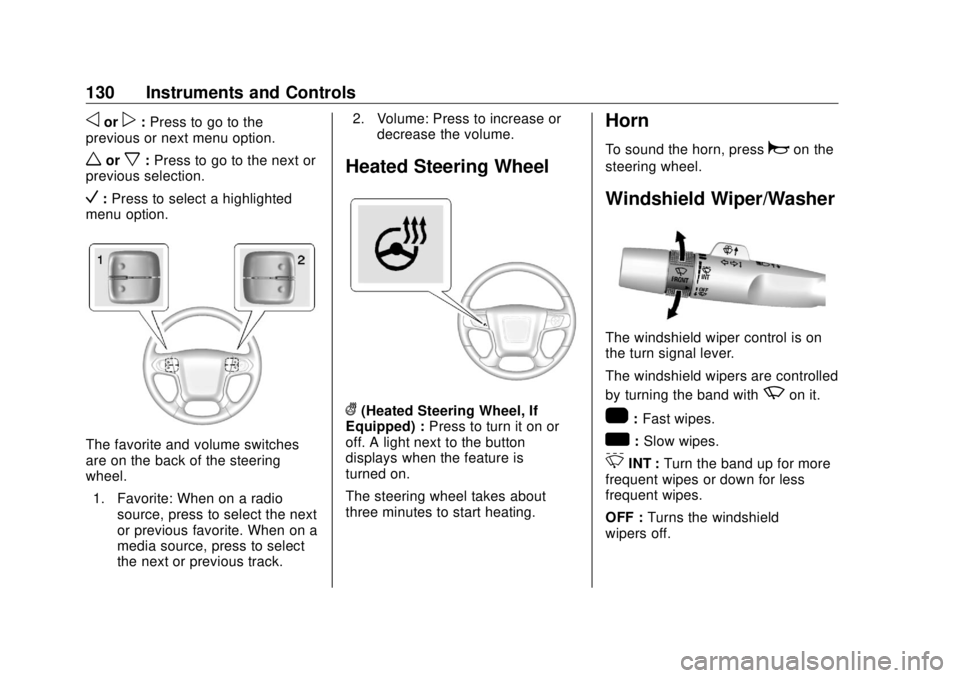
The favorite and volume switches
are on the back of the steering
wheel.
1. Favorite: When on a radio
source, press to select the next
or previous favorite. When on a
media source, press to select
the next or previous track. 2. Volume: Press to increase or
decrease the volume.
Heated Steering Wheel
( (Heated Steering Wheel, If
Equipped) : Press to turn it on or
off. A light next to the button
displays when the feature is
turned on.
The steering wheel takes about
three minutes to start heating. Horn To sound the horn, press
a on the
steering wheel.
Windshield Wiper/Washer
The windshield wiper control is on
the turn signal lever.
The windshield wipers are controlled
by turning the band with
z on it.
1 : Fast wipes.
w : Slow wipes.
3 INT : Turn the band up for more
frequent wipes or down for less
frequent wipes.
OFF : Turns the windshield
wipers off.
Page 132 of 505
GMC Sierra/Sierra Denali Owner Manual (GMNA-Localizing-U.S./Canada/
Mexico-11349177) - 2018 - CRC - 10/17/17
Instruments and Controls 131
8 : For a single wipe, turn to
8 ,
then release. For several wipes,
hold the band on
8 longer.
Clear ice and snow from the wiper
blades before using them. If frozen
to the windshield, carefully loosen or
thaw them. Damaged wiper blades
should be replaced. See Wiper
Blade Replacement 0 375 .
Heavy snow or ice can overload the
wiper motor. An internal circuit
breaker to the motor will stop the
motor until it cools down.
Wiper Parking
If the ignition is turned off while the
wipers are on
w ,
1 , or
3 INT,
they will immediately stop.
If the windshield wiper lever is then
moved to OFF before the driver
door is opened or within 10 minutes,
the wipers will restart and move to
the base of the windshield. If the ignition is turned off while the
wipers are performing wipes due to
windshield washing, the wipers
continue to run until they reach the
base of the windshield.
Windshield Washer
{ WarningIn freezing weather, do not use
the washer until the windshield is
warmed. Otherwise the washer
fluid can form ice on the
windshield, blocking your vision.
L m : Push the paddle marked with
the windshield washer symbol at the
top of the turn signal lever, to spray
washer fluid and activate the wipers.
The wipers will continue until the
paddle is released or the maximum
wash time is reached. When the
paddle is released, additional wipes
may occur depending on how long
the windshield washer had been
activated. See Washer Fluid 0 366
for information on filling the
windshield washer fluid reservoir. Compass The vehicle may have a compass
display on the Driver Information
Center (DIC). The compass receives
its heading and other information
from the Global Positioning
System (GPS) antenna, StabiliTrak,
and vehicle speed information.
The compass system is designed to
operate for a certain number of
miles or degrees of turn before
needing a signal from the GPS
satellites. When the compass
display shows CAL, drive the
vehicle for a short distance in an
open area where it can receive a
GPS signal. The compass system
will automatically determine when a
GPS signal is restored and provide
a heading again.
Page 133 of 505
GMC Sierra/Sierra Denali Owner Manual (GMNA-Localizing-U.S./Canada/
Mexico-11349177) - 2018 - CRC - 10/17/17
132 Instruments and Controls
Clock Setting the Time and Date with
Faceplate Controls To set the time or date:
1. Select SETTINGS from the
Home Page, then select Time
and Date.
2. Select the desired function.
3. Turn the MENU knob to
increase or decrease the value.
4. Press the MENU knob to go to
the next value. After the last
value is selected, the system
will update and return to the
Settings menu. Press
o BACK
to go to the last menu and
save the changes.
Auto Set requires an active OnStar
service plan.
If auto timing is set, the time
displayed on the clock may not
update immediately when driving
into a new time zone. To set the clock display:
1. Select SETTINGS from the
Home Page, then select Time
and Date.
2. Select Clock Display.
3. Turn the MENU knob to Off
or On.
4. Press the MENU knob to
select.
Press
o BACK to go to the last
menu and save the changes.
Setting the Time and Date with
Touchscreen Controls To set the time:
1. Touch SETTINGS from the
Home Page, then touch Time
and Date.
2. Touch Set Time and touch
«or
ª to increase or decrease
hours, minutes, and AM or PM.
Touch 12 – 24 Hr for 12 or
24 hour clock. 3. Touch the
} or
0 screen
button to go back to the
previous menu.
Auto Set requires an active OnStar
service plan.
If auto timing is set, the time
displayed on the clock may not
update immediately when driving
into a new time zone.
To set the date:
1. Touch SETTINGS from the
Home Page, then touch Time
and Date.
2. Touch Set Date and touch
« or
ª to increase or decrease
month, day, or year.
3. Touch the
} or
0 screen
button to go back to the
previous menu.
To set the clock display:
1. Touch SETTINGS and touch
Time and Date.
2. Touch Clock Display and touch
OFF or ON to turn the clock
display off or on.
Page 137 of 505
GMC Sierra/Sierra Denali Owner Manual (GMNA-Localizing-U.S./Canada/
Mexico-11349177) - 2018 - CRC - 10/17/17
136 Instruments and Controls 3. The
} will appear on the
Von the infotainment display.
This indicates that the mobile
device is properly positioned
and charging. If a mobile
device is placed on the
charging pad and
} does not
display, remove the mobile
device from the pad, turn it
180 degrees, and wait
three seconds before placing/
aligning the mobile device on
the pad again.
Software Acknowledgements
Certain Wireless Charging Module
product from LG Electronics, Inc.
("LGE") contains the open source
software detailed below. Refer to
the indicated open source licenses
(as are included following this
notice) for the terms and conditions
of their use.
OSS Notice Information
To obtain the source code that is
contained in this product, please
visit http://opensource.lge.com. In
addition to the source code, all referred license terms, warranty
disclaimers and copyright notices
are available for download. LG
Electronics will also provide open
source code to you on CD-ROM for
a charge covering the cost of
performing such distribution (such
as the cost of media, shipping, and
handling) upon email request to
[email protected]. This offer is
valid for three (3) years from the
date on which you purchased the
product.
Freescale-WCT library
Copyright (c) 2012-2014 Freescale
Semiconductor, Inc.. All rights
reserved.
1. Redistributions of source code
must retain the above copyright
notice, this list of conditions
and the following disclaimer.
2. Redistributions in binary form
must reproduce the above
copyright notice, this list of
conditions and the following
disclaimer in the documentation and/or other
materials provided with the
distribution.
3. Neither the name of the
copyright holder nor the names
of its contributors may be used
to endorse or promote products
derived from this software
without specific prior written
permission.
THIS SOFTWARE IS PROVIDED
BY THE COPYRIGHT HOLDERS
AND CONTRIBUTORS "AS IS"
AND ANY EXPRESS OR IMPLIED
WARRANTIES, INCLUDING,
BUT NOT LIMITED TO, THE
IMPLIED WARRANTIES OF
MERCHANTABILITY AND FITNESS
FOR A PARTICULAR PURPOSE
ARE DISCLAIMED. IN NO EVENT
SHALL THE COPYRIGHT HOLDER
OR CONTRIBUTORS BE LIABLE
FOR ANY DIRECT, INDIRECT,
INCIDENTAL, SPECIAL,
EXEMPLARY, OR
CONSEQUENTIAL DAMAGES
(INCLUDING, BUT NOT LIMITED
TO, PROCUREMENT OF
SUBSTITUTE GOODS OR
Page 142 of 505
GMC Sierra/Sierra Denali Owner Manual (GMNA-Localizing-U.S./Canada/
Mexico-11349177) - 2018 - CRC - 10/17/17
Instruments and Controls 141Cluster Menu (Uplevel and
Denali Cluster) There is an interactive display area
in the center of the instrument
cluster.
Use the right steering wheel control
to open and scroll through the
different items and displays.
Press
o to access the cluster
applications. Use
w or
x to scroll
through the list of available
applications. Not all applications will
be available on all vehicles. .
Info App. This is where the
selected Driver Information
Center (DIC) displays can be
viewed. See Driver Information
Center (DIC) (Uplevel and
Denali Cluster) 0 160 or Driver
Information Center (DIC) (Base
Level Cluster) 0 158 .
.
Audio
.
Phone
.
Navigation
.
Options
Audio
Press
V to select the Audio app,
then press
p to enter the Audio
menu. In the Audio menu browse for
music, select from the favorites,
or change the audio source. Use
wor
x to change the station or go to
the next or previous track.
Phone
Press
V to select the Phone app,
then press
p to enter the Phone
menu. In the Phone menu, if there is
no active phone call, view recent calls, or scroll through contacts.
If there is an active call, mute the
phone or switch to handset
operation.
Navigation
Press
V to select the Navigation
app, then press
p to enter the
Navigation menu. If there is no
active route, you can resume the
last route and turn the voice
prompts on/off. If there is an active
route, press
V to cancel or resume
route guidance or turn the voice
prompts on or off.
Options
Press
V to select the Options app,
then press
p to enter the Options
menu. Use
w or
x to scroll
through items in the Options menu.
Units : Press
p while Units is
displayed to enter the Units menu.
Choose US or Metric units by
pressing
V while the desired item is
highlighted. A checkmark will be
displayed next to the selected item.
Page 143 of 505
GMC Sierra/Sierra Denali Owner Manual (GMNA-Localizing-U.S./Canada/
Mexico-11349177) - 2018 - CRC - 10/17/17
142 Instruments and Controls Display Themes (Denali) : There
are three instrument cluster display
configurations to choose from:
Standard, Technology, and Media.
Info Pages : Press
p while Info
Pages is displayed to enter the Info
Pages menu and select the items to
be displayed in the Info app.
See Driver Information Center (DIC)
(Uplevel and Denali Cluster) 0 160
or Driver Information Center (DIC)
(Base Level Cluster) 0 158 .
Speed Warning : The Speed
Warning display allows the driver to
set a speed that they do not want to
exceed. To set the Speed Warning,
press
p when Speed Warning is
displayed. Press
V when Enabled is
highlighted. To set the speed, press
p when Set Speed is highlighted.
Press
V to set the speed.
Press
w or
x to adjust the value.
Once the speed is set, this feature
can be turned off by pressing
Vwhile viewing this page. If the selected speed limit is exceeded, a
pop-up warning is displayed with a
chime.
Software Information : Displays
open source software information.
Speedometer The speedometer shows the
vehicle's speed in either kilometers
per hour (km/h) or miles per
hour (mph).
Odometer The odometer shows how far the
vehicle has been driven, in either
kilometers or miles. The odometer
displays on the Speed page of the
Driver Information Center (DIC).
Trip Odometer The trip odometer shows how far
the vehicle has been driven since
the trip odometer was last reset. The trip odometer is accessed and
reset through the Driver Information
Center (DIC). See Driver
Information Center (DIC) (Uplevel
and Denali Cluster) 0 160 or Driver
Information Center (DIC) (Base
Level Cluster) 0 158 .
Tachometer The tachometer displays the engine
speed in revolutions per
minute (rpm).
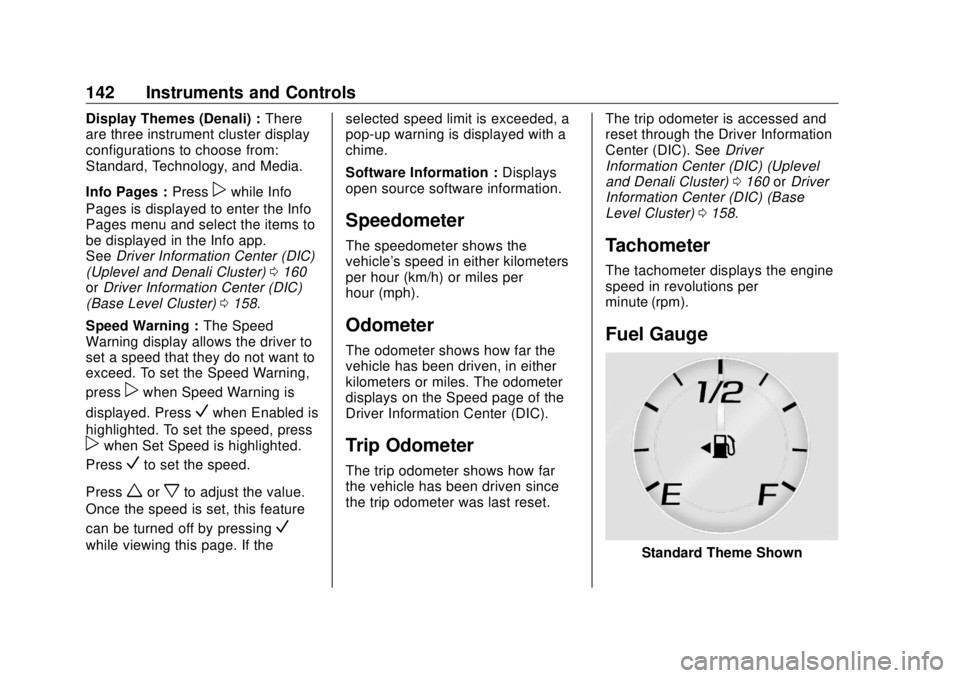
Fuel Gauge
Standard Theme Shown
Page 144 of 505
GMC Sierra/Sierra Denali Owner Manual (GMNA-Localizing-U.S./Canada/
Mexico-11349177) - 2018 - CRC - 10/17/17
Instruments and Controls 143When the ignition is on, the fuel
gauge indicates about how much
fuel is left in the tank.
There is an arrow near the fuel
gauge pointing to the side of the
vehicle the fuel door is on.
When the indicator nears empty, the
low fuel light comes on. There still is
a little fuel left, but the vehicle
should be refueled soon.
Here are four things that some
owners ask about. None of these
show a problem with the fuel gauge:
.
At the service station, the fuel
pump shuts off before the gauge
reads full.
.
It takes a little more or less fuel
to fill up than the gauge
indicated. For example, the
gauge may have indicated the
tank was half full, but it actually
took a little more or less than
half the tank's capacity to fill
the tank.
.
The gauge moves a little while
turning a corner or speeding up. .
The gauge takes a few seconds
to stabilize after the ignition is
turned on, and goes back to
empty when the ignition is
turned off.
Engine Oil Pressure
Gauge
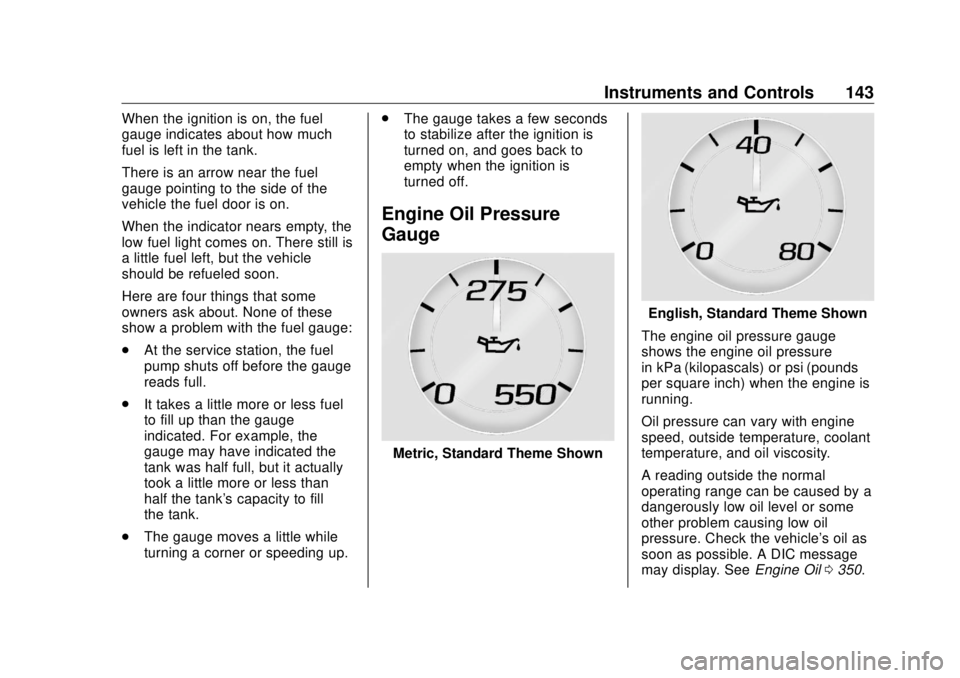
Metric, Standard Theme Shown English, Standard Theme Shown
The engine oil pressure gauge
shows the engine oil pressure
in kPa (kilopascals) or psi (pounds
per square inch) when the engine is
running.
Oil pressure can vary with engine
speed, outside temperature, coolant
temperature, and oil viscosity.
A reading outside the normal
operating range can be caused by a
dangerously low oil level or some
other problem causing low oil
pressure. Check the vehicle's oil as
soon as possible. A DIC message
may display. See Engine Oil 0 350 .