ECO mode GMC SIERRA DENALI 2019 User Guide
[x] Cancel search | Manufacturer: GMC, Model Year: 2019, Model line: SIERRA DENALI, Model: GMC SIERRA DENALI 2019Pages: 472, PDF Size: 8.98 MB
Page 197 of 472
GMC Sierra/Sierra Denali Owner Manual (GMNA-Localizing-U.S./Canada/
Mexico-1500-11698638) - 2019 - crc - 5/16/18
196 Driving and Operating
Driving and
Operating Driving Information Distracted Driving . . . . . . . . . . . . 197
Defensive Driving . . . . . . . . . . . . . 198
Drunk Driving . . . . . . . . . . . . . . . . . 198
Control of a Vehicle . . . . . . . . . . . 198
Braking . . . . . . . . . . . . . . . . . . . . . . . 198
Steering . . . . . . . . . . . . . . . . . . . . . . 199
Off-Road Recovery . . . . . . . . . . . 199
Loss of Control . . . . . . . . . . . . . . . 200
Off-Road Driving . . . . . . . . . . . . . 200
Driving on Wet Roads . . . . . . . . 205
Hill and Mountain Roads . . . . . 206
Winter Driving . . . . . . . . . . . . . . . . 206
If the Vehicle Is Stuck . . . . . . . . 208
Vehicle Load Limits . . . . . . . . . . . 209
Truck-Camper Loading
Information . . . . . . . . . . . . . . . . . . 214
Starting and Operating New Vehicle Break-In . . . . . . . . . 216
Ignition Positions (Key
Access) . . . . . . . . . . . . . . . . . . . . . 217
Ignition Positions (Keyless
Access) . . . . . . . . . . . . . . . . . . . . . 219
Starting the Engine . . . . . . . . . . . 221 Stop/Start System . . . . . . . . . . . . 222
Engine Heater . . . . . . . . . . . . . . . . 223
Retained Accessory
Power (RAP) . . . . . . . . . . . . . . . . 225
Shifting Into Park . . . . . . . . . . . . . 225
Shifting out of Park . . . . . . . . . . . 227
Parking over Things
That Burn . . . . . . . . . . . . . . . . . . . 227
Active Fuel Management . . . . . 227
Extended Parking . . . . . . . . . . . . 228
Engine Exhaust Engine Exhaust . . . . . . . . . . . . . . 228
Running the Vehicle While
Parked . . . . . . . . . . . . . . . . . . . . . . 229
Automatic Transmission Automatic Transmission . . . . . . 229
Manual Mode . . . . . . . . . . . . . . . . . 232
Tow/Haul Mode . . . . . . . . . . . . . . . 234
Drive Systems Four-Wheel Drive . . . . . . . . . . . . . 235
Brakes Antilock Brake
System (ABS) . . . . . . . . . . . . . . . 240
Electric Parking Brake . . . . . . . . 241
Brake Assist . . . . . . . . . . . . . . . . . . 242
Hill Start Assist (HSA) . . . . . . . . 242 Ride Control Systems Traction Control/Electronic
Stability Control . . . . . . . . . . . . . 243
Hill Descent Control (HDC) . . . 245
Driver Mode Control . . . . . . . . . . 246
Limited-Slip Differential . . . . . . . 250
Locking Rear Axle . . . . . . . . . . . . 250
Cruise Control Cruise Control . . . . . . . . . . . . . . . . 250
Driver Assistance Systems Driver Assistance Systems . . . 253
Assistance Systems for
Parking or Backing . . . . . . . . . . 254
Assistance Systems for
Driving . . . . . . . . . . . . . . . . . . . . . . 260
Forward Collision Alert (FCA)
System . . . . . . . . . . . . . . . . . . . . . . 260
Forward Automatic
Braking (FAB) . . . . . . . . . . . . . . . 263
Front Pedestrian Braking
(FPB) System . . . . . . . . . . . . . . . 264
Side Blind Zone
Alert (SBZA) . . . . . . . . . . . . . . . . 267
Lane Change Alert (LCA) . . . . . 267
Lane Departure
Warning (LDW) . . . . . . . . . . . . . 269
Lane Keep Assist (LKA) . . . . . . 269
Page 221 of 472
GMC Sierra/Sierra Denali Owner Manual (GMNA-Localizing-U.S./Canada/
Mexico-1500-11698638) - 2019 - crc - 5/16/18
220 Driving and Operating Stopping the Engine/LOCK/
OFF (No Indicator Lights) : When
the vehicle is stopped, press
ENGINE START/STOP once to turn
the engine off.
If the vehicle is in P (Park), the
ignition will turn off, and Retained
Accessory Power (RAP) will remain
active. See Retained Accessory
Power (RAP) 0 225 .
If the vehicle is not in P (Park), the
ignition will return to ACC/
ACCESSORY and display the
message SHIFT TO PARK in the
Driver Information Center (DIC).
When the vehicle is shifted into
P (Park), the ignition system will
turn off.
The vehicle may have an electric
steering column lock. The lock is
activated when the ignition is turned
off and either front door is opened.
A sound may be heard as the lock
actuates or releases. The steering
column lock may not release with
the wheels turned off center. If this
happens, the vehicle may not start.
Move the steering wheel from left to right while attempting to start the
vehicle. If this does not work, the
vehicle needs service.
If the vehicle must be shut off in an
emergency:
1. Brake using a firm and steady
pressure. Do not pump the
brakes repeatedly. This may
deplete power assist, requiring
increased brake pedal force.
2. Shift the vehicle to N (Neutral).
This can be done while the
vehicle is moving. After shifting
to N (Neutral), firmly apply the
brakes and steer the vehicle to
a safe location.
3. Come to a complete stop.
4. Hold the brake pedal down,
Shift to P (Park) with an
automatic transmission. The
shift lever must be in P (Park)
to turn the ignition off.
5. Continue to hold the brake
pedal down.
6. Set the parking brake, see
Electric Parking Brake 0 241 . 7. Press ENGINE START/STOP
once to turn the ignition off.
8. Release the brake pedal.
If the vehicle cannot be pulled over,
and must be shut off while driving,
press and hold ENGINE START/
STOP for longer than two seconds,
or press twice in five seconds.
ACC/ACCESSORY (Amber
Indicator Light) : This mode allows
some electrical accessories to be
used when the engine is off.
With the ignition off, pressing the
button one time without the brake
pedal applied will place the ignition
system in ACC/ACCESSORY.
The ignition will switch from ACC/
ACCESSORY to off after
five minutes to prevent battery
rundown.
ON/RUN/START (Green Indicator
Light) : This mode is for driving and
starting. With the ignition off, and
the brake pedal applied, pressing
the button once will turn the ignition
on. Once engine cranking begins,
Page 222 of 472
GMC Sierra/Sierra Denali Owner Manual (GMNA-Localizing-U.S./Canada/
Mexico-1500-11698638) - 2019 - crc - 5/16/18
Driving and Operating 221release the button. Engine cranking
will continue until the engine starts.
See Starting the Engine 0 221 .
Service Mode
This power mode is available for
service and diagnostics, and to
verify the proper operation of the
malfunction indicator lamp as may
be required for emission inspection
purposes. With the vehicle off, and
the brake pedal not applied,
pressing and holding the button for
more than five seconds will place
the vehicle in Service Mode. The
instruments and audio systems will
operate as they do when the ignition
is on, but the vehicle will not be able
to be driven. The engine will not
start in Service Mode. Press the
button again to turn the ignition off.
Starting the Engine If the vehicle has a diesel engine,
see the Duramax diesel
supplement. CautionIf you add electrical parts or
accessories, you could change
the way the engine operates. Any
resulting damage would not be
covered by the vehicle warranty.
See Add-On Electrical Equipment
0 306 .
Move the shift lever to P (Park) or
N (Neutral). To restart the engine
when the vehicle is already moving,
use N (Neutral) only.
CautionDo not try to shift to P (Park) if the
vehicle is moving. If you do, you
could damage the transmission.
Shift to P (Park) only when the
vehicle is stopped. Starting Procedure 1. For Key Access vehicles, turn
the ignition key to START.
When the engine starts, let go
of the key.
For Keyless Access vehicles,
the RKE transmitter must be in
the vehicle. Press ENGINE
START/STOP with the brake
pedal applied. When the
engine begins cranking, let go
of the button.
The idle speed will go down as
the engine gets warm. Do not
race the engine immediately
after starting it. Operate the
engine and transmission gently
to allow the oil to warm up and
lubricate all moving parts.
When the low fuel warning light
is on and the FUEL LEVEL
LOW message is displayed in
the Driver Information Center
(DIC), hold the ignition switch
in the START position to
continue engine cranking.
Page 224 of 472
GMC Sierra/Sierra Denali Owner Manual (GMNA-Localizing-U.S./Canada/
Mexico-1500-11698638) - 2019 - crc - 5/16/18
Driving and Operating 223.
The vehicle battery has recently
been disconnected.
.
Minimum vehicle speed has not
been reached since the last
Auto Stop.
.
The accelerator pedal is
pressed.
.
The engine or transmission is
not at the required operating
temperature.
.
The outside temperature is not
in the required operating range.
.
The vehicle is in any gear other
than D (Drive).
.
Tow/Haul Mode or other driver
modes have been selected.
.
The vehicle is on a steep hill or
grade.
.
The driver door has been
opened or the driver seat belt
has been unbuckled.
.
The hood has been opened.
.
The Auto Stop has reached the
maximum allowed time. Auto Stop Disable Switch
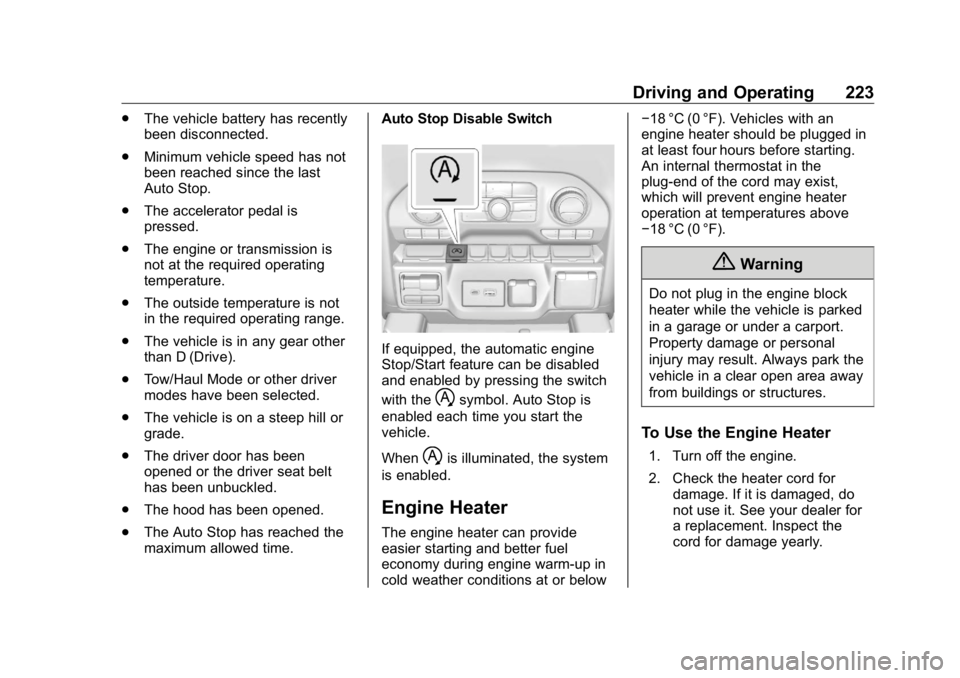
If equipped, the automatic engine
Stop/Start feature can be disabled
and enabled by pressing the switch
with the
h symbol. Auto Stop is
enabled each time you start the
vehicle.
When
h is illuminated, the system
is enabled.
Engine Heater The engine heater can provide
easier starting and better fuel
economy during engine warm-up in
cold weather conditions at or below − 18 °C (0 °F). Vehicles with an
engine heater should be plugged in
at least four hours before starting.
An internal thermostat in the
plug-end of the cord may exist,
which will prevent engine heater
operation at temperatures above
− 18 °C (0 °F).
{ WarningDo not plug in the engine block
heater while the vehicle is parked
in a garage or under a carport.
Property damage or personal
injury may result. Always park the
vehicle in a clear open area away
from buildings or structures.
To Use the Engine Heater 1. Turn off the engine.
2. Check the heater cord for
damage. If it is damaged, do
not use it. See your dealer for
a replacement. Inspect the
cord for damage yearly.
Page 225 of 472
GMC Sierra/Sierra Denali Owner Manual (GMNA-Localizing-U.S./Canada/
Mexico-1500-11698638) - 2019 - crc - 5/16/18
224 Driving and Operating
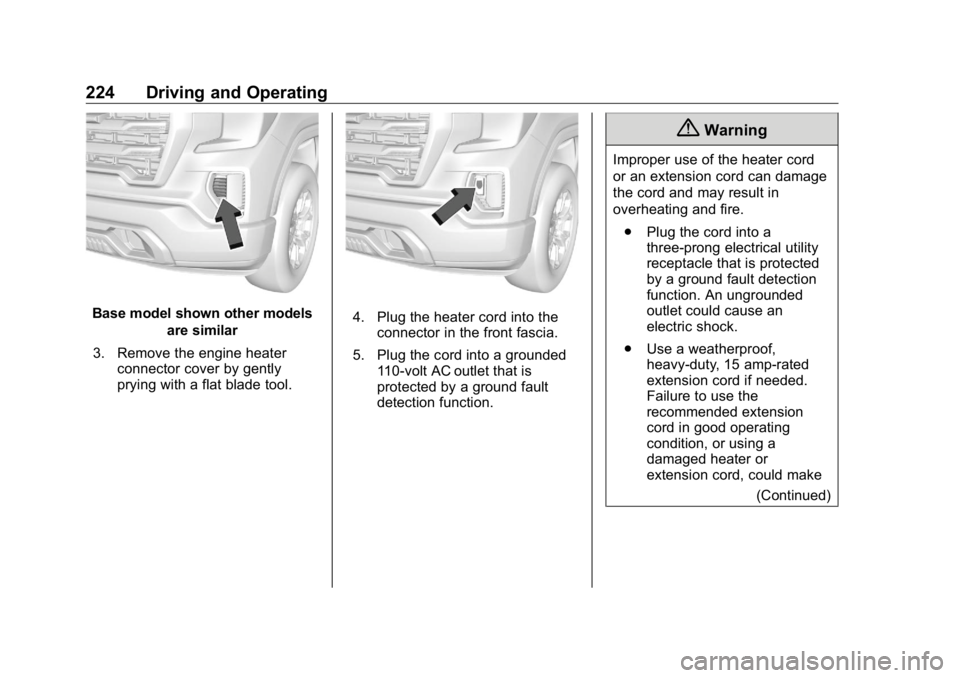
Base model shown other models
are similar
3. Remove the engine heater
connector cover by gently
prying with a flat blade tool. 4. Plug the heater cord into the
connector in the front fascia.
5. Plug the cord into a grounded
110-volt AC outlet that is
protected by a ground fault
detection function. { WarningImproper use of the heater cord
or an extension cord can damage
the cord and may result in
overheating and fire.
.
Plug the cord into a
three-prong electrical utility
receptacle that is protected
by a ground fault detection
function. An ungrounded
outlet could cause an
electric shock.
.
Use a weatherproof,
heavy-duty, 15 amp-rated
extension cord if needed.
Failure to use the
recommended extension
cord in good operating
condition, or using a
damaged heater or
extension cord, could make
(Continued)
Page 228 of 472
GMC Sierra/Sierra Denali Owner Manual (GMNA-Localizing-U.S./Canada/
Mexico-1500-11698638) - 2019 - crc - 5/16/18
Driving and Operating 227If torque lock does occur, you may
need to have another vehicle push
yours a little uphill to take some of
the pressure from the parking pawl
in the transmission. You will then be
able to pull the shift lever out of
P (Park).
Shifting out of Park This vehicle is equipped with an
electronic shift lock release system.
The system is designed to prevent
movement of the shift lever out of
P (Park), unless the brake pedal is
applied and the ignition is on or in
Service Mode.
The shift lock release is always
functional except in the case of an
uncharged or low voltage – less
than 9 volt – battery.
If the vehicle has an uncharged or
low voltage battery, try charging or
jump starting the battery. See Jump
Starting - North America 0 395 .
To shift out of P (Park):
1. Apply the brake pedal. 2. Release the parking brake if it
is applied. See Electric Parking
Brake 0 241 .
3. Pull the shift lever toward you,
then move it to the desired
position, and release.
If the vehicle still cannot be shifted
out of P (Park):
1. Ease the pressure on,
or release the shift lever.
2. While holding the brake pedal,
push the shift lever all the way
into P (Park).
3. Pull the shift lever toward you,
then move it to the desired
position, and release.
If there is still a problem shifting,
have the vehicle serviced soon. Parking over Things
That Burn
{ WarningThings that can burn could touch
hot exhaust parts under the
vehicle and ignite. Do not park
over papers, leaves, dry grass,
or other things that can burn.
Active Fuel Management If equipped, Active Fuel
Management allows a V8, V6, or L4
gasoline engine to operate on either
all of its cylinders, or a reduced
number of cylinders, depending on
the driving conditions.
When less power is required, such
as cruising at a constant vehicle
speed, the system will enable
reduced cylinder operation, allowing
the vehicle to achieve better fuel
economy. When greater power is
required, such as accelerating from
Page 232 of 472
GMC Sierra/Sierra Denali Owner Manual (GMNA-Localizing-U.S./Canada/
Mexico-1500-11698638) - 2019 - crc - 5/16/18
Driving and Operating 231CautionShifting out of P (Park) or
N (Neutral) with the engine
running at high speed may
damage the transmission. The
repairs would not be covered by
the vehicle warranty. Be sure the
engine is not running at high
speed when shifting the vehicle.
CautionA transmission hot message may
display if the automatic
transmission fluid is too hot.
Driving under this condition can
damage the vehicle. Stop and idle
the engine to cool the automatic
transmission fluid. This message
clears when the transmission fluid
has cooled sufficiently. D : This position is for normal
driving. It provides the best fuel
economy. If more power is needed
for passing, press the accelerator
pedal down.
.
When going less than about 55
km/h (35 mph), push the
accelerator pedal about
halfway down.
.
When going about 55 km/h (35
mph) or more, push the
accelerator all the way down.
By doing this, the vehicle shifts
down to the next gear and has
more power.
Use D (Drive) and Tow/Haul Mode
when towing a trailer, carrying a
heavy load, driving on steep hills,
or driving off-road. Shift the
transmission to a lower gear if the
transmission shifts too often.
Downshifting the transmission in
slippery road conditions could result
in skidding. See “ Skidding ” under
Loss of Control 0 200 . The vehicle has a shift stabilization
feature that adjusts the transmission
shifting to the current driving
conditions in order to reduce rapid
upshifts and downshifts. This shift
stabilization feature is designed to
determine, before making an
upshift, if the engine is able to
maintain vehicle speed by analyzing
things such as vehicle speed,
throttle position, and vehicle load.
If the shift stabilization feature
determines that a current vehicle
speed cannot be maintained, the
transmission does not upshift and
instead holds the current gear.
In some cases, this could appear to
be a delayed shift, however the
transmission is operating normally.
The transmission uses adaptive
shift controls. The adaptive shift
control process continually
compares key shift parameters to
pre-programmed ideal shifts stored
in the transmission ’ s computer. The
transmission constantly makes
adjustments to improve vehicle
performance according to how the
vehicle is being used, such as with
a heavy load or when the
Page 236 of 472
GMC Sierra/Sierra Denali Owner Manual (GMNA-Localizing-U.S./Canada/
Mexico-1500-11698638) - 2019 - crc - 5/16/18
Driving and Operating 235If equipped, the Stop/Start system
will become unavailable when Tow/
Haul Mode is active.
Tow/Haul Mode Grade Braking Tow/Haul Mode Grade Braking is
only enabled while the Tow/Haul
Mode is selected and the vehicle is
not in the Range Selection Mode.
See Manual Mode 0 232 . Tow/Haul
Mode Grade Braking assists in
maintaining desired vehicle speeds
when driving on downhill grades by
using the engine and transmission
to slow the vehicle.
See Towing Equipment 0 285 .Drive Systems Four-Wheel Drive If equipped, four-wheel drive
engages the front axle for extra
traction.
Read the appropriate section for
transfer case operation before
using.
CautionDo not drive on clean, dry
pavement in 4
m and 4
n (if
equipped) for an extended period
of time. These conditions may
cause premature wear on the
vehicle ’ s powertrain.
Driving on clean, dry pavement in 4
m or 4
n may:
.
Cause a vibration to be felt in
the steering system.
.
Cause tires to wear faster.{ WarningIf equipped with four-wheel drive,
the vehicle will be free to roll if the
transfer case is in N (Neutral),
even when the shift lever is in
P (Park). You or someone else
could be seriously injured. Be
sure the transfer case is in a drive
gear — 2
m , 4
m , or 4
n — or set the
parking brake before placing the
transfer case in N (Neutral). See
Shifting Into Park 0 225 .
Caution
Extended high-speed operation in
4
n may damage or shorten the
life of the drivetrain.
An engagement noise and bump is
normal when shifting between 4
n and 4
m or N (Neutral), with the
engine running.
Page 238 of 472
GMC Sierra/Sierra Denali Owner Manual (GMNA-Localizing-U.S./Canada/
Mexico-1500-11698638) - 2019 - crc - 5/16/18
Driving and Operating 237The actual 4x4 shift request is only
made after the button is released.
The 4x4 graphic will remain flashing
until the shift request has
completed. A DIC message displays
to indicate that the 4x4 transfer case
has been requested to shift to the
new desired state.
Once the 4x4 shift has completed,
the DIC message disappears, the
4x4 graphic stops flashing, and the
current setting is indicated.
When a shift to 2
m is completed
successfully while in P (park), the
parking brake will engage. To
resume driving, shift the
transmission to the desired gear
and manually release the parking
brake or press the accelerator pedal
to begin driving. See Electric
Parking Brake 0 241 .
If equipped, use 4
n , AUTO, or 4
m to
provide additional traction when
parking on a steep grade with poor
traction such as ice, snow, mud,
or gravel. Shifting Into 4
n 1. The ignition must be on and
the vehicle must be stopped or
moving less than 5 km/h
(3 mph) with the transmission
in N (Neutral). It is best for the
vehicle to be moving
1.6 to 3.2 km/h (1 to 2 mph).
2. Press 4
n . The actual 4x4 shift
request is only made after the
button is released. The 4x4
graphic will remain flashing
until the shift request has
completed. A DIC message
displays to indicate that the 4x4
transfer case has been
requested to shift to the new
desired state.
Once the 4x4 shift has
completed, the DIC message
disappears, the 4x4 graphic
stops flashing and the current
setting is indicated.
If vehicle speed is higher when shift
request occurs, a DIC message
displays. Reduce vehicle speed. If transmission is not in N (Neutral)
when shift request occurs, a DIC
message displays. The vehicle will
allow 20 seconds for the shift to
occur. After this time, a graphic in
the instrument cluster will indicate
that the transfer case is in 4
n .
CautionShifting the transmission into gear
before the requested mode
indicator light has stopped
flashing could damage the
transfer case.
If the transmission is not shifted into
N (Neutral) or the vehicle has not
slowed to 5 km/h (3 mph) within
20 seconds, the transfer case will
remain in its original state. This will
be indicated in the instrument
cluster.
With the vehicle moving less than
5 km/h (3 mph) and the transmission
in N (Neutral), attempt the shift
again.
Page 239 of 472
GMC Sierra/Sierra Denali Owner Manual (GMNA-Localizing-U.S./Canada/
Mexico-1500-11698638) - 2019 - crc - 5/16/18
238 Driving and Operating Shifting Out of 4
n1. The vehicle must be
stopped or moving less than
5 km/h (3 mph) with the
transmission in N (Neutral) and
the ignition on. It is best for the
vehicle to be moving
1.6 to 3.2 km/h (1 to 2 mph).
2. Press 4
m , AUTO or 2
m . The
actual 4x4 shift request is only
made after the button is
released. The 4x4 graphic will
remain flashing until the shift
request has completed. A DIC
message displays to indicate
the state of the request.
Once the 4x4 shift has
completed, the DIC message
disappears, the 4x4 graphic
stops flashing, and the current
setting is indicated.
If vehicle speed is higher when
shift request occurs, a DIC
message displays. Reduce
vehicle speed. If transmission is not in N (Neutral)
when shift request occurs, DIC
messages will display. The vehicle
will allow 20 seconds for this shift to
occur. After this time, a graphic in
the instrument cluster will indicate
that the transfer case is in 4
n .
CautionShifting the transmission into gear
before the requested mode
indicator light has stopped
flashing could damage the
transfer case.
If the transmission is not shifted into
N (Neutral) or the vehicle has not
slowed to 5 km/h (3 mph) within
20 seconds, the transfer case will
remain in its original state. This will
be indicated in the instrument
cluster.
With the vehicle moving less than
5 km/h (3 mph), and the
transmission in N (Neutral), attempt
the shift again. Shifting Into N (Neutral)
To shift into N (Neutral):
1. Start the vehicle.
2. Shift the transmission to
N (Neutral).
3. Shift the transfer case to 2
m .
4. Apply the park brake and/or
service brake.
5. Press 2
m five times in
10 seconds until the N (Neutral)
graphic starts flashing in the
instrument cluster. When the
shift is complete, the graphic
stops flashing. If the park brake
and/or service brake is not
applied within 20 seconds, the
transfer case will remain in the
original state.
6. If the transmission is not
shifted into N (Neutral) or the
vehicle has not slowed to
5 km/h (3 mph) within
20 seconds, the transfer case
will remain in its original state.
This will be indicated in the
instrument cluster.