TPMS GMC SIERRA DENALI 2019 User Guide
[x] Cancel search | Manufacturer: GMC, Model Year: 2019, Model line: SIERRA DENALI, Model: GMC SIERRA DENALI 2019Pages: 472, PDF Size: 8.98 MB
Page 374 of 472
GMC Sierra/Sierra Denali Owner Manual (GMNA-Localizing-U.S./Canada/
Mexico-1500-11698638) - 2019 - crc - 5/15/18
Vehicle Care 373See your dealer for service or to
purchase a relearn tool. A TPMS
relearn tool can also be purchased.
See Tire Pressure Monitor Sensor
Activation Tool at
www.gmtoolsandequipment.com or
call 1-800-GM TOOLS
(1-800-468-6657).
There are two minutes to match the
first tire/wheel position, and
five minutes overall to match all four
tire/wheel positions. If it takes
longer, the matching process stops
and must be restarted.
The TPMS sensor matching
process is:
1. Set the parking brake.
2. Turn the ignition on without
starting the vehicle.
3. Uplevel DIC Only: Make sure
the Tire Pressure info page
option is turned on. The info
pages on the DIC can be
turned on and off through the
Options menu. See Driver Information Center
(DIC) (Midlevel and Uplevel)
0 160 or Driver Information
Center (DIC) (Base Level)
0 159 .
4. If the vehicle has an uplevel
DIC, use the DIC controls on
the right side of the steering
wheel to scroll to the Tire
Pressure screen under the DIC
info page.
If the vehicle has a base level
DIC, use the trip odometer
reset stem to scroll to the Tire
Pressure screen.
5. If the vehicle has an uplevel
DIC, press and hold the
thumbwheel located in the
center of the DIC controls on
the right side of the steering
wheel.
If the vehicle has a base level
DIC, press and hold the trip
odometer reset stem for about
five seconds. A message
asking if the process should
begin should appear. Select yes and press the trip
odometer reset stem to confirm
the selection.
The horn sounds twice to
signal the receiver is in relearn
mode and the TIRE
LEARNING ACTIVE message
displays on the DIC screen.
6. Start with the driver side
front tire.
7. Place the relearn tool against
the tire sidewall, near the valve
stem. Then press the button to
activate the TPMS sensor.
A horn chirp confirms that the
sensor identification code has
been matched to this tire and
wheel position.
8. Proceed to the passenger side
front tire, and repeat the
procedure in Step 7.
9. Proceed to the passenger side
rear tire, and repeat the
procedure in Step 7.
10. Proceed to the driver side rear
tire, and repeat the procedure
in Step 7. The horn sounds two
Page 375 of 472
GMC Sierra/Sierra Denali Owner Manual (GMNA-Localizing-U.S./Canada/
Mexico-1500-11698638) - 2019 - crc - 5/15/18
374 Vehicle Care times to indicate the sensor
identification code has been
matched to the driver side rear
tire, and the TPMS sensor
matching process is no longer
active. The TIRE LEARNING
ACTIVE message on the DIC
display screen goes off.
11. Turn the vehicle off.
12. Set all four tires to the
recommended air pressure
level as indicated on the Tire
and Loading Information label.
Trailer Tire Pressure
Monitoring Operation If equipped, the Trailer Tire
Pressure Monitoring System
(TTPMS) is designed to monitor the
pressure of the trailer tires and warn
the driver when a low pressure
condition exists. TTPMS sensors for
four tires are provided. The system
can accommodate a trailer with up
to six tires if additional sensors are
purchased from the dealer. Also, the
system can be paired with up to five
individual trailers. Prior to use, the vehicle must learn
the sensors by following the
learning process. See Trailering App
0 296 .
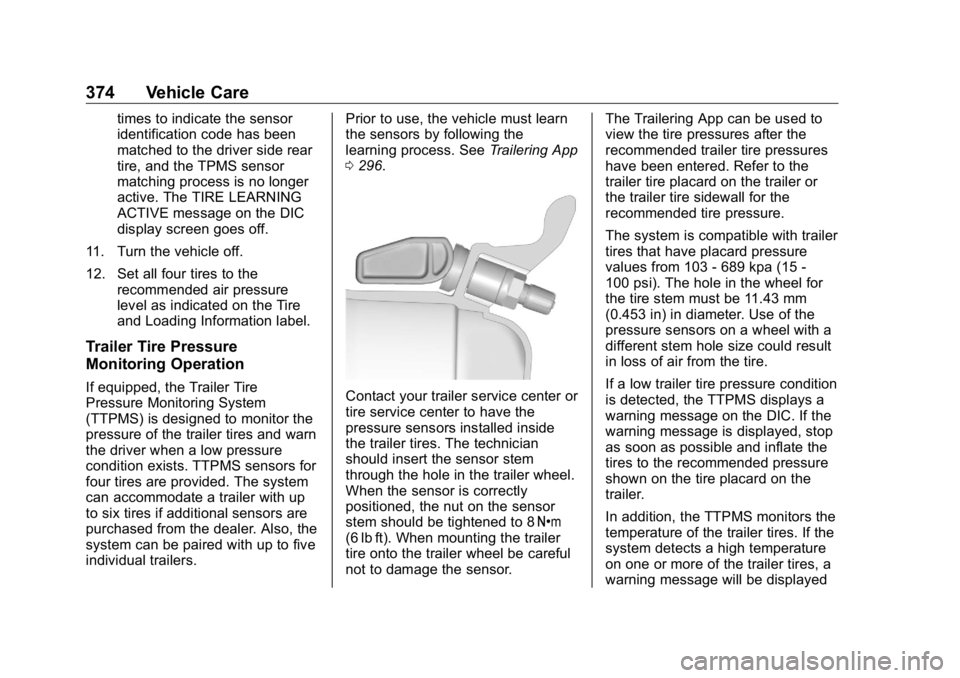
Contact your trailer service center or
tire service center to have the
pressure sensors installed inside
the trailer tires. The technician
should insert the sensor stem
through the hole in the trailer wheel.
When the sensor is correctly
positioned, the nut on the sensor
stem should be tightened to 8 Y
(6 lb ft). When mounting the trailer
tire onto the trailer wheel be careful
not to damage the sensor. The Trailering App can be used to
view the tire pressures after the
recommended trailer tire pressures
have been entered. Refer to the
trailer tire placard on the trailer or
the trailer tire sidewall for the
recommended tire pressure.
The system is compatible with trailer
tires that have placard pressure
values from 103 - 689 kpa (15 -
100 psi). The hole in the wheel for
the tire stem must be 11.43 mm
(0.453 in) in diameter. Use of the
pressure sensors on a wheel with a
different stem hole size could result
in loss of air from the tire.
If a low trailer tire pressure condition
is detected, the TTPMS displays a
warning message on the DIC. If the
warning message is displayed, stop
as soon as possible and inflate the
tires to the recommended pressure
shown on the tire placard on the
trailer.
In addition, the TTPMS monitors the
temperature of the trailer tires. If the
system detects a high temperature
on one or more of the trailer tires, a
warning message will be displayed
Page 376 of 472
GMC Sierra/Sierra Denali Owner Manual (GMNA-Localizing-U.S./Canada/
Mexico-1500-11698638) - 2019 - crc - 5/15/18
Vehicle Care 375on the DIC. If this warning message
is displayed, stop as soon as
possible, and inspect the
overheated trailer tire. Common
causes for high trailer tire
temperature are underinflation,
overloading, or tire damage.
TTPMS Malfunction Message The TTPMS will not function
properly if one or more of the trailer
tire sensors are missing or
inoperable. If the system detects a
malfunction, a DIC message
indicates that the system requires
service. Some of the conditions that
can cause the service message to
occur are:
.
One of the trailer tires has been
replaced with the spare tire
which does not have a learned
TTPMS sensor. The DIC
message should turn off after the
pressure sensor is installed in
the tire, and the learning process
is performed successfully. See
"TTPMS Sensor Learning
Process" under Trailering App
0 296 . .
The TTPMS sensor learning
process was not done or not
completed successfully. The DIC
message should go off after
successfully completing the
sensor learning process. See
"TTPMS Sensor Learning
Process" under Trailering App
0 296 .
.
One or more TTPMS sensors
are missing or damaged. The
DIC message should go off
when the TTPMS sensors are
installed and the sensor learning
process is performed
successfully. See "TTPMS
Sensor Learning Process" under
Trailering App 0 296 .
.
Operating electronic devices or
being near facilities using radio
wave frequencies similar to the
TTPMS could cause interference
to the TTPMS which could
cause loss of signal reception
from the sensor. .
If the system does not receive
the signal from an individual
sensor, an error message may
not occur until the vehicle has
been driver for a period of time.
If the TTPMS is not functioning
properly, it cannot detect or signal a
low tire condition. See your dealer
for service if the DIC message
comes on and stays on when the
trailer tire pressures have been
checked and determined to be
correct.
Tire Inspection We recommend that the tires,
including the spare tire, if the
vehicle has one, be inspected
for signs of wear or damage at
least once a month.
Replace the tire if:
.
The indicators at three or
more places around the tire
can be seen.
Page 383 of 472
GMC Sierra/Sierra Denali Owner Manual (GMNA-Localizing-U.S./Canada/
Mexico-1500-11698638) - 2019 - crc - 5/15/18
382 Vehicle Care Some aluminum wheels can be
repaired. See your dealer if any of
these conditions exist.
Your dealer will know the kind of
wheel that is needed.
Each new wheel should have the
same load-carrying capacity,
diameter, width, offset and be
mounted the same way as the one it
replaces.
Replace wheels, wheel bolts, wheel
nuts, or Tire Pressure Monitor
System (TPMS) sensors with new
GM original equipment parts.
{ WarningUsing the wrong replacement
wheels, wheel bolts, or wheel
nuts can be dangerous. It could
affect the braking and handling of
the vehicle. Tires can lose air,
and cause loss of control, causing
a crash. Always use the correct
wheel, wheel bolts, and wheel
nuts for replacement. CautionThe wrong wheel can also cause
problems with bearing life, brake
cooling, speedometer or
odometer calibration, headlamp
aim, bumper height, vehicle
ground clearance, and tire or tire
chain clearance to the body and
chassis.
Whenever a wheel, wheel bolt,
or wheel nut is replaced on a dual
wheel setup, check the wheel nut
torque after 160,1 600, and
10 000 km (100,1,000, and
6,000 mi) of driving. For proper
torque, see “ Wheel Nut Torque ”
under Capacities and Specifications
0 430 .
See If a Tire Goes Flat 0 383 for
more information. Used Replacement Wheels
{ WarningReplacing a wheel with a used
one is dangerous. How it has
been used or how far it has been
driven may be unknown. It could
fail suddenly and cause a crash.
When replacing wheels, use a
new GM original equipment
wheel.
Tire Chains
{ WarningIf the vehicle has LT265/70R17,
LT275/65R18, 275/60R20, or 275/
50R22 size tires, do not use tire
chains. They can damage the
vehicle because there is not
enough clearance. Tire chains
used on a vehicle without the
proper amount of clearance can
cause damage to the brakes,
(Continued)