clock GMC SIERRA DENALI 2019 User Guide
[x] Cancel search | Manufacturer: GMC, Model Year: 2019, Model line: SIERRA DENALI, Model: GMC SIERRA DENALI 2019Pages: 472, PDF Size: 8.98 MB
Page 350 of 472
GMC Sierra/Sierra Denali Owner Manual (GMNA-Localizing-U.S./Canada/
Mexico-1500-11698638) - 2019 - crc - 5/15/18
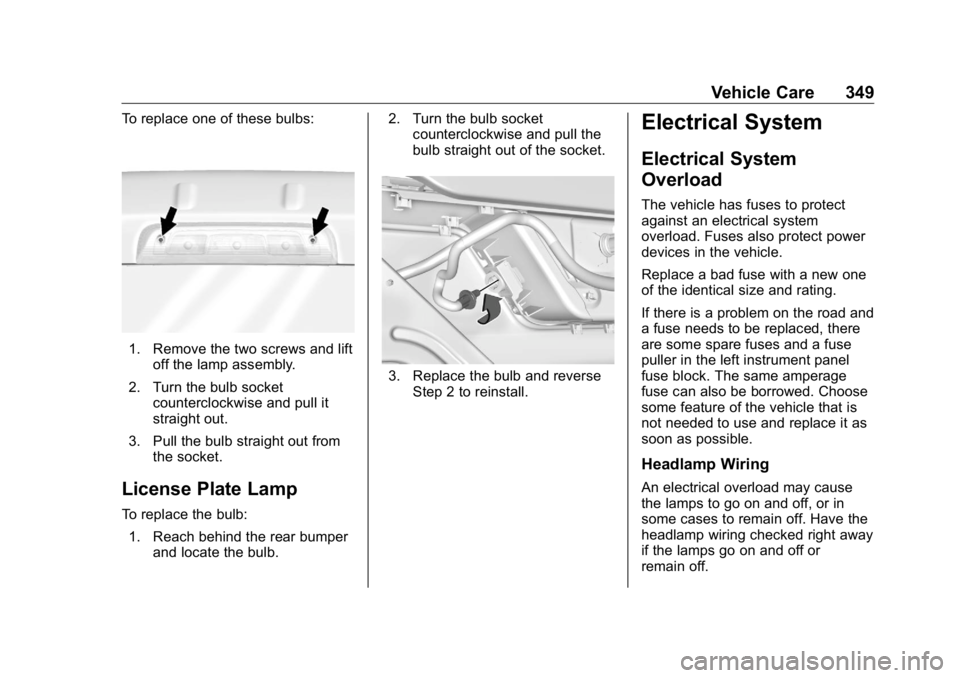
Vehicle Care 349To replace one of these bulbs:
1. Remove the two screws and lift
off the lamp assembly.
2. Turn the bulb socket
counterclockwise and pull it
straight out.
3. Pull the bulb straight out from
the socket.
License Plate Lamp To replace the bulb:
1. Reach behind the rear bumper
and locate the bulb. 2. Turn the bulb socket
counterclockwise and pull the
bulb straight out of the socket.
3. Replace the bulb and reverse
Step 2 to reinstall.Electrical System Electrical System
Overload The vehicle has fuses to protect
against an electrical system
overload. Fuses also protect power
devices in the vehicle.
Replace a bad fuse with a new one
of the identical size and rating.
If there is a problem on the road and
a fuse needs to be replaced, there
are some spare fuses and a fuse
puller in the left instrument panel
fuse block. The same amperage
fuse can also be borrowed. Choose
some feature of the vehicle that is
not needed to use and replace it as
soon as possible.
Headlamp Wiring
An electrical overload may cause
the lamps to go on and off, or in
some cases to remain off. Have the
headlamp wiring checked right away
if the lamps go on and off or
remain off.
Page 386 of 472
GMC Sierra/Sierra Denali Owner Manual (GMNA-Localizing-U.S./Canada/
Mexico-1500-11698638) - 2019 - crc - 5/15/18
Vehicle Care 385
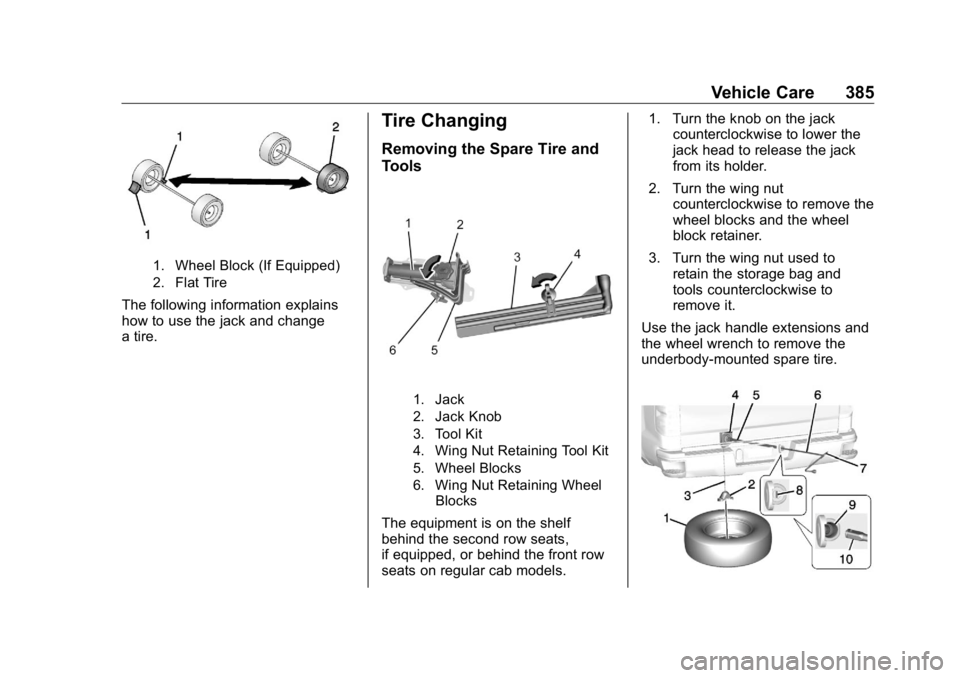
1. Wheel Block (If Equipped)
2. Flat Tire
The following information explains
how to use the jack and change
a tire. Tire Changing Removing the Spare Tire and
Tools
1. Jack
2. Jack Knob
3. Tool Kit
4. Wing Nut Retaining Tool Kit
5. Wheel Blocks
6. Wing Nut Retaining Wheel
Blocks
The equipment is on the shelf
behind the second row seats,
if equipped, or behind the front row
seats on regular cab models. 1. Turn the knob on the jack
counterclockwise to lower the
jack head to release the jack
from its holder.
2. Turn the wing nut
counterclockwise to remove the
wheel blocks and the wheel
block retainer.
3. Turn the wing nut used to
retain the storage bag and
tools counterclockwise to
remove it.
Use the jack handle extensions and
the wheel wrench to remove the
underbody-mounted spare tire.
Page 387 of 472
GMC Sierra/Sierra Denali Owner Manual (GMNA-Localizing-U.S./Canada/
Mexico-1500-11698638) - 2019 - crc - 5/15/18
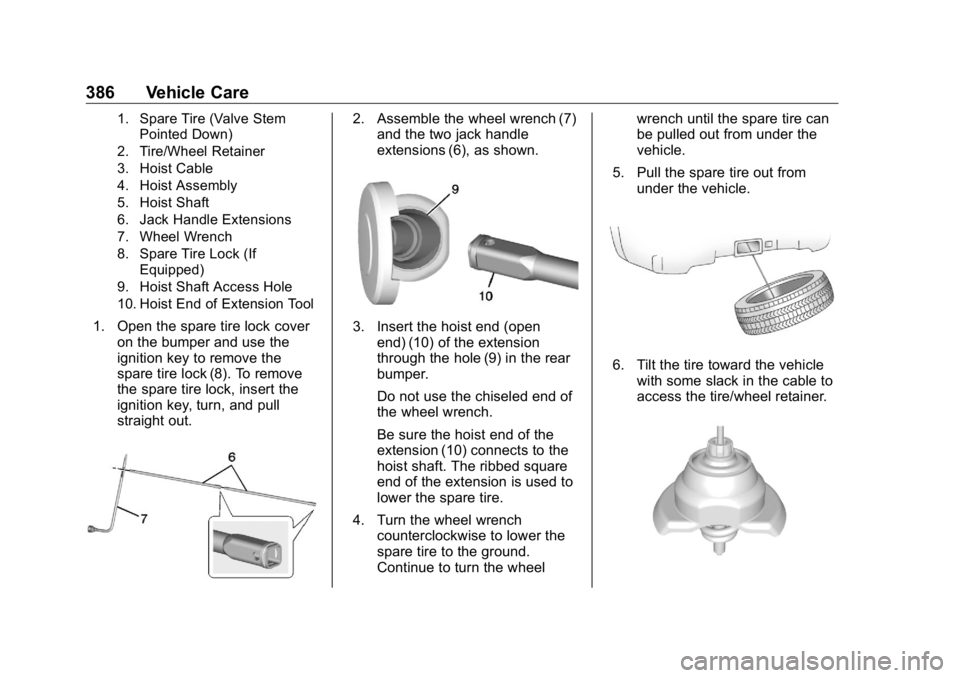
386 Vehicle Care 1. Spare Tire (Valve Stem
Pointed Down)
2. Tire/Wheel Retainer
3. Hoist Cable
4. Hoist Assembly
5. Hoist Shaft
6. Jack Handle Extensions
7. Wheel Wrench
8. Spare Tire Lock (If
Equipped)
9. Hoist Shaft Access Hole
10. Hoist End of Extension Tool
1. Open the spare tire lock cover
on the bumper and use the
ignition key to remove the
spare tire lock (8). To remove
the spare tire lock, insert the
ignition key, turn, and pull
straight out. 2. Assemble the wheel wrench (7)
and the two jack handle
extensions (6), as shown.
3. Insert the hoist end (open
end) (10) of the extension
through the hole (9) in the rear
bumper.
Do not use the chiseled end of
the wheel wrench.
Be sure the hoist end of the
extension (10) connects to the
hoist shaft. The ribbed square
end of the extension is used to
lower the spare tire.
4. Turn the wheel wrench
counterclockwise to lower the
spare tire to the ground.
Continue to turn the wheel wrench until the spare tire can
be pulled out from under the
vehicle.
5. Pull the spare tire out from
under the vehicle.
6. Tilt the tire toward the vehicle
with some slack in the cable to
access the tire/wheel retainer.
Page 388 of 472
GMC Sierra/Sierra Denali Owner Manual (GMNA-Localizing-U.S./Canada/
Mexico-1500-11698638) - 2019 - crc - 5/15/18
Vehicle Care 387Tilt the retainer and pull it
through the center of the wheel
along with the cable and
spring.
7. Put the spare tire near the
flat tire.
Removing the Flat Tire and
Installing the Spare Tire Use the following pictures and
instructions to remove the flat tire
and raise the vehicle.
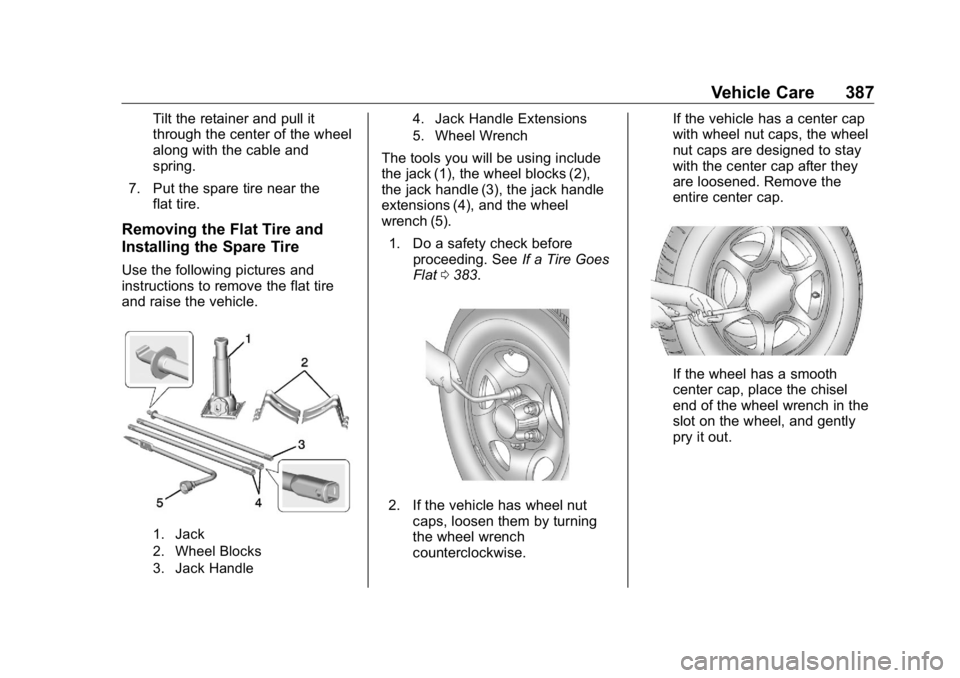
1. Jack
2. Wheel Blocks
3. Jack Handle 4. Jack Handle Extensions
5. Wheel Wrench
The tools you will be using include
the jack (1), the wheel blocks (2),
the jack handle (3), the jack handle
extensions (4), and the wheel
wrench (5).
1. Do a safety check before
proceeding. See If a Tire Goes
Flat 0 383 .
2. If the vehicle has wheel nut
caps, loosen them by turning
the wheel wrench
counterclockwise. If the vehicle has a center cap
with wheel nut caps, the wheel
nut caps are designed to stay
with the center cap after they
are loosened. Remove the
entire center cap.
If the wheel has a smooth
center cap, place the chisel
end of the wheel wrench in the
slot on the wheel, and gently
pry it out.
Page 389 of 472
GMC Sierra/Sierra Denali Owner Manual (GMNA-Localizing-U.S./Canada/
Mexico-1500-11698638) - 2019 - crc - 5/15/18
388 Vehicle Care
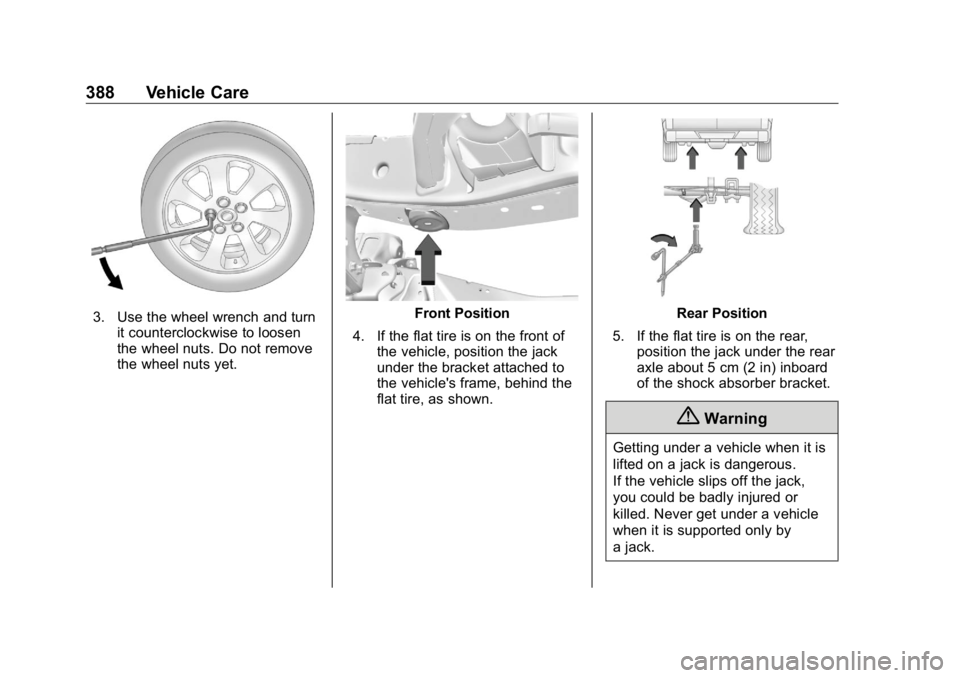
3. Use the wheel wrench and turn
it counterclockwise to loosen
the wheel nuts. Do not remove
the wheel nuts yet. Front Position
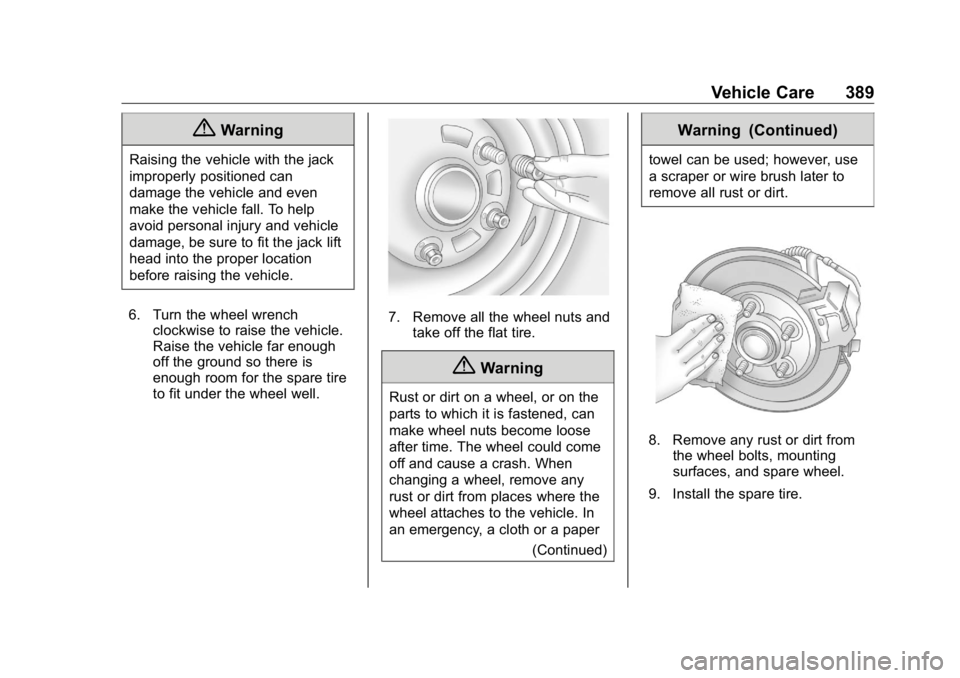
4. If the flat tire is on the front of
the vehicle, position the jack
under the bracket attached to
the vehicle's frame, behind the
flat tire, as shown. Rear Position
5. If the flat tire is on the rear,
position the jack under the rear
axle about 5 cm (2 in) inboard
of the shock absorber bracket.
{ Warning
Getting under a vehicle when it is
lifted on a jack is dangerous.
If the vehicle slips off the jack,
you could be badly injured or
killed. Never get under a vehicle
when it is supported only by
a jack.
Page 390 of 472
GMC Sierra/Sierra Denali Owner Manual (GMNA-Localizing-U.S./Canada/
Mexico-1500-11698638) - 2019 - crc - 5/15/18
Vehicle Care 389
{ WarningRaising the vehicle with the jack
improperly positioned can
damage the vehicle and even
make the vehicle fall. To help
avoid personal injury and vehicle
damage, be sure to fit the jack lift
head into the proper location
before raising the vehicle.
6. Turn the wheel wrench
clockwise to raise the vehicle.
Raise the vehicle far enough
off the ground so there is
enough room for the spare tire
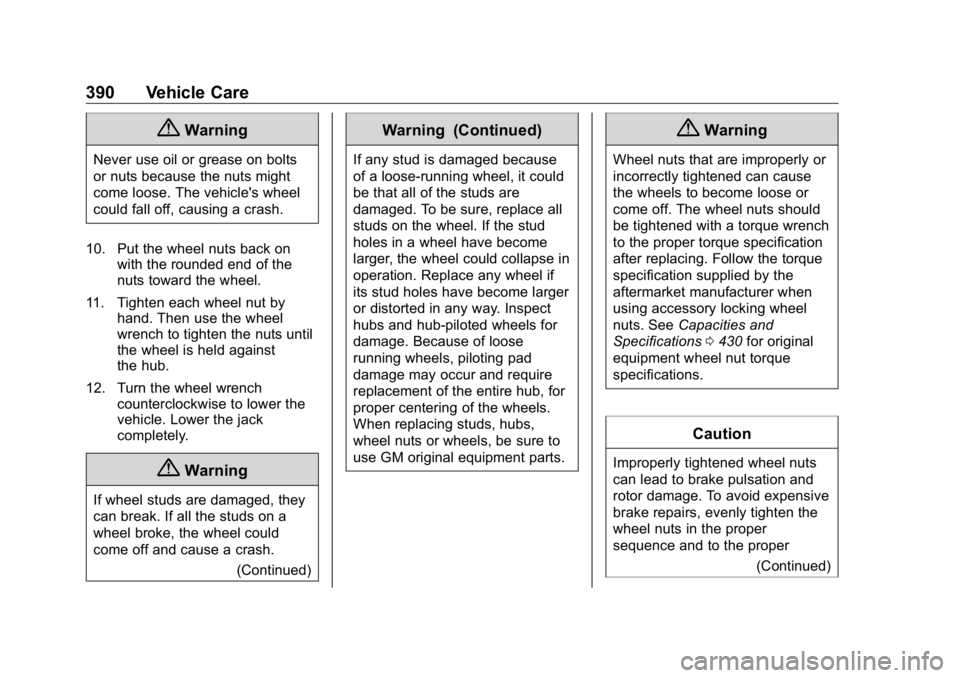
to fit under the wheel well. 7. Remove all the wheel nuts and
take off the flat tire.
{ WarningRust or dirt on a wheel, or on the
parts to which it is fastened, can
make wheel nuts become loose
after time. The wheel could come
off and cause a crash. When
changing a wheel, remove any
rust or dirt from places where the
wheel attaches to the vehicle. In
an emergency, a cloth or a paper
(Continued) Warning (Continued) towel can be used; however, use
a scraper or wire brush later to
remove all rust or dirt.
8. Remove any rust or dirt from
the wheel bolts, mounting
surfaces, and spare wheel.
9. Install the spare tire.
Page 391 of 472
GMC Sierra/Sierra Denali Owner Manual (GMNA-Localizing-U.S./Canada/
Mexico-1500-11698638) - 2019 - crc - 5/15/18
390 Vehicle Care
{ WarningNever use oil or grease on bolts
or nuts because the nuts might
come loose. The vehicle's wheel
could fall off, causing a crash.
10. Put the wheel nuts back on
with the rounded end of the
nuts toward the wheel.
11. Tighten each wheel nut by
hand. Then use the wheel
wrench to tighten the nuts until
the wheel is held against
the hub.
12. Turn the wheel wrench
counterclockwise to lower the
vehicle. Lower the jack
completely.
{ Warning
If wheel studs are damaged, they
can break. If all the studs on a
wheel broke, the wheel could
come off and cause a crash.
(Continued) Warning (Continued) If any stud is damaged because
of a loose-running wheel, it could
be that all of the studs are
damaged. To be sure, replace all
studs on the wheel. If the stud
holes in a wheel have become
larger, the wheel could collapse in
operation. Replace any wheel if
its stud holes have become larger
or distorted in any way. Inspect
hubs and hub ‐ piloted wheels for
damage. Because of loose
running wheels, piloting pad
damage may occur and require
replacement of the entire hub, for
proper centering of the wheels.
When replacing studs, hubs,
wheel nuts or wheels, be sure to
use GM original equipment parts. { WarningWheel nuts that are improperly or
incorrectly tightened can cause
the wheels to become loose or
come off. The wheel nuts should
be tightened with a torque wrench
to the proper torque specification
after replacing. Follow the torque
specification supplied by the
aftermarket manufacturer when
using accessory locking wheel
nuts. See Capacities and
Specifications 0 430 for original
equipment wheel nut torque
specifications.
Caution
Improperly tightened wheel nuts
can lead to brake pulsation and
rotor damage. To avoid expensive
brake repairs, evenly tighten the
wheel nuts in the proper
sequence and to the proper
(Continued)
Page 392 of 472
GMC Sierra/Sierra Denali Owner Manual (GMNA-Localizing-U.S./Canada/
Mexico-1500-11698638) - 2019 - crc - 5/15/18
Vehicle Care 391Caution (Continued)torque specification. See
Capacities and Specifications
0 430 for the wheel nut torque
specification.
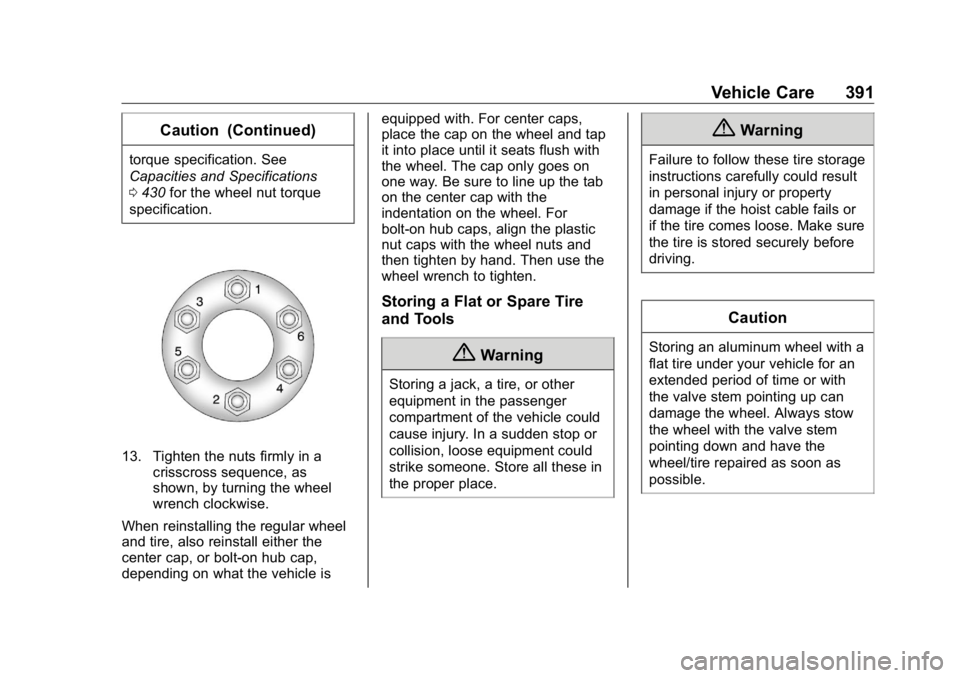
13. Tighten the nuts firmly in a
crisscross sequence, as
shown, by turning the wheel
wrench clockwise.
When reinstalling the regular wheel
and tire, also reinstall either the
center cap, or bolt-on hub cap,
depending on what the vehicle is equipped with. For center caps,
place the cap on the wheel and tap
it into place until it seats flush with
the wheel. The cap only goes on
one way. Be sure to line up the tab
on the center cap with the
indentation on the wheel. For
bolt-on hub caps, align the plastic
nut caps with the wheel nuts and
then tighten by hand. Then use the
wheel wrench to tighten.
Storing a Flat or Spare Tire
and Tools
{ WarningStoring a jack, a tire, or other
equipment in the passenger
compartment of the vehicle could
cause injury. In a sudden stop or
collision, loose equipment could
strike someone. Store all these in
the proper place. { WarningFailure to follow these tire storage
instructions carefully could result
in personal injury or property
damage if the hoist cable fails or
if the tire comes loose. Make sure
the tire is stored securely before
driving.
CautionStoring an aluminum wheel with a
flat tire under your vehicle for an
extended period of time or with
the valve stem pointing up can
damage the wheel. Always stow
the wheel with the valve stem
pointing down and have the
wheel/tire repaired as soon as
possible.
Page 394 of 472
GMC Sierra/Sierra Denali Owner Manual (GMNA-Localizing-U.S./Canada/
Mexico-1500-11698638) - 2019 - crc - 5/15/18
Vehicle Care 393Caution (Continued)and could damage the system.
Use only the tools supplied with
the hoist mechanism.
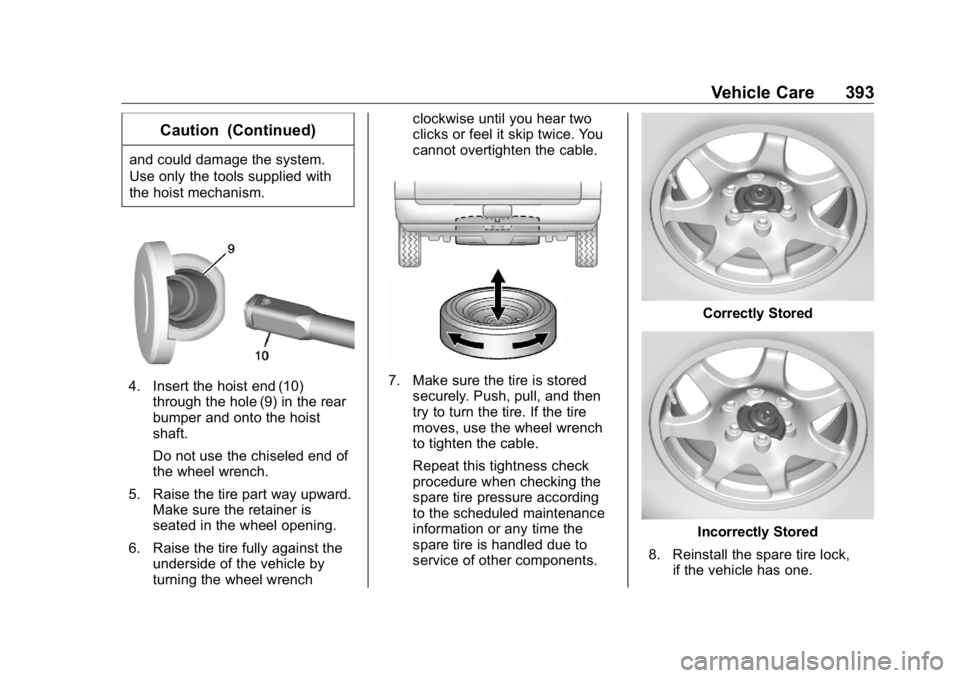
4. Insert the hoist end (10)
through the hole (9) in the rear
bumper and onto the hoist
shaft.
Do not use the chiseled end of
the wheel wrench.
5. Raise the tire part way upward.
Make sure the retainer is
seated in the wheel opening.
6. Raise the tire fully against the
underside of the vehicle by
turning the wheel wrench clockwise until you hear two
clicks or feel it skip twice. You
cannot overtighten the cable.
7. Make sure the tire is stored
securely. Push, pull, and then
try to turn the tire. If the tire
moves, use the wheel wrench
to tighten the cable.
Repeat this tightness check
procedure when checking the
spare tire pressure according
to the scheduled maintenance
information or any time the
spare tire is handled due to
service of other components. Correctly Stored
Incorrectly Stored
8. Reinstall the spare tire lock,
if the vehicle has one.
Page 462 of 472

GMC Sierra/Sierra Denali Owner Manual (GMNA-Localizing-U.S./Canada/-
Mexico-1500-11698638) - 2019 - crc - 5/16/18
Index 461Charging
Wireless . . . . . . . . . . . . . . . . . . . . . . 135
Charging System Light . . . . . . . . . 148
Check
Engine Light (Malfunction
Indicator) . . . . . . . . . . . . . . . . . . . . 149
Ignition Transmission Lock . . . 343
Child Restraints
Infants and Young Children . . . 100
Lower Anchors and Tethers
for Children . . . . . . . . . . . . . . . . . 106
Older Children . . . . . . . . . . . . . . . . . . 99
Securing . . . . . . . . . . . . 117, 120, 121
Systems . . . . . . . . . . . . . . . . . . . . . . 103
Circuit Breakers . . . . . . . . . . . . . . . . 350
Cleaning
Exterior Care . . . . . . . . . . . . . . . . . 403
Interior Care . . . . . . . . . . . . . . . . . . 408
Climate Control Systems . . . . . . . 188
Air Conditioning . . . . . . . . . . . . . . 188
Dual Automatic . . . . . . . . . . . . . . . 190
Heating . . . . . . . . . . . . . . . . . . . . . . . 188
Clock . . . . . . . . . . . . . . . . . . . . . . . . . . . 132
Cluster, Instrument . . . . . . . . . . . . . 138
Collision Damage Repair . . . . . . . 440
Compartments
Storage . . . . . . . . . . . . . . . . . . . . . . . 125
Compass . . . . . . . . . . . . . . . . . . . . . . . 132 Connected Services
Connections . . . . . . . . . . . . . . . . . . 456
Diagnostics . . . . . . . . . . . . . . . . . . . 458
Navigation . . . . . . . . . . . . . . . . . . . . 455
Connections
Connected Services . . . . . . . . . . 456
Control
Hill Descent . . . . . . . . . . . . . . . . . . 245
Traction and Electronic
Stability . . . . . . . . . . . . . . . . . . . . . 243
Control Light
Hill Descent . . . . . . . . . . . . . . . . . . 153
Control of a Vehicle . . . . . . . . . . . . . 198
Convex Mirrors . . . . . . . . . . . . . . . . . . 56
Coolant
Engine Temperature Gauge . . 145
Engine Temperature
Warning Light . . . . . . . . . . . . . . . 155
Cooling . . . . . . . . . . . . . . . . . . . . 188, 190
Cooling System . . . . . . . . . . . . . . . . . 327
Courtesy Transportation
Program . . . . . . . . . . . . . . . . . . . . . . . 439
Cruise Control . . . . . . . . . . . . . . . . . . 250
Light . . . . . . . . . . . . . . . . . . . . . . . . . . 158
Cupholders . . . . . . . . . . . . . . . . . . . . . 125
Customer Assistance . . . . . . . . . . . 436
Offices . . . . . . . . . . . . . . . . . . . . . . . . 435 Customer Assistance (cont'd)
Text Telephone (TTY)
Users . . . . . . . . . . . . . . . . . . . . . . . 436
Customer Information
Publications Ordering
Information . . . . . . . . . . . . . . . . . . 442
Customer Satisfaction
Procedure . . . . . . . . . . . . . . . . . . . . . 433
D Damage Repair, Collision . . . . . . . 440
Danger, Warning, and Caution . . . . 2
Data Collection
Infotainment System . . . . . . . . . . 446
OnStar . . . . . . . . . . . . . . . . . . . . . . . 446
Data Recorders, Event . . . . . . . . . 445
Daytime Running
Lamps (DRL) . . . . . . . . . . . . . . . . . . 179
Defensive Driving . . . . . . . . . . . . . . . 198
Delayed Locking . . . . . . . . . . . . . . . . . 45
Diagnostics
Connected Services . . . . . . . . . . 458
Differential, Limited-Slip . . . . . . . . 250
Distracted Driving . . . . . . . . . . . . . . . 197
Dome Lamps . . . . . . . . . . . . . . . . . . . 183
Door
Ajar Light . . . . . . . . . . . . . . . . . . . . . 158
Delayed Locking . . . . . . . . . . . . . . . . 45