tailgate GMC SIERRA DENALI 2019 User Guide
[x] Cancel search | Manufacturer: GMC, Model Year: 2019, Model line: SIERRA DENALI, Model: GMC SIERRA DENALI 2019Pages: 472, PDF Size: 8.98 MB
Page 51 of 472
GMC Sierra/Sierra Denali Owner Manual (GMNA-Localizing-U.S./Canada/
Mexico-1500-11698638) - 2019 - crc - 5/15/18
50 Keys, Doors, and Windows
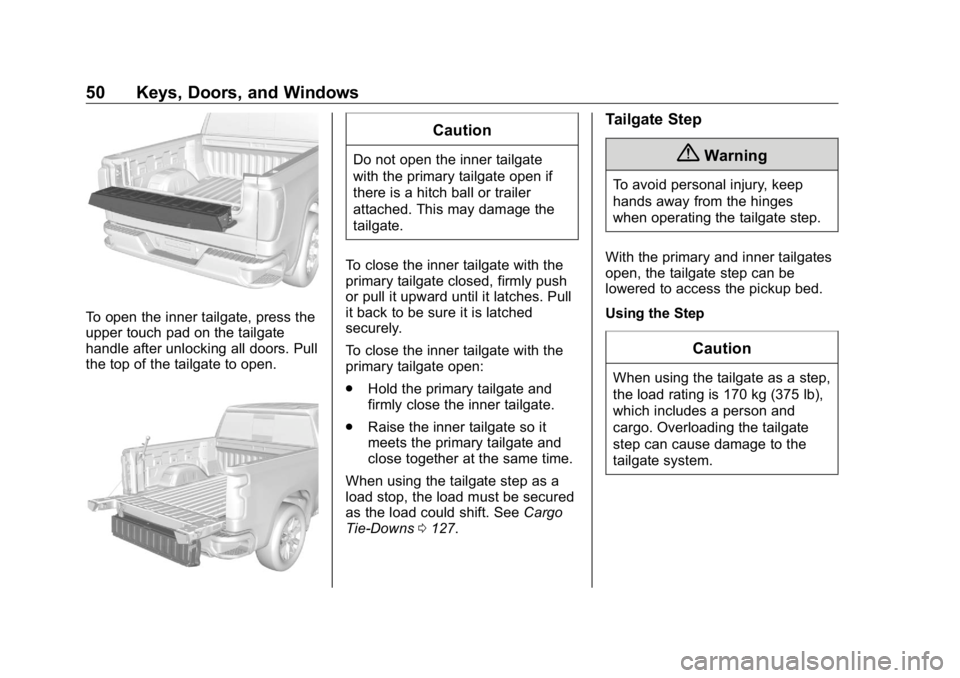
To open the inner tailgate, press the
upper touch pad on the tailgate
handle after unlocking all doors. Pull
the top of the tailgate to open. CautionDo not open the inner tailgate
with the primary tailgate open if
there is a hitch ball or trailer
attached. This may damage the
tailgate.
To close the inner tailgate with the
primary tailgate closed, firmly push
or pull it upward until it latches. Pull
it back to be sure it is latched
securely.
To close the inner tailgate with the
primary tailgate open:
.
Hold the primary tailgate and
firmly close the inner tailgate.
.
Raise the inner tailgate so it
meets the primary tailgate and
close together at the same time.
When using the tailgate step as a
load stop, the load must be secured
as the load could shift. See Cargo
Tie-Downs 0 127 . Tailgate Step
{ WarningTo avoid personal injury, keep
hands away from the hinges
when operating the tailgate step.
With the primary and inner tailgates
open, the tailgate step can be
lowered to access the pickup bed.
Using the Step
CautionWhen using the tailgate as a step,
the load rating is 170 kg (375 lb),
which includes a person and
cargo. Overloading the tailgate
step can cause damage to the
tailgate system.
Page 52 of 472
GMC Sierra/Sierra Denali Owner Manual (GMNA-Localizing-U.S./Canada/
Mexico-1500-11698638) - 2019 - crc - 5/15/18
Keys, Doors, and Windows 51
.
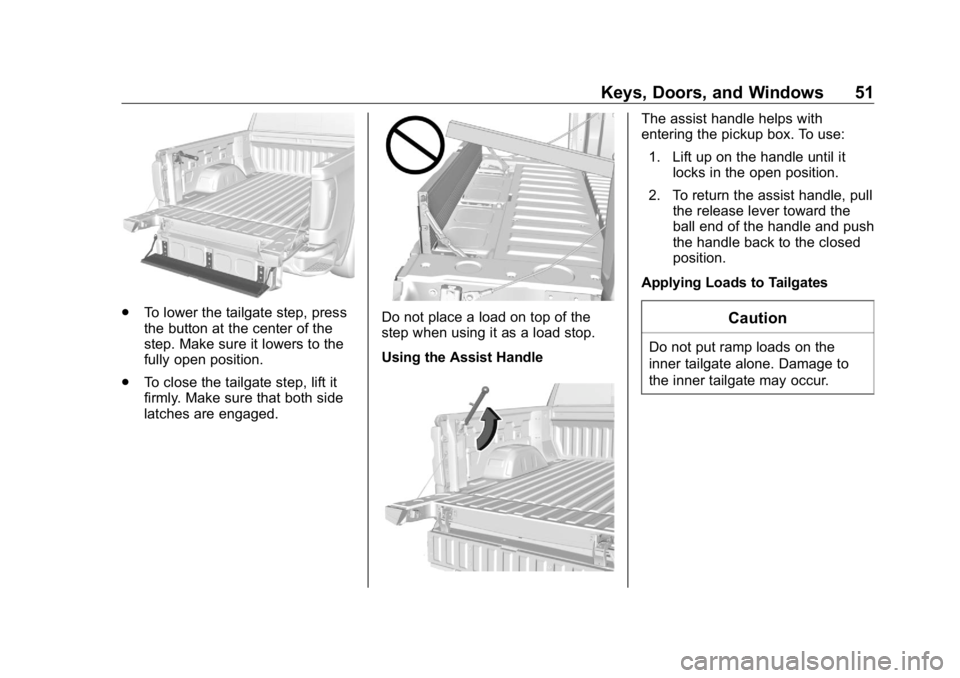
To lower the tailgate step, press
the button at the center of the
step. Make sure it lowers to the
fully open position.
.
To close the tailgate step, lift it
firmly. Make sure that both side
latches are engaged. Do not place a load on top of the
step when using it as a load stop.
Using the Assist Handle The assist handle helps with
entering the pickup box. To use:
1. Lift up on the handle until it
locks in the open position.
2. To return the assist handle, pull
the release lever toward the
ball end of the handle and push
the handle back to the closed
position.
Applying Loads to Tailgates
CautionDo not put ramp loads on the
inner tailgate alone. Damage to
the inner tailgate may occur.
Page 53 of 472
GMC Sierra/Sierra Denali Owner Manual (GMNA-Localizing-U.S./Canada/
Mexico-1500-11698638) - 2019 - crc - 5/15/18
52 Keys, Doors, and Windows
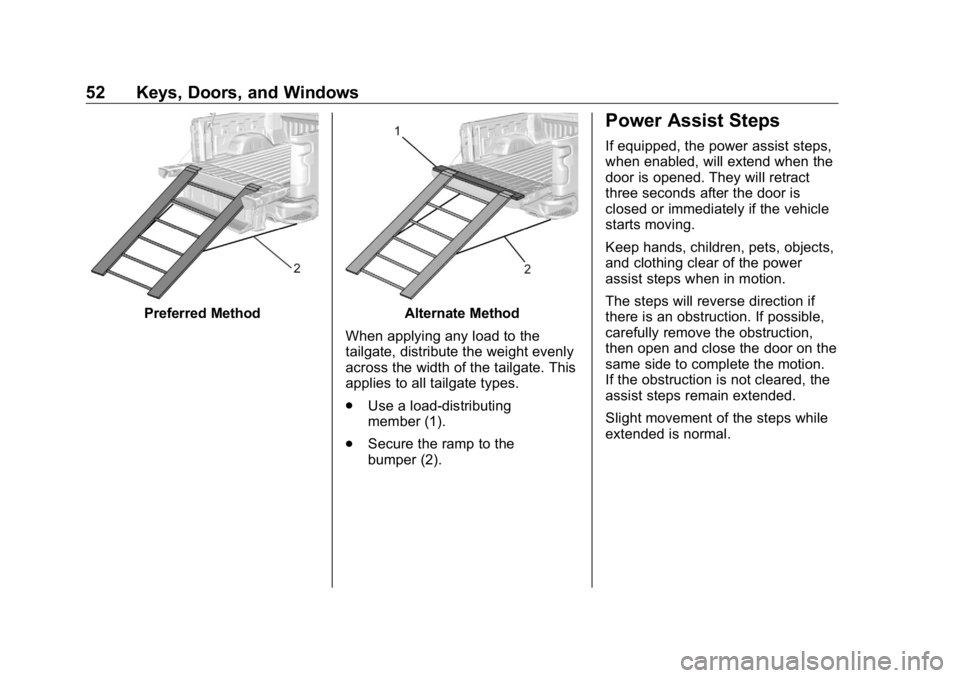
Preferred Method Alternate Method
When applying any load to the
tailgate, distribute the weight evenly
across the width of the tailgate. This
applies to all tailgate types.
.
Use a load-distributing
member (1).
.
Secure the ramp to the
bumper (2). Power Assist Steps If equipped, the power assist steps,
when enabled, will extend when the
door is opened. They will retract
three seconds after the door is
closed or immediately if the vehicle
starts moving.
Keep hands, children, pets, objects,
and clothing clear of the power
assist steps when in motion.
The steps will reverse direction if
there is an obstruction. If possible,
carefully remove the obstruction,
then open and close the door on the
same side to complete the motion.
If the obstruction is not cleared, the
assist steps remain extended.
Slight movement of the steps while
extended is normal.
Page 183 of 472
GMC Sierra/Sierra Denali Owner Manual (GMNA-Localizing-U.S./Canada/
Mexico-1500-11698638) - 2019 - crc - 5/15/18
182 Lighting When the headlamps are changed
to high beam, the fog lamps also go
off. When the high-beam headlamps
are turned off, the fog lamps will
come on again.
Some localities have laws that
require the headlamps to be on with
the fog lamps.
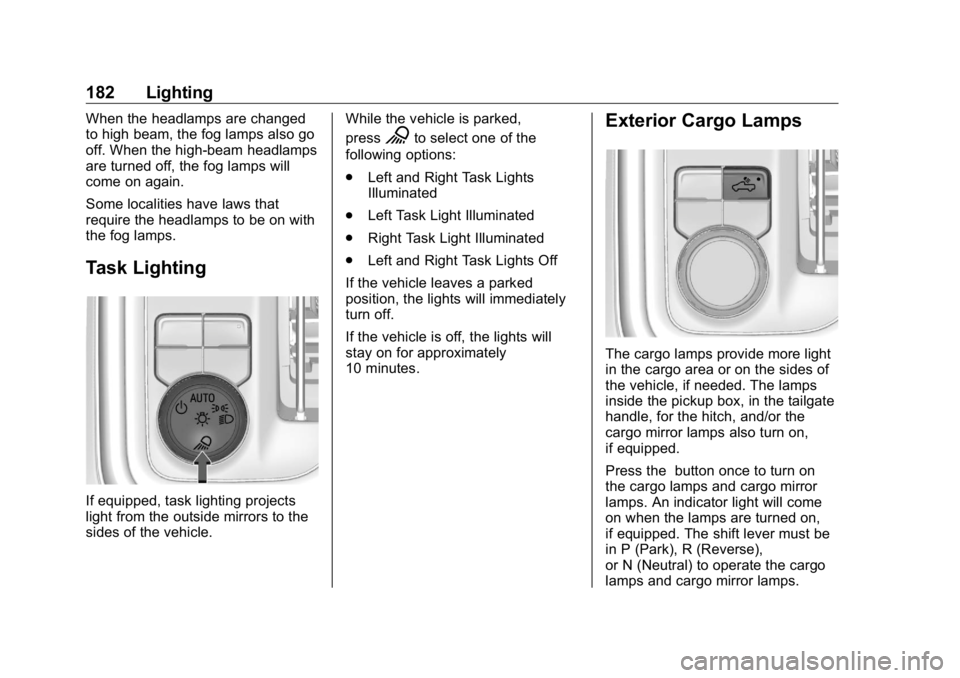
Task Lighting
If equipped, task lighting projects
light from the outside mirrors to the
sides of the vehicle. While the vehicle is parked,
press
K to select one of the
following options:
.
Left and Right Task Lights
Illuminated
.
Left Task Light Illuminated
.
Right Task Light Illuminated
.
Left and Right Task Lights Off
If the vehicle leaves a parked
position, the lights will immediately
turn off.
If the vehicle is off, the lights will
stay on for approximately
10 minutes. Exterior Cargo Lamps
The cargo lamps provide more light
in the cargo area or on the sides of
the vehicle, if needed. The lamps
inside the pickup box, in the tailgate
handle, for the hitch, and/or the
cargo mirror lamps also turn on,
if equipped.
Press the button once to turn on
the cargo lamps and cargo mirror
lamps. An indicator light will come
on when the lamps are turned on,
if equipped. The shift lever must be
in P (Park), R (Reverse),
or N (Neutral) to operate the cargo
lamps and cargo mirror lamps.
Page 255 of 472
GMC Sierra/Sierra Denali Owner Manual (GMNA-Localizing-U.S./Canada/
Mexico-1500-11698638) - 2019 - crc - 5/16/18
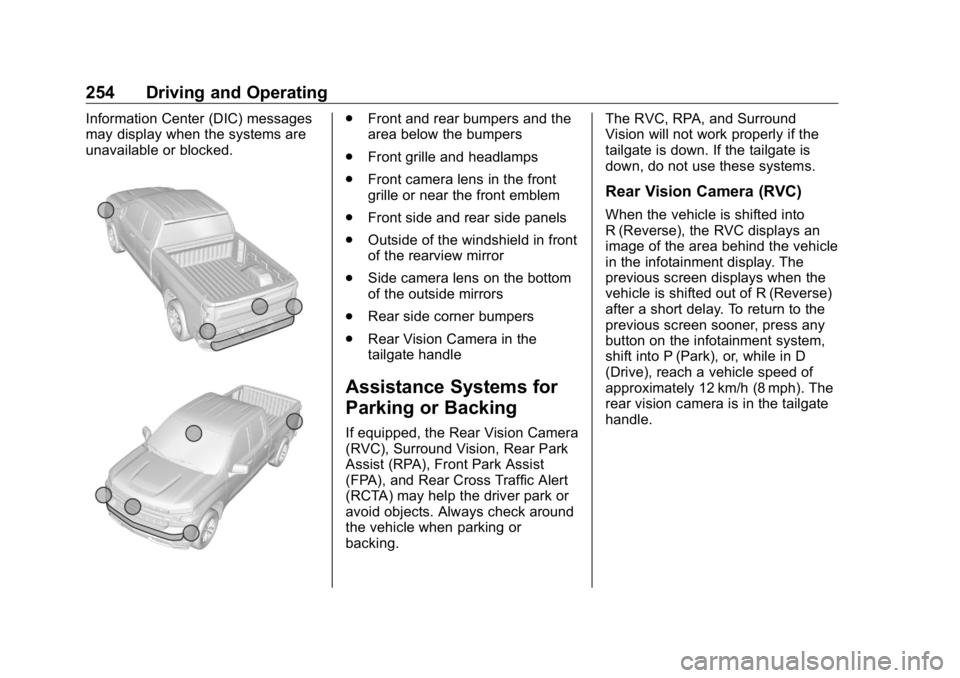
254 Driving and Operating Information Center (DIC) messages
may display when the systems are
unavailable or blocked. .
Front and rear bumpers and the
area below the bumpers
.
Front grille and headlamps
.
Front camera lens in the front
grille or near the front emblem
.
Front side and rear side panels
.
Outside of the windshield in front
of the rearview mirror
.
Side camera lens on the bottom
of the outside mirrors
.
Rear side corner bumpers
.
Rear Vision Camera in the
tailgate handle
Assistance Systems for
Parking or Backing If equipped, the Rear Vision Camera
(RVC), Surround Vision, Rear Park
Assist (RPA), Front Park Assist
(FPA), and Rear Cross Traffic Alert
(RCTA) may help the driver park or
avoid objects. Always check around
the vehicle when parking or
backing. The RVC, RPA, and Surround
Vision will not work properly if the
tailgate is down. If the tailgate is
down, do not use these systems.
Rear Vision Camera (RVC) When the vehicle is shifted into
R (Reverse), the RVC displays an
image of the area behind the vehicle
in the infotainment display. The
previous screen displays when the
vehicle is shifted out of R (Reverse)
after a short delay. To return to the
previous screen sooner, press any
button on the infotainment system,
shift into P (Park), or, while in D
(Drive), reach a vehicle speed of
approximately 12 km/h (8 mph). The
rear vision camera is in the tailgate
handle.
Page 256 of 472
GMC Sierra/Sierra Denali Owner Manual (GMNA-Localizing-U.S./Canada/
Mexico-1500-11698638) - 2019 - crc - 5/16/18
Driving and Operating 255
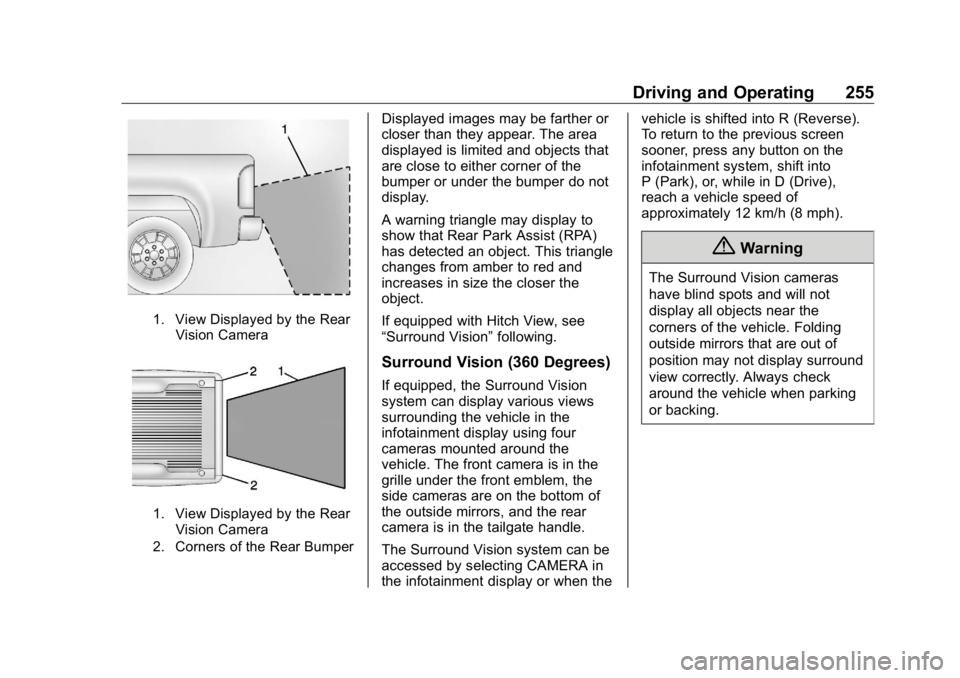
1. View Displayed by the Rear
Vision Camera
1. View Displayed by the Rear
Vision Camera
2. Corners of the Rear Bumper Displayed images may be farther or
closer than they appear. The area
displayed is limited and objects that
are close to either corner of the
bumper or under the bumper do not
display.
A warning triangle may display to
show that Rear Park Assist (RPA)
has detected an object. This triangle
changes from amber to red and
increases in size the closer the
object.
If equipped with Hitch View, see
“ Surround Vision ” following.
Surround Vision (360 Degrees) If equipped, the Surround Vision
system can display various views
surrounding the vehicle in the
infotainment display using four
cameras mounted around the
vehicle. The front camera is in the
grille under the front emblem, the
side cameras are on the bottom of
the outside mirrors, and the rear
camera is in the tailgate handle.
The Surround Vision system can be
accessed by selecting CAMERA in
the infotainment display or when the vehicle is shifted into R (Reverse).
To return to the previous screen
sooner, press any button on the
infotainment system, shift into
P (Park), or, while in D (Drive),
reach a vehicle speed of
approximately 12 km/h (8 mph).
{ WarningThe Surround Vision cameras
have blind spots and will not
display all objects near the
corners of the vehicle. Folding
outside mirrors that are out of
position may not display surround
view correctly. Always check
around the vehicle when parking
or backing.
Page 259 of 472
GMC Sierra/Sierra Denali Owner Manual (GMNA-Localizing-U.S./Canada/
Mexico-1500-11698638) - 2019 - crc - 5/16/18
258 Driving and Operating camera. Touch X to exit the view or
it will be removed automatically after
eight seconds.
{ WarningUse Hitch Guidance only to help
back the vehicle to a trailer hitch
or, when travelling above 12 km/h
(8 mph), to briefly check the
status of your trailer. Do not use
for any other purpose, such as
making lane change decisions.
Before making a lane change,
always check the mirrors and
glance over your shoulder.
Improper use could result in
serious injury to you or others.
Surround Vision (270 Degrees
with Trailer Camera Views)
If equipped, the Surround Vision
(270 Degrees) has additional
trailering views and no Front Vision
Camera. It can display various
views surrounding the vehicle in the
infotainment display using three
cameras mounted around the vehicle. The side cameras are on
the bottom of the outside mirrors
and the rear camera is in the
tailgate handle. A fourth camera can
be mounted to the rear of a trailer to
allow access to all possible camera
features. See your dealer for an
accessory fourth trailer camera.
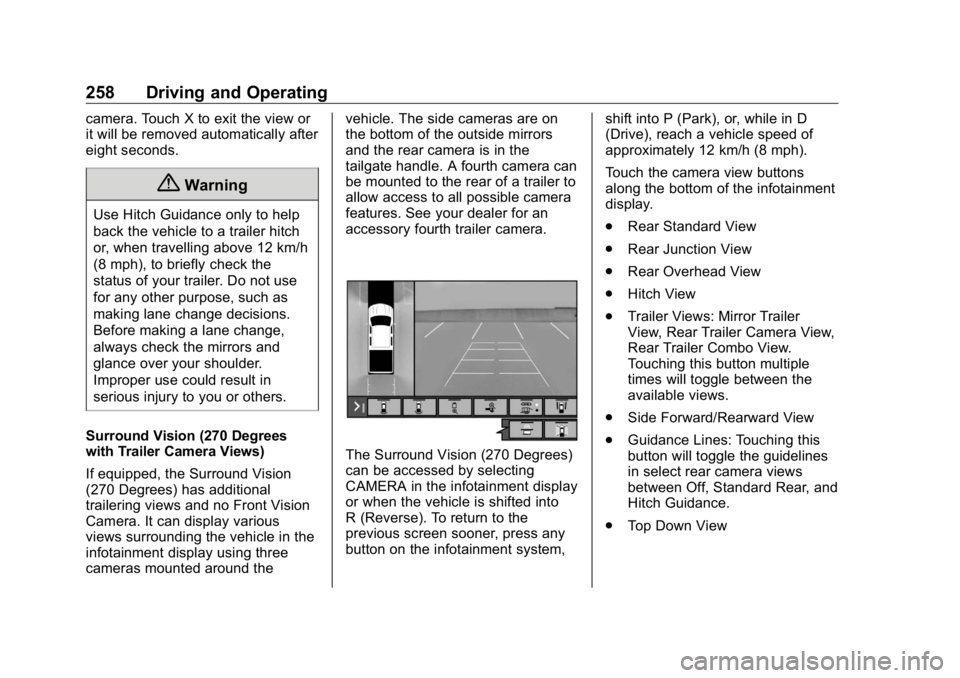
The Surround Vision (270 Degrees)
can be accessed by selecting
CAMERA in the infotainment display
or when the vehicle is shifted into
R (Reverse). To return to the
previous screen sooner, press any
button on the infotainment system, shift into P (Park), or, while in D
(Drive), reach a vehicle speed of
approximately 12 km/h (8 mph).
Touch the camera view buttons
along the bottom of the infotainment
display.
.
Rear Standard View
.
Rear Junction View
.
Rear Overhead View
.
Hitch View
.
Trailer Views: Mirror Trailer
View, Rear Trailer Camera View,
Rear Trailer Combo View.
Touching this button multiple
times will toggle between the
available views.
.
Side Forward/Rearward View
.
Guidance Lines: Touching this
button will toggle the guidelines
in select rear camera views
between Off, Standard Rear, and
Hitch Guidance.
.
Top Down View
Page 349 of 472
GMC Sierra/Sierra Denali Owner Manual (GMNA-Localizing-U.S./Canada/
Mexico-1500-11698638) - 2019 - crc - 5/15/18
348 Vehicle Care To replace one of these bulbs:
1. Open the tailgate.
2. Remove the two rear lamp
assembly screws. 4. Pull the rear lamp assembly
outward and rearward away
from the box side to remove it
from the vehicle.
5. Turn the bulb socket
counterclockwise.
6. Pull the bulb straight out from
the socket.
7. Replace the bulb and reverse
Steps 1 – 5 to reinstall. Center High-Mounted
Stoplamp (CHMSL) and
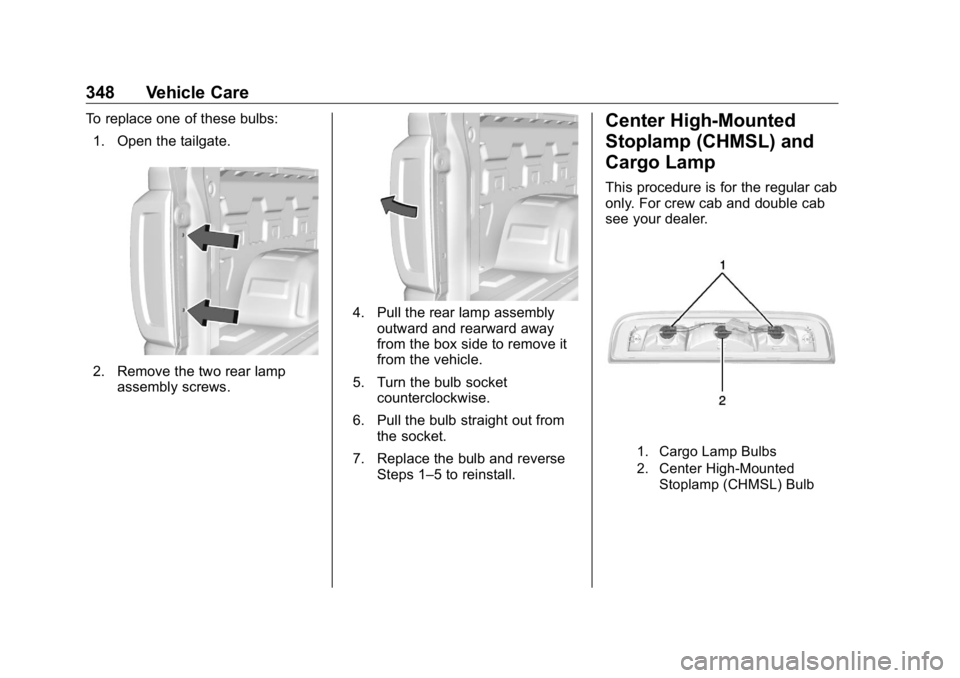
Cargo Lamp This procedure is for the regular cab
only. For crew cab and double cab
see your dealer.
1. Cargo Lamp Bulbs
2. Center High-Mounted
Stoplamp (CHMSL) Bulb
Page 427 of 472
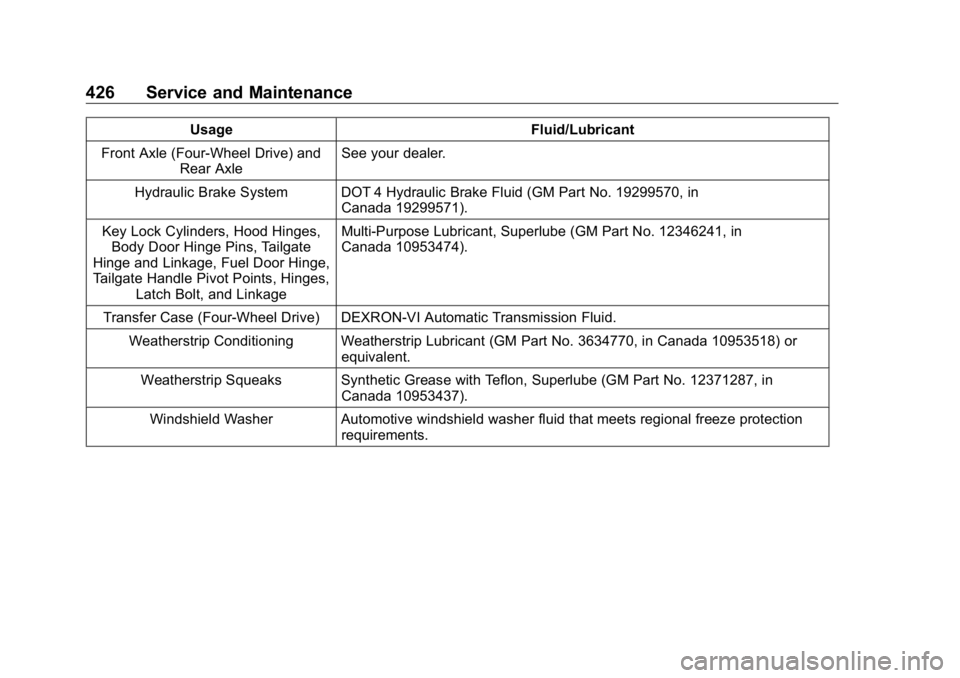
GMC Sierra/Sierra Denali Owner Manual (GMNA-Localizing-U.S./Canada/
Mexico-1500-11698638) - 2019 - crc - 5/15/18
426 Service and Maintenance Usage Fluid/Lubricant
Front Axle (Four-Wheel Drive) and
Rear Axle See your dealer.
Hydraulic Brake System DOT 4 Hydraulic Brake Fluid (GM Part No. 19299570, in
Canada 19299571).
Key Lock Cylinders, Hood Hinges,
Body Door Hinge Pins, Tailgate
Hinge and Linkage, Fuel Door Hinge,
Tailgate Handle Pivot Points, Hinges,
Latch Bolt, and Linkage Multi-Purpose Lubricant, Superlube (GM Part No. 12346241, in
Canada 10953474).
Transfer Case (Four-Wheel Drive) DEXRON-VI Automatic Transmission Fluid.
Weatherstrip Conditioning Weatherstrip Lubricant (GM Part No. 3634770, in Canada 10953518) or
equivalent.
Weatherstrip Squeaks Synthetic Grease with Teflon, Superlube (GM Part No. 12371287, in
Canada 10953437).
Windshield Washer Automotive windshield washer fluid that meets regional freeze protection
requirements.
Page 461 of 472

GMC Sierra/Sierra Denali Owner Manual (GMNA-Localizing-U.S./Canada/-
Mexico-1500-11698638) - 2019 - crc - 5/16/18
460 Index Assistance Systems for
Driving . . . . . . . . . . . . . . . . . . . . . . . . 260
Assistance Systems for
Parking and Backing . . . . . . . . . . 254
Auto Stop
Stop/Start System . . . . . . . . . . . . 222
Automatic
Dimming Mirrors . . . . . . . . . . . . . . . . 58
Door Locks . . . . . . . . . . . . . . . . . . . . . 46
Forward Braking . . . . . . . . . . . . . . 263
Headlamp System . . . . . . . . . . . . 179
Transmission . . . . . . . . . . . . . . . . . 229
Transmission Fluid . . . . . . . . . . . 325
Automatic Transmission
Manual Mode . . . . . . . . . . . . . . . . . 232
Axle, Front . . . . . . . . . . . . . . . . . . . . . . 340
Axle, Rear . . . . . . . . . . . . . . . . . . . . . . 341
B Battery
Exterior Lighting Battery
Saver . . . . . . . . . . . . . . . . . . . . . . . 185
Load Management . . . . . . . . . . . . 185
Power Protection . . . . . . . . . . . . . 185
Battery - North America . . . . 337, 395
Blade Replacement, Wiper . . . . . 344
Blind Spot Mirrors . . . . . . . . . . . . . . . 58 Brake
Parking, Electric . . . . . . . . . . . . . . 241
System Warning Light . . . . . . . . 151
Brake Pad Life System . . . . . . . . . 335
Brakes . . . . . . . . . . . . . . . . . . . . . . . . . . 335
Antilock . . . . . . . . . . . . . . . . . . . . . . . 240
Assist . . . . . . . . . . . . . . . . . . . . . . . . . 242
Fluid . . . . . . . . . . . . . . . . . . . . . . . . . . 336
Pad Life System . . . . . . . . . . . . . . 335
Braking . . . . . . . . . . . . . . . . . . . . . . . . . 198
Automatic Forward . . . . . . . . . . . 263
Braking System
Front Pedestrian (FPB) . . . . . . . 264
Break-In, New Vehicle . . . . . . . . . . 216
Bulb Replacement
Center High-Mounted
Stoplamp (CHMSL) and
Cargo Lamp . . . . . . . . . . . . . . . . . 348
Halogen Bulbs . . . . . . . . . . . . . . . . 346
Headlamp Aiming . . . . . . . . . . . . . 346
Headlamps . . . . . . . . . . . . . . . . . . . 346
Headlamps, Front Turn
Signal, Sidemarker, and
Parking Lamps . . . . . . . . . . . . . . 347
License Plate Lamps . . . . . . . . . 349
Taillamps, Turn Signal,
Stoplamps, and Back-up
Lamps . . . . . . . . . . . . . . . . . . . . . . 347 Buying New Tires . . . . . . . . . . . . . . . 378
C Calibration . . . . . . . . . . . . . . . . . . . . . . 132
California
Perchlorate Materials
Requirements . . . . . . . . . . . . . . . 313
California
Proposition
65 Warning . . . . . . . . . .313, 337, 395,
Back Cover
Canadian Vehicle Owners . . . . . . . . 2
Capacities and
Specifications . . . . . . . . . . . . . . . . . 430
Carbon Monoxide
Engine Exhaust . . . . . . . . . . . . . . . 228
Tailgate . . . . . . . . . . . . . . . . . . . . . . . . . 47
Winter Driving . . . . . . . . . . . . . . . . 206
Cargo
Tie-Downs . . . . . . . . . . . . . . . . . . . . 127
Caution, Danger, and Warning . . . . 2
Center Console Storage . . . . . . . . 126
Center High-Mounted
Stoplamp (CHMSL) and
Cargo Lamp . . . . . . . . . . . . . . . . . . . 348
Center Seat . . . . . . . . . . . . . . . . . . . . . 70
Chains, Tire . . . . . . . . . . . . . . . . . . . . 382