check engine GMC SIERRA DENALI 2019 Owner's Manual
[x] Cancel search | Manufacturer: GMC, Model Year: 2019, Model line: SIERRA DENALI, Model: GMC SIERRA DENALI 2019Pages: 472, PDF Size: 8.98 MB
Page 295 of 472
GMC Sierra/Sierra Denali Owner Manual (GMNA-Localizing-U.S./Canada/
Mexico-1500-11698638) - 2019 - crc - 5/16/18
294 Driving and Operating brakes are selectively applied at
each wheel, to help reduce
excessive trailer sway. If equipped
with the Integrated Trailer Brake
Control (ITBC) system, and the
trailer has an electric brake system,
StabiliTrak/ESC may also apply the
trailer brakes.
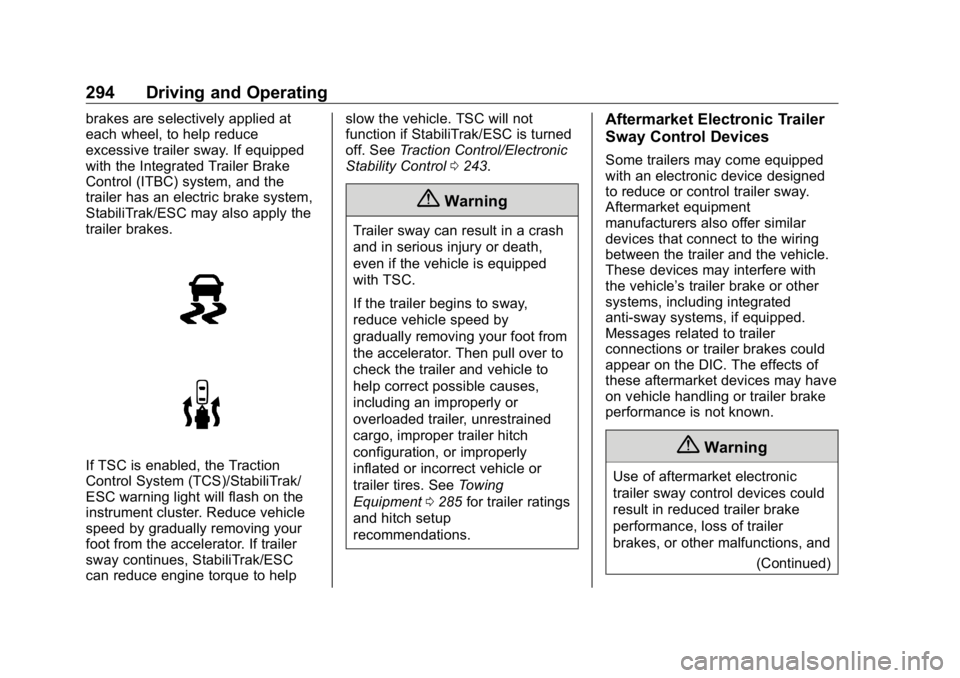
If TSC is enabled, the Traction
Control System (TCS)/StabiliTrak/
ESC warning light will flash on the
instrument cluster. Reduce vehicle
speed by gradually removing your
foot from the accelerator. If trailer
sway continues, StabiliTrak/ESC
can reduce engine torque to help slow the vehicle. TSC will not
function if StabiliTrak/ESC is turned
off. See Traction Control/Electronic
Stability Control 0 243 .
{ WarningTrailer sway can result in a crash
and in serious injury or death,
even if the vehicle is equipped
with TSC.
If the trailer begins to sway,
reduce vehicle speed by
gradually removing your foot from
the accelerator. Then pull over to
check the trailer and vehicle to
help correct possible causes,
including an improperly or
overloaded trailer, unrestrained
cargo, improper trailer hitch
configuration, or improperly
inflated or incorrect vehicle or
trailer tires. See Towing
Equipment 0 285 for trailer ratings
and hitch setup
recommendations. Aftermarket Electronic Trailer
Sway Control Devices Some trailers may come equipped
with an electronic device designed
to reduce or control trailer sway.
Aftermarket equipment
manufacturers also offer similar
devices that connect to the wiring
between the trailer and the vehicle.
These devices may interfere with
the vehicle ’ s trailer brake or other
systems, including integrated
anti-sway systems, if equipped.
Messages related to trailer
connections or trailer brakes could
appear on the DIC. The effects of
these aftermarket devices may have
on vehicle handling or trailer brake
performance is not known.
{ Warning
Use of aftermarket electronic
trailer sway control devices could
result in reduced trailer brake
performance, loss of trailer
brakes, or other malfunctions, and
(Continued)
Page 307 of 472
GMC Sierra/Sierra Denali Owner Manual (GMNA-Localizing-U.S./Canada/
Mexico-1500-11698638) - 2019 - crc - 5/16/18
306 Driving and Operating If Tow/Haul Mode is off and this
setting is on for a Trailer Profile,
each time the ignition is turned on a
reminder will appear to turn on Tow/
Haul Mode when the Trailer Profile
is active.
If Tow/Haul Mode is on and this
setting is on for a Trailer Profile, the
reminder will not appear when the
Trailer Profile is active.
Conversions and
Add-Ons Add-On Electrical
Equipment
{ WarningThe Data Link Connector
(DLC) is used for vehicle service
and Emission Inspection/
Maintenance testing. See
Malfunction Indicator Lamp
(Check Engine Light) 0 149 .
A device connected to the DLC —
such as an aftermarket fleet or
driver-behavior tracking device —
may interfere with vehicle
systems. This could affect vehicle
operation and cause a crash.
Such devices may also access
information stored in the vehicle ’ s
systems. CautionSome electrical equipment can
damage the vehicle or cause
components to not work and
would not be covered by the
vehicle warranty. Always check
with your dealer before adding
electrical equipment.
Add-on equipment can drain the
vehicle's 12-volt battery, even if the
vehicle is not operating.
The vehicle has an airbag system.
Before attempting to add anything
electrical to the vehicle, see
Servicing the Airbag-Equipped
Vehicle 0 96 and Adding Equipment
to the Airbag-Equipped Vehicle
0 97 .
For information on wiring auxiliary
switches, see www.gmupfitter.com
or contact your dealer.
Page 312 of 472
GMC Sierra/Sierra Denali Owner Manual (GMNA-Localizing-U.S./Canada/
Mexico-1500-11698638) - 2019 - crc - 5/15/18
Vehicle Care 311
Vehicle Care General Information General Information . . . . . . . . . . 312
California Proposition
65 Warning . . . . . . . . . . . . . . . . . 313
California Perchlorate
Materials Requirements . . . . . 313
Accessories and
Modifications . . . . . . . . . . . . . . . . 313
Vehicle Checks Doing Your Own
Service Work . . . . . . . . . . . . . . . 314
Hood . . . . . . . . . . . . . . . . . . . . . . . . . 314
Engine Compartment
Overview . . . . . . . . . . . . . . . . . . . . 316
Engine Oil . . . . . . . . . . . . . . . . . . . . 321
Engine Oil Life System . . . . . . . 323
Automatic Transmission
Fluid . . . . . . . . . . . . . . . . . . . . . . . . 325
Engine Air Filter Life
System . . . . . . . . . . . . . . . . . . . . . . 325
Engine Air Cleaner/Filter . . . . . . 326
Cooling System . . . . . . . . . . . . . . 327
Engine Overheating . . . . . . . . . . 331
Overheated Engine Protection
Operating Mode . . . . . . . . . . . . . 333
Engine Fan . . . . . . . . . . . . . . . . . . . 333 Washer Fluid . . . . . . . . . . . . . . . . . 334
Brakes . . . . . . . . . . . . . . . . . . . . . . . 335
Brake Pad Life System . . . . . . . 335
Brake Fluid . . . . . . . . . . . . . . . . . . . 336
Battery - North America . . . . . . 337
Four-Wheel Drive . . . . . . . . . . . . . 340
Front Axle . . . . . . . . . . . . . . . . . . . . 340
Rear Axle . . . . . . . . . . . . . . . . . . . . 341
Noise Control System . . . . . . . . 342
Starter Switch Check . . . . . . . . . 343
Ignition Transmission Lock
Check . . . . . . . . . . . . . . . . . . . . . . . 343
Park Brake and P (Park)
Mechanism Check . . . . . . . . . . 343
Wiper Blade Replacement . . . . 344
Windshield Replacement . . . . . 345
Gas Strut(s) . . . . . . . . . . . . . . . . . . 345
Headlamp Aiming Headlamp Aiming . . . . . . . . . . . . 346
Bulb Replacement Bulb Replacement . . . . . . . . . . . . 346
Halogen Bulbs . . . . . . . . . . . . . . . . 346
LED Lighting . . . . . . . . . . . . . . . . . 347
Headlamps, Front Turn Signal,
Sidemarker, and Parking
Lamps . . . . . . . . . . . . . . . . . . . . . . 347
Taillamps, Turn Signal,
Stoplamps, and Back-Up
Lamps . . . . . . . . . . . . . . . . . . . . . . 347 Center High-Mounted
Stoplamp (CHMSL) and
Cargo Lamp . . . . . . . . . . . . . . . . . 348
License Plate Lamp . . . . . . . . . . 349
Electrical System Electrical System Overload . . . 349
Fuses and Circuit Breakers . . . 350
Engine Compartment Fuse
Block . . . . . . . . . . . . . . . . . . . . . . . . 350
Instrument Panel Fuse Block
(Right) . . . . . . . . . . . . . . . . . . . . . . 354
Instrument Panel Fuse
Block (Left) . . . . . . . . . . . . . . . . . 356
Wheels and Tires Tires . . . . . . . . . . . . . . . . . . . . . . . . . . 358
All-Season Tires . . . . . . . . . . . . . . 359
Winter Tires . . . . . . . . . . . . . . . . . . 359
Low-Profile Tires . . . . . . . . . . . . . 360
All-Terrain Tires . . . . . . . . . . . . . . . 360
Tire Sidewall Labeling . . . . . . . . 360
Tire Designations . . . . . . . . . . . . . 363
Tire Terminology and
Definitions . . . . . . . . . . . . . . . . . . 364
Tire Pressure . . . . . . . . . . . . . . . . . 367
Tire Pressure for High-Speed
Operation . . . . . . . . . . . . . . . . . . . 368
Tire Pressure Monitor
System . . . . . . . . . . . . . . . . . . . . . . 369
Page 315 of 472
GMC Sierra/Sierra Denali Owner Manual (GMNA-Localizing-U.S./Canada/
Mexico-1500-11698638) - 2019 - crc - 5/15/18
314 Vehicle Care
Vehicle Checks Doing Your Own
Service Work
{ WarningIt can be dangerous to work on
your vehicle if you do not have
the proper knowledge, service
manual, tools, or parts. Always
follow owner ’ s manual procedures
and consult the service manual
for your vehicle before doing any
service work.
If doing some of your own service
work, use the proper service
manual. It tells you much more
about how to service the vehicle
than this manual can. To order the
proper service manual, see
Publication Ordering Information
0 442 .
This vehicle has an airbag system.
Before attempting to do your own
service work, see Servicing the
Airbag-Equipped Vehicle 0 96 . If equipped with remote vehicle
start, open the hood before
performing any service work to
prevent remote starting the vehicle
accidentally. See Remote Vehicle
Start 0 43 .
Keep a record with all parts receipts
and list the mileage and the date of
any service work performed. See
Maintenance Records 0 428 .
CautionEven small amounts of
contamination can cause damage
to vehicle systems. Do not allow
contaminants to contact the fluids,
reservoir caps, or dipsticks.
Hood
{ Warning
Turn the vehicle off before
opening the hood. If the vehicle is
on, the engine will start when the
hood is opened. You or others
could be injured. { WarningComponents under the hood can
get hot from running the engine.
To help avoid the risk of burning
unprotected skin, never touch
these components until they have
cooled, and always use a glove or
towel to avoid direct skin contact.
Clear any snow from the hood
before opening.
To open the hood:
1. Pull the hood release lever with
the
i symbol. It is on the
lower left side of the instrument
panel.
2. Go to the front of the vehicle
and locate the secondary
release lever under the front
center of the hood. Push the
secondary hood release lever
to the right to release.
Page 318 of 472

GMC Sierra/Sierra Denali Owner Manual (GMNA-Localizing-U.S./Canada/
Mexico-1500-11698638) - 2019 - crc - 5/15/18
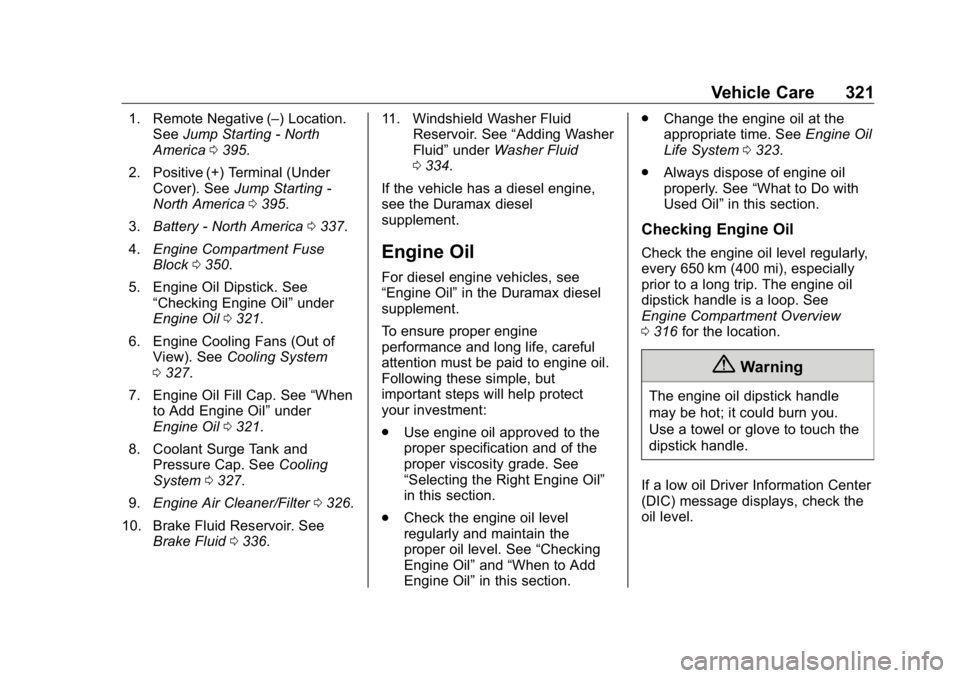
Vehicle Care 3171. Remote Negative ( – ) Location.
See Jump Starting - North
America 0 395 .
2. Positive (+) Terminal (Under
Cover). See Jump Starting -
North America 0 395 .
3. Battery - North America 0 337 .
4. Engine Compartment Fuse
Block 0 350 .
5. Engine Cooling Fans (Out of
View). See Cooling System
0 327 .
6. Engine Oil Fill Cap. See “ When
to Add Engine Oil ” under
Engine Oil 0 321 .
7. Engine Oil Dipstick. See
“ Checking Engine Oil ” under
Engine Oil 0 321 .
8. Coolant Surge Tank and
Pressure Cap. See Cooling
System 0 327 .
9. Engine Air Cleaner/Filter 0 326 .
10. Brake Fluid Reservoir. See
Brake Fluid 0 336 . 11. Windshield Washer Fluid
Reservoir. See “ Adding Washer
Fluid ” under Washer Fluid
0 334 .
Page 320 of 472

GMC Sierra/Sierra Denali Owner Manual (GMNA-Localizing-U.S./Canada/
Mexico-1500-11698638) - 2019 - crc - 5/15/18
Vehicle Care 3191. Remote Negative ( – ) Location.
See Jump Starting - North
America 0 395 .
2. Positive (+) Terminal (Under
Cover). See Jump Starting -
North America 0 395 .
3. Battery - North America 0 337 .
4. Engine Compartment Fuse
Block 0 350 .
5. Engine Cooling Fans (Out of
View). See Cooling System
0 327 .
6. Engine Oil Dipstick. See
“ Checking Engine Oil ” under
Engine Oil 0 321 .
7. Engine Oil Fill Cap. See “ When
to Add Engine Oil ” under
Engine Oil 0 321 .
8. Coolant Surge Tank and
Pressure Cap. See Cooling
System 0 327 .
9. Engine Air Cleaner/Filter 0 326 .
10. Brake Fluid Reservoir. See
Brake Fluid 0 336 . 11. Windshield Washer Fluid
Reservoir. See “ Adding Washer
Fluid ” under Washer Fluid
0 334 .
Page 322 of 472
GMC Sierra/Sierra Denali Owner Manual (GMNA-Localizing-U.S./Canada/
Mexico-1500-11698638) - 2019 - crc - 5/15/18
Vehicle Care 3211. Remote Negative ( – ) Location.
See Jump Starting - North
America 0 395 .
2. Positive (+) Terminal (Under
Cover). See Jump Starting -
North America 0 395 .
3. Battery - North America 0 337 .
4. Engine Compartment Fuse
Block 0 350 .
5. Engine Oil Dipstick. See
“ Checking Engine Oil ” under
Engine Oil 0 321 .
6. Engine Cooling Fans (Out of
View). See Cooling System
0 327 .
7. Engine Oil Fill Cap. See “ When
to Add Engine Oil ” under
Engine Oil 0 321 .
8. Coolant Surge Tank and
Pressure Cap. See Cooling
System 0 327 .
9. Engine Air Cleaner/Filter 0 326 .
10. Brake Fluid Reservoir. See
Brake Fluid 0 336 . 11. Windshield Washer Fluid
Reservoir. See “ Adding Washer
Fluid ” under Washer Fluid
0 334 .
If the vehicle has a diesel engine,
see the Duramax diesel
supplement.
Engine Oil For diesel engine vehicles, see
“ Engine Oil ” in the Duramax diesel
supplement.
To ensure proper engine
performance and long life, careful
attention must be paid to engine oil.
Following these simple, but
important steps will help protect
your investment:
.
Use engine oil approved to the
proper specification and of the
proper viscosity grade. See
“ Selecting the Right Engine Oil ”
in this section.
.
Check the engine oil level
regularly and maintain the
proper oil level. See “ Checking
Engine Oil ” and “ When to Add
Engine Oil ” in this section. .
Change the engine oil at the
appropriate time. See Engine Oil
Life System 0 323 .
.
Always dispose of engine oil
properly. See “ What to Do with
Used Oil ” in this section.
Checking Engine Oil Check the engine oil level regularly,
every 650 km (400 mi), especially
prior to a long trip. The engine oil
dipstick handle is a loop. See
Engine Compartment Overview
0 316 for the location.
{ WarningThe engine oil dipstick handle
may be hot; it could burn you.
Use a towel or glove to touch the
dipstick handle.
If a low oil Driver Information Center
(DIC) message displays, check the
oil level.
Page 323 of 472
GMC Sierra/Sierra Denali Owner Manual (GMNA-Localizing-U.S./Canada/
Mexico-1500-11698638) - 2019 - crc - 5/15/18
322 Vehicle Care Follow these guidelines:
.
To get an accurate reading, park
the vehicle on level ground.
Check the engine oil level after
the engine has been off for at
least two hours. Checking the
engine oil level on steep grades
or too soon after engine shutoff
can result in incorrect readings.
Accuracy improves when
checking a cold engine prior to
starting. Remove the dipstick
and check the level.
.
If unable to wait two hours, the
engine must be off for at least
15 minutes if the engine is
warm, or at least 30 minutes if
the engine is not warm. Pull out
the dipstick, wipe it with a clean
paper towel or cloth, then push it
back in all the way. Remove it
again, keeping the tip down, and
check the level. When to Add Engine Oil
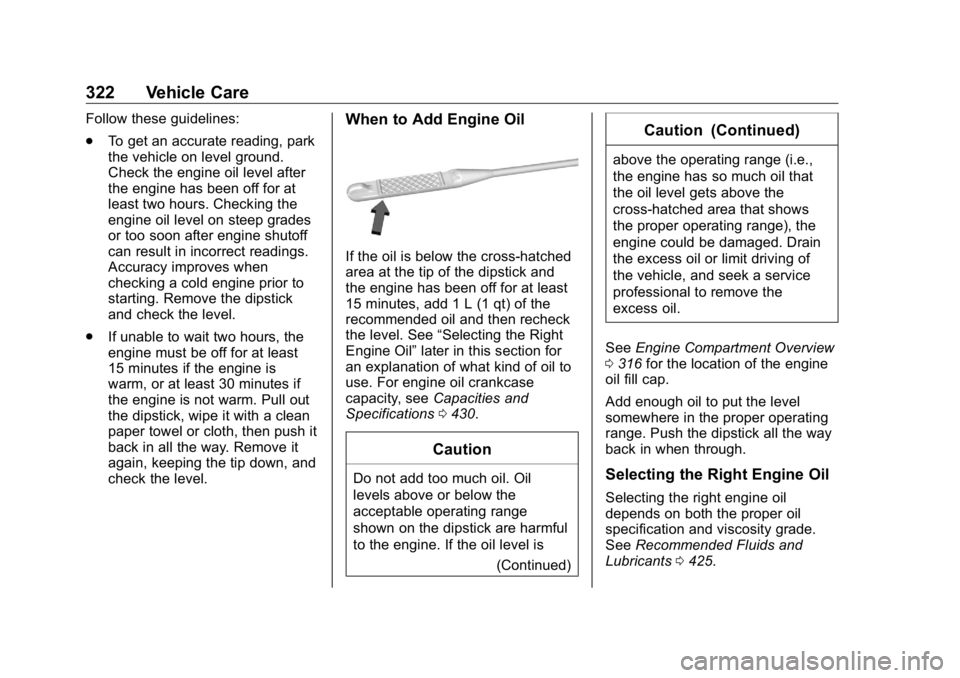
If the oil is below the cross-hatched
area at the tip of the dipstick and
the engine has been off for at least
15 minutes, add 1 L (1 qt) of the
recommended oil and then recheck
the level. See “ Selecting the Right
Engine Oil ” later in this section for
an explanation of what kind of oil to
use. For engine oil crankcase
capacity, see Capacities and
Specifications 0 430 .
Caution
Do not add too much oil. Oil
levels above or below the
acceptable operating range
shown on the dipstick are harmful
to the engine. If the oil level is
(Continued) Caution (Continued) above the operating range (i.e.,
the engine has so much oil that
the oil level gets above the
cross-hatched area that shows
the proper operating range), the
engine could be damaged. Drain
the excess oil or limit driving of
the vehicle, and seek a service
professional to remove the
excess oil.
See Engine Compartment Overview
0 316 for the location of the engine
oil fill cap.
Add enough oil to put the level
somewhere in the proper operating
range. Push the dipstick all the way
back in when through.
Selecting the Right Engine Oil
Selecting the right engine oil
depends on both the proper oil
specification and viscosity grade.
See Recommended Fluids and
Lubricants 0 425 .
Page 325 of 472
GMC Sierra/Sierra Denali Owner Manual (GMNA-Localizing-U.S./Canada/
Mexico-1500-11698638) - 2019 - crc - 5/15/18
324 Vehicle Care include engine revolutions, engine
temperature, and miles driven.
Based on driving conditions, the
mileage at which an oil change is
indicated can vary considerably. For
the oil life system to work properly,
the system must be reset every time
the oil is changed.
On some vehicles, when the system
has calculated that oil life has been
diminished, a CHANGE ENGINE
OIL SOON message comes on to
indicate that an oil change is
necessary. Change the oil as soon
as possible within the next 1 000 km
(600 mi). It is possible that, if driving
under the best conditions, the oil life
system might indicate that an oil
change is not necessary for up to a
year. The engine oil and filter must
be changed at least once a year
and, at this time, the system must
be reset. For vehicles without the
CHANGE ENGINE OIL SOON
message, an oil change is needed
when the REMAINING OIL LIFE
percentage is near 0%. Your dealer
has trained service people who will
perform this work and reset the
system. It is also important to check the oil regularly over the course of
an oil drain interval and keep it at
the proper level.
If the system is ever reset
accidentally, the oil must be
changed at 5 000 km (3,000 mi)
since the last oil change.
Remember to reset the oil life
system whenever the oil is changed.
How to Reset the Engine Oil
Life System Reset the system whenever the
engine oil is changed so that the
system can calculate the next
engine oil change. Always reset the
engine oil life to 100% after every oil
change. It will not reset itself. To
reset the engine oil life system:
1. Display the oil life percentage
on the DIC.
See Driver Information Center
(DIC) (Midlevel and Uplevel)
0 160 or Driver Information
Center (DIC) (Base Level)
0 159 .
2. Press the thumbwheel on the
steering wheel, or the trip
odometer reset stem if the vehicle does not have DIC
controls, for several seconds.
When the confirmation
message displays, select YES.
The oil life will change
to 100%.
The oil life system can also be reset
as follows:
1. Display the oil life percentage
on the DIC.
See Driver Information Center
(DIC) (Midlevel and Uplevel)
0 160 or Driver Information
Center (DIC) (Base Level)
0 159 .
2. Fully press the accelerator
pedal slowly three times within
five seconds.
3. If the display changes to 100%,
the system is reset.
If the vehicle has a CHANGE
ENGINE OIL SOON message and it
comes back on when the vehicle is
started and/or the oil life percentage
is near 0%, the engine oil life
system has not been reset. Repeat
the procedure.
Page 326 of 472
GMC Sierra/Sierra Denali Owner Manual (GMNA-Localizing-U.S./Canada/
Mexico-1500-11698638) - 2019 - crc - 5/15/18
Vehicle Care 325
Automatic Transmission
Fluid When to Check and Change
Automatic Transmission Fluid It is usually not necessary to check
the transmission fluid level. The only
reason for fluid loss is a
transmission leak or overheated
transmission. This vehicle is not
equipped with a transmission fluid
level dipstick. There is a special
procedure for checking and
changing the transmission fluid in
these vehicles. Because this
procedure is difficult, this should be
done at the dealer. Contact the
dealer for additional information or
the procedure can be found in the
service manual. See Publication
Ordering Information 0 442 .
Caution
Use of the incorrect automatic
transmission fluid may damage
the vehicle, and the damage may
(Continued) Caution (Continued) not be covered by the vehicle
warranty. Always use the correct
automatic transmission fluid. See
Recommended Fluids and
Lubricants 0 425 .
Change the fluid and filter at the
scheduled maintenance intervals
listed in Maintenance Schedule
0 415 . Be sure to use the
transmission fluid listed in
Recommended Fluids and
Lubricants 0 425 .
Engine Air Filter Life
System When to Change the Engine
Air Filter
When the “ Replace at Next Oil
Change ” message displays, the
engine air filter should be replaced
at the time of the next engine oil
change. When the “ Replace Engine
Air Filter Now ” message displays,
the engine air filter should be replaced as soon as possible. Reset
the engine air filter life system after
the engine air filter is replaced. See
your dealer for service and to reset
the system.
If equipped, this feature provides an
indication of when to change the
engine air filter. It is based on
driving conditions, which can cause
when to change to vary greatly. It is
possible an air filter change may not
be indicated for up to four years.
How to Reset the Engine Air
Filter Life System To reset:
1. Place the vehicle in P (Park).
2. Display the Air Filter Life on the
DIC.
See Driver Information Center
(DIC) (Midlevel and Uplevel)
0 160 or Driver Information
Center (DIC) (Base Level)
0 159 .
3. Press
T to move to the Reset/
Disable display area. Select
Reset then press
V .