reset GMC SIERRA DENALI 2019 Owner's Manual
[x] Cancel search | Manufacturer: GMC, Model Year: 2019, Model line: SIERRA DENALI, Model: GMC SIERRA DENALI 2019Pages: 472, PDF Size: 8.98 MB
Page 337 of 472
GMC Sierra/Sierra Denali Owner Manual (GMNA-Localizing-U.S./Canada/
Mexico-1500-11698638) - 2019 - crc - 5/15/18
336 Vehicle Care turned on after new pads and wear
sensors are installed, a message
will display. Follow the prompts to
reset the system.
The brake pad life system can also
be manually reset:
1. Display Brake Pad Life on the
DIC.
See Driver Information Center
(DIC) (Midlevel and Uplevel)
0 160 or Driver Information
Center (DIC) (Base Level)
0 159 .
2. Press the thumbwheel or the
trip odometer reset stem if the
vehicle does not have DIC
buttons. Select front or rear
pads as appropriate.
3. Select YES on the confirmation
message, or press the trip
odometer reset stem on a base
level DIC. Repeat for pads on
the other axle if they were also
replaced. How to Disable the Brake Pad
Life System The brake pad life system can be
turned off. This may be necessary if
aftermarket brake pads without wear
sensors are installed. When the
system is turned off, the front and
rear brake pad life percentages will
not display. However, the built-in
wear indicators that make a
high-pitched warning sound when
the brake pads are worn can still
determine when the pads should be
replaced. See Brakes 0 335 .
To turn off the brake pad life system:
1. Display Brake Pad Life on the
DIC.
See Driver Information Center
(DIC) (Midlevel and Uplevel)
0 160 or Driver Information
Center (DIC) (Base Level)
0 159 .
2. Select DISABLE.
To turn the brake pad life system
back on, follow the above steps but
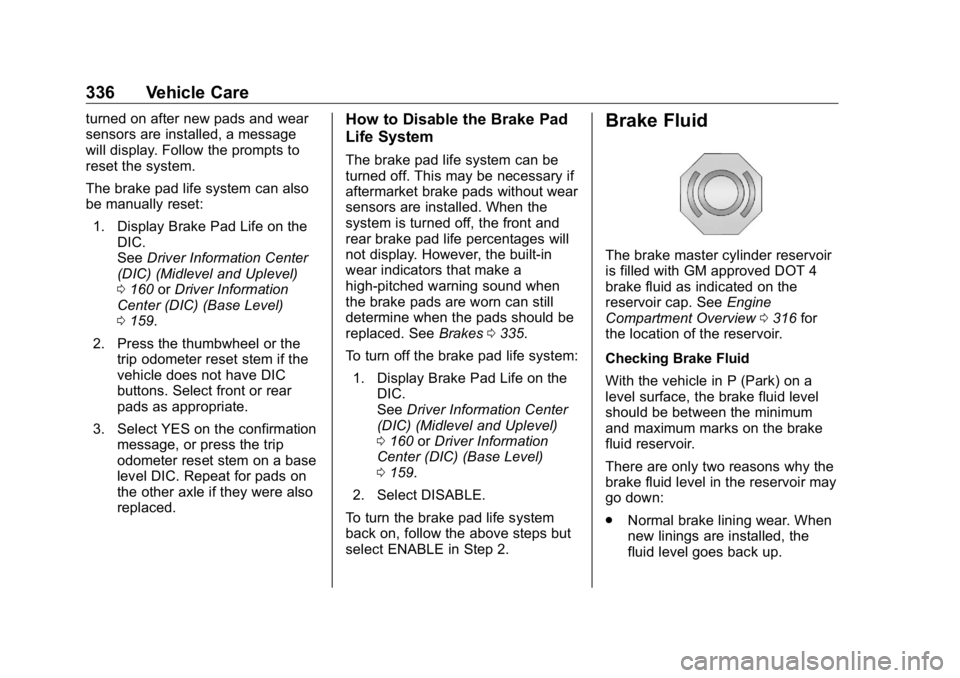
select ENABLE in Step 2. Brake Fluid The brake master cylinder reservoir
is filled with GM approved DOT 4
brake fluid as indicated on the
reservoir cap. See Engine
Compartment Overview 0 316 for
the location of the reservoir.
Checking Brake Fluid
With the vehicle in P (Park) on a
level surface, the brake fluid level
should be between the minimum
and maximum marks on the brake
fluid reservoir.
There are only two reasons why the
brake fluid level in the reservoir may
go down:
.
Normal brake lining wear. When
new linings are installed, the
fluid level goes back up.
Page 347 of 472
GMC Sierra/Sierra Denali Owner Manual (GMNA-Localizing-U.S./Canada/
Mexico-1500-11698638) - 2019 - crc - 5/15/18
346 Vehicle Care
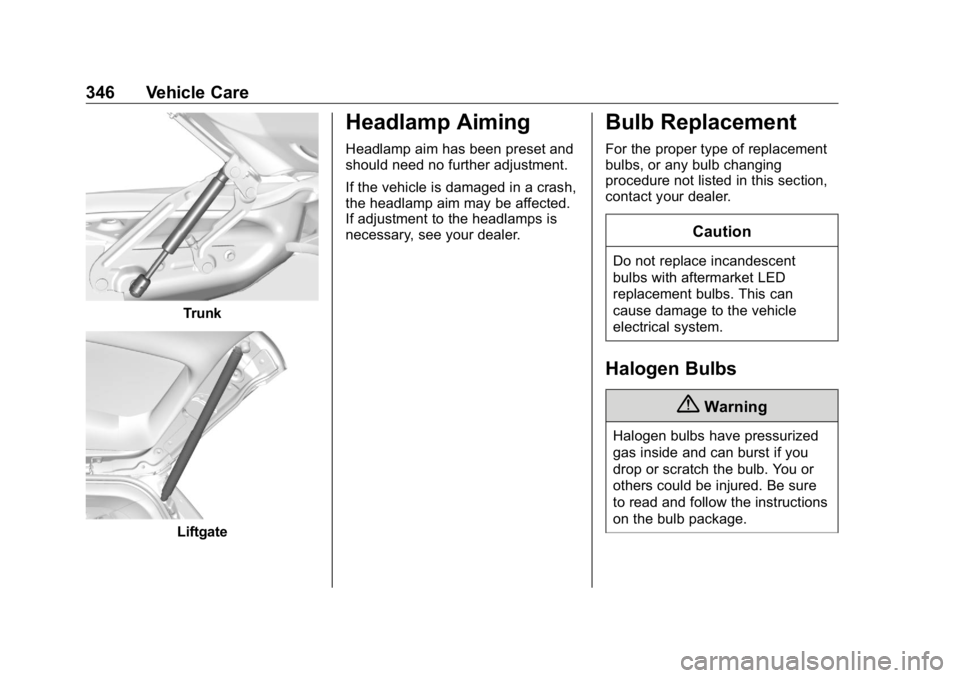
Trunk
Liftgate Headlamp Aiming Headlamp aim has been preset and
should need no further adjustment.
If the vehicle is damaged in a crash,
the headlamp aim may be affected.
If adjustment to the headlamps is
necessary, see your dealer.
Bulb Replacement For the proper type of replacement
bulbs, or any bulb changing
procedure not listed in this section,
contact your dealer.
CautionDo not replace incandescent
bulbs with aftermarket LED
replacement bulbs. This can
cause damage to the vehicle
electrical system.
Halogen Bulbs
{ Warning
Halogen bulbs have pressurized
gas inside and can burst if you
drop or scratch the bulb. You or
others could be injured. Be sure
to read and follow the instructions
on the bulb package.
Page 374 of 472
GMC Sierra/Sierra Denali Owner Manual (GMNA-Localizing-U.S./Canada/
Mexico-1500-11698638) - 2019 - crc - 5/15/18
Vehicle Care 373See your dealer for service or to
purchase a relearn tool. A TPMS
relearn tool can also be purchased.
See Tire Pressure Monitor Sensor
Activation Tool at
www.gmtoolsandequipment.com or
call 1-800-GM TOOLS
(1-800-468-6657).
There are two minutes to match the
first tire/wheel position, and
five minutes overall to match all four
tire/wheel positions. If it takes
longer, the matching process stops
and must be restarted.
The TPMS sensor matching
process is:
1. Set the parking brake.
2. Turn the ignition on without
starting the vehicle.
3. Uplevel DIC Only: Make sure
the Tire Pressure info page
option is turned on. The info
pages on the DIC can be
turned on and off through the
Options menu. See Driver Information Center
(DIC) (Midlevel and Uplevel)
0 160 or Driver Information
Center (DIC) (Base Level)
0 159 .
4. If the vehicle has an uplevel
DIC, use the DIC controls on
the right side of the steering
wheel to scroll to the Tire
Pressure screen under the DIC
info page.
If the vehicle has a base level
DIC, use the trip odometer
reset stem to scroll to the Tire
Pressure screen.
5. If the vehicle has an uplevel
DIC, press and hold the
thumbwheel located in the
center of the DIC controls on
the right side of the steering
wheel.
If the vehicle has a base level
DIC, press and hold the trip
odometer reset stem for about
five seconds. A message
asking if the process should
begin should appear. Select yes and press the trip
odometer reset stem to confirm
the selection.
The horn sounds twice to
signal the receiver is in relearn
mode and the TIRE
LEARNING ACTIVE message
displays on the DIC screen.
6. Start with the driver side
front tire.
7. Place the relearn tool against
the tire sidewall, near the valve
stem. Then press the button to
activate the TPMS sensor.
A horn chirp confirms that the
sensor identification code has
been matched to this tire and
wheel position.
8. Proceed to the passenger side
front tire, and repeat the
procedure in Step 7.
9. Proceed to the passenger side
rear tire, and repeat the
procedure in Step 7.
10. Proceed to the driver side rear
tire, and repeat the procedure
in Step 7. The horn sounds two
Page 377 of 472
GMC Sierra/Sierra Denali Owner Manual (GMNA-Localizing-U.S./Canada/
Mexico-1500-11698638) - 2019 - crc - 5/15/18
376 Vehicle Care .
There is cord or fabric
showing through the tire's
rubber..
The tread or sidewall is
cracked, cut, or snagged
deep enough to show cord or
fabric..
The tire has a bump, bulge,
or split..
The tire has a puncture, cut,
or other damage that cannot
be repaired well because of
the size or location of the
damage.
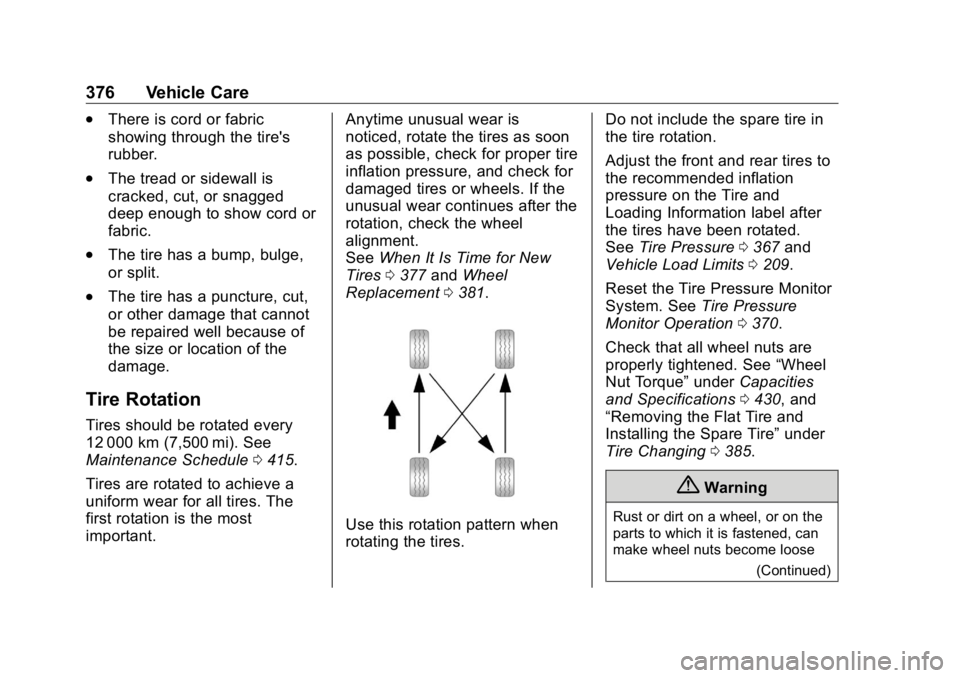
Tire Rotation Tires should be rotated every
12 000 km (7,500 mi). See
Maintenance Schedule 0 415 .
Tires are rotated to achieve a
uniform wear for all tires. The
first rotation is the most
important. Anytime unusual wear is
noticed, rotate the tires as soon
as possible, check for proper tire
inflation pressure, and check for
damaged tires or wheels. If the
unusual wear continues after the
rotation, check the wheel
alignment.
See When It Is Time for New
Tires 0 377 and Wheel
Replacement 0 381 .
Use this rotation pattern when
rotating the tires. Do not include the spare tire in
the tire rotation.
Adjust the front and rear tires to
the recommended inflation
pressure on the Tire and
Loading Information label after
the tires have been rotated.
See Tire Pressure 0 367 and
Vehicle Load Limits 0 209 .
Reset the Tire Pressure Monitor
System. See Tire Pressure
Monitor Operation 0 370 .
Check that all wheel nuts are
properly tightened. See “ Wheel
Nut Torque ” under Capacities
and Specifications 0 430 , and
“ Removing the Flat Tire and
Installing the Spare Tire ” under
Tire Changing 0 385 .
{ Warning
Rust or dirt on a wheel, or on the
parts to which it is fastened, can
make wheel nuts become loose
(Continued)
Page 403 of 472
GMC Sierra/Sierra Denali Owner Manual (GMNA-Localizing-U.S./Canada/
Mexico-1500-11698638) - 2019 - crc - 5/15/18
402 Vehicle Care vehicle is equipped with
Keyless Access, with your foot
off the brake pedal, press and
hold ENGINE START/STOP for
five seconds until the green
light comes on in the button.
See Ignition Positions (Key
Access) 0 217 or Ignition
Positions (Keyless Access)
0 219 .
4. Set the parking brake. See
Electric Parking Brake 0 241 .
5. Disconnect from the tow
vehicle.
6. Shift the transmission to
N (Neutral).
7. Shift the transfer case to 2
m(Two-Wheel Drive High). When
the shift to 2
m (Two-Wheel
Drive High) is complete, the
light in the instrument cluster
will stop flashing and stay lit.
See Four-Wheel-Drive Light
0 153 .
8. Start the engine. Check that
the vehicle is in 2
m(Two-Wheel Drive High) by starting the engine and shifting
the transmission to D (Drive)
and then to R (Reverse). There
should be movement of the
vehicle while shifting.
9. Shift the transmission to
P (Park) and turn off the
ignition.
10. Release the parking brake and
remove the wheel blocks.
11. Reset any lost presets.
The outside temperature
display will default to 0 °C
(32 °F) but will reset with
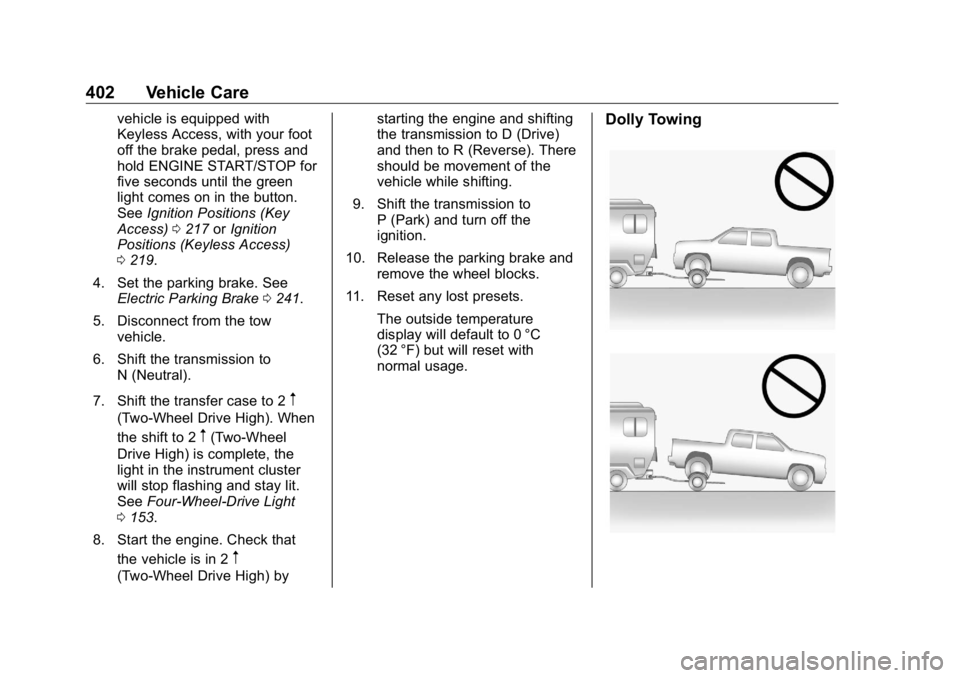
normal usage. Dolly Towing
Page 416 of 472
GMC Sierra/Sierra Denali Owner Manual (GMNA-Localizing-U.S./Canada/
Mexico-1500-11698638) - 2019 - crc - 5/15/18
Service and Maintenance 415
Maintenance
Schedule Owner Checks and Services At Each Fuel Stop
.
Check the engine oil level. See
Engine Oil 0 321 .
Once a Month
.
Check the tire inflation
pressures, including the spare.
See Tire Pressure 0 367 .
.
Inspect the tires for wear. See
Tire Inspection 0 375 .
.
Check the windshield washer
fluid level. See Washer Fluid
0 334 .
Engine Oil Change When the CHANGE ENGINE OIL
SOON message displays, have the
engine oil and filter changed within
the next 1 000 km/600 mi. If driven
under the best conditions, the
engine oil life system may not
indicate the need for vehicle service
for up to a year. The engine oil and filter must be changed at least once
a year and the oil life system must
be reset. Your trained dealer
technician can perform this work.
If the engine oil life system is reset
accidentally, service the vehicle
within 5 000 km/3,000 mi since the
last service. Reset the oil life
system when the oil is changed.
See Engine Oil Life System 0 323 .
Passenger Compartment Air
Filter The passenger compartment air
filter removes dust, pollen, and
other airborne irritants from outside
air that is pulled into the vehicle.
The filter should be replaced as part
of routine scheduled maintenance.
Inspect the passenger compartment
air filter every 36 000 km/
22,500 miles or two years,
whichever comes first. Replace if
necessary. More frequent
replacement may be needed if the
vehicle is driven in areas with heavy
traffic, areas with poor air quality,
or areas with high dust levels. Replacement may also be needed if
there is a reduction in air flow,
excessive window fogging, or odors.
Extended Idle Use When the vehicle is used in a way
that requires extended idle time,
one hour of use shall be deemed
the same as 53 km (33 mi).
See Driver Information Center (DIC)
(Midlevel and Uplevel) 0 160 or
Driver Information Center (DIC)
(Base Level) 0 159 for hourmeter.
Air Conditioning Desiccant
(Replace Every Seven Years) The air conditioning system requires
maintenance every seven years.
This service requires replacement of
the desiccant to help the longevity
and efficient operation of the air
conditioning system. This service
can be complex. See your dealer.
Page 417 of 472
GMC Sierra/Sierra Denali Owner Manual (GMNA-Localizing-U.S./Canada/
Mexico-1500-11698638) - 2019 - crc - 5/15/18
416 Service and Maintenance Tire Rotation and Required
Services Every 12 000 km/
7,500 mi Rotate the tires, if recommended for
the vehicle, and perform the
following services. See Tire
Rotation 0 376 .
.
Check engine oil level and oil
life percentage. If needed,
change engine oil and filter, and
reset oil life system.
See Engine Oil 0 321 and
Engine Oil Life System 0 323 .
.
Check engine coolant level. See
Cooling System 0 327 .
.
Check windshield washer fluid
level. See Washer Fluid 0 334 .
.
Check tire inflation pressures,
including the spare. See Tire
Pressure 0 367 .
.
Inspect tire wear. See Tire
Inspection 0 375 .
.
Visually check for fluid leaks.
.
Inspect engine air cleaner filter.
See Engine Air Cleaner/Filter
0 326 . .
Inspect brake system. See
Exterior Care 0 403 .
.
Visually inspect steering,
suspension, and chassis
components for damage,
including cracks or tears in the
rubber boots, loose or missing
parts, or signs of wear at least
once a year. See Exterior Care
0 403 . Lubricate the suspension
and steering components at
least every other oil change.
(If equipped with grease fittings)
.
Inspect power steering for
proper attachment, connections,
binding, leaks, cracks,
chafing, etc.
.
Visually inspect drive shafts for
excessive wear, lubricant leaks
or damage including: tube dents,
cracks, constant velocity joint or
universal joint looseness,
cracked or missing boots, loose
or missing boot clamps, center
bearing excessive looseness,
missing or loose fasteners. .
Check restraint system
components. See Safety System
Check 0 84 .
.
Visually inspect fuel system for
damage or leaks.
.
Visually inspect exhaust system
and nearby heat shields for
loose or damaged parts.
.
Lubricate body components. See
Exterior Care 0 403 .
.
Check starter switch. See Starter
Switch Check 0 343 .
.
Check ignition transmission lock.
See Ignition Transmission Lock
Check 0 343 .
.
Check parking brake and
automatic transmission park
mechanism. See Park Brake and
P (Park) Mechanism Check
0 343 .
.
Check accelerator pedal for
damage, high effort, or binding.
Replace if needed.
.
Visually inspect gas strut for
signs of wear, cracks, or other
damage. Check the hold open
Page 446 of 472
GMC Sierra/Sierra Denali Owner Manual (GMNA-Localizing-U.S./Canada/
Mexico-1500-11698638) - 2019 - crc - 5/15/18
Customer Information 445
Vehicle Data
Recording and
Privacy The vehicle has a number of
computers that record information
about the vehicle ’ s performance and
how it is driven. For example, the
vehicle uses computer modules to
monitor and control engine and
transmission performance, to
monitor the conditions for airbag
deployment and deploy them in a
crash, and, if equipped, to provide
antilock braking to help the driver
control the vehicle. These modules
may store data to help the dealer
technician service the vehicle.
Some modules may also store data
about how the vehicle is operated,
such as rate of fuel consumption or
average speed. These modules may
retain personal preferences, such as
radio presets, seat positions, and
temperature settings. Event Data Recorders This vehicle is equipped with an
event data recorder (EDR). The
main purpose of an EDR is to
record, in certain crash or near
crash-like situations, such as an air
bag deployment or hitting a road
obstacle, data that will assist in
understanding how a vehicle ’ s
systems performed. The EDR is
designed to record data related to
vehicle dynamics and safety
systems for a short period of time,
typically 30 seconds or less. The
EDR in this vehicle is designed to
record such data as:
.
How various systems in your
vehicle were operating;
.
Whether or not the driver and
passenger safety belts were
buckled/fastened;
.
How far (if at all) the driver was
depressing the accelerator and/
or brake pedal; and,
.
How fast the vehicle was
traveling. These data can help provide a
better understanding of the
circumstances in which crashes and
injuries occur.
Note
EDR data are recorded by your
vehicle only if a non-trivial crash
situation occurs; no data are
recorded by the EDR under normal
driving conditions and no personal
data (e.g., name, gender, age, and
crash location) are recorded.
However, other parties, such as law
enforcement, could combine the
EDR data with the type of
personally identifying data routinely
acquired during a crash
investigation.
To read data recorded by an EDR,
special equipment is required, and
access to the vehicle or the EDR is
needed. In addition to the vehicle
manufacturer, other parties, such as
law enforcement, that have the
special equipment, can read the
information if they have access to
the vehicle or the EDR.