diesel GMC SIERRA DENALI 2019 Owners Manual
[x] Cancel search | Manufacturer: GMC, Model Year: 2019, Model line: SIERRA DENALI, Model: GMC SIERRA DENALI 2019Pages: 472, PDF Size: 8.98 MB
Page 3 of 472
GMC Sierra/Sierra Denali Owner Manual (GMNA-Localizing-U.S./Canada/
Mexico-1500-11698638) - 2019 - crc - 5/15/18
2 Introduction
Introduction The names, logos, emblems,
slogans, vehicle model names, and
vehicle body designs appearing in
this manual including, but not limited
to, GM, the GM logo, GMC, the
GMC Truck Emblem, SIERRA, and
DENALI are trademarks and/or
service marks of General Motors
LLC, its subsidiaries, affiliates,
or licensors.
For vehicles first sold in Canada,
substitute the name “ General
Motors of Canada Company ” for
GMC Division wherever it appears
in this manual. This manual describes features that
may or may not be on the vehicle
because of optional equipment that
was not purchased on the vehicle,
model variants, country
specifications, features/applications
that may not be available in your
region, or changes subsequent to
the printing of this owner ’ s manual.
If the vehicle has the Duramax
diesel engine, see the Duramax
diesel supplement for additional and
specific information on this engine.
Refer to the purchase
documentation relating to your
specific vehicle to confirm the
features.
Keep this manual in the vehicle for
quick reference.
Canadian Vehicle Owners A French language manual can be
obtained from your dealer, at
www.helminc.com, or from: Propriétaires Canadiens On peut obtenir un exemplaire de
ce guide en français auprès du
concessionnaire ou à l'adresse
suivante:
Helm, Incorporated
Attention: Customer Service
47911 Halyard Drive
Plymouth, MI 48170
USA
Using this Manual To quickly locate information about
the vehicle, use the Index in the
back of the manual. It is an
alphabetical list of what is in the
manual and the page number where
it can be found.
Danger, Warning, and
Caution Warning messages found on vehicle
labels and in this manual describe
hazards and what to do to avoid or
reduce them.
Litho in U.S.A.
Part No. 23400205 A First Printing ©
2018 General Motors LLC. All Rights Reserved.
Page 6 of 472
GMC Sierra/Sierra Denali Owner Manual (GMNA-Localizing-U.S./Canada/
Mexico-1500-11698638) - 2019 - crc - 5/15/18
In Brief 5
In Brief Instrument Panel Instrument Panel . . . . . . . . . . . . . . . . 6
Initial Drive Information Initial Drive Information . . . . . . . . . . 8
Stop/Start System . . . . . . . . . . . . . . . 8
Remote Keyless Entry (RKE)
System . . . . . . . . . . . . . . . . . . . . . . . . 9
Remote Vehicle Start . . . . . . . . . . . 9
Door Locks . . . . . . . . . . . . . . . . . . . . 10
Windows . . . . . . . . . . . . . . . . . . . . . . . 10
Seat Adjustment . . . . . . . . . . . . . . . 11
Memory Features . . . . . . . . . . . . . . 12
Heated and Ventilated Seats . . . 13
Head Restraint Adjustment . . . . 13
Seat Belts . . . . . . . . . . . . . . . . . . . . . 14
Passenger Sensing System . . . 14
Mirror Adjustment . . . . . . . . . . . . . . 14
Steering Wheel Adjustment . . . . 16
Interior Lighting . . . . . . . . . . . . . . . . 16
Exterior Lighting . . . . . . . . . . . . . . . 17
Windshield Wiper/Washer . . . . . . 18
Climate Controls . . . . . . . . . . . . . . . 19
Transmission . . . . . . . . . . . . . . . . . . 20
Four-Wheel Drive . . . . . . . . . . . . . . 21 Vehicle Features Infotainment System . . . . . . . . . . . 22
Steering Wheel Controls . . . . . . . 22
Cruise Control . . . . . . . . . . . . . . . . . 22
Driver Information
Center (DIC) . . . . . . . . . . . . . . . . . 22
Forward Collision Alert (FCA)
System . . . . . . . . . . . . . . . . . . . . . . . 23
Forward Automatic
Braking (FAB) . . . . . . . . . . . . . . . . 23
Front Pedestrian Braking (FPB)
System . . . . . . . . . . . . . . . . . . . . . . . 23
Lane Keep Assist (LKA) . . . . . . . 24
Lane Change Alert (LCA) . . . . . . 24
Surround Vision . . . . . . . . . . . . . . . 24
Rear Vision Camera (RVC) . . . . 24
Rear Cross Traffic Alert (RCTA)
System . . . . . . . . . . . . . . . . . . . . . . . 24
Park Assist . . . . . . . . . . . . . . . . . . . . 24
Power Outlets . . . . . . . . . . . . . . . . . 25
Universal Remote System . . . . . 25
Sunroof . . . . . . . . . . . . . . . . . . . . . . . . 25
Performance and Maintenance Traction Control/Electronic
Stability Control . . . . . . . . . . . . . . 26
Tire Pressure Monitor . . . . . . . . . . 27
Fuel (Gasoline - Except
L87 6.2L Engine) . . . . . . . . . . . . . 27 Fuel (Gasoline - L87 6.2L
Engine) . . . . . . . . . . . . . . . . . . . . . . . 28
Fuel (Diesel) . . . . . . . . . . . . . . . . . . . 28
E85 or FlexFuel . . . . . . . . . . . . . . . . 28
Engine Oil Life System . . . . . . . . 28
Driving for Better Fuel
Economy . . . . . . . . . . . . . . . . . . . . . 29
Roadside Assistance
Program . . . . . . . . . . . . . . . . . . . . . . 29
Page 29 of 472
GMC Sierra/Sierra Denali Owner Manual (GMNA-Localizing-U.S./Canada/
Mexico-1500-11698638) - 2019 - crc - 5/15/18
28 In Brief
Fuel (Gasoline - L87 6.2L
Engine) Premium Recommended
Use premium 93 octane —
(R+M)/2 — unleaded gasoline in
your vehicle. TOP TIER Detergent
Gasoline is recommended.
Unleaded gasoline with an octane
rating as low as 87 may be used,
but it will reduce performance and
fuel economy.
See Recommended Fuel (Except
6.2L V8 Engine) 0 271 or
Recommended Fuel (6.2L
V8 Engine) 0 271 .
Fuel (Diesel) For diesel vehicles, do not use
gasoline. See “ Fuel for Diesel
Engines ” in the Duramax diesel
supplement. E85 or FlexFuel FlexFuel Possible
Certain models are compatible with
E85 fuel. See E85 or FlexFuel
0 272 .
Engine Oil Life System The engine oil life system calculates
engine oil life based on vehicle use
and, on most vehicles, displays a
DIC message when it is necessary
to change the engine oil and filter.
The oil life system should be reset
to 100% only following an oil
change.
Resetting the Oil Life System
To reset the engine oil life system:
1. Display the oil life percentage
on the DIC. See Driver Information Center
(DIC) (Midlevel and Uplevel)
0 160 or Driver Information
Center (DIC) (Base Level)
0 159 .
2. Press the thumbwheel on the
steering wheel, or the trip
odometer reset stem if the
vehicle does not have DIC
controls, for several seconds.
When the confirmation
message displays, select YES.
The oil life will change
to 100%.
The oil life system can also be reset
as follows:
1. Display the oil life percentage
on the DIC.
See Driver Information Center
(DIC) (Midlevel and Uplevel)
0 160 or Driver Information
Center (DIC) (Base Level)
0 159 .
2. Fully press the accelerator
pedal slowly three times within
five seconds.
3. If the display changes to 100%,
the system is reset.
Page 146 of 472
GMC Sierra/Sierra Denali Owner Manual (GMNA-Localizing-U.S./Canada/
Mexico-1500-11698638) - 2019 - crc - 5/15/18
Instruments and Controls 145Information Center (DIC) message
indicates oil pressure outside the
normal operating range, check the
vehicle's oil as soon as possible.
See Engine Oil 0 321 .
CautionLack of proper engine oil
maintenance can damage the
engine. Driving with the engine oil
low can also damage the engine.
The repairs would not be covered
by the vehicle warranty. Check
the oil level as soon as possible.
Add oil if required, but if the oil
level is within the operating range
and the oil pressure is still low,
have the vehicle serviced. Always
follow the maintenance schedule
for changing engine oil.
If the vehicle has a diesel engine,
see the Duramax diesel
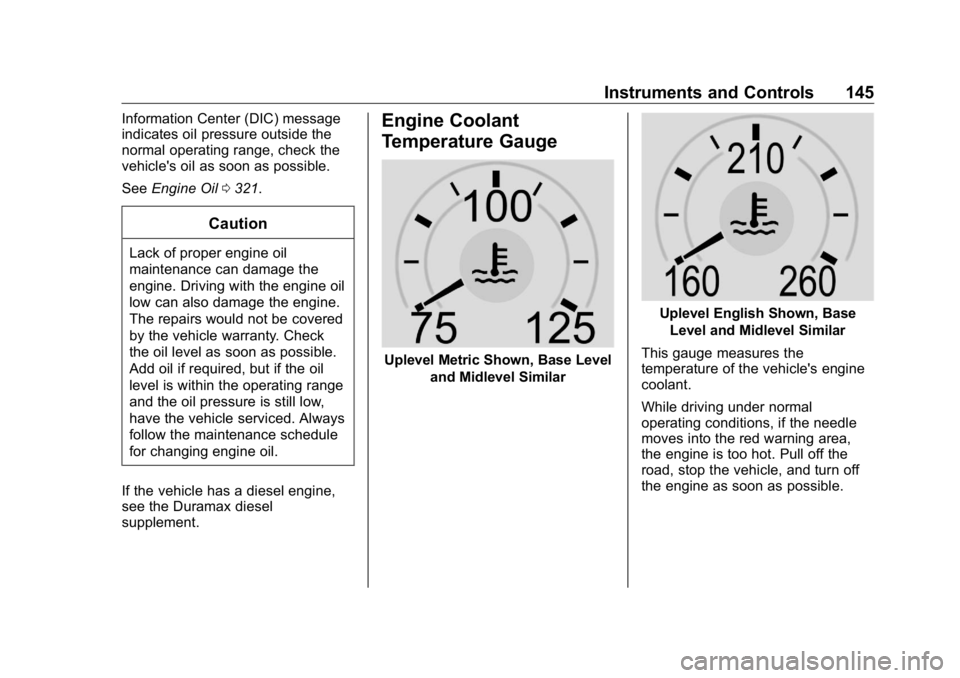
supplement. Engine Coolant
Temperature Gauge
Uplevel Metric Shown, Base Level
and Midlevel Similar Uplevel English Shown, Base
Level and Midlevel Similar
This gauge measures the
temperature of the vehicle's engine
coolant.
While driving under normal
operating conditions, if the needle
moves into the red warning area,
the engine is too hot. Pull off the
road, stop the vehicle, and turn off
the engine as soon as possible.
Page 160 of 472
GMC Sierra/Sierra Denali Owner Manual (GMNA-Localizing-U.S./Canada/
Mexico-1500-11698638) - 2019 - crc - 5/15/18
Instruments and Controls 159
Information Displays Driver Information Center
(DIC) (Base Level) The DIC displays are shown in the
center of the instrument cluster. The
displays show the status of many
vehicle systems. The trip odometer
reset stem in the instrument cluster
is used to access the DIC menu
items.
If the vehicle has a diesel engine,
see the Duramax diesel supplement
for more information.
DIC Menu Items Turn the trip odometer reset stem to
scroll through the following menu
items:
.
Digital Speedometer
.
Trip 1/2
.
Fuel Range
.
Tire Pressure
.
Remaining Oil Life
.
Air Filter Life .
Brake Pad Life
.
Units
Digital Speedometer
The speedometer shows how fast
the vehicle is moving in either
kilometers per hour (km/h) or miles
per hour (mph). The speedometer
cannot be reset.
Trip 1 or 2 and Average Fuel
Economy
Turn the trip odometer reset stem
until TRIP 1 or TRIP 2 displays. The
current distance traveled, in either
kilometers (km) or miles (mi), since
the last reset for the trip odometer is
shown, as well as the average fuel
economy. The trip odometer and the
average fuel economy can be reset
by pressing and holding the trip
odometer reset stem.
Fuel Range
This display shows the approximate
distance the vehicle can be driven
without refueling. The fuel range
estimate is based on an average of
the vehicle's fuel economy over recent driving history and the
amount of fuel remaining in the fuel
tank. Fuel range cannot be reset.
Tire Pressure
Turn the trip odometer reset stem
until a vehicle with the approximate
pressures of all four tires displays.
Tire pressure is displayed in either
kilopascal (kPa) or in pounds per
square inch (psi).
See Tire Pressure Monitor System
0 369 and Tire Pressure Monitor
Operation 0 370 .
Remaining Oil Life
Turn the trip odometer reset stem
until REMAINING OIL LIFE
displays. An estimate of the oil's
remaining useful life is shown.
REMAINING OIL LIFE 99% means
99% of the current oil life remains.
When the remaining oil life is low,
the CHANGE ENGINE OIL SOON
message will appear on the display.
The oil should be changed as soon
as possible. See Engine Oil 0 321 .
In addition to the engine oil life
system monitoring the oil life,
Page 161 of 472
GMC Sierra/Sierra Denali Owner Manual (GMNA-Localizing-U.S./Canada/
Mexico-1500-11698638) - 2019 - crc - 5/15/18
160 Instruments and Controls additional maintenance is
recommended. See Maintenance
Schedule 0 415 .
The Oil Life display must be reset
after each oil change. It will not
reset itself. Do not reset the Oil Life
display at any time other than when
the oil has just been changed.
It cannot be reset accurately until
the next oil change. To reset the
engine oil life system, see Engine
Oil Life System 0 323 .
Air Filter Life
Turn the trip odometer reset stem
until AIR FILTER LIFE displays.
This displays an estimate of the
engine air filter ’ s remaining useful
life and the state of the system.
Engine Air Filter Life 95% means
95% of the current air filter life
remains. Messages will display
based on the engine air filter life and
the state of the system.
When the REPLACE AT NEXT OIL
CHANGE message displays, the
engine air filter should be replaced
at the time of the next oil change.
When the REPLACE NOW message displays, the engine air
filter should be replaced as soon as
possible.
The Air Filter Life display must be
reset after the engine air filter
replacement. To reset, see Engine
Air Filter Life System 0 325 .
Brake Pad Life
This displays an estimate of the
remaining life of the front and rear
brake pads. Messages will display
based on brake pad wear and the
state of the system. Reset the Brake
Pad Life display after replacing the
brake pads. See Brake Pad Life
System 0 335 .
Driver Information Center
(DIC) (Midlevel and
Uplevel) The DIC displays are shown in the
center of the instrument cluster in
the Info app. See Instrument Cluster
0 138 . The displays show the status
of many vehicle systems. If the vehicle has a diesel engine,
see the Duramax diesel
supplement.
S or
T : Press to move left or right
between the interactive display
zones in the cluster. Press the
thumbwheel to select.
y or
z : Use the thumbwheel to
scroll up or down in a list. Press the
thumbwheel to select.
Info Page Options
The info pages on the DIC can be
turned on or off through the
Options menu.
Page 222 of 472
GMC Sierra/Sierra Denali Owner Manual (GMNA-Localizing-U.S./Canada/
Mexico-1500-11698638) - 2019 - crc - 5/16/18
Driving and Operating 221release the button. Engine cranking
will continue until the engine starts.
See Starting the Engine 0 221 .
Service Mode
This power mode is available for
service and diagnostics, and to
verify the proper operation of the
malfunction indicator lamp as may
be required for emission inspection
purposes. With the vehicle off, and
the brake pedal not applied,
pressing and holding the button for
more than five seconds will place
the vehicle in Service Mode. The
instruments and audio systems will
operate as they do when the ignition
is on, but the vehicle will not be able
to be driven. The engine will not
start in Service Mode. Press the
button again to turn the ignition off.
Starting the Engine If the vehicle has a diesel engine,
see the Duramax diesel
supplement. CautionIf you add electrical parts or
accessories, you could change
the way the engine operates. Any
resulting damage would not be
covered by the vehicle warranty.
See Add-On Electrical Equipment
0 306 .
Move the shift lever to P (Park) or
N (Neutral). To restart the engine
when the vehicle is already moving,
use N (Neutral) only.
CautionDo not try to shift to P (Park) if the
vehicle is moving. If you do, you
could damage the transmission.
Shift to P (Park) only when the
vehicle is stopped. Starting Procedure 1. For Key Access vehicles, turn
the ignition key to START.
When the engine starts, let go
of the key.
For Keyless Access vehicles,
the RKE transmitter must be in
the vehicle. Press ENGINE
START/STOP with the brake
pedal applied. When the
engine begins cranking, let go
of the button.
The idle speed will go down as
the engine gets warm. Do not
race the engine immediately
after starting it. Operate the
engine and transmission gently
to allow the oil to warm up and
lubricate all moving parts.
When the low fuel warning light
is on and the FUEL LEVEL
LOW message is displayed in
the Driver Information Center
(DIC), hold the ignition switch
in the START position to
continue engine cranking.
Page 235 of 472
GMC Sierra/Sierra Denali Owner Manual (GMNA-Localizing-U.S./Canada/
Mexico-1500-11698638) - 2019 - crc - 5/16/18
234 Driving and Operating 10-Speed Automatic Transmission
Gear before shifting from D (Drive) to
L (Manual Mode) 10th 9th 8th 7th 6th 5th 4th 3rd 2nd 1st
Range after shifting from D (Drive) to
L (Manual Mode) - Tow/Haul not engaged L7 L7 L7 L6 L5 L4 L3 L3 L2 L1
Range after shifting from D (Drive) to
L (Manual Mode) - Tow/Haul engaged L7 L7 L6 L5 L4 L3 L3 L3 L2 L1
Grade Braking is not available when
Range Selection Mode is active.
See Tow/Haul Mode 0 234 .
While using Range Selection Mode,
cruise control and the Tow/Haul
Mode can be used.
If the vehicle has an exhaust brake,
it can also be used, but will not
automatically downshift the
transmission. See “ Exhaust Brake ”
in the Duramax diesel supplement. CautionSpinning the tires or holding the
vehicle in one place on a hill
using only the accelerator pedal
may damage the transmission.
The repair will not be covered by
the vehicle warranty. If the vehicle
is stuck, do not spin the tires.
When stopping on a hill, use the
brakes to hold the vehicle in
place.
Low Traction Mode
If equipped, Low Traction Mode
assists in vehicle acceleration when
road conditions are slippery, such as with ice or snow. While the
vehicle is at a stop, select L2 using
Range Selection Mode. This will
limit torque to the wheels and help
prevent the tires from spinning.
Tow/Haul Mode The Tow/Haul Mode adjusts the
transmission shift pattern to reduce
shift cycling. This provides
increased performance, vehicle
control, and enhanced transmission
and engine cooling when driving
down steep hills or mountain
grades, when towing, or when
hauling heavy loads. See Driver
Mode Control 0 246 to activate Tow/
Haul Mode.
Page 272 of 472

GMC Sierra/Sierra Denali Owner Manual (GMNA-Localizing-U.S./Canada/
Mexico-1500-11698638) - 2019 - crc - 5/16/18
Driving and Operating 271are temporarily unavailable. This
message could be due to a blocked
camera. The LKA system does not
need service. Clean the outside of
the windshield behind the rearview
mirror.
LKA assistance and/or LDW alerts
may occur due to tar marks,
shadows, cracks in the road,
temporary or construction lane
markings, or other road
imperfections. This is normal system
operation; the vehicle does not need
service. Turn LKA off if these
conditions continue. Fuel Top Tier Fuel GM recommends the use of TOP
TIER Detergent Gasoline to keep
the engine clean, reduce engine
deposits, and maintain optimal
vehicle performance. Look for the
TOP TIER Logo or see
www.toptiergas.com for a list of TOP
TIER Detergent Gasoline marketers
and applicable countries. Recommended Fuel
(Except 6.2L V8 Engine) For diesel engine vehicles, see
“ Fuel for Diesel Engines ” in the
Duramax diesel supplement.
If the vehicle has a yellow fuel cap
or a yellow sticker on the fuel door,
E85 or FlexFuel can be used. If the
vehicle does not have a yellow fuel
cap or yellow sticker, do not use
gasoline with ethanol levels greater
than 15% by volume. See E85 or
FlexFuel 0 272 .
Use regular unleaded gasoline
meeting ASTM specification D4814
with a posted octane rating of 87 or
higher. Do not use gasoline with a
posted octane rating of less than 87,
as this may cause engine knock and
will lower fuel economy.
Recommended Fuel (6.2L
V8 Engine) Do not use any fuel labeled E85 or
FlexFuel. Do not use gasoline with
ethanol levels greater than 15% by
volume.
Page 274 of 472
GMC Sierra/Sierra Denali Owner Manual (GMNA-Localizing-U.S./Canada/
Mexico-1500-11698638) - 2019 - crc - 5/16/18
Driving and Operating 273up to 85% ethanol (E85). All other
vehicles should use only the
unleaded gasoline as described in
Recommended Fuel (Except 6.2L
V8 Engine) 0 271 or Recommended
Fuel (6.2L V8 Engine) 0 271 .
The use of E85 or FlexFuel is
encouraged when the vehicle is
designed to use it. E85 or FlexFuel
is made from renewable sources.
To help locate fuel stations that
carry E85 or FlexFuel, the U.S.
Department of Energy has an
alternative fuel website. See
www.afdc.energy.gov/afdc/locator/
stations.
E85 or FlexFuel should meet ASTM
Specification D 5798 or CAN/
CGSB – 3.512 in Canada. Do not use
the fuel if the ethanol content is
greater than 85%. Fuel mixtures that
do not meet ASTM or CGSB
specifications can affect driveability
and could cause the malfunction
indicator lamp to come on. The starting characteristics of E85
or FlexFuel make it unsuitable for
use when temperatures fall below
− 18 °C (0 °F). Use gasoline or add
gasoline to the E85 or FlexFuel.
Because E85 or FlexFuel has less
energy per liter (gallon) than
gasoline, the vehicle will need to be
refilled more often. See Filling the
Tank 0 273 .
The only GM approved aftermarket
additive is ACDelco Fuel System
Treatment Plus-FlexFuel. Follow the
instructions on the bottle for proper
use. This product is available at
your GM dealer.
Caution
Some additives are not
compatible with E85 or FlexFuel
and can harm the vehicle's fuel
system. Use only additives
approved by GM for E85 or
FlexFuel vehicles. Damage
caused by unapproved additives
would not be covered by the
vehicle warranty. CautionDo not use fuel containing
methanol. It can corrode metal
parts in the fuel system and also
damage plastic and rubber parts.
That damage would not be
covered under the vehicle
warranty.
Filling the Tank If the vehicle has a diesel engine,
see the Duramax diesel supplement
for more information.
{ Warning
Fuel vapors and fuel fires burn
violently and can cause injury or
death.
.
To help avoid injuries to you
and others, read and follow
all the instructions on the
fuel pump island.
(Continued)