remote start GMC SIERRA DENALI 2019 Owners Manual
[x] Cancel search | Manufacturer: GMC, Model Year: 2019, Model line: SIERRA DENALI, Model: GMC SIERRA DENALI 2019Pages: 472, PDF Size: 8.98 MB
Page 5 of 472
GMC Sierra/Sierra Denali Owner Manual (GMNA-Localizing-U.S./Canada/
Mexico-1500-11698638) - 2019 - crc - 5/15/18
4 Introduction
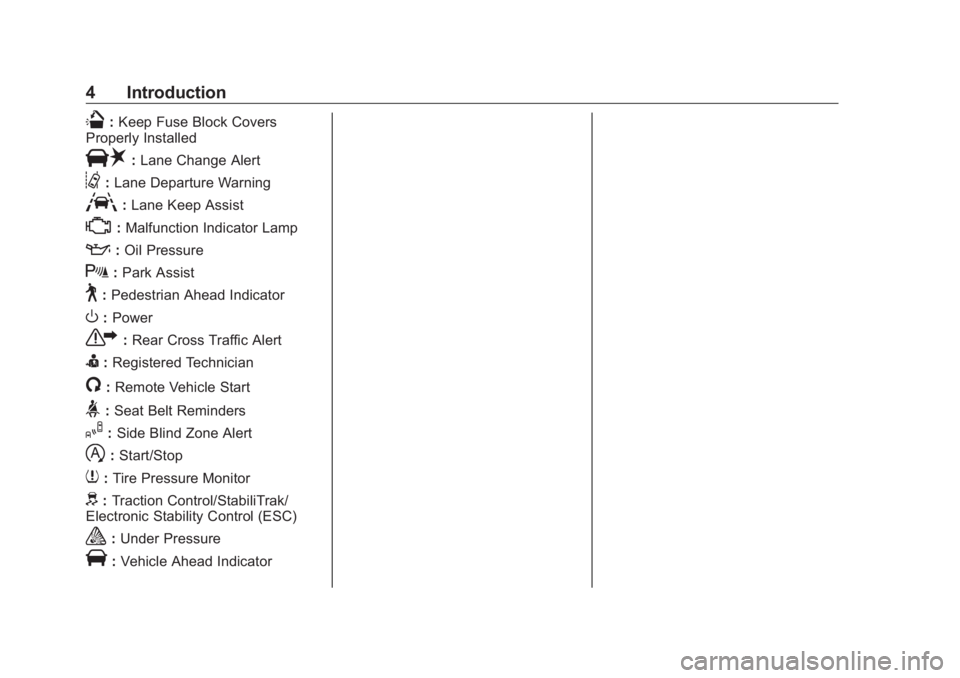
Q : Keep Fuse Block Covers
Properly Installed
| : Lane Change Alert
@ : Lane Departure Warning
A : Lane Keep Assist
* : Malfunction Indicator Lamp
: : Oil Pressure
X : Park Assist
~ : Pedestrian Ahead Indicator
O : Power
7 : Rear Cross Traffic Alert
I : Registered Technician
/ : Remote Vehicle Start
> : Seat Belt Reminders
I : Side Blind Zone Alert
h : Start/Stop
7 : Tire Pressure Monitor
d : Traction Control/StabiliTrak/
Electronic Stability Control (ESC)
a : Under Pressure
V : Vehicle Ahead Indicator
Page 6 of 472
GMC Sierra/Sierra Denali Owner Manual (GMNA-Localizing-U.S./Canada/
Mexico-1500-11698638) - 2019 - crc - 5/15/18
In Brief 5
In Brief Instrument Panel Instrument Panel . . . . . . . . . . . . . . . . 6
Initial Drive Information Initial Drive Information . . . . . . . . . . 8
Stop/Start System . . . . . . . . . . . . . . . 8
Remote Keyless Entry (RKE)
System . . . . . . . . . . . . . . . . . . . . . . . . 9
Remote Vehicle Start . . . . . . . . . . . 9
Door Locks . . . . . . . . . . . . . . . . . . . . 10
Windows . . . . . . . . . . . . . . . . . . . . . . . 10
Seat Adjustment . . . . . . . . . . . . . . . 11
Memory Features . . . . . . . . . . . . . . 12
Heated and Ventilated Seats . . . 13
Head Restraint Adjustment . . . . 13
Seat Belts . . . . . . . . . . . . . . . . . . . . . 14
Passenger Sensing System . . . 14
Mirror Adjustment . . . . . . . . . . . . . . 14
Steering Wheel Adjustment . . . . 16
Interior Lighting . . . . . . . . . . . . . . . . 16
Exterior Lighting . . . . . . . . . . . . . . . 17
Windshield Wiper/Washer . . . . . . 18
Climate Controls . . . . . . . . . . . . . . . 19
Transmission . . . . . . . . . . . . . . . . . . 20
Four-Wheel Drive . . . . . . . . . . . . . . 21 Vehicle Features Infotainment System . . . . . . . . . . . 22
Steering Wheel Controls . . . . . . . 22
Cruise Control . . . . . . . . . . . . . . . . . 22
Driver Information
Center (DIC) . . . . . . . . . . . . . . . . . 22
Forward Collision Alert (FCA)
System . . . . . . . . . . . . . . . . . . . . . . . 23
Forward Automatic
Braking (FAB) . . . . . . . . . . . . . . . . 23
Front Pedestrian Braking (FPB)
System . . . . . . . . . . . . . . . . . . . . . . . 23
Lane Keep Assist (LKA) . . . . . . . 24
Lane Change Alert (LCA) . . . . . . 24
Surround Vision . . . . . . . . . . . . . . . 24
Rear Vision Camera (RVC) . . . . 24
Rear Cross Traffic Alert (RCTA)
System . . . . . . . . . . . . . . . . . . . . . . . 24
Park Assist . . . . . . . . . . . . . . . . . . . . 24
Power Outlets . . . . . . . . . . . . . . . . . 25
Universal Remote System . . . . . 25
Sunroof . . . . . . . . . . . . . . . . . . . . . . . . 25
Performance and Maintenance Traction Control/Electronic
Stability Control . . . . . . . . . . . . . . 26
Tire Pressure Monitor . . . . . . . . . . 27
Fuel (Gasoline - Except
L87 6.2L Engine) . . . . . . . . . . . . . 27 Fuel (Gasoline - L87 6.2L
Engine) . . . . . . . . . . . . . . . . . . . . . . . 28
Fuel (Diesel) . . . . . . . . . . . . . . . . . . . 28
E85 or FlexFuel . . . . . . . . . . . . . . . . 28
Engine Oil Life System . . . . . . . . 28
Driving for Better Fuel
Economy . . . . . . . . . . . . . . . . . . . . . 29
Roadside Assistance
Program . . . . . . . . . . . . . . . . . . . . . . 29
Page 10 of 472
GMC Sierra/Sierra Denali Owner Manual (GMNA-Localizing-U.S./Canada/
Mexico-1500-11698638) - 2019 - crc - 5/15/18
In Brief 9
Remote Keyless Entry
(RKE) System The Remote Keyless Entry (RKE)
transmitter functions may work from
up to 60 m (197 ft) away from the
vehicle.
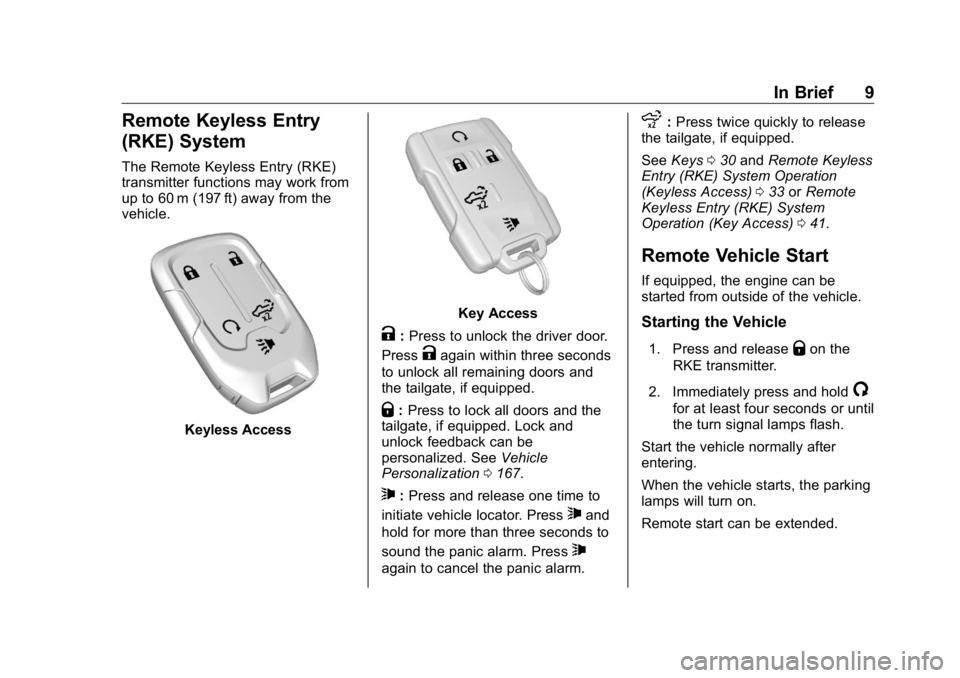
Keyless Access Key Access
K : Press to unlock the driver door.
Press
K again within three seconds
to unlock all remaining doors and
the tailgate, if equipped.
Q : Press to lock all doors and the
tailgate, if equipped. Lock and
unlock feedback can be
personalized. See Vehicle
Personalization 0 167 .
7 : Press and release one time to
initiate vehicle locator. Press
7 and
hold for more than three seconds to
sound the panic alarm. Press
7again to cancel the panic alarm. x : Press twice quickly to release
the tailgate, if equipped.
See Keys 0 30 and Remote Keyless
Entry (RKE) System Operation
(Keyless Access) 0 33 or Remote
Keyless Entry (RKE) System
Operation (Key Access) 0 41 .
Remote Vehicle Start If equipped, the engine can be
started from outside of the vehicle.
Starting the Vehicle 1. Press and release
Q on the
RKE transmitter.
2. Immediately press and hold
/ for at least four seconds or until
the turn signal lamps flash.
Start the vehicle normally after
entering.
When the vehicle starts, the parking
lamps will turn on.
Remote start can be extended.
Page 11 of 472
GMC Sierra/Sierra Denali Owner Manual (GMNA-Localizing-U.S./Canada/
Mexico-1500-11698638) - 2019 - crc - 5/15/18
10 In Brief Canceling a Remote Start To cancel a remote start, do one of
the following:
.
Press and hold
/ until the
parking lamps turn off.
.
Turn on the hazard warning
flashers.
.
Turn the vehicle on and then off.
See Remote Vehicle Start 0 43 .
Door Locks There are several ways to lock and
unlock the vehicle.
From outside, use one of the
following:
.
Keyless Access, if equipped.
.
The Remote Keyless Entry
(RKE) transmitter.
.
The key in the driver door (Key
Access). For Keyless Access,
push the button on the RKE
transmitter to remove the key.
From inside:
.
Use the power door lock switch. .
Push down or pull up on the
manual door locks.
.
Pull the door handle once to
unlock the door. Pull again to
open the door.
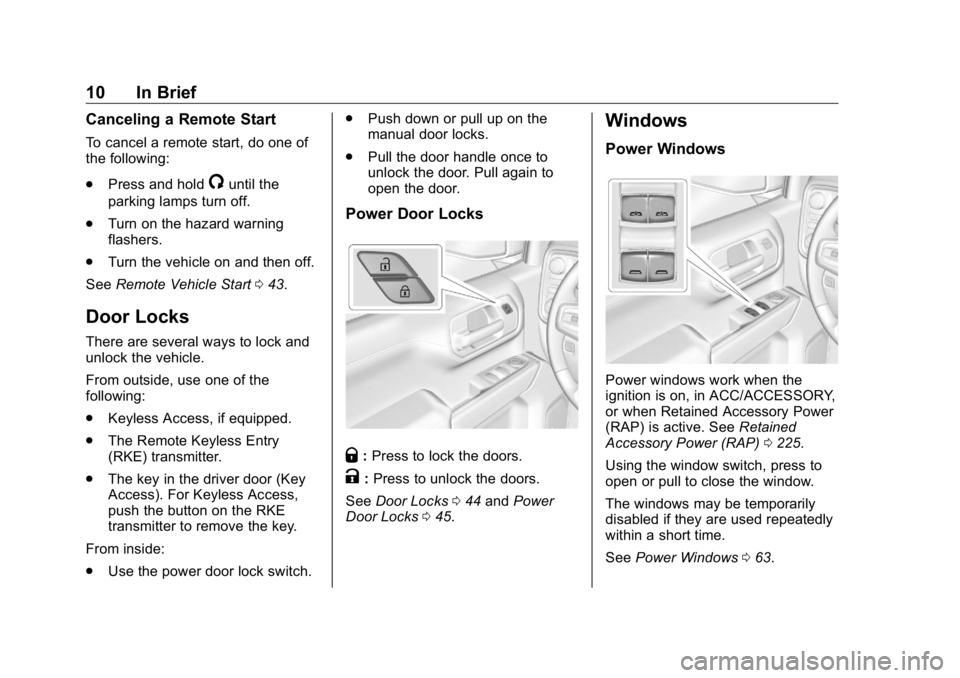
Power Door Locks
Q : Press to lock the doors.
K : Press to unlock the doors.
See Door Locks 0 44 and Power
Door Locks 0 45 . Windows Power Windows
Power windows work when the
ignition is on, in ACC/ACCESSORY,
or when Retained Accessory Power
(RAP) is active. See Retained
Accessory Power (RAP) 0 225 .
Using the window switch, press to
open or pull to close the window.
The windows may be temporarily
disabled if they are used repeatedly
within a short time.
See Power Windows 0 63 .
Page 16 of 472
GMC Sierra/Sierra Denali Owner Manual (GMNA-Localizing-U.S./Canada/
Mexico-1500-11698638) - 2019 - crc - 5/15/18
In Brief 15Power Mirrors
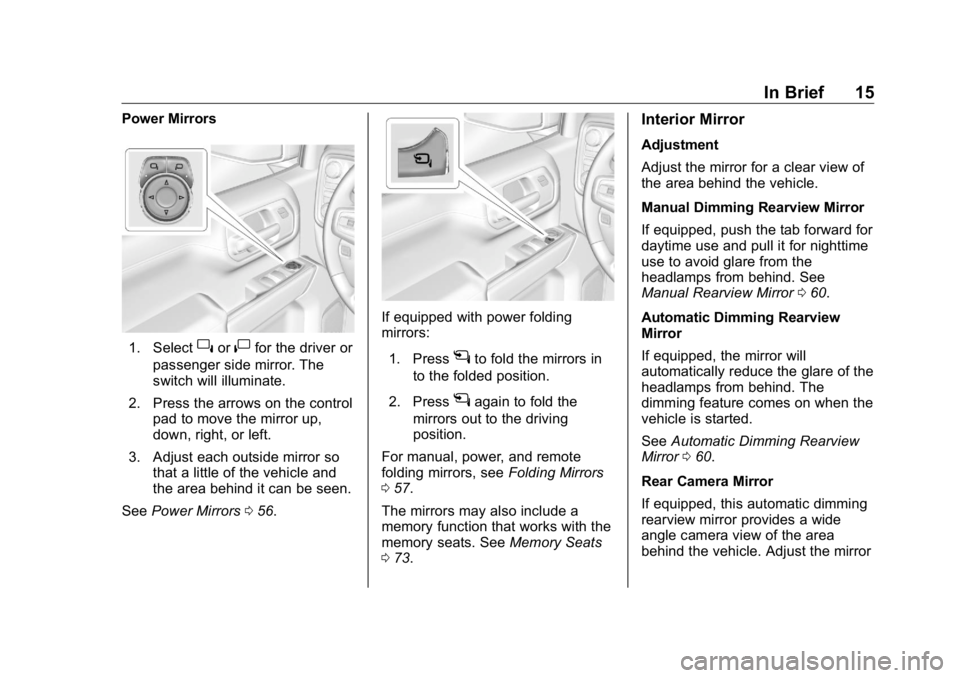
1. Select
} or
| for the driver or
passenger side mirror. The
switch will illuminate.
2. Press the arrows on the control
pad to move the mirror up,
down, right, or left.
3. Adjust each outside mirror so
that a little of the vehicle and
the area behind it can be seen.
See Power Mirrors 0 56 . If equipped with power folding
mirrors:
1. Press
g to fold the mirrors in
to the folded position.
2. Press
g again to fold the
mirrors out to the driving
position.
For manual, power, and remote
folding mirrors, see Folding Mirrors
0 57 .
The mirrors may also include a
memory function that works with the
memory seats. See Memory Seats
0 73 . Interior Mirror Adjustment
Adjust the mirror for a clear view of
the area behind the vehicle.
Manual Dimming Rearview Mirror
If equipped, push the tab forward for
daytime use and pull it for nighttime
use to avoid glare from the
headlamps from behind. See
Manual Rearview Mirror 0 60 .
Automatic Dimming Rearview
Mirror
If equipped, the mirror will
automatically reduce the glare of the
headlamps from behind. The
dimming feature comes on when the
vehicle is started.
See Automatic Dimming Rearview
Mirror 0 60 .
Rear Camera Mirror
If equipped, this automatic dimming
rearview mirror provides a wide
angle camera view of the area
behind the vehicle. Adjust the mirror
Page 31 of 472
GMC Sierra/Sierra Denali Owner Manual (GMNA-Localizing-U.S./Canada/
Mexico-1500-11698638) - 2019 - crc - 5/15/18
30 Keys, Doors, and Windows
Keys, Doors, and
Windows Keys and Locks Keys . . . . . . . . . . . . . . . . . . . . . . . . . . . 30
Remote Keyless Entry (RKE)
System . . . . . . . . . . . . . . . . . . . . . . . 33
Remote Keyless Entry (RKE)
System Operation (Keyless
Access) . . . . . . . . . . . . . . . . . . . . . . 33
Remote Keyless Entry (RKE)
System Operation (Key
Access) . . . . . . . . . . . . . . . . . . . . . . 41
Remote Vehicle Start . . . . . . . . . . 43
Door Locks . . . . . . . . . . . . . . . . . . . . 44
Power Door Locks . . . . . . . . . . . . . 45
Delayed Locking . . . . . . . . . . . . . . . 45
Automatic Door Locks . . . . . . . . . 46
Lockout Protection . . . . . . . . . . . . . 46
Safety Locks . . . . . . . . . . . . . . . . . . . 46
Doors Tailgate . . . . . . . . . . . . . . . . . . . . . . . . 47
Power Assist Steps . . . . . . . . . . . . 52
Vehicle Security
Vehicle Security . . . . . . . . . . . . . . . . 54
Vehicle Alarm System . . . . . . . . . 54
Immobilizer . . . . . . . . . . . . . . . . . . . . 55 Immobilizer Operation . . . . . . . . . 55
Exterior Mirrors Convex Mirrors . . . . . . . . . . . . . . . . 56
Manual Mirrors . . . . . . . . . . . . . . . . . 56
Power Mirrors . . . . . . . . . . . . . . . . . . 56
Folding Mirrors . . . . . . . . . . . . . . . . . 57
Heated Mirrors . . . . . . . . . . . . . . . . . 58
Automatic Dimming Mirror . . . . . 58
Blind Spot Mirrors . . . . . . . . . . . . . . 58
Reverse Tilt Mirrors . . . . . . . . . . . . 59
Interior Mirrors Interior Rearview Mirrors . . . . . . . 60
Manual Rearview Mirror . . . . . . . . 60
Automatic Dimming Rearview
Mirror . . . . . . . . . . . . . . . . . . . . . . . . . 60
Rear Camera Mirror . . . . . . . . . . . . 60
Windows Windows . . . . . . . . . . . . . . . . . . . . . . . 62
Manual Windows . . . . . . . . . . . . . . 63
Power Windows . . . . . . . . . . . . . . . 63
Rear Windows . . . . . . . . . . . . . . . . . 65
Sun Visors . . . . . . . . . . . . . . . . . . . . . 65
Roof Sunroof . . . . . . . . . . . . . . . . . . . . . . . . 65 Keys and Locks Keys
{ WarningLeaving children in a vehicle with
the ignition key is dangerous and
children or others could be
seriously injured or killed. They
could operate the power windows
or other controls or make the
vehicle move. The windows will
function with the keys in the
ignition, and children or others
could be caught in the path of a
closing window. Do not leave
children in a vehicle with the
ignition key.
Page 35 of 472
GMC Sierra/Sierra Denali Owner Manual (GMNA-Localizing-U.S./Canada/
Mexico-1500-11698638) - 2019 - crc - 5/15/18
34 Keys, Doors, and Windows
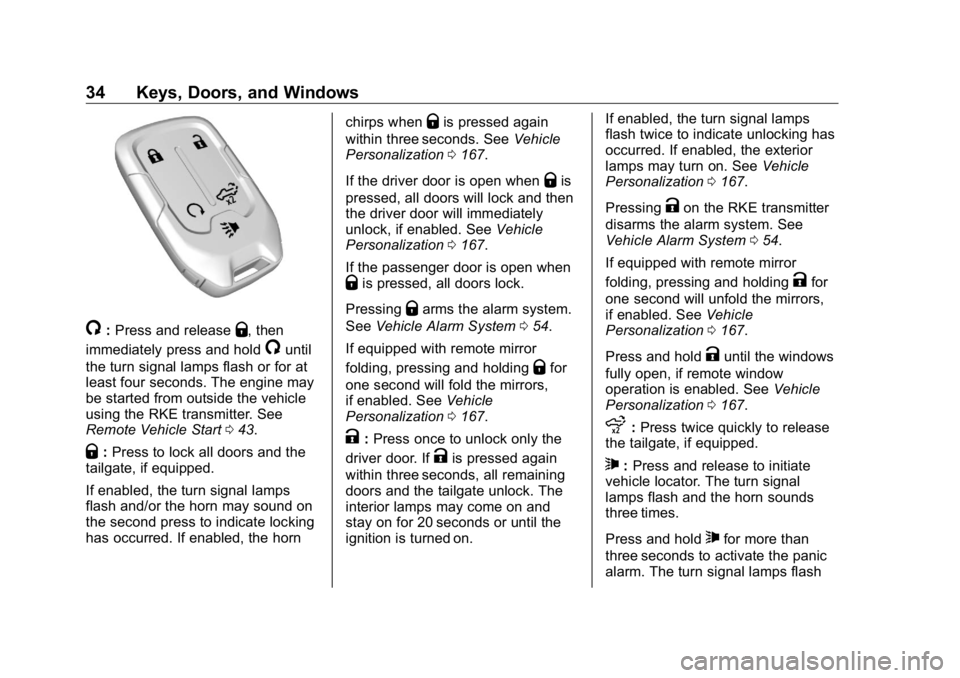
/ : Press and release
Q , then
immediately press and hold
/ until
the turn signal lamps flash or for at
least four seconds. The engine may
be started from outside the vehicle
using the RKE transmitter. See
Remote Vehicle Start 0 43 .
Q : Press to lock all doors and the
tailgate, if equipped.
If enabled, the turn signal lamps
flash and/or the horn may sound on
the second press to indicate locking
has occurred. If enabled, the horn chirps when
Q is pressed again
within three seconds. See Vehicle
Personalization 0 167 .
If the driver door is open when
Q is
pressed, all doors will lock and then
the driver door will immediately
unlock, if enabled. See Vehicle
Personalization 0 167 .
If the passenger door is open when
Q is pressed, all doors lock.
Pressing
Q arms the alarm system.
See Vehicle Alarm System 0 54 .
If equipped with remote mirror
folding, pressing and holding
Q for
one second will fold the mirrors,
if enabled. See Vehicle
Personalization 0 167 .
K : Press once to unlock only the
driver door. If
K is pressed again
within three seconds, all remaining
doors and the tailgate unlock. The
interior lamps may come on and
stay on for 20 seconds or until the
ignition is turned on. If enabled, the turn signal lamps
flash twice to indicate unlocking has
occurred. If enabled, the exterior
lamps may turn on. See Vehicle
Personalization 0 167 .
Pressing
K on the RKE transmitter
disarms the alarm system. See
Vehicle Alarm System 0 54 .
If equipped with remote mirror
folding, pressing and holding
K for
one second will unfold the mirrors,
if enabled. See Vehicle
Personalization 0 167 .
Press and hold
K until the windows
fully open, if remote window
operation is enabled. See Vehicle
Personalization 0 167 .
x : Press twice quickly to release
the tailgate, if equipped.
7 : Press and release to initiate
vehicle locator. The turn signal
lamps flash and the horn sounds
three times.
Press and hold
7 for more than
three seconds to activate the panic
alarm. The turn signal lamps flash
Page 37 of 472
GMC Sierra/Sierra Denali Owner Manual (GMNA-Localizing-U.S./Canada/
Mexico-1500-11698638) - 2019 - crc - 5/15/18
36 Keys, Doors, and Windows Disable/Enable Keyless Unlocking
of Exterior Door Handles and
Tailgate
If equipped, keyless unlocking of the
exterior door handles and tailgate
can be disabled and enabled.
Disabling Keyless Unlocking:
With the vehicle off, press and hold
Q and
K on the RKE transmitter at
the same time for approximately
three seconds. The turn signal
lamps will flash four times quickly to
indicate access is disabled. Using
any exterior handle to unlock the
doors or open the tailgate will cause
the turn signal lamps to flash four
times quickly, indicating access is
disabled. If disabled, disarm the
alarm system before starting the
vehicle.
Enabling Keyless Unlocking:
With the vehicle off, press and hold
Q and
K on the RKE transmitter at
the same time for approximately
three seconds. The turn signal
lamps will flash twice quickly to
indicate access is enabled. Passive Locking
This feature will lock the vehicle
several seconds after all doors are
closed, if the vehicle is off and at
least one RKE transmitter has been
removed from the interior, or none
remain in the interior.
If other electronic devices interfere
with the RKE transmitter signal, the
vehicle may not detect the RKE
transmitter inside the vehicle.
If passive locking is enabled, the
doors may lock with the RKE
transmitter inside the vehicle. Do
not leave the RKE transmitter in an
unattended vehicle.
To customize the doors to
automatically lock when exiting the
vehicle, see “ Remote Lock, Unlock,
Start ” under Vehicle Personalization
0 167 .
Temporary Disable of Passive
Locking
Temporarily disable passive locking
by pressing and holding
K on the
interior door switch with a door open
for at least four seconds, or until three chimes are heard. Passive
locking will then remain disabled
until
Q on the interior door is
pressed, or until the vehicle is
turned on.
Remote Left in Vehicle Alert
When the vehicle is turned off and
an RKE transmitter is left in the
vehicle, the horn will chirp three
times after all doors are closed. To
turn on or off see Vehicle
Personalization 0 167 .
Remote No Longer in Vehicle Alert
If the vehicle is on with a door open
and then all doors are closed, the
vehicle will check for RKE
transmitters inside. If an RKE
transmitter is not detected, the
Driver Information Center (DIC) will
display NO REMOTE DETECTED
and the horn will chirp three times.
This occurs only once each time the
vehicle is driven. To turn on or off
see Vehicle Personalization 0 167 .
Page 39 of 472
GMC Sierra/Sierra Denali Owner Manual (GMNA-Localizing-U.S./Canada/
Mexico-1500-11698638) - 2019 - crc - 5/15/18
38 Keys, Doors, and Windows
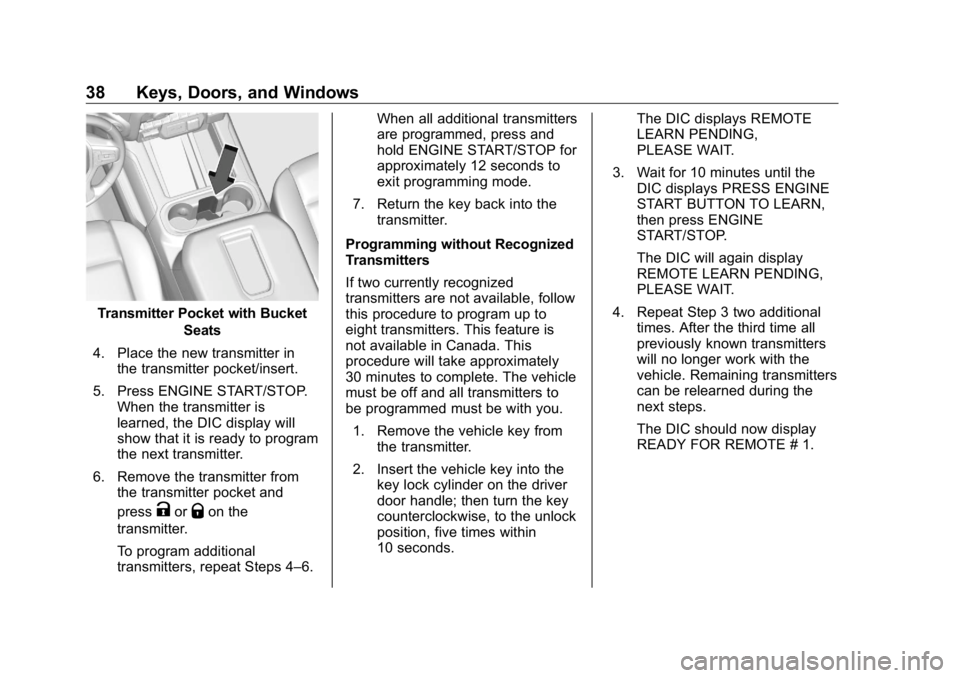
Transmitter Pocket with Bucket
Seats
4. Place the new transmitter in
the transmitter pocket/insert.
5. Press ENGINE START/STOP.
When the transmitter is
learned, the DIC display will
show that it is ready to program
the next transmitter.
6. Remove the transmitter from
the transmitter pocket and
press
K or
Q on the
transmitter.
To program additional
transmitters, repeat Steps 4 – 6. When all additional transmitters
are programmed, press and
hold ENGINE START/STOP for
approximately 12 seconds to
exit programming mode.
7. Return the key back into the
transmitter.
Programming without Recognized
Transmitters
If two currently recognized
transmitters are not available, follow
this procedure to program up to
eight transmitters. This feature is
not available in Canada. This
procedure will take approximately
30 minutes to complete. The vehicle
must be off and all transmitters to
be programmed must be with you.
1. Remove the vehicle key from
the transmitter.
2. Insert the vehicle key into the
key lock cylinder on the driver
door handle; then turn the key
counterclockwise, to the unlock
position, five times within
10 seconds. The DIC displays REMOTE
LEARN PENDING,
PLEASE WAIT.
3. Wait for 10 minutes until the
DIC displays PRESS ENGINE
START BUTTON TO LEARN,
then press ENGINE
START/STOP.
The DIC will again display
REMOTE LEARN PENDING,
PLEASE WAIT.
4. Repeat Step 3 two additional
times. After the third time all
previously known transmitters
will no longer work with the
vehicle. Remaining transmitters
can be relearned during the
next steps.
The DIC should now display
READY FOR REMOTE # 1.
Page 40 of 472
GMC Sierra/Sierra Denali Owner Manual (GMNA-Localizing-U.S./Canada/
Mexico-1500-11698638) - 2019 - crc - 5/15/18
Keys, Doors, and Windows 39
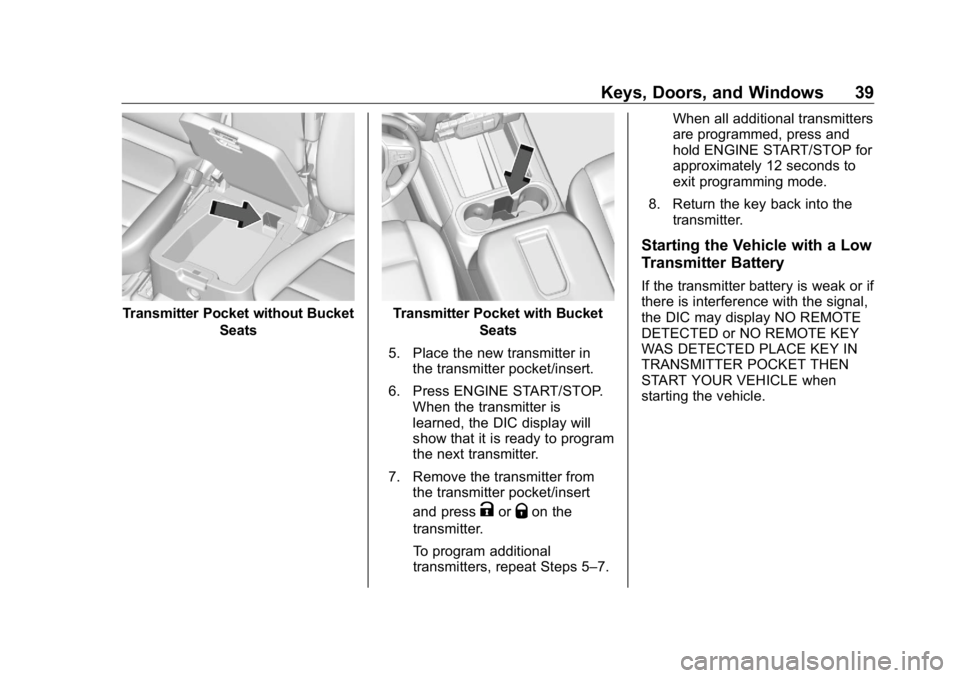
Transmitter Pocket without Bucket
Seats Transmitter Pocket with Bucket
Seats
5. Place the new transmitter in
the transmitter pocket/insert.
6. Press ENGINE START/STOP.
When the transmitter is
learned, the DIC display will
show that it is ready to program
the next transmitter.
7. Remove the transmitter from
the transmitter pocket/insert
and press
K or
Q on the
transmitter.
To program additional
transmitters, repeat Steps 5 – 7. When all additional transmitters
are programmed, press and
hold ENGINE START/STOP for
approximately 12 seconds to
exit programming mode.
8. Return the key back into the
transmitter.
Starting the Vehicle with a Low
Transmitter Battery If the transmitter battery is weak or if
there is interference with the signal,
the DIC may display NO REMOTE
DETECTED or NO REMOTE KEY
WAS DETECTED PLACE KEY IN
TRANSMITTER POCKET THEN
START YOUR VEHICLE when
starting the vehicle.