seat adjustment GMC SIERRA DENALI 2019 Owners Manual
[x] Cancel search | Manufacturer: GMC, Model Year: 2019, Model line: SIERRA DENALI, Model: GMC SIERRA DENALI 2019Pages: 472, PDF Size: 8.98 MB
Page 6 of 472
GMC Sierra/Sierra Denali Owner Manual (GMNA-Localizing-U.S./Canada/
Mexico-1500-11698638) - 2019 - crc - 5/15/18
In Brief 5
In Brief Instrument Panel Instrument Panel . . . . . . . . . . . . . . . . 6
Initial Drive Information Initial Drive Information . . . . . . . . . . 8
Stop/Start System . . . . . . . . . . . . . . . 8
Remote Keyless Entry (RKE)
System . . . . . . . . . . . . . . . . . . . . . . . . 9
Remote Vehicle Start . . . . . . . . . . . 9
Door Locks . . . . . . . . . . . . . . . . . . . . 10
Windows . . . . . . . . . . . . . . . . . . . . . . . 10
Seat Adjustment . . . . . . . . . . . . . . . 11
Memory Features . . . . . . . . . . . . . . 12
Heated and Ventilated Seats . . . 13
Head Restraint Adjustment . . . . 13
Seat Belts . . . . . . . . . . . . . . . . . . . . . 14
Passenger Sensing System . . . 14
Mirror Adjustment . . . . . . . . . . . . . . 14
Steering Wheel Adjustment . . . . 16
Interior Lighting . . . . . . . . . . . . . . . . 16
Exterior Lighting . . . . . . . . . . . . . . . 17
Windshield Wiper/Washer . . . . . . 18
Climate Controls . . . . . . . . . . . . . . . 19
Transmission . . . . . . . . . . . . . . . . . . 20
Four-Wheel Drive . . . . . . . . . . . . . . 21 Vehicle Features Infotainment System . . . . . . . . . . . 22
Steering Wheel Controls . . . . . . . 22
Cruise Control . . . . . . . . . . . . . . . . . 22
Driver Information
Center (DIC) . . . . . . . . . . . . . . . . . 22
Forward Collision Alert (FCA)
System . . . . . . . . . . . . . . . . . . . . . . . 23
Forward Automatic
Braking (FAB) . . . . . . . . . . . . . . . . 23
Front Pedestrian Braking (FPB)
System . . . . . . . . . . . . . . . . . . . . . . . 23
Lane Keep Assist (LKA) . . . . . . . 24
Lane Change Alert (LCA) . . . . . . 24
Surround Vision . . . . . . . . . . . . . . . 24
Rear Vision Camera (RVC) . . . . 24
Rear Cross Traffic Alert (RCTA)
System . . . . . . . . . . . . . . . . . . . . . . . 24
Park Assist . . . . . . . . . . . . . . . . . . . . 24
Power Outlets . . . . . . . . . . . . . . . . . 25
Universal Remote System . . . . . 25
Sunroof . . . . . . . . . . . . . . . . . . . . . . . . 25
Performance and Maintenance Traction Control/Electronic
Stability Control . . . . . . . . . . . . . . 26
Tire Pressure Monitor . . . . . . . . . . 27
Fuel (Gasoline - Except
L87 6.2L Engine) . . . . . . . . . . . . . 27 Fuel (Gasoline - L87 6.2L
Engine) . . . . . . . . . . . . . . . . . . . . . . . 28
Fuel (Diesel) . . . . . . . . . . . . . . . . . . . 28
E85 or FlexFuel . . . . . . . . . . . . . . . . 28
Engine Oil Life System . . . . . . . . 28
Driving for Better Fuel
Economy . . . . . . . . . . . . . . . . . . . . . 29
Roadside Assistance
Program . . . . . . . . . . . . . . . . . . . . . . 29
Page 12 of 472
GMC Sierra/Sierra Denali Owner Manual (GMNA-Localizing-U.S./Canada/
Mexico-1500-11698638) - 2019 - crc - 5/15/18
In Brief 11Power Sliding Rear Window
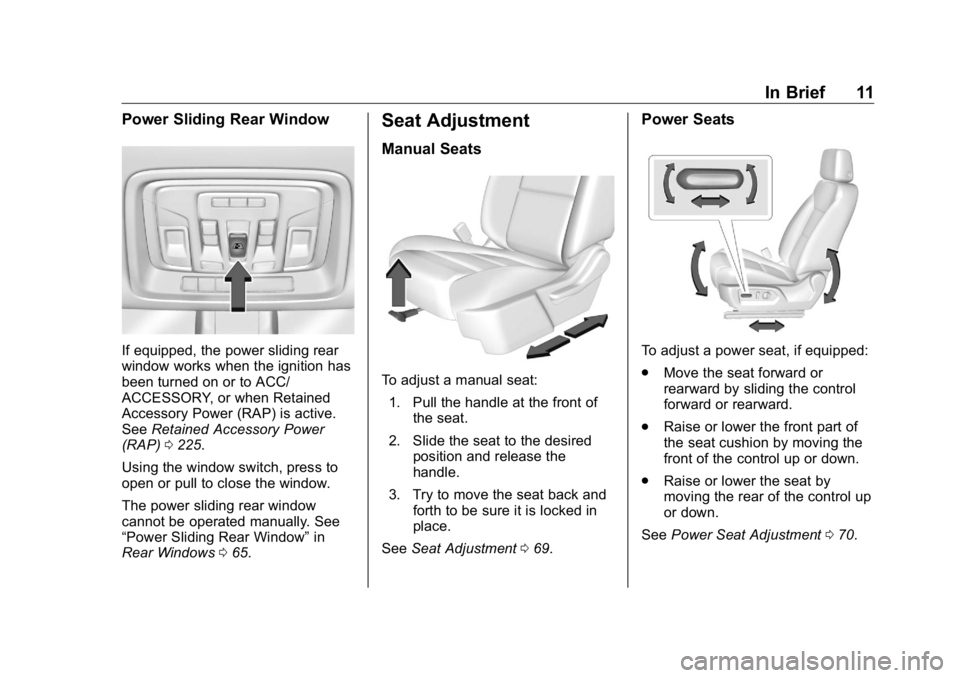
If equipped, the power sliding rear
window works when the ignition has
been turned on or to ACC/
ACCESSORY, or when Retained
Accessory Power (RAP) is active.
See Retained Accessory Power
(RAP) 0 225 .
Using the window switch, press to
open or pull to close the window.
The power sliding rear window
cannot be operated manually. See
“ Power Sliding Rear Window ” in
Rear Windows 0 65 . Seat Adjustment Manual Seats
To adjust a manual seat:
1. Pull the handle at the front of
the seat.
2. Slide the seat to the desired
position and release the
handle.
3. Try to move the seat back and
forth to be sure it is locked in
place.
See Seat Adjustment 0 69 . Power Seats
To adjust a power seat, if equipped:
.
Move the seat forward or
rearward by sliding the control
forward or rearward.
.
Raise or lower the front part of
the seat cushion by moving the
front of the control up or down.
.
Raise or lower the seat by
moving the rear of the control up
or down.
See Power Seat Adjustment 0 70 .
Page 14 of 472
GMC Sierra/Sierra Denali Owner Manual (GMNA-Localizing-U.S./Canada/
Mexico-1500-11698638) - 2019 - crc - 5/15/18
In Brief 13Before saving, adjust all available
memory feature positions. Turn the
ignition on and then press and
release SET; a beep will sound.
Then immediately press and hold 1,
2, or
B (Exit) until two beeps
sound. To manually recall these
positions, press and hold 1, 2, or
Buntil the saved position is reached.
When Seat Entry Memory is
enabled in vehicle personalization,
positions previously saved to
memory buttons 1 and 2 are
recalled when the ignition is
changed from off to on or ACC/
ACCESSORY.
When Seat Exit Memory is enabled
in vehicle personalization, the
feature automatically recalls the
previously saved exit position when
exiting the vehicle.
Memory adjustments may not be
available upon delivery or after
service until steps in “ Saving
Memory Positions ” section are
performed. See Memory Seats 0 73 .Heated and Ventilated
Seats
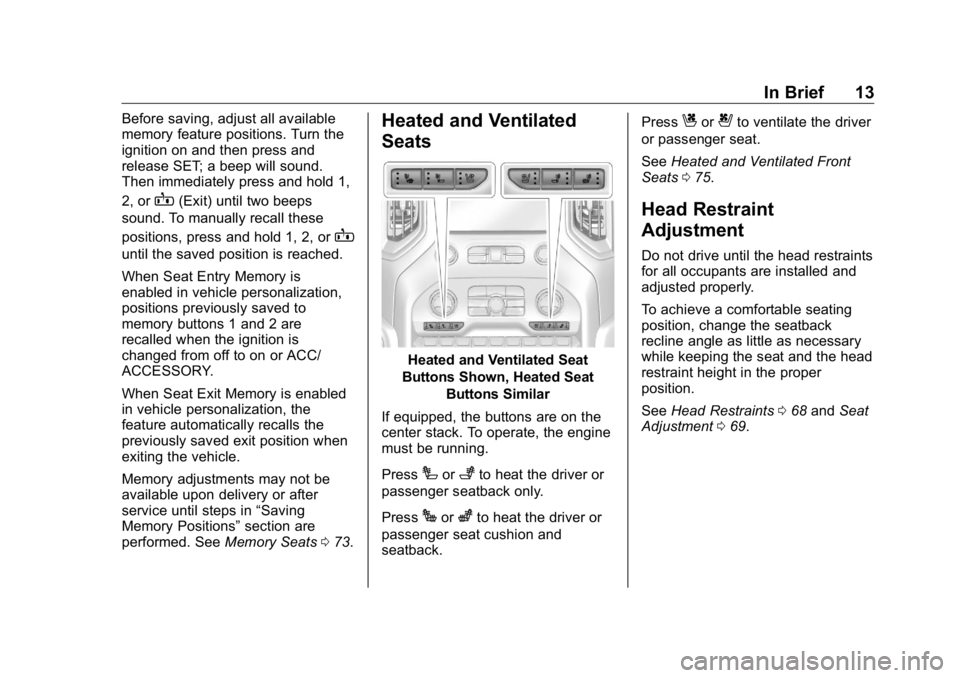
Heated and Ventilated Seat
Buttons Shown, Heated Seat
Buttons Similar
If equipped, the buttons are on the
center stack. To operate, the engine
must be running.
Press
I or
+ to heat the driver or
passenger seatback only.
Press
J or
z to heat the driver or
passenger seat cushion and
seatback. Press
C or
{ to ventilate the driver
or passenger seat.
See Heated and Ventilated Front
Seats 0 75 .
Head Restraint
Adjustment Do not drive until the head restraints
for all occupants are installed and
adjusted properly.
To achieve a comfortable seating
position, change the seatback
recline angle as little as necessary
while keeping the seat and the head
restraint height in the proper
position.
See Head Restraints 0 68 and Seat
Adjustment 0 69 .
Page 15 of 472
GMC Sierra/Sierra Denali Owner Manual (GMNA-Localizing-U.S./Canada/
Mexico-1500-11698638) - 2019 - crc - 5/15/18
14 In Brief
Seat Belts
Refer to the following sections for
important information on how to use
seat belts properly:
.
Seat Belts 0 79
.
How to Wear Seat Belts Properly
0 80
.
Lap-Shoulder Belt 0 82
.
Lower Anchors and Tethers for
Children (LATCH System) 0 106Passenger Sensing
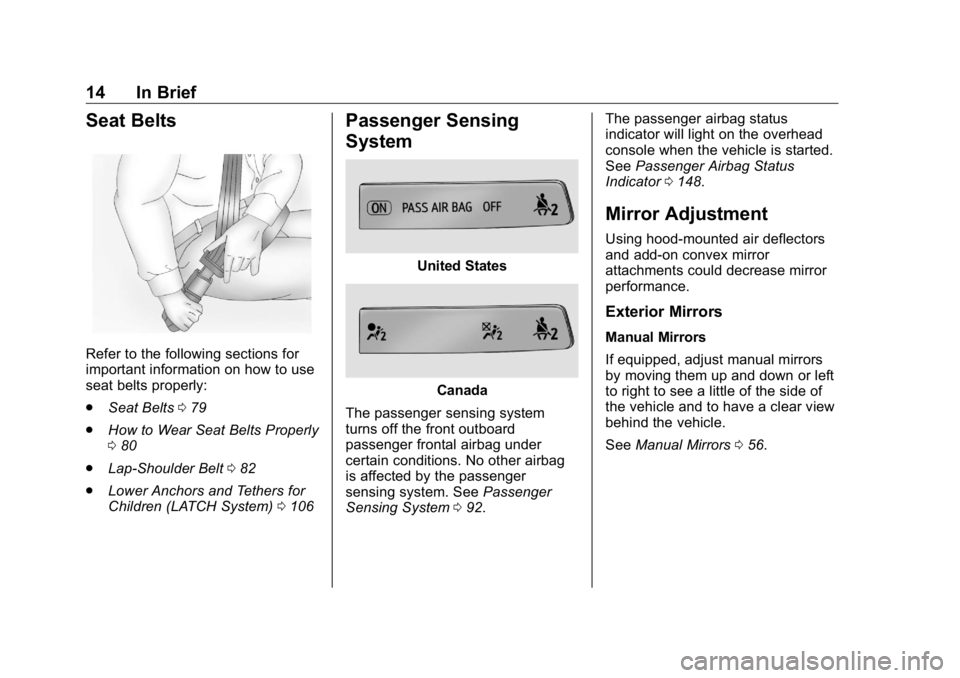
System United States
Canada
The passenger sensing system
turns off the front outboard
passenger frontal airbag under
certain conditions. No other airbag
is affected by the passenger
sensing system. See Passenger
Sensing System 0 92 . The passenger airbag status
indicator will light on the overhead
console when the vehicle is started.
See Passenger Airbag Status
Indicator 0 148 .
Mirror Adjustment Using hood-mounted air deflectors
and add-on convex mirror
attachments could decrease mirror
performance.
Exterior Mirrors Manual Mirrors
If equipped, adjust manual mirrors
by moving them up and down or left
to right to see a little of the side of
the vehicle and to have a clear view
behind the vehicle.
See Manual Mirrors 0 56 .
Page 16 of 472
GMC Sierra/Sierra Denali Owner Manual (GMNA-Localizing-U.S./Canada/
Mexico-1500-11698638) - 2019 - crc - 5/15/18
In Brief 15Power Mirrors
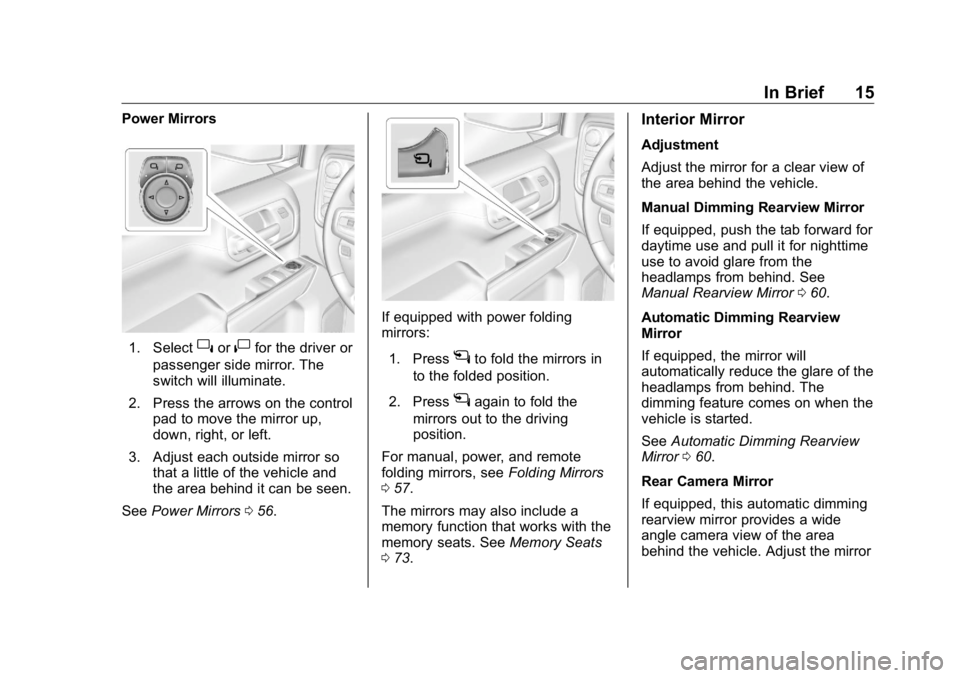
1. Select
} or
| for the driver or
passenger side mirror. The
switch will illuminate.
2. Press the arrows on the control
pad to move the mirror up,
down, right, or left.
3. Adjust each outside mirror so
that a little of the vehicle and
the area behind it can be seen.
See Power Mirrors 0 56 . If equipped with power folding
mirrors:
1. Press
g to fold the mirrors in
to the folded position.
2. Press
g again to fold the
mirrors out to the driving
position.
For manual, power, and remote
folding mirrors, see Folding Mirrors
0 57 .
The mirrors may also include a
memory function that works with the
memory seats. See Memory Seats
0 73 . Interior Mirror Adjustment
Adjust the mirror for a clear view of
the area behind the vehicle.
Manual Dimming Rearview Mirror
If equipped, push the tab forward for
daytime use and pull it for nighttime
use to avoid glare from the
headlamps from behind. See
Manual Rearview Mirror 0 60 .
Automatic Dimming Rearview
Mirror
If equipped, the mirror will
automatically reduce the glare of the
headlamps from behind. The
dimming feature comes on when the
vehicle is started.
See Automatic Dimming Rearview
Mirror 0 60 .
Rear Camera Mirror
If equipped, this automatic dimming
rearview mirror provides a wide
angle camera view of the area
behind the vehicle. Adjust the mirror
Page 68 of 472
GMC Sierra/Sierra Denali Owner Manual (GMNA-Localizing-U.S./Canada/
Mexico-1500-11698638) - 2019 - crc - 5/15/18
Seats and Restraints 67
Seats and
Restraints Head Restraints Head Restraints . . . . . . . . . . . . . . . 68
Front Seats Seat Adjustment . . . . . . . . . . . . . . . 69
Center Seat . . . . . . . . . . . . . . . . . . . . 70
Power Seat Adjustment . . . . . . . . 70
Lumbar Adjustment . . . . . . . . . . . . 71
Reclining Seatbacks . . . . . . . . . . . 71
Memory Seats . . . . . . . . . . . . . . . . . 73
Heated and Ventilated Front
Seats . . . . . . . . . . . . . . . . . . . . . . . . . 75
Rear Seats Rear Seats . . . . . . . . . . . . . . . . . . . . 77
Heated Rear Seats . . . . . . . . . . . . 78
Seat Belts Seat Belts . . . . . . . . . . . . . . . . . . . . . 79
How to Wear Seat Belts
Properly . . . . . . . . . . . . . . . . . . . . . . 80
Lap-Shoulder Belt . . . . . . . . . . . . . 82
Seat Belt Use During
Pregnancy . . . . . . . . . . . . . . . . . . . . 84
Seat Belt Extender . . . . . . . . . . . . . 84
Safety System Check . . . . . . . . . . 84 Seat Belt Care . . . . . . . . . . . . . . . . . 85
Replacing Seat Belt System
Parts after a Crash . . . . . . . . . . . 85
Airbag System Airbag System . . . . . . . . . . . . . . . . . 86
Where Are the Airbags? . . . . . . . 88
When Should an Airbag
Inflate? . . . . . . . . . . . . . . . . . . . . . . . 89
What Makes an Airbag
Inflate? . . . . . . . . . . . . . . . . . . . . . . . 90
How Does an Airbag
Restrain? . . . . . . . . . . . . . . . . . . . . . 90
What Will You See after an
Airbag Inflates? . . . . . . . . . . . . . . 91
Passenger Sensing System . . . 92
Servicing the Airbag-Equipped
Vehicle . . . . . . . . . . . . . . . . . . . . . . . 96
Adding Equipment to the
Airbag-Equipped Vehicle . . . . . 97
Airbag System Check . . . . . . . . . . 98
Replacing Airbag System Parts
after a Crash . . . . . . . . . . . . . . . . . 98
Child Restraints Older Children . . . . . . . . . . . . . . . . . 99
Infants and Young Children . . . 100
Child Restraint Systems . . . . . . 103
Where to Put the Restraint . . . 104
Lower Anchors and Tethers for
Children (LATCH System) . . . 106 Replacing LATCH System
Parts After a Crash . . . . . . . . . . 117
Securing Child Restraints (With
the Seat Belt in the
Rear Seat) . . . . . . . . . . . . . . . . . . 117
Securing Child Restraints (In
the Center Front Seat) . . . . . . 120
Securing Child Restraints (With
the Seat Belt in the Front
Outboard Seat) . . . . . . . . . . . . . 121
Page 70 of 472
GMC Sierra/Sierra Denali Owner Manual (GMNA-Localizing-U.S./Canada/
Mexico-1500-11698638) - 2019 - crc - 5/15/18
Seats and Restraints 69Rear Head Restraints The vehicle ’ s rear seat has head
restraints in the outboard seating
positions that cannot be adjusted.
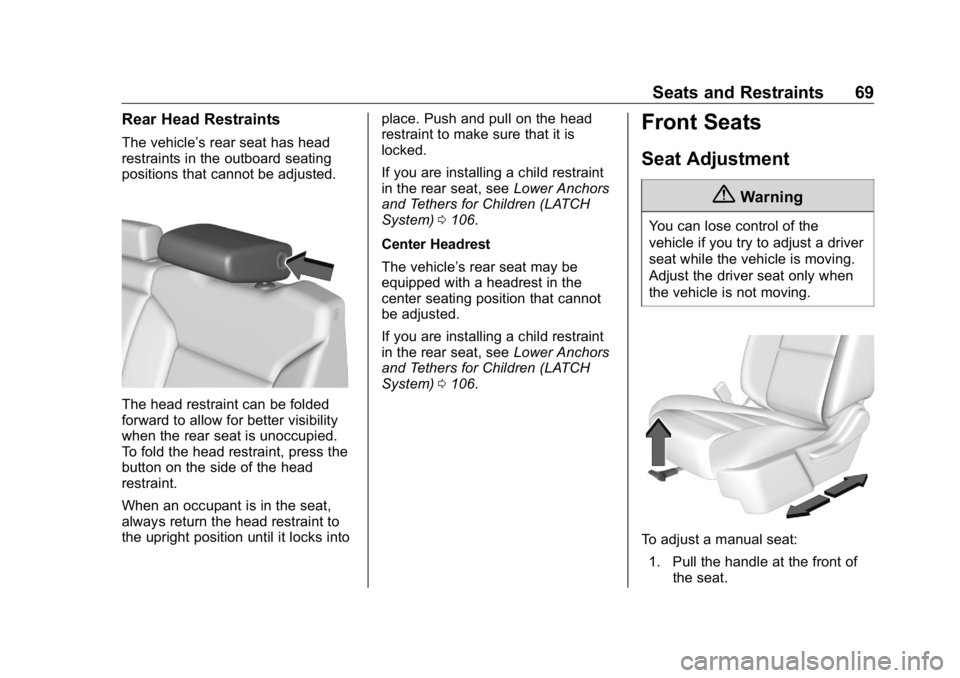
The head restraint can be folded
forward to allow for better visibility
when the rear seat is unoccupied.
To fold the head restraint, press the
button on the side of the head
restraint.
When an occupant is in the seat,
always return the head restraint to
the upright position until it locks into place. Push and pull on the head
restraint to make sure that it is
locked.
If you are installing a child restraint
in the rear seat, see Lower Anchors
and Tethers for Children (LATCH
System) 0 106 .
Center Headrest
The vehicle ’ s rear seat may be
equipped with a headrest in the
center seating position that cannot
be adjusted.
If you are installing a child restraint
in the rear seat, see Lower Anchors
and Tethers for Children (LATCH
System) 0 106 .Front Seats Seat Adjustment
{ WarningYou can lose control of the
vehicle if you try to adjust a driver
seat while the vehicle is moving.
Adjust the driver seat only when
the vehicle is not moving.
To adjust a manual seat:
1. Pull the handle at the front of
the seat.
Page 71 of 472
GMC Sierra/Sierra Denali Owner Manual (GMNA-Localizing-U.S./Canada/
Mexico-1500-11698638) - 2019 - crc - 5/15/18
70 Seats and Restraints 2. Slide the seat to the desired
position and release the
handle.
3. Try to move the seat back and
forth to be sure it is locked in
place.
To adjust the seatback, see
Reclining Seatbacks 0 71 .
To adjust the lumbar support,
if equipped, see Lumbar Adjustment
0 71 .
Center Seat If equipped, the center front
seatback doubles as an armrest and
cupholder/storage area for the driver
and passenger when the center
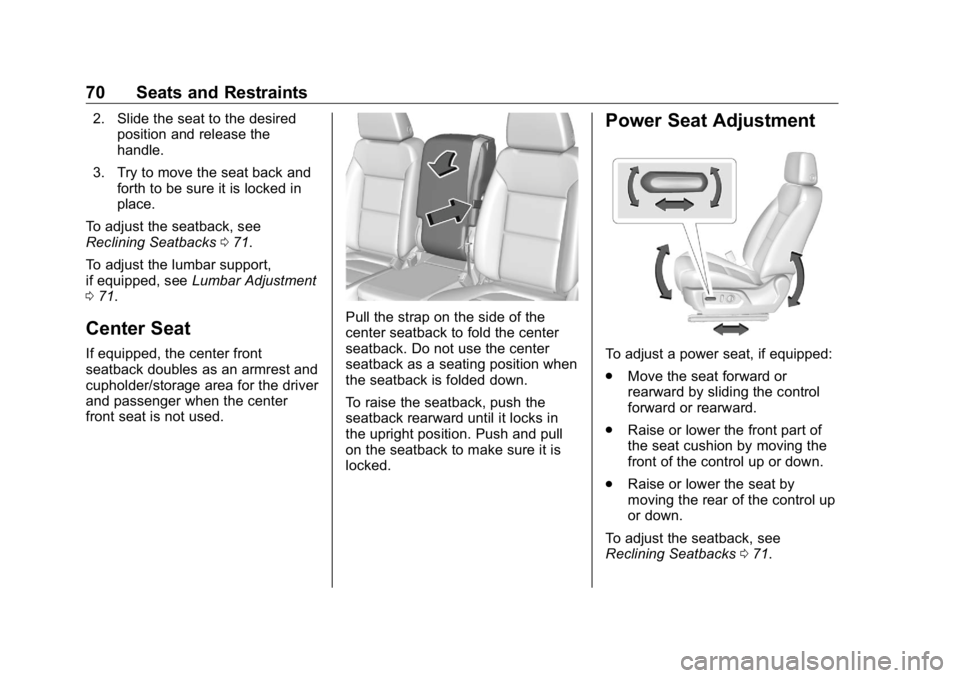
front seat is not used. Pull the strap on the side of the
center seatback to fold the center
seatback. Do not use the center
seatback as a seating position when
the seatback is folded down.
To raise the seatback, push the
seatback rearward until it locks in
the upright position. Push and pull
on the seatback to make sure it is
locked. Power Seat Adjustment
To adjust a power seat, if equipped:
.
Move the seat forward or
rearward by sliding the control
forward or rearward.
.
Raise or lower the front part of
the seat cushion by moving the
front of the control up or down.
.
Raise or lower the seat by
moving the rear of the control up
or down.
To adjust the seatback, see
Reclining Seatbacks 0 71 .
Page 72 of 472
GMC Sierra/Sierra Denali Owner Manual (GMNA-Localizing-U.S./Canada/
Mexico-1500-11698638) - 2019 - crc - 5/15/18
Seats and Restraints 71To adjust the lumbar support, see
Lumbar Adjustment 0 71 .
Some vehicles are equipped with a
feature that activates a vibrating
pulse alert in the driver seat to help
the driver avoid crashes. See Driver
Assistance Systems 0 253 .
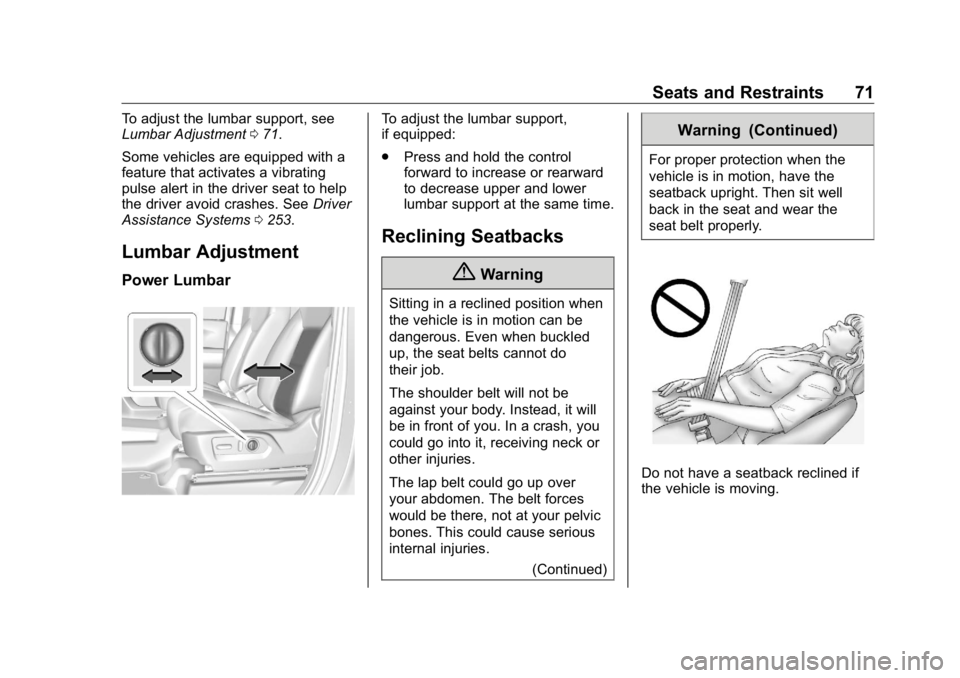
Lumbar Adjustment Power Lumbar To adjust the lumbar support,
if equipped:
.
Press and hold the control
forward to increase or rearward
to decrease upper and lower
lumbar support at the same time.
Reclining Seatbacks
{ WarningSitting in a reclined position when
the vehicle is in motion can be
dangerous. Even when buckled
up, the seat belts cannot do
their job.
The shoulder belt will not be
against your body. Instead, it will
be in front of you. In a crash, you
could go into it, receiving neck or
other injuries.
The lap belt could go up over
your abdomen. The belt forces
would be there, not at your pelvic
bones. This could cause serious
internal injuries.
(Continued) Warning (Continued) For proper protection when the
vehicle is in motion, have the
seatback upright. Then sit well
back in the seat and wear the
seat belt properly.
Do not have a seatback reclined if
the vehicle is moving.
Page 74 of 472
GMC Sierra/Sierra Denali Owner Manual (GMNA-Localizing-U.S./Canada/
Mexico-1500-11698638) - 2019 - crc - 5/15/18
Seats and Restraints 73
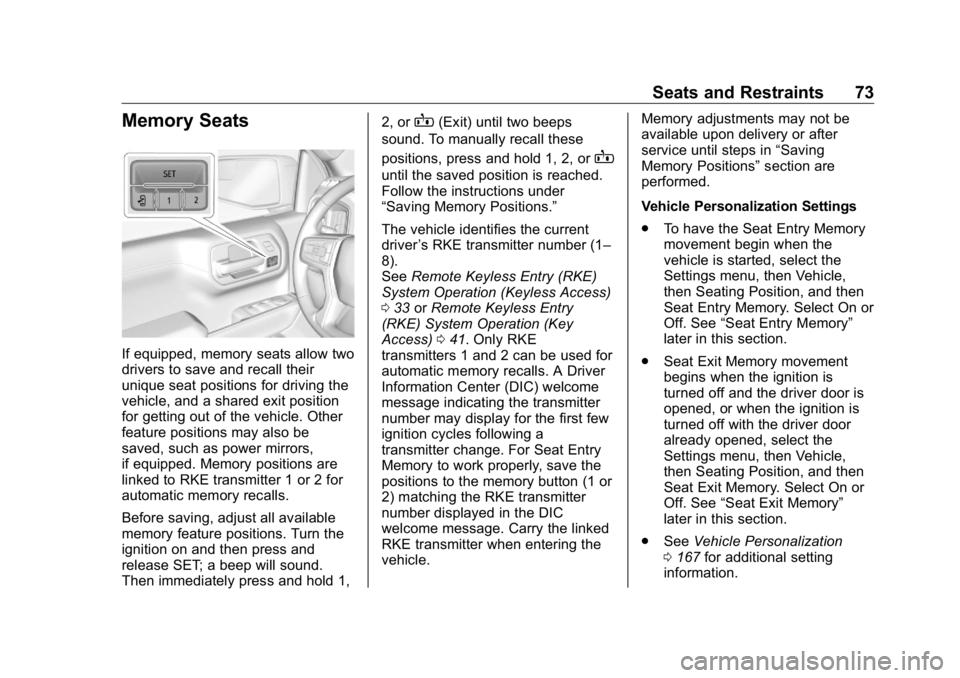
Memory Seats
If equipped, memory seats allow two
drivers to save and recall their
unique seat positions for driving the
vehicle, and a shared exit position
for getting out of the vehicle. Other
feature positions may also be
saved, such as power mirrors,
if equipped. Memory positions are
linked to RKE transmitter 1 or 2 for
automatic memory recalls.
Before saving, adjust all available
memory feature positions. Turn the
ignition on and then press and
release SET; a beep will sound.
Then immediately press and hold 1, 2, or
B (Exit) until two beeps
sound. To manually recall these
positions, press and hold 1, 2, or
Buntil the saved position is reached.
Follow the instructions under
“ Saving Memory Positions. ”
The vehicle identifies the current
driver ’ s RKE transmitter number (1 –
8).
See Remote Keyless Entry (RKE)
System Operation (Keyless Access)
0 33 or Remote Keyless Entry
(RKE) System Operation (Key
Access) 0 41 . Only RKE
transmitters 1 and 2 can be used for
automatic memory recalls. A Driver
Information Center (DIC) welcome
message indicating the transmitter
number may display for the first few
ignition cycles following a
transmitter change. For Seat Entry
Memory to work properly, save the
positions to the memory button (1 or
2) matching the RKE transmitter
number displayed in the DIC
welcome message. Carry the linked
RKE transmitter when entering the
vehicle. Memory adjustments may not be
available upon delivery or after
service until steps in “ Saving
Memory Positions ” section are
performed.
Vehicle Personalization Settings
.
To have the Seat Entry Memory
movement begin when the
vehicle is started, select the
Settings menu, then Vehicle,
then Seating Position, and then
Seat Entry Memory. Select On or
Off. See “ Seat Entry Memory ”
later in this section.
.
Seat Exit Memory movement
begins when the ignition is
turned off and the driver door is
opened, or when the ignition is
turned off with the driver door
already opened, select the
Settings menu, then Vehicle,
then Seating Position, and then
Seat Exit Memory. Select On or
Off. See “ Seat Exit Memory ”
later in this section.
.
See Vehicle Personalization
0 167 for additional setting
information.