power steering GMC SIERRA DENALI 2020 User Guide
[x] Cancel search | Manufacturer: GMC, Model Year: 2020, Model line: SIERRA DENALI, Model: GMC SIERRA DENALI 2020Pages: 501, PDF Size: 7.61 MB
Page 210 of 501
GMC Sierra/Sierra Denali Owner Manual (GMNA-Localizing-U.S./Canada/
Mexico-13337776) - 2020 - CRC - 8/27/19
Driving and Operating 209
to the Keyless Access system. See
Remote Keyless Entry (RKE)
System Operation (Key Access)
013 or
Remote Keyless Entry (RKE)
System Operation (Keyless Access)
0 16.
To shift out of P (Park), the ignition
must be on or in Service Mode, and
the brake pedal must be applied.
{Warning
Turning off the vehicle while
moving may cause loss of power
assist in the brake and steering
systems and disable the airbags.
While driving, only shut the
vehicle off in an emergency.
Stopping the Engine/LOCK/
OFF (No Indicator Lights) : When
the vehicle is stopped, press
ENGINE START/STOP once to turn
the engine off. If the vehicle is in P (Park), the
ignition will turn off, and Retained
Accessory Power (RAP) will remain
active. See
Retained Accessory
Power (RAP) 0216.
If the vehicle is not in P (Park), the
ignition will return to ACC/
ACCESSORY and display the
message SHIFT TO PARK in the
Driver Information Center (DIC).
When the vehicle is shifted into
P (Park), the ignition system will
turn off.
The vehicle may have an electric
steering column lock. The lock is
activated when the ignition is turned
off and driver door is opened.
A sound may be heard as the lock
actuates or releases. The steering
column lock may not release with
the wheels turned off center. If this
happens, the vehicle may not start.
Move the steering wheel from left to
right while attempting to start the
vehicle. If this does not work, the
vehicle needs service.
Unless an emergency exists, do not
turn the engine off when the vehicle
is moving. This will cause a loss of power assist in the brake and
steering systems and disable the
airbags.
If the vehicle must be shut off in an
emergency:
1. If the vehicle cannot be pulled over, and must be shut off
while driving, press and hold
ENGINE START/STOP button
for longer than two seconds,
or press twice in five seconds.
2. Brake using a firm and steady pressure. Do not pump the
brakes repeatedly. This may
deplete power assist, requiring
increased brake pedal force.
3. Shift the vehicle to N (Neutral). This can be done while the
vehicle is moving. After shifting
to N (Neutral), firmly apply the
brakes and steer the vehicle to
a safe location.
4. Come to a complete stop, shift to P (Park), and make sure
engine is off. The shift lever
must be in P (Park) to turn the
ignition off.
Page 211 of 501
GMC Sierra/Sierra Denali Owner Manual (GMNA-Localizing-U.S./Canada/
Mexico-13337776) - 2020 - CRC - 8/27/19
210 Driving and Operating
5. Set the parking brake. SeeElectric Parking Brake 0233.
{Warning
Turning off the vehicle while
moving may cause loss of power
assist in the brake and steering
systems and disable the airbags.
While driving, only shut the
vehicle off in an emergency.
ACC/ACCESSORY (Amber
Indicator Light) : This mode allows
some electrical accessories to be
used when the engine is off.
With the ignition off, pressing the
ENGINE START/STOP button one
time without the brake pedal applied
will place the ignition system in
ACC/ACCESSORY.
The ignition will switch from ACC/
ACCESSORY to off after
five minutes to prevent battery
rundown.
ON/RUN/START (Green Indicator
Light) : This mode is for driving and
starting. With the ignition off, and the brake pedal applied, pressing
ENGINE START/STOP button once
will turn the ignition on. Once engine
cranking begins, release the button.
Engine cranking will continue until
the engine starts. See
Starting the
Engine 0212.
Service Mode
This power mode is available for
service and diagnostics, and to
verify the proper operation of the
malfunction indicator lamp as may
be required for emission inspection
purposes. With the vehicle off, and
the brake pedal not applied,
pressing and holding the ENGINE
START/STOP button for more than
five seconds will place the vehicle in
Service Mode. The instruments and
audio systems will operate as they
do when the ignition is on, but the
vehicle will not be able to be driven.
The engine will not start in Service
Mode. Press the ENGINE START/
STOP button again to turn the
ignition off.
Ignition Positions (Key
Access)
0. Stopping the Engine/LOCK/OFF
1. ACC/ACCESSORY
2. ON/RUN
3. START
The ignition switch has four
positions.
To shift out of P (Park), the ignition
must be ON/RUN and the brake
pedal must be applied.
Page 212 of 501
GMC Sierra/Sierra Denali Owner Manual (GMNA-Localizing-U.S./Canada/
Mexico-13337776) - 2020 - CRC - 8/27/19
Driving and Operating 211
0 (Stopping the Engine/LOCK/
OFF) :This position turns off the
vehicle. It also locks the ignition, the
transmission, and the steering
column, if equipped with a locking
steering column.
To turn off the vehicle:
1. Make sure that the vehicle is stopped.
2. Shift to P (Park).
3. Continue to hold the brake pedal, then set the parking
brake. See Electric Parking
Brake 0233. 4. Push the key all the way in
toward the steering column,
then turn the key to
LOCK/OFF.
5. Remove the key.
6. Release the brake pedal.
See your dealer if the key can be
removed in any other position.
Retained Accessory Power (RAP)
will remain active. See Retained
Accessory Power (RAP) 0216.
A warning chime will sound when
the driver door is opened and the
key is in the ignition.
If equipped with a locking steering
column, the steering can bind with
the front wheels turned off center,
which may prevent key rotation out
of LOCK/OFF. If this happens, move
the steering wheel from right to left
while turning the key to ACC/
ACCESSORY. If this does not work,
then the vehicle needs service.
{Warning
Turning off the vehicle while
moving may cause loss of power
assist in the brake and steering
systems and disable the airbags.
While driving, turn off the vehicle
only in an emergency.
In an emergency, if the vehicle
cannot be pulled over and must be
turned off while driving: 1. Push the key all the way in toward the steering column,
then turn the key to ACC/
ACCESSORY.
2. Brake using firm and steady pressure. Do not pump the
brakes repeatedly. This may
deplete power assist, requiring
increased brake pedal force.
3. Shift the vehicle to N (Neutral). This can be done while the
vehicle is moving. Continue
braking and steer the vehicle to
a safe location.
4. Come to a complete stop.
Page 213 of 501
GMC Sierra/Sierra Denali Owner Manual (GMNA-Localizing-U.S./Canada/
Mexico-13337776) - 2020 - CRC - 8/27/19
212 Driving and Operating
5. Shift to P (Park).
6. Push the key all the way intoward the steering column (1),
then turn the ignition to
LOCK/OFF (2).
7. Set the parking brake. See Electric Parking Brake 0233.
8. Remove the key.
9. Release the brake pedal.
Caution
Use the correct key, make sure it
is all the way in —or pushed all
the way in toward the steering
column when turning off the
vehicle —and turn it only with
your hand.
1 (ACC/ACCESSORY) : This
position allows features such as the
infotainment system to operate
while the vehicle is off. It also
unlocks the steering column,
if equipped with a locking steering
column. Use this position if the vehicle must be pushed or towed.
See
Retained Accessory Power
(RAP) 0216.
From ON/RUN, push the key all the
way in toward the steering column,
then turn the key to ACC/
ACCESSORY.
If the key is left in ACC/
ACCESSORY with the engine off,
the battery could drain and the
vehicle may not start.
A warning chime will sound when
the driver door is opened and the
key is in the ignition.
2 (ON/RUN) : This position can be
used to operate the electrical
accessories and to display some
instrument cluster warning and
indicator lights. This position can
also be used for service and
diagnostics, and to verify the proper
operation of the malfunction
indicator lamp as may be required
for emission inspection purposes.
The switch stays in this position
when the engine is running. The
transmission is also unlocked in this
position. If the key is left in ON/RUN with the
engine off, the battery could drain
and the vehicle may not start.
3 (START) :
This is the position that
starts the engine. When the engine
starts, release the key. The ignition
returns to ON/RUN for driving.
Starting the Engine
If the vehicle has a diesel engine,
see the Duramax diesel
supplement.
Caution
If you add electrical parts or
accessories, you could change
the way the engine operates. Any
resulting damage would not be
covered by the vehicle warranty.
See Add-On Electrical Equipment
0 322.
Move the shift lever to P (Park) or
N (Neutral). To restart the engine
when the vehicle is already moving,
use N (Neutral) only.
Page 228 of 501
GMC Sierra/Sierra Denali Owner Manual (GMNA-Localizing-U.S./Canada/
Mexico-13337776) - 2020 - CRC - 8/27/19
Driving and Operating 227
Tow/Haul Mode
The Tow/Haul Mode adjusts the
transmission shift pattern to reduce
shift cycling. This provides
increased performance, vehicle
control, and enhanced transmission
and engine cooling when driving
down steep hills or mountain
grades, when towing, or when
hauling heavy loads. SeeDriver
Mode Control 0238 to activate Tow/
Haul Mode.
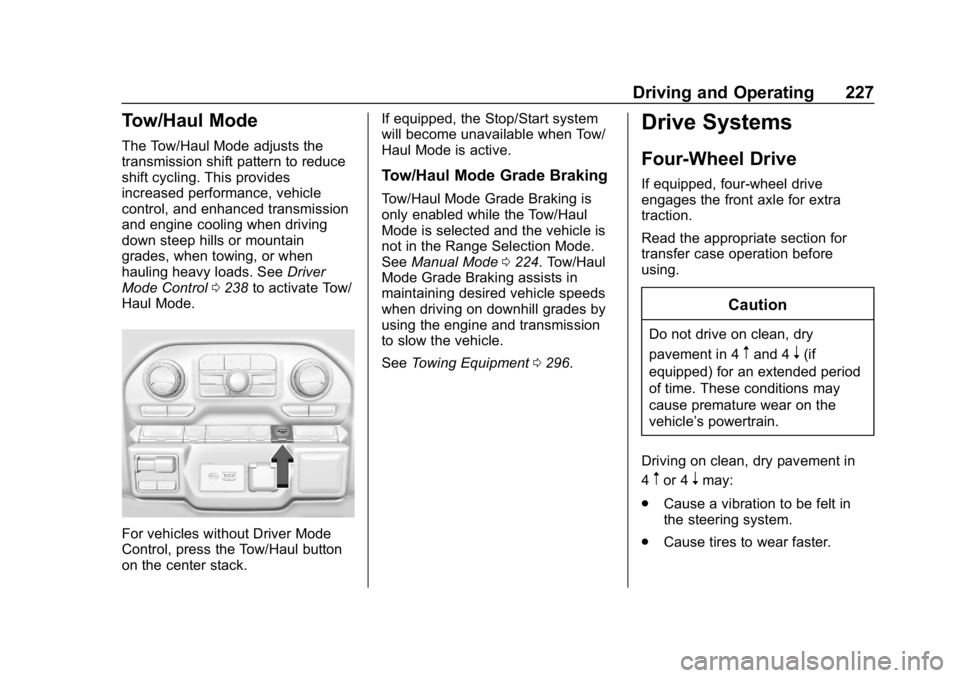
For vehicles without Driver Mode
Control, press the Tow/Haul button
on the center stack. If equipped, the Stop/Start system
will become unavailable when Tow/
Haul Mode is active.
Tow/Haul Mode Grade Braking
Tow/Haul Mode Grade Braking is
only enabled while the Tow/Haul
Mode is selected and the vehicle is
not in the Range Selection Mode.
See
Manual Mode 0224. Tow/Haul
Mode Grade Braking assists in
maintaining desired vehicle speeds
when driving on downhill grades by
using the engine and transmission
to slow the vehicle.
See Towing Equipment 0296.
Drive Systems
Four-Wheel Drive
If equipped, four-wheel drive
engages the front axle for extra
traction.
Read the appropriate section for
transfer case operation before
using.
Caution
Do not drive on clean, dry
pavement in 4
mand 4n(if
equipped) for an extended period
of time. These conditions may
cause premature wear on the
vehicle’s powertrain.
Driving on clean, dry pavement in
4
mor 4nmay:
. Cause a vibration to be felt in
the steering system.
. Cause tires to wear faster.
Page 233 of 501
GMC Sierra/Sierra Denali Owner Manual (GMNA-Localizing-U.S./Canada/
Mexico-13337776) - 2020 - CRC - 8/27/19
232 Driving and Operating
cannot complete a shift request, it
will go back to its last chosen
setting.
The settings are:
2
m(Two-Wheel Drive High) :Use
for driving on most streets and
highways. The front axle is not
engaged. This setting provides the
best fuel economy.
4
m(Four-Wheel Drive High) : Use
this setting when extra traction is
needed, such as when driving on
snowy or icy roads, when
off-roading, or when plowing snow.
AUTO (Automatic Four-Wheel
Drive)
Use when road surface conditions
are variable. When driving in AUTO,
the front axle is engaged, and the
vehicle's power is sent to the front
and rear wheels automatically
based on driving conditions. This
setting provides slightly lower fuel
economy than 2
m. Shifts between 2
m, 4m, and AUTO
Any of these shifts can be made at
normal driving speed.
The actual 4x4 shift request is only
made after the button is released.
The 4x4 graphic will remain flashing
until the shift request has
completed. A DIC message
displays.
Once the 4x4 shift has completed,
the DIC message disappears, the
4x4 graphic stops flashing, and the
current setting is indicated.
The actual 4x4 shift request is only
made after the button is released.
The 4x4 graphic will remain flashing
until the shift request has
completed.
A DIC message displays. Once the
4x4 shift has completed, the DIC
message disappears, the 4x4
graphic stops flashing, and the
current setting is indicated.Brakes
Electric Brake Boost
Vehicles equipped with electric
brake boost have hydraulic brake
circuits that are electronically
controlled when the brake pedal is
applied during normal operation.
The system performs routine tests
and turns off within a few minutes
after the vehicle is shutdown. Noise
may be heard during this time. If the
brake pedal is pressed during the
tests or when the electric brake
boost system is off, a noticeable
change in pedal force and travel
may be felt. This is normal.
Antilock Brake
System (ABS)
The Antilock Brake System (ABS)
helps prevent a braking skid and
maintain steering while
braking hard.
ABS performs a system check when
the vehicle is first driven.
A momentary motor or clicking noise
Page 239 of 501
GMC Sierra/Sierra Denali Owner Manual (GMNA-Localizing-U.S./Canada/
Mexico-13337776) - 2020 - CRC - 8/27/19
238 Driving and Operating
If HDC is to be used for more than
three minutes or on grades steeper
than 25%, the transfer case should
be put into Four-Wheel Drive Low
(4
n) to reduce the possibility of
brake overheating.
Noise from the Electronic Brake
Control Module (EBCM) is normal
when HDC is active.
When HDC is activated, the initial
HDC speed is set to the current
driving speed. It can be increased or
decreased by pressing +RES or
SET- on the steering wheel, or by
applying the accelerator or brake
pedal. This adjusted speed
becomes the new set speed.
HDC will remain enabled between
30 and 60 km/h (19 and 37 mph);
however, vehicle speed cannot be
set or maintained in this range. HDC
will automatically disable if the
vehicle speed is above 80 km/h
(50 mph) or above 60 km/h
(37 mph) for at least 30 seconds.
5must be pressed again to
re-enable HDC. HDC may disable
after an extended period of use. If this happens, HDC will require
time to cool down. The length of
time HDC remains active depends
on road conditions, grade, set
speed, vehicle loading, and outside
temperature.
When enabled, if the vehicle speed
is above 30 km/h (19 mph) and
below 60 km/h (37 mph), a DIC
message will display.
Driver Mode Control
This feature adds a sportier feel,
provides a more comfortable ride,
or assists in different weather
conditions or terrain. Depending on
the option package, available
features, and mode selected; the
suspension, steering, and
powertrain will change settings to
achieve the desired mode
characteristics. If the vehicle is
equipped with magnetic ride control,
selecting the various Driver Modes
enhances the ride performance for
the road conditions and the
selected mode.
Mode availability is dependent upon
vehicle trim level, region, and
optional features.
Not all drive modes are available
on. 1500 series vehicles may have
Normal, Sport, Off Road, Terrain,
and Tow Haul. 2500/3500 series
vehicles may have Normal, Off
Road, and Tow/Haul.
Mode Activation
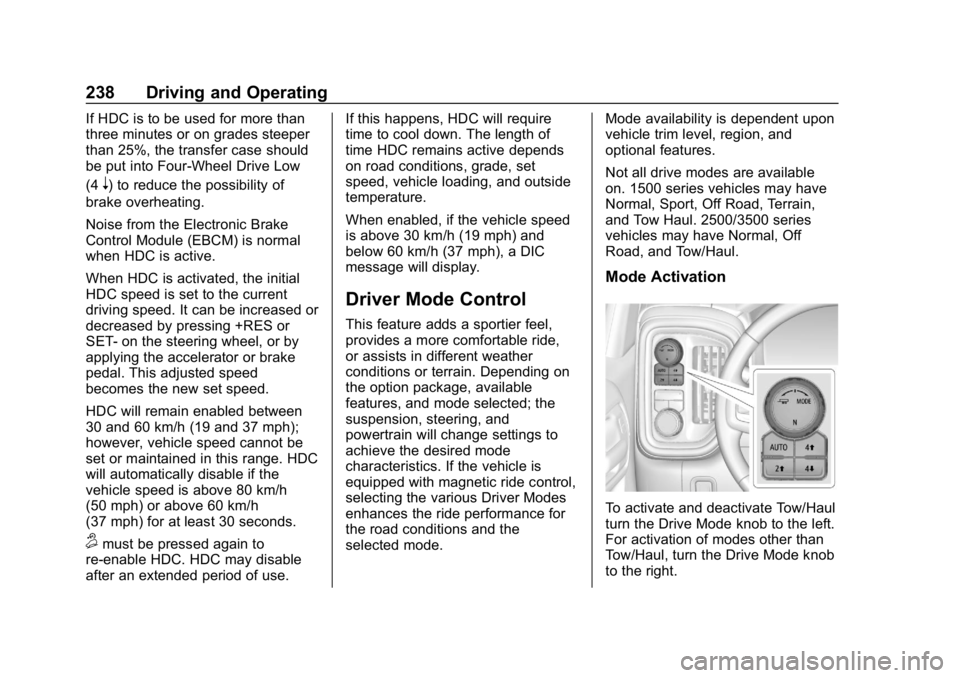
To activate and deactivate Tow/Haul
turn the Drive Mode knob to the left.
For activation of modes other than
Tow/Haul, turn the Drive Mode knob
to the right.
Page 305 of 501
GMC Sierra/Sierra Denali Owner Manual (GMNA-Localizing-U.S./Canada/
Mexico-13337776) - 2020 - CRC - 8/27/19
304 Driving and Operating
lamp circuits on the trailer. DIC
messages and Trailering App alerts
may be displayed if lighting circuit
issues are detected on the trailer.
Pressing START LIGHT TEST in the
Trailering App automatically
activates the trailer lamps. The
Trailering App is not a substitute for
manually inspecting your trailer
lamps. SeeTrailering App 0310.
Turn Signals When Towing a
Trailer
When properly connected, the trailer
turn signals will illuminate to indicate
the vehicle is turning, changing
lanes, or stopping. When towing a
trailer, the arrows on the instrument
cluster will illuminate even if the
trailer is not properly connected or
the bulbs are burned out.
Tow/Haul Mode
For instructions on how to enter
Tow/Haul Mode, see Driver Mode
Control 0238.
Tow/Haul assists when pulling a
heavy trailer or a large or heavy
load. See Tow/Haul Mode 0227. Tow/Haul Mode is designed to be
most effective when the vehicle and
trailer combined weight is at least
75% of the vehicle's Gross
Combined Weight Rating (GCWR).
See
“Trailer Weight ”under Trailer
Towing 0292.
Tow/Haul Mode is most useful when
towing a heavy trailer or carrying a
large or heavy load:
. Through rolling terrain.
. In stop-and-go traffic.
. In busy parking lots.
Operating the vehicle in Tow/Haul
Mode when lightly loaded or not
towing will not cause damage;
however, it is not recommended and
may result in unpleasant engine and
transmission driving characteristics,
heavy or light steering efforts, and
reduced fuel economy.Integrated Trailer Brake
Control System
The vehicle may have an Integrated
Trailer Brake Control (ITBC) system
for use with electric trailer brakes or
most electric over hydraulic trailer brake systems. These instructions
apply to both types of electric trailer
brakes.
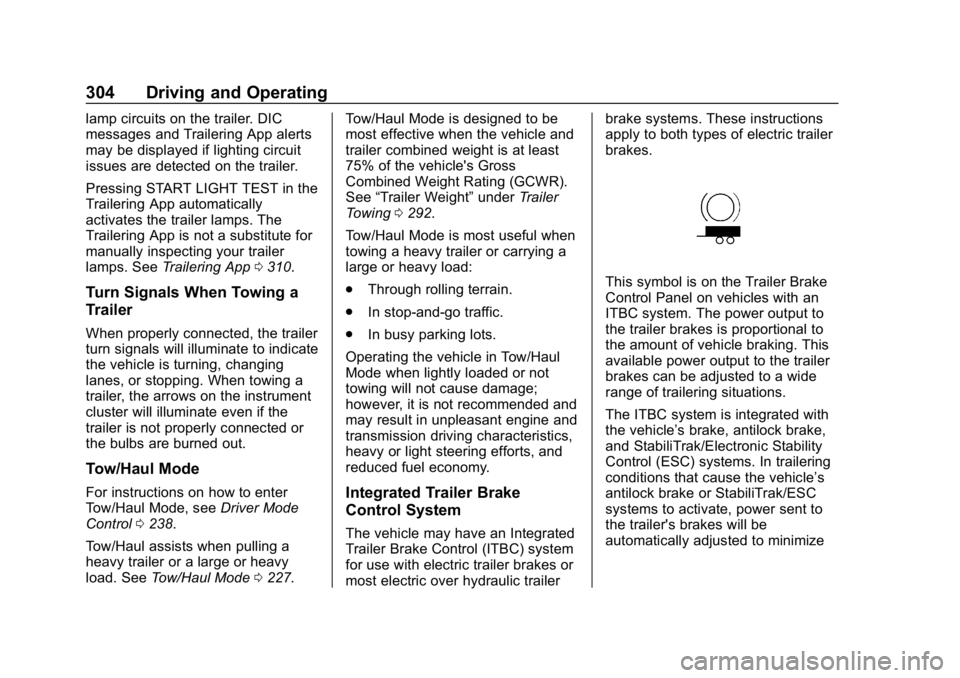
This symbol is on the Trailer Brake
Control Panel on vehicles with an
ITBC system. The power output to
the trailer brakes is proportional to
the amount of vehicle braking. This
available power output to the trailer
brakes can be adjusted to a wide
range of trailering situations.
The ITBC system is integrated with
the vehicle’
s brake, antilock brake,
and StabiliTrak/Electronic Stability
Control (ESC) systems. In trailering
conditions that cause the vehicle’s
antilock brake or StabiliTrak/ESC
systems to activate, power sent to
the trailer's brakes will be
automatically adjusted to minimize
Page 328 of 501
GMC Sierra/Sierra Denali Owner Manual (GMNA-Localizing-U.S./Canada/
Mexico-13337776) - 2020 - CRC - 8/27/19
Vehicle Care 327
Vehicle Care
General Information
General Information . . . . . . . . . . 328
California Proposition65 Warning . . . . . . . . . . . . . . . . . 329
California Perchlorate Materials Requirements . . . . . 329
Accessories and Modifications . . . . . . . . . . . . . . . . 329
Vehicle Checks
Doing Your OwnService Work . . . . . . . . . . . . . . . 330
Hood . . . . . . . . . . . . . . . . . . . . . . . . . 330
Engine Compartment Overview . . . . . . . . . . . . . . . . . . . . 332
Engine Oil . . . . . . . . . . . . . . . . . . . . 339
Engine Oil Life System . . . . . . . 341
Automatic Transmission Fluid . . . . . . . . . . . . . . . . . . . . . . . . 343
Engine Air Filter Life System . . . . . . . . . . . . . . . . . . . . . . 343
Engine Air Cleaner/Filter . . . . . . 344
Cooling System . . . . . . . . . . . . . . 346
Engine Overheating . . . . . . . . . . 351
Overheated Engine Protection Operating Mode . . . . . . . . . . . . . 352
Engine Fan . . . . . . . . . . . . . . . . . . . 353 Power Steering Fluid . . . . . . . . . 354
Washer Fluid . . . . . . . . . . . . . . . . . 354
Brakes . . . . . . . . . . . . . . . . . . . . . . . 355
Brake Pad Life System . . . . . . . 356
Brake Fluid . . . . . . . . . . . . . . . . . . . 357
Battery - North America . . . . . . 358
Four-Wheel Drive . . . . . . . . . . . . . 361
Front Axle . . . . . . . . . . . . . . . . . . . . 361
Rear Axle . . . . . . . . . . . . . . . . . . . . 362
Noise Control System . . . . . . . . 362
Starter Switch Check . . . . . . . . . 363
Automatic Transmission Shift
Lock Control Function
Check . . . . . . . . . . . . . . . . . . . . . . . 363
Ignition Transmission Lock Check . . . . . . . . . . . . . . . . . . . . . . . 363
Park Brake and P (Park) Mechanism Check . . . . . . . . . . 364
Wiper Blade Replacement . . . . 364
Windshield Replacement . . . . . 365
Gas Strut(s) . . . . . . . . . . . . . . . . . . 365
Headlamp Aiming
Front Headlamp Aiming . . . . . . 366
Bulb Replacement
Bulb Replacement . . . . . . . . . . . . 367
Halogen Bulbs . . . . . . . . . . . . . . . . 367
LED Lighting . . . . . . . . . . . . . . . . . 367 Headlamps, Front Turn Signal,
Sidemarker, and Parking
Lamps . . . . . . . . . . . . . . . . . . . . . . 367
Taillamps, Turn Signal, Stoplamps, and Back-Up
Lamps . . . . . . . . . . . . . . . . . . . . . . 368
Center High-Mounted Stoplamp (CHMSL) and
Cargo Lamp . . . . . . . . . . . . . . . . . 369
License Plate Lamp . . . . . . . . . . 369
Electrical System
Electrical System Overload . . . 370
Fuses and Circuit Breakers . . . 370
Engine Compartment Fuse Block . . . . . . . . . . . . . . . . . . . . . . . . 371
Instrument Panel Fuse
Block (Left) . . . . . . . . . . . . . . . . . 374
Instrument Panel Fuse Block (Right) . . . . . . . . . . . . . . . . . . . . . . 376
Wheels and Tires
Tires . . . . . . . . . . . . . . . . . . . . . . . . . . 379
All-Season Tires . . . . . . . . . . . . . . 379
Winter Tires . . . . . . . . . . . . . . . . . . 380
Low-Profile Tires . . . . . . . . . . . . . 380
All-Terrain Tires . . . . . . . . . . . . . . . 381
Tire Sidewall Labeling . . . . . . . . 381
Tire Designations . . . . . . . . . . . . . 383
Tire Terminology andDefinitions . . . . . . . . . . . . . . . . . . 385
Page 340 of 501
GMC Sierra/Sierra Denali Owner Manual (GMNA-Localizing-U.S./Canada/
Mexico-13337776) - 2020 - CRC - 8/27/19
Vehicle Care 339
1. Remote Negative (–) Location.See Jump Starting - North
America 0419.
2. Positive (+) Terminal (Under Cover). See Jump Starting -
North America 0419.
3. Battery - North America 0358.
4. Engine Air Cleaner/Filter 0344.
5. Engine Oil Dipstick. See “Checking Engine Oil” under
Engine Oil 0339.
6. Engine Cooling Fan (Out of View). See Cooling System
0 346.
7. Power Steering Fluid Reservoir. See Power Steering
Fluid 0354.
8. Engine Oil Fill Cap. See “When
to Add Engine Oil” under
Engine Oil 0339.
9. Auxiliary Battery. Battery -
North America 0358.
10. Brake Fluid Reservoir. See Brake Fluid 0357.
11. Engine Compartment Fuse
Block 0371. 12. Coolant Surge Tank and
Pressure Cap. See Cooling
System 0346.
13. Windshield Washer Fluid Reservoir. See “Adding Washer
Fluid” under Washer Fluid
0 354.
If the vehicle has a diesel engine,
see the Duramax diesel
supplement.
Engine Oil
For diesel engine vehicles, see
“Engine Oil” in the Duramax diesel
supplement.
To ensure proper engine
performance and long life, careful
attention must be paid to engine oil.
Following these simple, but
important steps will help protect
your investment:
. Use engine oil approved to the
proper specification and of the
proper viscosity grade. See
“Selecting the Right Engine Oil”
in this section. .
Check the engine oil level
regularly and maintain the
proper oil level. See “Checking
Engine Oil” and“When to Add
Engine Oil” in this section.
. Change the engine oil at the
appropriate time. See Engine Oil
Life System 0341.
. Always dispose of engine oil
properly. See “What to Do with
Used Oil” in this section.Checking Engine Oil
Check the engine oil level regularly,
every 650 km (400 mi), especially
prior to a long trip. The engine oil
dipstick handle is a loop. See
Engine Compartment Overview
0332 for the location.
{Warning
The engine oil dipstick handle
may be hot; it could burn you.
Use a towel or glove to touch the
dipstick handle.