lock GMC SIERRA DENALI 2020 Workshop Manual
[x] Cancel search | Manufacturer: GMC, Model Year: 2020, Model line: SIERRA DENALI, Model: GMC SIERRA DENALI 2020Pages: 501, PDF Size: 7.61 MB
Page 113 of 501
GMC Sierra/Sierra Denali Owner Manual (GMNA-Localizing-U.S./Canada/
Mexico-13337776) - 2020 - CRC - 8/27/19
112 Storage
Storage
Storage Compartments
Storage Compartments . . . . . . . 112
Glove Box . . . . . . . . . . . . . . . . . . . . 112
Cupholders . . . . . . . . . . . . . . . . . . . 112
Underseat Storage . . . . . . . . . . . 113
Rear Storage . . . . . . . . . . . . . . . . . 113
Center Console Storage . . . . . . 113
Floor Console Storage . . . . . . . . 114
Additional Storage Features
Cargo Tie-Downs . . . . . . . . . . . . . 115
Storage
Compartments
{Warning
Do not store heavy or sharp
objects in storage compartments.
In a crash, these objects may
cause the cover to open and
could result in injury.
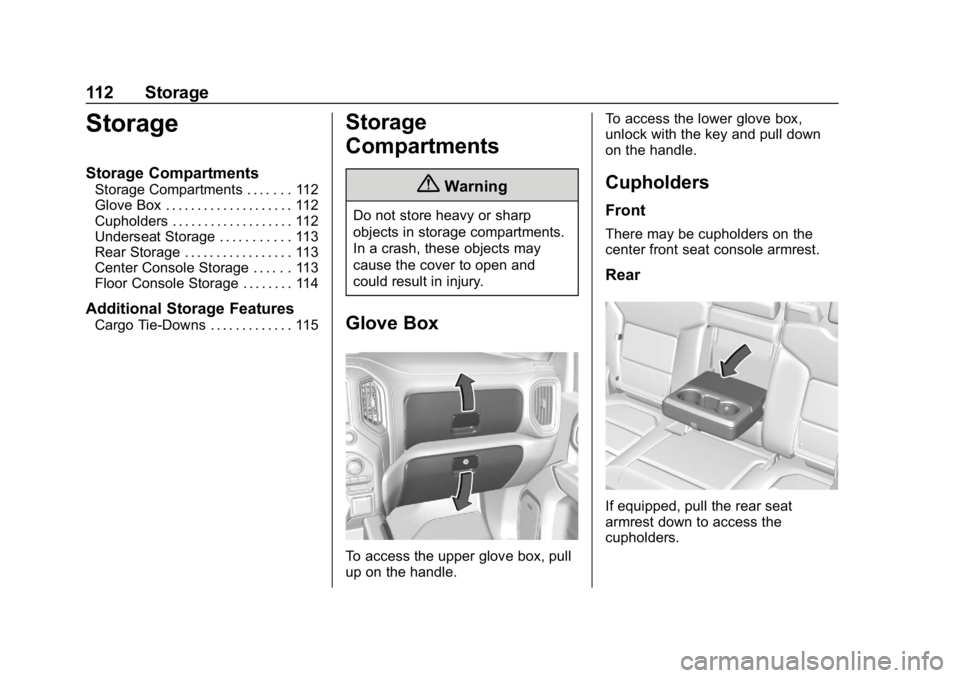
Glove Box
To access the upper glove box, pull
up on the handle.To access the lower glove box,
unlock with the key and pull down
on the handle.
Cupholders
Front
There may be cupholders on the
center front seat console armrest.
Rear
If equipped, pull the rear seat
armrest down to access the
cupholders.
Page 114 of 501
GMC Sierra/Sierra Denali Owner Manual (GMNA-Localizing-U.S./Canada/
Mexico-13337776) - 2020 - CRC - 8/27/19
Storage 113
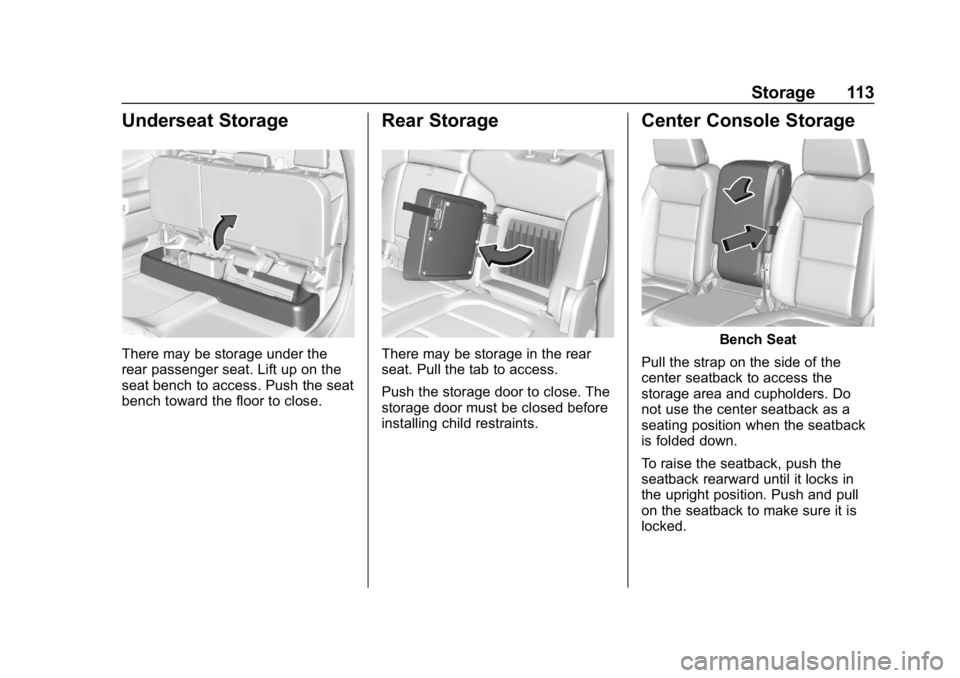
Underseat Storage
There may be storage under the
rear passenger seat. Lift up on the
seat bench to access. Push the seat
bench toward the floor to close.
Rear Storage
There may be storage in the rear
seat. Pull the tab to access.
Push the storage door to close. The
storage door must be closed before
installing child restraints.
Center Console Storage
Bench Seat
Pull the strap on the side of the
center seatback to access the
storage area and cupholders. Do
not use the center seatback as a
seating position when the seatback
is folded down.
To raise the seatback, push the
seatback rearward until it locks in
the upright position. Push and pull
on the seatback to make sure it is
locked.
Page 115 of 501
GMC Sierra/Sierra Denali Owner Manual (GMNA-Localizing-U.S./Canada/
Mexico-13337776) - 2020 - CRC - 8/27/19
114 Storage
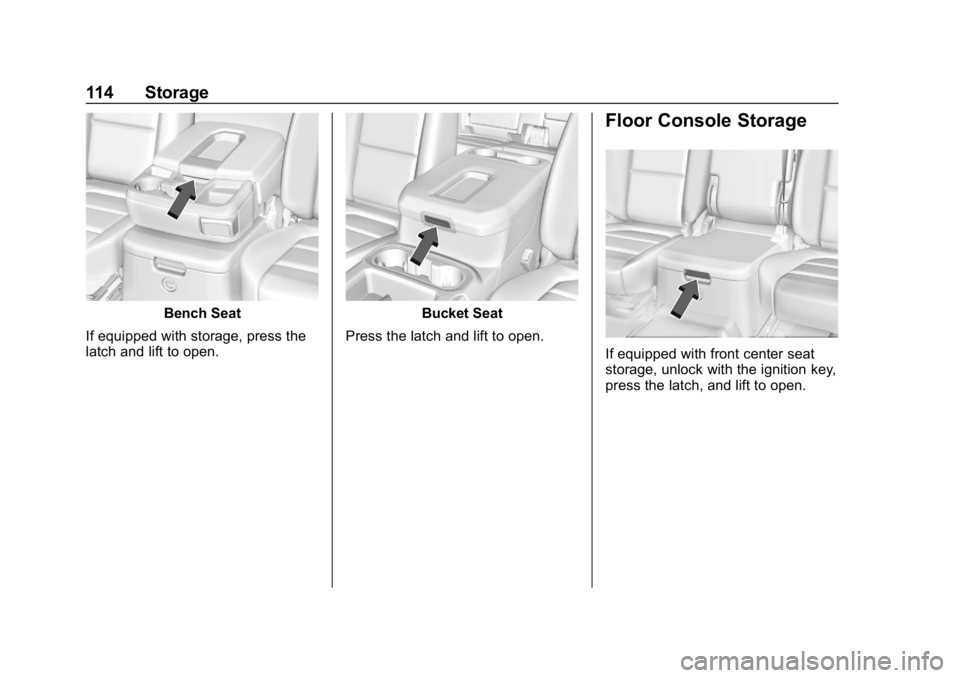
Bench Seat
If equipped with storage, press the
latch and lift to open.Bucket Seat
Press the latch and lift to open.
Floor Console Storage
If equipped with front center seat
storage, unlock with the ignition key,
press the latch, and lift to open.
Page 117 of 501
GMC Sierra/Sierra Denali Owner Manual (GMNA-Localizing-U.S./Canada/
Mexico-13337776) - 2020 - CRC - 8/27/19
116 Storage
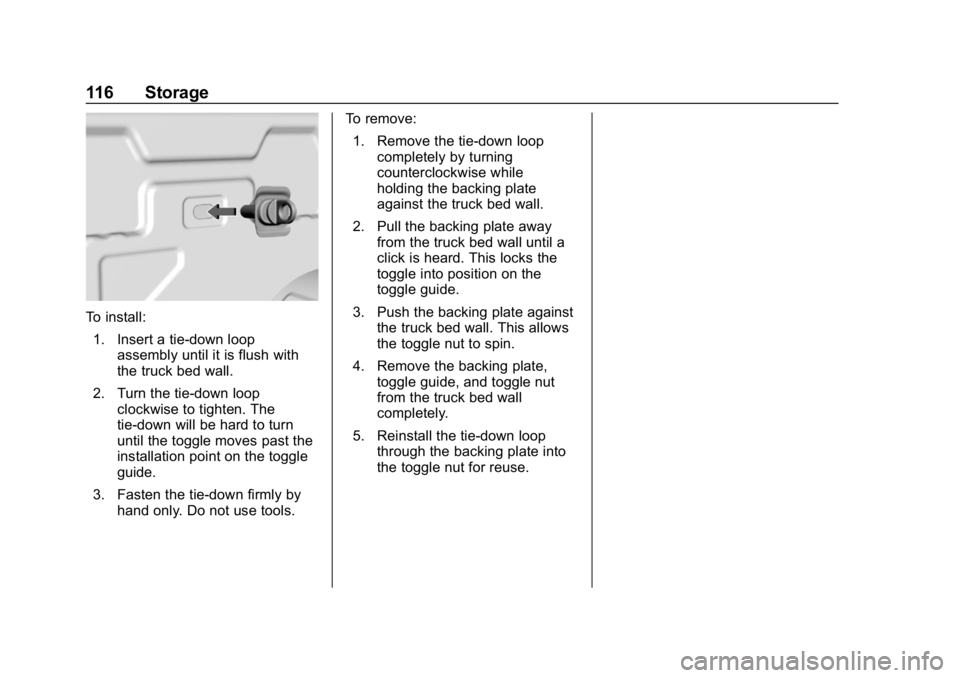
To install:1. Insert a tie-down loop assembly until it is flush with
the truck bed wall.
2. Turn the tie-down loop clockwise to tighten. The
tie-down will be hard to turn
until the toggle moves past the
installation point on the toggle
guide.
3. Fasten the tie-down firmly by hand only. Do not use tools. To remove:
1. Remove the tie-down loop completely by turning
counterclockwise while
holding the backing plate
against the truck bed wall.
2. Pull the backing plate away from the truck bed wall until a
click is heard. This locks the
toggle into position on the
toggle guide.
3. Push the backing plate against the truck bed wall. This allows
the toggle nut to spin.
4. Remove the backing plate, toggle guide, and toggle nut
from the truck bed wall
completely.
5. Reinstall the tie-down loop through the backing plate into
the toggle nut for reuse.
Page 118 of 501
GMC Sierra/Sierra Denali Owner Manual (GMNA-Localizing-U.S./Canada/
Mexico-13337776) - 2020 - CRC - 8/27/19
Instruments and Controls 117
Instruments and
Controls
Controls
Steering Wheel Adjustment . . . 118
Steering Wheel Controls . . . . . . 119
Heated Steering Wheel . . . . . . . 119
Horn . . . . . . . . . . . . . . . . . . . . . . . . . . 119
Windshield Wiper/Washer . . . . 119
Compass . . . . . . . . . . . . . . . . . . . . . 120
Clock . . . . . . . . . . . . . . . . . . . . . . . . . 120
Power Outlets . . . . . . . . . . . . . . . . 121
Wireless Charging . . . . . . . . . . . . 122
Warning Lights, Gauges, and
Indicators
Warning Lights, Gauges, andIndicators . . . . . . . . . . . . . . . . . . . 125
Instrument Cluster . . . . . . . . . . . . 126
Speedometer . . . . . . . . . . . . . . . . . 130
Odometer . . . . . . . . . . . . . . . . . . . . . 131
Trip Odometer . . . . . . . . . . . . . . . . 131
Tachometer . . . . . . . . . . . . . . . . . . . 131
Fuel Gauge . . . . . . . . . . . . . . . . . . . 131
Engine Oil Pressure Gauge . . . . . . . . . . . . . . . . . . . . . . 132
Engine Coolant Temperature Gauge . . . . . . . . . . . . . . . . . . . . . . 133 Voltmeter Gauge . . . . . . . . . . . . . 134
Seat Belt Reminders . . . . . . . . . 135
Airbag Readiness Light . . . . . . . 135
Passenger Airbag Status
Indicator . . . . . . . . . . . . . . . . . . . . 136
Charging System Light . . . . . . . 137
Malfunction Indicator Lamp (Check Engine Light) . . . . . . . . 137
Brake System Warning Light . . . . . . . . . . . . . . . . . . . . . . . . 139
Electric Parking Brake Light . . . . . . . . . . . . . . . . . . . . . . . . 140
Service Electric Parking Brake Light . . . . . . . . . . . . . . . . . . . . . . . . 140
Antilock Brake System (ABS) Warning Light . . . . . . . . . . . . . . . 140
Four-Wheel-Drive Light . . . . . . . 141
Tow/Haul Mode Light . . . . . . . . . 141
Hill Descent Control Light . . . . 141
Lane Departure Warning (LDW) Light (2500/3500
Series) . . . . . . . . . . . . . . . . . . . . . . 141
Lane Keep Assist (LKA) Light (1500 Series) . . . . . . . . . . . . . . . 142
Vehicle Ahead Indicator . . . . . . 142
Pedestrian Ahead Indicator . . . 142
Traction Off Light . . . . . . . . . . . . . 142
Traction Control System (TCS)/ Electronic Stability Control
Light . . . . . . . . . . . . . . . . . . . . . . . . 143 Electronic Stability Control
(ESC) Off Light . . . . . . . . . . . . . . 143
Engine Coolant Temperature Warning Light . . . . . . . . . . . . . . . 144
Driver Mode Control Light . . . . 144
Tire Pressure Light . . . . . . . . . . . 144
Engine Oil Pressure Light
(Uplevel Cluster) . . . . . . . . . . . . 145
Low Fuel Warning Light . . . . . . 145
Security Light . . . . . . . . . . . . . . . . . 146
High-Beam On Light . . . . . . . . . . 146
Front Fog Lamp Light . . . . . . . . . 146
Lamps On Reminder . . . . . . . . . 146
Cruise Control Light . . . . . . . . . . 146
Door Ajar Light . . . . . . . . . . . . . . . 147
Information Displays
Driver Information Center (DIC) (Base Level) . . . . . . . . . . . . . . . . 147
Driver Information Center (DIC) (Midlevel and Uplevel) . . . . . . 148
Head-Up Display (HUD) . . . . . . 152
Vehicle Messages
Vehicle Messages . . . . . . . . . . . . 155
Engine Power Messages . . . . . 155
Vehicle Speed Messages . . . . . 156
Vehicle Personalization
Vehicle Personalization . . . . . . . 156
Page 119 of 501
GMC Sierra/Sierra Denali Owner Manual (GMNA-Localizing-U.S./Canada/
Mexico-13337776) - 2020 - CRC - 8/27/19
118 Instruments and Controls
Universal Remote System
Universal Remote System . . . . 161
Universal Remote SystemProgramming . . . . . . . . . . . . . . . 161
Universal Remote System Operation . . . . . . . . . . . . . . . . . . . 164Controls
Steering Wheel
Adjustment
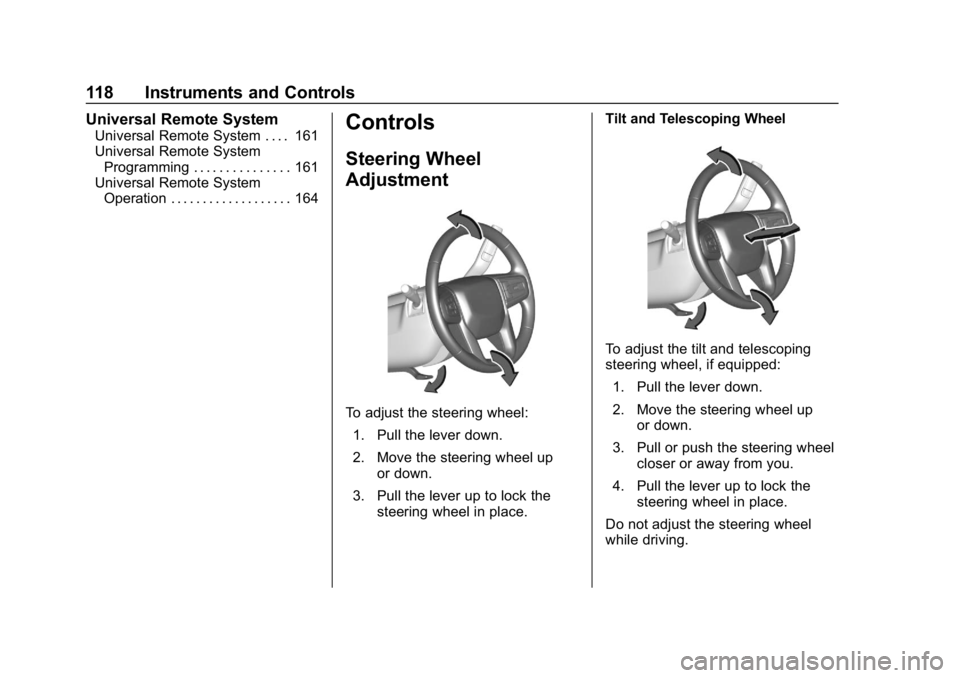
To adjust the steering wheel:
1. Pull the lever down.
2. Move the steering wheel up or down.
3. Pull the lever up to lock the steering wheel in place. Tilt and Telescoping Wheel
To adjust the tilt and telescoping
steering wheel, if equipped:
1. Pull the lever down.
2. Move the steering wheel up or down.
3. Pull or push the steering wheel closer or away from you.
4. Pull the lever up to lock the steering wheel in place.
Do not adjust the steering wheel
while driving.
Page 121 of 501
GMC Sierra/Sierra Denali Owner Manual (GMNA-Localizing-U.S./Canada/
Mexico-13337776) - 2020 - CRC - 8/27/19
120 Instruments and Controls
depending on how long the
windshield washer had been
activated. SeeWasher Fluid0354
for information on filling the
windshield washer fluid reservoir.
Clear snow and ice from the wiper
blades before using them. If frozen
to the windshield, carefully loosen or
thaw them. Damaged blades should
be replaced. See Wiper Blade
Replacement 0364.
Heavy snow or ice can overload the
wiper motor.
{Warning
In freezing weather, do not use
the washer until the windshield is
warmed. Otherwise the washer
fluid can form ice on the
windshield, blocking your vision.
{Warning
Before driving the vehicle, always
clear snow and ice from the hood,
windshield, roof, and rear of the
vehicle, including all lamps and
windows. Reduced visibility from
snow and ice buildup could lead
to a crash.
Wipe Parking
If the ignition is turned off while the
wipers are on LO, HI, or
3, they
will immediately stop.
If the windshield wiper control is ON
then moved to OFF before the driver
door is opened or within 10 minutes,
the wipers will restart and move to
the base of the windshield.
If the ignition is turned off while the
wipers are performing wipes due to
windshield washing, the wipers
continue to run until they reach the
base of the windshield.
Compass
The vehicle may have a compass
display on the Driver Information
Center (DIC). The compass receives
its heading and other information
from the Global Positioning
System (GPS) antenna, Electronic
Stability Control (ESC), and vehicle
speed information.
The compass system is designed to
operate for a certain number of
miles or degrees of turn before
needing a signal from the GPS
satellites. When the compass
display shows CAL, drive the
vehicle for a short distance in an
open area where it can receive a
GPS signal. The compass system
will automatically determine when a
GPS signal is restored and provide
a heading again.
Clock
The time and date for the clock can
be set using the infotainment
system. See “Time/Date”in
“System” under“Settings” in the
infotainment manual.
Page 141 of 501
GMC Sierra/Sierra Denali Owner Manual (GMNA-Localizing-U.S./Canada/
Mexico-13337776) - 2020 - CRC - 8/27/19
140 Instruments and Controls
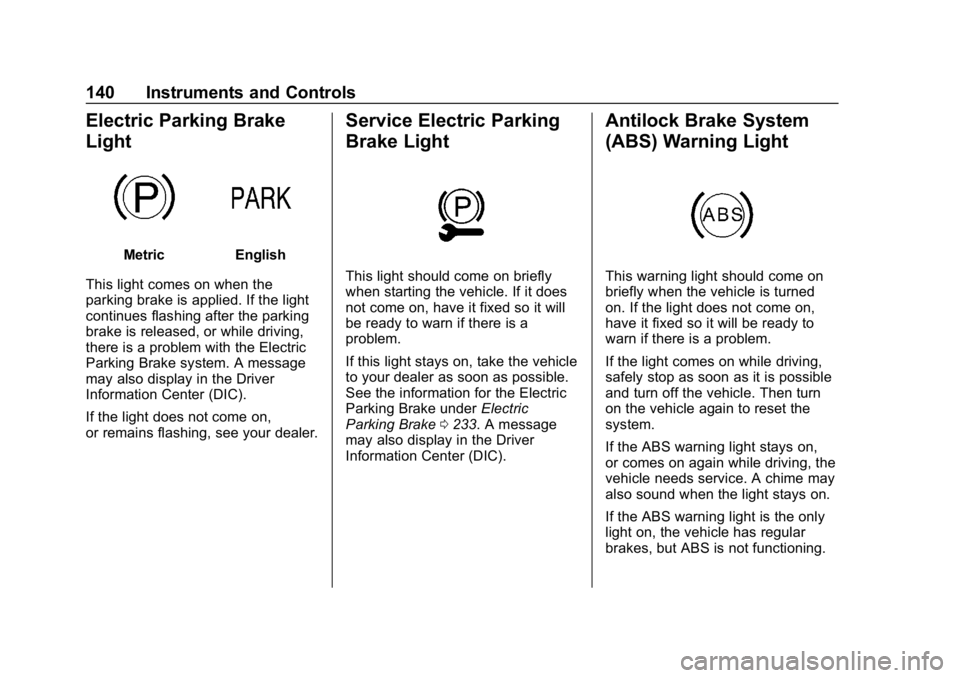
Electric Parking Brake
Light
MetricEnglish
This light comes on when the
parking brake is applied. If the light
continues flashing after the parking
brake is released, or while driving,
there is a problem with the Electric
Parking Brake system. A message
may also display in the Driver
Information Center (DIC).
If the light does not come on,
or remains flashing, see your dealer.
Service Electric Parking
Brake Light
This light should come on briefly
when starting the vehicle. If it does
not come on, have it fixed so it will
be ready to warn if there is a
problem.
If this light stays on, take the vehicle
to your dealer as soon as possible.
See the information for the Electric
Parking Brake under Electric
Parking Brake 0233. A message
may also display in the Driver
Information Center (DIC).
Antilock Brake System
(ABS) Warning Light
This warning light should come on
briefly when the vehicle is turned
on. If the light does not come on,
have it fixed so it will be ready to
warn if there is a problem.
If the light comes on while driving,
safely stop as soon as it is possible
and turn off the vehicle. Then turn
on the vehicle again to reset the
system.
If the ABS warning light stays on,
or comes on again while driving, the
vehicle needs service. A chime may
also sound when the light stays on.
If the ABS warning light is the only
light on, the vehicle has regular
brakes, but ABS is not functioning.
Page 159 of 501
GMC Sierra/Sierra Denali Owner Manual (GMNA-Localizing-U.S./Canada/
Mexico-13337776) - 2020 - CRC - 8/27/19
158 Instruments and Controls
Rear Cross Traffic Alert
This allows the Rear Cross Traffic
Alert feature to be turned on or off.
SeeAssistance Systems for Parking
or Backing 0257.
Touch Off or On.
Comfort and Convenience
Touch and the following may
display:
. Chime Volume
. Reverse Tilt Mirror
. Remote Mirror Folding
Chime Volume
This determines the chime volume
level.
Touch the controls on the
infotainment display to adjust the
volume.
Reverse Tilt Mirror
This allows the feature to be turned
on or off. See Reverse Tilt Mirrors
0 44. Touch Off, On - Driver and
Passenger, On - Driver, or On -
Passenger.
Remote Mirror Folding
When on, the outside mirrors will
remotely fold or unfold when the
Remote Keyless Entry (RKE)
transmitterQorKbutton is
pressed and held. See Folding
Mirrors 042.
Touch Off or On.
Lighting
Touch and the following may
display:
. Vehicle Locator Lights
. Exit Lighting
Vehicle Locator Lights
This setting flashes the vehicle’ s
headlamps when
Kis pressed on
the Remote Keyless Entry (RKE)
transmitter.
Touch Off or On. Exit Lighting
This setting specifies how long the
headlamps stay on after the vehicle
is turned off and exited.
Touch Off, 30 Seconds, 60 Seconds,
or 120 Seconds.
Power Door Locks
Touch and the following may
display:
.
Open Door Anti Lock Out
. Auto Door Unlock
. Delayed Door Lock
Open Door Anti Lock Out
This setting prevents the driver door
from locking when the door is open.
If this setting is on, the Delayed
Door Lock menu will not be
available.
Touch Off or On.
Auto Door Unlock
This setting allows selection of
which doors will automatically
unlock when the vehicle is shifted
into P (Park).
Page 160 of 501
GMC Sierra/Sierra Denali Owner Manual (GMNA-Localizing-U.S./Canada/
Mexico-13337776) - 2020 - CRC - 8/27/19
Instruments and Controls 159
Touch Off, All Doors, or Driver Door.
Delayed Door Lock
This setting delays the locking of
the vehicle’s doors.
Touch Off or On.
Remote Lock, Unlock, Start
Touch and the following may
display:
. Remote Unlock Light Feedback
. Remote Lock Feedback
. Remote Door Unlock
. Remote Start Auto Cool Seats
. Remote Start Auto Heat Seats
. Remote Window Operation
. Passive Door Unlock
. Passive Door Lock
. Remote Left in Vehicle Alert
Remote Unlock Light Feedback
This setting flashes the exterior
lamps when the vehicle is unlocked
with the RKE transmitter.
Touch Off or Flash Lights. Remote Lock Feedback
This setting specifies how the
vehicle responds when the vehicle
is locked with the RKE transmitter.
Touch Off, Lights and Horn, Lights
Only, or Horn Only.
Remote Door Unlock
This setting specifies whether all
doors, or just the driver door, unlock
when pressing
Kon the RKE
transmitter.
Touch All Doors or Driver Door.
Remote Start Auto Cool Seats
If equipped and turned on, this
feature will turn on the ventilated
seats when using remote start on
warm days. See Heated and
Ventilated Front Seats 060 and
Remote Vehicle Start 025.
Touch Off or On.
Remote Start Auto Heat Seats
If equipped and turned on, this
feature will turn on the heated seats
when using remote start on cold days. See
Heated and
Ventilated Front Seats 060 and
Remote Vehicle Start 025.
If equipped with Auto Heated
Steering Wheel, this feature will turn
on when the Remote Start Auto
Heated Seats turn on.
Touch Off or On.
Remote Window Operation
If equipped, this feature enables
remote operation of the windows
with the RKE transmitter. See
Remote Keyless Entry (RKE)
System Operation (Key Access)
0 13 or
Remote Keyless Entry (RKE)
System Operation (Keyless Access)
0 16.
Touch Off or On.
Passive Door Unlock
This allows the selection of what
doors will unlock when using the
button on the driver door to unlock
the vehicle.
Touch Off, All Doors, or Driver
Door Only.