warning GMC SIERRA DENALI 2024 Owners Manual
[x] Cancel search | Manufacturer: GMC, Model Year: 2024, Model line: SIERRA DENALI, Model: GMC SIERRA DENALI 2024Pages: 440, PDF Size: 9.21 MB
Page 378 of 440
GMC Sierra/Sierra Denali 2500 HD/3500 HD Owner Manual (GMNA-
Localizing-U.S./Canada-16908340) - 2024 - CRC - 12/7/22
376 Vehicle Care
Caution
If the vehicle has four-wheel drive and a
different size spare tire is installed, do
not drive in four-wheel drive until the flat
tire is repaired and/or replaced. The
vehicle could be damaged and the repairs
would not be covered by the warranty.
Never use four-wheel drive when a
different size spare tire is installed on the
vehicle.
The vehicle may have a different size spare
tire than the road tires originally installed
on the vehicle. This spare tire was developed
for use on this vehicle, so it is all right to
drive on it. If the vehicle has four-wheel
drive and a different size spare tire is
installed, drive only in two-wheel drive.
If the vehicle has a spare tire that does not
match the vehicle’s original road tires and
wheels, in size and type, do not include the
spare in the tire rotation.
Jump Starting
Jump Starting - North America
For more information about the vehicle
battery, see Battery - North America 0327.
If the vehicle's battery (or batteries) has run
down, you may want to use another vehicle
and some jumper cables to start your
vehicle. Be sure to use the following steps
to do it safely.
{Warning
WARNING: Battery posts, terminals and
related accessories can expose you to
chemicals including lead and lead
compounds, which are known to the
State of California to cause cancer and
birth defects or other reproductive harm.
Wash hands after handling. For more
information go to
www.P65Warnings.ca.gov.
See California Proposition 65 Warning 01.
{Warning
Batteries can hurt you. They can be
dangerous because:
.They contain acid that can burn you.
.They contain gas that can explode or
ignite.
.They contain enough electricity to
burn you.
If you do not follow these steps exactly,
some or all of these things can hurt you.
Caution
Ignoring these steps could result in costly
damage to the vehicle that would not be
covered by the vehicle warranty. Trying
to start the vehicle by pushing or pulling
it will not work, and it could damage the
vehicle.
Caution
If the jumper cables are connected or
removed in the wrong order, electrical
shorting may occur and damage the
vehicle. The repairs would not be covered
(Continued)
Page 380 of 440
GMC Sierra/Sierra Denali 2500 HD/3500 HD Owner Manual (GMNA-
Localizing-U.S./Canada-16908340) - 2024 - CRC - 12/7/22
378 Vehicle Care
Caution (Continued)
warranty. Whenever possible, turn off or
unplug all accessories on either vehicle
when jump starting.
4. Turn the ignition off on both vehicles. Unplug unnecessary accessories plugged
into the accessory power outlets. Turn
off the radio and all the lamps that are
not needed. This will avoid sparks and
help save both batteries. And it could
save the radio!
5. Open the hood on the other vehicle and locate the positive (+) and negative (−)
terminal locations on that vehicle.
{Warning
An electric fan can start up even when
the engine is not running and can injure
you. Keep hands, clothing, and tools
away from any underhood electric fan.
{Warning
Using a match near a battery can cause
battery gas to explode. People have been
hurt doing this, and some have been
blinded. Use a flashlight if you need
more light.
Battery fluid contains acid that can burn
you. Do not get it on you. If you
accidentally get it in your eyes or on
your skin, flush the place with water and
get medical help immediately.
{Warning
Fans or other moving engine parts can
injure you badly. Keep your hands away
from moving parts once the engine is
running.
6. Check that the jumper cables do not have loose or missing insulation. If they
do, you could get a shock. The vehicles
could be damaged too.
Before you connect the cables, here are
some basic things you should know.
Positive (+) will go to positive (+) or to a
remote positive (+) terminal if the vehicle has one. Negative (–) will go to a
heavy, unpainted metal engine part or to
a remote negative (–) terminal if the
vehicle has one.
Do not connect positive (+) to negative
(–) or you will get a short that would
damage the battery and maybe other
parts too. And do not connect the
negative (–) cable to the negative (–)
terminal on the dead battery because
this can cause sparks.
7. Connect one end of the red positive (+) cable to the discharged battery
positive (+) terminal.
8. Do not let the other end touch metal. Connect it to the good battery
positive (+) terminal. Use a remote
positive (+) terminal if the vehicle
has one.
9. Connect one end of the black negative (–) cable to the good battery negative
(–) terminal. Use a remote negative (–)
terminal if the vehicle has one.
Do not let the other end touch anything
until the next step.
10. Connect the other end of the negative (–) cable to the discharged battery
negative (–) grounding point.
Page 383 of 440
GMC Sierra/Sierra Denali 2500 HD/3500 HD Owner Manual (GMNA-
Localizing-U.S./Canada-16908340) - 2024 - CRC - 12/7/22
Vehicle Care 381
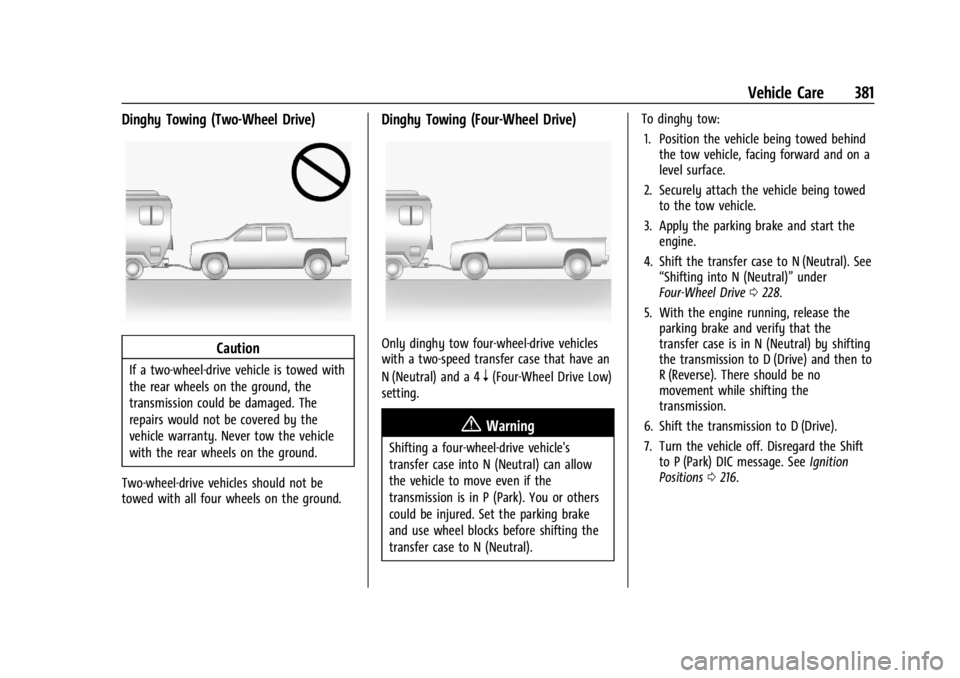
Dinghy Towing (Two-Wheel Drive)
Caution
If a two-wheel-drive vehicle is towed with
the rear wheels on the ground, the
transmission could be damaged. The
repairs would not be covered by the
vehicle warranty. Never tow the vehicle
with the rear wheels on the ground.
Two-wheel-drive vehicles should not be
towed with all four wheels on the ground.
Dinghy Towing (Four-Wheel Drive)
Only dinghy tow four-wheel-drive vehicles
with a two-speed transfer case that have an
N (Neutral) and a 4
n(Four-Wheel Drive Low)
setting.
{Warning
Shifting a four-wheel-drive vehicle's
transfer case into N (Neutral) can allow
the vehicle to move even if the
transmission is in P (Park). You or others
could be injured. Set the parking brake
and use wheel blocks before shifting the
transfer case to N (Neutral). To dinghy tow:
1. Position the vehicle being towed behind the tow vehicle, facing forward and on a
level surface.
2. Securely attach the vehicle being towed to the tow vehicle.
3. Apply the parking brake and start the engine.
4. Shift the transfer case to N (Neutral). See “Shifting into N (Neutral)” under
Four-Wheel Drive 0228.
5. With the engine running, release the parking brake and verify that the
transfer case is in N (Neutral) by shifting
the transmission to D (Drive) and then to
R (Reverse). There should be no
movement while shifting the
transmission.
6. Shift the transmission to D (Drive).
7. Turn the vehicle off. Disregard the Shift to P (Park) DIC message. See Ignition
Positions 0216.
Page 384 of 440
GMC Sierra/Sierra Denali 2500 HD/3500 HD Owner Manual (GMNA-
Localizing-U.S./Canada-16908340) - 2024 - CRC - 12/7/22
382 Vehicle Care
{Warning
To avoid death, serious injury,
or property damage, before dinghy
towing the vehicle, always disconnect and
secure the negative battery cable and
cover the negative battery post and cable
with a non-conductive material. If the
battery is left connected or the battery
cable contacts the post, the Electric
Parking Brake may activate during
towing, which could cause a crash.
8. Disconnect the negative (–) battery cable. See “Negative Battery Cable
Disconnection” inBattery - North
America 0327.
9. Shift the transmission to P (Park).
Caution
If the steering column is locked, vehicle
damage may occur.
10. Move the steering wheel to make sure the steering column is unlocked.
11. Keep the remote key outside of the vehicle and manually lock the doors.
Access the vehicle by using the key in
the door lock. See Door Locks022. Disconnecting the Towed Vehicle
Before disconnecting from the tow vehicle:
1. Park on a level surface. Secure the vehicle with wheel blocks.
2. Reconnect the negative (–) battery. See Battery - North America 0327.
3. Turn on the vehicle. With your foot off the brake pedal, press and hold ENGINE
START/STOP for five seconds until the
green light comes on in the button. See
Ignition Positions 0216.
4. Set the parking brake. See Electric
Parking Brake 0234.
5. Disconnect from the tow vehicle.
6. Shift the transmission to N (Neutral).
7. Shift the transfer case to 2
m(Two-Wheel
Drive High). When the shift to 2
m
(Two-Wheel Drive High) is complete, the
light in the instrument cluster will stop
flashing and stay lit. See
Four-Wheel-Drive Light 0125.
8. Start the engine. Check that the vehicle is in 2
m(Two-Wheel Drive High) by
starting the engine and shifting the
transmission to D (Drive) and then to
R (Reverse). There should be movement
of the vehicle while shifting. 9. Shift the transmission to P (Park) and
turn off the vehicle.
10. Release the parking brake and remove the wheel blocks.
11. Reset any lost presets.
The outside temperature display will
default to 0 °C (32 °F) but will reset with
normal usage.
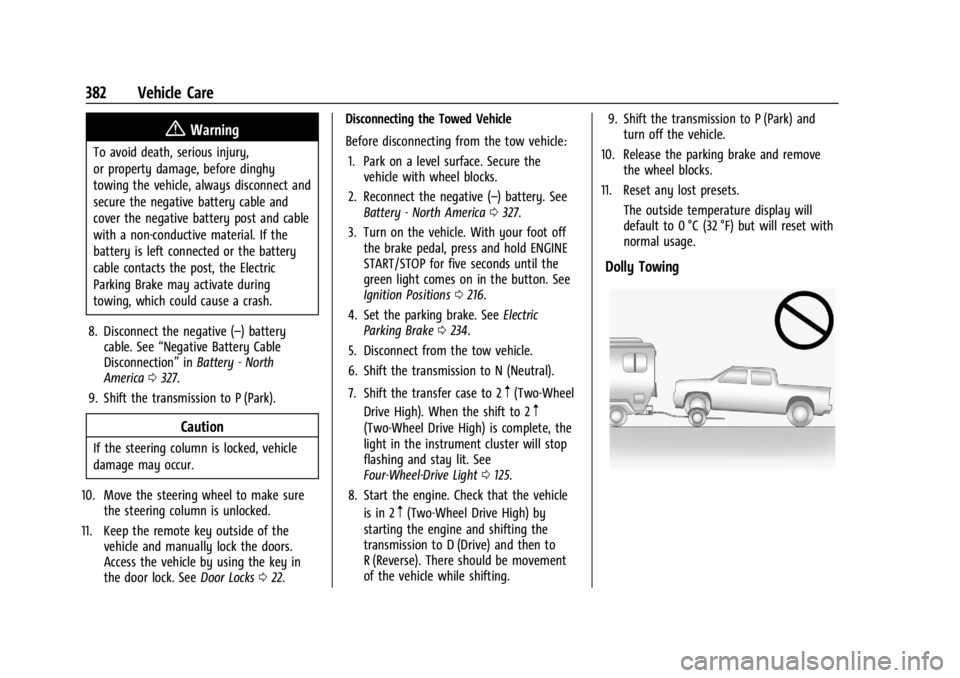
Dolly Towing
Page 385 of 440
GMC Sierra/Sierra Denali 2500 HD/3500 HD Owner Manual (GMNA-
Localizing-U.S./Canada-16908340) - 2024 - CRC - 12/7/22
Vehicle Care 383
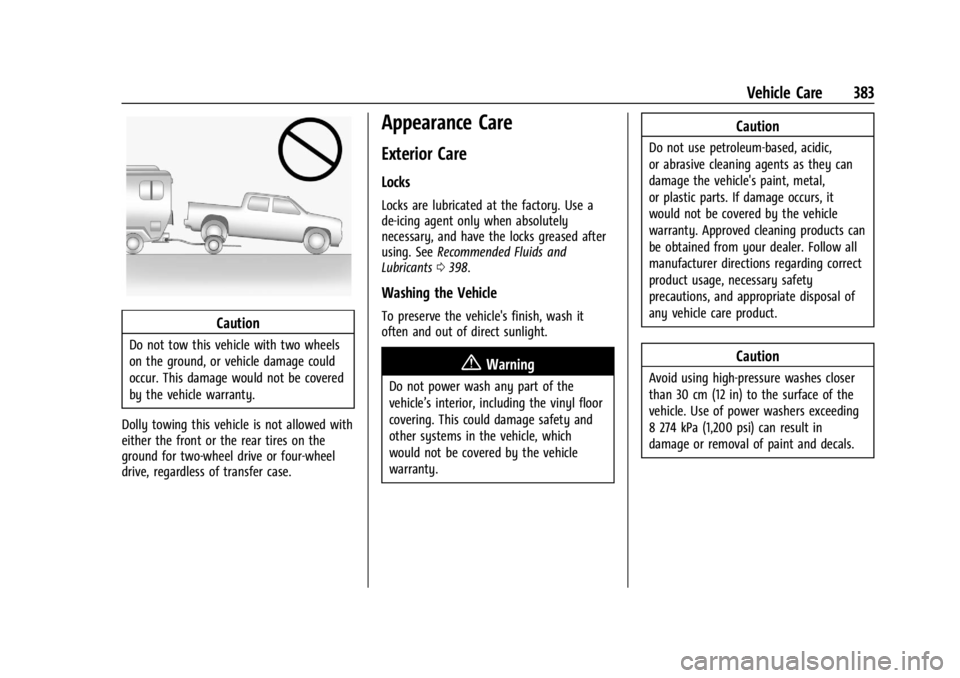
Caution
Do not tow this vehicle with two wheels
on the ground, or vehicle damage could
occur. This damage would not be covered
by the vehicle warranty.
Dolly towing this vehicle is not allowed with
either the front or the rear tires on the
ground for two-wheel drive or four-wheel
drive, regardless of transfer case.
Appearance Care
Exterior Care
Locks
Locks are lubricated at the factory. Use a
de-icing agent only when absolutely
necessary, and have the locks greased after
using. See Recommended Fluids and
Lubricants 0398.
Washing the Vehicle
To preserve the vehicle's finish, wash it
often and out of direct sunlight.
{Warning
Do not power wash any part of the
vehicle’s interior, including the vinyl floor
covering. This could damage safety and
other systems in the vehicle, which
would not be covered by the vehicle
warranty.
Caution
Do not use petroleum-based, acidic,
or abrasive cleaning agents as they can
damage the vehicle's paint, metal,
or plastic parts. If damage occurs, it
would not be covered by the vehicle
warranty. Approved cleaning products can
be obtained from your dealer. Follow all
manufacturer directions regarding correct
product usage, necessary safety
precautions, and appropriate disposal of
any vehicle care product.
Caution
Avoid using high-pressure washes closer
than 30 cm (12 in) to the surface of the
vehicle. Use of power washers exceeding
8 274 kPa (1,200 psi) can result in
damage or removal of paint and decals.
Page 392 of 440
GMC Sierra/Sierra Denali 2500 HD/3500 HD Owner Manual (GMNA-
Localizing-U.S./Canada-16908340) - 2024 - CRC - 12/7/22
390 Vehicle Care
Vinyl/Rubber
If equipped with vinyl floor and rubber floor
mats, use a soft cloth and/or brush
dampened with water to remove dust and
loose dirt. For more thorough cleaning, use
a mild soap and water solution.
{Warning
Do not use cleaners that contain silicone,
wax-based products, or cleaners that
increase gloss on vinyl/rubber floor and
mats. These cleaners can permanently
change the appearance and feel of the
vinyl/rubber and can make the floor
slippery. Your foot could slip while
operating the vehicle, and you could lose
control, resulting in a crash. You or
others could be injured.
Fabric/Carpet/Suede
Start by vacuuming the surface using a soft
brush attachment. If a rotating vacuum
brush attachment is being used, only use it
on the floor carpet. Before cleaning, gently
remove as much of the soil as possible:
.Gently blot liquids with a paper towel.
Continue blotting until no more soil can
be removed.
.For solid soils, remove as much as
possible prior to vacuuming.
To clean: 1. Saturate a clean, lint-free colorfast cloth with water. Microfiber cloth is
recommended to prevent lint transfer to
the fabric or carpet.
2. Remove excess moisture by gently wringing until water does not drip from
the cleaning cloth.
3. Start on the outside edge of the soil and gently rub toward the center. Fold the
cleaning cloth to a clean area frequently
to prevent forcing the soil into the
fabric.
4. Continue gently rubbing the soiled area until there is no longer any color
transfer from the soil to the cleaning
cloth.
5. If the soil is not completely removed, use a mild soap solution followed only
by plain water.
If the soil is not completely removed, it may
be necessary to use a commercial upholstery
cleaner or spot lifter. Test a small hidden
area for colorfastness before using a commercial upholstery cleaner or spot lifter.
If ring formation occurs, clean the entire
fabric or carpet.
After cleaning, use a paper towel to blot
excess moisture.
Cleaning High Gloss Surfaces and Vehicle
Information and Radio Displays
Use a microfiber cloth on high gloss surfaces
or vehicle displays. First, use a soft bristle
brush to remove dirt that can scratch the
surface. Then gently clean by rubbing with a
microfiber cloth. Never use window cleaners
or solvents. Periodically hand wash the
microfiber cloth separately, using mild soap.
Do not use bleach or fabric softener. Rinse
thoroughly and air dry before next use.
Caution
Do not attach a device with a suction cup
to the display. This may cause damage
and would not be covered by the vehicle
warranty.
Page 393 of 440
GMC Sierra/Sierra Denali 2500 HD/3500 HD Owner Manual (GMNA-
Localizing-U.S./Canada-16908340) - 2024 - CRC - 12/7/22
Vehicle Care 391
Instrument Panel, Leather, Vinyl, Other
Plastic Surfaces, Low Gloss Paint
Surfaces, and Natural Open Pore Wood
Surfaces
Use a soft bristle brush to remove dust from
knobs and crevices on the instrument
cluster. Use a soft microfiber cloth
dampened with water to remove dust and
loose dirt. For a more thorough cleaning,
use a soft microfiber cloth dampened with a
mild soap and water solution.
Caution
Soaking or saturating leather, especially
perforated leather, as well as other
interior surfaces, may cause permanent
damage. Wipe excess moisture from
these surfaces after cleaning and allow
them to dry naturally. Never use heat,
steam, or spot removers. Do not use
liquids that contain alcohol or solvents on
leather seats. Do not use cleaners that
contain silicone or wax-based products.
Cleaners containing these solvents can
permanently change the appearance and
feel of leather or soft trim, and are not
recommended.Do not use cleaners that increase gloss,
especially on the instrument panel. Reflected
glare can decrease visibility through the
windshield under certain conditions.
Caution
Use of air fresheners may cause
permanent damage to plastics and
painted surfaces. If an air freshener
comes in contact with any plastic or
painted surface in the vehicle, blot
immediately and clean with a soft cloth
dampened with a mild soap solution.
Damage caused by air fresheners would
not be covered by the vehicle warranty.
Care of Seat Belts
Keep belts clean and dry.
{Warning
Do not bleach or dye seat belt webbing.
It may severely weaken the webbing. In
a crash, they might not be able to
provide adequate protection. Clean and
rinse seat belt webbing only with mild
soap and lukewarm water. Allow the
webbing to dry.
Floor Mats
{Warning
If a floor mat, a liner, or a liner insert is
the wrong size or is not properly
installed, it can interfere with the pedals.
Interference with the pedals can cause
unintended acceleration and/or increased
stopping distance, which can cause a
crash and injury. Make sure the floor
mat, liner, or liner insert does not
interfere with the pedals.
Use the following guidelines for proper floor
mat/liner use:
.The original equipment floor mats are
designed for your vehicle. If the floor
mats need to be replaced, it is
recommended that GM-certified floor
mats are purchased. Non-GM floor mats
may not fit properly and may interfere
with the pedals. Always check that the
floor mats do not interfere with the
pedals.
.Do not use a floor mat/liner if the vehicle
is not equipped with a floor mat retainer
on the driver side floor.
Page 396 of 440
GMC Sierra/Sierra Denali 2500 HD/3500 HD Owner Manual (GMNA-
Localizing-U.S./Canada-16908340) - 2024 - CRC - 12/7/22
394 Service and Maintenance
Because of the way people use vehicles,
maintenance needs vary. There may need to
be more frequent checks and services. The
Additional Required Services - Normal are for
vehicles that:
.Carry passengers and cargo within
recommended limits on the Tire and
Loading Information label. SeeVehicle
Load Limits 0210.
.Are driven on reasonable road surfaces
within legal driving limits.
.Use the recommended fuel. See
Recommended Fuel 0272.
Refer to the information in the Maintenance
Schedule Additional Required Services -
Normal Service.
The Additional Required Services - Severe are
for vehicles that are:
.Mainly driven in heavy city traffic in hot
weather.
.Mainly driven in hilly or mountainous
terrain.
.Frequently towing a trailer.
.Used for high speed or competitive
driving.
.Used for taxi, police, or delivery service. Refer to the information in the Maintenance
Schedule Additional Required Services -
Severe Service.
{Warning
Performing maintenance work can be
dangerous and can cause serious injury.
Perform maintenance work only if the
required information, proper tools, and
equipment are available. If they are not,
see your dealer to have a trained
technician do the work. See
Doing Your
Own Service Work 0311.
Maintenance Schedule
Tire Rotation and Required Services
Every 12 000 km (7,500 mi)
Tires are rotated to achieve a more uniform
wear for all tires. The first rotation is the
most important. Anytime unusual wear is noticed, rotate the
tires as soon as possible, check for proper
tire inflation pressure, and check for
damaged tires or wheels. If the unusual
wear continues after the rotation, check the
wheel alignment. See
When It Is Time for
New Tires 0359 and
Wheel Replacement 0362.
.Perform Multi-Point Vehicle Inspection.
See Multi-Point Vehicle Inspection (MPVI)
0 396.
.Lubricate body components. See Exterior
Care 0383.
Power Take Off (PTO) and Extended
Idle Use
When the vehicle is used with the PTO
equipment or used in a way that requires
extended idle time, one hour of use shall be
deemed the same as 53 km (33 mi). See
Driver Information Center (DIC) (Base Level)
0131 or
Driver Information Center (DIC) (Uplevel)
0 133 for hourmeter, if equipped.
Page 427 of 440

GMC Sierra/Sierra Denali 2500 HD/3500 HD Owner Manual (GMNA-
Localizing-U.S./Canada-16908340) - 2024 - CRC - 12/7/22
Index 425
IndexA
Accessories and Modifications . . . . . . . . . . . 310
Accessory Power . . . . . . . . . . . . . . . . . . . . . . . . . 220
AdaptiveCruise Control . . . . . . . . . . . . . . . . . . . . . . . . . 241
Add-On Electrical Equipment . . . . . . . . . . . . . 306
Adding a Snow Plow or Similar Equipment . . . . . . . . . . . . . . . . . . . . . . . . . . . . . 306
Additional OnStar Information . . . . . . . . . . . . . . . . . . . . 419
Adjustments Lumbar, Front Seats . . . . . . . . . . . . . . . . . . . . 50
Advanced Driver Assistance Systems . . . . . . . . . . . . . 252
Agreements Trademarks and License . . . . . . . . . . . . . . . 188
Air Cleaner/Filter, Engine . . . . . . . . . . . . . . . . . . 318
Conditioning . . . . . . . . . . . . . . . . . . . . . . . . . . . 193
Filter Life System . . . . . . . . . . . . . . . . . . . . . . . 317
Filter, Passenger Compartment . . . . . . . . 196
Vents . . . . . . . . . . . . . . . . . . . . . . . . . . . . . . . . . . 196
Air Conditioning . . . . . . . . . . . . . . . . . . . . . . . . . . 191
Airbag System . . . . . . . . . . . . . . . . . . . . . . . . . . . . 64 Check . . . . . . . . . . . . . . . . . . . . . . . . . . . . . . . . . . . 74
How Does an Airbag Restrain? . . . . . . . . . . 68
Passenger Sensing System . . . . . . . . . . . . . . 69
What Makes an Airbag Inflate? . . . . . . . . . 68 Airbag System (cont'd)
What Will You See after an Airbag
Inflates? . . . . . . . . . . . . . . . . . . . . . . . . . . . . . . 68
When Should an Airbag Inflate? . . . . . . . . 67
Where Are the Airbags? . . . . . . . . . . . . . . . . 66
Airbags Adding Equipment to the Vehicle . . . . . . . 73
Passenger Status Indicator . . . . . . . . . . . . . . 121
Readiness Light . . . . . . . . . . . . . . . . . . . . . . . . . 121
Replacing System Parts after a
Crash . . . . . . . . . . . . . . . . . . . . . . . . . . . . . . . . . 74
Servicing Airbag-Equipped Vehicles . . . . . . 73
Alarm Vehicle Security . . . . . . . . . . . . . . . . . . . . . . . . 32
Alert Lane Change (LCA) . . . . . . . . . . . . . . . . . . . . . 268
Rear Cross Traffic . . . . . . . . . . . . . . . . . . . . . . 263
All-Season Tires . . . . . . . . . . . . . . . . . . . . . . . . . . 345
All-Terrain Tires . . . . . . . . . . . . . . . . . . . . . . . . . . 346
AM-FM Radio . . . . . . . . . . . . . . . . . . . . . . . . 159, 161
Antenna Multi-band . . . . . . . . . . . . . . . . . . . . . . . . . . . . . 163
Antilock Brake System (ABS) . . . . . . . . . . . . . 233 Warning Light . . . . . . . . . . . . . . . . . . . . . . . . . 125
Appearance Care Exterior . . . . . . . . . . . . . . . . . . . . . . . . . . . . . . . . 383
Interior . . . . . . . . . . . . . . . . . . . . . . . . . . . . . . . . 388
Apple CarPlay and Android Auto . . . . . 177, 179
Page 428 of 440

GMC Sierra/Sierra Denali 2500 HD/3500 HD Owner Manual (GMNA-
Localizing-U.S./Canada-16908340) - 2024 - CRC - 12/7/22
426 Index
Assistance Program, Roadside . . . . . . . . . . . . 408
Assistance SystemsAdvanced . . . . . . . . . . . . . . . . . . . . . . . . . . . . . . 252
Automatic EmergencyBraking (AEB) . . . . . . . . . . . . . . . . . . . . . . . . 265
Driving . . . . . . . . . . . . . . . . . . . . . . . . . . . . . . . . 263
Forward Collision Alert (FCA) System . . . . . . . . . . . . . . . . . . . . . . . . . . . . . . 263
Front Pedestrian Braking (FPB) . . . . . . . . . 266
Lane Change Alert (LCA) . . . . . . . . . . . . . . . 268
Lane Departure Warning (LDW) . . . . . . . . 270
Parking . . . . . . . . . . . . . . . . . . . . . . . . . . . . . . . . 262
Parking and Backing . . . . . . . . . . . . . . . . . . . 253
Rear Cross Traffic Alert (RCTA) . . . . . . . . . 263
Rear Vision Camera (RVC) . . . . . . . . . . . . . . 253
Surround Vision System . . . . . . . . . . . . . . . 254
Audio Bluetooth . . . . . . . . . . . . . . . . . . . . . . . . . 163, 164
Automatic Dimming Mirrors . . . . . . . . . . . . . . . . . . . . . . . 37
Door Locks . . . . . . . . . . . . . . . . . . . . . . . . . . . . . . 23
Emergency Braking (AEB) DisabledLight . . . . . . . . . . . . . . . . . . . . . . . . . . . . . . . . . 126
Headlamp System . . . . . . . . . . . . . . . . . . . . . 145
Transmission . . . . . . . . . . . . . . . . . . . . . . . . . . . 223
Transmission Fluid . . . . . . . . . . . . . . . . . . . . . . 317
Transmission Shift Lock Control Function Check . . . . . . . . . . . . . . . . . . . . . . . 330 Automatic Transmission
Manual Mode . . . . . . . . . . . . . . . . . . . . . . . . . 226
Auxiliary Roof Mounted Lamp . . . . . . . . . . . . . . . . . . . 148
Avoiding Untrusted Media Devices . . . . . . . 163
Axle Front . . . . . . . . . . . . . . . . . . . . . . . . . . . . . . . . . . 329
Rear . . . . . . . . . . . . . . . . . . . . . . . . . . . . . . . . . . . 329
B
BatteryExterior Lighting Battery Saver . . . . . . . . 152
Load Management . . . . . . . . . . . . . . . . . . . . . 152
Power Protection . . . . . . . . . . . . . . . . . . . . . . 152
Battery - North America . . . . . . . . . . . . .327, 376
Blade Replacement, Wiper . . . . . . . . . . . . . . . . 331
Blind Spot Mirrors . . . . . . . . . . . . . . . . . . . . . . . . .37
Bluetooth Audio . . . . . . . . . . . . . . . . . . . . . . . . . . . . . 163, 164
Overview . . . . . . . . . . . . . . . . . . . . . . 170, 171, 174
Brake
Fluid . . . . . . . . . . . . . . . . . . . . . . . . . . . . . . . . . . . 326
Pad Life System . . . . . . . . . . . . . . . . . . . . . . . 325
System Warning Light . . . . . . . . . . . . . . . . . 124
Brake Pad Life System . . . . . . . . . . . . . . . . . . . 325
Brakes . . . . . . . . . . . . . . . . . . . . . . . . . . . . . . . . . . . 325 Antilock . . . . . . . . . . . . . . . . . . . . . . . . . . . . . . . . 233
Brake Assist . . . . . . . . . . . . . . . . . . . . . . . . . . . 235 Brakes (cont'd)
Electric Parking Brake . . . . . . . . . . . . . . . . . . 234
Braking . . . . . . . . . . . . . . . . . . . . . . . . . . . . . . . . . . 200 Automatic Emergency (AEB) . . . . . . . . . . . 265
Front Pedestrian (FPB) System . . . . . . . . . 266
Break-In, New Vehicle . . . . . . . . . . . . . . . . . . . . 216
Buckle To Drive . . . . . . . . . . . . . . . . . . . . . . . . . . . 58
Bulb Replacement . . . . . . . . . . . . . . . . . . . . . . . . 333 Center High-Mounted Stoplamp(CHMSL) and Cargo Lamp . . . . . . . . . . . . 335
Halogen Bulbs . . . . . . . . . . . . . . . . . . . . . . . . . 333
Headlamp Aiming . . . . . . . . . . . . . . . . . . . . . . 333
Headlamps, Front Turn Signal, Sidemarker, and Parking Lamps . . . . . . 333
License Plate Lamps . . . . . . . . . . . . . . . . . . . 335
Taillamps, Turn Signal, Stoplamps, and Back-up Lamps . . . . . . . . . . . . . . . . . . 334
Buying New Tires . . . . . . . . . . . . . . . . . . . . . . . . 360
C
Calibration Compass . . . . . . . . . . . . . . . . . . . . . . . . . . . . . . . 107
California Perchlorate Materials Requirements . . . 310
California Proposition 65 Warning . . . . . 1, 376
Camera Rear Vision (RVC) . . . . . . . . . . . . . . . . . . . . . . 253
Truck Bed . . . . . . . . . . . . . . . . . . . . . . . . . . . . . . . 41