Storage GMC SIERRA DENALI 2024 User Guide
[x] Cancel search | Manufacturer: GMC, Model Year: 2024, Model line: SIERRA DENALI, Model: GMC SIERRA DENALI 2024Pages: 440, PDF Size: 9.21 MB
Page 186 of 440
GMC Sierra/Sierra Denali 2500 HD/3500 HD Owner Manual (GMNA-
Localizing-U.S./Canada-16908340) - 2024 - CRC - 12/7/22
184 Infotainment System
Seating Position
Adjusts different seating position settings.
Suspension
Adjusts different suspension settings.
Trailering
Adjusts different trailering settings.
Apps and Notifications
Shows a list of installed apps and the
permissions used.
Date / Time
Allows setting of the clock.
Display
Allows adjustment of the infotainment
display.
Sounds
Allows adjustment of the infotainment
system sounds.
Users
Modifies the infotainment system’s users.
Accounts
Allows adding or adjusting of the user
accounts.
Privacy
The menu may contain the following:
Location Services
Touch to view the Location Services screen.
App permissions
Touch to view the Permission manager
screen.
GM Privacy Statement
Touch to view the GM Privacy Statement
screen.
Google legal
Touch to view the Google legal screen.
Storage
This menu shows the storage info on the
infotainment system.
Security
This menu allows adjustment of the
infotainment security settings.
System
The menu may contain the following:
Language
This will set the display language used on
the infotainment display.
Keyboard & speech
Touch to change keyboard and speech
settings.
Reset Options
Touch to change reset settings.
About
Touch to view the infotainment system
software information.
Legal Information
Touch to view legal and license information.
Updates
This menu allows adjustment of the vehicle
update settings.
Google
This menu allows adjustment of the Google
settings.
Page 276 of 440
GMC Sierra/Sierra Denali 2500 HD/3500 HD Owner Manual (GMNA-
Localizing-U.S./Canada-16908340) - 2024 - CRC - 12/13/22
274 Driving and Operating
Warning (Continued)
.Keep children away from the fuel
pump and never let children
pump fuel.
.Before touching the fill nozzle, touch a
metallic object to discharge static
electricity from your body.
.Fuel can spray out if the fill nozzle is
inserted too quickly. This spray can
happen if the tank is nearly full, and is
more likely in hot weather. Insert the
fill nozzle slowly and wait for any hiss
noise to stop before beginning to
flow fuel.
The capless refueling system does not have
a fuel cap. Fully insert and latch the fill
nozzle, begin fueling.
{Warning
Overfilling the fuel tank by more than
three clicks of a standard fill nozzle may
cause:
.Vehicle performance issues, including
engine stalling and damage to the fuel
system.
.Fuel spills.
.Under certain conditions, fuel fires.
Be careful not to spill fuel. Wait five seconds
after you have finished pumping before
removing the fill nozzle. Clean fuel from
painted surfaces as soon as possible. See
Exterior Care 0383. Push the fuel door
closed.
{Warning
If a fire starts while you are refueling, do
not remove the fill nozzle. Shut off the
flow of fuel by shutting off the pump or
by notifying the station attendant. Leave
the area immediately. Filling the Tank with a Portable Fuel
Container
If the vehicle runs out of fuel and must be
filled from a portable fuel container:
1. Locate the capless funnel adapter.
2. Insert and latch the funnel into the
capless fuel system.
{Warning
Attempting to refuel from a portable fuel
container without using the funnel
adapter may cause fuel spillage and
damage the capless fuel system. This
could cause a fire. You or others could be
badly burned and the vehicle could be
damaged.
3. Remove and clean the funnel adapter and return it to the storage location.
Page 329 of 440
GMC Sierra/Sierra Denali 2500 HD/3500 HD Owner Manual (GMNA-
Localizing-U.S./Canada-16908340) - 2024 - CRC - 12/7/22
Vehicle Care 327
installed. Add or remove fluid, as necessary,
only when work is done on the brake
hydraulic system.
{Warning
If too much brake fluid is added, it can
spill on the engine and burn, if the
engine is hot enough. You or others could
be burned, and the vehicle could be
damaged. Add brake fluid only when
work is done on the brake hydraulic
system.
When the brake fluid falls to a low level,
the brake warning light comes on. See Brake
System Warning Light 0124.
Brake fluid absorbs water over time which
degrades the effectiveness of the brake fluid.
Replace brake fluid at the specified intervals
to prevent increased stopping distance. See
Maintenance Schedule 0394.
What to Add
Use only GM approved DOT 4 brake fluid
from a clean, sealed container. See
Recommended Fluids and Lubricants 0398.
{Warning
The wrong or contaminated brake fluid
could result in damage to the brake
system. This could result in the loss of
braking leading to a possible injury.
Always use the proper GM approved
brake fluid.
Caution
If brake fluid is spilled on the vehicle's
painted surfaces, the paint finish can be
damaged. Immediately wash off any
painted surface.
Battery - North America
The original equipment battery is
maintenance free. Do not remove the cap
and do not add fluid.
Refer to the replacement number shown on
the original battery label when a new
battery is needed. See Engine Compartment
Overview 0313 for battery location.
{Warning
WARNING: Battery posts, terminals and
related accessories can expose you to
chemicals including lead and lead
compounds, which are known to the
State of California to cause cancer and
birth defects or other reproductive harm.
Wash hands after handling. For more
information go to
www.P65Warnings.ca.gov.
See California Proposition 65 Warning 01.
Vehicle Storage
{Warning
Batteries have acid that can burn you and
gas that can explode. You can be badly
hurt if you are not careful. Always wear
eye protection. See Jump Starting - North
America 0376 for tips on working around
a battery without getting hurt.
Infrequent Usage: Remove the black,
negative (−) cable from the battery to keep
the battery from running down.
Page 330 of 440
GMC Sierra/Sierra Denali 2500 HD/3500 HD Owner Manual (GMNA-
Localizing-U.S./Canada-16908340) - 2024 - CRC - 12/7/22
328 Vehicle Care
Extended Storage: Remove the black,
negative (−) cable from the battery or use a
battery trickle charger.
Negative Battery Cable Disconnection
{Warning
Before disconnecting the negative battery
cable, turn off all features, turn the
ignition off, and remove the key,
if equipped, from the vehicle. If this is
not done, you or others could be injured,
and the vehicle could be damaged.
Caution
If the battery is disconnected with the
ignition on or the vehicle in Retained
Accessory Power (RAP), the OnStar
back-up battery will be permanently
discharged and will need to be replaced.
1. Make sure the lamps, features, and accessories are turned off.
2. Turn the vehicle off and remove the key, if equipped.
1. Loosen the negative battery cable nut (1).
2. Remove the negative battery cableclamp (2) from the negative battery post.
3. Cover the negative battery cable clamp, and negative battery post with a
non-conductive material to prevent any
contact with the negative battery cable.
Negative Battery Cable Reconnection
Caution
When reconnecting the battery:
.Use the original nut from the vehicle
to secure the negative battery cable.
Do not use a different nut. If you
need a replacement nut, see your
dealer.
.Tighten the nut with a hand tool. Do
not use an impact wrench or power
tools to tighten the nut.
The vehicle could be damaged if these
guidelines are not followed.
Caution
Do not use paints, lubricants, or corrosion
inhibitors on the nut that secures the
negative battery cable to the vehicle. This
could damage the vehicle.
1. Install the negative battery cable clamp to the negative battery post.
2. Tighten the negative battery cable nut.
3. Turn the vehicle on.
Page 361 of 440
GMC Sierra/Sierra Denali 2500 HD/3500 HD Owner Manual (GMNA-
Localizing-U.S./Canada-16908340) - 2024 - CRC - 12/7/22
Vehicle Care 359
Warning (Continued)
or paper towel can be used; however,
use a scraper or wire brush later to
remove all rust or dirt.
Lightly coat the inner diameter of the
wheel hub opening with wheel bearing
grease after a wheel change or tire
rotation to prevent corrosion or rust
build-up.
{Warning
Do not apply grease to the wheel
mounting surface, wheel conical
seats, or the wheel nuts or bolts.
Grease applied to these areas could
cause a wheel to become loose or
come off, resulting in a crash.
When It Is Time for New Tires
Factors, such as maintenance, temperatures,
driving speeds, vehicle loading, and road
conditions affect the wear rate of the tires.
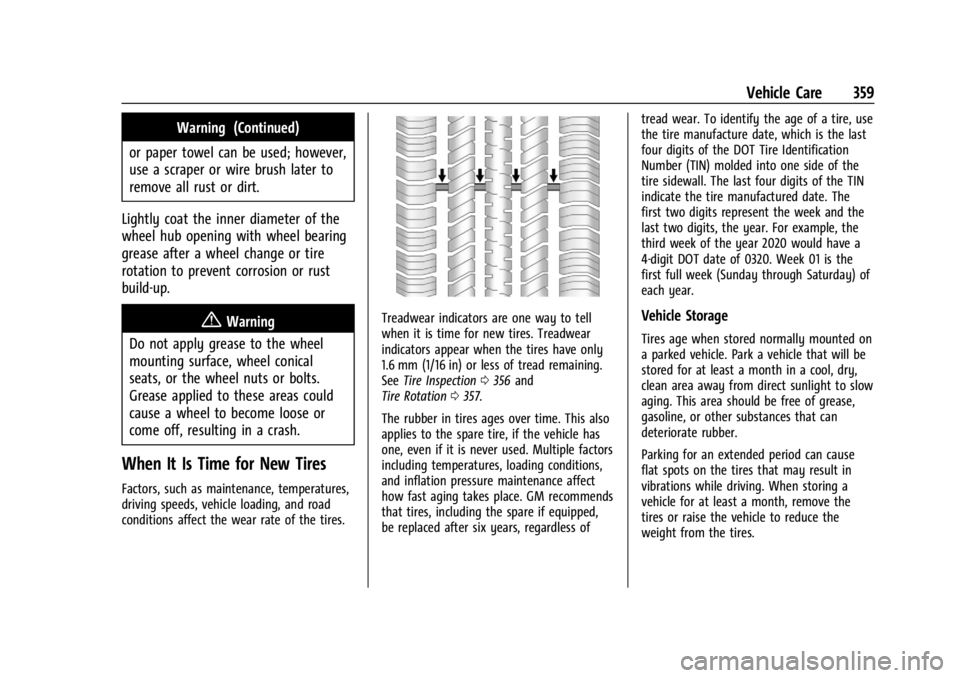
Treadwear indicators are one way to tell
when it is time for new tires. Treadwear
indicators appear when the tires have only
1.6 mm (1/16 in) or less of tread remaining.
See Tire Inspection 0356 and
Tire Rotation 0357.
The rubber in tires ages over time. This also
applies to the spare tire, if the vehicle has
one, even if it is never used. Multiple factors
including temperatures, loading conditions,
and inflation pressure maintenance affect
how fast aging takes place. GM recommends
that tires, including the spare if equipped,
be replaced after six years, regardless of tread wear. To identify the age of a tire, use
the tire manufacture date, which is the last
four digits of the DOT Tire Identification
Number (TIN) molded into one side of the
tire sidewall. The last four digits of the TIN
indicate the tire manufactured date. The
first two digits represent the week and the
last two digits, the year. For example, the
third week of the year 2020 would have a
4-digit DOT date of 0320. Week 01 is the
first full week (Sunday through Saturday) of
each year.Vehicle Storage
Tires age when stored normally mounted on
a parked vehicle. Park a vehicle that will be
stored for at least a month in a cool, dry,
clean area away from direct sunlight to slow
aging. This area should be free of grease,
gasoline, or other substances that can
deteriorate rubber.
Parking for an extended period can cause
flat spots on the tires that may result in
vibrations while driving. When storing a
vehicle for at least a month, remove the
tires or raise the vehicle to reduce the
weight from the tires.
Page 368 of 440
GMC Sierra/Sierra Denali 2500 HD/3500 HD Owner Manual (GMNA-
Localizing-U.S./Canada-16908340) - 2024 - CRC - 12/7/22
366 Vehicle Care
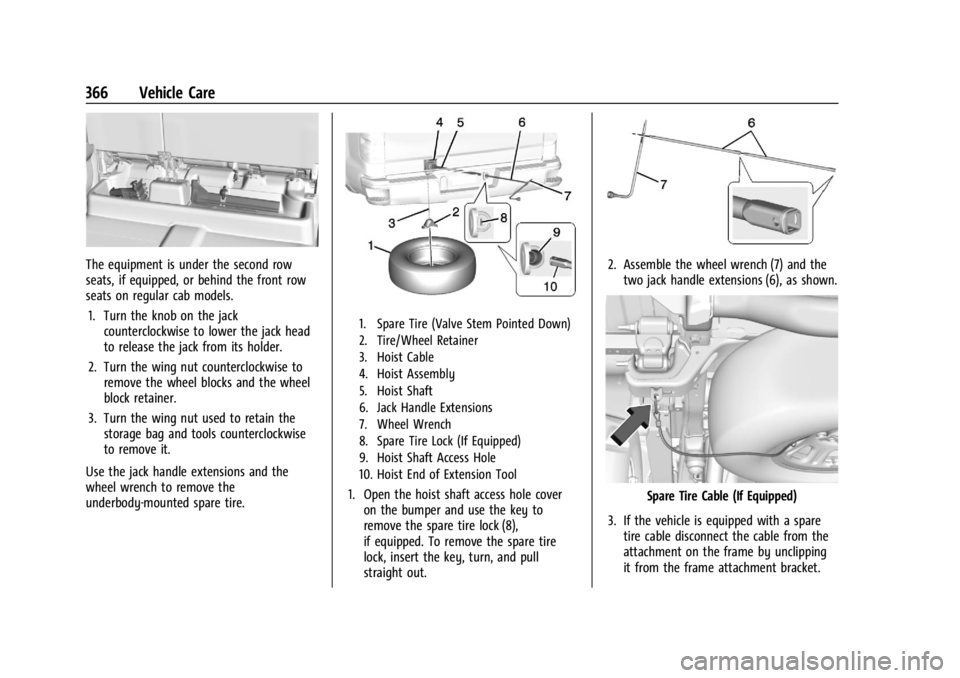
The equipment is under the second row
seats, if equipped, or behind the front row
seats on regular cab models.1. Turn the knob on the jack counterclockwise to lower the jack head
to release the jack from its holder.
2. Turn the wing nut counterclockwise to remove the wheel blocks and the wheel
block retainer.
3. Turn the wing nut used to retain the storage bag and tools counterclockwise
to remove it.
Use the jack handle extensions and the
wheel wrench to remove the
underbody-mounted spare tire.
1. Spare Tire (Valve Stem Pointed Down)
2. Tire/Wheel Retainer
3. Hoist Cable
4. Hoist Assembly
5. Hoist Shaft
6. Jack Handle Extensions
7. Wheel Wrench
8. Spare Tire Lock (If Equipped)
9. Hoist Shaft Access Hole
10. Hoist End of Extension Tool
1. Open the hoist shaft access hole cover on the bumper and use the key to
remove the spare tire lock (8),
if equipped. To remove the spare tire
lock, insert the key, turn, and pull
straight out.
2. Assemble the wheel wrench (7) and thetwo jack handle extensions (6), as shown.
Spare Tire Cable (If Equipped)
3. If the vehicle is equipped with a spare tire cable disconnect the cable from the
attachment on the frame by unclipping
it from the frame attachment bracket.
Page 374 of 440
GMC Sierra/Sierra Denali 2500 HD/3500 HD Owner Manual (GMNA-
Localizing-U.S./Canada-16908340) - 2024 - CRC - 12/7/22
372 Vehicle Care
{Warning
Wheel nuts that are improperly or
incorrectly tightened can cause the
wheels to become loose or come off. The
wheel nuts should be tightened with a
torque wrench to the proper torque
specification after replacing. Follow the
torque specification supplied by the
aftermarket manufacturer when using
accessory locking wheel nuts. See
Capacities and Specifications0402 for
original equipment wheel nut torque
specifications.
Caution
Improperly tightened wheel nuts can lead
to brake pulsation and rotor damage. To
avoid expensive brake repairs, evenly
tighten the wheel nuts in the proper
sequence and to the proper torque
specification. See Capacities and
Specifications 0402 for the wheel nut
torque specification.
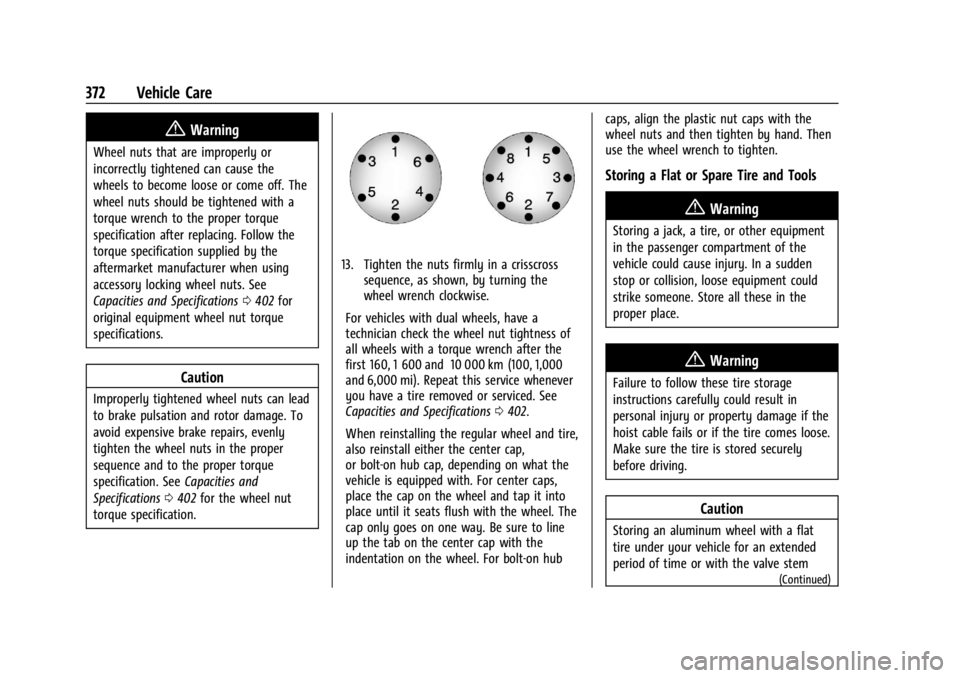
13. Tighten the nuts firmly in a crisscross sequence, as shown, by turning the
wheel wrench clockwise.
For vehicles with dual wheels, have a
technician check the wheel nut tightness of
all wheels with a torque wrench after the
first 160, 1 600 and 10 000 km (100, 1,000
and 6,000 mi). Repeat this service whenever
you have a tire removed or serviced. See
Capacities and Specifications 0402.
When reinstalling the regular wheel and tire,
also reinstall either the center cap,
or bolt-on hub cap, depending on what the
vehicle is equipped with. For center caps,
place the cap on the wheel and tap it into
place until it seats flush with the wheel. The
cap only goes on one way. Be sure to line
up the tab on the center cap with the
indentation on the wheel. For bolt-on hub caps, align the plastic nut caps with the
wheel nuts and then tighten by hand. Then
use the wheel wrench to tighten.
Storing a Flat or Spare Tire and Tools
{Warning
Storing a jack, a tire, or other equipment
in the passenger compartment of the
vehicle could cause injury. In a sudden
stop or collision, loose equipment could
strike someone. Store all these in the
proper place.
{Warning
Failure to follow these tire storage
instructions carefully could result in
personal injury or property damage if the
hoist cable fails or if the tire comes loose.
Make sure the tire is stored securely
before driving.
Caution
Storing an aluminum wheel with a flat
tire under your vehicle for an extended
period of time or with the valve stem
(Continued)
Page 418 of 440
GMC Sierra/Sierra Denali 2500 HD/3500 HD Owner Manual (GMNA-
Localizing-U.S./Canada-16908340) - 2024 - CRC - 12/7/22
416 Customer Information
driving conditions and no personal data
(e.g., name, gender, age, and crash location)
are recorded. However, other parties, such
as law enforcement, could combine the EDR
data with the type of personally identifying
data routinely acquired during a crash
investigation.
To read data recorded by an EDR, special
equipment is required, and access to the
vehicle or the EDR is needed. In addition to
the vehicle manufacturer, other parties, such
as law enforcement, that have the special
equipment, can read the information if they
have access to the vehicle or the EDR.
GM will not access these data or share it
with others except: with the consent of the
vehicle owner or, if the vehicle is leased,
with the consent of the lessee; in response
to an official request by police or similar
government office; as part of GM's defense
of litigation through the discovery process;
or, as permitted by law. Data that GM
collects or receives may also be used for GM
research needs or may be made available to
others for research purposes, where a need
is shown and the data is not tied to a
specific vehicle or vehicle owner.OnStar
If the vehicle is equipped with OnStar and
has an active service plan, additional data
may be collected and transmitted through
the OnStar system. This includes information
about the vehicle’s operation; collisions
involving the vehicle; the use of the vehicle
and its features, including infotainment; and
the location and approximate GPS speed of
the vehicle. Refer to the OnStar Terms and
Conditions and Privacy Statement on the
OnStar website.
SeeOnStar Additional Information 0419.
Infotainment System
If the vehicle is equipped with a navigation
system as part of the infotainment system,
use of the system may result in the storage
of destinations, addresses, telephone
numbers, and other trip information. See the
infotainment section for information on
stored data and for deletion instructions.
Page 429 of 440

GMC Sierra/Sierra Denali 2500 HD/3500 HD Owner Manual (GMNA-
Localizing-U.S./Canada-16908340) - 2024 - CRC - 12/7/22
Index 427
Canadian Vehicle Owners . . . . . . . . . . . . . . . . . . .2
Capacities and Specifications . . . . . . . . . . . . . 402
Carbon MonoxideEngine Exhaust . . . . . . . . . . . . . . . . . . . . . . . . 222
Tailgate . . . . . . . . . . . . . . . . . . . . . . . . . . . . . . . . . 24
Winter Driving . . . . . . . . . . . . . . . . . . . . . . . . . 207
Cargo
Tie-Downs . . . . . . . . . . . . . . . . . . . . . . . . . . . . . 102
Caution, Danger, and Warning . . . . . . . . . . . . . .2
Center High-Mounted Stoplamp (CHMSL)
and Cargo Lamp . . . . . . . . . . . . . . . . . . . . . 335
Seat . . . . . . . . . . . . . . . . . . . . . . . . . . . . . . . . . . . . 48
Center Console Storage . . . . . . . . . . . . . . . . . . . . . . . . . . . . . . . . 101
Chains, Tire . . . . . . . . . . . . . . . . . . . . . . . . . . . . . . 363
Charging
System Light . . . . . . . . . . . . . . . . . . . . . . . . . . 122
Wireless . . . . . . . . . . . . . . . . . . . . . . . . . . . . . . . 109
Check Engine Light (Malfunction Indicator) . . . . . . . . . . . . . . . . . . . . . . . . . . . . . . . 122
Child Restraints Infants and Young Children . . . . . . . . . . . . . 76
Lower Anchors and Tethers forChildren . . . . . . . . . . . . . . . . . . . . . . . . . . . . . . . 81
Older Children . . . . . . . . . . . . . . . . . . . . . . . . . . 75
Securing . . . . . . . . . . . . . . . . . . . . . . . . . . . . 92, 95
Systems . . . . . . . . . . . . . . . . . . . . . . . . . . . . . . . . 78 Child Safety Locks . . . . . . . . . . . . . . . . . . . . . . . . 24
Circuit Breakers . . . . . . . . . . . . . . . . . . . . . . . . . . 337
Cleaning
Exterior Care . . . . . . . . . . . . . . . . . . . . . . . . . . . 383
Interior Care . . . . . . . . . . . . . . . . . . . . . . . . . . . 388
Climate Control Systems . . . . . . . . . . . . . . . . . . 191 Air Conditioning . . . . . . . . . . . . . . . . . . . . . . . . 191
Dual Automatic . . . . . . . . . . . . . . . . . . . . . . . . 193
Heating . . . . . . . . . . . . . . . . . . . . . . . . . . . . . . . . . 191
Clock . . . . . . . . . . . . . . . . . . . . . . . . . . . . . . . . . . . . 107
Cluster, Instrument . . . . . . . . . . . . . . . . . . . 112, 113
Collision Alert Forward (FCA) System . . . . . . . . . . . . . . . . . 263
Collision Damage Repair . . . . . . . . . . . . . . . . . . 411
Compartments Storage . . . . . . . . . . . . . . . . . . . . . . . . . . . . . . . . . 99
Compass . . . . . . . . . . . . . . . . . . . . . . . . . . . . . . . . . 107
Connected Services Connections . . . . . . . . . . . . . . . . . . . . . . . . . . . 422
Diagnostics . . . . . . . . . . . . . . . . . . . . . . . . . . . . 424
Navigation . . . . . . . . . . . . . . . . . . . . . . . . . . . . . 422
Connections Connected Services . . . . . . . . . . . . . . . . . . . . 422
Control Hill Descent . . . . . . . . . . . . . . . . . . . . . . . . . . . . 237
Traction and Electronic Stability . . . . . . . 236
Control Light Hill Descent . . . . . . . . . . . . . . . . . . . . . . . . . . . . 126 Control of a Vehicle . . . . . . . . . . . . . . . . . . . . . 200
Controls
Steering Wheel . . . . . . . . . . . . . . . . . . . . . . . . 156
Convex Mirrors . . . . . . . . . . . . . . . . . . . . . . . . . . . 34
Coolant Engine Temperature Gauge . . . . . . . . . . . . . 118
Engine Temperature Warning Light . . . . 128
Cooling . . . . . . . . . . . . . . . . . . . . . . . . . . . . . . 191, 193
Cooling System . . . . . . . . . . . . . . . . . . . . . . . . . . 319
Courtesy Transportation Program . . . . . . . . 410
Cruise Control . . . . . . . . . . . . . . . . . . . . . . . . . . . 239 Adaptive . . . . . . . . . . . . . . . . . . . . . . . . . . . . . . . 241
Light . . . . . . . . . . . . . . . . . . . . . . . . . . . . . . . . . . . . 131
Cupholders . . . . . . . . . . . . . . . . . . . . . . . . . . . . . . 100
Customer Assistance Offices . . . . . . . . . . . . . . . . . . . . . . . . . . . . . . . . . 407
Text Telephone (TTY) Users . . . . . . . . . . . . 407
Customer Information Publications Ordering Information . . . . . 413
Customer Satisfaction Procedure . . . . . . . . . 405
Cybersecurity . . . . . . . . . . . . . . . . . . . . . . . . . . . . .415
D
Damage Repair, Collision . . . . . . . . . . . . . . . . . . 411
Danger, Warning, and Caution . . . . . . . . . . . . . .2
Dashboard . . . . . . . . . . . . . . . . . . . . . . . . . . . . . . . . . .5
Data Collection Infotainment System . . . . . . . . . . . . . . . . . . 416
Page 431 of 440

GMC Sierra/Sierra Denali 2500 HD/3500 HD Owner Manual (GMNA-
Localizing-U.S./Canada-16908340) - 2024 - CRC - 12/7/22
Index 429
Engine (cont'd)Running While Parked . . . . . . . . . . . . . . . . . 223
Starting . . . . . . . . . . . . . . . . . . . . . . . . . . . . . . . . 218
Entry Lighting . . . . . . . . . . . . . . . . . . . . . . . . . . . . 151
Equipment, Towing . . . . . . . . . . . . . . . . . . . . . . 284
Event Data Recorders . . . . . . . . . . . . . . . . . . . . .415
Exit Lighting . . . . . . . . . . . . . . . . . . . . . . . . . . . . . . 151
Extended Mirrors . . . . . . . . . . . . . . . . . . . . . . . . . .35
Extended Parking . . . . . . . . . . . . . . . . . . . . . . . . 222
Extender, Seat Belt . . . . . . . . . . . . . . . . . . . . . . . 63
Exterior Cargo Lamps . . . . . . . . . . . . . . . . . . . . . . . . . . . 149
Lamp Controls . . . . . . . . . . . . . . . . . . . . . . . . . 143
Lamps Off Reminder . . . . . . . . . . . . . . . . . . . 145
Lighting Battery Saver . . . . . . . . . . . . . . . . . 152
F
Fan
Engine . . . . . . . . . . . . . . . . . . . . . . . . . . . . . . . . . 323
Filter Engine Air Cleaner . . . . . . . . . . . . . . . . . . . . . 318
Flash-to-Pass . . . . . . . . . . . . . . . . . . . . . . . . . . . . . .145
Flashers, Hazard Warning . . . . . . . . . . . . . . . . 146
Flat Tire . . . . . . . . . . . . . . . . . . . . . . . . . . . . . . . . . 364
Changing . . . . . . . . . . . . . . . . . . . . . . . . . . . . . . 365
Floor Console
Storage . . . . . . . . . . . . . . . . . . . . . . . . . . . . . . . . 101
Floor Mats . . . . . . . . . . . . . . . . . . . . . . . . . . . . . . . 391 Fluid
Automatic Transmission . . . . . . . . . . . . . . . . 317
Brakes . . . . . . . . . . . . . . . . . . . . . . . . . . . . . . . . . 326
Power Steering . . . . . . . . . . . . . . . . . . . . . . . . 323
Washer . . . . . . . . . . . . . . . . . . . . . . . . . . . . . . . . 324
Fog Lamp Light Front . . . . . . . . . . . . . . . . . . . . . . . . . . . . . . . . . . 130
Fog Lamps . . . . . . . . . . . . . . . . . . . . . . . . . . . . . . . 148
Folding Mirrors . . . . . . . . . . . . . . . . . . . . . . . . . . . 36
Four-Wheel Drive . . . . . . . . . . . . . . . . . . . 228, 329
Four-Wheel-Drive Light . . . . . . . . . . . . . . . . . . . . . . . . . . . . . . . . . . . 125
Frequency Statement Radio . . . . . . . . . . . . . . . . . . . . . . . . . . . . . . . . . . 413
Front Axle . . . . . . . . . . . . . . . . . . . . . . . . . . . . . . . . . . . 329
Heated and Ventilated Seats . . . . . . . . . . . . 54
Front Seats Adjustment . . . . . . . . . . . . . . . . . . . . . . . . . . . . . 48
Fuel Additives . . . . . . . . . . . . . . . . . . . . . . . . . . . . . . 272
E85 . . . . . . . . . . . . . . . . . . . . . . . . . . . . . . . . . . . . 272
Economy, Driving for Better . . . . . . . . . . . 199
Filling a Portable Fuel Container . . . . . . . 276
Filling the Tank . . . . . . . . . . . . . . . . . . . . 273, 275
Foreign Countries . . . . . . . . . . . . . . . . . . . . . . 272
Gauge . . . . . . . . . . . . . . . . . . . . . . . . . . . . . . . . . . 116
Low Fuel Warning Light . . . . . . . . . . . . . . . 129 Fuel (cont'd)
Prohibited Fuels . . . . . . . . . . . . . . . . . . . . . . . 272
Recommended . . . . . . . . . . . . . . . . . . . . . . . . . 272
Top Tier . . . . . . . . . . . . . . . . . . . . . . . . . . . . . . . . 271
Full-Size Spare Tire . . . . . . . . . . . . . . . . . . . . . . . 375
Fuses Engine Compartment Fuse Block . . . . . . . 337
Fuses and Circuit Breakers . . . . . . . . . . . . . 337
Instrument Panel Fuse Block . . . . . . 341, 342
G
Garage Door Opener . . . . . . . . . . . . . . . . . . . . . 140
Programming . . . . . . . . . . . . . . . . . . . . . . . . . . 140
Gas Strut(s) . . . . . . . . . . . . . . . . . . . . . . . . . . . . . . 332
Gauges Engine Coolant Temperature . . . . . . . . . . . . 118
Engine Oil Pressure . . . . . . . . . . . . . . . . . . . . . 117
Fuel . . . . . . . . . . . . . . . . . . . . . . . . . . . . . . . . . . . . . 116
Odometer . . . . . . . . . . . . . . . . . . . . . . . . . . . . . . 116
Speedometer . . . . . . . . . . . . . . . . . . . . . . . . . . . 116
Tachometer . . . . . . . . . . . . . . . . . . . . . . . . . . . . . 116
Transmission Temperature . . . . . . . . . . . . . . 119
Trip Odometer . . . . . . . . . . . . . . . . . . . . . . . . . . 116
Voltmeter . . . . . . . . . . . . . . . . . . . . . . . . . . . . . . . 119
Warning Lights and Indicators . . . . . . . . . . 111
General Information
Service and Maintenance . . . . . . . . . . . . . . 393
Towing . . . . . . . . . . . . . . . . . . . . . . . . . . . . . . . . 276