console GMC SIERRA DENALI 2024 User Guide
[x] Cancel search | Manufacturer: GMC, Model Year: 2024, Model line: SIERRA DENALI, Model: GMC SIERRA DENALI 2024Pages: 440, PDF Size: 9.21 MB
Page 109 of 440
GMC Sierra/Sierra Denali 2500 HD/3500 HD Owner Manual (GMNA-
Localizing-U.S./Canada-16908340) - 2024 - CRC - 12/15/22
Instruments and Controls 107
on the windshield and controls the
frequency of the windshield wiper based on
the current sensitivity setting.
Keep this area of the windshield clear of
debris to allow for best system performance.
To turn the Rain Sense feature on or off, see
“Rain Sense Wipers”under Settings >
Vehicle > Comfort and Convenience > Rain
Sense > Enable/Disable.
If Rain Sense is enabled in Settings, turning
the wiper lever to INT will activate Rain
Sense.
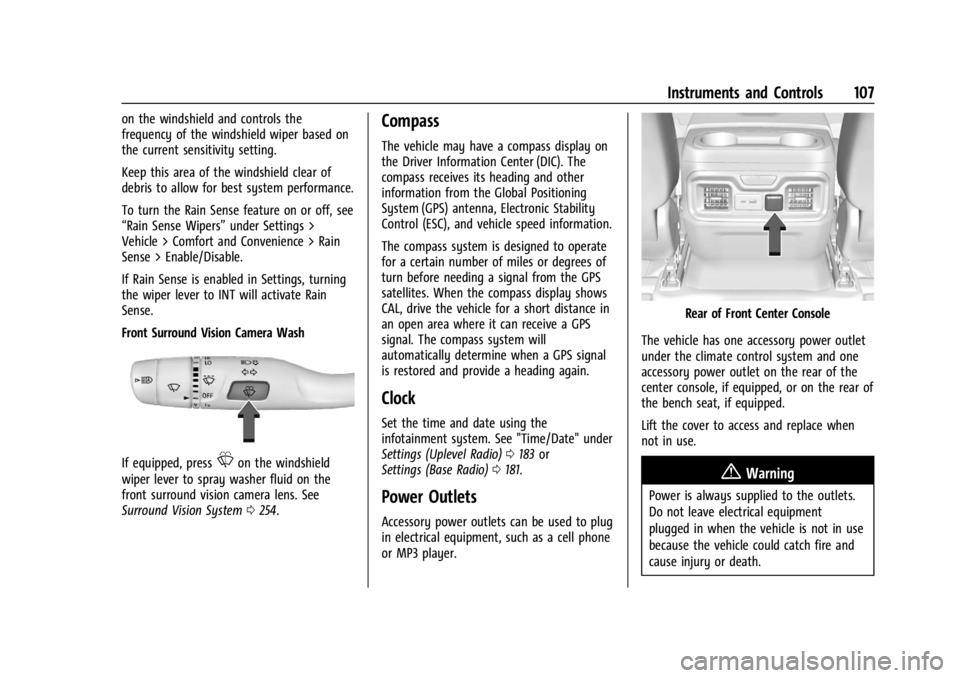
Front Surround Vision Camera Wash
If equipped, pressLon the windshield
wiper lever to spray washer fluid on the
front surround vision camera lens. See
Surround Vision System 0254.
Compass
The vehicle may have a compass display on
the Driver Information Center (DIC). The
compass receives its heading and other
information from the Global Positioning
System (GPS) antenna, Electronic Stability
Control (ESC), and vehicle speed information.
The compass system is designed to operate
for a certain number of miles or degrees of
turn before needing a signal from the GPS
satellites. When the compass display shows
CAL, drive the vehicle for a short distance in
an open area where it can receive a GPS
signal. The compass system will
automatically determine when a GPS signal
is restored and provide a heading again.
Clock
Set the time and date using the
infotainment system. See "Time/Date" under
Settings (Uplevel Radio) 0183 or
Settings (Base Radio) 0181.
Power Outlets
Accessory power outlets can be used to plug
in electrical equipment, such as a cell phone
or MP3 player.
Rear of Front Center Console
The vehicle has one accessory power outlet
under the climate control system and one
accessory power outlet on the rear of the
center console, if equipped, or on the rear of
the bench seat, if equipped.
Lift the cover to access and replace when
not in use.
{Warning
Power is always supplied to the outlets.
Do not leave electrical equipment
plugged in when the vehicle is not in use
because the vehicle could catch fire and
cause injury or death.
Page 111 of 440
GMC Sierra/Sierra Denali 2500 HD/3500 HD Owner Manual (GMNA-
Localizing-U.S./Canada-16908340) - 2024 - CRC - 12/15/22
Instruments and Controls 109
An indicator light on the outlet illuminates
when power is provided to the outlet and
no system fault is detected. The outlets will
not operate when the ignition is off, the
DC/AC switch is not pressed, or the plug is
not fully seated into the outlet.
If equipment is connected using more than
400 watts or a system fault is detected, a
protection circuit shuts off the power supply
and the indicator light turns off.
Do not use a power outlet with a missing or
damaged cover.
The power outlet is not designed for the
following, and may not work properly if
they are plugged in:
.Equipment with high initial peak wattage,
such as compressor-driven refrigerators
and electric power tools
.Other equipment requiring an extremely
stable power supply, such as
microcomputer-controlled electric blankets
and touch sensor lamps
.Medical equipment
Wireless Charging
If equipped and enabled, the vehicle has
wireless charging on the center console in
front of the cupholders. The system
operates at 145 kHz and wirelessly charges
one Qi compatible smartphone. The power
output of the system is capable of charging
at a rate up to 3 amp (15 W), as requested
by the compatible smartphone. SeeRadio
Frequency Statement 0413.
{Warning
Wireless charging may affect the
operation of an implanted pacemaker or
other medical devices. If you have one, it
is recommended to consult with your
doctor before using the wireless charging
system.
The vehicle must be on, in ACC/ACCESSORY,
or Retained Accessory Power (RAP) must be
active. The wireless charging feature may
not correctly indicate charging when the
vehicle is in RAP, during a Bluetooth phone
call, or when phone projection (e.g. Apple
CarPlay / Android Auto) is active. See
Retained Accessory Power (RAP) 0220. The operating temperature is
−40 °C (−40 °F)
to 85 °C (185 °F) for the charging system and
0 °C (32 °F) to 35 °C (95 °F) for the phone.
A charging stopped alert may be displayed
on the infotainment screen, if the wireless
charger or smartphone are outside of
normal operating temperature. Charging will
automatically resume when a normal
operating temperature is reached.
{Warning
Remove all objects from the charger
before charging your compatible
smartphone. Objects, such as coins, keys,
rings, paper clips, or cards, between the
smartphone and charger may become
very hot.
On the rare occasion that the charging
system does not detect an object, and
the object gets wedged between the
smartphone and charger, remove the
smartphone and allow the object to cool
before removing it from the charger, to
prevent burns.
Page 123 of 440
GMC Sierra/Sierra Denali 2500 HD/3500 HD Owner Manual (GMNA-
Localizing-U.S./Canada-16908340) - 2024 - CRC - 12/15/22
Instruments and Controls 121
When the vehicle is started, these lights
come on solid to remind rear passengers to
fasten their seat belts. Then each light may
stay on solid or flash, and a chime may
come on if the rear passenger remains
unbuckled, or becomes unbuckled, when the
vehicle is moving. An X indicates the seat
belt is not buckled. A check mark indicates
the seat belt is buckled.
If all rear seat positions are buckled, neither
the chime nor the lights will come on.
For information on the front seat belt
reminder lights, see "Driver Seat Belt
Reminder Light" and "Front Passenger Seat
Belt Reminder Light" listed previously.
Airbag Readiness Light
This light shows if there is an electrical
problem with the airbag system. It is
located in the instrument cluster. The
system check includes the airbag sensor(s),
the passenger sensing system, the
pretensioners, the airbag modules, the
wiring, and the crash sensing and diagnostic
module. For more information on the airbag
system, seeAirbag System 064.
The airbag readiness light comes on for
several seconds when the vehicle is started.
If the light does not come on then, have it
fixed immediately.
{Warning
If the airbag readiness light stays on
after the vehicle is started or comes on
while driving, it means the airbag system
might not be working properly. The
airbags in the vehicle might not inflate in
a crash, or they could even inflate
without a crash. To help avoid injury,
have the vehicle serviced right away.
If there is a problem with the airbag
system, a Driver Information Center (DIC)
message may also come on.
Passenger Airbag Status Indicator
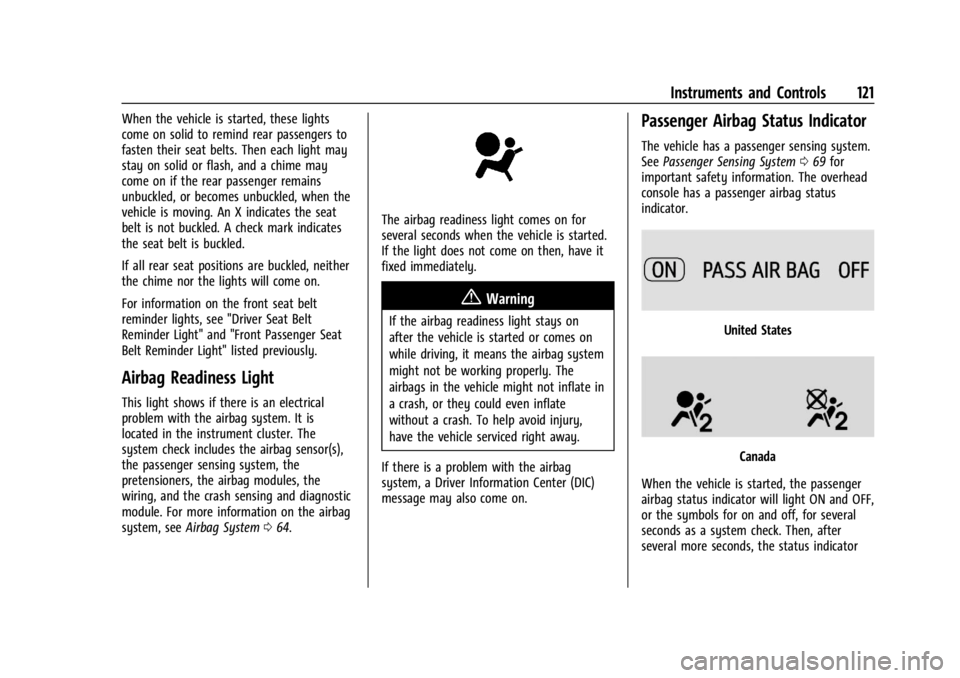
The vehicle has a passenger sensing system.
See Passenger Sensing System 069 for
important safety information. The overhead
console has a passenger airbag status
indicator.
United States
Canada
When the vehicle is started, the passenger
airbag status indicator will light ON and OFF,
or the symbols for on and off, for several
seconds as a system check. Then, after
several more seconds, the status indicator
Page 142 of 440
GMC Sierra/Sierra Denali 2500 HD/3500 HD Owner Manual (GMNA-
Localizing-U.S./Canada-16908340) - 2024 - CRC - 12/15/22
140 Instruments and Controls
Universal Remote System
SeeRadio Frequency Statement 0413.
Universal Remote System
Programming
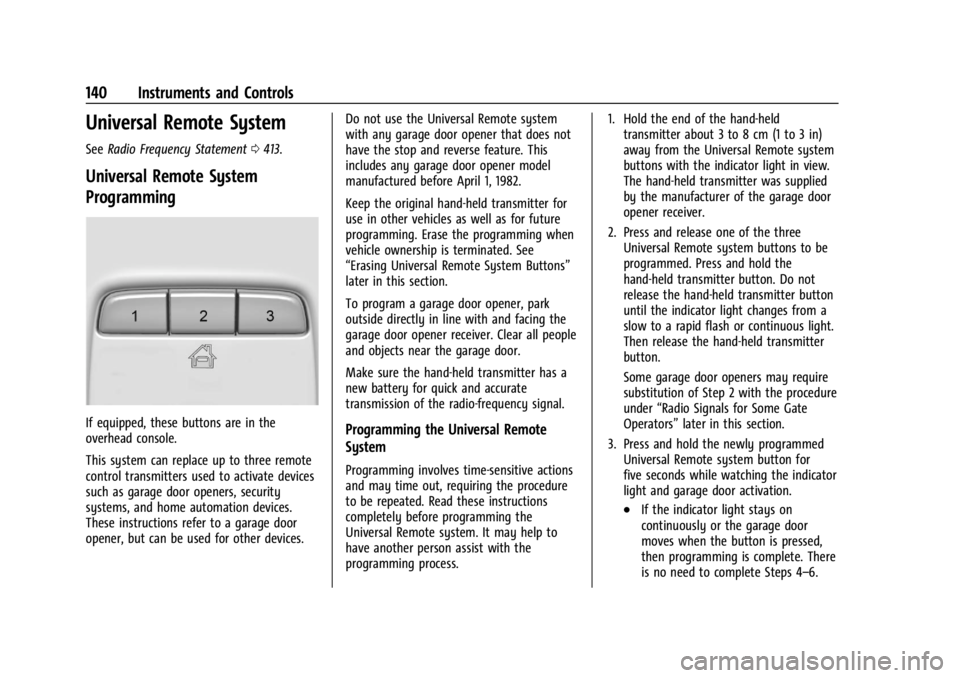
If equipped, these buttons are in the
overhead console.
This system can replace up to three remote
control transmitters used to activate devices
such as garage door openers, security
systems, and home automation devices.
These instructions refer to a garage door
opener, but can be used for other devices. Do not use the Universal Remote system
with any garage door opener that does not
have the stop and reverse feature. This
includes any garage door opener model
manufactured before April 1, 1982.
Keep the original hand-held transmitter for
use in other vehicles as well as for future
programming. Erase the programming when
vehicle ownership is terminated. See
“Erasing Universal Remote System Buttons”
later in this section.
To program a garage door opener, park
outside directly in line with and facing the
garage door opener receiver. Clear all people
and objects near the garage door.
Make sure the hand-held transmitter has a
new battery for quick and accurate
transmission of the radio-frequency signal.Programming the Universal Remote
System
Programming involves time-sensitive actions
and may time out, requiring the procedure
to be repeated. Read these instructions
completely before programming the
Universal Remote system. It may help to
have another person assist with the
programming process. 1. Hold the end of the hand-held
transmitter about 3 to 8 cm (1 to 3 in)
away from the Universal Remote system
buttons with the indicator light in view.
The hand-held transmitter was supplied
by the manufacturer of the garage door
opener receiver.
2. Press and release one of the three Universal Remote system buttons to be
programmed. Press and hold the
hand-held transmitter button. Do not
release the hand-held transmitter button
until the indicator light changes from a
slow to a rapid flash or continuous light.
Then release the hand-held transmitter
button.
Some garage door openers may require
substitution of Step 2 with the procedure
under “Radio Signals for Some Gate
Operators” later in this section.
3. Press and hold the newly programmed Universal Remote system button for
five seconds while watching the indicator
light and garage door activation.
.If the indicator light stays on
continuously or the garage door
moves when the button is pressed,
then programming is complete. There
is no need to complete Steps 4–6.
Page 152 of 440
GMC Sierra/Sierra Denali 2500 HD/3500 HD Owner Manual (GMNA-
Localizing-U.S./Canada-16908340) - 2024 - CRC - 12/7/22
150 Lighting
Become familiar with and follow all state
and local laws that apply to cargo lamp
operation.
Interior Lighting
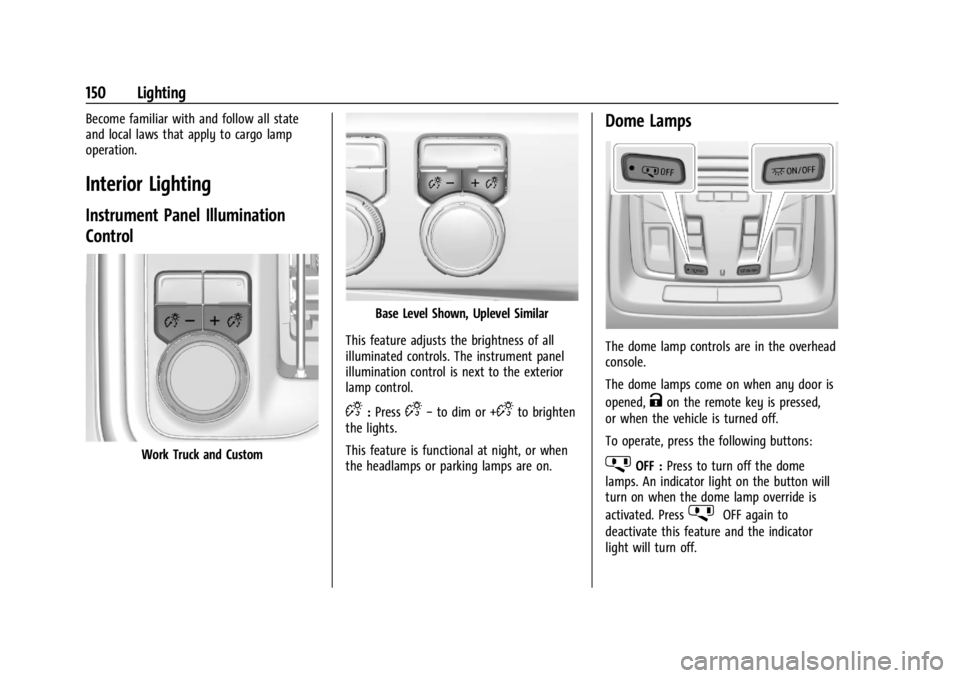
Instrument Panel Illumination
Control
Work Truck and Custom
Base Level Shown, Uplevel Similar
This feature adjusts the brightness of all
illuminated controls. The instrument panel
illumination control is next to the exterior
lamp control.
D: PressD− to dim or +Dto brighten
the lights.
This feature is functional at night, or when
the headlamps or parking lamps are on.
Dome Lamps
The dome lamp controls are in the overhead
console.
The dome lamps come on when any door is
opened,
Kon the remote key is pressed,
or when the vehicle is turned off.
To operate, press the following buttons:
jOFF : Press to turn off the dome
lamps. An indicator light on the button will
turn on when the dome lamp override is
activated. Press
jOFF again to
deactivate this feature and the indicator
light will turn off.
Page 153 of 440
GMC Sierra/Sierra Denali 2500 HD/3500 HD Owner Manual (GMNA-
Localizing-U.S./Canada-16908340) - 2024 - CRC - 12/7/22
Lighting 151
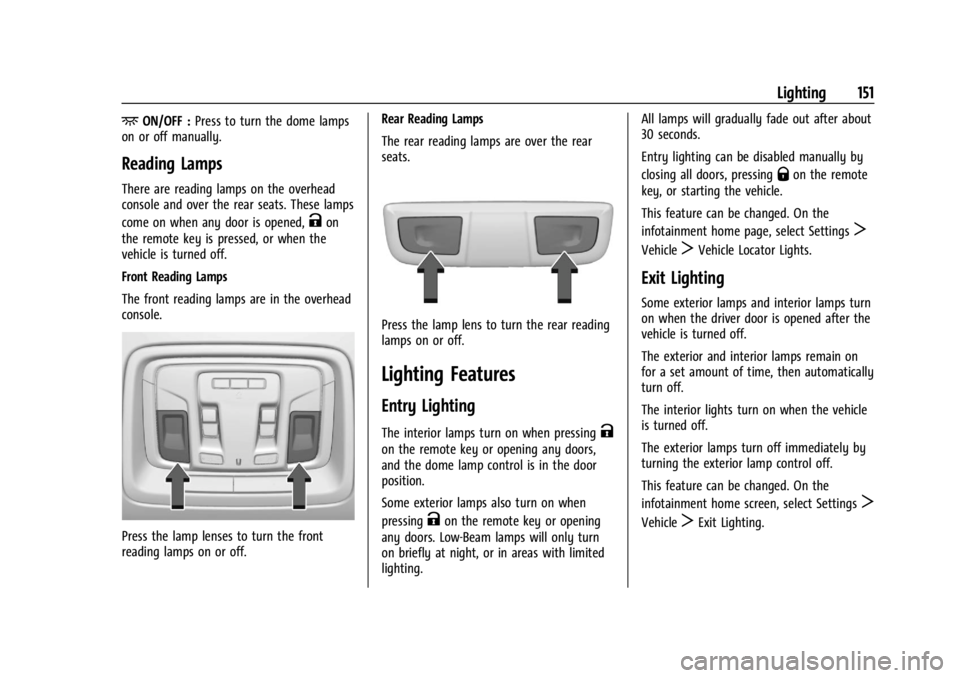
+ON/OFF :Press to turn the dome lamps
on or off manually.
Reading Lamps
There are reading lamps on the overhead
console and over the rear seats. These lamps
come on when any door is opened,
Kon
the remote key is pressed, or when the
vehicle is turned off.
Front Reading Lamps
The front reading lamps are in the overhead
console.
Press the lamp lenses to turn the front
reading lamps on or off. Rear Reading Lamps
The rear reading lamps are over the rear
seats.
Press the lamp lens to turn the rear reading
lamps on or off.
Lighting Features
Entry Lighting
The interior lamps turn on when pressingK
on the remote key or opening any doors,
and the dome lamp control is in the door
position.
Some exterior lamps also turn on when
pressing
Kon the remote key or opening
any doors. Low-Beam lamps will only turn
on briefly at night, or in areas with limited
lighting. All lamps will gradually fade out after about
30 seconds.
Entry lighting can be disabled manually by
closing all doors, pressing
Qon the remote
key, or starting the vehicle.
This feature can be changed. On the
infotainment home page, select Settings
T
VehicleTVehicle Locator Lights.
Exit Lighting
Some exterior lamps and interior lamps turn
on when the driver door is opened after the
vehicle is turned off.
The exterior and interior lamps remain on
for a set amount of time, then automatically
turn off.
The interior lights turn on when the vehicle
is turned off.
The exterior lamps turn off immediately by
turning the exterior lamp control off.
This feature can be changed. On the
infotainment home screen, select Settings
T
VehicleTExit Lighting.
Page 294 of 440
GMC Sierra/Sierra Denali 2500 HD/3500 HD Owner Manual (GMNA-
Localizing-U.S./Canada-16908340) - 2024 - CRC - 12/13/22
292 Driving and Operating
Warning (Continued)
injury, death, or property damage. Only
use the ITBC system with electric or
electric over hydraulic trailer brake
systems.
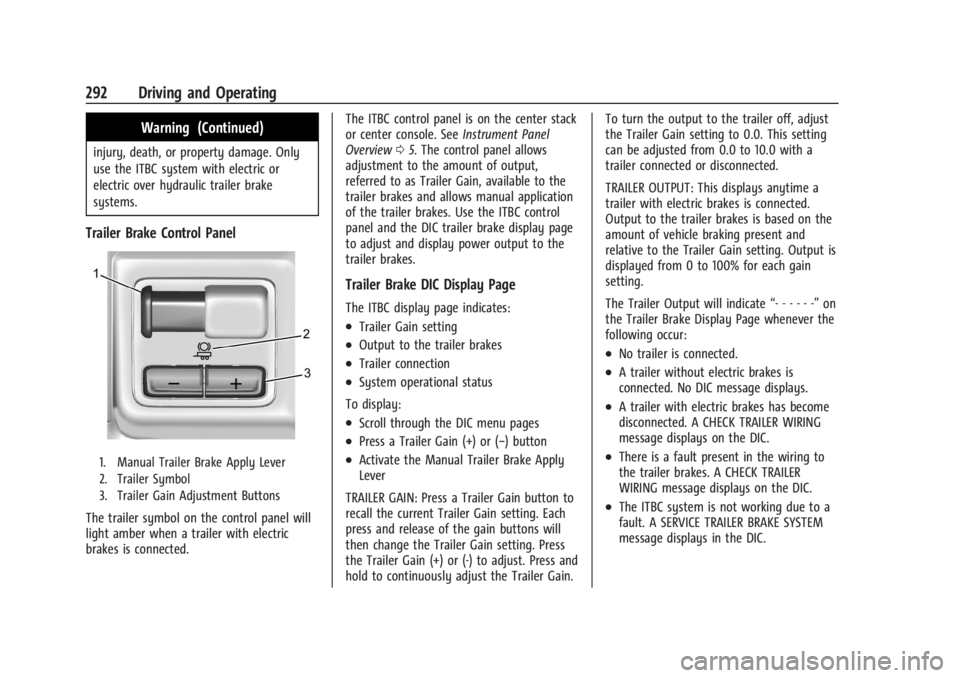
Trailer Brake Control Panel
1. Manual Trailer Brake Apply Lever
2. Trailer Symbol
3. Trailer Gain Adjustment Buttons
The trailer symbol on the control panel will
light amber when a trailer with electric
brakes is connected.The ITBC control panel is on the center stack
or center console. See
Instrument Panel
Overview 05. The control panel allows
adjustment to the amount of output,
referred to as Trailer Gain, available to the
trailer brakes and allows manual application
of the trailer brakes. Use the ITBC control
panel and the DIC trailer brake display page
to adjust and display power output to the
trailer brakes.
Trailer Brake DIC Display Page
The ITBC display page indicates:
.Trailer Gain setting
.Output to the trailer brakes
.Trailer connection
.System operational status
To display:
.Scroll through the DIC menu pages
.Press a Trailer Gain (+) or (−) button
.Activate the Manual Trailer Brake Apply
Lever
TRAILER GAIN: Press a Trailer Gain button to
recall the current Trailer Gain setting. Each
press and release of the gain buttons will
then change the Trailer Gain setting. Press
the Trailer Gain (+) or (-) to adjust. Press and
hold to continuously adjust the Trailer Gain. To turn the output to the trailer off, adjust
the Trailer Gain setting to 0.0. This setting
can be adjusted from 0.0 to 10.0 with a
trailer connected or disconnected.
TRAILER OUTPUT: This displays anytime a
trailer with electric brakes is connected.
Output to the trailer brakes is based on the
amount of vehicle braking present and
relative to the Trailer Gain setting. Output is
displayed from 0 to 100% for each gain
setting.
The Trailer Output will indicate
“- - - - - -”on
the Trailer Brake Display Page whenever the
following occur:
.No trailer is connected.
.A trailer without electric brakes is
connected. No DIC message displays.
.A trailer with electric brakes has become
disconnected. A CHECK TRAILER WIRING
message displays on the DIC.
.There is a fault present in the wiring to
the trailer brakes. A CHECK TRAILER
WIRING message displays on the DIC.
.The ITBC system is not working due to a
fault. A SERVICE TRAILER BRAKE SYSTEM
message displays in the DIC.
Page 429 of 440

GMC Sierra/Sierra Denali 2500 HD/3500 HD Owner Manual (GMNA-
Localizing-U.S./Canada-16908340) - 2024 - CRC - 12/7/22
Index 427
Canadian Vehicle Owners . . . . . . . . . . . . . . . . . . .2
Capacities and Specifications . . . . . . . . . . . . . 402
Carbon MonoxideEngine Exhaust . . . . . . . . . . . . . . . . . . . . . . . . 222
Tailgate . . . . . . . . . . . . . . . . . . . . . . . . . . . . . . . . . 24
Winter Driving . . . . . . . . . . . . . . . . . . . . . . . . . 207
Cargo
Tie-Downs . . . . . . . . . . . . . . . . . . . . . . . . . . . . . 102
Caution, Danger, and Warning . . . . . . . . . . . . . .2
Center High-Mounted Stoplamp (CHMSL)
and Cargo Lamp . . . . . . . . . . . . . . . . . . . . . 335
Seat . . . . . . . . . . . . . . . . . . . . . . . . . . . . . . . . . . . . 48
Center Console Storage . . . . . . . . . . . . . . . . . . . . . . . . . . . . . . . . 101
Chains, Tire . . . . . . . . . . . . . . . . . . . . . . . . . . . . . . 363
Charging
System Light . . . . . . . . . . . . . . . . . . . . . . . . . . 122
Wireless . . . . . . . . . . . . . . . . . . . . . . . . . . . . . . . 109
Check Engine Light (Malfunction Indicator) . . . . . . . . . . . . . . . . . . . . . . . . . . . . . . . 122
Child Restraints Infants and Young Children . . . . . . . . . . . . . 76
Lower Anchors and Tethers forChildren . . . . . . . . . . . . . . . . . . . . . . . . . . . . . . . 81
Older Children . . . . . . . . . . . . . . . . . . . . . . . . . . 75
Securing . . . . . . . . . . . . . . . . . . . . . . . . . . . . 92, 95
Systems . . . . . . . . . . . . . . . . . . . . . . . . . . . . . . . . 78 Child Safety Locks . . . . . . . . . . . . . . . . . . . . . . . . 24
Circuit Breakers . . . . . . . . . . . . . . . . . . . . . . . . . . 337
Cleaning
Exterior Care . . . . . . . . . . . . . . . . . . . . . . . . . . . 383
Interior Care . . . . . . . . . . . . . . . . . . . . . . . . . . . 388
Climate Control Systems . . . . . . . . . . . . . . . . . . 191 Air Conditioning . . . . . . . . . . . . . . . . . . . . . . . . 191
Dual Automatic . . . . . . . . . . . . . . . . . . . . . . . . 193
Heating . . . . . . . . . . . . . . . . . . . . . . . . . . . . . . . . . 191
Clock . . . . . . . . . . . . . . . . . . . . . . . . . . . . . . . . . . . . 107
Cluster, Instrument . . . . . . . . . . . . . . . . . . . 112, 113
Collision Alert Forward (FCA) System . . . . . . . . . . . . . . . . . 263
Collision Damage Repair . . . . . . . . . . . . . . . . . . 411
Compartments Storage . . . . . . . . . . . . . . . . . . . . . . . . . . . . . . . . . 99
Compass . . . . . . . . . . . . . . . . . . . . . . . . . . . . . . . . . 107
Connected Services Connections . . . . . . . . . . . . . . . . . . . . . . . . . . . 422
Diagnostics . . . . . . . . . . . . . . . . . . . . . . . . . . . . 424
Navigation . . . . . . . . . . . . . . . . . . . . . . . . . . . . . 422
Connections Connected Services . . . . . . . . . . . . . . . . . . . . 422
Control Hill Descent . . . . . . . . . . . . . . . . . . . . . . . . . . . . 237
Traction and Electronic Stability . . . . . . . 236
Control Light Hill Descent . . . . . . . . . . . . . . . . . . . . . . . . . . . . 126 Control of a Vehicle . . . . . . . . . . . . . . . . . . . . . 200
Controls
Steering Wheel . . . . . . . . . . . . . . . . . . . . . . . . 156
Convex Mirrors . . . . . . . . . . . . . . . . . . . . . . . . . . . 34
Coolant Engine Temperature Gauge . . . . . . . . . . . . . 118
Engine Temperature Warning Light . . . . 128
Cooling . . . . . . . . . . . . . . . . . . . . . . . . . . . . . . 191, 193
Cooling System . . . . . . . . . . . . . . . . . . . . . . . . . . 319
Courtesy Transportation Program . . . . . . . . 410
Cruise Control . . . . . . . . . . . . . . . . . . . . . . . . . . . 239 Adaptive . . . . . . . . . . . . . . . . . . . . . . . . . . . . . . . 241
Light . . . . . . . . . . . . . . . . . . . . . . . . . . . . . . . . . . . . 131
Cupholders . . . . . . . . . . . . . . . . . . . . . . . . . . . . . . 100
Customer Assistance Offices . . . . . . . . . . . . . . . . . . . . . . . . . . . . . . . . . 407
Text Telephone (TTY) Users . . . . . . . . . . . . 407
Customer Information Publications Ordering Information . . . . . 413
Customer Satisfaction Procedure . . . . . . . . . 405
Cybersecurity . . . . . . . . . . . . . . . . . . . . . . . . . . . . .415
D
Damage Repair, Collision . . . . . . . . . . . . . . . . . . 411
Danger, Warning, and Caution . . . . . . . . . . . . . .2
Dashboard . . . . . . . . . . . . . . . . . . . . . . . . . . . . . . . . . .5
Data Collection Infotainment System . . . . . . . . . . . . . . . . . . 416
Page 431 of 440

GMC Sierra/Sierra Denali 2500 HD/3500 HD Owner Manual (GMNA-
Localizing-U.S./Canada-16908340) - 2024 - CRC - 12/7/22
Index 429
Engine (cont'd)Running While Parked . . . . . . . . . . . . . . . . . 223
Starting . . . . . . . . . . . . . . . . . . . . . . . . . . . . . . . . 218
Entry Lighting . . . . . . . . . . . . . . . . . . . . . . . . . . . . 151
Equipment, Towing . . . . . . . . . . . . . . . . . . . . . . 284
Event Data Recorders . . . . . . . . . . . . . . . . . . . . .415
Exit Lighting . . . . . . . . . . . . . . . . . . . . . . . . . . . . . . 151
Extended Mirrors . . . . . . . . . . . . . . . . . . . . . . . . . .35
Extended Parking . . . . . . . . . . . . . . . . . . . . . . . . 222
Extender, Seat Belt . . . . . . . . . . . . . . . . . . . . . . . 63
Exterior Cargo Lamps . . . . . . . . . . . . . . . . . . . . . . . . . . . 149
Lamp Controls . . . . . . . . . . . . . . . . . . . . . . . . . 143
Lamps Off Reminder . . . . . . . . . . . . . . . . . . . 145
Lighting Battery Saver . . . . . . . . . . . . . . . . . 152
F
Fan
Engine . . . . . . . . . . . . . . . . . . . . . . . . . . . . . . . . . 323
Filter Engine Air Cleaner . . . . . . . . . . . . . . . . . . . . . 318
Flash-to-Pass . . . . . . . . . . . . . . . . . . . . . . . . . . . . . .145
Flashers, Hazard Warning . . . . . . . . . . . . . . . . 146
Flat Tire . . . . . . . . . . . . . . . . . . . . . . . . . . . . . . . . . 364
Changing . . . . . . . . . . . . . . . . . . . . . . . . . . . . . . 365
Floor Console
Storage . . . . . . . . . . . . . . . . . . . . . . . . . . . . . . . . 101
Floor Mats . . . . . . . . . . . . . . . . . . . . . . . . . . . . . . . 391 Fluid
Automatic Transmission . . . . . . . . . . . . . . . . 317
Brakes . . . . . . . . . . . . . . . . . . . . . . . . . . . . . . . . . 326
Power Steering . . . . . . . . . . . . . . . . . . . . . . . . 323
Washer . . . . . . . . . . . . . . . . . . . . . . . . . . . . . . . . 324
Fog Lamp Light Front . . . . . . . . . . . . . . . . . . . . . . . . . . . . . . . . . . 130
Fog Lamps . . . . . . . . . . . . . . . . . . . . . . . . . . . . . . . 148
Folding Mirrors . . . . . . . . . . . . . . . . . . . . . . . . . . . 36
Four-Wheel Drive . . . . . . . . . . . . . . . . . . . 228, 329
Four-Wheel-Drive Light . . . . . . . . . . . . . . . . . . . . . . . . . . . . . . . . . . . 125
Frequency Statement Radio . . . . . . . . . . . . . . . . . . . . . . . . . . . . . . . . . . 413
Front Axle . . . . . . . . . . . . . . . . . . . . . . . . . . . . . . . . . . . 329
Heated and Ventilated Seats . . . . . . . . . . . . 54
Front Seats Adjustment . . . . . . . . . . . . . . . . . . . . . . . . . . . . . 48
Fuel Additives . . . . . . . . . . . . . . . . . . . . . . . . . . . . . . 272
E85 . . . . . . . . . . . . . . . . . . . . . . . . . . . . . . . . . . . . 272
Economy, Driving for Better . . . . . . . . . . . 199
Filling a Portable Fuel Container . . . . . . . 276
Filling the Tank . . . . . . . . . . . . . . . . . . . . 273, 275
Foreign Countries . . . . . . . . . . . . . . . . . . . . . . 272
Gauge . . . . . . . . . . . . . . . . . . . . . . . . . . . . . . . . . . 116
Low Fuel Warning Light . . . . . . . . . . . . . . . 129 Fuel (cont'd)
Prohibited Fuels . . . . . . . . . . . . . . . . . . . . . . . 272
Recommended . . . . . . . . . . . . . . . . . . . . . . . . . 272
Top Tier . . . . . . . . . . . . . . . . . . . . . . . . . . . . . . . . 271
Full-Size Spare Tire . . . . . . . . . . . . . . . . . . . . . . . 375
Fuses Engine Compartment Fuse Block . . . . . . . 337
Fuses and Circuit Breakers . . . . . . . . . . . . . 337
Instrument Panel Fuse Block . . . . . . 341, 342
G
Garage Door Opener . . . . . . . . . . . . . . . . . . . . . 140
Programming . . . . . . . . . . . . . . . . . . . . . . . . . . 140
Gas Strut(s) . . . . . . . . . . . . . . . . . . . . . . . . . . . . . . 332
Gauges Engine Coolant Temperature . . . . . . . . . . . . 118
Engine Oil Pressure . . . . . . . . . . . . . . . . . . . . . 117
Fuel . . . . . . . . . . . . . . . . . . . . . . . . . . . . . . . . . . . . . 116
Odometer . . . . . . . . . . . . . . . . . . . . . . . . . . . . . . 116
Speedometer . . . . . . . . . . . . . . . . . . . . . . . . . . . 116
Tachometer . . . . . . . . . . . . . . . . . . . . . . . . . . . . . 116
Transmission Temperature . . . . . . . . . . . . . . 119
Trip Odometer . . . . . . . . . . . . . . . . . . . . . . . . . . 116
Voltmeter . . . . . . . . . . . . . . . . . . . . . . . . . . . . . . . 119
Warning Lights and Indicators . . . . . . . . . . 111
General Information
Service and Maintenance . . . . . . . . . . . . . . 393
Towing . . . . . . . . . . . . . . . . . . . . . . . . . . . . . . . . 276
Page 437 of 440

GMC Sierra/Sierra Denali 2500 HD/3500 HD Owner Manual (GMNA-
Localizing-U.S./Canada-16908340) - 2024 - CRC - 12/7/22
Index 435
Shifting (cont'd)Out of Park . . . . . . . . . . . . . . . . . . . . . . . . . . . . 221
Shutdown, Vehicle . . . . . . . . . . . . . . . . . . . . . . . 220
Signals, Turn and Lane-Change . . . . . . . . . . . .147
Snow Plow . . . . . . . . . . . . . . . . . . . . . . . . . . . . . . 306
Software Updates . . . . . . . . . . . . . . . . . . . . . . . . 159
Special Application Services . . . . . . . . . . . . . . 397
Specifications and Capacities . . . . . . . . . . . . . 402
Speedometer . . . . . . . . . . . . . . . . . . . . . . . . . . . . . 116
Start Assist, Hill . . . . . . . . . . . . . . . . . . . . . . . . . . 235
Start Vehicle, Remote . . . . . . . . . . . . . . . . . . . . . . 21
Starting the Engine . . . . . . . . . . . . . . . . . . . . . . .218
Steering . . . . . . . . . . . . . . . . . . . . . . . . . . . . . . . . . 201 Column Lock . . . . . . . . . . . . . . . . . . . . . . . . . . . . 33
Fluid, Power . . . . . . . . . . . . . . . . . . . . . . . . . . . 323
Heated Wheel . . . . . . . . . . . . . . . . . . . . . . . . . 105
Wheel Adjustment . . . . . . . . . . . . . . . . . . . . . 105
Wheel Controls . . . . . . . . . . . . . . . . . . . . . . . . 156
Steps Power Assist . . . . . . . . . . . . . . . . . . . . . . . . . . . . . 31
Stoplamps and Back-up Lamps
Bulb Replacement . . . . . . . . . . . . . . . . . . . . . . 334
Storage Center Console . . . . . . . . . . . . . . . . . . . . . . . . 101
Compartments . . . . . . . . . . . . . . . . . . . . . . . . . . 99
Cupholders . . . . . . . . . . . . . . . . . . . . . . . . . . . . 100
Floor Console . . . . . . . . . . . . . . . . . . . . . . . . . . 101
Glove Box . . . . . . . . . . . . . . . . . . . . . . . . . . . . . . 99 Storage (cont'd)
Rear . . . . . . . . . . . . . . . . . . . . . . . . . . . . . . . . . . . 100
Underseat . . . . . . . . . . . . . . . . . . . . . . . . . . . . . 100
Struts Gas . . . . . . . . . . . . . . . . . . . . . . . . . . . . . . . . . . . . 332
Stuck Vehicle . . . . . . . . . . . . . . . . . . . . . . . . . . . . 209
Sun Visors . . . . . . . . . . . . . . . . . . . . . . . . . . . . . . . . 44
Sunroof . . . . . . . . . . . . . . . . . . . . . . . . . . . . . . . . . . . 44
Surround Vision System . . . . . . . . . . . . . . . . . . . . . . . . . 254
Symbols . . . . . . . . . . . . . . . . . . . . . . . . . . . . . . . . . . . .3 Navigation . . . . . . . . . . . . . . . . . . . . . . . . . . . . . 166
System Airbag . . . . . . . . . . . . . . . . . . . . . . . . . . . . . . . . . . 64
Brake Pad Life . . . . . . . . . . . . . . . . . . . . . . . . . 325
Engine Air Filter Life . . . . . . . . . . . . . . . . . . . . 317
Global Positioning . . . . . . . . . . . . . . . . . . . . . 167
Infotainment . . . . . . . . . . . . . . . . . . . . . . . . . . . 416
Noise Control . . . . . . . . . . . . . . . . . . . . . . . . . . 329
T
Tachometer . . . . . . . . . . . . . . . . . . . . . . . . . . . . . . . 116
Tailgate . . . . . . . . . . . . . . . . . . . . . . . . . . . . . . . . . . . 24
TaillampsBulb Replacement . . . . . . . . . . . . . . . . . . . . . . 334
Task Lighting . . . . . . . . . . . . . . . . . . . . . . . . . . . . 148
Teen Driver . . . . . . . . . . . . . . . . . . . . . . . . . . . . . . .185
Text Telephone (TTY) Users . . . . . . . . . . . . . . 407 Theft-Deterrent Systems . . . . . . . . . . . . . . . . . . .33
Immobilizer . . . . . . . . . . . . . . . . . . . . . . . . . . . . . 33
Time . . . . . . . . . . . . . . . . . . . . . . . . . . . . . . . . . . . . . 107
Tires . . . . . . . . . . . . . . . . . . . . . . . . . . . . . . . . . . . . . 345 All-Season . . . . . . . . . . . . . . . . . . . . . . . . . . . . . 345
All-Terrain . . . . . . . . . . . . . . . . . . . . . . . . . . . . . 346
Buying New Tires . . . . . . . . . . . . . . . . . . . . . . 360
Chains . . . . . . . . . . . . . . . . . . . . . . . . . . . . . . . . . 363
Changing . . . . . . . . . . . . . . . . . . . . . . . . . . . . . . 365
Designations . . . . . . . . . . . . . . . . . . . . . . . . . . . 347
Different Size . . . . . . . . . . . . . . . . . . . . . . . . . . 361
Full-Size Spare . . . . . . . . . . . . . . . . . . . . . . . . . 375
If a Tire Goes Flat . . . . . . . . . . . . . . . . . . . . . 364
Inspection . . . . . . . . . . . . . . . . . . . . . . . . . . . . . 356
Pressure . . . . . . . . . . . . . . . . . . . . . . . . . . . . . . . 350
Pressure Light . . . . . . . . . . . . . . . . . . . . . . . . . 129
Pressure Monitor Operation . . . . . . . . . . . 351
Pressure Monitor System . . . . . . . . . . . . . . 351
Rotation . . . . . . . . . . . . . . . . . . . . . . . . . . . . . . . 357
Sidewall Labeling . . . . . . . . . . . . . . . . . . . . . . 346
Terminology and Definitions . . . . . . . . . . . 348
Uniform Tire Quality Grading . . . . . . . . . . 361
Wheel Alignment and Tire Balance . . . . 362
Wheel Replacement . . . . . . . . . . . . . . . . . . . . 362
When It Is Time for New Tires . . . . . . . . . 359
Winter . . . . . . . . . . . . . . . . . . . . . . . . . . . . . . . . . 346
Top Tier Fuel . . . . . . . . . . . . . . . . . . . . . . . . . . . . . 271