service schedule GMC SIERRA DENALI 2024 User Guide
[x] Cancel search | Manufacturer: GMC, Model Year: 2024, Model line: SIERRA DENALI, Model: GMC SIERRA DENALI 2024Pages: 440, PDF Size: 9.21 MB
Page 359 of 440

GMC Sierra/Sierra Denali 2500 HD/3500 HD Owner Manual (GMNA-
Localizing-U.S./Canada-16908340) - 2024 - CRC - 12/7/22
Vehicle Care 357
Replace the tire if:
.The indicators at three or more
places around the tire can be seen.
.There is cord or fabric showing
through the tire's rubber.
.The tread or sidewall is cracked, cut,
or snagged deep enough to show
cord or fabric.
.The tire has a bump, bulge, or split.
.The tire has a puncture, cut, or other
damage that cannot be repaired well
because of the size or location of the
damage.
Tire Rotation
Tires should be rotated according to the
interval listed in the maintenance
schedule. SeeMaintenance Schedule
0 394.
Tires are rotated to achieve a more
uniform wear for all tires. The first
rotation is the most important.
Anytime unusual wear is noticed, rotate
the tires as soon as possible, check for
proper tire inflation pressure, and check for damaged tires or wheels. If the
unusual wear continues after the
rotation, check the wheel alignment.
See
When It Is Time for New Tires
0 359 and
Wheel Replacement 0362.
If the full-size spare tire is part of the
tire rotation, make sure the tire rotated
into the spare position is stored
securely. Push, pull, and then try to
rotate or turn the tire. If it moves, use
the wheel wrench/hoist shaft to tighten
the cable. See Tire Changing0365.
Use this rotation pattern when rotating
the tires if the vehicle has single rear
wheels.
Dual Tire Rotation
When the vehicle is new, or whenever a
wheel, wheel bolt, or wheel nut is
replaced or serviced, check the wheel
nut torque after 160, 1 600, and
10 000 km (100, 1,000, and 6,000 mi) of
driving. For proper torque and wheel
nut tightening information, see “Wheel
Nut Torque” underCapacities and
Specifications 0402 and “Removing the
Flat Tire and Installing the Spare Tire”
under Tire Changing 0365.
The outer tire on a dual wheel setup
generally wears faster than the inner
tire. Tires last longer and wear more
evenly if they are rotated. See Tire
Inspection 0356 and
Tire Rotation 0357. Also see
Maintenance Schedule 0394.
Page 377 of 440
GMC Sierra/Sierra Denali 2500 HD/3500 HD Owner Manual (GMNA-
Localizing-U.S./Canada-16908340) - 2024 - CRC - 12/7/22
Vehicle Care 375
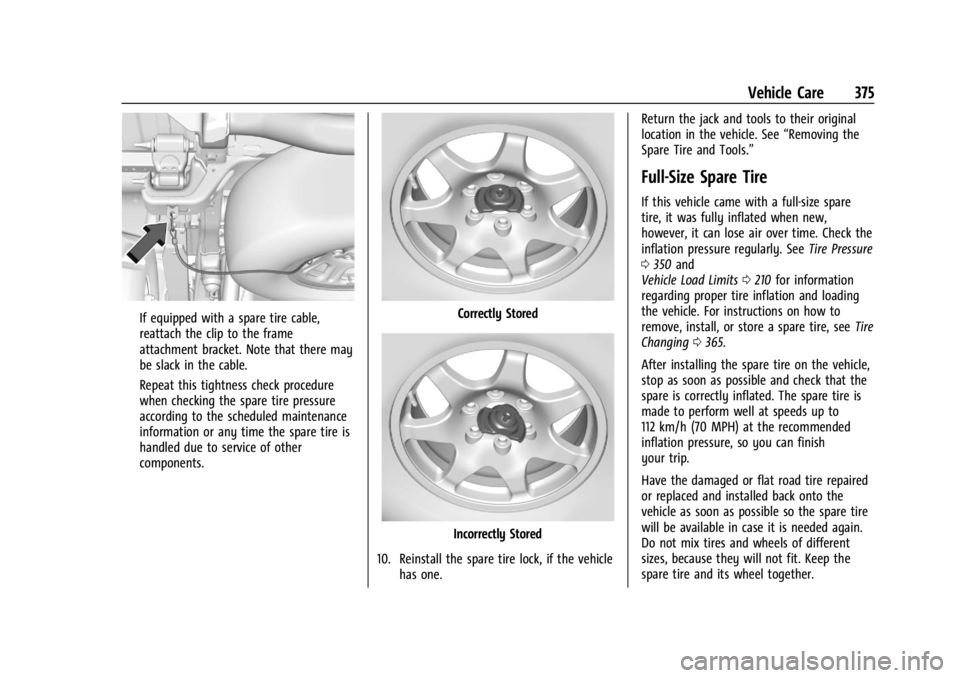
If equipped with a spare tire cable,
reattach the clip to the frame
attachment bracket. Note that there may
be slack in the cable.
Repeat this tightness check procedure
when checking the spare tire pressure
according to the scheduled maintenance
information or any time the spare tire is
handled due to service of other
components.Correctly Stored
Incorrectly Stored
10. Reinstall the spare tire lock, if the vehicle has one. Return the jack and tools to their original
location in the vehicle. See
“Removing the
Spare Tire and Tools.”
Full-Size Spare Tire
If this vehicle came with a full-size spare
tire, it was fully inflated when new,
however, it can lose air over time. Check the
inflation pressure regularly. See Tire Pressure
0 350 and
Vehicle Load Limits 0210 for information
regarding proper tire inflation and loading
the vehicle. For instructions on how to
remove, install, or store a spare tire, see Tire
Changing 0365.
After installing the spare tire on the vehicle,
stop as soon as possible and check that the
spare is correctly inflated. The spare tire is
made to perform well at speeds up to
112 km/h (70 MPH) at the recommended
inflation pressure, so you can finish
your trip.
Have the damaged or flat road tire repaired
or replaced and installed back onto the
vehicle as soon as possible so the spare tire
will be available in case it is needed again.
Do not mix tires and wheels of different
sizes, because they will not fit. Keep the
spare tire and its wheel together.
Page 395 of 440
GMC Sierra/Sierra Denali 2500 HD/3500 HD Owner Manual (GMNA-
Localizing-U.S./Canada-16908340) - 2024 - CRC - 12/7/22
Service and Maintenance 393
Service and Maintenance
General Information
General Information . . . . . . . . . . . . . . . . . . . 393
Maintenance Schedule
Maintenance Schedule . . . . . . . . . . . . . . . . 394
Multi-Point Vehicle Inspection (MPVI)
Multi-Point VehicleInspection (MPVI) . . . . . . . . . . . . . . . . . . . 396
Special Application Services
Special Application Services . . . . . . . . . . . . 397
Recommended Fluids, Lubricants, and
Parts
Recommended Fluids and
Lubricants . . . . . . . . . . . . . . . . . . . . . . . . . . . 398
Maintenance Replacement Parts . . . . . . 399
Maintenance Records
Maintenance Records . . . . . . . . . . . . . . . . . 400
General Information
Your vehicle is an important investment.
This section describes the required
maintenance for the vehicle. Follow this
schedule to help protect against major repair
expenses resulting from neglect or
inadequate maintenance. It may also help to
maintain the value of the vehicle if it is
sold. It is the responsibility of the owner to
have all required maintenance performed.
Your dealer has trained technicians who can
perform required maintenance using genuine
replacement parts. They have up-to-date
tools and equipment for fast and accurate
diagnostics. Many dealers have extended
evening and Saturday hours, courtesy
transportation, and online scheduling to
assist with service needs.
Your dealer recognizes the importance of
providing competitively priced maintenance
and repair services. With trained technicians,
the dealer is the place for routine
maintenance such as oil changes and tire
rotations and additional maintenance items
like tires, brakes, batteries, and wiper blades.
Caution
Damage caused by improper maintenance
can lead to costly repairs and may not be
covered by the vehicle warranty.
Maintenance intervals, checks,
inspections, recommended fluids, and
lubricants are important to keep the
vehicle in good working condition.
Do not have chemical flushes that are not
approved by GM performed on the
vehicle. The use of flushes, solvents,
cleaners, or lubricants that are not
approved by GM could damage the
vehicle, requiring expensive repairs that
are not covered by the vehicle warranty.
The Tire Rotation and Required Services are
the responsibility of the vehicle owner. It is
recommended to have your dealer perform
these services every 12 000 km/7,500 mi.
Proper vehicle maintenance helps to keep
the vehicle in good working condition,
improves fuel economy, and reduces vehicle
emissions.
Page 396 of 440
GMC Sierra/Sierra Denali 2500 HD/3500 HD Owner Manual (GMNA-
Localizing-U.S./Canada-16908340) - 2024 - CRC - 12/7/22
394 Service and Maintenance
Because of the way people use vehicles,
maintenance needs vary. There may need to
be more frequent checks and services. The
Additional Required Services - Normal are for
vehicles that:
.Carry passengers and cargo within
recommended limits on the Tire and
Loading Information label. SeeVehicle
Load Limits 0210.
.Are driven on reasonable road surfaces
within legal driving limits.
.Use the recommended fuel. See
Recommended Fuel 0272.
Refer to the information in the Maintenance
Schedule Additional Required Services -
Normal Service.
The Additional Required Services - Severe are
for vehicles that are:
.Mainly driven in heavy city traffic in hot
weather.
.Mainly driven in hilly or mountainous
terrain.
.Frequently towing a trailer.
.Used for high speed or competitive
driving.
.Used for taxi, police, or delivery service. Refer to the information in the Maintenance
Schedule Additional Required Services -
Severe Service.
{Warning
Performing maintenance work can be
dangerous and can cause serious injury.
Perform maintenance work only if the
required information, proper tools, and
equipment are available. If they are not,
see your dealer to have a trained
technician do the work. See
Doing Your
Own Service Work 0311.
Maintenance Schedule
Tire Rotation and Required Services
Every 12 000 km (7,500 mi)
Tires are rotated to achieve a more uniform
wear for all tires. The first rotation is the
most important. Anytime unusual wear is noticed, rotate the
tires as soon as possible, check for proper
tire inflation pressure, and check for
damaged tires or wheels. If the unusual
wear continues after the rotation, check the
wheel alignment. See
When It Is Time for
New Tires 0359 and
Wheel Replacement 0362.
.Perform Multi-Point Vehicle Inspection.
See Multi-Point Vehicle Inspection (MPVI)
0 396.
.Lubricate body components. See Exterior
Care 0383.
Power Take Off (PTO) and Extended
Idle Use
When the vehicle is used with the PTO
equipment or used in a way that requires
extended idle time, one hour of use shall be
deemed the same as 53 km (33 mi). See
Driver Information Center (DIC) (Base Level)
0131 or
Driver Information Center (DIC) (Uplevel)
0 133 for hourmeter, if equipped.
Page 402 of 440
GMC Sierra/Sierra Denali 2500 HD/3500 HD Owner Manual (GMNA-
Localizing-U.S./Canada-16908340) - 2024 - CRC - 12/7/22
400 Service and Maintenance
Maintenance Records
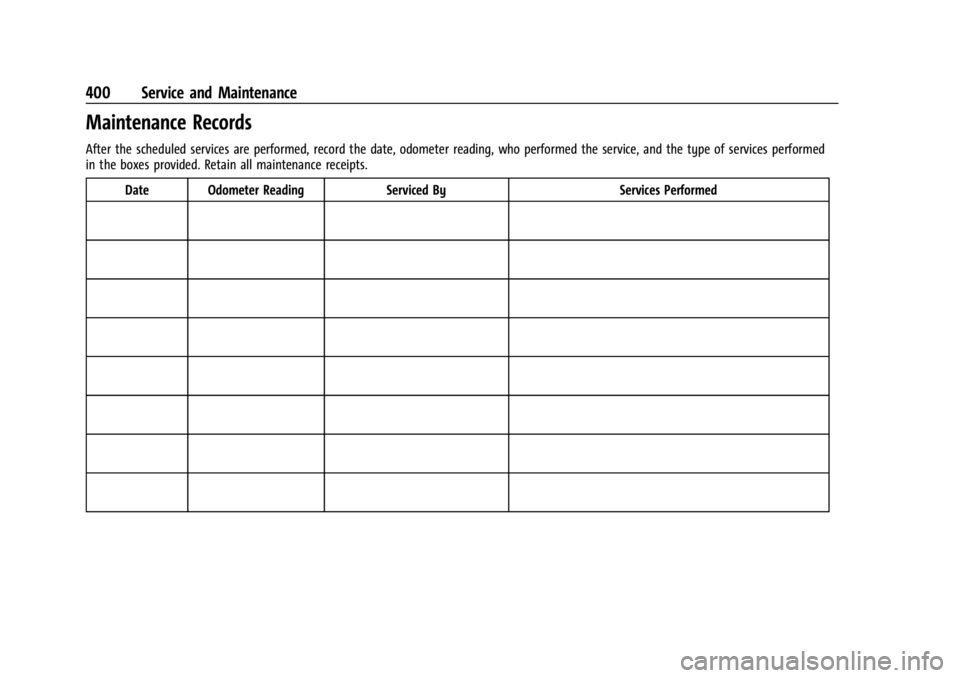
After the scheduled services are performed, record the date, odometer reading, who performed the service, and the type of services performed
in the boxes provided. Retain all maintenance receipts.Date Odometer Reading Serviced By Services Performed
Page 409 of 440
GMC Sierra/Sierra Denali 2500 HD/3500 HD Owner Manual (GMNA-
Localizing-U.S./Canada-16908340) - 2024 - CRC - 12/7/22
Customer Information 407
For further information concerning eligibility
in the Canadian Motor Vehicle Arbitration
Plan (CAMVAP), call toll-free 1-800-207-0685,
or call the General Motors Customer Care
Centre, 1-800-263-3777 (English),
1-800-263-7854 (French), or write to:
Mediation/Arbitration Program
c/o Customer Care Centre
General Motors of Canada Company
500 Wentworth Street W
Oshawa, ON L1J 0C5
Your inquiry should be accompanied by the
Vehicle Identification Number (VIN).
Customer Assistance Offices
GMC is committed to assisting customers.
Visit us online at www.gmc.com/support
(U.S.) or www.mygmc.ca (Canada) to chat
with us or find answers to commonly asked
questions, tips, vehicle how-to instructions,
and available support.
Need more help? Use the phone numbers or
mailing addresses below for additional
assistance.
United States and Puerto Rico
GMC Customer Assistance Center
P.O. Box 33172
Detroit, MI 48232-5172
1-800-GMC-8782 (1-800-462-8782)
TTY: Dial 711 relay service and contact
1-800-833-2438
Roadside Assistance: 1-888-881-3302
Canada
Customer Care Centre
General Motors of Canada Company
500 Wentworth Street W
Oshawa, ON L1J 0C5
1-800-263-3777 (English)
1-800-263-7854 (French)
1-800-263-3830 (For Text Telephone Devices
(TTYs))
Roadside Assistance: 1-800-268-6800
Overseas
Please contact the local General Motors
Business Unit.
Customer Assistance for Text
Telephone (TTY) Users
To assist customers who are deaf, hard of
hearing, or speech-impaired and/or who use
Text Telephones (TTYs), GMC is able to
assist. Please dial the national 711 relay
service and contact 1-800-833-2438. TTY users
in Canada can dial 1-800-263-3830.
Online Account
Create a GMC Account (U.S.) at gmc.com
Learn more about your vehicle features,
shop for and manage your connected
services and OnStar plans, and access
diagnostic information specific to your
vehicle.
Membership Benefits
E:Download owner’s manuals and view
vehicle-specific how-to videos.
G: View maintenance schedules, alerts, and
Vehicle Diagnostic Information. Schedule
service appointments.
I: View service records from your
dealership and add your own.
Page 412 of 440
GMC Sierra/Sierra Denali 2500 HD/3500 HD Owner Manual (GMNA-
Localizing-U.S./Canada-16908340) - 2024 - CRC - 12/7/22
410 Customer Information
.Trip Interruption Benefits and Assistance:
Must be over 150 km from where your
trip was started to qualify.
Pre-authorization, original detailed
receipts, and a copy of the repair orders
are required. Once authorization has been
received, the Roadside Assistance advisor
will help to make arrangements and
explain how to receive payment.
.Alternative Service:If assistance cannot
be provided right away, the Roadside
Assistance advisor may give permission to
get local emergency road service. You will
receive payment, up to $100, after
sending the original receipt to Roadside
Assistance. Mechanical failures may be
covered, however any cost for parts and
labor for repairs not covered by the
warranty are the owner’s responsibility.
Scheduling Service Appointments
When the vehicle requires warranty service,
contact your dealer and request an
appointment. By scheduling a service
appointment and advising the service
consultant of your transportation needs,
your dealer can help minimize your
inconvenience. If the vehicle cannot be scheduled into the
service department immediately, keep
driving it until it can be scheduled for
service, unless, of course, the problem is
safety related. If it is, please call your
dealership, let them know this, and ask for
instructions.
If your dealer requests you to bring the
vehicle for service, you are urged to do so
as early in the work day as possible to
allow for same-day repair.
Courtesy Transportation Program
To enhance your ownership experience, we
and our participating dealers are proud to
offer Courtesy Transportation, a customer
support program for vehicles with the
Bumper-to-Bumper (Base Warranty Coverage
period in Canada), Federal Emission,
Extended Powertrain or Electric specific
warranties in both the U.S. and Canada.
Several Courtesy Transportation options are
available to assist in reducing inconvenience
when warranty repairs are required.
Courtesy Transportation is not a part of the
New Vehicle Limited Warranty. A separate
manual entitled
“Limited Warranty and Owner Assistance Information”
produced for
new vehicles provides detailed warranty
coverage information.
Transportation Options
Warranty service can generally be
completed while you wait. However, if you
are unable to do so, your dealer may offer
the following transportation options:
Shuttle Service
This includes one-way or round-trip shuttle
service within reasonable time and distance
parameters of your dealer's area.
Public Transportation or Fuel Reimbursement
If overnight warranty repairs are needed,
and public transportation is used, the
expense must be supported by original
receipts and within the maximum amount
allowed by GM. If U.S. customers arrange
their own transportation, limited
reimbursement for reasonable fuel expenses
may be available. Claim amounts should
reflect actual costs and be supported by
original receipts. See your dealer for
information.
Page 415 of 440
GMC Sierra/Sierra Denali 2500 HD/3500 HD Owner Manual (GMNA-
Localizing-U.S./Canada-16908340) - 2024 - CRC - 12/7/22
Customer Information 413
vehicle repaired with Genuine GM parts,
even if your insurance coverage does not
pay the full cost.
If another party's insurance company is
paying for the repairs, you are not obligated
to accept a repair valuation based on that
insurance company's collision policy repair
limits, as you have no contractual limits
with that company. In such cases, you can
have control of the repair and parts choices
as long as the cost stays within reasonable
limits.
Publication Ordering Information
Service Manuals
Service manuals have the diagnosis and
repair information on the engine/propulsion,
transmission, axle, suspension, brakes,
electrical system, steering system, body, etc.
Customer Literature
Owner’s manuals are written specifically for
owners and are intended to provide basic
operational information about the vehicle.
The owner’s manual includes the
Maintenance Schedule for all models.Customer literature publications available for
purchase include owner’s manuals, warranty
manuals, and portfolios. Portfolios include an
owner’s manual, warranty manual,
if applicable, and zip lock bag or pouch.
Current and Past Models
Service manuals and customer literature are
available for many GM vehicles.
To check availability and to order,
call 1-800-551-4123 Monday–Friday,
8:00 a.m.–6:00 p.m. Eastern Time
For credit card orders only (VISA,
MasterCard, or Discover), see Helm, Inc. at:
www.helminc.com.
To order by mail, write to:
Helm, Incorporated
Attention: Customer Service
47911 Halyard Drive
Plymouth, MI 48170
Make checks payable in U.S. funds.
Radio Frequency Statement
This vehicle uses license-exempt
transmitters / receivers / systems that
operate on a radio frequency that complies
with Part 15/Part 18 of the Federal
Communications Commission (FCC) rules and
with Innovation, Science and Economic
Development (ISED) Canada's license-exempt
RSS(s) / RSP-100 / ICES-GEN.
Operation is subject to the following two
conditions:
1. The device may not cause harmful interference.
2. The device must accept any interference received, including interference that may
cause undesired operation of the device.
Changes or modifications to any of these
systems by other than an authorized service
facility could void authorization to use this
equipment.
Page 425 of 440
GMC Sierra/Sierra Denali 2500 HD/3500 HD Owner Manual (GMNA-
Localizing-U.S./Canada-16908340) - 2024 - CRC - 12/7/22
Connected Services 423
Ensuring Security
.Change the default passwords for the
Wi-Fi hotspot and myGMC mobile
application. Make these passwords
different from each other and use a
combination of letters and numbers to
increase the security.
.Change the default name of the SSID
(Service Set Identifier). This is your
network’s name that is visible to other
wireless devices. Choose a unique name
and avoid family names or vehicle
descriptions.
Wi-Fi Hotspot (If Equipped)
The vehicle may have a built-in Wi-Fi
hotspot that provides access to the Internet
and web content at 4G LTE speed. Up to
seven mobile devices can be connected.
A data plan is required. Use the in-vehicle
controls only when it is safe to do so. 1. To retrieve Wi-Fi hotspot information, press
=to open the OnStar app on the
infotainment display, then select Wi-Fi
Hotspot. On some vehicles, touch Wi-Fi
or Wi-Fi Settings on the screen. 2. The Wi-Fi settings will display the Wi-Fi
hotspot name (SSID), password, and on
some vehicles, the connection type (no
Internet connection, 3G, 4G, 4G LTE), and
signal quality (poor, good, excellent). The
LTE icon shows connection to Wi-Fi. It is
possible that the icon may not illuminate
even though the vehicle has an active
connection.
3. To change the SSID or password, press
Qor call 1-888-4ONSTAR to connect
with an Advisor. On some vehicles, the
SSID and password can be changed in
the Wi-Fi Hotspot menu.
After initial set-up, your vehicle’s Wi-Fi
hotspot will connect automatically to your
mobile devices. Manage data usage by
turning Wi-Fi on or off on your mobile
device, using the myGMC mobile app, or by
contacting an OnStar Advisor. On some
vehicles, Wi-Fi can also be managed from
the Wi-Fi Hotspot menu. MyGMC Mobile App (If Available)
Download the myGMC mobile app to
compatible Apple and Android smartphones.
GMC users can access the following services
from a smartphone:
.Remotely start/stop the vehicle,
if factory-equipped.
.Lock/unlock doors, if equipped with
automatic locks.
.Activate the horn and lamps.
.Check the vehicle’s fuel level, oil life,
or tire pressure, if factory-equipped with
the Tire Pressure Monitor System.
.Send destinations to the vehicle.
.Locate the vehicle on a map (U.S.
market only).
.Turn the vehicle's Wi-Fi hotspot on/off,
manage settings, and monitor data
consumption, if equipped.
.Locate a dealer and schedule service.
.Request Roadside Assistance.
.Set a parking reminder with pin drop,
take a photo, make a note, and set a
timer.
.Connect with GMC on social media.
Page 434 of 440

GMC Sierra/Sierra Denali 2500 HD/3500 HD Owner Manual (GMNA-
Localizing-U.S./Canada-16908340) - 2024 - CRC - 12/7/22
432 Index
M
MaintenanceRecords . . . . . . . . . . . . . . . . . . . . . . . . . . . . . . . 400
Maintenance Schedule . . . . . . . . . . . . . . . . . . . 394 Recommended Fluids and
Lubricants . . . . . . . . . . . . . . . . . . . . . . . . . . . . 398
Malfunction Indicator Lamp . . . . . . . . . . . . . . . 122
Manual Mirrors . . . . . . . . . . . . . . . . . . . . . . . . . . . . . . . . . 34
Mode . . . . . . . . . . . . . . . . . . . . . . . . . . . . . . . . . . 226
Maps . . . . . . . . . . . . . . . . . . . . . . . . . . . . . . . . . . . . 165
Massage Seats . . . . . . . . . . . . . . . . . . . . . . . . . . . . . . . . . . . . 51
Media
Avoiding Untrusted Devices . . . . . . . . . . . . 163
Memory Seats . . . . . . . . . . . . . . . . . . . . . . . . . . . . . 51
Messages Engine Power . . . . . . . . . . . . . . . . . . . . . . . . . . 139
Vehicle . . . . . . . . . . . . . . . . . . . . . . . . . . . . . . . . 139
Vehicle Speed . . . . . . . . . . . . . . . . . . . . . . . . . . 139
Mirrors Automatic Dimming . . . . . . . . . . . . . . . . . . . . 37
Automatic Dimming Rearview . . . . . . . . . . 38
Blind Spot . . . . . . . . . . . . . . . . . . . . . . . . . . . . . . 37
Convex . . . . . . . . . . . . . . . . . . . . . . . . . . . . . . . . . 34
Folding . . . . . . . . . . . . . . . . . . . . . . . . . . . . . . . . . 36
Heated . . . . . . . . . . . . . . . . . . . . . . . . . . . . . . . . . 37
Interior Rearview . . . . . . . . . . . . . . . . . . . . . . . 38 Mirrors (cont'd)
Manual . . . . . . . . . . . . . . . . . . . . . . . . . . . . . . . . . 34
Manual Rearview . . . . . . . . . . . . . . . . . . . . . . . 38
Power . . . . . . . . . . . . . . . . . . . . . . . . . . . . . . . . . . 35
Rear Camera . . . . . . . . . . . . . . . . . . . . . . . . . . . . 38
Tilt in Reverse . . . . . . . . . . . . . . . . . . . . . . . . . . 38
Trailer Tow . . . . . . . . . . . . . . . . . . . . . . . . . . . . . 35
Mode Driver Control . . . . . . . . . . . . . . . . . . . . . . . . . 238
Monitor System, Tire Pressure . . . . . . . . . . . . 351
Multi-band Antenna . . . . . . . . . . . . . . . . . . . . . 163
Multi-Point Vehicle Inspection (MPVI) . . . . 396
N
Navigation Connected Services . . . . . . . . . . . . . . . . . . . . 422
Destination . . . . . . . . . . . . . . . . . . . . . . . . . . . . 166
Symbols . . . . . . . . . . . . . . . . . . . . . . . . . . . . . . . 166
Using the System . . . . . . . . . . . . . . . . . . . . . . 165
New Vehicle Break-In . . . . . . . . . . . . . . . . . . . . 216
Noise Control System . . . . . . . . . . . . . . . . . . . . 329
O
Odometer . . . . . . . . . . . . . . . . . . . . . . . . . . . . . . . . 116 Trip . . . . . . . . . . . . . . . . . . . . . . . . . . . . . . . . . . . . . 116
Off-Road Driving . . . . . . . . . . . . . . . . . . . . . . . . . . . . . . . . 203
Recovery . . . . . . . . . . . . . . . . . . . . . . . . . . . . . . . 202 Oil
Engine . . . . . . . . . . . . . . . . . . . . . . . . . . . . . . . . . 314
Engine Oil Life System . . . . . . . . . . . . . . . . . 316
Engine Oil Pressure Gauge . . . . . . . . . . . . . . 117
Pressure Light . . . . . . . . . . . . . . . . . . . . . . . . . 129
Older Children, Restraints . . . . . . . . . . . . . . . . . .75
Online Account . . . . . . . . . . . . . . . . . . . . . . . . . . 407
OnStar . . . . . . . . . . . . . . . . . . . . . . . . . . . . . . . . . . . 416 Additional Information . . . . . . . . . . . . . . . . . 419
Overview . . . . . . . . . . . . . . . . . . . . . . . . . . . . . . 417
OnStar Emergency . . . . . . . . . . . . . . . . . . . . . . . 418
OnStar Security . . . . . . . . . . . . . . . . . . . . . . . . . . 418
Operating Mode
Overheated Engine Protection . . . . . . . . . 323
Outlets Power . . . . . . . . . . . . . . . . . . . . . . . . . . . . . . . . . 107
Overheated Engine Protection Operating Mode . . . . . . . . . . . . . . . . . . . . . . . 323
Overheating, Engine . . . . . . . . . . . . . . . . . . . . . . 321
Overview . . . . . . . . . . . . . . . . . . . . . . . . . . . . 154, 155 Instrument Panel . . . . . . . . . . . . . . . . . . . . . . . . 5P
Park
Assist . . . . . . . . . . . . . . . . . . . . . . . . . . . . . 253, 262
Shifting Into . . . . . . . . . . . . . . . . . . . . . . . . . . . 220
Shifting Out of . . . . . . . . . . . . . . . . . . . . . . . . 221