tailgate warning GMC SIERRA DENALI 2024 Owners Manual
[x] Cancel search | Manufacturer: GMC, Model Year: 2024, Model line: SIERRA DENALI, Model: GMC SIERRA DENALI 2024Pages: 440, PDF Size: 9.21 MB
Page 8 of 440

GMC Sierra/Sierra Denali 2500 HD/3500 HD Owner Manual (GMNA-
Localizing-U.S./Canada-16908340) - 2024 - CRC - 12/13/22
6 Introduction
1. Tow/Haul Mode (On Some Models). SeeDriver Mode Control 0238.
Automatic Transfer Case Control (If
Equipped). See Four-Wheel Drive 0228.
Driver Mode Control 0238 (If Equipped).
2. Air Vents 0196.
3. Turn Signal Lever. See Turn and
Lane-Change Signals 0147.
Windshield Wiper/Washer 0106.
4. Head-Up Display (HUD) 0135 (If
Equipped).
5. Instrument Cluster (Base Level) 0112 or
Instrument Cluster (Uplevel) 0113.
6. Shift Lever. See Automatic Transmission
0 223.
Range Selection Mode. See Manual Mode
0 226.
7. Light Sensor. See Automatic Headlamp
System 0145.
8. Infotainment Controls. See Overview
(Uplevel Radio) 0155 or
Overview (Base Radio) 0154.
9. Upper Glove Box. See Glove Box099. 10. Lower Glove Box. See
Glove Box099.
11. Climate Control Systems 0191 (If
Equipped).
Dual Automatic Climate Control System
0 193 (If Equipped).
12.
XPark Assist Switch (If Equipped). See
Assistance Systems for Parking or Backing
0 253.
5Power Release Tailgate (If
Equipped). See Tailgate024.
|Hazard Warning Flashers 0146.
gTraction Control/Electronic Stability
Control 0236.
-DC/AC Switch. See Power Outlets
0 107.
@Lane Departure Warning (LDW) 0270
(If Equipped).
5Hill Descent Control Switch (If
Equipped). See Hill Descent Control (HDC)
0 237.
jPower Assist Steps 031 (If
Equipped).
LExpress Window Down Button (If
Equipped). See Power Windows 042.
Tow/Haul Mode 0227 (On Some
Models).
Exhaust Brake (If Equipped). See Duramax
Diesel Supplement.
Power Take-Off (PTO) (If Equipped). See
Duramax Diesel Supplement.
13. Power Outlet (Alternating Current) (If Equipped). See Power Outlets0107.
14. Power Outlets 0107.
15. USB Port 0163.
16. Trailer Brake Control Panel (If Equipped). See“Integrated Trailer Brake Control
System” underTowing Equipment 0284.
17. ENGINE START/STOP. See Ignition
Positions 0216.
18. Steering Wheel Controls 0156 (If
Equipped).
Driver Information Center (DIC) Controls.
See Driver Information Center (DIC) (Base
Level) 0131 or
Driver Information Center (DIC) (Uplevel)
0 133.
Page 11 of 440

GMC Sierra/Sierra Denali 2500 HD/3500 HD Owner Manual (GMNA-
Localizing-U.S./Canada-16908340) - 2024 - CRC - 12/13/22
Introduction 9
1.Head-Up Display (HUD) 0135 (If
Equipped).
2. Air Vents 0196.
3. Turn Signal Lever. See Turn and
Lane-Change Signals 0147.
Windshield Wiper/Washer 0106.
4. Instrument Cluster (Base Level) 0112 or
Instrument Cluster (Uplevel) 0113.
5. Shift Lever. See Automatic Transmission
0 223.
Range Selection Mode. See Manual Mode
0 226.
6. Infotainment System. See Overview
(Uplevel Radio) 0155 or
Overview (Base Radio) 0154.
7. Light Sensor. See Automatic Headlamp
System 0145.
Vehicle Alarm System. See Vehicle
Security 032.
8. Upper Glove Box. See Glove Box099.
9. Lower Glove Box. See Glove Box099.
10. Upper Glove Box Button. See Glove Box
0 99. 11. Power Release Tailgate (If Equipped). See
Tailgate 024.
Hazard Warning Flashers 0146.
Traction Control/Electronic Stability
Control 0236.
Hill Descent Control Switch (If Equipped).
See Hill Descent Control (HDC) 0237.
Power Assist Steps 031 (If Equipped).
Express Window Down Button (If
Equipped). See Power Windows 042.
Tow/Haul Mode 0227 (On Some
Models).
Exhaust Brake (If Equipped). See Duramax
Diesel Supplement.
Power Take-Off (PTO) (If Equipped). See
Duramax Diesel Supplement.
12. USB Port 0163.
13. Climate Control Systems 0191 (If
Equipped).
Dual Automatic Climate Control System
0 193 (If Equipped).
Heated and Ventilated Front Seats 054
(If Equipped).
Heated Steering Wheel 0105 (If
Equipped). 14. Front Center Console Storage.
15.
Cupholders 0100.
16. Trailer Brake Control Panel (If Equipped). See“Integrated Trailer Brake Control
System” underTowing Equipment 0284.
17. ENGINE START/STOP. See Ignition
Positions 0216.
18. Steering Wheel Controls 0156.
Driver Information Center (DIC) Controls.
See Driver Information Center (DIC) (Base
Level) 0131 or
Driver Information Center (DIC) (Uplevel)
0 133.
19. Horn 0106.
20. Steering Wheel Adjustment 0105 (Out
of View).
21. Hood Release. See Hood0312.
22. Cruise Control 0239.
Adaptive Cruise Control (Camera) 0241
(If Equipped).
Forward Collision Alert (FCA) System
0 263 (If Equipped).
Page 14 of 440

GMC Sierra/Sierra Denali 2500 HD/3500 HD Owner Manual (GMNA-
Localizing-U.S./Canada-16908340) - 2024 - CRC - 12/13/22
12 Introduction
1.Air Vents 0196.
2. Head-Up Display (HUD) 0135 (If
Equipped).
3. Turn Signal Lever. See Turn and
Lane-Change Signals 0147.
Windshield Wiper/Washer 0106.
4. Instrument Cluster (Base Level) 0112 or
Instrument Cluster (Uplevel) 0113.
5. Shift Lever. See Automatic Transmission
0 223.
Range Selection Mode. See Manual Mode
0 226.
6. Infotainment System. See Overview
(Uplevel Radio) 0155 or
Overview (Base Radio) 0154.
7. Light Sensor. See Automatic Headlamp
System 0145.
Vehicle Alarm System. See Vehicle
Security 032.
8. Upper Glove Box Button. See Glove Box
0 99.
9. Upper Glove Box. See Glove Box099.
10. Lower Glove Box. See Glove Box099. 11.
Climate Control Systems 0191 (If
Equipped).
Dual Automatic Climate Control System
0 193 (If Equipped).
Heated and Ventilated Front Seats 054
(If Equipped).
Heated Steering Wheel 0105 (If
Equipped).
12. Power Release Tailgate (If Equipped). See Tailgate 024.
Hazard Warning Flashers 0146.
Traction Control/Electronic Stability
Control 0236.
Hill Descent Control Switch (If Equipped).
See Hill Descent Control (HDC) 0237.
Power Assist Steps 031 (If Equipped).
Express Window Down Button (If
Equipped). See Power Windows 042.
Tow/Haul Mode 0227 (On Some
Models).
Exhaust Brake (If Equipped). See Duramax
Diesel Supplement.
Power Take-Off (PTO) (If Equipped). See
Duramax Diesel Supplement. 13. Front Center Console Storage.
14.
USB Port 0163.
15. Cupholders 0100.
16. Trailer Brake Control Panel (If Equipped). See“Integrated Trailer Brake Control
System” underTowing Equipment 0284.
17. ENGINE START/STOP. See Ignition
Positions 0216.
18. Steering Wheel Controls 0156.
Driver Information Center (DIC) Controls.
See Driver Information Center (DIC) (Base
Level) 0131 or
Driver Information Center (DIC) (Uplevel)
0 133.
19. Horn 0106.
20. Hood Release. See Hood0312.
21. Steering Wheel Adjustment 0105 (Out
of View).
22. Cruise Control 0239.
Adaptive Cruise Control (Camera) 0241
(If Equipped).
Forward Collision Alert (FCA) System
0 263 (If Equipped).
Page 16 of 440
GMC Sierra/Sierra Denali 2500 HD/3500 HD Owner Manual (GMNA-
Localizing-U.S./Canada-16908340) - 2024 - CRC - 12/7/22
14 Keys, Doors, and Windows
Keys, Doors, and
Windows
Keys and Locks
Keys . . . . . . . . . . . . . . . . . . . . . . . . . . . . . . . . . . . . 14
Remote Key . . . . . . . . . . . . . . . . . . . . . . . . . . . . . 15
Remote Key Operation . . . . . . . . . . . . . . . . . . 15
Remote Vehicle Start . . . . . . . . . . . . . . . . . . . 21
Door Locks . . . . . . . . . . . . . . . . . . . . . . . . . . . . . . 22
Power Door Locks . . . . . . . . . . . . . . . . . . . . . . . 23
Delayed Locking . . . . . . . . . . . . . . . . . . . . . . . . 23
Automatic Door Locks . . . . . . . . . . . . . . . . . . 23
Lockout Protection . . . . . . . . . . . . . . . . . . . . . . 23
Safety Locks . . . . . . . . . . . . . . . . . . . . . . . . . . . . 24
Doors
Tailgate . . . . . . . . . . . . . . . . . . . . . . . . . . . . . . . . 24
Transporting Items That CanCatch Fire . . . . . . . . . . . . . . . . . . . . . . . . . . . . . 31
Power Assist Steps . . . . . . . . . . . . . . . . . . . . . . 31
Vehicle Security
Vehicle Security . . . . . . . . . . . . . . . . . . . . . . . . 32
Vehicle Alarm System . . . . . . . . . . . . . . . . . . 32
Steering Column Lock . . . . . . . . . . . . . . . . . . . 33
Immobilizer . . . . . . . . . . . . . . . . . . . . . . . . . . . . . 33
Immobilizer Operation . . . . . . . . . . . . . . . . . . 33
Exterior Mirrors
Convex Mirrors . . . . . . . . . . . . . . . . . . . . . . . . . 34
Manual Mirrors . . . . . . . . . . . . . . . . . . . . . . . . . 34
Trailer-Tow Mirrors . . . . . . . . . . . . . . . . . . . . . 35
Power Mirrors . . . . . . . . . . . . . . . . . . . . . . . . . . 35
Folding Mirrors . . . . . . . . . . . . . . . . . . . . . . . . . 36
Heated Mirrors . . . . . . . . . . . . . . . . . . . . . . . . . 37
Automatic Dimming Mirror . . . . . . . . . . . . . 37
Blind Spot Mirrors . . . . . . . . . . . . . . . . . . . . . . 37
Reverse Tilt Mirrors . . . . . . . . . . . . . . . . . . . . . 38
Interior Mirrors
Interior Rearview Mirrors . . . . . . . . . . . . . . . 38
Manual Rearview Mirror . . . . . . . . . . . . . . . . 38
Automatic Dimming Rearview Mirror . . . 38
Rear Camera Mirror . . . . . . . . . . . . . . . . . . . . 38
Truck Bed Camera Rearview Mirror . . . . . 41
Windows
Windows . . . . . . . . . . . . . . . . . . . . . . . . . . . . . . . 41
Power Windows . . . . . . . . . . . . . . . . . . . . . . . . 42
Rear Windows . . . . . . . . . . . . . . . . . . . . . . . . . . 44
Sun Visors . . . . . . . . . . . . . . . . . . . . . . . . . . . . . . 44
Roof
Sunroof . . . . . . . . . . . . . . . . . . . . . . . . . . . . . . . . 44
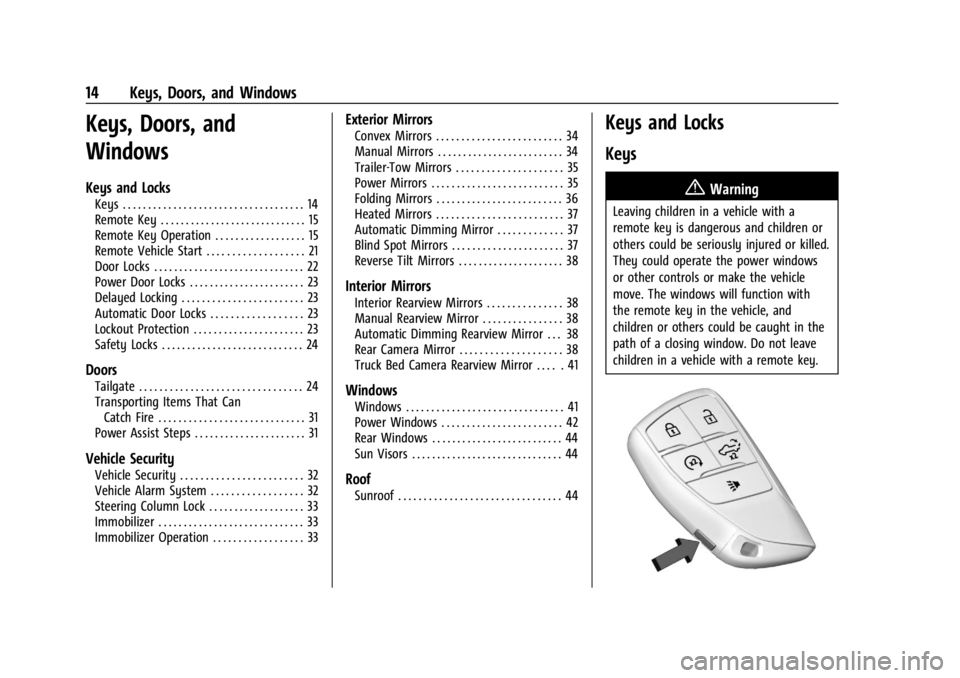
Keys and Locks
Keys
{Warning
Leaving children in a vehicle with a
remote key is dangerous and children or
others could be seriously injured or killed.
They could operate the power windows
or other controls or make the vehicle
move. The windows will function with
the remote key in the vehicle, and
children or others could be caught in the
path of a closing window. Do not leave
children in a vehicle with a remote key.
Page 24 of 440
GMC Sierra/Sierra Denali 2500 HD/3500 HD Owner Manual (GMNA-
Localizing-U.S./Canada-16908340) - 2024 - CRC - 12/7/22
22 Keys, Doors, and Windows
Press the brake pedal and turn the ignition
on to drive the vehicle.
Total Engine Run Time
Remote start can be used for up to
30 minutes of total engine run time.
After two remote starts of 15 minutes,
or multiple shorter time starts totaling
30 minutes have been used, the vehicle
must be started and then turned off before
the remote start can be used again.
Canceling a Remote Start
To cancel a remote start, do one of the
following:
.PressS. The parking lamps will turn off.
.Turn on the hazard warning flashers.
.Turn the ignition on and then off.
Door Locks
{Warning
Unlocked doors can be dangerous.
.Passengers, especially children, can
easily open the doors and fall out of a
moving vehicle. The doors can be
unlocked and opened while the vehicle(Continued)
Warning (Continued)
is moving. The chance of being thrown
out of the vehicle in a crash is
increased if the doors are not locked.
So, all passengers should wear seat
belts properly and the doors should be
locked whenever the vehicle is driven.
.Young children who get into unlocked
vehicles may be unable to get out.
A child can be overcome by extreme
heat and can suffer permanent injuries
or even death from heat stroke.
Always lock the vehicle whenever
leaving it.
.Outsiders can easily enter through an
unlocked door when you slow down
or stop the vehicle. Locking the doors
can help prevent this from happening.
There are several ways to lock and unlock
the vehicle.
From outside:
.Use the remote key.
.Use Keyless Access, if equipped.
.Use the key in the driver door or the
passenger door, if equipped. From inside, pull the door handle once to
unlock the door. Pull the handle again to
open the door.
See
Vehicle Alarm System 032.
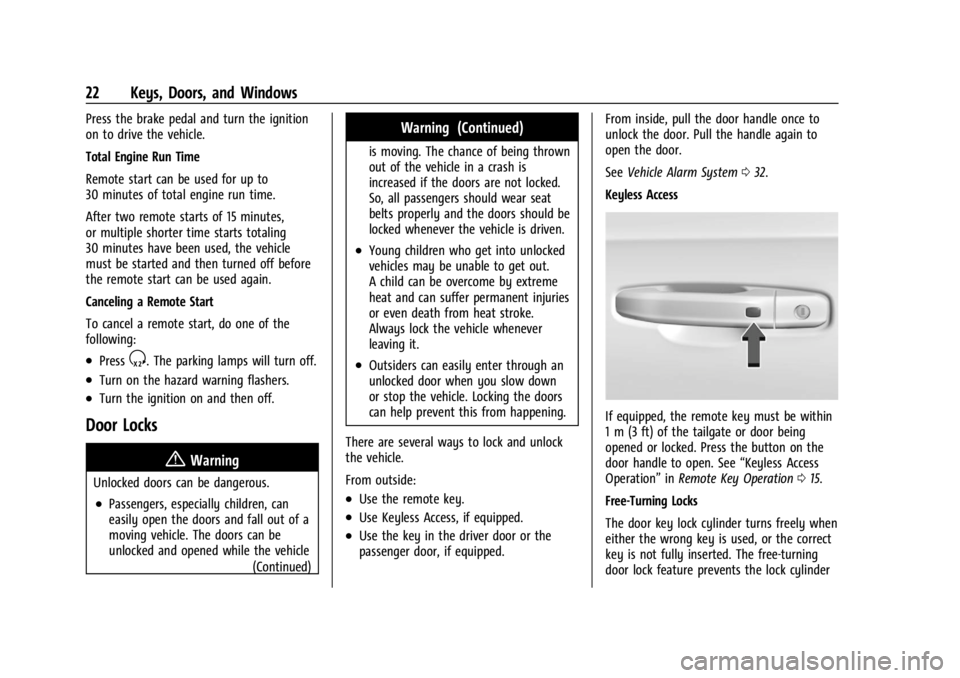
Keyless Access
If equipped, the remote key must be within
1 m (3 ft) of the tailgate or door being
opened or locked. Press the button on the
door handle to open. See “Keyless Access
Operation” inRemote Key Operation 015.
Free-Turning Locks
The door key lock cylinder turns freely when
either the wrong key is used, or the correct
key is not fully inserted. The free-turning
door lock feature prevents the lock cylinder
Page 26 of 440
GMC Sierra/Sierra Denali 2500 HD/3500 HD Owner Manual (GMNA-
Localizing-U.S./Canada-16908340) - 2024 - CRC - 12/7/22
24 Keys, Doors, and Windows
Safety Locks
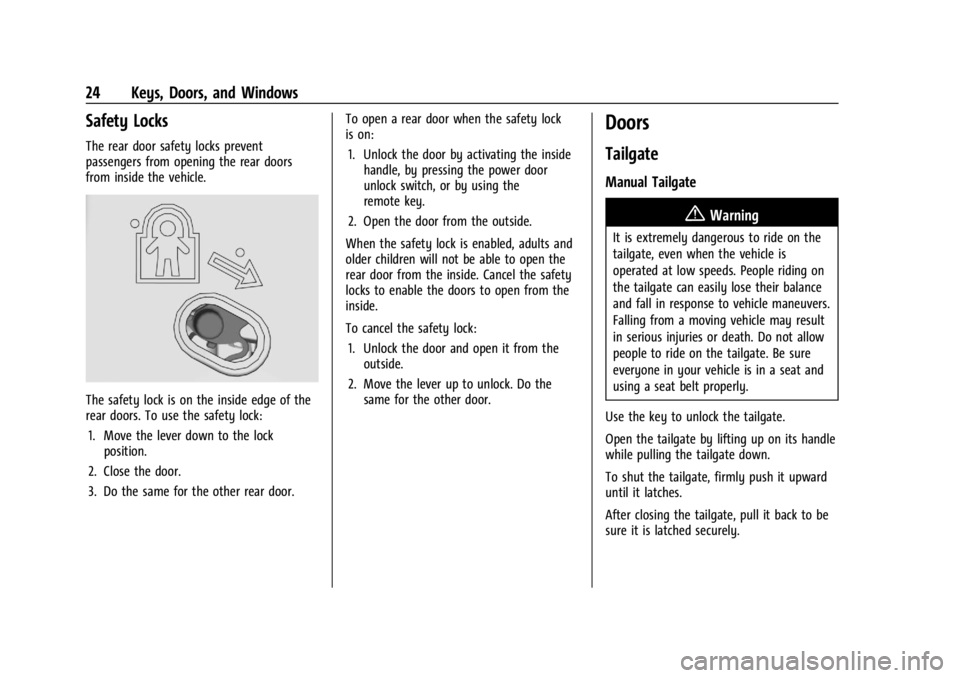
The rear door safety locks prevent
passengers from opening the rear doors
from inside the vehicle.
The safety lock is on the inside edge of the
rear doors. To use the safety lock:1. Move the lever down to the lock position.
2. Close the door.
3. Do the same for the other rear door. To open a rear door when the safety lock
is on:
1. Unlock the door by activating the inside handle, by pressing the power door
unlock switch, or by using the
remote key.
2. Open the door from the outside.
When the safety lock is enabled, adults and
older children will not be able to open the
rear door from the inside. Cancel the safety
locks to enable the doors to open from the
inside.
To cancel the safety lock: 1. Unlock the door and open it from the outside.
2. Move the lever up to unlock. Do the same for the other door.
Doors
Tailgate
Manual Tailgate
{Warning
It is extremely dangerous to ride on the
tailgate, even when the vehicle is
operated at low speeds. People riding on
the tailgate can easily lose their balance
and fall in response to vehicle maneuvers.
Falling from a moving vehicle may result
in serious injuries or death. Do not allow
people to ride on the tailgate. Be sure
everyone in your vehicle is in a seat and
using a seat belt properly.
Use the key to unlock the tailgate.
Open the tailgate by lifting up on its handle
while pulling the tailgate down.
To shut the tailgate, firmly push it upward
until it latches.
After closing the tailgate, pull it back to be
sure it is latched securely.
Page 27 of 440

GMC Sierra/Sierra Denali 2500 HD/3500 HD Owner Manual (GMNA-
Localizing-U.S./Canada-16908340) - 2024 - CRC - 12/7/22
Keys, Doors, and Windows 25
Some tailgates have an electric latch. If the
battery is disconnected or has low voltage,
the tailgate will not open. The tailgate will
resume operation when the battery is
reconnected or recharged.
Power Release Tailgate
{Warning
Make sure there is no one in the way of
the power tailgate as it is opening and
closing, and keep hands away from the
tailgate hinges when in use. You or
others could be injured if caught in the
path of the power tailgate or tailgate
hinges.
Caution
To avoid damage to the tailgate, make
sure the area behind the tailgate is clear
before opening it.
In the case of a dead battery, the tailgate
can be opened manually. Contact your
dealer or Roadside Assistance. If equipped, to lock or unlock the tailgate,
use the remote key or the key. See
Remote
Key Operation 015.
The vehicle must be in P (Park).
To open the tailgate:
.Pressxtwice quickly on the remote
key until the tailgate moves.
.Press5on the center stack.
.Press the touch pad on the tailgate
handle after unlocking all doors. Use the
top of the tailgate to pull against if
assistance is required. If equipped with
Keyless Access, a locked tailgate can be
opened if the remote key is within
1 m (3 ft).
To close the tailgate, firmly push it upward
until it latches. Pull it back to be sure it is
latched securely.
Page 28 of 440

GMC Sierra/Sierra Denali 2500 HD/3500 HD Owner Manual (GMNA-
Localizing-U.S./Canada-16908340) - 2024 - CRC - 12/7/22
26 Keys, Doors, and Windows
Power Tailgate
{Warning
Make sure there is no one in the way of
the power tailgate as it is opening and
closing, and keep hands away from the
tailgate hinges when in use. You or
others could be injured if caught in the
path of the power tailgate or tailgate
hinges.
Caution
To avoid damage to the tailgate, make
sure the area behind the tailgate is clear
before opening it.
If equipped with a power open/close
tailgate, the tailgate can be opened or
closed in several ways. To open the tailgate,
do one of the following:
.Pressxtwice quickly on the remote
key until the tailgate moves. See Remote
Key Operation 015. If equipped with
Keyless Access, a locked tailgate can be
opened if the remote key is within
1 m (3 ft).
.Press5on the center stack.
.Press the touch pad on the tailgate
handle after unlocking all doors. To close the tailgate, do one of the
following:
.Pressxon the remote key once, then
quickly press and hold
xuntil the
tailgate completely closes. If
xis
released prior to it being fully closed, the
tailgate will reopen.
.Press and hold5on the center stack
until the tailgate is fully closed. If
5
is released prior to the tailgate being
fully closed, it will reopen. A chime will
sound when the tailgate is fully closed.
.Press the touch pad on the tailgate
handle.
A chime sounds and the taillamps flash
during the closing operation. If the warning
chime is not functioning, the tailgate will
not power close. Power opening is still
enabled. See your dealer for service.
The power tailgate may be temporarily
disabled after repeated power cycling over a
short period of time. If this occurs, the
tailgate can still be operated manually.
The vehicle must be in P (Park) to operate
the power tailgate. If the vehicle is shifted
out of P (Park) while the power function is
in progress, the tailgate will continue to
Page 29 of 440
GMC Sierra/Sierra Denali 2500 HD/3500 HD Owner Manual (GMNA-
Localizing-U.S./Canada-16908340) - 2024 - CRC - 12/7/22
Keys, Doors, and Windows 27
completion. If the vehicle is accelerated
while the tailgate is still closing, the tailgate
may stop and reverse direction. Make sure
the tailgate is closed and latched before
driving.
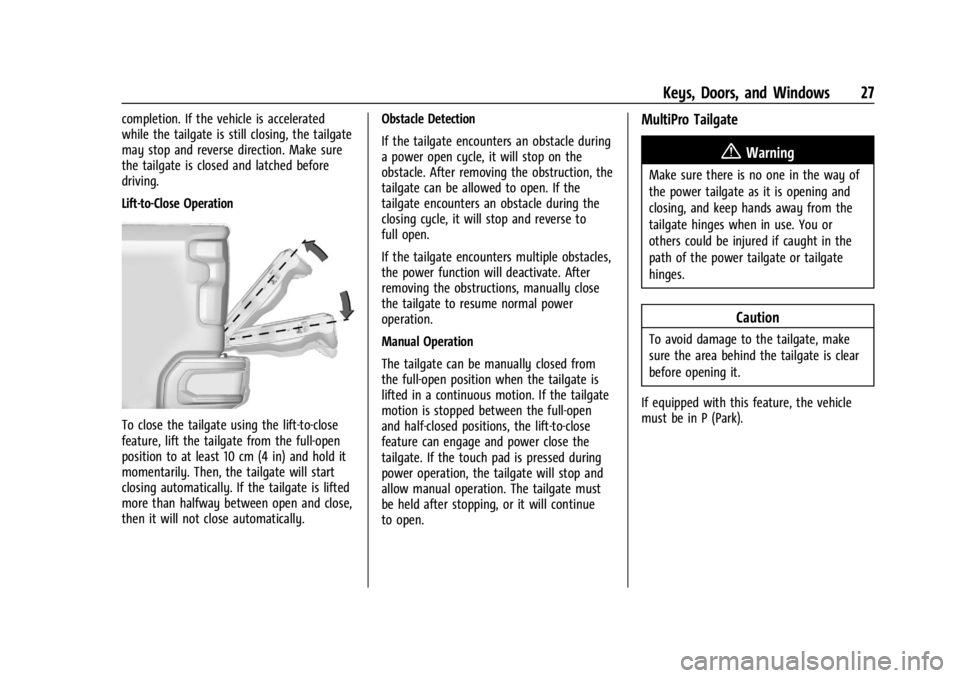
Lift-to-Close Operation
To close the tailgate using the lift-to-close
feature, lift the tailgate from the full-open
position to at least 10 cm (4 in) and hold it
momentarily. Then, the tailgate will start
closing automatically. If the tailgate is lifted
more than halfway between open and close,
then it will not close automatically.Obstacle Detection
If the tailgate encounters an obstacle during
a power open cycle, it will stop on the
obstacle. After removing the obstruction, the
tailgate can be allowed to open. If the
tailgate encounters an obstacle during the
closing cycle, it will stop and reverse to
full open.
If the tailgate encounters multiple obstacles,
the power function will deactivate. After
removing the obstructions, manually close
the tailgate to resume normal power
operation.
Manual Operation
The tailgate can be manually closed from
the full-open position when the tailgate is
lifted in a continuous motion. If the tailgate
motion is stopped between the full-open
and half-closed positions, the lift-to-close
feature can engage and power close the
tailgate. If the touch pad is pressed during
power operation, the tailgate will stop and
allow manual operation. The tailgate must
be held after stopping, or it will continue
to open.
MultiPro Tailgate
{Warning
Make sure there is no one in the way of
the power tailgate as it is opening and
closing, and keep hands away from the
tailgate hinges when in use. You or
others could be injured if caught in the
path of the power tailgate or tailgate
hinges.
Caution
To avoid damage to the tailgate, make
sure the area behind the tailgate is clear
before opening it.
If equipped with this feature, the vehicle
must be in P (Park).
Page 31 of 440
GMC Sierra/Sierra Denali 2500 HD/3500 HD Owner Manual (GMNA-
Localizing-U.S./Canada-16908340) - 2024 - CRC - 12/7/22
Keys, Doors, and Windows 29
Caution
Do not open the inner tailgate with the
primary tailgate open if there is a hitch
ball or trailer attached. This may damage
the tailgate.
To close the inner tailgate with the primary
tailgate closed, firmly push or pull it upward
until it latches. Pull it back to be sure it is
latched securely.
To close the inner tailgate with the primary
tailgate open:
.Hold the primary tailgate and firmly close
the inner tailgate.
.Raise the inner tailgate so it meets the
primary tailgate and close together at the
same time.
When using the tailgate step as a load stop,
the load must be secured as the load could
shift. See Cargo Tie-Downs 0102.
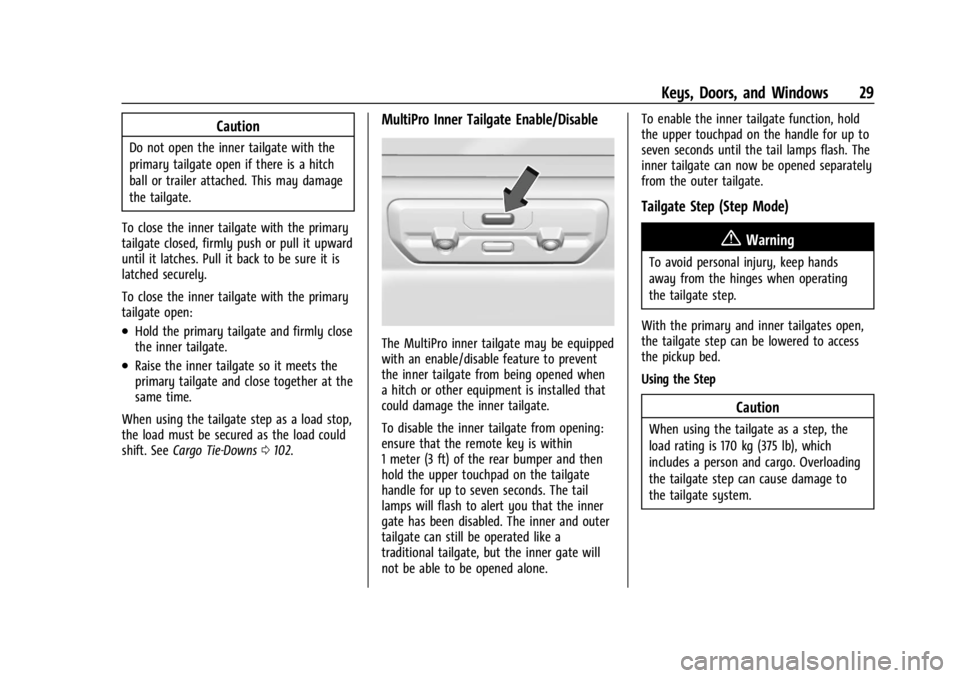
MultiPro Inner Tailgate Enable/Disable
The MultiPro inner tailgate may be equipped
with an enable/disable feature to prevent
the inner tailgate from being opened when
a hitch or other equipment is installed that
could damage the inner tailgate.
To disable the inner tailgate from opening:
ensure that the remote key is within
1 meter (3 ft) of the rear bumper and then
hold the upper touchpad on the tailgate
handle for up to seven seconds. The tail
lamps will flash to alert you that the inner
gate has been disabled. The inner and outer
tailgate can still be operated like a
traditional tailgate, but the inner gate will
not be able to be opened alone. To enable the inner tailgate function, hold
the upper touchpad on the handle for up to
seven seconds until the tail lamps flash. The
inner tailgate can now be opened separately
from the outer tailgate.
Tailgate Step (Step Mode)
{Warning
To avoid personal injury, keep hands
away from the hinges when operating
the tailgate step.
With the primary and inner tailgates open,
the tailgate step can be lowered to access
the pickup bed.
Using the Step
Caution
When using the tailgate as a step, the
load rating is 170 kg (375 lb), which
includes a person and cargo. Overloading
the tailgate step can cause damage to
the tailgate system.