change time GMC TERRAIN 2010 User Guide
[x] Cancel search | Manufacturer: GMC, Model Year: 2010, Model line: TERRAIN, Model: GMC TERRAIN 2010Pages: 410, PDF Size: 2.55 MB
Page 172 of 410
6-34 Infotainment System
Push the On/Off button to turn on
the headphones. A light on the
headphones comes on. If the light
does not come on, check the
batteries. Intermittent sound or static
can also indicate weak batteries.
See“Battery Replacement” later in
this section for more information.
Infrared transmitters are on the
top of the left seatback video
screen. The headphones shut off
automatically to save the battery
power if the RSE system is shut off
or if the headphones are out of
range of the transmitters for more
than three minutes. Moving too far
forward or stepping out of the
vehicle, can cause the headphones
to lose the signal or have static.
The headphones may automatically
turn off after four hours of
continuous use.
To adjust the volume on the
headphones, use the volume
control. For best audio performance, the
headphones must be worn correctly,
with the headband over the top of
the head. L (Left) and R (Right)
are above the ear pads and
are indicators as to how the
headphones should be placed
on the head.
Notice:
Do not store the
headphones in heat or direct
sunlight. This could damage the
headphones and repairs will not
be covered by the warranty.
Storage in extreme cold can
weaken the batteries. Keep the
headphones stored in a cool, dry
place.
If the foam ear pads become worn
or damaged, they can be replaced
separately from the headphones.
See your dealer/retailer for more
information. Battery Replacement
To change the batteries:
1. Loosen the screw to the battery
door located on the left side of
the headphones.
2. Slide the battery door open.
3. Replace the two AAA batteries.
4. Replace the battery door and tighten the screw.
Remove the batteries if the
headphones are not going to be
used for a long period of time.
Audio/Video (A/V) Jacks
If available, the A/V jacks are
located on the rear of the floor
console. They allow audio or video
cables to be connected from an
auxiliary device such as a
camcorder or a video game system.
The A/V jacks are color coded:
.Yellow for video input.
.White for left audio input.
.Red for right audio input.
Page 173 of 410
Infotainment System 6-35
Power for auxiliary devices is not
supplied by the radio system.
To use the auxiliary inputs of the
RSE system:
1. Connect the auxiliary devicecables to the A/V jacks.
2. Power on both the auxiliary device and the RSE video
screen.
Changing the Source on the Video
Display Screens
The image from the auxiliary device
can be switched between the video
display screens.
To change the display:
1. Press the AUX button on the remote control to change the
source of both video screens
from the DVD player to the
auxiliary device.
2. Press the AUX button a second time to change the left video
screen source to the DVD player
and the right video screen to the
auxiliary device. 3. Press the AUX button a third
time to change the left video
screen source to the auxiliary
device and the right video
screen to the DVD player.
4. Press the AUX button a fourth time to change the source of
both video screens to the DVD
player.
How to Change the RSE Video
Screen Settings
The screen display mode,
brightness, and language can be
changed from the setup menu using
the remote control. To change a
setting:
1. Press
z.
2. Use
n,q,p,oandrto
select the settings.
3. Press
zagain to exit the
setup menu.
Audio Output
Audio from the DVD player or
auxiliary inputs can be heard
through the following:
.Wireless Headphones
.Vehicle Speakers
The RSE system transmits the
audio signal to the wireless
headphones if an audio signal is
available. See “Headphones” earlier
in this section for more information.
The front seat passengers are able
to listen to playback from the
A/V jacks through the vehicle
speakers by selecting Rear A/V as
the source on the radio.
Page 177 of 410
Infotainment System 6-39
Battery Replacement
To change the remote control
batteries:
1. Slide back the rear cover on theremote control.
2. Replace the two batteries in the compartment.
3. Replace the battery cover.
Remove the batteries from the
remote control if unused for an
extended period of time.Tips and Troubleshooting Chart
Problem Recommended Action
No power. The ignition might not be turned to
ON/RUN or in ACC/ACCESSORY.
The picture does not fill the screen.
There are black borders on the top
and bottom or on both sides or it
looks stretched out. Check the display mode settings in
the setup menu by pressing the
display menu button on the remote
control.
In auxiliary mode, the picture moves
or scrolls. Check the auxiliary input
connections at both devices.
The remote control does not work. Check to make sure there is no obstruction between the remote
control and the transmitter window.
Check the batteries to make sure
they are not dead or installed
incorrectly.
After stopping the player, I push
Play but sometimes the DVD starts
where I left off and sometimes at the
beginning. If the stop button was pressed one
time, the DVD player resumes
playing where the DVD was
stopped. If the stop button was
pressed two times the DVD player
begins to play from the beginning of
the DVD.
Page 180 of 410
6-42 Infotainment System
When to Speak:A tone sounds to
indicate that the system is ready for
a voice command. Wait for the tone
and then speak.
How to Speak: Speak clearly in a
calm and natural voice.
Audio System
When using the Bluetooth system,
sound comes through the vehicle's
front audio system speakers and
overrides the audio system. Use the
VOL/
Oknob during a call to
change the volume level. The
adjusted volume level remains in
memory for later calls. The system
maintains a minimum volume level.
Other Information
The Bluetooth®word mark and
logos are owned by the Bluetooth®
SIG, Inc. and any use of such marks
by General Motors is under license.
Other trademarks and trade names
are those of their respective owners.
See Radio Frequency Statement
on
page 12‑16for FCC information.
Bluetooth (Infotainment
Controls)
For information about how to
navigate the menu system using the
infotainment controls, see Operation
on page 6‑7.
Pairing
A Bluetooth enabled cell phone
must be paired to the Bluetooth
system first and then connected to
the vehicle before it can be used.
See the cell phone manufacturer
user guide for Bluetooth functions
before pairing the cell phone. If a
Bluetooth phone is not connected,
calls will be made using OnStar
®
Hands‐Free Calling, if available.
Refer to the OnStar Owner's Guide
for more information.
The pairing process can be started
by using the voice recognition
system or the controls on the
infotainment system. Pairing Information:
.Up to five cell phones can be
paired to the Bluetooth system.
.The pairing process is disabled
when the vehicle is moving.
.The Bluetooth system links with
the first available paired cell
phone in the order the phone
was paired.
.Only one paired cell phone can
be connected to the Bluetooth
system at a time.
.Pairing should only need to be
completed once, unless changes
to the pairing information have
been made or the phone is
deleted.
To link to a different paired phone,
see “Linking to a Different Phone”
later in this section.
Pairing a Phone
1. Press the CONFIG button.
2. Select Phone Settings.
3. Select Bluetooth.
Page 183 of 410
Infotainment System 6-45
4. After the call has been placed,press the MENU/SEL knob and
choose Merge Calls.
5. To add more callers to the conference call, repeat Steps 1
through 4. The amount of callers
that can be added are limited by
your wireless service carrier.
Ending a Call
Press the MENU/SEL knob and
select Hang Up.
Muting a Call
To Mute a Call
Press the MENU/SEL knob and
select Mute Call.
To Cancel Mute
Press the MENU/SEL knob and
select Mute Call.
Dual Tone Multi-Frequency
(DTMF) Tones
The in‐vehicle Bluetooth system can
send numbers during a call. This is
used when calling a menu driven
phone system.
1. Press the MENU/SEL knob andselect Enter Number.
2. Enter the character sequence, see “Entering a Character
Sequence” inOperation
on
page 6‑7for more information.
Bluetooth (Voice
Recognition)
Pairing
A Bluetooth cell phone must be
paired to the Bluetooth system and
then connected to the vehicle before
it can be used. See the cell phone
manufacturers user guide for
Bluetooth functions before pairing
the cell phone. If a Bluetooth phone
is not connected, calls will be made using OnStar
®Hands‐Free Calling,
if available. Refer to the OnStar
owner's guide for more information.
The pairing process can be started
by using the voice recognition
system or the controls on the
infotainment system.
Pairing Information:
.Up to five cell phones can be
paired to the Bluetooth system.
.The pairing process is disabled
when the vehicle is moving.
.The Bluetooth system links with
the first available paired cell
phone in the order the phone
was paired.
.Only one paired cell phone can
be connected to the Bluetooth
system at a time.
.Pairing only needs to be
completed once, unless the
pairing information changes or
the phone is deleted.
Page 194 of 410
6-56 Infotainment System
Bluetooth (Navigation)
For information about how to
navigate the menu system using
the infotainment controls, see
“Overview”under Introduction, in
the Navigation supplement.
Bluetooth Pairing
To make calls with a Bluetooth
cell phone through your vehicle, it
must be paired to the vehicle's
Bluetooth system first and then
connected to the vehicle before
it can be used. Refer to the cell
phone manufacturer's user guide
for Bluetooth pairing instructions.
If a Bluetooth phone is off or not
connected, calls will automatically
be made using the OnStar
®
Hands‐Free Calling feature,
if available. Refer to the OnStar
owner's guide for more information
about OnStar Hands-Free Calling.
A Bluetooth phone with MP3
capability cannot be connected to
the vehicle as a phone and an MP3
player at the same time. The pairing process can be started
by using the voice recognition
system or the controls on the
infotainment system.
Pairing Information:
.Up to five cell phones can be
paired to the Bluetooth system.
.The pairing process is disabled
when the vehicle is moving.
.The Bluetooth system links with
the first available paired cell
phone based on the order
shown in the device list.
.Only one paired cell phone can
be connected to the vehicle's
Bluetooth system at a time.
.Pairing should only need to be
completed once, unless changes
to the pairing information have
been made or the phone is
deleted.
To link to a different paired phone,
see “Linking to a Different Phone”
later in this section. Pairing a Phone
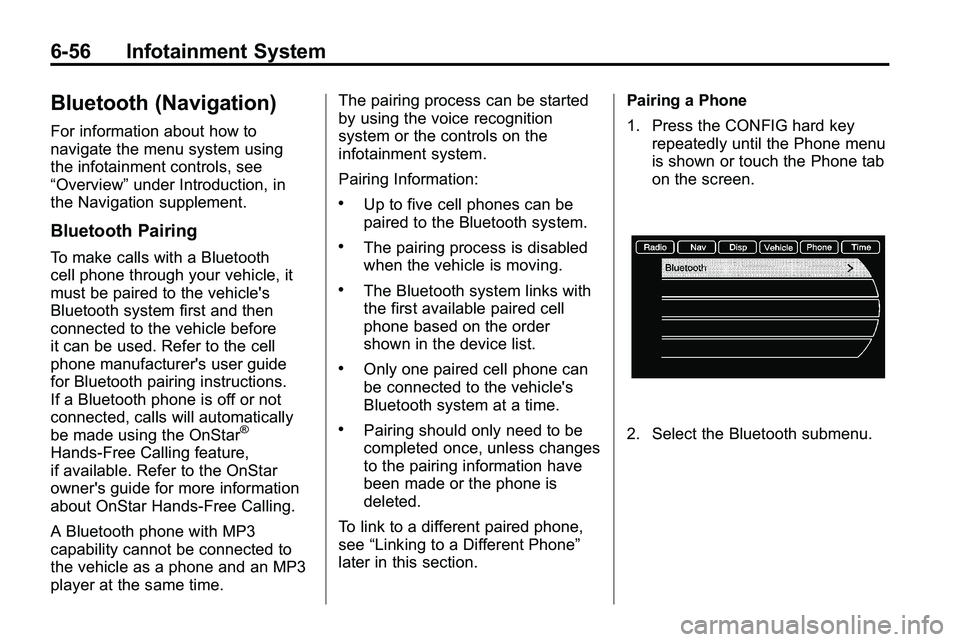
1. Press the CONFIG hard key
repeatedly until the Phone menu
is shown or touch the Phone tab
on the screen.2. Select the Bluetooth submenu.
Page 219 of 410

Driving and Operating 8-11
Controlling the vehicle is the key to
successful off-road driving. One of
the best ways to control the vehicle
is to control the speed. At higher
speeds:
.You approach things faster and
have less time to react.
.There is less time to scan the
terrain for obstacles.
.The vehicle has more bounce
when driving over obstacles.
.More braking distance is
needed, especially on an
unpaved surface.
{WARNING
When you are driving off-road,
bouncing and quick changes in
direction can easily throw you out
of position. This could cause you
to lose control and crash. So,
whether you are driving on or
off the road, you and your
passengers should wear safety
belts.
Scanning the Terrain
Off-road driving can take you over
many different kinds of terrain. Be
familiar with the terrain and its many
different features.
Surface Conditions:Off-roading
surfaces can be hard-packed dirt,
gravel, rocks, grass, sand, mud,
snow, or ice. Each of these surfaces
affects the vehicle's steering,
acceleration, and braking in different
ways. Depending on the surface,
slipping, sliding, wheel spinning,
delayed acceleration, poor traction,
and longer braking distances can
occur.
Surface Obstacles: Unseen or
hidden obstacles can be hazardous.
A rock, log, hole, rut, or bump can
startle you if you are not prepared
for them. Often these obstacles are
hidden by grass, bushes, snow,
or even the rise and fall of the
terrain itself. Some things to consider:.Is the path ahead clear?
.Will the surface texture change
abruptly up ahead?
.Does the travel take you uphill or
downhill?
.Will you have to stop suddenly
or change direction quickly?
When driving over obstacles or
rough terrain, keep a firm grip on
the steering wheel. Ruts, troughs,
or other surface features can jerk
the wheel out of your hands.
When driving over bumps, rocks,
or other obstacles, the wheels can
leave the ground. If this happens,
even with one or two wheels, you
cannot control the vehicle as well or
at all.
Because you will be on an unpaved
surface, it is especially important to
avoid sudden acceleration, sudden
turns, or sudden braking.
Page 238 of 410
8-30 Driving and Operating
The vehicle has a
Computer-Controlled Cranking
System. This feature assists in
starting the engine and protects
components. If the ignition key is
turned to the START position,
and then released when the
engine begins cranking, the
engine will continue cranking for
a few seconds or until the
vehicle starts. If the engine does
not start and the key is held in
START for many seconds,
cranking will be stopped after
15 seconds to prevent cranking
motor damage. To prevent gear
damage, this system also
prevents cranking if the engine
is already running. Engine
cranking can be stopped by
turning the ignition switch to
ACC/ACCESSORY or
LOCK/OFF.Notice:
Cranking the engine for
long periods of time, by returning
the key to the START position
immediately after cranking has
ended, can overheat and damage
the cranking motor, and drain the
battery. Wait at least 15 seconds
between each try, to let the
cranking motor cool down.
2. If the engine does not start after
5 to 10 seconds, especially in
very cold weather (below −18°C
or 0°F), it could be flooded with
too much gasoline. Push the
accelerator pedal all the way to
the floor and holding it there as
you hold the key in START for a
maximum of 15 seconds. Wait at
least 15 seconds between each
try, to allow the cranking motor
to cool. When the engine starts,
let go of the key and accelerator. If the vehicle starts briefly but
then stops again, repeat the
procedure. This clears the extra
gasoline from the engine. Do not
race the engine immediately
after starting it. Operate the
engine and transmission gently
until the oil warms up and
lubricates all moving parts.
Notice: The engine is designed to
work with the electronics in the
vehicle. If you add electrical parts
or accessories, you could change
the way the engine operates.
Before adding electrical
equipment, check with your
dealer/retailer. If you do not, the
engine might not perform
properly. Any resulting damage
would not be covered by the
vehicle warranty.
Page 247 of 410

Driving and Operating 8-39
Brakes
Antilock Brake
System (ABS)
This vehicle has the Antilock Brake
System (ABS), an advanced
electronic braking system that helps
prevent a braking skid.
When the engine is started and the
vehicle begins to drive away, ABS
checks itself. A momentary motor or
clicking noise might be heard while
this test is going on, and it might
even be noticed that the brake
pedal moves a little. This is normal.
If there is a problem with ABS, this
warning light stays on. SeeAntilock
Brake System (ABS) Warning Light
on page 4‑20. If driving safely on a wet road and
it becomes necessary to slam on
the brakes and continue braking
to avoid a sudden obstacle, a
computer senses that the wheels
are slowing down. If one of the
wheels is about to stop rolling, the
computer will separately work the
brakes at each wheel.
ABS can change the brake pressure
to each wheel, as required, faster
than any driver could. This can help
the driver steer around the obstacle
while braking hard.
As the brakes are applied, the
computer keeps receiving updates
on wheel speed and controls
braking pressure accordingly.
Remember: ABS does not change
the time needed to get a foot up to
the brake pedal or always decrease
stopping distance. If you get too
close to the vehicle in front of you,
there will not be enough time to
apply the brakes if that vehicle
suddenly slows or stops. Always
leave enough room up ahead to
stop, even with ABS.
Using ABS
Do not pump the brakes. Just hold
the brake pedal down firmly and let
ABS work. The ABS pump or motor
might be heard operating, and the
brake pedal might be felt to pulsate,
but this is normal.
Braking in Emergencies
ABS allows the driver to steer and
brake at the same time. In many
emergencies, steering can help
more than even the very best
braking.
Page 261 of 410

Driving and Operating 8-53
A. View displayed by the camera.
B. Corner of the rear bumper.
When the System Does Not
Seem To Work Properly
The RVC system may not work
properly or display a clear image if:
.The RVC is turned off. See
“Turning the Rear Camera
System On or Off”earlier in this
section.
.It is dark.
.The sun or the beam of
headlights is shining directly
into the camera lens.
.Ice, snow, mud, or anything else
builds up on the camera lens.
Clean the lens, rinse it with
water, and wipe it with a soft
cloth.
.The back of the vehicle is in an
accident, the position and
mounting angle of the camera
can change or the camera can
be affected. Be sure to have the
camera and its position and
mounting angle checked at your
dealer/retailer.
The RVC system display in the
rearview mirror may turn off or not
appear as expected due to one of
the following conditions. If this
occurs the left indicator light on the
mirror will flash.
.A slow flash may indicate a loss
of video signal, or no video
signal present during the reverse
cycle.
.A fast flash may indicate that
the display has been on for the
maximum allowable time during
a reverse cycle, or the display
has reached an over
temperature limit.
The fast flash conditions are
used to protect the video
device from high temperature
conditions. Once conditions
return to normal the device will
reset and the green indicator will
stop flashing.
During any of these fault conditions,
the display will be blank and the
indicator will continue to flash as
long as the vehicle is in R (Reverse)
or until the conditions return to
normal.
Pressing and holding
zwhen the
left indicator light is flashing will turn
off the video display along with the
left indicator light.