change wheel GMC TERRAIN 2010 User Guide
[x] Cancel search | Manufacturer: GMC, Model Year: 2010, Model line: TERRAIN, Model: GMC TERRAIN 2010Pages: 410, PDF Size: 2.55 MB
Page 300 of 410

9-26 Vehicle Care
All-Wheel Drive
Transfer Case
When to Check and Change
Lubricant
Refer to the Maintenance Schedule
to determine how often to check the
lubricant and when to change it.
SeeScheduled Maintenance
on
page 10‑2.
How to Check Lubricant
To get an accurate reading, the
vehicle should be on a level
surface. If the level is below the bottom of
the filler plug hole, located on the
transfer case, you will need to add
some lubricant. Add enough
lubricant to raise the level to the
bottom of the filler plug hole. A fluid
loss could indicate a problem; check
and have it repaired, if needed.
What to Use
Refer to the Maintenance Schedule
to determine what kind of lubricant
to use. See
Recommended Fluids
and Lubricants on page 10‑7.
Starter Switch Check
{WARNING
When you are doing this
inspection, the vehicle could
move suddenly. If the vehicle
moves, you or others could be
injured.
1. Before starting this check, be sure there is enough room
around the vehicle.
2. Firmly apply both the parking brake and the regular brake.
See Parking Brake
on
page 8‑40.
Do not use the accelerator
pedal, and be ready to turn off
the engine immediately if it
starts.
Page 342 of 410
9-68 Vehicle Care
If a tire goes flat, avoid further tire
and wheel damage by driving slowly
to a level place. Turn on the hazard
warning flashers. SeeHazard
Warning Flashers on page 5‑3.
{WARNING
Changing a tire can be
dangerous. The vehicle can slip
off the jack and roll over or fall on
you or other people. You and they
could be badly injured or even
killed. Find a level place to
change your tire. To help prevent
the vehicle from moving:
1. Set the parking brake firmly.
2. Put an automatic transmission shift lever in
P (Park), or shift a manual
transmission to 1 (First) or
R (Reverse).
(Continued)
WARNING (Continued)
3. Turn off the engine and donot restart while the vehicle
is raised.
4. Do not allow passengers to remain in the vehicle.
To be certain the vehicle will not
move, put blocks at the front and
rear of the tire farthest away from
the one being changed. That
would be the tire on the other
side, at the opposite end of the
vehicle.
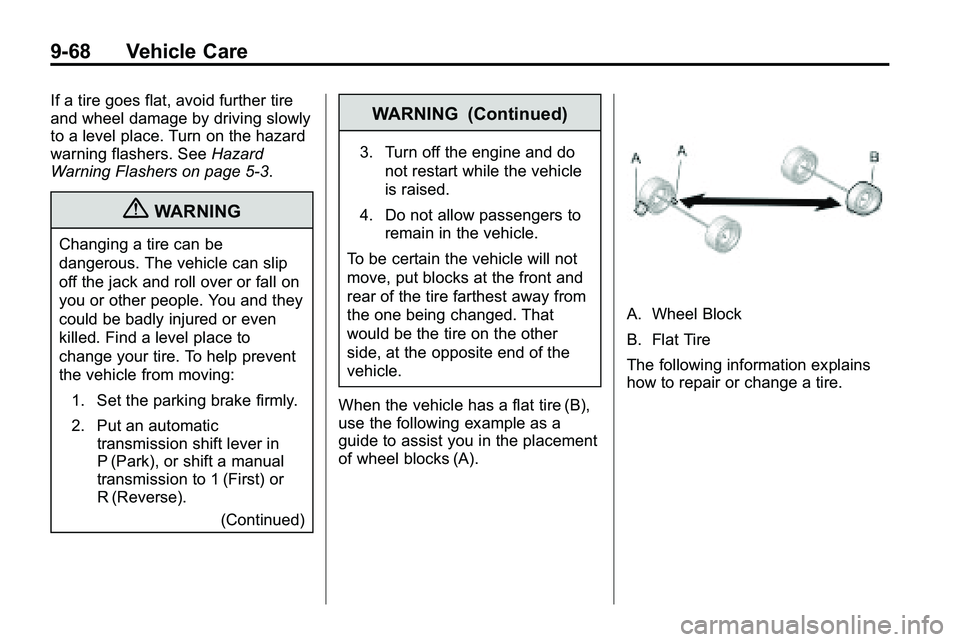
When the vehicle has a flat tire (B),
use the following example as a
guide to assist you in the placement
of wheel blocks (A).
A. Wheel Block
B. Flat Tire
The following information explains
how to repair or change a tire.
Page 343 of 410
Vehicle Care 9-69
Tire Changing
Removing the Spare Tire and
Tools
To access the spare tire and tools:
1. Open the liftgate. SeeLiftgate
(Manual)
on page 1‑8or
Liftgate (Power) on page 1‑9.
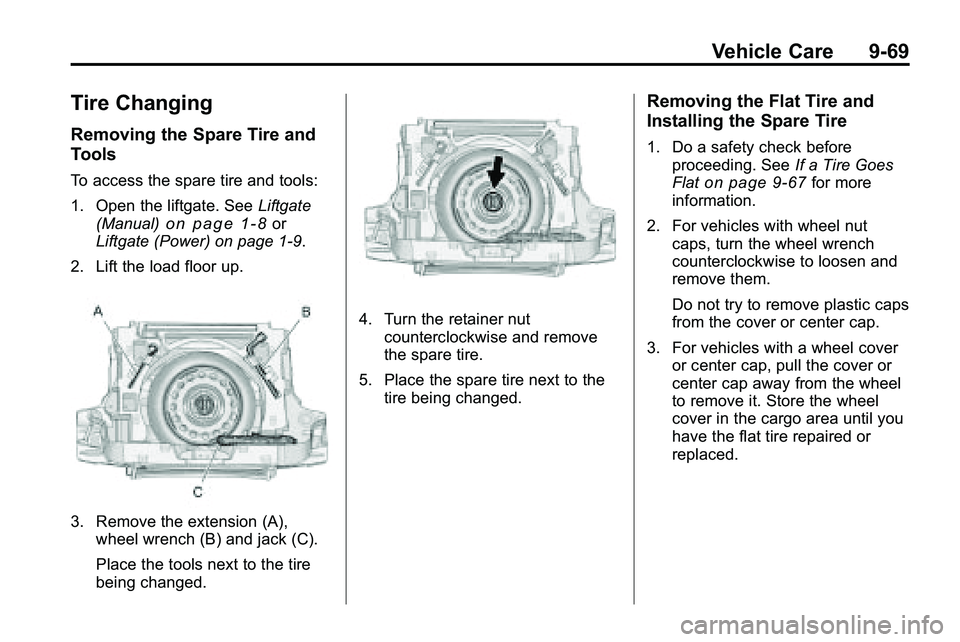
2. Lift the load floor up.
3. Remove the extension (A), wheel wrench (B) and jack (C).
Place the tools next to the tire
being changed.
4. Turn the retainer nutcounterclockwise and remove
the spare tire.
5. Place the spare tire next to the tire being changed.
Removing the Flat Tire and
Installing the Spare Tire
1. Do a safety check beforeproceeding. See If a Tire Goes
Flat
on page 9‑67for more
information.
2. For vehicles with wheel nut caps, turn the wheel wrench
counterclockwise to loosen and
remove them.
Do not try to remove plastic caps
from the cover or center cap.
3. For vehicles with a wheel cover or center cap, pull the cover or
center cap away from the wheel
to remove it. Store the wheel
cover in the cargo area until you
have the flat tire repaired or
replaced.
Page 410 of 410
i-12 INDEX
TransmissionAutomatic . . . . . . . . . . . . . . . . . . . . . 8-35
Fluid, Automatic . . . . . . . . . . . . . . 9-13
Messages . . . . . . . . . . . . . . . . . . . . 4-35
Transportation Program, Courtesy . . . . . . . . . . . . . . . . . . . . . 12-8
Turn and Lane-Change
Signals . . . . . . . . . . . . . . . . . . . . . . . . 5-3
Turn Signal Bulb Replacement . . . . . . . . . . . . 9-34
U
Ultrasonic Parking Assist . . . . . . 8-47
Uniform Tire QualityGrading . . . . . . . . . . . . . . . . . . . . . . 9-62
Using this Manual . . . . . . . . . . . . . . . . iv
V
Vehicle Canadian Owners . . . . . . . . . . . . . . . iii
Control . . . . . . . . . . . . . . . . . . . . . . . . 8-4
Load Limits . . . . . . . . . . . . . . . . . . . 8-22
Messages . . . . . . . . . . . . . . . . . . . . 4-29
Personalization . . . . . . . . . . . . . . . 4-36
Remote Start . . . . . . . . . . . . . . . . . . 1-5
Security . . . . . . . . . . . . . . . . . . . . . . 1-13
Towing . . . . . . . . . . . . . . . . . . . . . . . . 9-81
Vehicle Care
Tire Pressure . . . . . . . . . . . . . . . . . 9-52
Vehicle Identification Number (VIN) . . . . . . . . . . . . . . . . . 11-1
Service Parts IdentificationLabel . . . . . . . . . . . . . . . . . . . . . . . . 11-1
Vehicle Reminder Messages . . . . . . . . . . . . . . . . . . . . 4-36
Ventilation, Air . . . . . . . . . . . . . . . . . . 7-6
Visors . . . . . . . . . . . . . . . . . . . . . . . . . 1-18
W
Warning Lights, Gauges, and Indicators . . . . . . . . . . . . . . . . 4-11
Warnings . . . . . . . . . . . . . . . . . . . . . . . . . iv Cautions and Danger . . . . . . . . . . . .iv
Hazard Flashers . . . . . . . . . . . . . . . 5-3
Washer Fluid . . . . . . . . . . . . . . . . . . 9-22
Washer Fluid Messages . . . . . . . 4-36
Wheels
Alignment and TireBalance . . . . . . . . . . . . . . . . . . . . . 9-64
Different Size . . . . . . . . . . . . . . . . . 9-62
Replacement . . . . . . . . . . . . . . . . . 9-65
When It Is Time for New Tires . . . . . . . . . . . . . . . . . . . . . . . . . 9-59
Where to Put the Child
Restraint . . . . . . . . . . . . . . . . . . . . . 2-47
Windows . . . . . . . . . . . . . . . . . . . . . . 1-16 Power . . . . . . . . . . . . . . . . . . . . . . . . 1-17
Windshield
Wiper/Washer . . . . . . . . . . . . . . . . . 4-7
Winter Driving . . . . . . . . . . . . . . . . . 8-20
Wiper Blade Replacement . . . . . 9-28
Wipers Rear Washer . . . . . . . . . . . . . . . . . . 4-8