instrument panel GMC TERRAIN 2010 User Guide
[x] Cancel search | Manufacturer: GMC, Model Year: 2010, Model line: TERRAIN, Model: GMC TERRAIN 2010Pages: 410, PDF Size: 2.55 MB
Page 63 of 410
Seats and Restraints 2-37
If this happens, use the following
steps to allow the system to detect
that person and enable the right
front passenger frontal airbag:
1. Turn the vehicle off.
2. Remove any additional materialfrom the seat, such as blankets,
cushions, seat covers, seat
heaters, or seat massagers.
3. Place the seatback in the fully upright position.
4. Have the person sit upright in the seat, centered on the seat
cushion, with legs comfortably
extended.
5. Restart the vehicle and have the person remain in this position for
two to three minutes after the on
indicator is lit.Additional Factors Affecting
System Operation
Safety belts help keep the
passenger in position on the seat
during vehicle maneuvers and
braking, which helps the passenger
sensing system maintain the
passenger airbag status. See
“Safety Belts” and“Child Restraints”
in the Index for additional
information about the importance of
proper restraint use.
A thick layer of additional material,
such as a blanket or cushion,
or aftermarket equipment such as
seat covers, seat heaters, and seat
massagers can affect how well the
passenger sensing system
operates. We recommend that you
not use seat covers or other
aftermarket equipment except when
approved by GM for your specific
vehicle. See Adding Equipment to
the Airbag-Equipped Vehicle
on
page 2‑38for more information
about modifications that can affect
how the system operates. A wet seat can affect the
performance of the passenger
sensing system. Here is how:
.The passenger sensing system
may turn off the passenger
airbag when liquid is soaked into
the seat. If this happens, the off
indicator will be lit, and the
airbag readiness light on the
instrument panel will also be lit.
.Liquid pooled on the seat that
has not soaked in may make it
more likely that the passenger
sensing system will enable (turn
on) the passenger airbag while a
child restraint or child occupant
is on the seat. If the passenger
airbag is turned on, the on
indicator will be lit.
Page 65 of 410
Seats and Restraints 2-39
steering wheel, instrument
panel, roof-rail airbag modules,
ceiling headliner or pillar garnish
trim, overhead console, front
sensors, side impact sensors,
rollover sensor module, or airbag
wiring can affect the operation of
the airbag system.
In addition, the vehicle has a
passenger sensing system for
the right front passenger
position, which includes sensors
that are part of the passenger
seat. The passenger sensing
system may not operate properly
if the original seat trim is
replaced with non-GM covers,
upholstery or trim, or with GM
covers, upholstery or trim
designed for a different vehicle.
Any object, such as an
aftermarket seat heater or a
comfort enhancing pad or
device, installed under or on top
of the seat fabric, could also
interfere with the operation of
the passenger sensing system.This could either prevent proper
deployment of the passenger
airbag(s) or prevent the
passenger sensing system
from properly turning off the
passenger airbag(s). See
Passenger Sensing System
on
page 2‑33.
If you have questions, call
Customer Assistance. The
phone numbers and addresses
for Customer Assistance are in
Step Two of the Customer
Satisfaction Procedure in this
manual. See Customer
Satisfaction Procedure
on
page 12‑1.
If the vehicle has rollover
roof-rail airbags, see Different
Size Tires and Wheels
on
page 9‑62for additional
important information. Q: Because I have a disability,
I have to get my vehicle
modified. How can I find out
whether this will affect my
airbag system?
A: If you have questions, call
Customer Assistance. The
phone numbers and addresses
for Customer Assistance are in
Step Two of the Customer
Satisfaction Procedure in this
manual. See Customer
Satisfaction Procedure
on
page 12‑1.
In addition, your dealer/retailer and
the service manual have information
about the location of the airbag
sensors, sensing and diagnostic
module and airbag wiring.
Page 89 of 410
Storage 3-1
Storage
Storage Compartments
Instrument Panel Storage . . . . 3-1
Glove Box . . . . . . . . . . . . . . . . . . . . 3-1
Cupholders . . . . . . . . . . . . . . . . . . . 3-1
Center Console Storage . . . . . . 3-1
Additional Storage Features
Cargo Tie Downs . . . . . . . . . . . . . 3-2
Convenience Net . . . . . . . . . . . . . 3-2
Roof Rack System
Roof Rack System . . . . . . . . . . . . 3-2
Storage
Compartments
Instrument Panel Storage
There may be a storage
compartment on the instrument
panel. Pull the handle to open.
Glove Box
Open the glove box by lifting up on
the lever.
Cupholders
Two cupholders are in the center
console. Cupholders may be located
in the second row seat armrest.
To access, pull the armrest down.
Center Console Storage
For vehicles with a center console
storage, use the lever (A) on the
front to open.
Page 93 of 410
Instruments and Controls 4-1
Instruments and
Controls
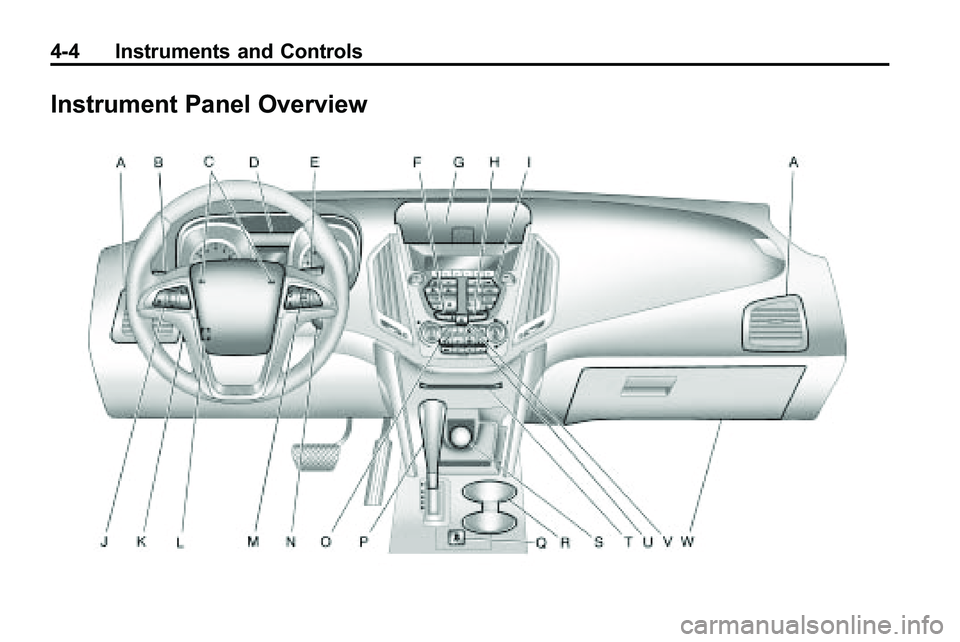
Instrument Panel Overview
Instrument Panel Overview . . . . 4-4
Controls
Steering Wheel Adjustment . . . 4-6
Steering Wheel Controls . . . . . . 4-6
Horn . . . . . . . . . . . . . . . . . . . . . . . . . . 4-7
Windshield Wiper/Washer . . . . . 4-7
Rear Window Wiper/Washer . . . . . . . . . . . . . . . . . . . . . . 4-8
Compass . . . . . . . . . . . . . . . . . . . . . 4-9
Clock (With Date Display) . . . . . 4-9
Clock (Without Date Display) . . . . . . . . . . . . . . . . . . . . 4-10
Power Outlets . . . . . . . . . . . . . . . 4-10
Warning Lights, Gauges, and
Indicators
Warning Lights, Gauges, and Indicators . . . . . . . . . . . . . . . . . . . 4-11
Instrument Cluster . . . . . . . . . . . 4-12
Speedometer . . . . . . . . . . . . . . . . 4-13
Odometer . . . . . . . . . . . . . . . . . . . . 4-13
Tachometer . . . . . . . . . . . . . . . . . . 4-13
Fuel Gauge . . . . . . . . . . . . . . . . . . 4-13
Engine Coolant Temperature Gauge . . . . . . . . 4-14
Safety Belt Reminders . . . . . . . 4-14
Airbag Readiness Light . . . . . . 4-15
Passenger Airbag Status Indicator . . . . . . . . . . . . . . . . . . . . 4-15
Charging System Light . . . . . . 4-16
Malfunction Indicator Lamp . . . . . . . . . . . . . 4-17
Brake System Warning Light . . . . . . . . . . . . . . . . . . . . . . . 4-19 Antilock Brake System (ABS)
Warning Light . . . . . . . . . . . . . . 4-20
Traction Off Light . . . . . . . . . . . . 4-21
StabiliTrak®OFF Light . . . . . . . 4-21
Traction Control System
(TCS)/StabiliTrak
®Light . . . . 4-21
Tire Pressure Light . . . . . . . . . . 4-22
Engine Oil Pressure Light . . . . 4-23
Fuel Economy Light . . . . . . . . . 4-23
Low Fuel Warning Light . . . . . . 4-24
Security Light . . . . . . . . . . . . . . . . 4-24
High-Beam on Light . . . . . . . . . 4-24
Fog Lamp Light . . . . . . . . . . . . . . 4-25
Lamps on Reminder . . . . . . . . . 4-25
Cruise Control Light . . . . . . . . . 4-25
Information Displays
Driver Information Center (DIC) . . . . . . . . . . . . . . . 4-25
Page 96 of 410
4-4 Instruments and Controls
Instrument Panel Overview
Page 97 of 410

Instruments and Controls 4-5
A.Air Vents on page 7‑6.
B. Turn and Lane-Change Signals
on page 5‑3.Exterior Lamp
Controlson page 5‑1. Fog
Lamps on page 5‑3.
C. Horn on page 4‑7.
D. Instrument Cluster
on
page 4‑12.
E. Windshield Wiper/Washer
on
page 4‑7. Rear Window
Wiper/Washer on page 4‑8.
F. Power Door Locks
on
page 1‑7.
G. Instrument Panel Storage
on
page 3‑1. H.
Safety Locks on page 1‑8.
I. AM-FM Radio on page 6‑11.
J. Cruise Control
on page 8‑44.
K. Instrument Panel Illumination
Control
on page 5‑4.
L. Steering Wheel Adjustment
on
page 4‑6.
M. Steering Wheel Controls
on
page 4‑6.
N. Ignition Positions on page 8‑28.
O. Climate Control Systems
on
page 7‑1or Automatic Climate
Control System on page 7‑3.
P. Shift Lever. See Automatic
Transmission on page 8‑35. Q.
StabiliTrak System
on
page 8‑42.
R. Cupholders on page 3‑1.
S. Power Outlets on page 4‑10.
T. CD/DVD Player Slot. See CD
Player
on page 6‑18or
CD/DVD Player on page 6‑21.
U. Driver Information Center (DIC) Buttons. See Driver Information
Center (DIC) on page 4‑25.
V. Hazard Warning Flashers
on
page 5‑3.
W. Glove Box on page 3‑1.
Page 101 of 410
Instruments and Controls 4-9
Compass
The vehicle may have a compass
display on the Driver Information
Center (DIC). The compass
receives its heading and other
information from Global Positioning
System (GPS) antenna, StabiliTrak,
and vehicle speed information.
Avoid covering the GPS antenna for
long periods of time with objects
that may interfere with the antenna's
ability to receive a satellite signal.
SeeMulti-Band Antenna
on
page 6‑18for the location of the
vehicle's antennas. The compass
system is designed to operate for a
certain number of miles or degrees
of turn before needing a signal from
the GPS satellites. When the
compass display shows CAL, drive
the vehicle for a short distance in
an open area where it can receive a
GPS signal. The compass system
will automatically determine when GPS signal is restored and provide
a heading again. See
Compass
Messages
on page 4‑30for more
information on the messages that
may be displayed for the compass.
Clock (With Date Display)
The infotainment system controls,
located on the instrument panel, are
used to access the time and date
settings through the menu system.
See Operation
on page 6‑7for
information about how to use the
menu system.
Setting the Time and Date
1. Turn the infotainment
system ON.
2. Press the CONFIG button and select Time and Date Settings.
3. Select Set Time or Set Date.
4. Turn the MENU/SEL knob to adjust the highlighted value. 5. Press the MENU/SEL knob
to select the next value.
6. To save the time or date and return to the Time and
Date Settings menu, press
the
0BACK button at any time
or press the MENU/SEL knob
after adjusting the minutes
or year.
Setting the 12/24 Hour Format
1. Turn the infotainment system ON.
2. Press the CONFIG button and select Time and Date Settings.
3. Highlight 12/24 Hour Format.
4. Press the MENU/SEL knob to select the 12 hour or 24 hour
display format.
Page 102 of 410
4-10 Instruments and Controls
Setting the Month & Day
Format
1. Turn the infotainmentsystem ON.
2. Press the CONFIG button and select Time and Date Settings.
3. Highlight Month & Day Format.
4. Press the MENU/SEL knob to select MM/DD (month/day) or
DD/MM (day/month).
Setting the Auto Time Adjust
1. Turn the infotainmentsystem ON.
2. Press the CONFIG button and select Time and Date Settings.
3. Highlight Auto Time Adjust.
4. Press the MENU/SEL knob to turn Auto Time Adjust on or off.
5. Press the MENU/SEL knob to select Time Zone, and then
select the Time Zone.
6. Press the MENU/SEL knob to turn Daylight Savings on or off.
Clock (Without Date
Display)
The infotainment system controls,
located on the instrument panel, are
used to access the time and date
settings through the menu system.
See Operation
on page 6‑7for
information about how to use the
menu system.
Setting the Time
1. Turn the infotainment system ON.
2. Press the CONFIG button and select Time Settings, or press
the
Hbutton.
3. Select Set Time.
4. Turn the MENU/SEL knob to adjust the highlighted value.
5. Press the MENU/SEL knob to select the next value. 6. To save the time and return to
the Time Settings menu, press
the
0BACK button at any time
or press the SELECT button
after adjusting the minutes.
Setting the 12/24 Hour Format
1. Turn the infotainment system ON.
2. Press the CONFIG button and select Time Settings, or press
the
Hbutton.
3. Highlight 12/24 Hour Format.
4. Press the MENU/SEL knob to select the 12 hour or 24 hour
display format.
Power Outlets
The accessory power outlets can
be used to connect electrical
equipment, such as a cellular
phone.
Page 106 of 410
4-14 Instruments and Controls
.The gauge moves a little while
turning a corner or speeding up.
.The gauge takes a few seconds
to stabilize after the ignition is
turned on, and goes back to
empty when the ignition is
turned off.
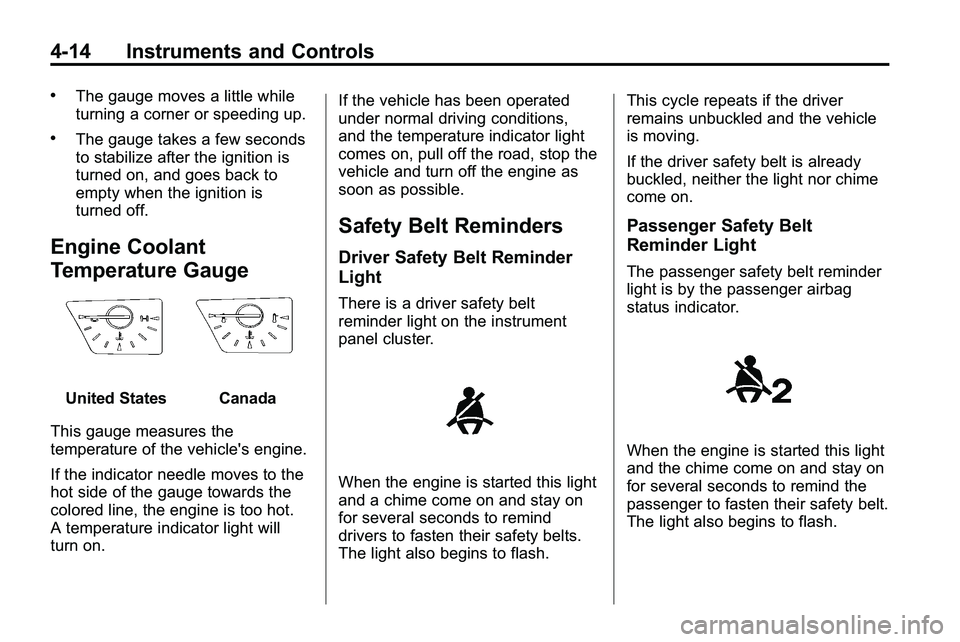
Engine Coolant
Temperature Gauge
United StatesCanada
This gauge measures the
temperature of the vehicle's engine.
If the indicator needle moves to the
hot side of the gauge towards the
colored line, the engine is too hot.
A temperature indicator light will
turn on. If the vehicle has been operated
under normal driving conditions,
and the temperature indicator light
comes on, pull off the road, stop the
vehicle and turn off the engine as
soon as possible.
Safety Belt Reminders
Driver Safety Belt Reminder
Light
There is a driver safety belt
reminder light on the instrument
panel cluster.
When the engine is started this light
and a chime come on and stay on
for several seconds to remind
drivers to fasten their safety belts.
The light also begins to flash.This cycle repeats if the driver
remains unbuckled and the vehicle
is moving.
If the driver safety belt is already
buckled, neither the light nor chime
come on.
Passenger Safety Belt
Reminder Light
The passenger safety belt reminder
light is by the passenger airbag
status indicator.
When the engine is started this light
and the chime come on and stay on
for several seconds to remind the
passenger to fasten their safety belt.
The light also begins to flash.
Page 117 of 410
Instruments and Controls 4-25
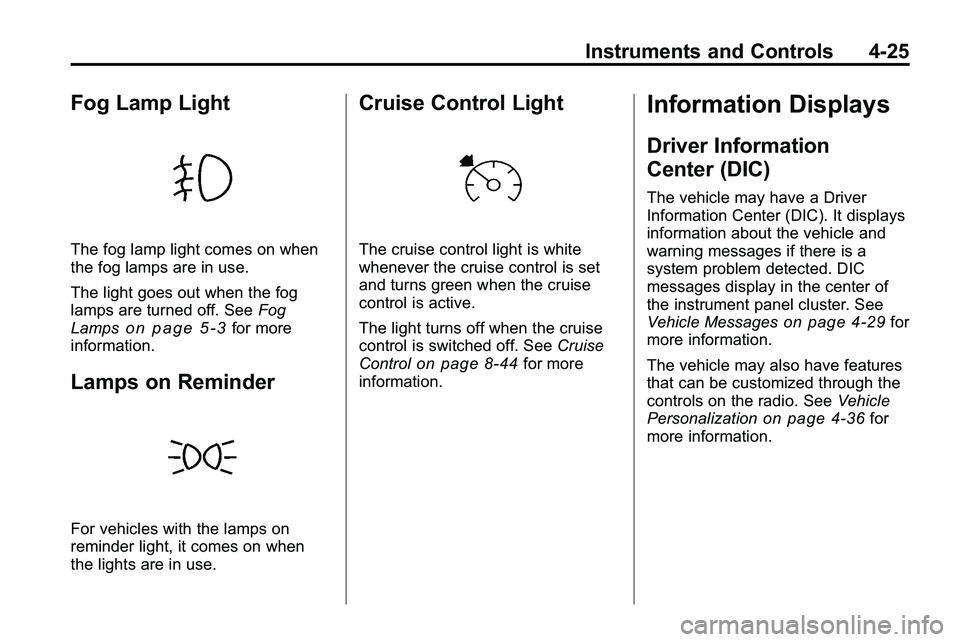
Fog Lamp Light
The fog lamp light comes on when
the fog lamps are in use.
The light goes out when the fog
lamps are turned off. SeeFog
Lamps
on page 5‑3for more
information.
Lamps on Reminder
For vehicles with the lamps on
reminder light, it comes on when
the lights are in use.
Cruise Control Light
The cruise control light is white
whenever the cruise control is set
and turns green when the cruise
control is active.
The light turns off when the cruise
control is switched off. See Cruise
Control
on page 8‑44for more
information.
Information Displays
Driver Information
Center (DIC)
The vehicle may have a Driver
Information Center (DIC). It displays
information about the vehicle and
warning messages if there is a
system problem detected. DIC
messages display in the center of
the instrument panel cluster. See
Vehicle Messages
on page 4‑29for
more information.
The vehicle may also have features
that can be customized through the
controls on the radio. See Vehicle
Personalization
on page 4‑36for
more information.