door lock GMC TERRAIN 2010 Owner's Guide
[x] Cancel search | Manufacturer: GMC, Model Year: 2010, Model line: TERRAIN, Model: GMC TERRAIN 2010Pages: 410, PDF Size: 2.55 MB
Page 132 of 410
4-40 Instruments and Controls
Remote Lock/Unlock/Start
Select Remote Lock/Unlock/Start
and the following will be displayed:
.Remote Unlock Light Feedback
.Remote Lock Feedback
.Remote Door Unlock
.Memory Remote Recall
.Remote Vehicle Start
Remote Unlock Light Feedback
When on, the exterior lamps will
flash when unlocking the vehicle
with the RKE transmitter.
Press the MENU / SELECT knob
when “Remote Unlock Light
Feedback” is highlighted. Turn the
knob to select “Flash Lights”or
“Off”. Press the knob to confirm
and go back to the last menu.
Remote Lock Feedback
This allows selection of what type of
feedback is given when unlocking
the vehicle with the RKE transmitter. Press the MENU / SELECT knob
when
“Remote Lock Feedback” is
highlighted. Turn the knob to select
“Lights and Horn”, “Lights Only”,
“Horn Only”, or “Off”. Press the knob
to confirm and go back to the
last menu.
Remote Door Unlock
This allows selection of which doors
will unlock when pressing the unlock
button on the RKE transmitter.
Press the MENU / SELECT knob
when “Remote Door Unlock” is
highlighted. Turn the knob to select
“All Doors” or“Driver Door”. Press
the knob to confirm and go back to
the last menu.
Memory Remote Recall
This allows the “Memory Remote
Recall” feature to be turned on or
off. “Memory Remote Recall” is
when the memorized settings will be
recalled as you unlock the vehicle. Press the MENU / SELECT knob
when
“Memory Remote Recall” is
highlighted to toggle between “On”
or “Off”. Press
0BACK to confirm
the selection and go back to the
last menu.
Remote Vehicle Start
This allows the “Remote Vehicle
Start” to be turned on or off, if the
vehicle has this feature.
Press the MENU / SELECT knob
when “Remote Vehicle Start” is
highlighted to toggle between “On”
or “Off”. Press
0BACK to confirm
the selection and go back to the
last menu.
Return to Factory Settings
Select “Return to Factory Settings”
to return all of the vehicle
personalization to the default
settings. Turn the knob to select
“Yes” or“No”. Press the knob to
confirm and go back to the
last menu.
Page 133 of 410
Instruments and Controls 4-41
OnStar®System
OnStar®uses several innovative
technologies and live advisors to
provide a wide range of safety,
security, navigation, diagnostics,
and calling services.
Automatic Crash Response
In a crash, built in sensors can
automatically alert an OnStar
advisor who is immediately
connected to the vehicle to see
if you need help.
How OnStar Service Works
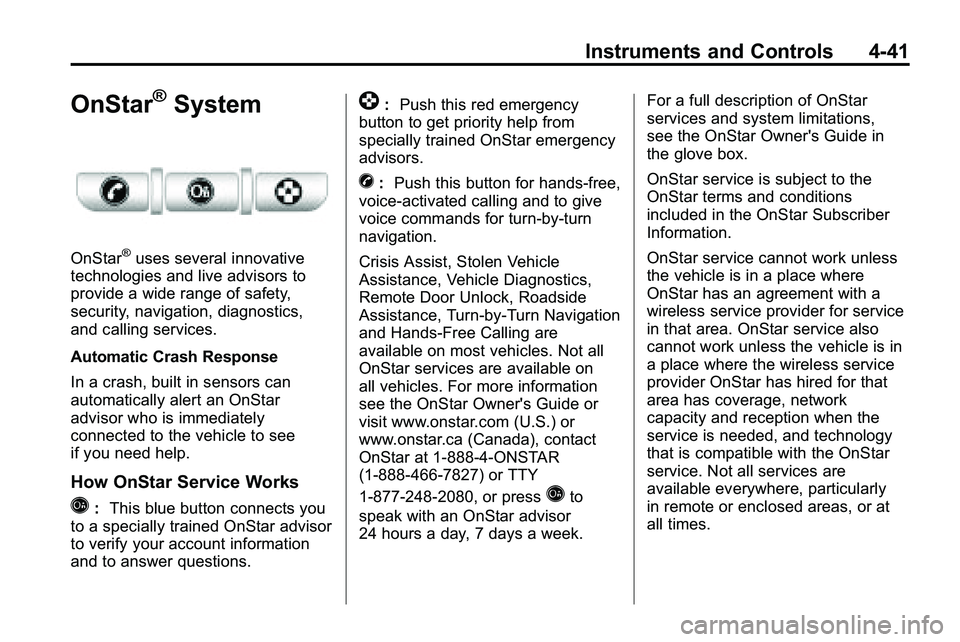
Q: This blue button connects you
to a specially trained OnStar advisor
to verify your account information
and to answer questions.
]: Push this red emergency
button to get priority help from
specially trained OnStar emergency
advisors.
X: Push this button for hands‐free,
voice‐activated calling and to give
voice commands for turn‐by‐turn
navigation.
Crisis Assist, Stolen Vehicle
Assistance, Vehicle Diagnostics,
Remote Door Unlock, Roadside
Assistance, Turn‐by‐Turn Navigation
and Hands‐Free Calling are
available on most vehicles. Not all
OnStar services are available on
all vehicles. For more information
see the OnStar Owner's Guide or
visit www.onstar.com (U.S.) or
www.onstar.ca (Canada), contact
OnStar at 1-888-4-ONSTAR
(1‐888‐466‐7827) or TTY
1‐877‐248‐2080, or press
Qto
speak with an OnStar advisor
24 hours a day, 7 days a week. For a full description of OnStar
services and system limitations,
see the OnStar Owner's Guide in
the glove box.
OnStar service is subject to the
OnStar terms and conditions
included in the OnStar Subscriber
Information.
OnStar service cannot work unless
the vehicle is in a place where
OnStar has an agreement with a
wireless service provider for service
in that area. OnStar service also
cannot work unless the vehicle is in
a place where the wireless service
provider OnStar has hired for that
area has coverage, network
capacity and reception when the
service is needed, and technology
that is compatible with the OnStar
service. Not all services are
available everywhere, particularly
in remote or enclosed areas, or at
all times.
Page 138 of 410
5-4 Lighting
Interior Lighting
Instrument Panel
Illumination Control
This control is located on the
instrument panel, to the left of the
steering column.
D(Instrument Panel
Brightness): Turn clockwise or
counterclockwise to brighten or dim
the lights.
Dome Lamps
The dome lamp controls are located
in the overhead console. To change
the settings, press the following:
*(Dome Lamp Override): Turns
the lamp off, even when a door
is open.
1(Door): The lamp comes on
automatically when a door is
opened.
+(On): Turns the dome lamp on.
Reading Lamps
The reading lamps are located on
the overhead console. These lamps
come on automatically when any
door is opened.
For manual operation, press the
button next to each lamp to turn it
on or off.
Lighting Features
Entry Lighting
The dome lamp, cargo lamp and
foot lamp inside the vehicle come
on when any door is opened, if the
dome lamp is in the door position. In
addition, these lamps come on
when the Remote Keyless Entry
(RKE) unlock button is pressed.
They stay on for 20 seconds or until
a door is opened. After the door is
opened and then closed, the light
remains on for 20 seconds, or until
the ignition is turned to ON/RUN.
Page 231 of 410
Driving and Operating 8-23
{WARNING
Do not load the vehicle any
heavier than the Gross
Vehicle Weight Rating
(GVWR), or either the
maximum front or rear Gross
Axle Weight Rating (GAWR).
If you do, parts on the vehicle
can break, and it can change
the way the vehicle handles.
These could cause you to lose
control and crash. Also,
overloading can shorten the
life of the vehicle. Tire and Loading Information
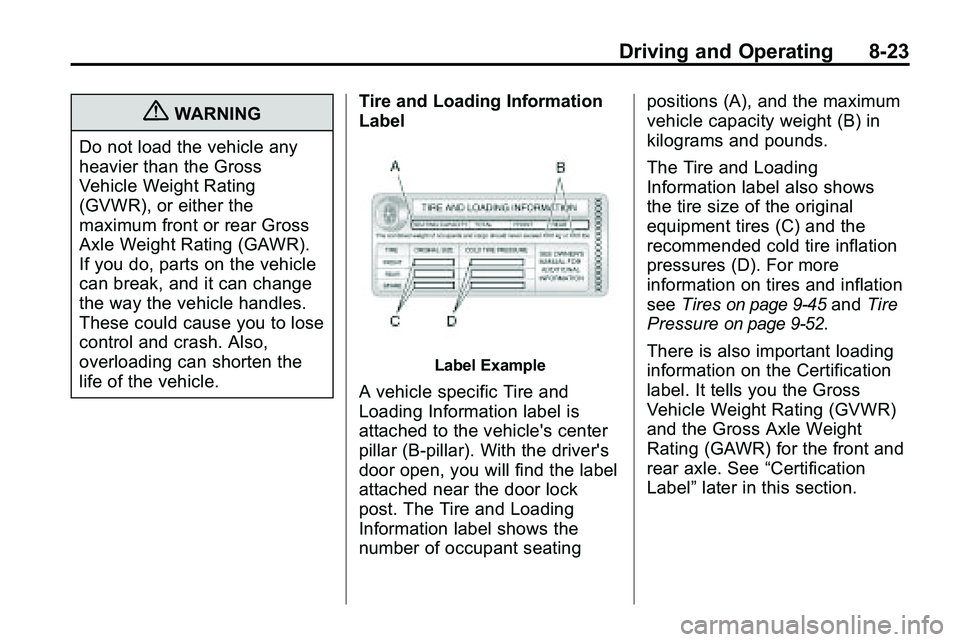
Label
Label Example
A vehicle specific Tire and
Loading Information label is
attached to the vehicle's center
pillar (B-pillar). With the driver's
door open, you will find the label
attached near the door lock
post. The Tire and Loading
Information label shows the
number of occupant seating positions (A), and the maximum
vehicle capacity weight (B) in
kilograms and pounds.
The Tire and Loading
Information label also shows
the tire size of the original
equipment tires (C) and the
recommended cold tire inflation
pressures (D). For more
information on tires and inflation
see
Tires
on page 9‑45and Tire
Pressure
on page 9‑52.
There is also important loading
information on the Certification
label. It tells you the Gross
Vehicle Weight Rating (GVWR)
and the Gross Axle Weight
Rating (GAWR) for the front and
rear axle. See “Certification
Label” later in this section.
Page 264 of 410
8-56 Driving and Operating
Gasolines containing oxygenates,
such as ethers and ethanol, and
reformulated gasolines might be
available in your area. We
recommend that you use these
gasolines, if they comply with the
specifications described earlier.
However, E85 (85% ethanol) and
other fuels containing more than
10% ethanol must not be used in
vehicles that were not designed for
those fuels.
Notice:This vehicle was not
designed for fuel that contains
methanol. Do not use fuel
containing methanol. It can
corrode metal parts in the fuel
system and also damage plastic
and rubber parts. That damage
would not be covered under the
vehicle warranty.
Some gasolines that are
not reformulated for low
emissions can contain an
octane-enhancing additive called
methylcyclopentadienyl manganese tricarbonyl (MMT); ask the attendant
where you buy gasoline whether the
fuel contains MMT. We recommend
against the use of such gasolines.
Fuels containing MMT can reduce
the life of spark plugs and the
performance of the emission control
system could be affected. The
malfunction indicator lamp might
turn on. If this occurs, return to your
dealer/retailer for service.
Filling the Tank
{WARNING
Fuel vapor burns violently and a
fuel fire can cause bad injuries.
To help avoid injuries to you and
others, read and follow all the
instructions on the fuel pump
island. Turn off the engine when
refueling. Do not smoke near fuel
or when refueling the vehicle. Do
not use cellular phones. Keep
(Continued)
WARNING (Continued)
sparks, flames, and smoking
materials away from fuel. Do not
leave the fuel pump unattended
when refueling the vehicle. This is
against the law in some places.
Do not re-enter the vehicle while
pumping fuel. Keep children away
from the fuel pump; never let
children pump fuel.
The fuel cap is behind the fuel door
on the vehicle's passenger side.
Turn the fuel cap counterclockwise
to remove. Do not release the cap
too soon or it will spring back.
Reinstall the cap by turning it
clockwise until it clicks.
If the cap is not properly installed,
the Malfunction Indicator Lamp
come on. See Malfunction Indicator
Lamp
on page 4‑17for more
information.
Page 316 of 410

9-42 Vehicle Care
Micro
Relays Usage
61 Fog Lamp
62 Engine Control
63 Starter
64 Run/Crank
Mini Relays Usage 65 Cooling Fan High
66 Brake BoosterInstrument Panel Fuse
Block
The instrument panel fuse block is
located on the passenger side panel
of the center console. To access the fuses, open the fuse panel door
from the passenger side by pulling
it out.
To reinstall the door, insert the tabs
on the bottom of the door into the
console first, then push the door
back into its original location.
The vehicle may not be equipped
with all of the fuses and relays
shown.
Page 344 of 410
9-70 Vehicle Care
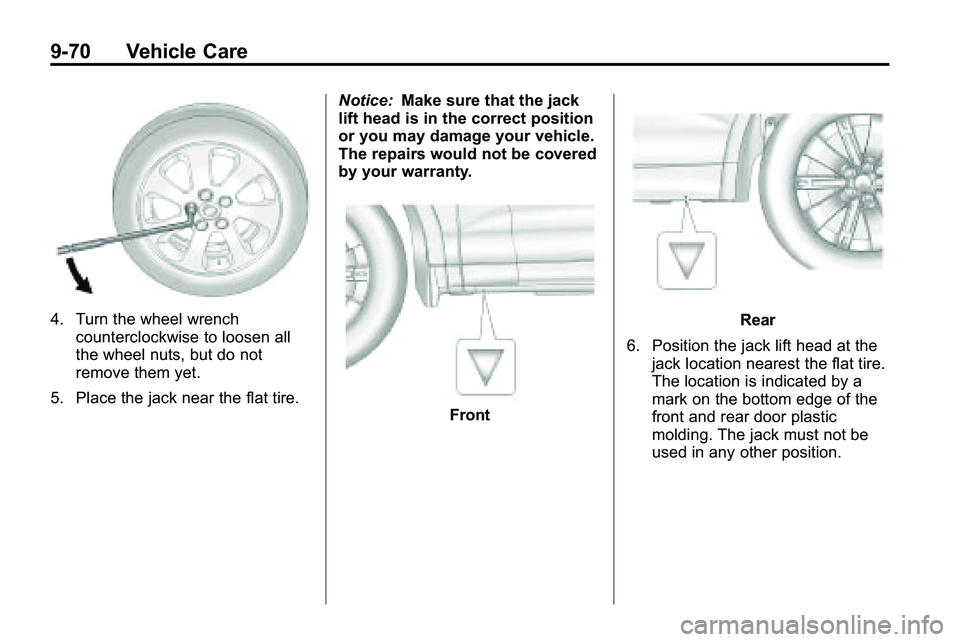
4. Turn the wheel wrenchcounterclockwise to loosen all
the wheel nuts, but do not
remove them yet.
5. Place the jack near the flat tire. Notice:
Make sure that the jack
lift head is in the correct position
or you may damage your vehicle.
The repairs would not be covered
by your warranty.
Front
Rear
6. Position the jack lift head at the jack location nearest the flat tire.
The location is indicated by a
mark on the bottom edge of the
front and rear door plastic
molding. The jack must not be
used in any other position.
Page 374 of 410
10-8 Service and Maintenance
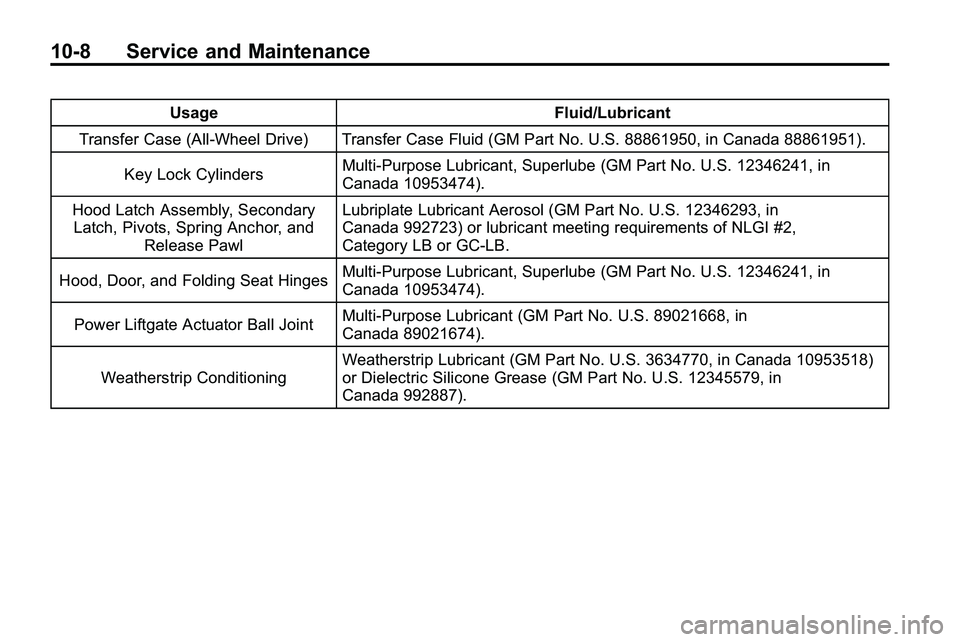
UsageFluid/Lubricant
Transfer Case (All-Wheel Drive) Transfer Case Fluid (GM Part No. U.S. 88861950, in Canada 88861951).
Key Lock Cylinders Multi-Purpose Lubricant, Superlube (GM Part No. U.S. 12346241, in
Canada 10953474).
Hood Latch Assembly, Secondary Latch, Pivots, Spring Anchor, and
Release Pawl Lubriplate Lubricant Aerosol (GM Part No. U.S. 12346293, in
Canada 992723) or lubricant meeting requirements of NLGI #2,
Category LB or GC-LB.
Hood, Door, and Folding Seat Hinges Multi-Purpose Lubricant, Superlube (GM Part No. U.S. 12346241, in
Canada 10953474).
Power Liftgate Actuator Ball Joint Multi-Purpose Lubricant (GM Part No. U.S. 89021668, in
Canada 89021674).
Weatherstrip Conditioning Weatherstrip Lubricant (GM Part No. U.S. 3634770, in Canada 10953518)
or Dielectric Silicone Grease (GM Part No. U.S. 12345579, in
Canada 992887).
Page 398 of 410

12-16 Customer Information
GM will not access this data or
share it with others except: with the
consent of the vehicle owner or,
if the vehicle is leased, with the
consent of the lessee; in response
to an official request of police or
similar government office; as part of
GM's defense of litigation through
the discovery process; or, as
required by law. Data that GM
collects or receives may also be
used for GM research needs or may
be made available to others for
research purposes, where a need is
shown and the data is not tied to a
specific vehicle or vehicle owner.
OnStar®
If your vehicle has OnStar and you
subscribe to the OnStar services,
please refer to the OnStar Terms
and Conditions for information on
data collection and use. See also
OnStar
®Systemon page 4‑41in
this manual for more information.
Navigation System
If your vehicle has a navigation
system, use of the system may
result in the storage of destinations,
addresses, telephone numbers, and
other trip information. Refer to the
navigation system operating manual
for information on stored data and
for deletion instructions.
Radio Frequency
Identification (RFID)
RFID technology is used in some
vehicles for functions such as tire
pressure monitoring and ignition
system security, as well as in
connection with conveniences such
as key fobs for remote door locking/
unlocking and starting, and
in-vehicle transmitters for garage
door openers. RFID technology in
GM vehicles does not use or record
personal information or link with any
other GM system containing
personal information.
Radio Frequency
Statement
This vehicle has systems that
operate on a radio frequency that
comply with Part 15 of the Federal
Communications Commission (FCC)
Rules and with RSS-210/211 of
Industry Canada.
Operation is subject to the following
two conditions:
1. The device may not cause interference.
2. The device must accept any interference received, including
interference that may cause
undesired operation of the
device.
Changes or modifications to any of
these systems by other than an
authorized service facility could void
authorization to use this equipment.
Page 401 of 410
INDEX i-3
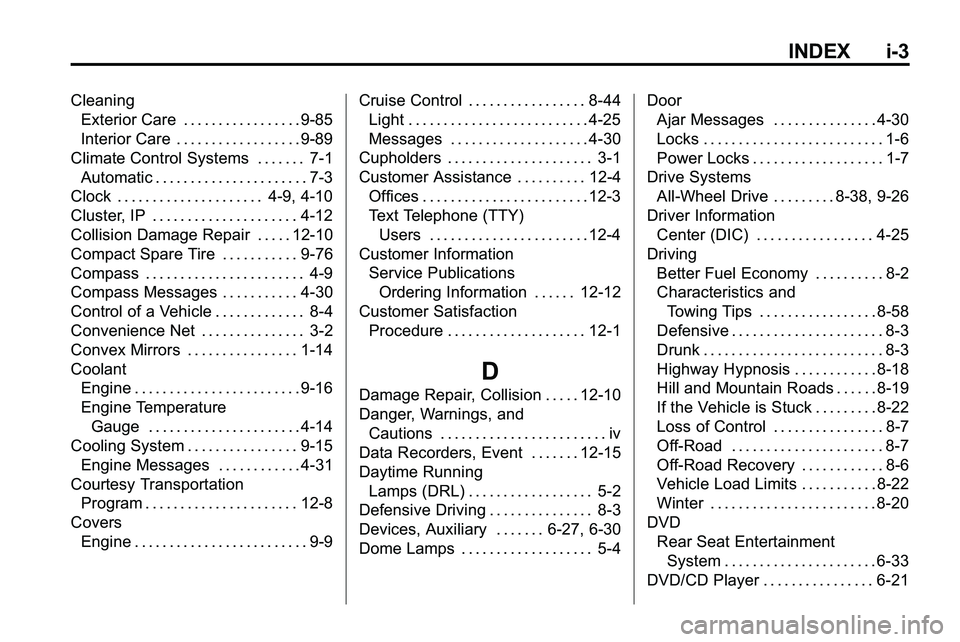
CleaningExterior Care . . . . . . . . . . . . . . . . . 9-85
Interior Care . . . . . . . . . . . . . . . . . . 9-89
Climate Control Systems . . . . . . . 7-1 Automatic . . . . . . . . . . . . . . . . . . . . . . 7-3
Clock . . . . . . . . . . . . . . . . . . . . . 4-9, 4-10
Cluster, IP . . . . . . . . . . . . . . . . . . . . . 4-12
Collision Damage Repair . . . . . 12-10
Compact Spare Tire . . . . . . . . . . . 9-76
Compass . . . . . . . . . . . . . . . . . . . . . . . 4-9
Compass Messages . . . . . . . . . . . 4-30
Control of a Vehicle . . . . . . . . . . . . . 8-4
Convenience Net . . . . . . . . . . . . . . . 3-2
Convex Mirrors . . . . . . . . . . . . . . . . 1-14
Coolant Engine . . . . . . . . . . . . . . . . . . . . . . . . 9-16
Engine Temperature
Gauge . . . . . . . . . . . . . . . . . . . . . . 4-14
Cooling System . . . . . . . . . . . . . . . . 9-15 Engine Messages . . . . . . . . . . . . 4-31
Courtesy Transportation
Program . . . . . . . . . . . . . . . . . . . . . . 12-8
Covers Engine . . . . . . . . . . . . . . . . . . . . . . . . . 9-9 Cruise Control . . . . . . . . . . . . . . . . . 8-44
Light . . . . . . . . . . . . . . . . . . . . . . . . . . 4-25
Messages . . . . . . . . . . . . . . . . . . . . 4-30
Cupholders . . . . . . . . . . . . . . . . . . . . . 3-1
Customer Assistance . . . . . . . . . . 12-4 Offices . . . . . . . . . . . . . . . . . . . . . . . . 12-3
Text Telephone (TTY)Users . . . . . . . . . . . . . . . . . . . . . . . 12-4
Customer Information Service PublicationsOrdering Information . . . . . . 12-12
Customer Satisfaction Procedure . . . . . . . . . . . . . . . . . . . . 12-1
D
Damage Repair, Collision . . . . . 12-10
Danger, Warnings, andCautions . . . . . . . . . . . . . . . . . . . . . . . . iv
Data Recorders, Event . . . . . . . 12-15
Daytime Running Lamps (DRL) . . . . . . . . . . . . . . . . . . 5-2
Defensive Driving . . . . . . . . . . . . . . . 8-3
Devices, Auxiliary . . . . . . . 6-27, 6-30
Dome Lamps . . . . . . . . . . . . . . . . . . . 5-4 Door
Ajar Messages . . . . . . . . . . . . . . . 4-30
Locks . . . . . . . . . . . . . . . . . . . . . . . . . . 1-6
Power Locks . . . . . . . . . . . . . . . . . . . 1-7
Drive Systems All-Wheel Drive . . . . . . . . . 8-38, 9-26
Driver Information
Center (DIC) . . . . . . . . . . . . . . . . . 4-25
Driving Better Fuel Economy . . . . . . . . . . 8-2
Characteristics andTowing Tips . . . . . . . . . . . . . . . . . 8-58
Defensive . . . . . . . . . . . . . . . . . . . . . . 8-3
Drunk . . . . . . . . . . . . . . . . . . . . . . . . . . 8-3
Highway Hypnosis . . . . . . . . . . . . 8-18
Hill and Mountain Roads . . . . . . 8-19
If the Vehicle is Stuck . . . . . . . . . 8-22
Loss of Control . . . . . . . . . . . . . . . . 8-7
Off-Road . . . . . . . . . . . . . . . . . . . . . . 8-7
Off-Road Recovery . . . . . . . . . . . . 8-6
Vehicle Load Limits . . . . . . . . . . . 8-22
Winter . . . . . . . . . . . . . . . . . . . . . . . . 8-20
DVD Rear Seat EntertainmentSystem . . . . . . . . . . . . . . . . . . . . . . 6-33
DVD/CD Player . . . . . . . . . . . . . . . . 6-21