park assist GMC TERRAIN 2010 Owner's Manual
[x] Cancel search | Manufacturer: GMC, Model Year: 2010, Model line: TERRAIN, Model: GMC TERRAIN 2010Pages: 410, PDF Size: 2.55 MB
Page 125 of 410
Instruments and Controls 4-33
Key and Lock Messages
Replace Battery In Remote Key
This message displays when the
battery in the Remote Keyless Entry
(RKE) transmitter needs to be
replaced.
Transport Mode On
This message displays when the
ignition is held in START for
15 seconds. The battery light may
also be flashing when this message
is displayed. To turn this message
off, start the vehicle and hold the
key in the START position for
15 seconds.
Object Detection System
Messages
Park Assist Off
This message is displayed when the
park assist system has been turned
off. SeeUltrasonic Parking Assist
on page 8‑47.
Service Park Assist
This message is displayed if there is
a problem with the park assist
system. Take the vehicle to your
dealer/retailer for service.
Ride Control System
Messages
All Wheel Drive Off
If your vehicle has the All-Wheel
Drive (AWD) system, this message
displays when the rear drive system
is overheating. This message turns
off when the rear drive system cools
down. If the warning message stays
on for a while, you need to reset the
warning message. To reset the
warning message, turn the ignition
off and then back on again. If the
message stays on, see your dealer/
retailer right away. See All-Wheel
Drive
on page 8‑38for more
information.
Service All Wheel Drive
If your vehicle has the All-Wheel
Drive (AWD) system, this message
displays if a problem occurs with
this system. If this message
appears, stop as soon as possible
and turn off the vehicle. Restart the
vehicle and check for the message
on the DIC display. If the message
is still displayed or appears again
when you begin driving, the AWD
system needs service. See your
dealer/retailer.
Service Traction Control
This message displays when there
is a problem with the Traction
Control System (TCS). When this
message is displayed, the system
will not limit wheel spin. Adjust your
driving accordingly. See your dealer/
retailer for service.
Page 130 of 410
4-38 Instruments and Controls
Easy Exit Driver Seat
This allows you to turn the easy exit
seat feature on or off.
Press the MENU / SELECT knob
when“Easy Exit Driver Seat” is
highlighted. Turn the knob to select
“On” or“Off”. Press the knob to
confirm and go back to the
last menu.
Chime Volume
This allows the selection of the
chime volume level.
Press the MENU / SELECT
knob when “Chime Volume” is
highlighted. Turn the knob to select
“Normal” or“High”. Press the knob
to confirm and go back to the
last menu. Reverse Tilt Mirror
This allows you to turn the park tilt
mirrors feature on or off.
Press the MENU / SELECT knob
when
“Reverse Tilt Mirror” is
highlighted. Turn the knob to select
“On” or“Off”. Press the knob to
confirm and go back to the
last menu.
Collision/Detection Systems
Select the Collision/Detection
Systems menu and the following will
be displayed:
.Park Assist
Park Assist
This allows the Ultrasonic Parking
Assist feature to be turned on or off.
Press the MENU / SELECT knob
when “Park Assist” is highlighted.
Turn the knob to select “On”,“Off”,
or “Tow Bar”. Press the knob to
confirm and go back to the
last menu.
Languages
Select the Language menu and the
following will be displayed:
.English
.French
.Spanish
Turn the MENU / SELECT knob to
select the language. Press the knob
to confirm and go back to the
last menu.
Lighting
Select the Lighting menu and the
following will be displayed:
.Vehicle Locator Lights
.Exit Lighting
Page 209 of 410

Driving and Operating 8-1
Driving and
Operating
Driving Information
Driving for Better FuelEconomy . . . . . . . . . . . . . . . . . . . . 8-2
Defensive Driving . . . . . . . . . . . . . 8-3
Drunk Driving . . . . . . . . . . . . . . . . . 8-3
Control of a Vehicle . . . . . . . . . . . 8-4
Braking . . . . . . . . . . . . . . . . . . . . . . . 8-4
Steering . . . . . . . . . . . . . . . . . . . . . . . 8-5
Off-Road Recovery . . . . . . . . . . . . 8-6
Loss of Control . . . . . . . . . . . . . . . . 8-7
Off-Road Driving . . . . . . . . . . . . . . 8-7
Driving on Wet Roads . . . . . . . 8-18
Highway Hypnosis . . . . . . . . . . . 8-18
Hill and Mountain Roads . . . . . 8-19
Winter Driving . . . . . . . . . . . . . . . 8-20
If the Vehicle is Stuck . . . . . . . . 8-22
Vehicle Load Limits . . . . . . . . . . 8-22
Starting and Operating
New Vehicle Break-In . . . . . . . . 8-27
Ignition Positions . . . . . . . . . . . . 8-28
Retained Accessory Power (RAP) . . . . . . . . . . . . . . . 8-29
Starting the Engine . . . . . . . . . . 8-29
Engine Coolant Heater . . . . . . . 8-31
Shifting Into Park . . . . . . . . . . . . 8-32
Shifting Out of Park . . . . . . . . . . 8-33
Parking Over Things
That Burn . . . . . . . . . . . . . . . . . . 8-33
Engine Exhaust
Engine Exhaust . . . . . . . . . . . . . . 8-34
Running the Vehicle WhileParked . . . . . . . . . . . . . . . . . . . . . 8-34
Automatic Transmission
Automatic Transmission . . . . . 8-35
Manual Mode . . . . . . . . . . . . . . . . 8-37
Fuel Economy Mode . . . . . . . . . 8-38
Drive Systems
All-Wheel Drive . . . . . . . . . . . . . . 8-38
Brakes
Antilock BrakeSystem (ABS) . . . . . . . . . . . . . . 8-39
Parking Brake . . . . . . . . . . . . . . . 8-40
Brake Assist . . . . . . . . . . . . . . . . . 8-40
Hill Start Assist (HSA) . . . . . . . 8-41
Ride Control Systems
Traction Control System (TCS) . . . . . . . . . . . . . . 8-41
StabiliTrak System . . . . . . . . . . . 8-42
Cruise Control
Cruise Control . . . . . . . . . . . . . . . 8-44
Object Detection Systems
Ultrasonic Parking Assist . . . . 8-47
Rear Vision Camera (RVC) . . . . . . . . . . . . . 8-50
Fuel
Fuel . . . . . . . . . . . . . . . . . . . . . . . . . 8-54
Recommended Fuel . . . . . . . . . 8-54
Gasoline Specifications . . . . . . 8-54
Page 248 of 410
8-40 Driving and Operating
Parking Brake
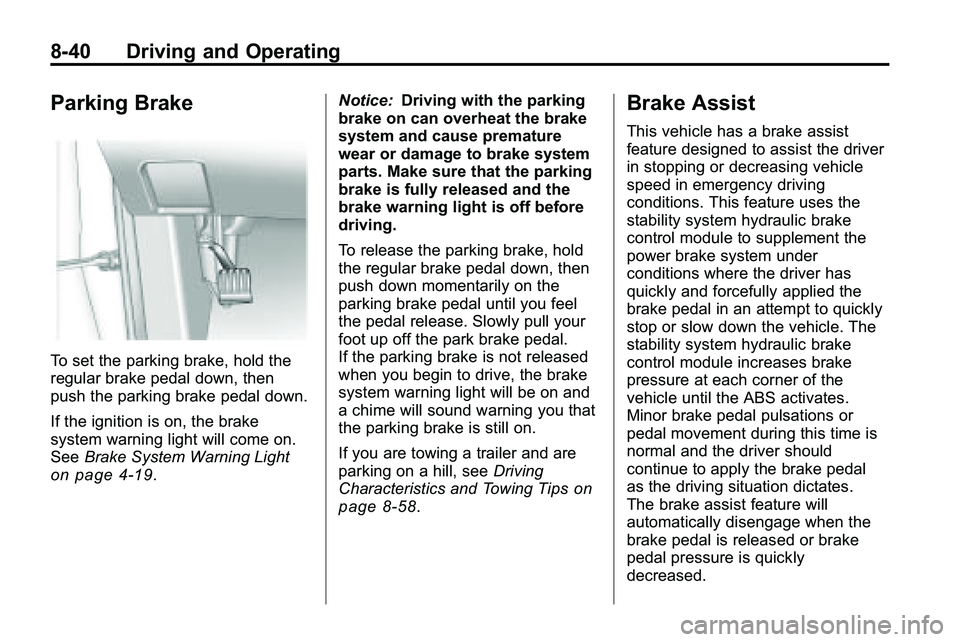
To set the parking brake, hold the
regular brake pedal down, then
push the parking brake pedal down.
If the ignition is on, the brake
system warning light will come on.
SeeBrake System Warning Light
on page 4‑19. Notice:
Driving with the parking
brake on can overheat the brake
system and cause premature
wear or damage to brake system
parts. Make sure that the parking
brake is fully released and the
brake warning light is off before
driving.
To release the parking brake, hold
the regular brake pedal down, then
push down momentarily on the
parking brake pedal until you feel
the pedal release. Slowly pull your
foot up off the park brake pedal.
If the parking brake is not released
when you begin to drive, the brake
system warning light will be on and
a chime will sound warning you that
the parking brake is still on.
If you are towing a trailer and are
parking on a hill, see Driving
Characteristics and Towing Tipson
page 8‑58.
Brake Assist
This vehicle has a brake assist
feature designed to assist the driver
in stopping or decreasing vehicle
speed in emergency driving
conditions. This feature uses the
stability system hydraulic brake
control module to supplement the
power brake system under
conditions where the driver has
quickly and forcefully applied the
brake pedal in an attempt to quickly
stop or slow down the vehicle. The
stability system hydraulic brake
control module increases brake
pressure at each corner of the
vehicle until the ABS activates.
Minor brake pedal pulsations or
pedal movement during this time is
normal and the driver should
continue to apply the brake pedal
as the driving situation dictates.
The brake assist feature will
automatically disengage when the
brake pedal is released or brake
pedal pressure is quickly
decreased.
Page 255 of 410
Driving and Operating 8-47
Object Detection
Systems
Ultrasonic Parking Assist
For vehicles with the Ultrasonic
Rear Parking Assist (URPA) system,
it assists the driver with parking
and avoiding objects while in
R (Reverse). URPA operates at
speeds less than 8 km/h (5 mph),
and the sensors on the rear bumper
detect objects up to 2.5 m (8 ft)
behind the vehicle, and at least
20 cm (8 in) off the ground.
{WARNING
The Ultrasonic Rear Parking
Assist (URPA) system does not
replace driver vision. It cannot
detect:
.Objects that are below the
bumper, underneath the
vehicle, or if they are too
close or far from the vehicle
.Children, pedestrians,
bicyclists, or pets.
If you do not use proper care
before and while backing; vehicle
damage, injury, or death could
occur. Even with URPA, always
check behind the vehicle before
backing up. While backing, be
sure to look for objects and check
the vehicle's mirrors. The display is located in the
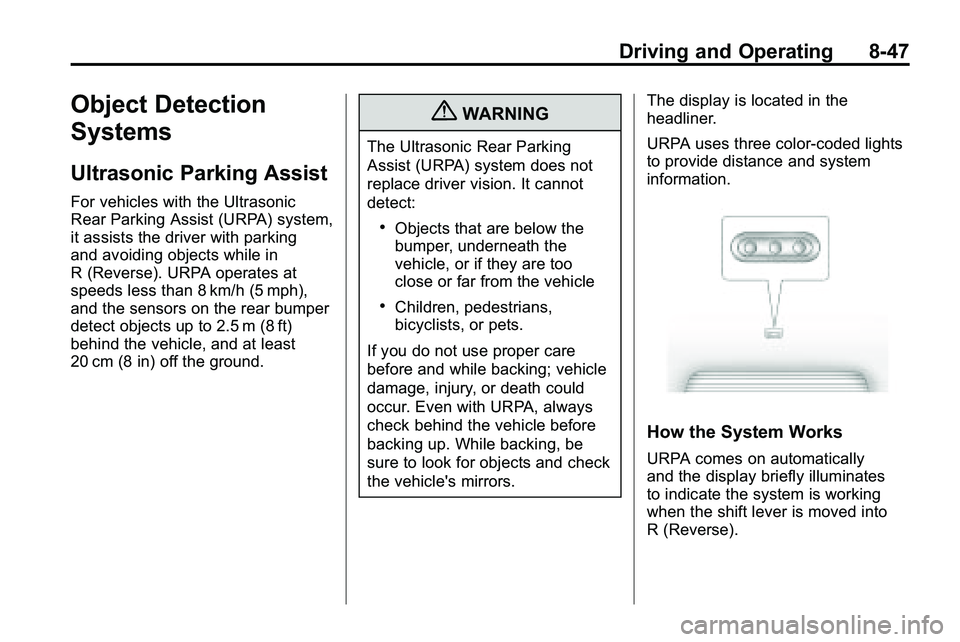
headliner.
URPA uses three color-coded lights
to provide distance and system
information.
How the System Works
URPA comes on automatically
and the display briefly illuminates
to indicate the system is working
when the shift lever is moved into
R (Reverse).
Page 256 of 410
8-48 Driving and Operating
If the vehicle is traveling faster then
8 km/h (5 mph) in reverse, the red
light on the rear display flashes.
Objects must be at least 20 cm (8 in)
off the ground, below liftgate level,
and within 2.5 m (8 ft) from the rear
bumper to be detected. The
distance may be less during warmer
or humid weather.
A single beep sounds the first time
an object is detected between
0.6 m (23 in) and 2.5 m (8 ft) away.
Beeping occurs continuously when
the vehicle is 0.6 m (23 in) or closer
to an object.The following describes how the URPA display lights appear as the vehicle
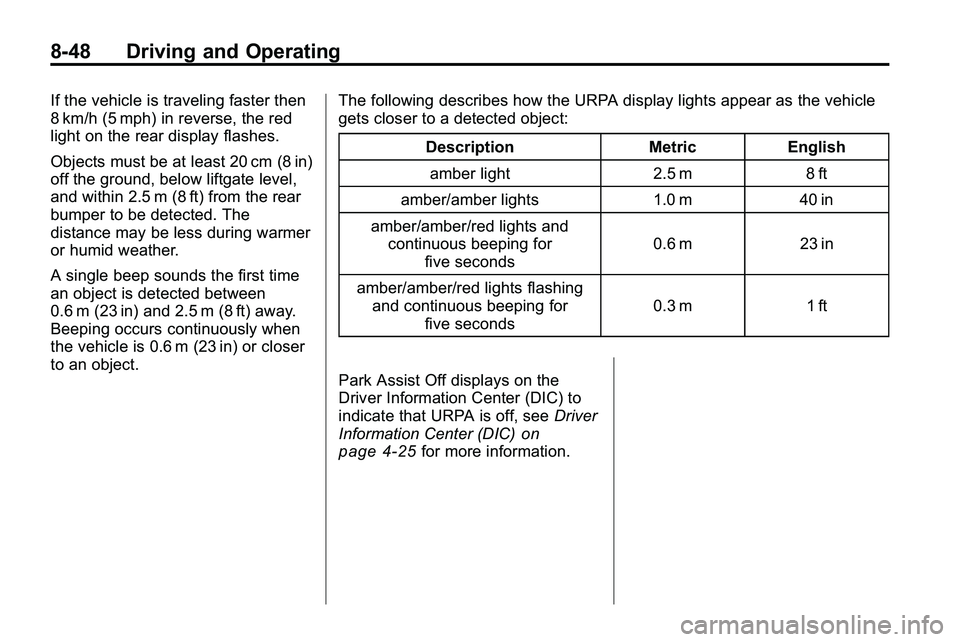
gets closer to a detected object:
Description Metric Englishamber light 2.5 m 8 ft
amber/amber lights 1.0 m 40 in
amber/amber/red lights and continuous beeping for five seconds 0.6 m 23 in
amber/amber/red lights flashing and continuous beeping for five seconds 0.3 m 1 ft
Park Assist Off displays on the
Driver Information Center (DIC) to
indicate that URPA is off, see Driver
Information Center (DIC)
on
page 4‑25for more information.
Page 257 of 410
Driving and Operating 8-49
System Settings
Each time the vehicle is started
URPA defaults to the On setting.
Use theVehicle Personalization
on
page 4‑36menu to
configure URPA.
The settings are:
.On: Turns URPA on
.Off: Turns URPA off
.Tow Bar: Use when a tow bar is
attached to the vehicle
Tow Bar
When the tow bar setting is used,
an area of 16 cm (6 in) around the
hitch is not detected by the system.
When the System Does Not
Seem to Work Properly
If the URPA system does not
activate due to a temporary
condition, the message Park Assist
Off displays on the DIC and a red
light is shown on the rear URPA
display when the shift lever is
moved into R (Reverse). This can
occur under the following
conditions:
.The ultrasonic sensors are not
clean. Keep the vehicle's rear
bumper free of mud, dirt, snow,
ice and slush. For cleaning
instructions, see Exterior Care
on page 9‑85.
.A trailer was attached to the
vehicle, or an object was
hanging out of the liftgate during
the last drive cycle, a red light
may come on in the rear display.
Once the attached object is
removed, URPA will return to
normal operation.
.A tow bar is attached to the
vehicle and the tow bar setting is
not being used, or an odd
shaped tow bar is attached to
the vehicle and the tow bar
setting is being used.
.The vehicle's bumper is
damaged. Take the vehicle to
your dealer/retailer to repair the
system.
.Other conditions may affect
system performance, such as
vibrations from a jackhammer or
the compression of air brakes on
a very large truck.
If the system is still disabled, after
driving forward at least 25 km/h
(15 mph), take the vehicle to your
dealer/retailer.
Page 259 of 410

Driving and Operating 8-51
Vehicles With a Navigation
System
An image appears on the navigation
screen with the message“Check
Surroundings for Safety” when the
vehicle is shifted into R (Reverse).
The navigation screen goes to the
previous screen after approximately
10 seconds once the vehicle is
shifted out of R (Reverse).
To cancel the delay, do one of the
following:
.Press a hard key on the
navigation system.
.Shift into P (Park).
.Reach a vehicle speed of
8 km/h (5 mph). Turning the Rear Vision Camera
System On or Off
To turn the rear vision camera
system on or off:
1. Shift into P (Park).
2. Press the CONFIG button.
3. Select Display.
4. Select Camera. When a check
mark appears next to the
Camera option, then the RVC
system is on. Symbols
The navigation system may have a
feature that lets the driver view
symbols on the navigation screen
while using the RVC. The Ultrasonic
Rear Park Assist (URPA) system
must not be disabled to use the
caution symbols. The error message
“Rear Parking Assist Symbols
Unavailable”
may display if URPA
has been disabled and the symbols
have been turned on. See
Ultrasonic Parking Assist
on
page 8‑47.
The symbols appear and may
cover an object when viewing the
navigation screen when an object is
detected by the URPA system.
To turn the symbols on or off:
1. Shift into P (Park).
2. Press the CONFIG button.
3. Select Display.
4. Select Symbols. When a check mark appears next to the
Symbols option, symbols will
appear.
Page 267 of 410

Driving and Operating 8-59
Pulling A Trailer
Here are some important points:
.There are many laws, including
speed limit restrictions that apply
to trailering. Check for legal
requirements with state or
provincial police.
.Do not tow a trailer at all during
the first 1 600 km (1,000 miles)
the new vehicle is driven. The
engine, axle or other parts could
be damaged.
.During the first 800 km
(500 miles) that a trailer is
towed, do not drive over 80 km/h
(50 mph) and do not make starts
at full throttle. This reduces wear
on the vehicle.
.The vehicle can tow in D (Drive).
Use a lower gear if the
transmission shifts too often.
.Do not use the Fuel Saver Mode
when towing.
.Obey speed limit restrictions.
Do not drive faster than the
maximum posted speed for
trailers, or no more than 90 km/h
(55 mph), to reduce wear on the
vehicle.
.For vehicles with the Ultra Rear
Parking Assist (URPA) system,
turn the system off when towing
a trailer. If the tow bar is
installed while not towing a
trailer, change the URPA system
to the“Tow Bar” setting. See
Ultrasonic Parking Assist
on
page 8‑47for more information.
Driving with a Trailer
Towing a trailer requires experience.
Get familiar with handling and
braking with the added trailer
weight. The vehicle is now longer
and not as responsive as the
vehicle is by itself.
Check all trailer hitch parts and
attachments, safety chains,
electrical connectors, lamps, tires
and mirror adjustments. If the trailer
has electric brakes, start the vehicle
and trailer moving and then apply
the trailer brake controller by hand
to be sure the brakes are working.
During the trip, check regularly to be
sure that the load is secure, and the
lamps and trailer brakes are working
properly.
Page 294 of 410
9-20 Vehicle Care
Engine Overheating
The vehicle has an indicator to warn
of engine overheating. There is an
engine coolant temperature warning
light on the vehicle's instrument
panel. SeeEngine Coolant
Temperature Gauge on page 4‑14.
The decision may be made not
to lift the hood when this warning
appears, but instead get service
help right away. See Roadside
Assistance Program on page 12‑6.
If the decision to lift the hood is
made, make sure the vehicle is
parked on a level surface.
Then check to see if the engine
cooling fans are running. If the
engine is overheating, both fans
should be running. If they are not,
do not continue to run the engine
and have the vehicle serviced.
Notice: Engine damage from
running the engine without
coolant is not covered by the
warranty.
If Steam Is Coming From The
Engine Compartment
{WARNING
Steam from an overheated engine
can burn you badly, even if you
just open the hood. Stay away
from the engine if you see or hear
steam coming from it. Just turn it
off and get everyone away from
the vehicle until it cools down.
Wait until there is no sign of
steam or coolant before you open
the hood.
If you keep driving when your
engine is overheated, the liquids
in it can catch fire. You or others
could be badly burned. Stop your
engine if it overheats, and get out
of the vehicle until the engine
is cool.
If No Steam Is Coming From
The Engine Compartment
If an engine overheat warning is
displayed but no steam can be seen
or heard, the problem may not be
too serious. Sometimes the engine
can get a little too hot when the
vehicle:
.Climbs a long hill on a hot day.
.Stops after high-speed driving.
.Idles for long periods in traffic.
.Tows a trailer.
If the overheat warning is displayed
with no sign of steam:
1. Turn the air conditioning off.
2. Turn the heater on to the highest temperature and to the highest
fan speed. Open the windows as
necessary.
3. In heavy traffic, let the engine idle in N (Neutral) while stopped.
If it is safe to do so, pull off
the road, shift to P (Park) or
N (Neutral) and let the
engine idle.