park assist GMC TERRAIN 2011 User Guide
[x] Cancel search | Manufacturer: GMC, Model Year: 2011, Model line: TERRAIN, Model: GMC TERRAIN 2011Pages: 426, PDF Size: 5.58 MB
Page 255 of 426
Black plate (29,1)GMC Terrain Owner Manual - 2011
Driving and Operating 9-29
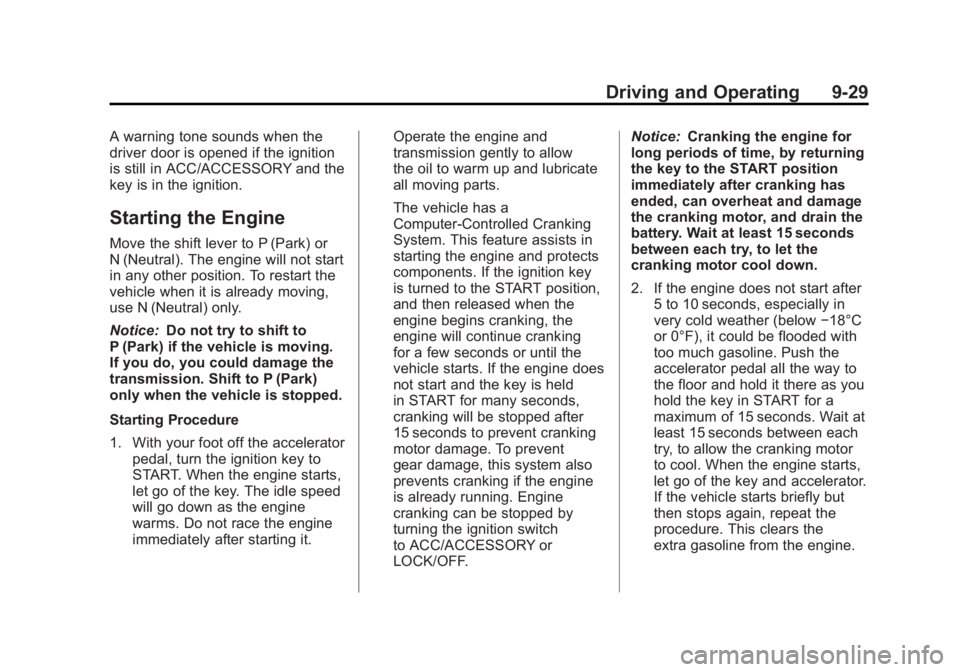
A warning tone sounds when the
driver door is opened if the ignition
is still in ACC/ACCESSORY and the
key is in the ignition.
Starting the Engine
Move the shift lever to P (Park) or
N (Neutral). The engine will not start
in any other position. To restart the
vehicle when it is already moving,
use N (Neutral) only.
Notice:Do not try to shift to
P (Park) if the vehicle is moving.
If you do, you could damage the
transmission. Shift to P (Park)
only when the vehicle is stopped.
Starting Procedure
1. With your foot off the accelerator
pedal, turn the ignition key to
START. When the engine starts,
let go of the key. The idle speed
will go down as the engine
warms. Do not race the engine
immediately after starting it. Operate the engine and
transmission gently to allow
the oil to warm up and lubricate
all moving parts.
The vehicle has a
Computer-Controlled Cranking
System. This feature assists in
starting the engine and protects
components. If the ignition key
is turned to the START position,
and then released when the
engine begins cranking, the
engine will continue cranking
for a few seconds or until the
vehicle starts. If the engine does
not start and the key is held
in START for many seconds,
cranking will be stopped after
15 seconds to prevent cranking
motor damage. To prevent
gear damage, this system also
prevents cranking if the engine
is already running. Engine
cranking can be stopped by
turning the ignition switch
to ACC/ACCESSORY or
LOCK/OFF.Notice:
Cranking the engine for
long periods of time, by returning
the key to the START position
immediately after cranking has
ended, can overheat and damage
the cranking motor, and drain the
battery. Wait at least 15 seconds
between each try, to let the
cranking motor cool down.
2. If the engine does not start after
5 to 10 seconds, especially in
very cold weather (below −18°C
or 0°F), it could be flooded with
too much gasoline. Push the
accelerator pedal all the way to
the floor and hold it there as you
hold the key in START for a
maximum of 15 seconds. Wait at
least 15 seconds between each
try, to allow the cranking motor
to cool. When the engine starts,
let go of the key and accelerator.
If the vehicle starts briefly but
then stops again, repeat the
procedure. This clears the
extra gasoline from the engine.
Page 271 of 426

Black plate (45,1)GMC Terrain Owner Manual - 2011
Driving and Operating 9-45
Object Detection
Systems
Ultrasonic Parking Assist
For vehicles with the Ultrasonic
Rear Parking Assist (URPA) system,
it assists the driver with parking
and avoiding objects while in
R (Reverse). URPA operates at
speeds less than 8 km/h (5 mph),
and the sensors on the rear bumper
detect objects up to 2.5 m (8 ft)
behind the vehicle, and at least
20 cm (8 in) off the ground.
{WARNING
The Ultrasonic Rear Parking
Assist (URPA) system does not
replace driver vision. It cannot
detect:
.Objects that are below the
bumper, underneath the
vehicle, or too close or far
from the vehicle.
.Children, pedestrians,
bicyclists, or pets.
If you do not use proper care
before and while backing, vehicle
damage, injury, or death could
occur. Even with URPA, always
check behind the vehicle before
backing up. While backing, be
sure to look for objects and check
the vehicle's mirrors.
How the System Works
URPA comes on automatically
when the shift lever is moved into
R (Reverse). A single tone sounds
to indicate the system is working.
URPA operates only at speeds less
than 8 km/h (5 mph).
An obstacle is indicated by audible
beeps. The interval between the
beeps becomes shorter as the
vehicle gets closer to the obstacle.
When the distance is less than
30 cm (12 in) the beeping is
continuous for 5 seconds.
To be detected, objects must be at
least 20 cm (8 in) off the ground and
below taillamp level. Objects must
also be within 2.5 m (8 ft) from the
rear bumper. The distance objects
can be detected may be less during
warmer or humid weather.
Page 272 of 426

Black plate (46,1)GMC Terrain Owner Manual - 2011
9-46 Driving and Operating
PARK ASSIST OFF displays on the
Driver Information Center (DIC) to
indicate that URPA is off. The
message disappears after a short
period of time.
SeeObject Detection System
Messages on page 5‑27 for URPA
messages.
Turning the System On and Off
The URPA system can be turned
on and off using the infotainment
system controls. See Vehicle
Personalization on page 5‑30 for
more information.
URPA defaults to the on setting
each time the vehicle is started.
When the System Does Not
Seem to Work Properly
If the URPA system does not
activate due to a temporary
condition, the message PARK
ASSIST OFF displays on the DIC.
See Driver Information Center (DIC)
on page 5‑20 for more information.
This can occur under the following
conditions:
.The driver has disabled the
system.
.The ultrasonic sensors are not
clean. Keep the vehicle's rear
bumper free of mud, dirt, snow,
ice, and slush. For cleaning
instructions, see Exterior Care
on page 10‑82.
.The park assist sensors are
covered by frost or ice, which
can occur after washing the
vehicle in cold weather. Keep
the sensors free of frost or ice.
.A trailer was attached to the
vehicle, or an object was
hanging out of the trunk during
the last drive cycle. Once the
object is removed, URPA will
return to normal operation.
.The vehicle's bumper is
damaged. Take the vehicle to
your dealer to repair the system.
.Other conditions may affect
system performance, such as
vibrations from a jackhammer or
the compression of air brakes on
a very large truck.
Page 275 of 426

Black plate (49,1)GMC Terrain Owner Manual - 2011
Driving and Operating 9-49
Symbols
The navigation system may have
a feature that lets the driver view
symbols on the navigation screen
while using the RVC. The Ultrasonic
Rear Park Assist (URPA) system
must not be disabled to use
the caution symbols. The error
message Rear Parking Assist
Symbols Unavailable may display if
URPA has been disabled and the
symbols have been turned on.
SeeUltrasonic Parking Assist on
page 9‑45.
The symbols appear and may
cover an object when viewing the
navigation screen when an object is
detected by the URPA system. To turn the symbols on or off:
1. Shift into P (Park).
2. Press the CONFIG button.
3. Select Display.
4. Select Rear Camera Options.
5. Select Symbols. When a check
mark appears next to the
Symbols option, symbols will
appear.
Guidelines
The RVC system has a guideline
overlay that can help the driver align
the vehicle when backing into a
parking spot. To turn the guidelines on or off:
1. Shift into P (Park).
2. Press the CONFIG button.
3. Select Display.
4. Select Rear Camera Options.
5. Select Guidelines. When a
check mark appears next to the
Guidelines option, guidelines will
appear.
Rear Vision Camera Error
Messages
SERVICE REAR VISION CAMERA
SYSTEM: This message can
display on the navigation screen
when the system is not receiving
information it requires from other
vehicle systems.
If any other problem occurs or if a
problem persists, see your dealer.
Page 285 of 426
Black plate (59,1)GMC Terrain Owner Manual - 2011
Driving and Operating 9-59
.Do not use the Fuel Saver Mode
when towing.
.Obey speed limit restrictions.
Do not drive faster than the
maximum posted speed for
trailers, or no more than 90 km/h
(55 mph), to reduce wear on the
vehicle.
.For vehicles with the Ultra
Rear Parking Assist (URPA)
system, turn the system off when
towing a trailer. If the tow bar
is installed while not towing a
trailer, change the URPA system
to the“Tow Bar” setting. See
Ultrasonic Parking Assist on
page 9‑45 for more information.
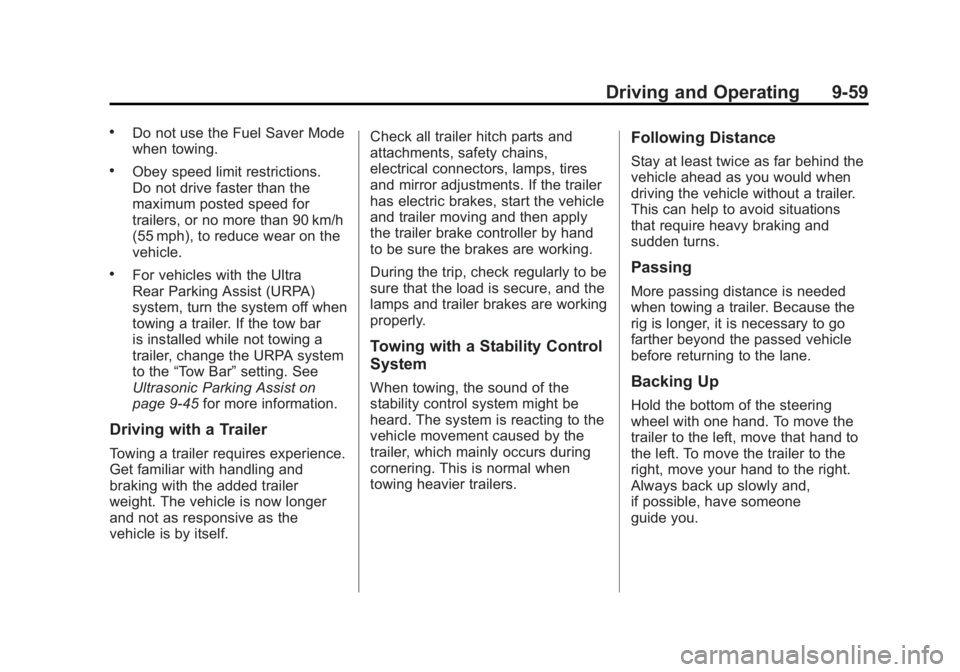
Driving with a Trailer
Towing a trailer requires experience.
Get familiar with handling and
braking with the added trailer
weight. The vehicle is now longer
and not as responsive as the
vehicle is by itself. Check all trailer hitch parts and
attachments, safety chains,
electrical connectors, lamps, tires
and mirror adjustments. If the trailer
has electric brakes, start the vehicle
and trailer moving and then apply
the trailer brake controller by hand
to be sure the brakes are working.
During the trip, check regularly to be
sure that the load is secure, and the
lamps and trailer brakes are working
properly.
Towing with a Stability Control
System
When towing, the sound of the
stability control system might be
heard. The system is reacting to the
vehicle movement caused by the
trailer, which mainly occurs during
cornering. This is normal when
towing heavier trailers.
Following Distance
Stay at least twice as far behind the
vehicle ahead as you would when
driving the vehicle without a trailer.
This can help to avoid situations
that require heavy braking and
sudden turns.
Passing
More passing distance is needed
when towing a trailer. Because the
rig is longer, it is necessary to go
farther beyond the passed vehicle
before returning to the lane.
Backing Up
Hold the bottom of the steering
wheel with one hand. To move the
trailer to the left, move that hand to
the left. To move the trailer to the
right, move your hand to the right.
Always back up slowly and,
if possible, have someone
guide you.
Page 311 of 426

Black plate (21,1)GMC Terrain Owner Manual - 2011
Vehicle Care 10-21
By this time, the coolant level
inside the coolant surge tank
may be lower. If the level is
lower, add more of the proper
DEX-COOL coolant mixture to
the coolant surge tank until
the level reaches the COLD
FILL line.
5. Replace the pressure cap. Be sure the pressure cap is
hand-tight.
Check the level in the coolant
surge tank when the cooling system
has cooled down. If the coolant
is not at the proper level, repeat
Steps 1 through 3 and reinstall the
pressure cap. If the coolant still is
not at the proper level when the
system cools down again, see your
dealer.Engine Overheating
The vehicle has an indicator to warn
of engine overheating. There is an
engine coolant temperature warning
light on the vehicle's instrument
panel. See Engine Coolant
Temperature Gauge on page 5‑10.
The decision may be made not
to lift the hood when this warning
appears, but instead get service
help right away. See Roadside
Assistance Program (U.S. and
Canada) on page 13‑7 orRoadside
Assistance Program (Mexico) on
page 13‑9. If the decision to lift the hood is
made, make sure the vehicle is
parked on a level surface.
Then check to see if the engine
cooling fan(s) are running. If the
engine is overheating, the fan(s)
should be running. If they are not,
do not continue to run the engine
and have the vehicle serviced.
Notice:
Engine damage from
running the engine without
coolant is not covered by the
warranty.
Page 333 of 426

Black plate (43,1)GMC Terrain Owner Manual - 2011
Vehicle Care 10-43
To access the fuses, open the fuse
panel door from the passenger side
by pulling it out.
To reinstall the door, insert the tabs
on the top of the door into the
console first, then push the door
back into its original location.
The vehicle may not be equipped
with all of the fuses, relays, and
features shown.
Instrument Panel Fuse BlockMini Fuses Usage
1 Steering Wheel
Dimming
2 Spare
3 Spare
4 Body Control
Module 1
5 Infotainment
6 Body Control
Module 7
7 Noise Control
Module
8 Body Control
Module 4
9 Radio
10 Special Equipment
Order Battery
11 Ultrasonic Rear
Parking Assist
Module
Page 356 of 426
Black plate (66,1)GMC Terrain Owner Manual - 2011
10-66 Vehicle Care
{WARNING
Lifting a vehicle and getting
under it to do maintenance or
repairs is dangerous without the
appropriate safety equipment and
training. If a jack is provided with
the vehicle, it is designed only for
changing a flat tire. If it is used for
anything else, you or others could
be badly injured or killed if the
vehicle slips off the jack. If a jack
is provided with the vehicle, only
use it for changing a flat tire.
If a tire goes flat, avoid further tire
and wheel damage by driving slowly
to a level place, well off the road,
if possible. Turn on the hazard
warning flashers. See Hazard
Warning Flashers on page 6‑3.
{WARNING
Changing a tire can be
dangerous. The vehicle can
slip off the jack and roll over or
fall causing injury or death. Find
a level place to change the tire.
To help prevent the vehicle from
moving:
1. Set the parking brake firmly.
2. Put an automatic transmission in P (Park) or
a manual transmission in
1 (First) or R (Reverse).
3. Turn off the engine and do not restart while the vehicle
is raised.
4. Do not allow passengers to remain in the vehicle.
5. Place wheel blocks on both sides of the tire at the
opposite corner of the tire
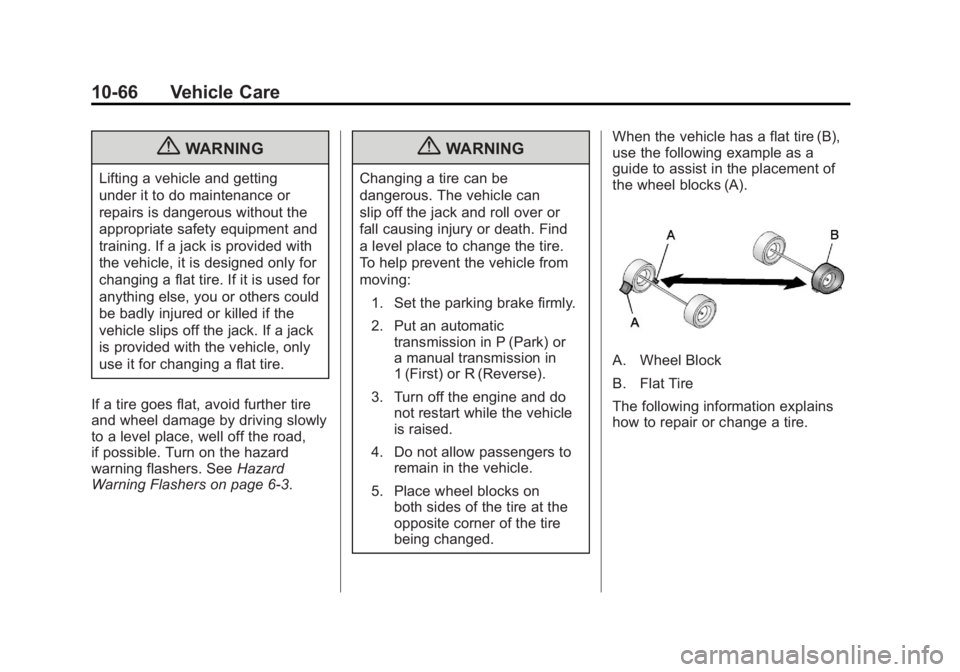
being changed. When the vehicle has a flat tire (B),
use the following example as a
guide to assist in the placement of
the wheel blocks (A).
A. Wheel Block
B. Flat Tire
The following information explains
how to repair or change a tire.
Page 416 of 426
Black plate (2,1)GMC Terrain Owner Manual - 2011
i-2 INDEX
B
Battery . . . . . . . . . . . . . . . . . . . . . . . 10-27Jump Starting . . . . . . . . . . . . . . . 10-75
Load Management . . . . . . . . . . . . . 6-5
Voltage and ChargingMessages . . . . . . . . . . . . . . . . . . . 5-24
Blade Replacement, Wiper . . . 10-30
Bluetooth . . . . . . . . . . 7-45, 7-46, 7-51
Brake System Warning Light . . . 5-15
Brakes . . . . . . . . . . . . . . . . . . . . . . . . 10-24 Antilock . . . . . . . . . . . . . . . . . . . . . . . 9-37
Assist . . . . . . . . . . . . . . . . . . . . . . . . . 9-39
Fluid . . . . . . . . . . . . . . . . . . . . . . . . 10-25
Parking . . . . . . . . . . . . . . . . . . . . . . . 9-38
System Messages . . . . . . . . . . . . 5-24
Braking . . . . . . . . . . . . . . . . . . . . . . . . . 9-3
Break-In, New Vehicle . . . . . . . . . 9-26
Bulb Replacement . . . . . . . . . . . . 10-38
Fog Lamps . . . . . . . . . . . . . 6-4, 10-35
Headlamp Aiming . . . . . . . . . . . 10-31
Headlamps . . . . . . . . . . . . . . . . . 10-33 Bulb Replacement (cont.)
Headlamps, Front Turn
Signal, Sidemarker, and
Parking Lamps . . . . . . . . . . . . 10-34
License Plate Lamps . . . . . . . 10-38
Taillamps, Turn Signal, Sidemarker, Stoplamps,
and Backup Lamps . . . . . . . . 10-35
Buying New Tires . . . . . . . . . . . . . 10-59
C
Calibration . . . . . . . . . . . . . . . . . . . . . . 5-4
California
Fuel Requirements . . . . . . . . . . . 9-53
Perchlorate MaterialsRequirements . . . . . . . . . . . . . . . 10-3
Warning . . . . . . . . . . . . . . . . . . . . . . 10-2
Camera, Rear Vision . . . . . . . . . . 9-47
Canadian Vehicle Owners . . . . . . . . iv
Capacities and Specifications . . . . . . . . . . . . . . . . 12-2
Carbon Monoxide Engine Exhaust . . . . . . . . . . . . . . . 9-32
Liftgate . . . . . . . . . . . . . . . . . . . 2-8, 2-9
Winter Driving . . . . . . . . . . . . . . . . 9-19 Cargo
Cover . . . . . . . . . . . . . . . . . . . . . . . . . . 4-2
Tie-Downs . . . . . . . . . . . . . . . . . . . . . 4-2
Cautions, Danger, and Warnings . . . . . . . . . . . . . . . . . . . . . . . . iv
CD Player . . . . . . . . . . . . . . . . . . . . . 7-19
CD/DVD Player . . . . . . . . . . . . . . . . 7-21
Center Console Storage . . . . . . . . 4-1
Chains, Tire . . . . . . . . . . . . . . . . . . 10-65
Charging System Light . . . . . . . . 5-12
Check Engine Light . . . . . . . . . . . . . . . . . . 5-13
IgnitionTransmission Lock . . . . . . . . 10-29
Child Restraints Infants and Young
Children . . . . . . . . . . . . . . . . . . . . . 3-43
Lower Anchors and Tethers for Children . . . . . . . . . 3-49
Older Children . . . . . . . . . . . . . . . . 3-40
Securing . . . . . . . . . . . . . . . . 3-55, 3-57
Systems . . . . . . . . . . . . . . . . . . . . . . 3-45
Cleaning Exterior Care . . . . . . . . . . . . . . . 10-82
Interior Care . . . . . . . . . . . . . . . . 10-86
Page 422 of 426
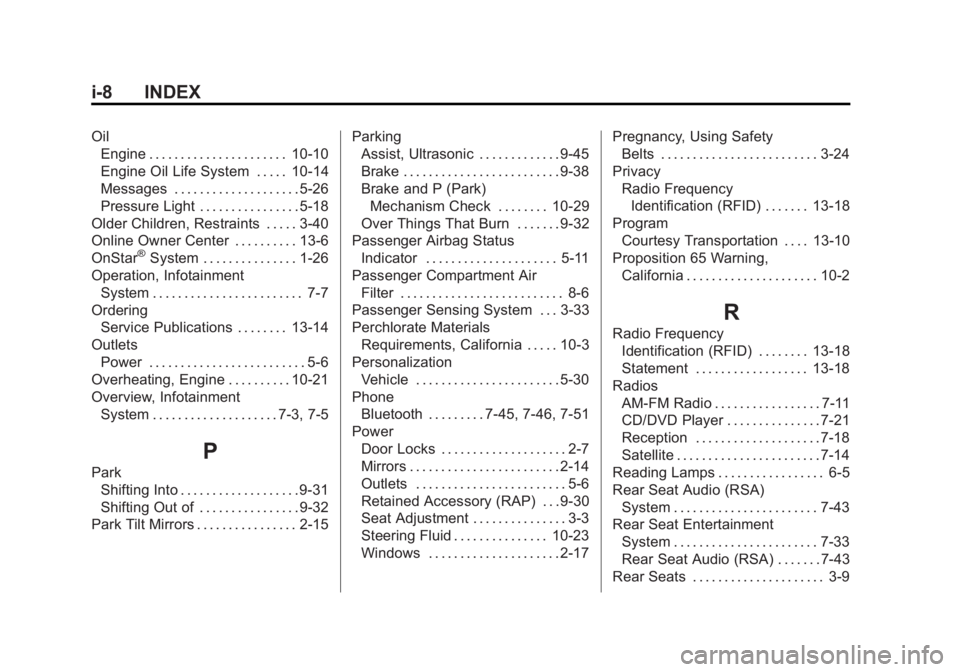
Black plate (8,1)GMC Terrain Owner Manual - 2011
i-8 INDEX
OilEngine . . . . . . . . . . . . . . . . . . . . . . 10-10
Engine Oil Life System . . . . . 10-14
Messages . . . . . . . . . . . . . . . . . . . . 5-26
Pressure Light . . . . . . . . . . . . . . . . 5-18
Older Children, Restraints . . . . . 3-40
Online Owner Center . . . . . . . . . . 13-6
OnStar
®System . . . . . . . . . . . . . . . 1-26
Operation, Infotainment System . . . . . . . . . . . . . . . . . . . . . . . . 7-7
Ordering
Service Publications . . . . . . . . 13-14
Outlets Power . . . . . . . . . . . . . . . . . . . . . . . . . 5-6
Overheating, Engine . . . . . . . . . . 10-21
Overview, Infotainment System . . . . . . . . . . . . . . . . . . . . 7-3, 7-5
P
ParkShifting Into . . . . . . . . . . . . . . . . . . . 9-31
Shifting Out of . . . . . . . . . . . . . . . . 9-32
Park Tilt Mirrors . . . . . . . . . . . . . . . . 2-15 Parking
Assist, Ultrasonic . . . . . . . . . . . . . 9-45
Brake . . . . . . . . . . . . . . . . . . . . . . . . . 9-38
Brake and P (Park)
Mechanism Check . . . . . . . . 10-29
Over Things That Burn . . . . . . . 9-32
Passenger Airbag Status
Indicator . . . . . . . . . . . . . . . . . . . . . 5-11
Passenger Compartment Air Filter . . . . . . . . . . . . . . . . . . . . . . . . . . 8-6
Passenger Sensing System . . . 3-33
Perchlorate Materials
Requirements, California . . . . . 10-3
Personalization Vehicle . . . . . . . . . . . . . . . . . . . . . . . 5-30
Phone
Bluetooth . . . . . . . . . 7-45, 7-46, 7-51
Power Door Locks . . . . . . . . . . . . . . . . . . . . 2-7
Mirrors . . . . . . . . . . . . . . . . . . . . . . . . 2-14
Outlets . . . . . . . . . . . . . . . . . . . . . . . . 5-6
Retained Accessory (RAP) . . . 9-30
Seat Adjustment . . . . . . . . . . . . . . . 3-3
Steering Fluid . . . . . . . . . . . . . . . 10-23
Windows . . . . . . . . . . . . . . . . . . . . . 2-17 Pregnancy, Using Safety
Belts . . . . . . . . . . . . . . . . . . . . . . . . . 3-24
Privacy Radio FrequencyIdentification (RFID) . . . . . . . 13-18
Program Courtesy Transportation . . . . 13-10
Proposition 65 Warning, California . . . . . . . . . . . . . . . . . . . . . 10-2
R
Radio FrequencyIdentification (RFID) . . . . . . . . 13-18
Statement . . . . . . . . . . . . . . . . . . 13-18
Radios AM-FM Radio . . . . . . . . . . . . . . . . . 7-11
CD/DVD Player . . . . . . . . . . . . . . . 7-21
Reception . . . . . . . . . . . . . . . . . . . . 7-18
Satellite . . . . . . . . . . . . . . . . . . . . . . . 7-14
Reading Lamps . . . . . . . . . . . . . . . . . 6-5
Rear Seat Audio (RSA) System . . . . . . . . . . . . . . . . . . . . . . . 7-43
Rear Seat Entertainment
System . . . . . . . . . . . . . . . . . . . . . . . 7-33
Rear Seat Audio (RSA) . . . . . . . 7-43
Rear Seats . . . . . . . . . . . . . . . . . . . . . 3-9