spare wheel GMC TERRAIN 2011 User Guide
[x] Cancel search | Manufacturer: GMC, Model Year: 2011, Model line: TERRAIN, Model: GMC TERRAIN 2011Pages: 426, PDF Size: 5.58 MB
Page 355 of 426
Black plate (65,1)GMC Terrain Owner Manual - 2011
Vehicle Care 10-65
Tire Chains
{WARNING
Do not use tire chains. There is
not enough clearance. Tire chains
used on a vehicle without the
proper amount of clearance can
cause damage to the brakes,
suspension or other vehicle parts.
The area damaged by the tire
chains could cause you to lose
control of the vehicle and you or
others may be injured in a crash.
A Type S low-profile cable
can be used only if the cable
manufacturer recommends it for
use on the vehicle, the tire size
combination, and road conditions.
Follow the manufacturer's
instructions. To help avoid
damage to the vehicle, drive
slowly, readjust or remove the
cable if it is contacting the vehicle
and do not spin the vehicle's tires.(Continued)
WARNING (Continued)
Install the cables on the front
tires only. Cables should not be
installed on the spare tire or on
the optional 19-inch tire.
If a Tire Goes Flat
It is unusual for a tire to blowout
while driving, especially if the tires
are maintained properly. If air goes
out of a tire, it is much more likely to
leak out slowly. But if there ever is a
blowout, here are a few tips about
what to expect and what to do:
If a front tire fails, the flat tire
creates a drag that pulls the vehicle
toward that side. Take your foot off
the accelerator pedal and grip the
steering wheel firmly. Steer to
maintain lane position, and then
gently brake to a stop, well off the
road, if possible. A rear blowout, particularly on a
curve, acts much like a skid and
may require the same correction as
used in a skid. Stop pressing the
accelerator pedal and steer to
straighten the vehicle. It may be
very bumpy and noisy. Gently
brake to a stop, well off the road,
if possible.{WARNING
Driving on a flat tire will cause
permanent damage to the tire.
Re-inflating a tire after it has
been driven on while severely
underinflated or flat may cause
a blowout and a serious crash.
Never attempt to re-inflate a tire
that has been driven on while
severely underinflated or flat.
Have your dealer or an authorized
tire service center repair or
replace the flat tire as soon as
possible.
Page 357 of 426
Black plate (67,1)GMC Terrain Owner Manual - 2011
Vehicle Care 10-67
Tire Changing
Removing the Spare Tire and
Tools
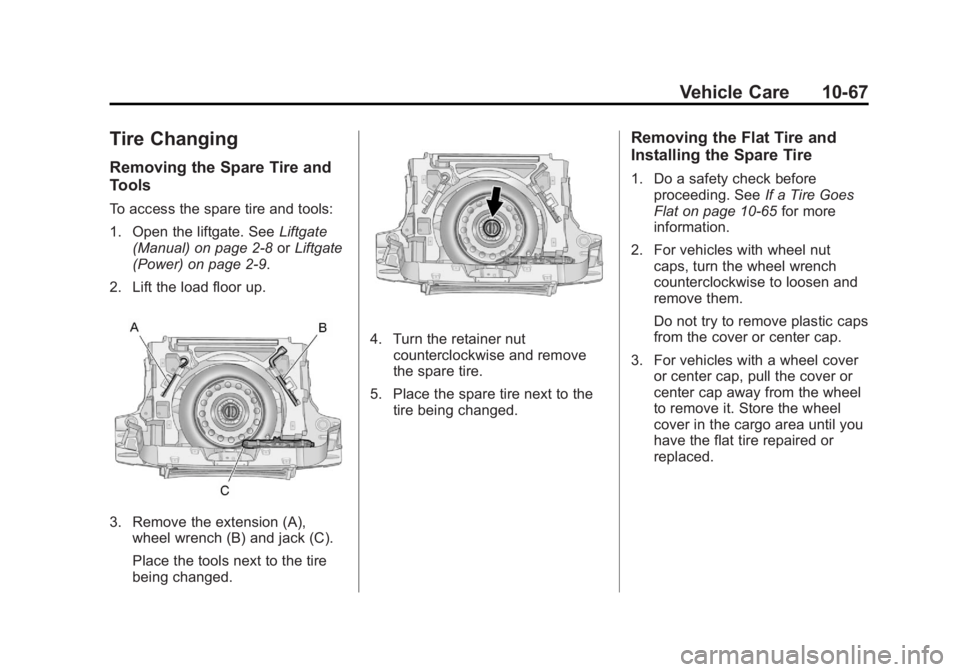
To access the spare tire and tools:
1. Open the liftgate. SeeLiftgate
(Manual) on page 2‑8 orLiftgate
(Power) on page 2‑9.
2. Lift the load floor up.
3. Remove the extension (A), wheel wrench (B) and jack (C).
Place the tools next to the tire
being changed.
4. Turn the retainer nutcounterclockwise and remove
the spare tire.
5. Place the spare tire next to the tire being changed.
Removing the Flat Tire and
Installing the Spare Tire
1. Do a safety check beforeproceeding. See If a Tire Goes
Flat on page 10‑65 for more
information.
2. For vehicles with wheel nut caps, turn the wheel wrench
counterclockwise to loosen and
remove them.
Do not try to remove plastic caps
from the cover or center cap.
3. For vehicles with a wheel cover or center cap, pull the cover or
center cap away from the wheel
to remove it. Store the wheel
cover in the cargo area until you
have the flat tire repaired or
replaced.
Page 358 of 426
Black plate (68,1)GMC Terrain Owner Manual - 2011
10-68 Vehicle Care
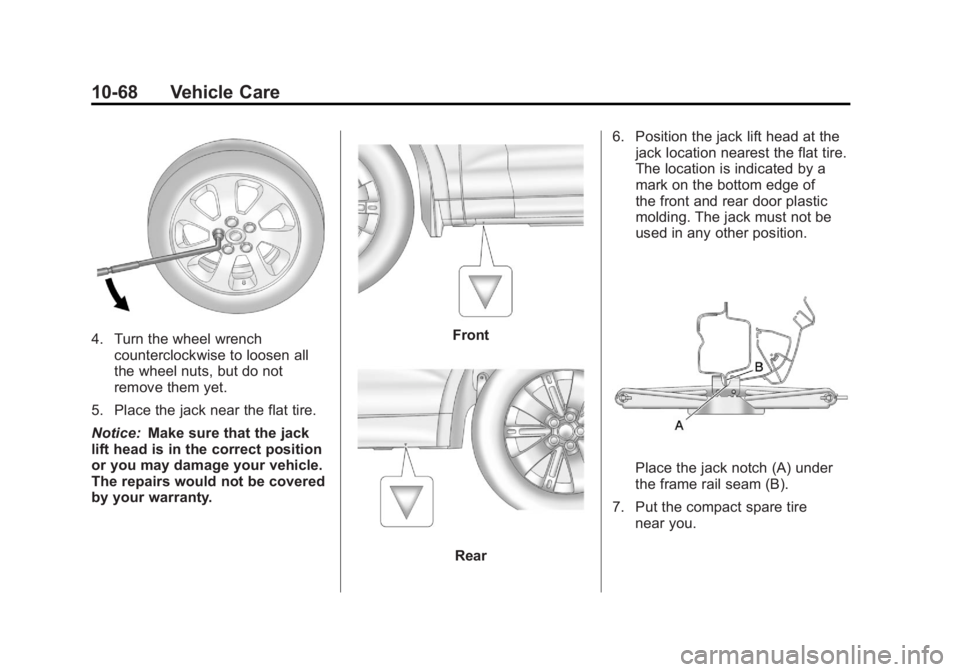
4. Turn the wheel wrenchcounterclockwise to loosen all
the wheel nuts, but do not
remove them yet.
5. Place the jack near the flat tire.
Notice: Make sure that the jack
lift head is in the correct position
or you may damage your vehicle.
The repairs would not be covered
by your warranty.Front
Rear 6. Position the jack lift head at the
jack location nearest the flat tire.
The location is indicated by a
mark on the bottom edge of
the front and rear door plastic
molding. The jack must not be
used in any other position.
Place the jack notch (A) under
the frame rail seam (B).
7. Put the compact spare tire near you.
Page 361 of 426
Black plate (71,1)GMC Terrain Owner Manual - 2011
Vehicle Care 10-71
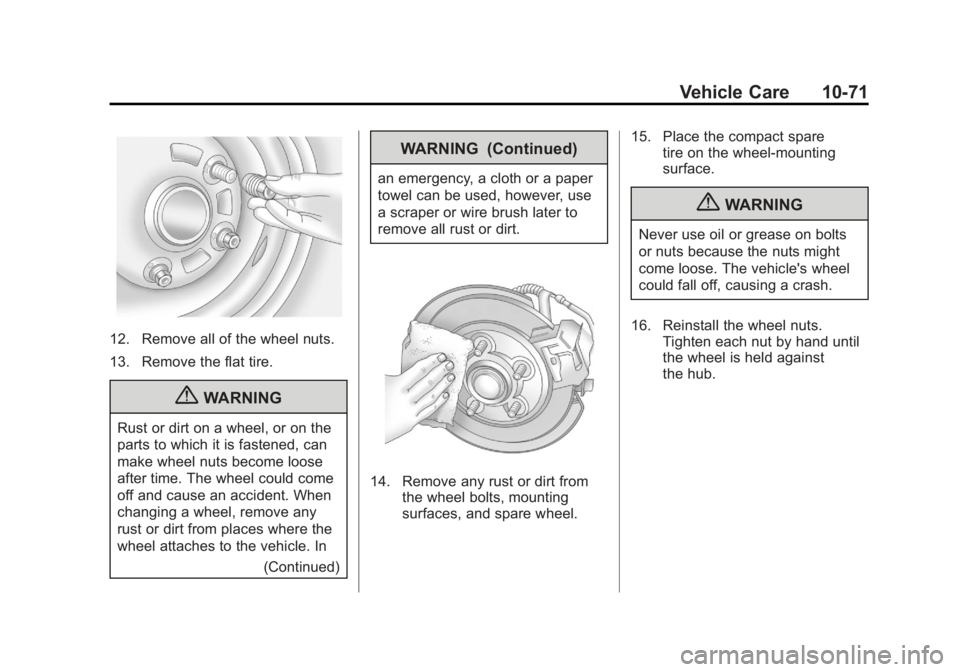
12. Remove all of the wheel nuts.
13. Remove the flat tire.
{WARNING
Rust or dirt on a wheel, or on the
parts to which it is fastened, can
make wheel nuts become loose
after time. The wheel could come
off and cause an accident. When
changing a wheel, remove any
rust or dirt from places where the
wheel attaches to the vehicle. In(Continued)
WARNING (Continued)
an emergency, a cloth or a paper
towel can be used, however, use
a scraper or wire brush later to
remove all rust or dirt.
14. Remove any rust or dirt fromthe wheel bolts, mounting
surfaces, and spare wheel. 15. Place the compact spare
tire on the wheel-mounting
surface.
{WARNING
Never use oil or grease on bolts
or nuts because the nuts might
come loose. The vehicle's wheel
could fall off, causing a crash.
16. Reinstall the wheel nuts. Tighten each nut by hand until
the wheel is held against
the hub.
Page 362 of 426
Black plate (72,1)GMC Terrain Owner Manual - 2011
10-72 Vehicle Care
17. Lower the vehicle byturning the jack handle
counterclockwise.
{WARNING
Wheel nuts that are improperly or
incorrectly tightened can cause
the wheels to become loose or
come off. The wheel nuts should
be tightened with a torque wrench
to the proper torque specification
after replacing. Follow the torque
specification supplied by the
aftermarket manufacturer when
using accessory locking wheel
nuts. See Capacities and
Specifications on page 12‑2 for
original equipment wheel nut
torque specifications.
Notice: Improperly tightened
wheel nuts can lead to brake
pulsation and rotor damage. To
avoid expensive brake repairs,
evenly tighten the wheel nuts in
the proper sequence and to the proper torque specification. See
Capacities and Specifications on
page 12‑2
for the wheel nut
torque specification.
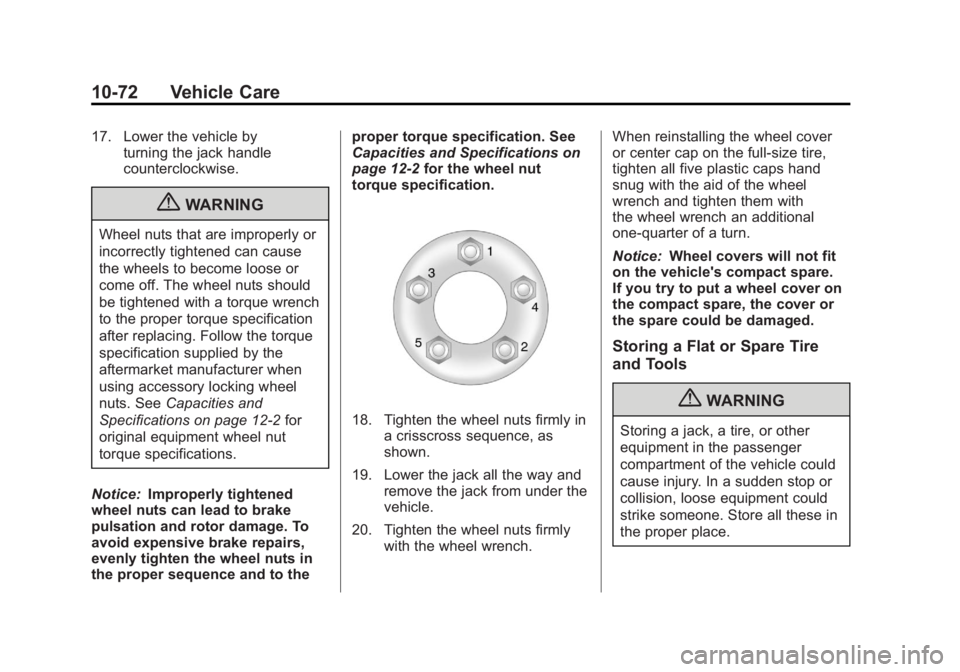
18. Tighten the wheel nuts firmly in a crisscross sequence, as
shown.
19. Lower the jack all the way and remove the jack from under the
vehicle.
20. Tighten the wheel nuts firmly with the wheel wrench. When reinstalling the wheel cover
or center cap on the full-size tire,
tighten all five plastic caps hand
snug with the aid of the wheel
wrench and tighten them with
the wheel wrench an additional
one‐quarter of a turn.
Notice:
Wheel covers will not fit
on the vehicle's compact spare.
If you try to put a wheel cover on
the compact spare, the cover or
the spare could be damaged.
Storing a Flat or Spare Tire
and Tools
{WARNING
Storing a jack, a tire, or other
equipment in the passenger
compartment of the vehicle could
cause injury. In a sudden stop or
collision, loose equipment could
strike someone. Store all these in
the proper place.
Page 363 of 426
Black plate (73,1)GMC Terrain Owner Manual - 2011
Vehicle Care 10-73
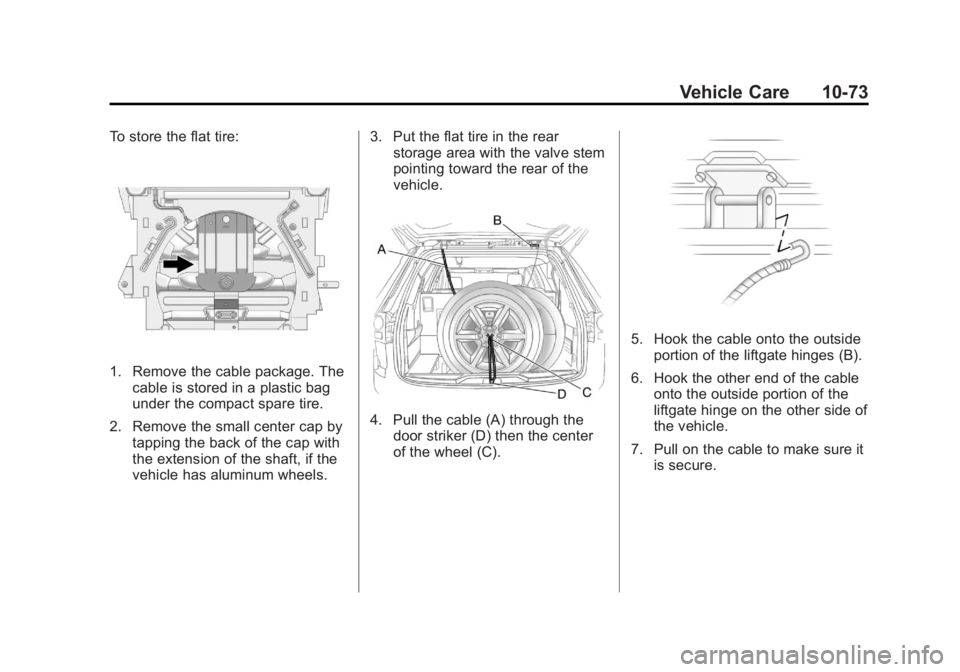
To store the flat tire:
1. Remove the cable package. Thecable is stored in a plastic bag
under the compact spare tire.
2. Remove the small center cap by tapping the back of the cap with
the extension of the shaft, if the
vehicle has aluminum wheels. 3. Put the flat tire in the rear
storage area with the valve stem
pointing toward the rear of the
vehicle.
4. Pull the cable (A) through the
door striker (D) then the center
of the wheel (C).
5. Hook the cable onto the outsideportion of the liftgate hinges (B).
6. Hook the other end of the cable onto the outside portion of the
liftgate hinge on the other side of
the vehicle.
7. Pull on the cable to make sure it is secure.
Page 364 of 426
Black plate (74,1)GMC Terrain Owner Manual - 2011
10-74 Vehicle Care
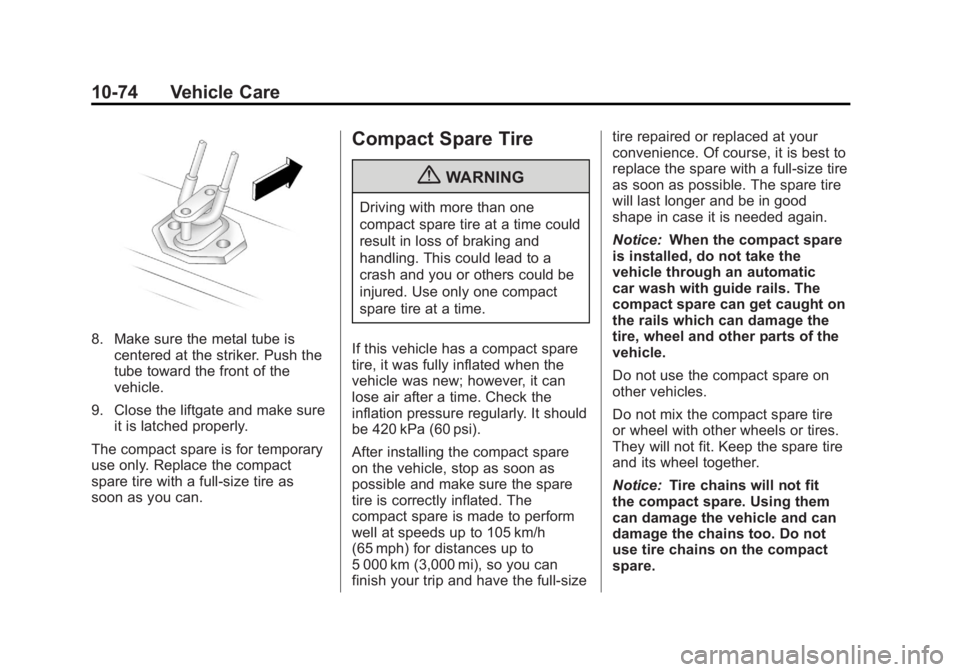
8. Make sure the metal tube iscentered at the striker. Push the
tube toward the front of the
vehicle.
9. Close the liftgate and make sure it is latched properly.
The compact spare is for temporary
use only. Replace the compact
spare tire with a full-size tire as
soon as you can.
Compact Spare Tire
{WARNING
Driving with more than one
compact spare tire at a time could
result in loss of braking and
handling. This could lead to a
crash and you or others could be
injured. Use only one compact
spare tire at a time.
If this vehicle has a compact spare
tire, it was fully inflated when the
vehicle was new; however, it can
lose air after a time. Check the
inflation pressure regularly. It should
be 420 kPa (60 psi).
After installing the compact spare
on the vehicle, stop as soon as
possible and make sure the spare
tire is correctly inflated. The
compact spare is made to perform
well at speeds up to 105 km/h
(65 mph) for distances up to
5 000 km (3,000 mi), so you can
finish your trip and have the full-size tire repaired or replaced at your
convenience. Of course, it is best to
replace the spare with a full-size tire
as soon as possible. The spare tire
will last longer and be in good
shape in case it is needed again.
Notice:
When the compact spare
is installed, do not take the
vehicle through an automatic
car wash with guide rails. The
compact spare can get caught on
the rails which can damage the
tire, wheel and other parts of the
vehicle.
Do not use the compact spare on
other vehicles.
Do not mix the compact spare tire
or wheel with other wheels or tires.
They will not fit. Keep the spare tire
and its wheel together.
Notice: Tire chains will not fit
the compact spare. Using them
can damage the vehicle and can
damage the chains too. Do not
use tire chains on the compact
spare.
Page 371 of 426
Black plate (81,1)GMC Terrain Owner Manual - 2011
Vehicle Care 10-81
Once the destination has been
reached:
1. Set the parking brake.
2. Shift the transmission toP (Park).
3. Turn the ignition key to LOCK/OFF.
4. Install fuse 32, the Discrete Logic Ignition Switch fuse. See
Instrument Panel Fuse Block on
page 10‑42.
5. Start the engine and let it idle for more than three minutes before
driving the vehicle.
Notice: Too much or too
little fluid can damage the
transmission. Be sure that the
transmission fluid is at the
proper level before towing with
all four wheels on the ground. Notice:
Do not tow a vehicle with
the front drive wheels on the
ground if one of the front tires
is a compact spare tire. Towing
with two different tire sizes
on the front of the vehicle can
cause severe damage to the
transmission.
Dolly Towing (All-Wheel‐Drive
Vehicles)
All-wheel‐drive vehicles should not
be towed with two wheels on the
ground. To properly tow these
vehicles, they should be placed on
a platform trailer with all four wheels
off of the ground or dinghy towed
from the front.
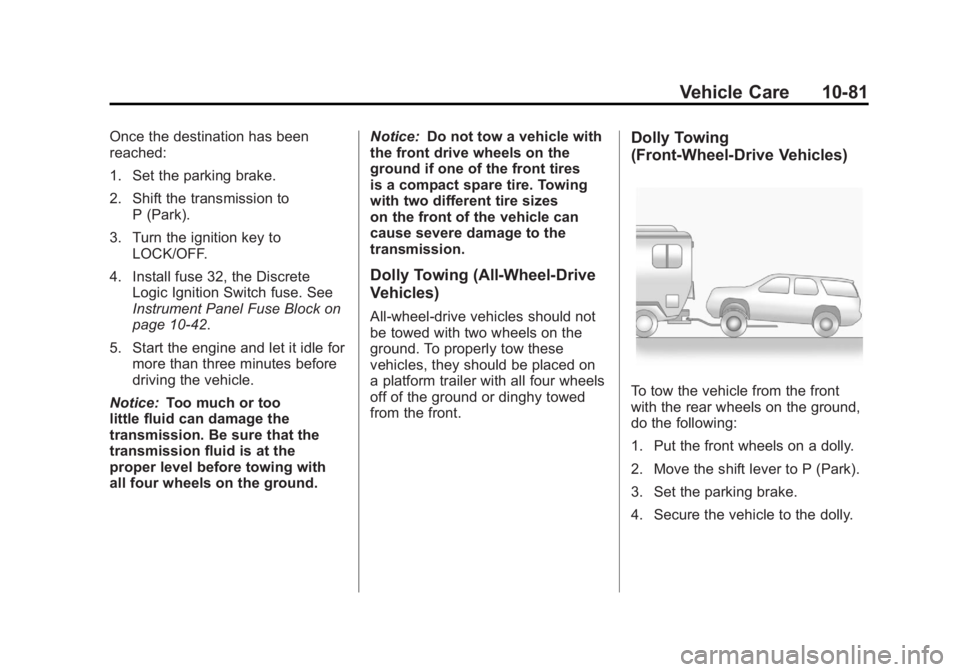
Dolly Towing
(Front-Wheel‐ Drive Vehicles)
To tow the vehicle from the front
with the rear wheels on the ground,
do the following:
1. Put the front wheels on a dolly.
2. Move the shift lever to P (Park).
3. Set the parking brake.
4. Secure the vehicle to the dolly.
Page 417 of 426
Black plate (3,1)GMC Terrain Owner Manual - 2011
INDEX i-3
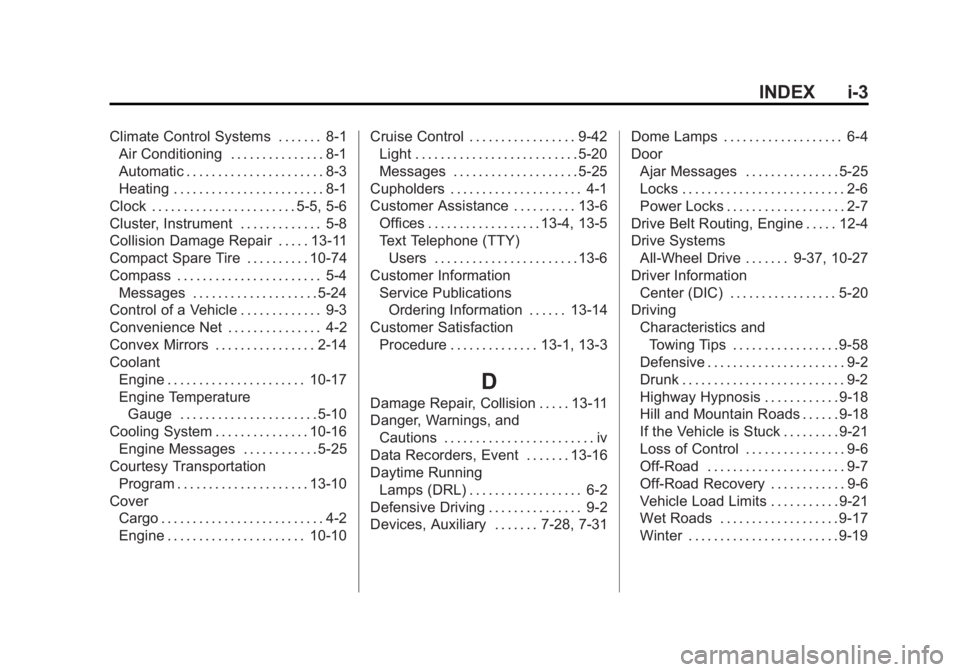
Climate Control Systems . . . . . . . 8-1Air Conditioning . . . . . . . . . . . . . . . 8-1
Automatic . . . . . . . . . . . . . . . . . . . . . . 8-3
Heating . . . . . . . . . . . . . . . . . . . . . . . . 8-1
Clock . . . . . . . . . . . . . . . . . . . . . . . 5-5, 5-6
Cluster, Instrument . . . . . . . . . . . . . 5-8
Collision Damage Repair . . . . . 13-11
Compact Spare Tire . . . . . . . . . . 10-74
Compass . . . . . . . . . . . . . . . . . . . . . . . 5-4 Messages . . . . . . . . . . . . . . . . . . . . 5-24
Control of a Vehicle . . . . . . . . . . . . . 9-3
Convenience Net . . . . . . . . . . . . . . . 4-2
Convex Mirrors . . . . . . . . . . . . . . . . 2-14
Coolant
Engine . . . . . . . . . . . . . . . . . . . . . . 10-17
Engine TemperatureGauge . . . . . . . . . . . . . . . . . . . . . . 5-10
Cooling System . . . . . . . . . . . . . . . 10-16 Engine Messages . . . . . . . . . . . . 5-25
Courtesy Transportation Program . . . . . . . . . . . . . . . . . . . . . 13-10
Cover Cargo . . . . . . . . . . . . . . . . . . . . . . . . . . 4-2
Engine . . . . . . . . . . . . . . . . . . . . . . 10-10 Cruise Control . . . . . . . . . . . . . . . . . 9-42
Light . . . . . . . . . . . . . . . . . . . . . . . . . . 5-20
Messages . . . . . . . . . . . . . . . . . . . . 5-25
Cupholders . . . . . . . . . . . . . . . . . . . . . 4-1
Customer Assistance . . . . . . . . . . 13-6 Offices . . . . . . . . . . . . . . . . . . 13-4, 13-5
Text Telephone (TTY)Users . . . . . . . . . . . . . . . . . . . . . . . 13-6
Customer Information Service PublicationsOrdering Information . . . . . . 13-14
Customer Satisfaction Procedure . . . . . . . . . . . . . . 13-1, 13-3
D
Damage Repair, Collision . . . . . 13-11
Danger, Warnings, andCautions . . . . . . . . . . . . . . . . . . . . . . . . iv
Data Recorders, Event . . . . . . . 13-16
Daytime Running Lamps (DRL) . . . . . . . . . . . . . . . . . . 6-2
Defensive Driving . . . . . . . . . . . . . . . 9-2
Devices, Auxiliary . . . . . . . 7-28, 7-31 Dome Lamps . . . . . . . . . . . . . . . . . . . 6-4
Door
Ajar Messages . . . . . . . . . . . . . . . 5-25
Locks . . . . . . . . . . . . . . . . . . . . . . . . . . 2-6
Power Locks . . . . . . . . . . . . . . . . . . . 2-7
Drive Belt Routing, Engine . . . . . 12-4
Drive Systems All-Wheel Drive . . . . . . . 9-37, 10-27
Driver Information Center (DIC) . . . . . . . . . . . . . . . . . 5-20
Driving
Characteristics andTowing Tips . . . . . . . . . . . . . . . . . 9-58
Defensive . . . . . . . . . . . . . . . . . . . . . . 9-2
Drunk . . . . . . . . . . . . . . . . . . . . . . . . . . 9-2
Highway Hypnosis . . . . . . . . . . . . 9-18
Hill and Mountain Roads . . . . . . 9-18
If the Vehicle is Stuck . . . . . . . . . 9-21
Loss of Control . . . . . . . . . . . . . . . . 9-6
Off-Road . . . . . . . . . . . . . . . . . . . . . . 9-7
Off-Road Recovery . . . . . . . . . . . . 9-6
Vehicle Load Limits . . . . . . . . . . . 9-21
Wet Roads . . . . . . . . . . . . . . . . . . . 9-17
Winter . . . . . . . . . . . . . . . . . . . . . . . . 9-19
Page 424 of 426

Black plate (10,1)GMC Terrain Owner Manual - 2011
i-10 INDEX
Seats (cont.)Power Adjustment, Front . . . . . . 3-3
Rear . . . . . . . . . . . . . . . . . . . . . . . . . . . 3-9
Reclining Seatbacks . . . . . . . . . . . 3-6
Securing Child Restraints . . . . . . . . . . . . . . 3-55, 3-57
Security Light . . . . . . . . . . . . . . . . . . . . . . . . . . 5-19
Vehicle . . . . . . . . . . . . . . . . . . . . . . . 2-12
Service Accessories andModifications . . . . . . . . . . . . . . . . 10-3
Doing Your Own Work . . . . . . . . 10-4
Engine Soon Light . . . . . . . . . . . . 5-13
Maintenance Records . . . . . . . . 11-9
Maintenance, General Information . . . . . . . . . . . . . . . . . . 11-1
Parts Identification Label . . . . . 12-1
Publications Ordering
Information . . . . . . . . . . . . . . . . 13-14
Scheduling Appointments . . . 13-10
Vehicle Messages . . . . . . . . . . . . 5-28
Servicing the Airbag . . . . . . . . . . . 3-37
Shift Lock Control Function
Check, Automatic
Transmission . . . . . . . . . . . . . . . . 10-28 Shifting
Into Park . . . . . . . . . . . . . . . . . . . . . . 9-31
Out of Park . . . . . . . . . . . . . . . . . . . 9-32
Sidemarker Bulb Replacement . . . . . . . . . . 10-35
Signals, Turn and Lane-Change . . . . . . . . . . . . . . . . . 6-3
Spare Tire Compact . . . . . . . . . . . . . . . . . . . . 10-74
Specifications and Capacities . . . . . . . . . . . . . . . . . . . . 12-2
Speedometer . . . . . . . . . . . . . . . . . . . 5-9
StabiliTrak
®OFF Light . . . . . . . . . 5-16
StabiliTrak®System . . . . . . . . . . . 9-41
Start Assist, Hills . . . . . . . . . . . . . . 9-39
Start Vehicle, Remote . . . . . . . . . . 2-5
Starter Switch Check . . . . . . . . . 10-28
Starting the Engine . . . . . . . . . . . . 9-29
Steering . . . . . . . . . . . . . . . . . . . . . . . . 9-4 Fluid, Power . . . . . . . . . . . . . . . . 10-23
Wheel Adjustment . . . . . . . . . . . . . 5-2
Wheel Controls . . . . . . . . . . . . . . . . 5-2
Stoplamps and Back-Up Lamps Bulb Replacement . . . . . . . . . . 10-35
Storage
Mass Media (MEM) . . . . . . . . . . . 7-24 Storage Areas
Cargo Cover . . . . . . . . . . . . . . . . . . . 4-2
Center Console . . . . . . . . . . . . . . . . 4-1
Convenience Net . . . . . . . . . . . . . . 4-2
Glove Box . . . . . . . . . . . . . . . . . . . . . 4-1
Instrument Panel . . . . . . . . . . . . . . 4-1
Roof Rack System . . . . . . . . . . . . . 4-2
Stuck Vehicle . . . . . . . . . . . . . . . . . . 9-21
Sun Visors . . . . . . . . . . . . . . . . . . . . . 2-18
Sunroof . . . . . . . . . . . . . . . . . . . . . . . . 2-18
Symbols . . . . . . . . . . . . . . . . . . . . . . . . . . .v
System Infotainment . . . . . . . . . . . . . . . . . . . 7-1
Roof Rack . . . . . . . . . . . . . . . . . . . . . 4-2
T
Tachometer . . . . . . . . . . . . . . . . . . . . . 5-9
TaillampsBulb Replacement . . . . . . . . . . 10-35
Text Telephone (TTY) Users . . . 13-6
Theft-Deterrent Systems . . . . . . . 2-13 Immobilizer . . . . . . . . . . . . . . . . . . . 2-13
Time . . . . . . . . . . . . . . . . . . . . . . . . 5-5, 5-6