parking brake GMC TERRAIN 2011 Owner's Guide
[x] Cancel search | Manufacturer: GMC, Model Year: 2011, Model line: TERRAIN, Model: GMC TERRAIN 2011Pages: 426, PDF Size: 5.58 MB
Page 318 of 426

Black plate (28,1)GMC Terrain Owner Manual - 2011
10-28 Vehicle Care
What to Use
Refer toRecommended Fluids
and Lubricants on page 11‑6 to
determine what kind of lubricant
to use.
Starter Switch Check
{WARNING
When you are doing this
inspection, the vehicle could
move suddenly. If the vehicle
moves, you or others could be
injured.
1. Before starting this check, be sure there is enough room
around the vehicle. 2. Firmly apply both the parking
brake and the regular brake.
See Parking Brake on
page 9‑38.
Do not use the accelerator
pedal, and be ready to turn off
the engine immediately if it
starts.
3. Try to start the engine in each gear. The vehicle should start
only in P (Park) or N (Neutral).
If the vehicle starts in any other
position, contact your dealer for
service.
Automatic Transmission
Shift Lock Control
Function Check
{WARNING
When you are doing this
inspection, the vehicle could
move suddenly. If the vehicle
moves, you or others could be
injured.
1. Before starting this check, be sure there is enough room
around the vehicle. It should be
parked on a level surface.
2. Firmly apply the parking brake. See Parking Brake on
page 9‑38.
Be ready to apply the regular
brake immediately if the vehicle
begins to move.
Page 319 of 426

Black plate (29,1)GMC Terrain Owner Manual - 2011
Vehicle Care 10-29
3. With the engine off, turn theignition on, but do not start the
engine. Without applying the
regular brake, try to move the
shift lever out of P (Park) with
normal effort. If the shift lever
moves out of P (Park), contact
your dealer for service.
Ignition Transmission
Lock Check
While parked, and with the parking
brake set, try to turn the ignition to
LOCK/OFF in each shift lever
position.
.The ignition should turn to
LOCK/OFF only when the shift
lever is in P (Park).
.The ignition key should come
out only in LOCK/OFF.
Contact your dealer if service is
required.
Park Brake and P (Park)
Mechanism Check
{WARNING
When you are doing this check,
the vehicle could begin to move.
You or others could be injured
and property could be damaged.
Make sure there is room in front
of the vehicle in case it begins to
roll. Be ready to apply the regular
brake at once should the vehicle
begin to move. Park on a fairly steep hill, with the
vehicle facing downhill. Keeping
your foot on the regular brake, set
the parking brake.
.To check the parking brake's
holding ability: With the engine
running and the transmission in
N (Neutral), slowly remove foot
pressure from the regular brake
pedal. Do this until the vehicle is
held by the parking brake only.
.To check the P (Park)
mechanism's holding ability:
With the engine running, shift
to P (Park). Then release the
parking brake followed by the
regular brake.
Contact your dealer if service is
required.
Page 331 of 426

Black plate (41,1)GMC Terrain Owner Manual - 2011
Vehicle Care 10-41
J-CaseFuses Usage
6 Power Seat –Left
7 Instrument Panel Fuse
Block 1
8 Rear Defogger
9 Starter
10 AIR Pump Motor
11 Instrument Panel Fuse
Block 2
12 Sunroof
13 Antilock Brake
System Pump
14 Instrument Panel Fuse
Block 3
15 Power
Windows
–Left
16 Antilock Brake System
Module Mini Fuses Usage
17 Transmission
Control Module
Battery
18 Trailer Parking Light
19 AIR Pump Solenoid
20 Engine Control
Module Battery
21 Canister Vent
22 Trailer Left Side
(If Equipped)
23 Lift Gate Module
24 Power Lumbar
25 Trailer Right Side
(If Equipped)
26 Rear Accessory
Power Outlet
27 Memory Mirror
Module
28 Regulated Voltage
Control Battery
Sensor Mini Fuses Usage
29 Front Wiper
30 Rear Wiper
31 Air Conditioning
Compressor
32 Rear Latch
33 Heated Mirrors
34 Horn
35 Right High‐Beam
Headlamp
36 Left High‐Beam
Headlamp
37 Ignition Even Coil
38 Ignition Odd Coil
39 Windshield Washer
40 Front Fog Lamps
41 Post Catalytic
Converter Oxygen
Sensor
42 Engine Control
Module
Page 346 of 426

Black plate (56,1)GMC Terrain Owner Manual - 2011
10-56 Vehicle Care
If the TPMS is not functioning
properly, it cannot detect or signal a
low tire condition. See your dealer
for service if the TPMS malfunction
light and DIC message comes on
and stays on.
TPMS Sensor Matching
Process
Each TPMS sensor has a unique
identification code. The identification
code needs to be matched to a new
tire/wheel position after rotating the
tires or replacing one or more of the
TPMS sensors. The TPMS sensor
matching process should also be
performed after replacing a spare
tire with a road tire containing the
TPMS sensor. The malfunction light
and the DIC message should go
off at the next ignition cycle. The
sensors are matched to the tire/
wheel positions, using a TPMS
relearn tool, in the following order:
driver side front tire, passenger side
front tire, passenger side rear tire,and driver side rear. See your
dealer for service or to purchase a
relearn tool.
There are two minutes to match
the first tire/wheel position, and
five minutes overall to match all
four tire/wheel positions. If it takes
longer, the matching process stops
and must be restarted.
The TPMS sensor matching
process is:
1. Set the parking brake.
2. Turn the ignition to ON/RUN with
the engine off.
3. Use the MENU button to select the Vehicle Information Menu in
the Driver Information Center
(DIC). Use the arrow keys to
scroll to the Tire Pressure
screen.
4. Press the SET/CLR button to begin the sensor matching
process.
A message requesting
acceptance of the process
should display. 5. Press the SET/CLR button again
to confirm the selection.
The horn sounds twice to signal
the receiver is in relearn mode
and the TIRE LEARNING
ACTIVE message displays on
the DIC screen.
6. Start with the driver side front tire.
7. Place the relearn tool against the tire sidewall, near the valve
stem. Then press the button
to activate the TPMS sensor.
A horn chirp confirms that the
sensor identification code has
been matched to this tire and
wheel position.
8. Proceed to the passenger side front tire, and repeat the
procedure in Step 7.
9. Proceed to the passenger side rear tire, and repeat the
procedure in Step 7.
Page 349 of 426
Black plate (59,1)GMC Terrain Owner Manual - 2011
Vehicle Care 10-59
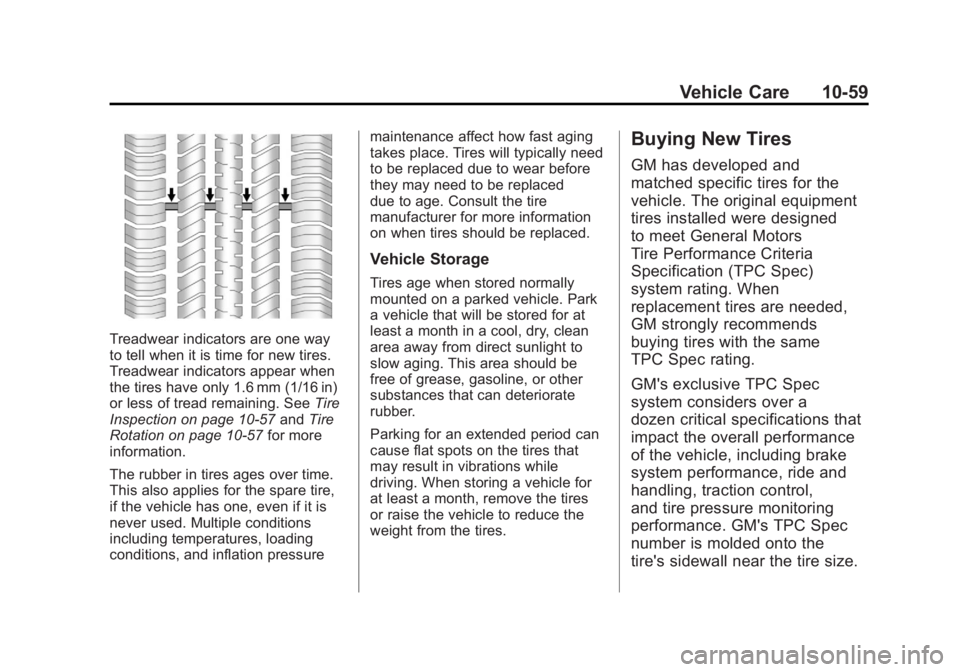
Treadwear indicators are one way
to tell when it is time for new tires.
Treadwear indicators appear when
the tires have only 1.6 mm (1/16 in)
or less of tread remaining. SeeTire
Inspection on page 10‑57 andTire
Rotation on page 10‑57 for more
information.
The rubber in tires ages over time.
This also applies for the spare tire,
if the vehicle has one, even if it is
never used. Multiple conditions
including temperatures, loading
conditions, and inflation pressure maintenance affect how fast aging
takes place. Tires will typically need
to be replaced due to wear before
they may need to be replaced
due to age. Consult the tire
manufacturer for more information
on when tires should be replaced.
Vehicle Storage
Tires age when stored normally
mounted on a parked vehicle. Park
a vehicle that will be stored for at
least a month in a cool, dry, clean
area away from direct sunlight to
slow aging. This area should be
free of grease, gasoline, or other
substances that can deteriorate
rubber.
Parking for an extended period can
cause flat spots on the tires that
may result in vibrations while
driving. When storing a vehicle for
at least a month, remove the tires
or raise the vehicle to reduce the
weight from the tires.
Buying New Tires
GM has developed and
matched specific tires for the
vehicle. The original equipment
tires installed were designed
to meet General Motors
Tire Performance Criteria
Specification (TPC Spec)
system rating. When
replacement tires are needed,
GM strongly recommends
buying tires with the same
TPC Spec rating.
GM's exclusive TPC Spec
system considers over a
dozen critical specifications that
impact the overall performance
of the vehicle, including brake
system performance, ride and
handling, traction control,
and tire pressure monitoring
performance. GM's TPC Spec
number is molded onto the
tire's sidewall near the tire size.
Page 356 of 426
Black plate (66,1)GMC Terrain Owner Manual - 2011
10-66 Vehicle Care
{WARNING
Lifting a vehicle and getting
under it to do maintenance or
repairs is dangerous without the
appropriate safety equipment and
training. If a jack is provided with
the vehicle, it is designed only for
changing a flat tire. If it is used for
anything else, you or others could
be badly injured or killed if the
vehicle slips off the jack. If a jack
is provided with the vehicle, only
use it for changing a flat tire.
If a tire goes flat, avoid further tire
and wheel damage by driving slowly
to a level place, well off the road,
if possible. Turn on the hazard
warning flashers. See Hazard
Warning Flashers on page 6‑3.
{WARNING
Changing a tire can be
dangerous. The vehicle can
slip off the jack and roll over or
fall causing injury or death. Find
a level place to change the tire.
To help prevent the vehicle from
moving:
1. Set the parking brake firmly.
2. Put an automatic transmission in P (Park) or
a manual transmission in
1 (First) or R (Reverse).
3. Turn off the engine and do not restart while the vehicle
is raised.
4. Do not allow passengers to remain in the vehicle.
5. Place wheel blocks on both sides of the tire at the
opposite corner of the tire
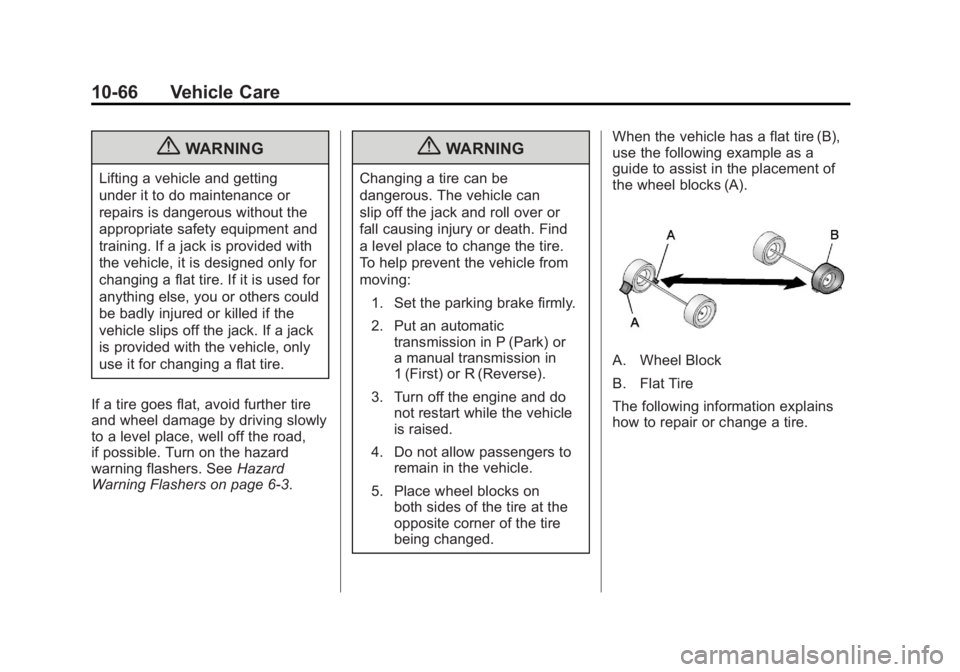
being changed. When the vehicle has a flat tire (B),
use the following example as a
guide to assist in the placement of
the wheel blocks (A).
A. Wheel Block
B. Flat Tire
The following information explains
how to repair or change a tire.
Page 366 of 426

Black plate (76,1)GMC Terrain Owner Manual - 2011
10-76 Vehicle Care
Trying to start the vehicle by
pushing or pulling it will not work,
and it could damage the vehicle.
Notice:If the radio or other
accessories are left on during the
jump starting procedure, they
could be damaged. The repairs
would not be covered by the
warranty. Always turn off the
radio and other accessories when
jump starting the vehicle.
Notice: If the jumper cables are
connected or removed in the
wrong order, electrical shorting
may occur and damage the
vehicle. The repairs would not be
covered by the vehicle warranty.
Always connect and remove the
jumper cables in the correct
order, making sure that the
cables do not touch each other or
other metal.
1. The vehicle used to jump start must have 12-volt battery with a
negative ground. Notice:
Only use a vehicle that
has a 12-volt system with a
negative ground for jump
starting. If the other vehicle does
not have a 12-volt system with a
negative ground, both vehicles
can be damaged.
2. The vehicles should be close enough for the jumper cables to
reach, but the vehicles should
not be touching. Touching could
cause grounding and possible
electrical system damage.
Put both vehicles in P (Park) and
set the parking brake firmly.
3. Unplug accessories plugged into the cigarette lighter or the
accessory power outlet. Turn off
the radio and all lamps that are
not needed. Turn off the ignition
on both vehicles. 4. Locate the positive (+) and
negative (−) terminals on both
vehicles. Some vehicles have
remote jump starting terminals.
{WARNING
An electric fan can start up even
when the engine is not running
and can injure you. Keep hands,
clothing and tools away from any
underhood electric fan.
Page 371 of 426
Black plate (81,1)GMC Terrain Owner Manual - 2011
Vehicle Care 10-81
Once the destination has been
reached:
1. Set the parking brake.
2. Shift the transmission toP (Park).
3. Turn the ignition key to LOCK/OFF.
4. Install fuse 32, the Discrete Logic Ignition Switch fuse. See
Instrument Panel Fuse Block on
page 10‑42.
5. Start the engine and let it idle for more than three minutes before
driving the vehicle.
Notice: Too much or too
little fluid can damage the
transmission. Be sure that the
transmission fluid is at the
proper level before towing with
all four wheels on the ground. Notice:
Do not tow a vehicle with
the front drive wheels on the
ground if one of the front tires
is a compact spare tire. Towing
with two different tire sizes
on the front of the vehicle can
cause severe damage to the
transmission.
Dolly Towing (All-Wheel‐Drive
Vehicles)
All-wheel‐drive vehicles should not
be towed with two wheels on the
ground. To properly tow these
vehicles, they should be placed on
a platform trailer with all four wheels
off of the ground or dinghy towed
from the front.
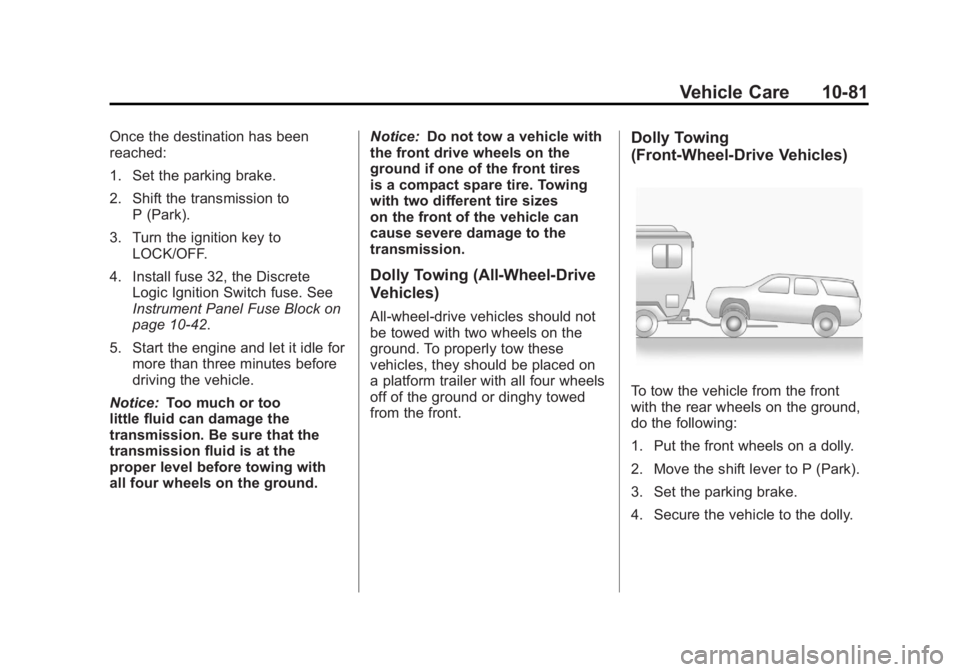
Dolly Towing
(Front-Wheel‐ Drive Vehicles)
To tow the vehicle from the front
with the rear wheels on the ground,
do the following:
1. Put the front wheels on a dolly.
2. Move the shift lever to P (Park).
3. Set the parking brake.
4. Secure the vehicle to the dolly.
Page 372 of 426
Black plate (82,1)GMC Terrain Owner Manual - 2011
10-82 Vehicle Care
5. Follow the dolly manufacturer'sinstructions for preparing the
vehicle and dolly for towing.
6. Release the parking brake.
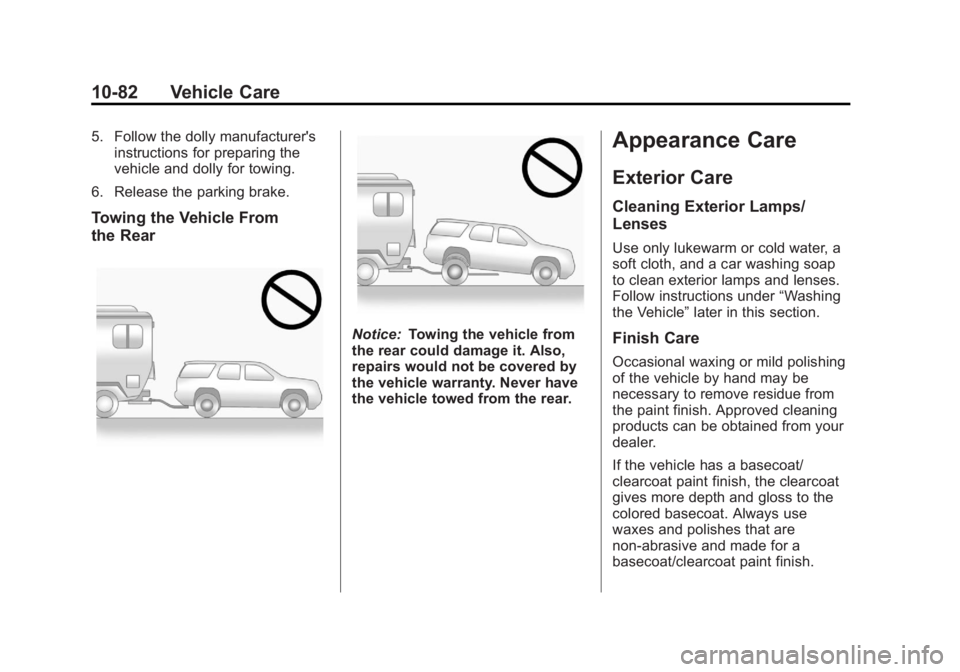
Towing the Vehicle From
the Rear
Notice: Towing the vehicle from
the rear could damage it. Also,
repairs would not be covered by
the vehicle warranty. Never have
the vehicle towed from the rear.
Appearance Care
Exterior Care
Cleaning Exterior Lamps/
Lenses
Use only lukewarm or cold water, a
soft cloth, and a car washing soap
to clean exterior lamps and lenses.
Follow instructions under “Washing
the Vehicle” later in this section.
Finish Care
Occasional waxing or mild polishing
of the vehicle by hand may be
necessary to remove residue from
the paint finish. Approved cleaning
products can be obtained from your
dealer.
If the vehicle has a basecoat/
clearcoat paint finish, the clearcoat
gives more depth and gloss to the
colored basecoat. Always use
waxes and polishes that are
non-abrasive and made for a
basecoat/clearcoat paint finish.
Page 416 of 426
Black plate (2,1)GMC Terrain Owner Manual - 2011
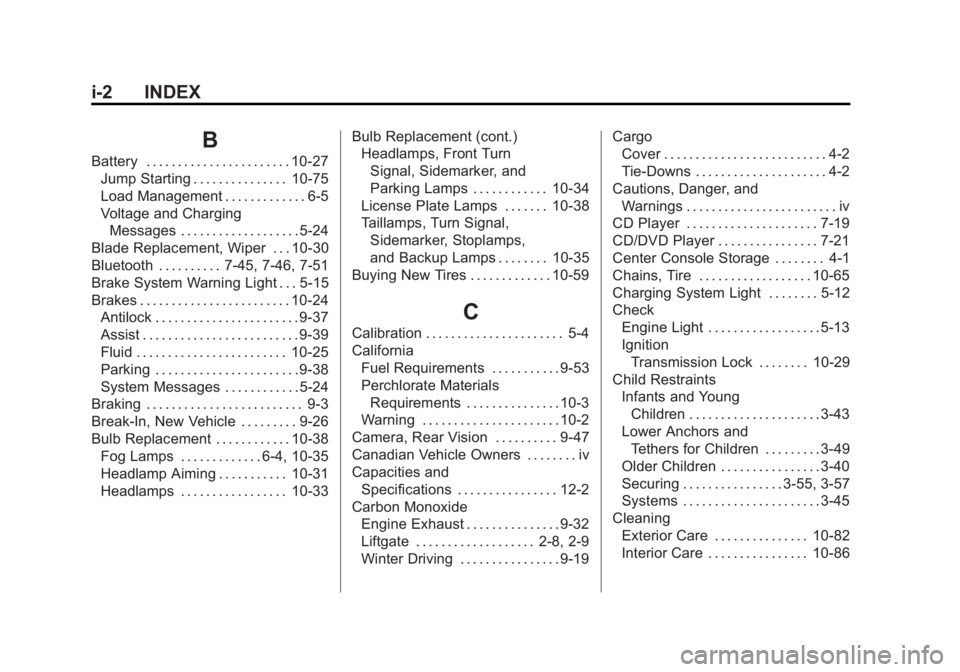
i-2 INDEX
B
Battery . . . . . . . . . . . . . . . . . . . . . . . 10-27Jump Starting . . . . . . . . . . . . . . . 10-75
Load Management . . . . . . . . . . . . . 6-5
Voltage and ChargingMessages . . . . . . . . . . . . . . . . . . . 5-24
Blade Replacement, Wiper . . . 10-30
Bluetooth . . . . . . . . . . 7-45, 7-46, 7-51
Brake System Warning Light . . . 5-15
Brakes . . . . . . . . . . . . . . . . . . . . . . . . 10-24 Antilock . . . . . . . . . . . . . . . . . . . . . . . 9-37
Assist . . . . . . . . . . . . . . . . . . . . . . . . . 9-39
Fluid . . . . . . . . . . . . . . . . . . . . . . . . 10-25
Parking . . . . . . . . . . . . . . . . . . . . . . . 9-38
System Messages . . . . . . . . . . . . 5-24
Braking . . . . . . . . . . . . . . . . . . . . . . . . . 9-3
Break-In, New Vehicle . . . . . . . . . 9-26
Bulb Replacement . . . . . . . . . . . . 10-38
Fog Lamps . . . . . . . . . . . . . 6-4, 10-35
Headlamp Aiming . . . . . . . . . . . 10-31
Headlamps . . . . . . . . . . . . . . . . . 10-33 Bulb Replacement (cont.)
Headlamps, Front Turn
Signal, Sidemarker, and
Parking Lamps . . . . . . . . . . . . 10-34
License Plate Lamps . . . . . . . 10-38
Taillamps, Turn Signal, Sidemarker, Stoplamps,
and Backup Lamps . . . . . . . . 10-35
Buying New Tires . . . . . . . . . . . . . 10-59
C
Calibration . . . . . . . . . . . . . . . . . . . . . . 5-4
California
Fuel Requirements . . . . . . . . . . . 9-53
Perchlorate MaterialsRequirements . . . . . . . . . . . . . . . 10-3
Warning . . . . . . . . . . . . . . . . . . . . . . 10-2
Camera, Rear Vision . . . . . . . . . . 9-47
Canadian Vehicle Owners . . . . . . . . iv
Capacities and Specifications . . . . . . . . . . . . . . . . 12-2
Carbon Monoxide Engine Exhaust . . . . . . . . . . . . . . . 9-32
Liftgate . . . . . . . . . . . . . . . . . . . 2-8, 2-9
Winter Driving . . . . . . . . . . . . . . . . 9-19 Cargo
Cover . . . . . . . . . . . . . . . . . . . . . . . . . . 4-2
Tie-Downs . . . . . . . . . . . . . . . . . . . . . 4-2
Cautions, Danger, and Warnings . . . . . . . . . . . . . . . . . . . . . . . . iv
CD Player . . . . . . . . . . . . . . . . . . . . . 7-19
CD/DVD Player . . . . . . . . . . . . . . . . 7-21
Center Console Storage . . . . . . . . 4-1
Chains, Tire . . . . . . . . . . . . . . . . . . 10-65
Charging System Light . . . . . . . . 5-12
Check Engine Light . . . . . . . . . . . . . . . . . . 5-13
IgnitionTransmission Lock . . . . . . . . 10-29
Child Restraints Infants and Young
Children . . . . . . . . . . . . . . . . . . . . . 3-43
Lower Anchors and Tethers for Children . . . . . . . . . 3-49
Older Children . . . . . . . . . . . . . . . . 3-40
Securing . . . . . . . . . . . . . . . . 3-55, 3-57
Systems . . . . . . . . . . . . . . . . . . . . . . 3-45
Cleaning Exterior Care . . . . . . . . . . . . . . . 10-82
Interior Care . . . . . . . . . . . . . . . . 10-86