ABS GMC TERRAIN 2011 Owner's Manual
[x] Cancel search | Manufacturer: GMC, Model Year: 2011, Model line: TERRAIN, Model: GMC TERRAIN 2011Pages: 426, PDF Size: 5.58 MB
Page 5 of 426
Black plate (5,1)GMC Terrain Owner Manual - 2011
Introduction v
{WARNING
These mean there is something
that could hurt you or other
people.
Notice: This means there is
something that could result in
property or vehicle damage. This
would not be covered by the
vehicle's warranty.
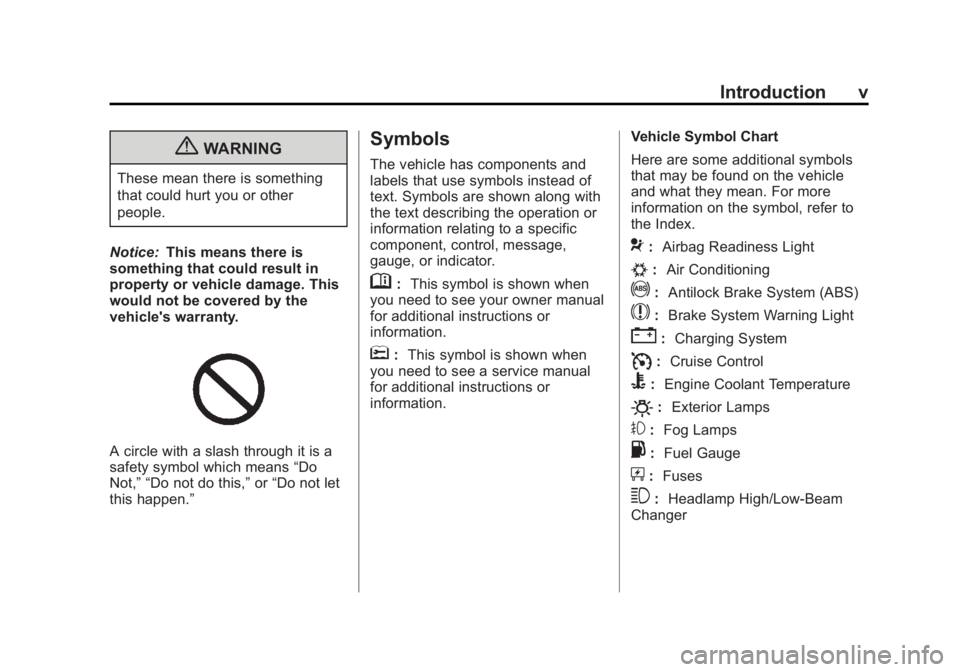
A circle with a slash through it is a
safety symbol which means “Do
Not,” “Do not do this,” or“Do not let
this happen.”
Symbols
The vehicle has components and
labels that use symbols instead of
text. Symbols are shown along with
the text describing the operation or
information relating to a specific
component, control, message,
gauge, or indicator.
M: This symbol is shown when
you need to see your owner manual
for additional instructions or
information.
*: This symbol is shown when
you need to see a service manual
for additional instructions or
information. Vehicle Symbol Chart
Here are some additional symbols
that may be found on the vehicle
and what they mean. For more
information on the symbol, refer to
the Index.
9:
Airbag Readiness Light
#:Air Conditioning
!:Antilock Brake System (ABS)
$:Brake System Warning Light
":Charging System
I:Cruise Control
B: Engine Coolant Temperature
O:Exterior Lamps
#:Fog Lamps
.: Fuel Gauge
+:Fuses
3: Headlamp High/Low-Beam
Changer
Page 119 of 426
Black plate (1,1)GMC Terrain Owner Manual - 2011
Instruments and Controls 5-1
Instruments and
Controls
Controls
Steering Wheel Adjustment . . . 5-2
Steering Wheel Controls . . . . . . 5-2
Horn . . . . . . . . . . . . . . . . . . . . . . . . . . 5-3
Windshield Wiper/Washer . . . . . 5-3
Rear Window Wiper/Washer . . . . . . . . . . . . . . . . . . . . . . 5-4
Compass . . . . . . . . . . . . . . . . . . . . . 5-4
Clock (With Date Display) . . . . . 5-5
Clock (Without Date Display) . . . . . . . . . . . . . . . . . . . . . 5-6
Power Outlets . . . . . . . . . . . . . . . . . 5-6
Warning Lights, Gauges, and
Indicators
Warning Lights, Gauges, and Indicators . . . . . . . . . . . . . . . . . . . . 5-7
Instrument Cluster . . . . . . . . . . . . 5-8
Speedometer . . . . . . . . . . . . . . . . . 5-9 Odometer . . . . . . . . . . . . . . . . . . . . . 5-9
Tachometer . . . . . . . . . . . . . . . . . . . 5-9
Fuel Gauge . . . . . . . . . . . . . . . . . . . 5-9
Engine Coolant Temperature
Gauge . . . . . . . . . . . . . . . . . . . . . . 5-10
Safety Belt Reminders . . . . . . . 5-10
Airbag Readiness Light . . . . . . 5-11
Passenger Airbag Status Indicator . . . . . . . . . . . . . . . . . . . . 5-11
Charging System Light . . . . . . 5-12
Malfunction Indicator Lamp . . . . . . . . . . . . . 5-13
Brake System Warning Light . . . . . . . . . . . . . . . . . . . . . . . 5-15
Antilock Brake System (ABS) Warning Light . . . . . . . . . . . . . . 5-16
Traction Off Light . . . . . . . . . . . . 5-16
StabiliTrak
®OFF Light . . . . . . . 5-16
Traction Control System (TCS)/StabiliTrak
®Light . . . . 5-17
Tire Pressure Light . . . . . . . . . . 5-17
Engine Oil Pressure Light . . . . 5-18
Fuel Economy Light . . . . . . . . . 5-18
Low Fuel Warning Light . . . . . . 5-19 Security Light . . . . . . . . . . . . . . . . 5-19
High-Beam On Light . . . . . . . . . 5-19
Front Fog Lamp Light . . . . . . . . 5-20
Lamps On Reminder . . . . . . . . . 5-20
Cruise Control Light . . . . . . . . . 5-20
Information Displays
Driver Information
Center (DIC) . . . . . . . . . . . . . . . 5-20
Vehicle Messages
Vehicle Messages . . . . . . . . . . . 5-24
Battery Voltage and ChargingMessages . . . . . . . . . . . . . . . . . . 5-24
Brake System Messages . . . . 5-24
Compass Messages . . . . . . . . . 5-24
Cruise Control Messages . . . . 5-25
Door Ajar Messages . . . . . . . . . 5-25
Engine Cooling System Messages . . . . . . . . . . . . . . . . . . 5-25
Engine Oil Messages . . . . . . . . 5-26
Engine Power Messages . . . . 5-26
Fuel System Messages . . . . . . 5-27
Key and Lock Messages . . . . . 5-27
Page 134 of 426

Black plate (16,1)GMC Terrain Owner Manual - 2011
5-16 Instruments and Controls
Antilock Brake System
(ABS) Warning Light
For vehicles with the Antilock Brake
System (ABS), this light comes on
briefly when the engine is started.
If the light does not come on, have it
fixed so it will be ready to warn if
there is a problem.
If the ABS light comes on and stays
on while driving, stop as soon as
possible and turn the ignition off.
Start the engine again to reset the
system. If the light stays on after
driving at a speed above 20 km/h
(13 mph), see your dealer for
service. A chime may also sound
when the light comes on steady.If the regular brake system warning
light is not on, the vehicle still has
brakes, but not antilock brakes.
If the regular brake system warning
light is also on, the vehicle does not
have antilock brakes and there is a
problem with the regular brakes.
See
Brake System Warning Light on
page 5‑15.
See Brake System Messages on
page 5‑24 for all brake‐related DIC
messages.
Traction Off Light
This light comes on briefly while
starting the engine. If it does not,
have the vehicle serviced by your
dealer. If the system is working
normally, the indicator light then
turns off. The traction off light comes on when
the Traction Control System (TCS)
has been turned off by pressing and
releasing the traction control button.
This light and the StabiliTrak Off
light come on when StabiliTrak is
turned off.
If the Traction Control System (TCS)
is off, wheelspin is not limited.
Adjust driving accordingly.
See
Traction Control System (TCS)
on page 9‑39 andStabiliTrak
®
System on page 9‑41 for more
information.
StabiliTrak®OFF Light
This light comes on when the
StabiliTrak system is turned off.
If the Traction Control System (TCS)
is off, wheel spin is not limited.
Page 226 of 426
Black plate (6,1)GMC Terrain Owner Manual - 2011
8-6 Climate Controls
Maintenance
Passenger Compartment
Air Filter
The filter removes dust, pollen, and
other airborne irritants from outside
air that is pulled into the vehicle.
The filter should be replaced as part
of routine scheduled maintenance.
SeeScheduled Maintenance on
page 11‑2 for replacement intervals.
To find out what type of filter to use,
see Maintenance Replacement
Parts on page 11‑8.
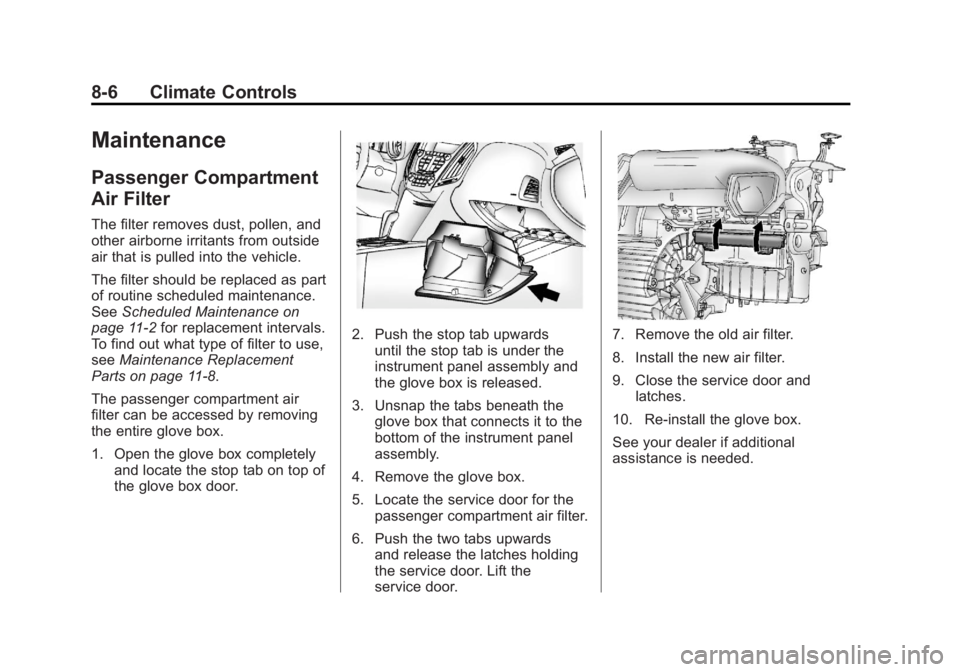
The passenger compartment air
filter can be accessed by removing
the entire glove box.
1. Open the glove box completely and locate the stop tab on top of
the glove box door.
2. Push the stop tab upwardsuntil the stop tab is under the
instrument panel assembly and
the glove box is released.
3. Unsnap the tabs beneath the glove box that connects it to the
bottom of the instrument panel
assembly.
4. Remove the glove box.
5. Locate the service door for the passenger compartment air filter.
6. Push the two tabs upwards and release the latches holding
the service door. Lift the
service door.7. Remove the old air filter.
8. Install the new air filter.
9. Close the service door andlatches.
10. Re‐install the glove box.
See your dealer if additional
assistance is needed.
Page 227 of 426

Black plate (1,1)GMC Terrain Owner Manual - 2011
Driving and Operating 9-1
Driving and
Operating
Driving Information
Defensive Driving . . . . . . . . . . . . . 9-2
Drunk Driving . . . . . . . . . . . . . . . . . 9-2
Control of a Vehicle . . . . . . . . . . . 9-3
Braking . . . . . . . . . . . . . . . . . . . . . . . 9-3
Steering . . . . . . . . . . . . . . . . . . . . . . . 9-4
Off-Road Recovery . . . . . . . . . . . . 9-6
Loss of Control . . . . . . . . . . . . . . . . 9-6
Off-Road Driving . . . . . . . . . . . . . . 9-7
Driving on Wet Roads . . . . . . . 9-17
Highway Hypnosis . . . . . . . . . . . 9-18
Hill and Mountain Roads . . . . . 9-18
Winter Driving . . . . . . . . . . . . . . . 9-19
If the Vehicle is Stuck . . . . . . . . 9-21
Vehicle Load Limits . . . . . . . . . . 9-21
Starting and Operating
New Vehicle Break-In . . . . . . . . 9-26
Ignition Positions . . . . . . . . . . . . 9-27
Starting the Engine . . . . . . . . . . 9-29Retained Accessory
Power (RAP) . . . . . . . . . . . . . . . 9-30
Engine Coolant Heater . . . . . . . 9-30
Shifting Into Park . . . . . . . . . . . . 9-31
Shifting Out of Park . . . . . . . . . . 9-32
Parking Over Things That Burn . . . . . . . . . . . . . . . . . . 9-32
Engine Exhaust
Engine Exhaust . . . . . . . . . . . . . . 9-32
Running the Vehicle WhileParked . . . . . . . . . . . . . . . . . . . . . 9-33
Automatic Transmission
Automatic Transmission . . . . . 9-34
Manual Mode . . . . . . . . . . . . . . . . 9-35
Fuel Economy Mode . . . . . . . . . 9-36
Drive Systems
All-Wheel Drive . . . . . . . . . . . . . . 9-37
Brakes
Antilock BrakeSystem (ABS) . . . . . . . . . . . . . . 9-37
Parking Brake . . . . . . . . . . . . . . . 9-38
Brake Assist . . . . . . . . . . . . . . . . . 9-39
Hill Start Assist (HSA) . . . . . . . 9-39
Ride Control Systems
Traction Control System (TCS) . . . . . . . . . . . . . . 9-39
StabiliTrak
®System . . . . . . . . . 9-41
Cruise Control
Cruise Control . . . . . . . . . . . . . . . 9-42
Object Detection Systems
Ultrasonic Parking Assist . . . . 9-45
Rear Vision Camera (RVC) . . . . . . . . . . . . . 9-47
Fuel
Fuel . . . . . . . . . . . . . . . . . . . . . . . . . 9-52
Recommended Fuel . . . . . . . . . 9-52
Gasoline Specifications (U.S.and Canada Only) . . . . . . . . . . 9-52
California Fuel Requirements . . . . . . . . . . . . . . 9-53
Fuels in Foreign Countries . . . 9-53
Fuel Additives . . . . . . . . . . . . . . . 9-53
Fuel E85 (85% Ethanol) . . . . . 9-54
Filling the Tank . . . . . . . . . . . . . . 9-55
Filling a Portable Fuel Container . . . . . . . . . . . . . . . . . . . 9-57
Page 245 of 426
Black plate (19,1)GMC Terrain Owner Manual - 2011
Driving and Operating 9-19
.Stay in your own lane. Do not
swing wide or cut across the
center of the road. Drive at
speeds that let you stay in your
own lane.
.Top of hills: Be alert—something
could be in your lane (stalled
car, accident).
.Pay attention to special road
signs (falling rocks area, winding
roads, long grades, passing or
no-passing zones) and take
appropriate action.
Winter Driving
Driving on Snow or Ice
Drive carefully when there is snow
or ice between the tires and the
road, creating less traction or grip.
Wet ice can occur at about 0°C
(32°F) when freezing rain begins to
fall, resulting in even less traction.
Avoid driving on wet ice or in
freezing rain until roads can be
treated with salt or sand.
Drive with caution, whatever the
condition. Accelerate gently so
traction is not lost. Accelerating too
quickly causes the wheels to spin
and makes the surface under the
tires slick, so there is even less
traction. Try not to break the fragile traction.
If you accelerate too fast, the drive
wheels will spin and polish the
surface under the tires even more.
The
Antilock Brake System (ABS)
on page 9‑37 improves vehicle
stability during hard stops on
slippery roads, but apply the brakes
sooner than when on dry pavement.
Allow greater following distance on
any slippery road and watch for
slippery spots. Icy patches can
occur on otherwise clear roads in
shaded areas. The surface of a
curve or an overpass can remain icy
when the surrounding roads are
clear. Avoid sudden steering
maneuvers and braking while
on ice.
Turn off cruise control on slippery
surfaces.
Page 263 of 426

Black plate (37,1)GMC Terrain Owner Manual - 2011
Driving and Operating 9-37
Drive Systems
All-Wheel Drive
Vehicles with this feature always
send engine power to all four
wheels. It is fully automatic, and
adjusts itself as needed for road
conditions.
When using a compact spare tire
on an AWD vehicle, the system
automatically detects the compact
spare and disables AWD. To restore
AWD operation and prevent
excessive wear on the system,
replace the compact spare with a
full-size tire as soon as possible.
SeeCompact Spare Tire on
page 10‑74 for more information.
Brakes
Antilock Brake
System (ABS)
This vehicle has the Antilock Brake
System (ABS), an advanced
electronic braking system that
helps prevent a braking skid.
When the engine is started and the
vehicle begins to drive away, ABS
checks itself. A momentary motor or
clicking noise might be heard while
this test is going on, and it might
even be noticed that the brake
pedal moves a little. This is normal.If there is a problem with ABS, this
warning light stays on. See Antilock
Brake System (ABS) Warning Light
on page 5‑16.
If driving safely on a wet road and
it becomes necessary to slam on
the brakes and continue braking
to avoid a sudden obstacle, a
computer senses that the wheels
are slowing down. If one of the
wheels is about to stop rolling, the
computer will separately work the
brakes at each wheel.
ABS can change the brake pressure
to each wheel, as required, faster
than any driver could. This can help
the driver steer around the obstacle
while braking hard.
Page 264 of 426
Black plate (38,1)GMC Terrain Owner Manual - 2011
9-38 Driving and Operating
As the brakes are applied, the
computer keeps receiving updates
on wheel speed and controls
braking pressure accordingly.
Remember: ABS does not change
the time needed to get a foot up to
the brake pedal or always decrease
stopping distance. If you get too
close to the vehicle in front of you,
there will not be enough time to
apply the brakes if that vehicle
suddenly slows or stops. Always
leave enough room up ahead to
stop, even with ABS.
Using ABS
Do not pump the brakes. Just hold
the brake pedal down firmly and let
ABS work. You might hear the ABS
pump or motor operating and feel
the brake pedal pulsate, but this is
normal.
Braking in Emergencies
ABS allows the driver to steer and
brake at the same time. In many
emergencies, steering can help
more than even the very best
braking.
Parking Brake
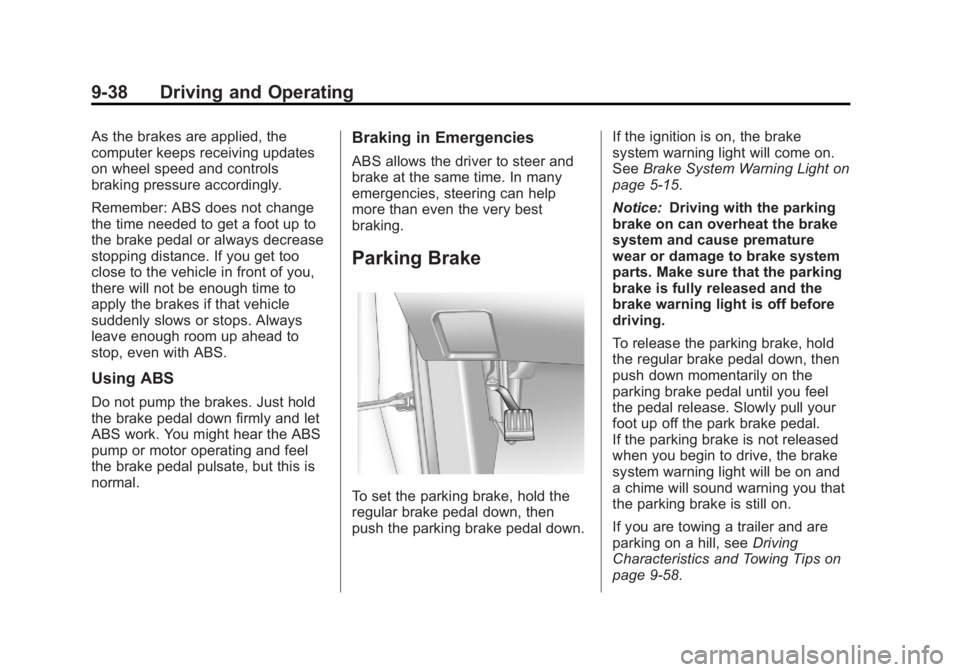
To set the parking brake, hold the
regular brake pedal down, then
push the parking brake pedal down.If the ignition is on, the brake
system warning light will come on.
See
Brake System Warning Light on
page 5‑15.
Notice: Driving with the parking
brake on can overheat the brake
system and cause premature
wear or damage to brake system
parts. Make sure that the parking
brake is fully released and the
brake warning light is off before
driving.
To release the parking brake, hold
the regular brake pedal down, then
push down momentarily on the
parking brake pedal until you feel
the pedal release. Slowly pull your
foot up off the park brake pedal.
If the parking brake is not released
when you begin to drive, the brake
system warning light will be on and
a chime will sound warning you that
the parking brake is still on.
If you are towing a trailer and are
parking on a hill, see Driving
Characteristics and Towing Tips on
page 9‑58.
Page 265 of 426

Black plate (39,1)GMC Terrain Owner Manual - 2011
Driving and Operating 9-39
Brake Assist
This vehicle has a brake assist
feature designed to assist the driver
in stopping or decreasing vehicle
speed in emergency driving
conditions. This feature uses the
stability system hydraulic brake
control module to supplement
the power brake system under
conditions where the driver has
quickly and forcefully applied the
brake pedal in an attempt to quickly
stop or slow down the vehicle. The
stability system hydraulic brake
control module increases brake
pressure at each corner of the
vehicle until the ABS activates.
Minor brake pedal pulsation or
pedal movement during this time
is normal and the driver should
continue to apply the brake pedal
as the driving situation dictates.
The brake assist feature will
automatically disengage when the
brake pedal is released or brake
pedal pressure is quickly
decreased.
Hill Start Assist (HSA)
This vehicle has a Hill Start Assist
(HSA) feature, which may be useful
when the vehicle is stopped on a
grade. This feature is designed to
prevent the vehicle from rolling,
either forward or rearward, during
vehicle drive off. After the driver
completely stops and holds the
vehicle in a complete standstill on
a grade, HSA will be automatically
activated. During the transition
period between when the driver
releases the brake pedal and starts
to accelerate to drive off on a grade,
HSA holds the braking pressure to
ensure that there is no rolling. The
brakes will automatically release
when the accelerator pedal is
applied within the two‐second
window. It will not activate if the
vehicle is in a drive gear and facing
downhill or if the vehicle is facing
uphill and in R (Reverse).
Ride Control Systems
Traction Control
System (TCS)
The vehicle has a Traction Control
System (TCS) that limits wheel spin.
On a front-wheel-drive vehicle, the
system operates if it senses that
one or both of the front wheels
are spinning or beginning to lose
traction. On an All-Wheel-Drive
(AWD) vehicle, the system will
operate if it senses that any of the
wheels are spinning or beginning to
lose traction. When this happens,
the system brakes the spinning
wheel(s) and/or reduces engine
power to limit wheel spin.
The system may be heard or felt
while it is working, but this is
normal.
Page 287 of 426
Black plate (61,1)GMC Terrain Owner Manual - 2011
Driving and Operating 9-61
If parking the rig on a hill:
1. Press the brake pedal, but donot shift into P (Park) yet. Turn
the wheels into the curb if facing
downhill or into traffic if facing
uphill.
2. Have someone place chocks under the trailer wheels.
3. When the wheel chocks are in place, release the brake pedal
until the chocks absorb the load.
4. Reapply the brake pedal. Then apply the parking brake and shift
into P (Park).
5. Release the brake pedal.
Leaving After Parking on a Hill
1. Apply and hold the brake pedal.
2. Start the engine.
3. Shift into a gear.
4. Release the parking brake.
5. Let up on the brake pedal. 6. Drive slowly until the trailer is
clear of the chocks.
7. Stop and have someone pick up and store the chocks.
Maintenance When Trailer
Towing
The vehicle needs service more
often when pulling a trailer. See this
manual's Maintenance Schedule
or Index for more information.
Things that are especially important
in trailer operation are automatic
transmission fluid, engine oil, axle
lubricant, belts, cooling system and
brake system. Inspect these before
and during the trip.
Check periodically to see that all
hitch nuts and bolts are tight.
Engine Cooling When Trailer
Towing
The cooling system may temporarily
overheat during severe operating
conditions. See Engine Overheating
on page 10‑21.
Trailer Towing
Before pulling a trailer, there are
three important considerations that
have to do with weight:
.The weight of the trailer
.The weight of the trailer tongue
.The total weight on the vehicle's
tires
Weight of the Trailer
How heavy can a trailer safely be?
Speed, altitude, road grades,
outside temperature, special
equipment, and the amount of
tongue weight the vehicle can carry
must be considered. See “Weight
of the Trailer Tongue” later in this
section for more information.
Maximum trailer weight is calculated
assuming only the driver is in
the tow vehicle and it has all the
required trailering equipment.
The weight of additional optional
equipment, passengers and cargo in
the tow vehicle must be subtracted
from the maximum trailer weight.