service schedule GMC TERRAIN 2011 Owner's Manual
[x] Cancel search | Manufacturer: GMC, Model Year: 2011, Model line: TERRAIN, Model: GMC TERRAIN 2011Pages: 426, PDF Size: 5.58 MB
Page 2 of 426
Black plate (2,1)GMC Terrain Owner Manual - 2011
2011 GMC Terrain Owner ManualM
Vehicle Care. . . . . . . . . . . . . . . . . 10-1
General Information . . . . . . . . . . 10-2
Vehicle Checks . . . . . . . . . . . . . . . 10-4
Headlamp Aiming . . . . . . . . . . . 10-31
Bulb Replacement . . . . . . . . . . 10-33
Electrical System . . . . . . . . . . . . 10-39
Wheels and Tires . . . . . . . . . . . 10-45
Jump Starting . . . . . . . . . . . . . . . 10-75
Towing . . . . . . . . . . . . . . . . . . . . . . 10-79
Appearance Care . . . . . . . . . . . 10-82 Service and Maintenance
. . . 11-1
General Information . . . . . . . . . . 11-1
Scheduled Maintenance . . . . . . 11-2
Recommended Fluids,
Lubricants, and Parts . . . . . . . 11-6
Maintenance Records . . . . . . . . 11-9
Technical Data . . . . . . . . . . . . . . . 12-1
Vehicle Identification . . . . . . . . . 12-1
Vehicle Data . . . . . . . . . . . . . . . . . . 12-2 Customer Information
. . . . . . . 13-1
Customer Information . . . . . . . . 13-1
Reporting Safety Defects . . . . 13-15
Vehicle Data Recording and
Privacy . . . . . . . . . . . . . . . . . . . . 13-16
Index . . . . . . . . . . . . . . . . . . . . . i-1
Page 31 of 426

Black plate (25,1)GMC Terrain Owner Manual - 2011
In Brief 1-25
Driving for Better Fuel
Economy
Driving habits can affect fuel
mileage. Here are some driving tips
to get the best fuel economy
possible.
.Avoid fast starts and accelerate
smoothly.
.Brake gradually and avoid
abrupt stops.
.Avoid idling the engine for long
periods of time.
.When road and weather
conditions are appropriate, use
cruise control.
.Always follow posted speed
limits or drive more slowly when
conditions require.
.Keep vehicle tires properly
inflated.
.Combine several trips into a
single trip.
.Replace the vehicle's tires with
the same TPC Spec number
molded into the tire's sidewall
near the size.
.Follow recommended scheduled
maintenance.
Roadside Assistance
Program
U.S.:1-800-GMC-8782
(1‐800‐462-8782)
TTY Users (U.S.): 1-888-889-2438
Canada: 1-800-268-6800
Mexico: 01-800-466-0801
As the owner of a new GMC, you
are automatically enrolled in the
Roadside Assistance program.
See Roadside Assistance Program
(U.S. and Canada) on page 13‑7
or Roadside Assistance Program
(Mexico) on page 13‑9 for more
information. Roadside Assistance and OnStar
(U.S. and Canada)
If you have an active OnStar
subscription, press the
Qbutton
and the current GPS location will
be sent to an OnStar advisor who
will assess your problem, contact
Roadside Assistance, and relay
your exact location to get the help
you need.
Online Owner Center
(U.S. and Canada)
The Online Owner Center is a
complimentary service that includes
online service reminders, vehicle
maintenance tips, online owner
manual, special privileges,
and more.
Sign up today at:
www.gmcownercenter.com (U.S.)
or www.gm.ca (Canada).
Page 93 of 426
Black plate (39,1)GMC Terrain Owner Manual - 2011
Seats and Restraints 3-39
If you have questions, call
Customer Assistance. The
phone numbers and addresses
for Customer Assistance are
in Step Two of the Customer
Satisfaction Procedure in
this manual. SeeCustomer
Satisfaction Procedure (U.S.
and Canada) on page 13‑1
or Customer Satisfaction
Procedure (Mexico) on
page 13‑3.
If the vehicle has rollover
roof-rail airbags, see Different
Size Tires and Wheels on
page 10‑61 for additional
important information. Q: Because I have a disability,
I have to get my vehicle
modified. How can I find out
whether this will affect my
airbag system?
A: If you have questions, call
Customer Assistance. The
phone numbers and addresses
for Customer Assistance are
in Step Two of the Customer
Satisfaction Procedure in
this manual. See Customer
Satisfaction Procedure (U.S.
and Canada) on page 13‑1
or Customer Satisfaction
Procedure (Mexico) on
page 13‑3.
In addition, your dealer and the
service manual have information
about the location of the airbag
sensors, sensing and diagnostic
module and airbag wiring.Airbag System Check
The airbag system does not need
regularly scheduled maintenance or
replacement. Make sure the airbag
readiness light is working. See
Airbag Readiness Light on
page 5‑11 for more information.
Notice: If an airbag covering is
damaged, opened, or broken, the
airbag may not work properly.
Do not open or break the airbag
coverings. If there are any
opened or broken airbag covers,
have the airbag covering and/or
airbag module replaced. For the
location of the airbag modules,
see What Makes an Airbag
Inflate? on page 3‑31. See your
dealer for service.
Page 136 of 426
Black plate (18,1)GMC Terrain Owner Manual - 2011
5-18 Instruments and Controls
When the Light Flashes First and
Then is On Steady
This indicates that there may be a
problem with the TPMS. The light
flashes for about a minute and
stays on steady for the remainder of
the ignition cycle. This sequence
repeats with every ignition cycle.
SeeTire Pressure Monitor
Operation on page 10‑54 for
more information.
Engine Oil Pressure Light
{WARNING
Do not keep driving if the oil
pressure is low. The engine can
become so hot that it catches fire.
Someone could be burned. Check
the oil as soon as possible and
have the vehicle serviced. Notice:
Lack of proper engine
oil maintenance can damage the
engine. The repairs would not be
covered by the vehicle warranty.
Always follow the maintenance
schedule for changing engine oil.
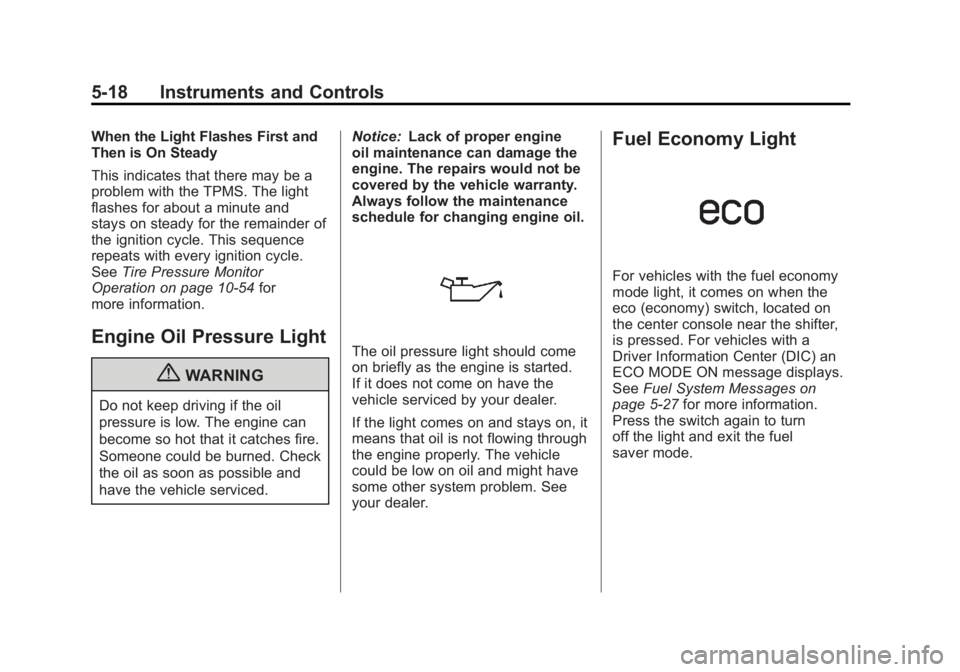
The oil pressure light should come
on briefly as the engine is started.
If it does not come on have the
vehicle serviced by your dealer.
If the light comes on and stays on, it
means that oil is not flowing through
the engine properly. The vehicle
could be low on oil and might have
some other system problem. See
your dealer.
Fuel Economy Light
For vehicles with the fuel economy
mode light, it comes on when the
eco (economy) switch, located on
the center console near the shifter,
is pressed. For vehicles with a
Driver Information Center (DIC) an
ECO MODE ON message displays.
See Fuel System Messages on
page 5‑27 for more information.
Press the switch again to turn
off the light and exit the fuel
saver mode.
Page 144 of 426
Black plate (26,1)GMC Terrain Owner Manual - 2011
5-26 Instruments and Controls
ENGINE
OVERHEATED—STOP
ENGINE
This message displays and a
continuous chime sounds if the
engine cooling system reaches
unsafe temperatures for operation.
Stop and turn off the vehicle as
soon as it is safe to do so to avoid
severe damage. This message
clears when the engine has cooled
to a safe operating temperature.
HIGH COOLANT
TEMPERATURE
This message displays if the coolant
temperature is hot. See Engine
Overheating on page 10‑21.
Engine Oil Messages
CHANGE ENGINE OIL SOON
This message displays when the
engine oil needs to be changed.
When you change the engine oil, be
sure to reset the Oil Life System.
See Engine Oil Life System on page 10‑14
andDriver Information
Center (DIC) on page 5‑20 for
information on how to reset the
system. See Engine Oil on
page 10‑10 andScheduled
Maintenance on page 11‑2 for
more information.
ENGINE OIL HOT, IDLE
ENGINE
This message displays when the
engine oil temperature is too hot.
Stop and allow the vehicle to idle
until it cools down.
ENGINE OIL LOW —ADD OIL
This message displays when the
engine oil level is too low. Check
the oil level. See Engine Oil on
page 10‑10.
OIL PRESSURE LOW —STOP
ENGINE
This message displays if low oil
pressure levels occur. Stop the
vehicle as soon as safely possible
and do not operate it until the cause
of the low oil pressure has been corrected. Check the oil as soon
as possible and have the vehicle
serviced by your dealer.
Engine Power Messages
ENGINE POWER IS REDUCED
This message displays when the
vehicle's engine power is reduced.
Reduced engine power can affect
the vehicle's ability to accelerate.
If this message is on, but there
is no reduction in performance,
proceed to your destination. The
performance may be reduced the
next time the vehicle is driven. The
vehicle may be driven at a reduced
speed while this message is on, but
maximum acceleration and speed
may be reduced. Anytime this
message stays on, the vehicle
should be taken to your dealer for
service as soon as possible.
Page 226 of 426
Black plate (6,1)GMC Terrain Owner Manual - 2011
8-6 Climate Controls
Maintenance
Passenger Compartment
Air Filter
The filter removes dust, pollen, and
other airborne irritants from outside
air that is pulled into the vehicle.
The filter should be replaced as part
of routine scheduled maintenance.
SeeScheduled Maintenance on
page 11‑2 for replacement intervals.
To find out what type of filter to use,
see Maintenance Replacement
Parts on page 11‑8.
The passenger compartment air
filter can be accessed by removing
the entire glove box.
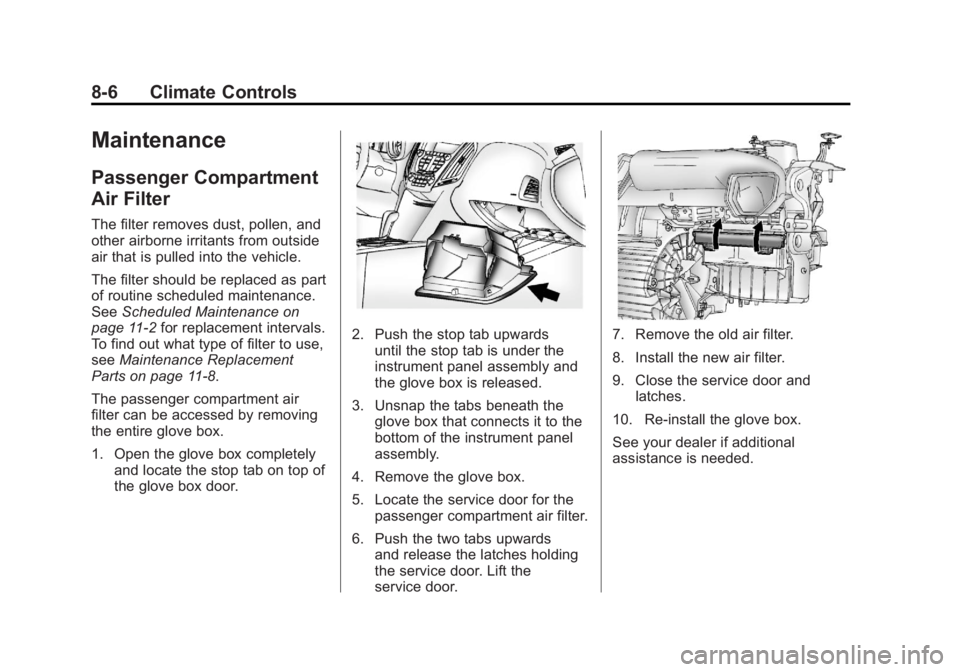
1. Open the glove box completely and locate the stop tab on top of
the glove box door.
2. Push the stop tab upwardsuntil the stop tab is under the
instrument panel assembly and
the glove box is released.
3. Unsnap the tabs beneath the glove box that connects it to the
bottom of the instrument panel
assembly.
4. Remove the glove box.
5. Locate the service door for the passenger compartment air filter.
6. Push the two tabs upwards and release the latches holding
the service door. Lift the
service door.7. Remove the old air filter.
8. Install the new air filter.
9. Close the service door andlatches.
10. Re‐install the glove box.
See your dealer if additional
assistance is needed.
Page 243 of 426
Black plate (17,1)GMC Terrain Owner Manual - 2011
Driving and Operating 9-17
After Off-Road Driving
Remove any brush or debris that
has collected on the underbody,
chassis, or under the hood. These
accumulations can be a fire hazard.
After operation in mud or sand,
have the brake linings cleaned and
checked. These substances can
cause glazing and uneven braking.
Check the body structure, steering,
suspension, wheels, tires, axles,
and exhaust system for damage
and check the fuel lines and cooling
system for any leakage.
The vehicle requires more frequent
service due to off-road use. Refer
to the Maintenance Schedule for
additional information.
Driving on Wet Roads
Rain and wet roads can reduce
vehicle traction and affect your
ability to stop and accelerate.
Always drive slower in these types
of driving conditions and avoid
driving through large puddles and
deep‐standing or flowing water.
{WARNING
Wet brakes can cause crashes.
They might not work as well in a
quick stop and could cause
pulling to one side. You could
lose control of the vehicle.
After driving through a large
puddle of water or a car/vehicle
wash, lightly apply the brake
pedal until the brakes work
normally.(Continued)
WARNING (Continued)
Flowing or rushing water creates
strong forces. Driving through
flowing water could cause the
vehicle to be carried away. If this
happens, you and other vehicle
occupants could drown. Do not
ignore police warnings and be
very cautious about trying to drive
through flowing water.
Hydroplaning
Hydroplaning is dangerous. Water
can build up under the vehicle's
tires so they actually ride on the
water. This can happen if the road
is wet enough and you are going
fast enough. When the vehicle is
hydroplaning, it has little or no
contact with the road.
There is no hard and fast rule about
hydroplaning. The best advice is to
slow down when the road is wet.
Page 287 of 426
Black plate (61,1)GMC Terrain Owner Manual - 2011
Driving and Operating 9-61
If parking the rig on a hill:
1. Press the brake pedal, but donot shift into P (Park) yet. Turn
the wheels into the curb if facing
downhill or into traffic if facing
uphill.
2. Have someone place chocks under the trailer wheels.
3. When the wheel chocks are in place, release the brake pedal
until the chocks absorb the load.
4. Reapply the brake pedal. Then apply the parking brake and shift
into P (Park).
5. Release the brake pedal.
Leaving After Parking on a Hill
1. Apply and hold the brake pedal.
2. Start the engine.
3. Shift into a gear.
4. Release the parking brake.
5. Let up on the brake pedal. 6. Drive slowly until the trailer is
clear of the chocks.
7. Stop and have someone pick up and store the chocks.
Maintenance When Trailer
Towing
The vehicle needs service more
often when pulling a trailer. See this
manual's Maintenance Schedule
or Index for more information.
Things that are especially important
in trailer operation are automatic
transmission fluid, engine oil, axle
lubricant, belts, cooling system and
brake system. Inspect these before
and during the trip.
Check periodically to see that all
hitch nuts and bolts are tight.
Engine Cooling When Trailer
Towing
The cooling system may temporarily
overheat during severe operating
conditions. See Engine Overheating
on page 10‑21.
Trailer Towing
Before pulling a trailer, there are
three important considerations that
have to do with weight:
.The weight of the trailer
.The weight of the trailer tongue
.The total weight on the vehicle's
tires
Weight of the Trailer
How heavy can a trailer safely be?
Speed, altitude, road grades,
outside temperature, special
equipment, and the amount of
tongue weight the vehicle can carry
must be considered. See “Weight
of the Trailer Tongue” later in this
section for more information.
Maximum trailer weight is calculated
assuming only the driver is in
the tow vehicle and it has all the
required trailering equipment.
The weight of additional optional
equipment, passengers and cargo in
the tow vehicle must be subtracted
from the maximum trailer weight.
Page 305 of 426

Black plate (15,1)GMC Terrain Owner Manual - 2011
Vehicle Care 10-15
Automatic Transmission
Fluid
How to Check Automatic
Transmission Fluid
It is not necessary to check
the transmission fluid level.
A transmission fluid leak is the
only reason for fluid loss. If a leak
occurs, take the vehicle to your
dealer service department and have
it repaired as soon as possible.
There is a special procedure for
checking and changing the
transmission fluid. Because this
procedure is difficult, this should
be done at your dealer service
department. Contact your dealer
for additional information or the
procedure can be found in the
service manual. To purchase a
service manual, seeService
Publications Ordering Information
on page 13‑14. Change the fluid and filter at the
intervals listed in
Scheduled
Maintenance on page 11‑2, and
be sure to use the fluid listed in
Recommended Fluids and
Lubricants on page 11‑6.
Engine Air Cleaner/Filter
See Engine Compartment Overview
on page 10‑6 for the location of the
engine air cleaner/filter.
When to Inspect the Engine
Air Cleaner/Filter
Inspect or replace the air
cleaner/filter at the scheduled
maintenance intervals. See
Scheduled Maintenance on
page 11‑2 for more information.
If driving in dusty/dirty conditions,
inspect the filter at each engine oil
change.
How to Inspect the Engine
Air Cleaner/Filter
To inspect the air cleaner/filter,
remove the filter from the vehicle
and lightly shake the filter to
release loose dust and dirt. If the
filter remains covered with dirt, a
new filter is required. Never use
compressed air to clean the filter.
To inspect or replace the engine air
cleaner/filter:
1. Open the hood. See Hood on
page 10‑5.
2. Locate the air filter housing on the passenger side of the engine
compartment. See Engine
Compartment Overview on
page 10‑6.
Page 381 of 426

Black plate (1,1)GMC Terrain Owner Manual - 2011
Service and Maintenance 11-1
Service and
Maintenance
General Information
General Information . . . . . . . . . . 11-1
Scheduled Maintenance
Scheduled Maintenance . . . . . 11-2
Recommended Fluids,
Lubricants, and Parts
Recommended Fluids andLubricants . . . . . . . . . . . . . . . . . . 11-6
Maintenance Replacement Parts . . . . . . . . . . . . . . . . . . . . . . . 11-8
Maintenance Records
Maintenance Records . . . . . . . . 11-9
General Information
Notice: Maintenance intervals,
checks, inspections,
recommended fluids, and
lubricants are necessary to keep
this vehicle in good working
condition. Damage caused by
failure to follow scheduled
maintenance might not be
covered by the vehicle warranty.
As the vehicle owner, you are
responsible for the scheduled
maintenance in this section. We
recommend having your dealer
perform these services. Proper
vehicle maintenance helps to
keep the vehicle in good working
condition, improves fuel economy,
and reduces vehicle emissions for
better air quality. Because of all the different ways
people use vehicles, maintenance
needs vary. The vehicle might need
more frequent checks and services.
Please read the information under
Scheduled Maintenance. To keep
the vehicle in good condition, see
your dealer.
The maintenance schedule is for
vehicles that:
.Carry passengers and cargo
within recommended limits on
the Tire and Loading Information
label. See
Vehicle Load Limits
on page 9‑21.
.Are driven on reasonable road
surfaces within legal driving
limits.