wheel GMC TERRAIN 2012 Owner's Guide
[x] Cancel search | Manufacturer: GMC, Model Year: 2012, Model line: TERRAIN, Model: GMC TERRAIN 2012Pages: 428, PDF Size: 5.45 MB
Page 145 of 428

Black plate (31,1)GMC Terrain Owner Manual (Include Mex) - 2012
Instruments and Controls 5-31
SERVICE ALL WHEEL DRIVE
If your vehicle has the All-Wheel
Drive (AWD) system, this message
displays if a problem occurs with
this system. If this message
appears, stop as soon as possible
and turn off the vehicle. Restart the
vehicle and check for the message
on the DIC display. If the message
is still displayed or appears again
when you begin driving, the AWD
system needs service. See your
dealer.
SERVICE TRACTION
CONTROL
This message displays when there
is a problem with the Traction
Control System (TCS). SeeTraction
Control System (TCS) on
page 9‑35.
SERVICE STABILITRAK
This message displays if there is a
problem with the StabiliTrak system.
StabiliTrak
®System on page 9‑36.
STABILITRAK OFF
This message displays when the
StabiliTrak system is turned off. See
StabiliTrak
®System on page 9‑36
for more information.
TRACTION CONTROL OFF
This message displays when the
Traction Control System (TCS) is
turned off. Adjust your driving
accordingly.
TRACTION CONTROL ON
This message displays when the
Traction Control System (TCS) is
first turned on. See Traction Control
System (TCS) on page 9‑35 for
more information.
Airbag System Messages
SERVICE AIRBAG
This message displays if there is a
problem with the airbag system.
Take the vehicle to your dealer for
service.
Safety Belt Messages
BUCKLE SEATBELT
This message displays as a
reminder when the safety belt is not
buckled.
Anti-theft Alarm System
Messages
THEFT ATTEMPTED
This message displays if the vehicle
detects a tamper condition.
Service Vehicle Messages
SERVICE AC SYSTEM
This message is displayed if there is
a problem with the air conditioning
system. Take the vehicle to your
dealer for service.
SERVICE POWER STEERING
This message is displayed if there is
a problem with the power steering
system. Take the vehicle to your
dealer for service.
Page 149 of 428
Black plate (35,1)GMC Terrain Owner Manual (Include Mex) - 2012
Instruments and Controls 5-35
Easy Exit Driver Seat
When on, this feature will move the
driver seat rearward upon turning
the ignition off and the driver door
opening. This may be performed to
make it easier to exit the vehicle.
See the“Easy Exit Driver Seat”
information under Power Seat
Adjustment on page 3‑4 for more
information.
This allows you to turn the easy exit
seat feature on or off.
Press the MENU/SELECT knob
when “Easy Exit Driver Seat” is
highlighted. Turn the knob to select
“On” or“Off.” Press the knob to
confirm and go back to the
last menu. Chime Volume
This allows the selection of the
chime volume level.
Press the MENU/SELECT knob
when
“Chime Volume” is
highlighted. Turn the knob to select
“Normal” or“High.” Press the knob
to confirm and go back to the
last menu.
Reverse Tilt Mirror
When on, both the driver and
passenger mirrors will tilt downward
when vehicle is shifted to
R (Reverse) to improve visibility of
the ground near the rear wheels.
They will return to their previous
driving position when the vehicle is
shifted out of R (Reverse), the
ignition is turned to OFF, or the
vehicle is left in reverse. See Park
Tilt Mirrors on page 2‑17 for more
information.
This allows you to turn the park tilt
mirrors feature on or off. Press the MENU/SELECT knob
when
“Reverse Tilt Mirror” is
highlighted. Turn the knob to select
“On” or“Off.” Press the knob to
confirm and go back to the
last menu.
Collision/Detection Systems
Select the Collision/Detection
Systems menu and the following will
be displayed:
.Park Assist
Park Assist
This allows the Ultrasonic Parking
Assist feature to be turned on or off.
Press the MENU/SELECT knob
when “Park Assist” is highlighted.
Turn the knob to select “On,” “Off,”
or “Tow Bar.” Press the knob to
confirm and go back to the
last menu.
See Ultrasonic Parking Assist on
page 9‑43 for more information
Page 166 of 428
Black plate (8,1)GMC Terrain Owner Manual (Include Mex) - 2012
7-8 Infotainment System
Press the AUX screen button to
access any connected auxiliary
device. SeeAuxiliary Devices on
page 7‑18.
Languages
The vehicle supports English,
French (Canadian), and Spanish.
The default language is English.
To change the display language,
see Vehicle Personalization on
page 5‑33 for more information.
English and Metric Unit
Conversion
To change the display units between
English and metric units, see Driver
Information Center (DIC) on
page 5‑23 for more information.
Cleaning the Display
Notice:Using abrasive cleaners
when cleaning glass surfaces
could scratch the glass. Use only
a soft cloth and do not spray
cleaner directly on the system as
it could affect the mechanical
parts.
Do not wipe the panel with a hard
cloth or use a volatile liquid such as
paint thinner; it could scratch the
surface or erase the characters on
the buttons.
Radio
AM-FM Radio
Playing the Radio
For vehicles equipped with the
MyLink or IntelliLink infotainment
system, see the separate MyLink/
IntelliLink Features and Functions
Guide for more information.
Audio Source
VOL/
O(Power/Volume):
1. Press to turn the radio on or off.
2. Turn to increase or decrease the volume of the active source
(i.e., current audio source, active
navigation voice guidance,
or traffic prompts).
The steering wheel controls can
also be used to adjust the volume.
See “Steering Wheel Controls” in
the vehicle owner manual for more
information.
Page 181 of 428
Black plate (23,1)GMC Terrain Owner Manual (Include Mex) - 2012
Infotainment System 7-23
Before Driving
The RSE is for rear seat
passengers only. The driver cannot
safely view the video screen while
driving.
In severe or extreme weather
conditions, the RSE system may not
work until the temperature is within
the operating range. The operating
range is above−20°C (−4°F) and
below 60°C (140°F). If the
temperature is outside of this range,
heat or cool the vehicle until it is
within the operating range.
Global Off
Depending on the infotainment
system, the RSE system may have
a Global Off feature. The Global Off
feature disables all RSE system
features. Press and hold the radio
power button for more than
three seconds for Global Off to
disable the RSE features. On some infotainment systems, the Global Off
feature can be turned off by
performing one of the following:
.Press and hold the radio power
button for more than
three seconds.
.Insert or eject any disc.
.Insert a DVD video disc.
.Press the remote control power
button.
.Press the SOURCE button ork
when a DVD video disc is in the
player.
.Press the SRC button on the
steering wheel when a DVD
video disc is in the player.
.Cycle the ignition.
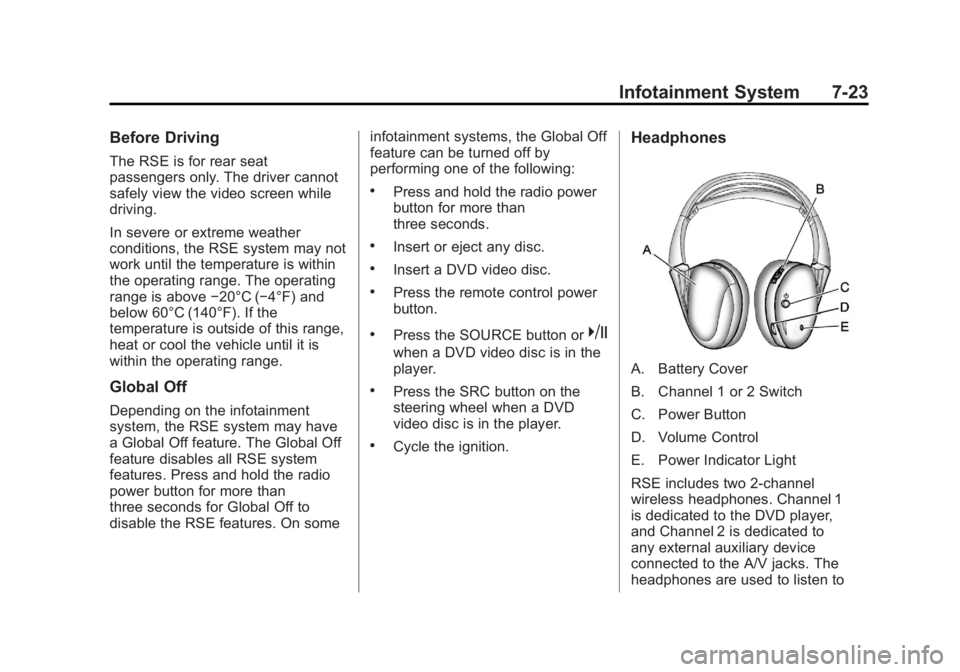
Headphones
A. Battery Cover
B. Channel 1 or 2 Switch
C. Power Button
D. Volume Control
E. Power Indicator Light
RSE includes two 2-channel
wireless headphones. Channel 1
is dedicated to the DVD player,
and Channel 2 is dedicated to
any external auxiliary device
connected to the A/V jacks. The
headphones are used to listen to
Page 193 of 428
Black plate (35,1)GMC Terrain Owner Manual (Include Mex) - 2012
Infotainment System 7-35
with the Bluetooth system. See
www.gm.com/bluetooth for more
information about compatible
phones.
Bluetooth Controls
Use the buttons located on the
infotainment system and the
steering wheel to operate the
Bluetooth system.
Steering Wheel Controls
b/g(Push To Talk):Press to
answer incoming calls, confirm
system information, and start voice
recognition.
$/i(End Call/Mute): Press to
end a call, reject a call, or cancel an
operation.
Infotainment System Controls
If equipped, the infotainment system
allows certain controls to be
selected on the infotainment display.
For information about how to
navigate the menu system using the
infotainment controls, see Overview
on page 7‑3.
5(Phone): Press to enter the
Phone main menu. Press
5to mute
the audio system.
?(Mute): Press?to mute the
audio system.
Voice Recognition
The voice recognition system uses
commands to control the system
and dial phone numbers.
Noise: The system may not
recognize voice commands if there
is too much background noise.
When to Speak: A tone sounds to
indicate that the system is ready for
a voice command. Wait for the tone
and then speak.
How to Speak: Speak clearly in a
calm and natural voice.
Audio System
When using the Bluetooth system,
sound comes through the vehicle's
front audio system speakers and
overrides the audio system. Use the
VOL/
Oknob during a call to
change the volume level. The
adjusted volume level remains in
memory for later calls. The system
maintains a minimum volume level.
Other Information
The Bluetooth®word mark and
logos are owned by the Bluetooth®
SIG, Inc. and any use of such marks
by General Motors is under license.
Other trademarks and trade names
are those of their respective owners.
See Radio Frequency Statement on
page 13‑21 for information
regarding Part 15 of the Federal
Communications Commission (FCC)
rules and Industry Canada
Standards RSS-GEN/210/220/310.
Page 197 of 428

Black plate (39,1)GMC Terrain Owner Manual (Include Mex) - 2012
Infotainment System 7-39
Declining a Call
Turn the MENU/SEL knob to
“Decline”and press the MENU/SEL
knob to decline the call.
Switching Between Calls (Call
Waiting Calls Only)
To switch between calls:
1. Turn or press the MENU/ SEL knob.
2. Select Switch Call from the menu.
Conference Calling
Conference calling and three‐way
calling must be supported on the
Bluetooth phone and enabled by the
wireless service carrier to work.
To start a conference while in a
current call:
1. Turn or press the MENU/SEL knob.
2. Select Enter Number.
3. Enter the phone number. 4. After the call has been placed,
turn or press the MENU/SEL
knob and choose Merge Calls.
5. To add more callers to the conference call, repeat Steps 1
through 4. The number of callers
that can be added is limited by
your wireless service carrier.
Ending a Call
Turn or press the MENU/SEL knob
and select Hang Up.
Muting a Call
To Mute a Call
Turn or press the MENU/SEL knob
and select Mute Call.
To Cancel Mute
Turn or press the MENU/SEL knob
and select Mute Call.
Dual Tone Multi-Frequency
(DTMF) Tones
The in‐vehicle Bluetooth system can
send numbers during a call. This is
used when calling a menu‐driven
phone system.
1. Turn or press the MENU/SELknob and select Enter Number.
2. Enter the phone number.
Bluetooth (Voice
Recognition)
Using Voice Recognition
For vehicles equipped with the
MyLink or IntelliLink infotainment
system, see the separate MyLink/
IntelliLink Features and Functions
Guide for more information.
To use voice recognition, press the
b/gbutton located on the steering
wheel. Use the commands below for
the various voice features. For
additional information, say “Help”
while you are in a voice
recognition menu.
Page 209 of 428
Black plate (5,1)GMC Terrain Owner Manual (Include Mex) - 2012
Climate Controls 8-5
Rear Window Defogger
1REAR (Rear Defogger):Press
to turn the rear window defogger on
or off. The rear window defogger
turns off after about 10 minutes.
It can also be turned off by turning
the ignition to ACC/ACCESSORY or
LOCK/OFF. If turned on again, it
runs for about five minutes before
turning off.
Do not drive the vehicle until all the
windows are clear.
Notice: Do not use a razor blade
or sharp object to clear the inside
rear window. Do not adhere
anything to the defogger grid
lines in the rear glass. These
actions may damage the rear
defogger. Repairs would not be
covered by your warranty.
L/M(Driver and Passenger
Heated Seats): For vehicles with
heated seats, see Heated Front
Seats on page 3‑9. Remote Start Climate Control
Operation:
For vehicles with the
remote vehicle start feature, the
climate control system may run
when the vehicle is started remotely.
The system uses the driver's
previous settings to heat or cool the
inside of the vehicle. The front
heated seats will turn on if it is cold
outside. The heated seat indicator
lights do not come on during a
remote start. See Remote Vehicle
Start on page 2‑5.
Sensors
The solar sensor, located on top of
the instrument panel near the
windshield, monitors the solar heat.
The climate control system uses the
information to adjust the
temperature, fan speed,
recirculation, and air delivery mode.
Do not cover the solar sensor or the
system will not work properly.
Air Vents
Use the air outlets, located in the
center and on the side of the
instrument panel, to direct the
airflow. Use the thumbwheels
located near the center air outlets,
to open or close off the airflow.
Operation Tips
.Clear away any ice, snow,
or leaves from air inlets at the
base of the windshield that could
block the flow of air into the
vehicle.
.Keep the path under the front
seats clear of objects to help
circulate the air inside of the
vehicle more effectively.
.Use of non‐GM approved hood
deflectors can adversely affect
the performance of the system.
Check with your dealer before
adding equipment to the outside
of the vehicle.
Page 211 of 428
Black plate (1,1)GMC Terrain Owner Manual (Include Mex) - 2012
Driving and Operating 9-1
Driving and
Operating
Driving Information
Distracted Driving . . . . . . . . . . . . . 9-2
Defensive Driving . . . . . . . . . . . . . 9-3
Drunk Driving . . . . . . . . . . . . . . . . . 9-3
Control of a Vehicle . . . . . . . . . . . 9-4
Braking . . . . . . . . . . . . . . . . . . . . . . . 9-4
Steering . . . . . . . . . . . . . . . . . . . . . . . 9-4
Off-Road Recovery . . . . . . . . . . . . 9-5
Loss of Control . . . . . . . . . . . . . . . . 9-5
Off-Road Driving . . . . . . . . . . . . . . 9-6
Driving on Wet Roads . . . . . . . . 9-11
Highway Hypnosis . . . . . . . . . . . 9-12
Hill and Mountain Roads . . . . . 9-12
Winter Driving . . . . . . . . . . . . . . . 9-13
If the Vehicle Is Stuck . . . . . . . . 9-15
Vehicle Load Limits . . . . . . . . . . 9-16
Starting and Operating
New Vehicle Break-In . . . . . . . . 9-20
Ignition Positions . . . . . . . . . . . . 9-21
Starting the Engine . . . . . . . . . . 9-23
Retained AccessoryPower (RAP) . . . . . . . . . . . . . . . 9-25
Engine Coolant Heater . . . . . . . 9-25 Shifting Into Park . . . . . . . . . . . . 9-26
Shifting out of Park . . . . . . . . . . 9-27
Parking over Things
That Burn . . . . . . . . . . . . . . . . . . 9-27
Engine Exhaust
Engine Exhaust . . . . . . . . . . . . . . 9-28
Running the Vehicle WhileParked . . . . . . . . . . . . . . . . . . . . . 9-28
Automatic Transmission
Automatic Transmission . . . . . 9-29
Manual Mode . . . . . . . . . . . . . . . . 9-31
Fuel Economy Mode . . . . . . . . . 9-31
Drive Systems
All-Wheel Drive . . . . . . . . . . . . . . 9-32
Brakes
Antilock BrakeSystem (ABS) . . . . . . . . . . . . . . 9-32
Parking Brake . . . . . . . . . . . . . . . 9-33
Brake Assist . . . . . . . . . . . . . . . . . 9-34
Hill Start Assist (HSA) . . . . . . . 9-34
Ride Control Systems
Traction Control System (TCS) . . . . . . . . . . . . . . 9-35
StabiliTrak
®System . . . . . . . . . 9-36
Cruise Control
Cruise Control . . . . . . . . . . . . . . . 9-38
Object Detection Systems
Forward Collision Alert (FCA) System . . . . . . . . . . . . . . . . . . . . . 9-40
Ultrasonic Parking Assist . . . . 9-43
Rear Vision Camera (RVC) . . . . . . . . . . . . . 9-45
Lane Departure Warning (LDW) . . . . . . . . . . . . . 9-48
Fuel
Fuel . . . . . . . . . . . . . . . . . . . . . . . . . 9-51
Recommended Fuel . . . . . . . . . 9-51
Gasoline Specifications (U.S.and Canada Only) . . . . . . . . . . 9-51
California Fuel Requirements . . . . . . . . . . . . . . 9-52
Fuels in Foreign Countries . . . 9-52
Fuel Additives . . . . . . . . . . . . . . . 9-52
Fuel E85 (85% Ethanol) . . . . . 9-53
Filling the Tank . . . . . . . . . . . . . . 9-54
Filling a Portable Fuel Container . . . . . . . . . . . . . . . . . . . 9-56
Page 212 of 428
Black plate (2,1)GMC Terrain Owner Manual (Include Mex) - 2012
9-2 Driving and Operating
Towing
General TowingInformation . . . . . . . . . . . . . . . . . 9-56
Driving Characteristics and Towing Tips . . . . . . . . . . . . . . . . 9-57
Trailer Towing . . . . . . . . . . . . . . . . 9-60
Towing Equipment . . . . . . . . . . . 9-63
Trailer Sway
Control (TSC) . . . . . . . . . . . . . . 9-63
Conversions and Add-Ons
Add-On ElectricalEquipment . . . . . . . . . . . . . . . . . 9-64
Driving Information
Distracted Driving
Distraction comes in many forms
and can take your focus from the
task of driving. Exercise good
judgment and do not let other
activities divert your attention away
from the road. Many local
governments have enacted laws
regarding driver distraction. Become
familiar with the local laws in
your area.
To avoid distracted driving, always
keep your eyes on the road, hands
on the wheel, and mind on the drive.
.Do not use a phone in
demanding driving situations.
Use a hands-free method to
place or receive necessary
phone calls.
.Watch the road. Do not read,
take notes, or look up
information on phones or other
electronic devices.
.Designate a front seat
passenger to handle potential
distractions.
.Become familiar with vehicle
features before driving, such as
programming favorite radio
stations and adjusting climate
control and seat settings.
Program all trip information into
any navigation device prior to
driving.
.Wait until the vehicle is parked
to retrieve items that have fallen
to the floor.
.Stop or park the vehicle to tend
to children.
.Keep pets in an appropriate
carrier or restraint.
.Avoid stressful conversations
while driving, whether with a
passenger or on a cell phone.
Page 214 of 428
Black plate (4,1)GMC Terrain Owner Manual (Include Mex) - 2012
9-4 Driving and Operating
Control of a Vehicle
Braking, steering, and accelerating
are important factors in helping to
control a vehicle while driving.
Braking
Braking action involves perception
time and reaction time. Deciding to
push the brake pedal is perception
time. Actually doing it is
reaction time.
Average driver reaction time is
about three‐fourths of a second. In
that time, a vehicle moving at
100 km/h (60 mph) travels
20 m (66 ft), which could be a lot of
distance in an emergency.
Helpful braking tips to keep in mind
include:
.Keep enough distance between
you and the vehicle in front
of you.
.Avoid needless heavy braking.
.Keep pace with traffic.If the engine ever stops while the
vehicle is being driven, brake
normally but do not pump the
brakes. Doing so could make the
pedal harder to push down. If the
engine stops, there will be some
power brake assist but it will be
used when the brake is applied.
Once the power assist is used up, it
can take longer to stop and the
brake pedal will be harder to push.
Steering
Electric Power Steering
(2.4L L4 Engine)
If the engine stalls while driving, the
power steering assist system will
continue to operate until you are
able to stop the vehicle.
If power steering assist is lost due
to a system malfunction, the vehicle
can be steered, but may require
increased effort.
If the steering wheel is turned in
either direction several times until it
stops, or it is held until it is stopped
for an extended time, power
steering assist may be reduced. The
normal power steering assist should
return shortly after a few normal
steering movements.
The electric power steering system
does not require regular
maintenance. If you suspect
steering system problems, such as
abnormally high steering effort for a
prolonged period of time, contact
your dealer for service repairs.Hydraulic Power Steering
(3.0L V6 Engine)
If power steering assist is lost due
to a system malfunction, the vehicle
can be steered, but may require
increased effort.