lock GMC TERRAIN 2013 Owners Manual
[x] Cancel search | Manufacturer: GMC, Model Year: 2013, Model line: TERRAIN, Model: GMC TERRAIN 2013Pages: 364, PDF Size: 5.26 MB
Page 252 of 364
Black plate (32,1)GMC Terrain/Terrain Denali Owner Manual - 2013 - crc 1st edition - 5/8/12
10-32 Vehicle Care
Electrical System
Fuses
The wiring circuits in the vehicle are
protected from short circuits by
fuses. This greatly reduces the
chance of damage caused by
electrical problems.
Look at the silver-colored band
inside the fuse. If the band is broken
or melted, replace the fuse. Be sure
to replace a bad fuse with a new
one of the identical size and rating.
Replace a bad fuse with a new one
of the identical size and rating.If there is a problem on the road and
a fuse needs to be replaced, the
same amperage fuse can be
borrowed. Choose some feature of
the vehicle that is not needed to use
and replace it as soon as possible.
There are two fuse blocks in the
vehicle: one in the engine
compartment and one in the
instrument panel.
There is a fuse puller located in the
engine compartment fuse block.
See
Engine Compartment Fuse
Block on page 10‑32. It can be used
to easily remove fuses from the fuse
block.
Engine Compartment
Fuse Block
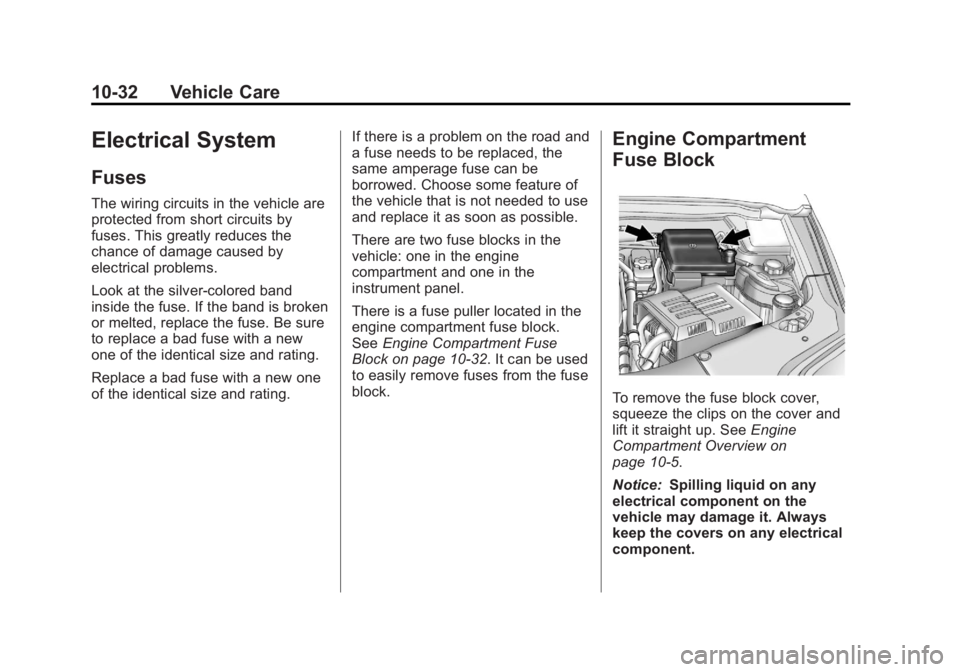
To remove the fuse block cover,
squeeze the clips on the cover and
lift it straight up. See Engine
Compartment Overview on
page 10‑5.
Notice: Spilling liquid on any
electrical component on the
vehicle may damage it. Always
keep the covers on any electrical
component.
Page 253 of 364
Black plate (33,1)GMC Terrain/Terrain Denali Owner Manual - 2013 - crc 1st edition - 5/8/12
Vehicle Care 10-33
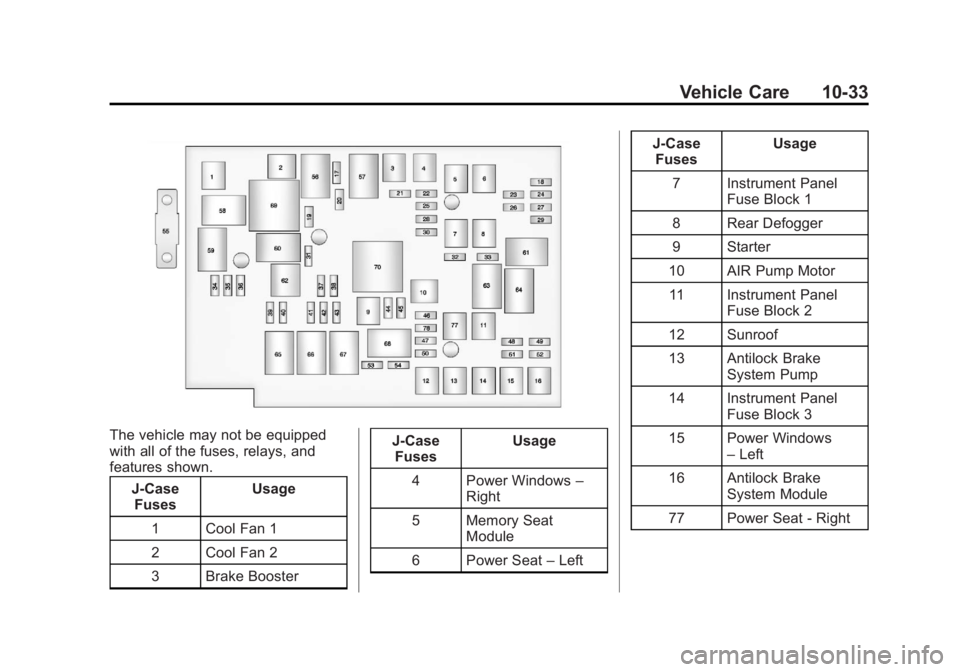
The vehicle may not be equipped
with all of the fuses, relays, and
features shown.J-CaseFuses Usage
1 Cool Fan 1
2 Cool Fan 2
3 Brake Booster J-Case
Fuses Usage
4 Power Windows –
Right
5 Memory Seat Module
6 Power Seat –Left J-Case
Fuses Usage
7 Instrument Panel Fuse Block 1
8 Rear Defogger
9 Starter
10 AIR Pump Motor 11 Instrument Panel Fuse Block 2
12 Sunroof
13 Antilock Brake System Pump
14 Instrument Panel Fuse Block 3
15 Power Windows –Left
16 Antilock Brake System Module
77 Power Seat - Right
Page 254 of 364
Black plate (34,1)GMC Terrain/Terrain Denali Owner Manual - 2013 - crc 1st edition - 5/8/12
10-34 Vehicle Care
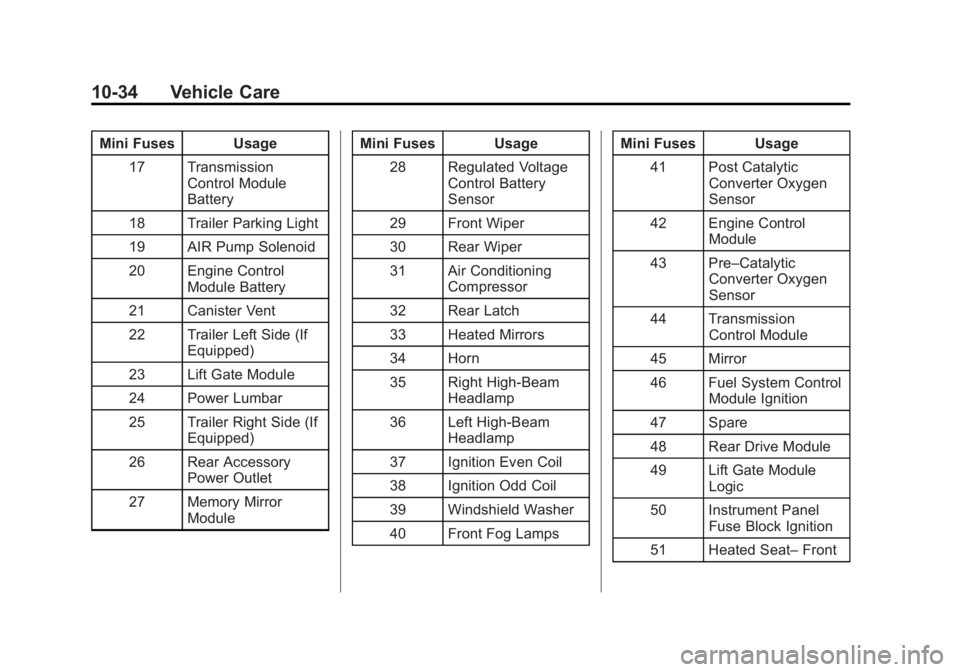
Mini Fuses Usage17 Transmission Control Module
Battery
18 Trailer Parking Light
19 AIR Pump Solenoid
20 Engine Control Module Battery
21 Canister Vent
22 Trailer Left Side (If Equipped)
23 Lift Gate Module
24 Power Lumbar
25 Trailer Right Side (If Equipped)
26 Rear Accessory Power Outlet
27 Memory Mirror Module Mini Fuses Usage
28 Regulated Voltage Control Battery
Sensor
29 Front Wiper
30 Rear Wiper
31 Air Conditioning Compressor
32 Rear Latch
33 Heated Mirrors
34 Horn
35 Right High-Beam Headlamp
36 Left High-Beam Headlamp
37 Ignition Even Coil
38 Ignition Odd Coil
39 Windshield Washer
40 Front Fog Lamps Mini Fuses Usage
41 Post Catalytic Converter Oxygen
Sensor
42 Engine Control Module
43 Pre–Catalytic Converter Oxygen
Sensor
44 Transmission Control Module
45 Mirror
46 Fuel System Control Module Ignition
47 Spare
48 Rear Drive Module
49 Lift Gate Module Logic
50 Instrument Panel Fuse Block Ignition
51 Heated Seat– Front
Page 255 of 364
Black plate (35,1)GMC Terrain/Terrain Denali Owner Manual - 2013 - crc 1st edition - 5/8/12
Vehicle Care 10-35
Mini Fuses Usage52 Fuel System Control Module
53 Engine Control Module
54 Rear Vision Camera
78 Passenger Power Lumber
Midi Fuse Usage 55 Electric Power Steering
Micro
Relays Usage
56 AIR Pump Solenoid
57 Brake Booster
58 Cooling Fan Low
59 Headlamp High Beam
60 Cooling Fan Control Micro
Relays Usage
61 Wiper On/Off Control
62 Air Conditioning Compressor
63 Rear Defogger
64 Wiper Speed
65 Fog Lamp
66 Engine Control
67 Starter
68 Run/Crank
Mini Relays Usage 69 Cooling Fan High
70 AIR Pump MotorInstrument Panel Fuse
Block
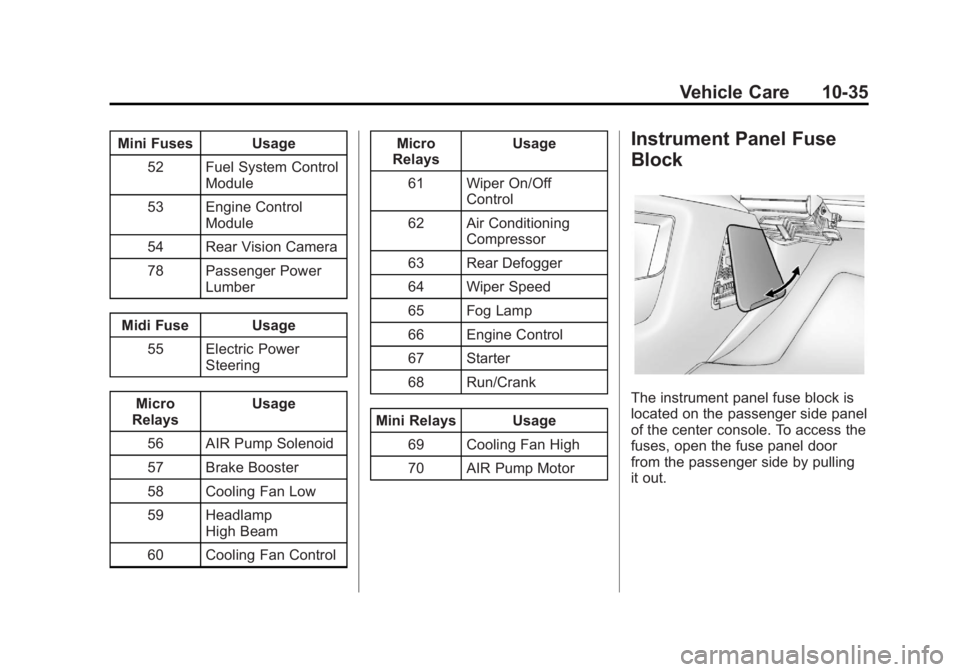
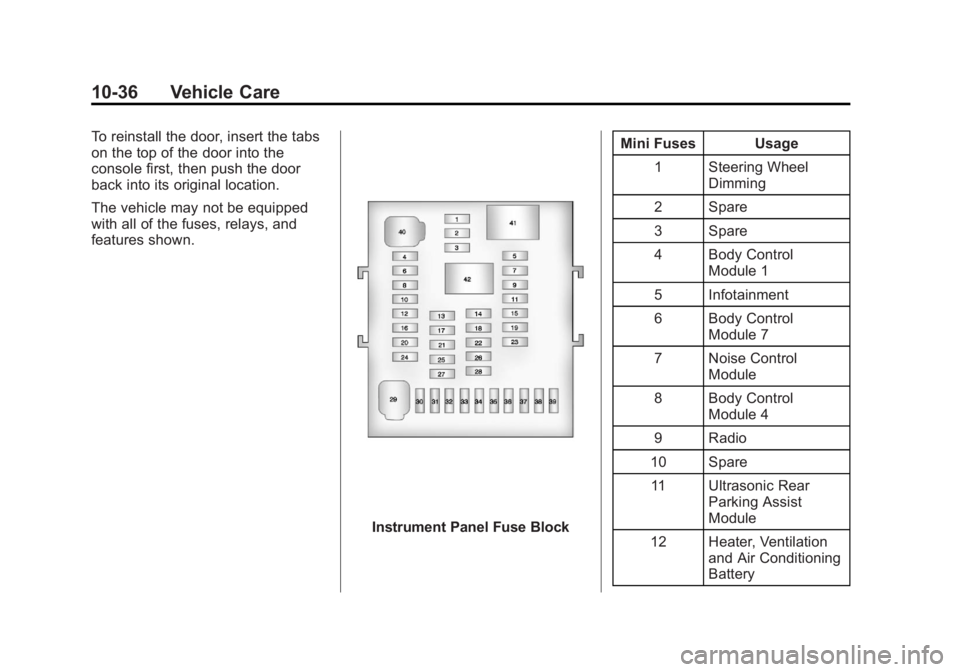
The instrument panel fuse block is
located on the passenger side panel
of the center console. To access the
fuses, open the fuse panel door
from the passenger side by pulling
it out.
Page 256 of 364
Black plate (36,1)GMC Terrain/Terrain Denali Owner Manual - 2013 - crc 1st edition - 5/8/12
10-36 Vehicle Care
To reinstall the door, insert the tabs
on the top of the door into the
console first, then push the door
back into its original location.
The vehicle may not be equipped
with all of the fuses, relays, and
features shown.
Instrument Panel Fuse BlockMini Fuses Usage
1 Steering Wheel Dimming
2 Spare
3 Spare
4 Body Control Module 1
5 Infotainment
6 Body Control Module 7
7 Noise Control Module
8 Body Control Module 4
9 Radio
10 Spare 11 Ultrasonic Rear Parking Assist
Module
12 Heater, Ventilation and Air Conditioning
Battery
Page 270 of 364
Black plate (50,1)GMC Terrain/Terrain Denali Owner Manual - 2013 - crc 1st edition - 5/8/12
10-50 Vehicle Care
4. Press the SET/CLR button tobegin the sensor matching
process.
A message requesting
acceptance of the process
should display.
5. Press the SET/CLR button again to confirm the selection.
The horn sounds twice to signal
the receiver is in relearn mode
and the TIRE LEARNING
ACTIVE message displays on
the DIC screen.
6. Start with the driver side front tire.
7. Place the relearn tool against the tire sidewall, near the valve
stem. Then press the button to
activate the TPMS sensor.
A horn chirp confirms that the
sensor identification code has
been matched to this tire and
wheel position.
8. Proceed to the passenger side front tire, and repeat the
procedure in Step 7. 9. Proceed to the passenger side
rear tire, and repeat the
procedure in Step 7.
10. Proceed to the driver side rear tire, and repeat the procedure
in Step 7. The horn sounds two
times to indicate the sensor
identification code has been
matched to the driver side rear
tire, and the TPMS sensor
matching process is no longer
active. The TIRE LEARNING
ACTIVE message on the DIC
display screen goes off.
11. Turn the ignition to LOCK/OFF.
12. Set all four tires to the recommended air pressure
level as indicated on the Tire
and Loading Information label.
Tire Inspection
We recommend that the tires,
including the spare tire, if the
vehicle has one, be inspected
for signs of wear or damage at
least once a month. Replace the tire if:
.The indicators at three or
more places around the tire
can be seen.
.There is cord or fabric
showing through the tire's
rubber.
.The tread or sidewall is
cracked, cut, or snagged
deep enough to show cord or
fabric.
.The tire has a bump, bulge,
or split.
.The tire has a puncture, cut,
or other damage that cannot
be repaired well because of
the size or location of the
damage.
Page 274 of 364
Black plate (54,1)GMC Terrain/Terrain Denali Owner Manual - 2013 - crc 1st edition - 5/8/12
10-54 Vehicle Care
{WARNING
Mixing tires of different sizes,
brands, or types may cause
loss of control of the vehicle,
resulting in a crash or other
vehicle damage. Use the
correct size, brand, and type
of tires on all wheels.
{WARNING
Using bias-ply tires on the
vehicle may cause the wheel
rim flanges to develop cracks
after many miles of driving.
A tire and/or wheel could fail
suddenly and cause a crash.
Use only radial-ply tires with
the wheels on the vehicle.
If the vehicle tires must be
replaced with a tire that does not
have a TPC Spec number, make sure they are the same size,
load range, speed rating, and
construction (radial) as the
original tires.
Vehicles that have a tire
pressure monitoring system
could give an inaccurate
low-pressure warning if non-TPC
Spec rated tires are installed.
See
Tire Pressure Monitor
System on page 10‑46.
The Tire and Loading
Information label indicates the
original equipment tires on the
vehicle. See Vehicle Load Limits
on page 9‑14.
Different Size Tires and
Wheels
If wheels or tires are installed that
are a different size than the original
equipment wheels and tires, vehicle
performance, including its braking,
ride and handling characteristics,
stability, and resistance to rollover may be affected. If the vehicle has
electronic systems such as antilock
brakes, rollover airbags, traction
control, and electronic stability
control, the performance of these
systems can also be affected.
{WARNING
If different sized wheels are used,
there may not be an acceptable
level of performance and safety if
tires not recommended for those
wheels are selected. This
increases the chance of a crash
and serious injury. Only use GM
specific wheel and tire systems
developed for the vehicle, and
have them properly installed by a
GM certified technician.
See Buying New Tires on
page 10‑53 andAccessories and
Modifications on page 10‑2.
Page 279 of 364
Black plate (59,1)GMC Terrain/Terrain Denali Owner Manual - 2013 - crc 1st edition - 5/8/12
Vehicle Care 10-59
{WARNING
Changing a tire can be
dangerous. The vehicle can slip
off the jack and roll over or fall
causing injury or death. Find a
level place to change the tire. To
help prevent the vehicle from
moving:1. Set the parking brake firmly.
2. Put an automatic transmission in P (Park) or a
manual transmission in
1 (First) or R (Reverse).
3. Turn off the engine and do not restart while the vehicle
is raised.
4. Do not allow passengers to remain in the vehicle.
5. Place wheel blocks on both sides of the tire at the
opposite corner of the tire
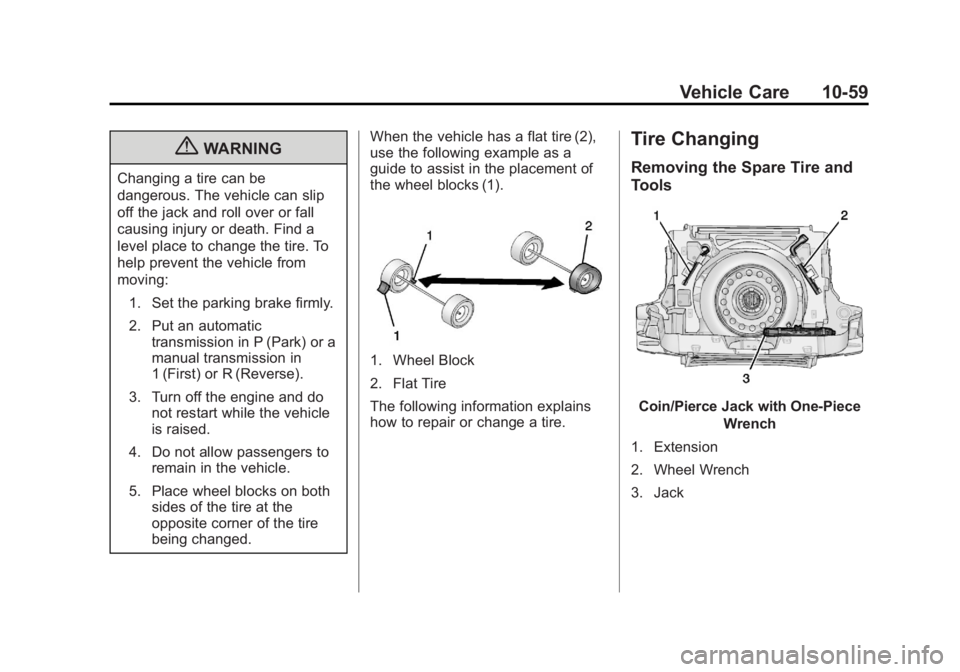
being changed. When the vehicle has a flat tire (2),
use the following example as a
guide to assist in the placement of
the wheel blocks (1).
1. Wheel Block
2. Flat Tire
The following information explains
how to repair or change a tire.
Tire Changing
Removing the Spare Tire and
Tools
Coin/Pierce Jack with One-Piece
Wrench
1. Extension
2. Wheel Wrench
3. Jack
Page 280 of 364
Black plate (60,1)GMC Terrain/Terrain Denali Owner Manual - 2013 - crc 1st edition - 5/8/12
10-60 Vehicle Care
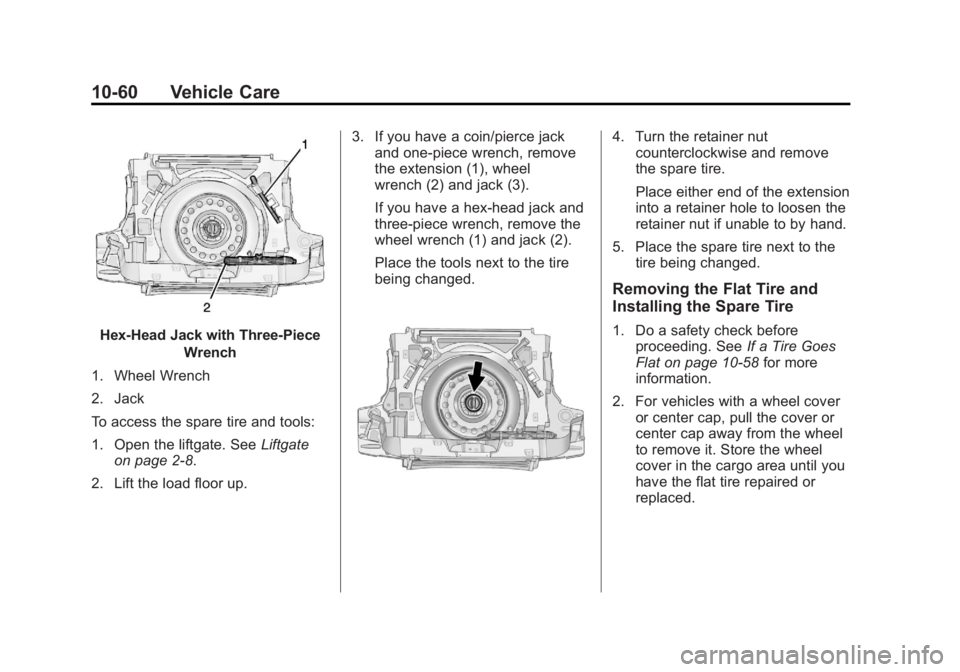
Hex-Head Jack with Three-PieceWrench
1. Wheel Wrench
2. Jack
To access the spare tire and tools:
1. Open the liftgate. See Liftgate
on page 2‑8.
2. Lift the load floor up. 3. If you have a coin/pierce jack
and one-piece wrench, remove
the extension (1), wheel
wrench (2) and jack (3).
If you have a hex-head jack and
three-piece wrench, remove the
wheel wrench (1) and jack (2).
Place the tools next to the tire
being changed.
4. Turn the retainer nutcounterclockwise and remove
the spare tire.
Place either end of the extension
into a retainer hole to loosen the
retainer nut if unable to by hand.
5. Place the spare tire next to the tire being changed.
Removing the Flat Tire and
Installing the Spare Tire
1. Do a safety check beforeproceeding. See If a Tire Goes
Flat on page 10‑58 for more
information.
2. For vehicles with a wheel cover or center cap, pull the cover or
center cap away from the wheel
to remove it. Store the wheel
cover in the cargo area until you
have the flat tire repaired or
replaced.
Page 281 of 364
Black plate (61,1)GMC Terrain/Terrain Denali Owner Manual - 2013 - crc 1st edition - 5/8/12
Vehicle Care 10-61
3. Turn the wheel wrenchcounterclockwise to loosen all
the wheel nuts, but do not
remove them yet.
Notice: Make sure that the jack
lift head is in the correct position
or you may damage your vehicle.
The repairs would not be covered
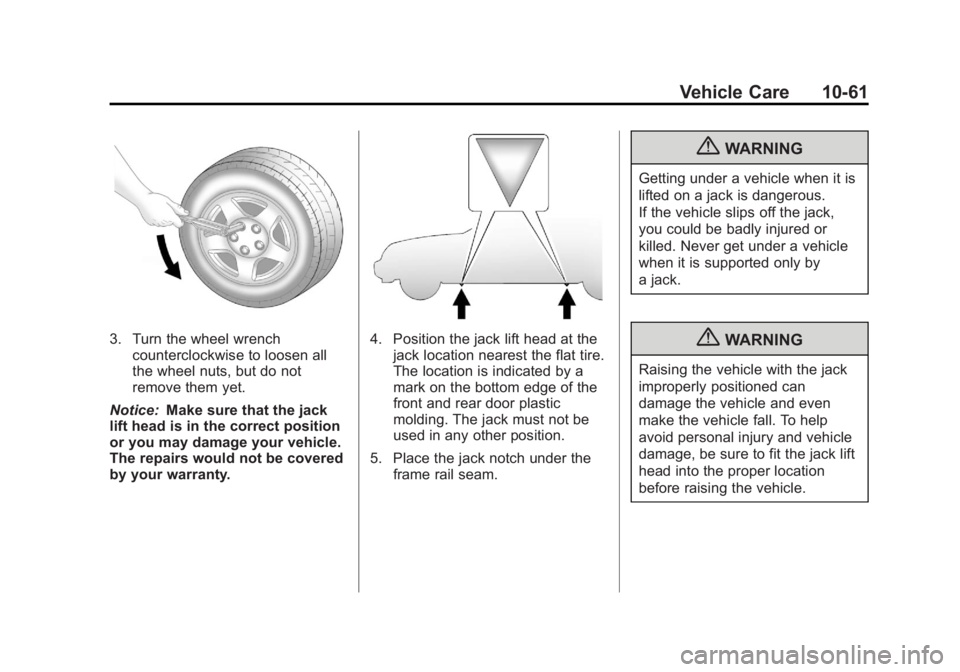
by your warranty.4. Position the jack lift head at the
jack location nearest the flat tire.
The location is indicated by a
mark on the bottom edge of the
front and rear door plastic
molding. The jack must not be
used in any other position.
5. Place the jack notch under the frame rail seam.
{WARNING
Getting under a vehicle when it is
lifted on a jack is dangerous.
If the vehicle slips off the jack,
you could be badly injured or
killed. Never get under a vehicle
when it is supported only by
a jack.
{WARNING
Raising the vehicle with the jack
improperly positioned can
damage the vehicle and even
make the vehicle fall. To help
avoid personal injury and vehicle
damage, be sure to fit the jack lift
head into the proper location
before raising the vehicle.