roof GMC TERRAIN 2013 Owner's Guide
[x] Cancel search | Manufacturer: GMC, Model Year: 2013, Model line: TERRAIN, Model: GMC TERRAIN 2013Pages: 364, PDF Size: 5.26 MB
Page 109 of 364
Black plate (5,1)GMC Terrain/Terrain Denali Owner Manual - 2013 - crc 1st edition - 5/8/12
Instruments and Controls 5-5
m=REAR (Rear Washer): Push
the windshield wiper lever forward
to spray washer fluid on the rear
window. The lever returns to its
starting position when released.
The windshield washer reservoir is
used for the windshield and the rear
window. Check the fluid level in the
reservoir if either washer is not
working. See Washer Fluid on
page 10‑20.
Compass
The vehicle may have a compass
display in the Driver Information
Center (DIC). The compass receives
its heading and other information
from the Global Positioning
System (GPS) antenna, StabiliTrak,
and vehicle speed information. Avoid covering the GPS antenna,
located on the roof, for long periods
of time with objects that may
interfere with the antenna's ability to
receive a satellite signal. The
compass system is designed to
operate for a certain number of
miles or degrees of turn before
needing a signal from the GPS
satellites. When the compass
display shows CAL, drive the
vehicle for a short distance in an
open area where it can receive a
GPS signal. The compass system
will automatically determine when
the GPS signal is restored and
provide a heading again.
Power Outlets
The accessory power outlets can be
used to connect electrical
equipment, such as a cell phone or
MP3 player.
There are four accessory power
outlets in the following locations:
below the CD slot, inside the center
console storage, on the rear of the
center console storage, and in the
rear cargo compartment.
To use the outlets, remove the cover
and close when not in use.
Notice:
Leaving electrical
equipment plugged in for an
extended period of time while the
vehicle is off will drain the
battery. Always unplug electrical
equipment when not in use and
do not plug in equipment that
exceeds the maximum 20 ampere
rating.
Page 167 of 364
Black plate (7,1)GMC Terrain/Terrain Denali Owner Manual - 2013 - crc 1st edition - 5/8/12
Driving and Operating 9-7
Loading the Vehicle for
Off-Road Driving
{WARNING
.Unsecured cargo on the load
floor can be tossed about
when driving over rough
terrain. You or your
passengers can be struck by
flying objects. Secure the
cargo properly.
.Keep cargo in the cargo area
as far forward and as low as
possible. The heaviest things
should be on the floor,
forward of the rear axle.
.Heavy loads on the roof raise
the vehicle's center of gravity,
making it more likely to roll
over. You can be seriously or
fatally injured if the vehicle
rolls over. Put heavy loads
inside the cargo area, not on
the roof.For more information about loading
the vehicle, see
Vehicle Load Limits
on page 9‑14.
Environmental Concerns
.Always use established trails,
roads, and areas that have been
set aside for public off-road
recreational driving and obey all
posted regulations.
.Do not damage shrubs, flowers,
trees, or grasses or disturb
wildlife.
.Do not park over things that
burn. See Parking over Things
That Burn on page 9‑25.
Driving on Hills
Driving safely on hills requires good
judgment and an understanding of
what the vehicle can and cannot do.
{WARNING
Many hills are simply too steep
for any vehicle. Driving up hills
can cause the vehicle to stall.
Driving down hills can cause loss
of control. Driving across hills can
cause a rollover. You could be
injured or killed. Do not drive on
steep hills.
Before driving on a hill, assess the
steepness, traction, and
obstructions. If the terrain ahead
cannot be seen, get out of the
vehicle and walk the hill before
driving further.
When driving on hills:
.Use a low gear and keep a firm
grip on the steering wheel.
.Maintain a slow speed.
.When possible, drive straight up
or down the hill.
.Slow down when approaching
the top of the hill.
Page 182 of 364
Black plate (22,1)GMC Terrain/Terrain Denali Owner Manual - 2013 - crc 1st edition - 5/8/12
9-22 Driving and Operating
Starting Procedure
1. With your foot off the acceleratorpedal, turn the ignition key to
START. When the engine starts,
let go of the key. The idle speed
will go down as the engine
warms. Do not race the engine
immediately after starting it.
Operate the engine and
transmission gently to allow the
oil to warm up and lubricate all
moving parts.
The vehicle has a
Computer-Controlled Cranking
System. This feature assists in
starting the engine and protects
components. If the ignition key is
turned to the START position,
and then released when the
engine begins cranking, the
engine will continue cranking for
a few seconds or until the
vehicle starts. If the engine does
not start and the key is held in
START for many seconds,
cranking will be stopped after
15 seconds to prevent cranking
motor damage. To prevent gear damage, this system also
prevents cranking if the engine
is already running. Engine
cranking can be stopped by
turning the ignition switch to
ACC/ACCESSORY or
LOCK/OFF.
Notice: Cranking the engine for
long periods of time, by returning
the key to the START position
immediately after cranking has
ended, can overheat and damage
the cranking motor, and drain the
battery. Wait at least 15 seconds
between each try, to let the
cranking motor cool down.
2. If the engine does not start after
five to 10 seconds, especially in
very cold weather (below −18°C
or 0°F), it could be flooded with
too much gasoline. Push the
accelerator pedal all the way to
the floor and hold it there as you
hold the key in START for a
maximum of 15 seconds. Wait at
least 15 seconds between each
try, to allow the cranking motor
to cool. When the engine starts, let go of the key and accelerator.
If the vehicle starts briefly but
then stops again, repeat the
procedure. This clears the extra
gasoline from the engine. Do not
race the engine immediately
after starting it. Operate the
engine and transmission gently
until the oil warms up and
lubricates all moving parts.
Notice: If you add electrical parts
or accessories, you could change
the way the engine operates. Any
resulting damage would not be
covered by the vehicle warranty.
See Add-On Electrical Equipment
on page 9‑59.
Retained Accessory
Power (RAP)
These vehicle accessories can be
used for up to 10 minutes after the
engine is turned off:
.Audio System
.Power Windows
.Sunroof (if equipped)
Page 183 of 364
Black plate (23,1)GMC Terrain/Terrain Denali Owner Manual - 2013 - crc 1st edition - 5/8/12
Driving and Operating 9-23
Power to the audio system will
continue to operate for up to
10 minutes or until the driver door is
opened.
Power to the power windows and
sunroof will continue to operate for
up to 10 minutes or until any door is
opened.
All these features will work when the
key is in ON/RUN or ACC/
ACCESSORY.
Engine Coolant Heater
The engine coolant heater,
if available, can help in cold weather
conditions at or below−18°C (0°F)
for easier starting and better fuel
economy during engine warm-up.
Plug in the coolant heater at least
four hours before starting the
vehicle. An internal thermostat in
the plug-end of the cord will prevent
engine coolant heater operation at
temperatures above −18°C (0°F).
To Use The Engine Coolant
Heater
1. Turn off the engine.
2. Open the hood and unwrap the
electrical cord.
The electrical cord is located on
the passenger side of the engine
compartment, in front of the air
cleaner.
3. Plug it into a normal, grounded 110-volt AC outlet.
{WARNING
Plugging the cord into an
ungrounded outlet could cause
an electrical shock. Also, the
wrong kind of extension cord
could overheat and cause a fire.
(Continued)
WARNING (CONTINUED)
You could be seriously injured.
Plug the cord into a properly
grounded three-prong 110-volt AC
outlet. If the cord will not reach,
use a heavy-duty three-prong
extension cord rated for at least
15 amps.
4. Before starting the engine, be sure to unplug and store the
cord as it was before to keep it
away from moving engine parts.
If you do not it could be
damaged.
The length of time the heater should
remain plugged in depends on
several factors. Ask a dealer in the
area where you will be parking the
vehicle for the best advice on this.
Page 253 of 364
Black plate (33,1)GMC Terrain/Terrain Denali Owner Manual - 2013 - crc 1st edition - 5/8/12
Vehicle Care 10-33
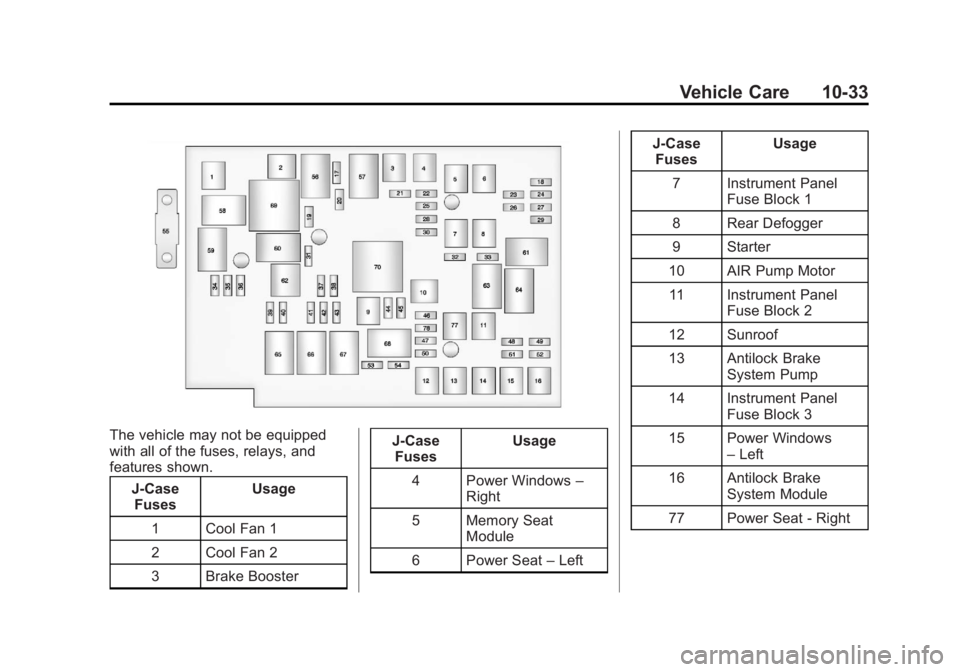
The vehicle may not be equipped
with all of the fuses, relays, and
features shown.J-CaseFuses Usage
1 Cool Fan 1
2 Cool Fan 2
3 Brake Booster J-Case
Fuses Usage
4 Power Windows –
Right
5 Memory Seat Module
6 Power Seat –Left J-Case
Fuses Usage
7 Instrument Panel Fuse Block 1
8 Rear Defogger
9 Starter
10 AIR Pump Motor 11 Instrument Panel Fuse Block 2
12 Sunroof
13 Antilock Brake System Pump
14 Instrument Panel Fuse Block 3
15 Power Windows –Left
16 Antilock Brake System Module
77 Power Seat - Right
Page 304 of 364
Black plate (4,1)GMC Terrain/Terrain Denali Owner Manual - 2013 - crc 1st edition - 5/8/12
11-4 Service and Maintenance
.Check tire inflation pressures.
SeeTire Pressure on
page 10‑45.
.Inspect tire wear. See Tire
Inspection on page 10‑50.
.Visually check for fluid leaks.
.Inspect engine air cleaner filter.
See Engine Air Cleaner/Filter on
page 10‑12.
.Inspect brake system.
.Visually inspect steering,
suspension, and chassis
components for damaged, loose,
or missing parts or signs of
wear. See Exterior Care on
page 10‑73.
.Check restraint system
components. See Safety System
Check on page 3‑17.
.Visually inspect fuel system for
damage or leaks.
.Visually inspect exhaust system
and nearby heat shields for
loose or damaged parts.
.Lubricate body components. See
Exterior Care on page 10‑73.
.Check starter switch. See Starter
Switch Check on page 10‑23.
.Check automatic transmission
shift lock control function. See
Automatic Transmission Shift
Lock Control Function Check on
page 10‑24.
.Check ignition transmission lock.
See Ignition Transmission Lock
Check on page 10‑24.
.Check parking brake and
automatic transmission park
mechanism. See Park Brake and
P (Park) Mechanism Check on
page 10‑24.
.Check accelerator pedal for
damage, high effort, or binding.
Replace if needed.
.Visually inspect gas strut for
signs of wear, cracks, or other
damage. Check the hold open
ability of the strut. See your
dealer if service is required.
.Inspect sunroof track and seal,
if equipped. See Sunroof on
page 2‑18.
Page 361 of 364
Black plate (9,1)GMC Terrain/Terrain Denali Owner Manual - 2013 - crc 1st edition - 5/8/12
INDEX i-9
Replacement PartsAirbags . . . . . . . . . . . . . . . . . . . . . . . 3-32
Maintenance . . . . . . . . . . . . . . . . .11-13
Replacing Airbag System . . . . . . 3-32
Replacing LATCH System Parts after a Crash . . . . . . . . . . . 3-45
Replacing Safety Belt
System Parts after a Crash . . . 3-18
Reporting Safety Defects Canadian Government . . . . . . 13-18
General Motors . . . . . . . . . . . . . 13-19
U.S. Government . . . . . . . . . . . 13-18
Restraints Where to Put . . . . . . . . . . . . . . . . . 3-39
Retained Accessory Power (RAP) . . . . . . . . . . . . . . . . . 9-22
Ride Control Systems Messages . . . . . . . . . . . . . . . . . . . . 5-28
Roads Driving, Wet . . . . . . . . . . . . . . . . . . 9-10
Roadside Assistance
Program . . . . . . . . . . . . . . . 13-7, 13-11
Roof Sunroof . . . . . . . . . . . . . . . . . . . . . . . 2-18 Roof Rack System . . . . . . . . . . . . . . 4-2
Rotation, Tires . . . . . . . . . . . . . . . . 10-51
Routing, Engine Drive Belt . . . . . 12-4
Running the Vehicle While
Parked . . . . . . . . . . . . . . . . . . . . . . . 9-26
S
Safety Belts . . . . . . . . . . . . . . . . . . . 3-11Care . . . . . . . . . . . . . . . . . . . . . . . . . . 3-18
Extender . . . . . . . . . . . . . . . . . . . . . . 3-17
How to Wear Safety Belts
Properly . . . . . . . . . . . . . . . . . . . . . 3-12
Lap-Shoulder Belt . . . . . . . . . . . . 3-13
Reminders . . . . . . . . . . . . . . . . . . . . 5-10
Replacing after a Crash . . . . . . 3-18
Use During Pregnancy . . . . . . . . 3-17
Safety Defects Reporting Canadian Government . . . . . . 13-18
General Motors . . . . . . . . . . . . . 13-19
U.S. Government . . . . . . . . . . . 13-18
Safety Locks . . . . . . . . . . . . . . . . . . . . 2-7
Safety System Check . . . . . . . . . . 3-17
Scheduling Appointments . . . . . 13-13 Seats
Adjustment, Front . . . . . . . . . . . . . . 3-3
Head Restraints . . . . . . . . . . . . . . . 3-2
Heated Front . . . . . . . . . . . . . . . . . . 3-8
Lumbar Adjustment, Front . . . . . 3-5
Memory . . . . . . . . . . . . . . . . . . . . . . . . 3-7
Power Adjustment, Front . . . . . . 3-4
Rear . . . . . . . . . . . . . . . . . . . . . . . . . . . 3-9
Reclining Seatbacks . . . . . . . . . . . 3-5
Securing Child Restraints . . . . . . . . . . . . . . 3-45, 3-48
Security Light . . . . . . . . . . . . . . . . . . . . . . . . . . 5-19
Messages . . . . . . . . . . . . . . . . . . . . 5-29
OnStar
®. . . . . . . . . . . . . . . . . . . . . . 14-2
Vehicle . . . . . . . . . . . . . . . . . . . . . . . 2-12
Vehicle Alarm . . . . . . . . . . . . . . . . . 2-12
Service Accessories andModifications . . . . . . . . . . . . . . . . 10-2
Doing Your Own Work . . . . . . . . 10-3
Engine Soon Light . . . . . . . . . . . . 5-12
Maintenance Records . . . . . . .11-15
Maintenance, General Information . . . . . . . . . . . . . . . . . . 11-1
Parts Identification Label . . . . . 12-1
Page 362 of 364
Black plate (10,1)GMC Terrain/Terrain Denali Owner Manual - 2013 - crc 1st edition - 5/8/12
i-10 INDEX
Service (cont'd)Publications Ordering
Information . . . . . . . . . . . . . . . . 13-17
Scheduling Appointments . . . 13-13
Vehicle Messages . . . . . . . . . . . . 5-29
Servicing the Airbag . . . . . . . . . . . 3-30
Shift Lock Control Function Check, Automatic
Transmission . . . . . . . . . . . . . . . . 10-24
Shifting Into Park . . . . . . . . . . . . . . . . . . . . . . 9-24
Out of Park . . . . . . . . . . . . . . . . . . . 9-25
Side Blind Zone Alert . . . . . . . . . . 9-41
Sidemarker Bulb Replacement . . . . . . . . . . 10-28
Signals, Turn and Lane-Change . . . . . . . . . . . . . . . . . 6-3
Spare Tire
Compact . . . . . . . . . . . . . . . . . . . . 10-66
Specifications and Capacities . . . . . . . . . . . . . . . . . . . . 12-2
Speedometer . . . . . . . . . . . . . . . . . . . 5-8
StabiliTrak OFF Light . . . . . . . . . . . . . . . . . . . . . 5-17
System . . . . . . . . . . . . . . . . . . . . . . . 9-33 Start Assist, Hills . . . . . . . . . . . . . . 9-32
Start Vehicle, Remote . . . . . . . . . . 2-4
Starter Switch Check . . . . . . . . . 10-23
Starting the Engine . . . . . . . . . . . . 9-21
Steering . . . . . . . . . . . . . . . . . . . . . . . . 9-4
Fluid, Power . . . . . . . . . . . . . . . . 10-19
Wheel Adjustment . . . . . . . . . . . . . 5-2
Wheel Controls . . . . . . . . . . . . . . . . 5-2
Stoplamps and Back-Up Lamps Bulb Replacement . . . . . . . . . . 10-28
Storage Areas
Cargo Cover . . . . . . . . . . . . . . . . . . . 4-2
Center Console . . . . . . . . . . . . . . . . 4-1
Convenience Net . . . . . . . . . . . . . . 4-2
Glove Box . . . . . . . . . . . . . . . . . . . . . 4-1
Roof Rack System . . . . . . . . . . . . . 4-2
Stuck Vehicle . . . . . . . . . . . . . . . . . . 9-14
Sun Visors . . . . . . . . . . . . . . . . . . . . . 2-18
Sunroof . . . . . . . . . . . . . . . . . . . . . . . . 2-18
Symbols . . . . . . . . . . . . . . . . . . . . . . . . . . iv
System Forward CollisionAlert (FCA) . . . . . . . . . . . . . . . . . . 9-37
Infotainment . . . . . . . . . . . . 13-20, 7-1
Roof Rack . . . . . . . . . . . . . . . . . . . . . 4-2T
Tachometer . . . . . . . . . . . . . . . . . . . . . 5-8
Taillamps Bulb Replacement . . . . . . . . . . 10-28
Text Telephone (TTY) Users . . . 13-6
Theft-Deterrent Systems . . . . . . . 2-13 Immobilizer . . . . . . . . . . . . . . . . . . . 2-13
Tires Buying New Tires . . . . . . . . . . . 10-53
Chains . . . . . . . . . . . . . . . . . . . . . . 10-57
Changing . . . . . . . . . . . . . . . . . . . 10-59
Compact Spare . . . . . . . . . . . . . 10-66
Designations . . . . . . . . . . . . . . . 10-42
Different Size . . . . . . . . . . . . . . . 10-54
If a Tire Goes Flat . . . . . . . . . . 10-58
Inflation Monitor System . . . . 10-47
Inspection . . . . . . . . . . . . . . . . . . 10-50
Messages . . . . . . . . . . . . . . . . . . . . 5-30
Pressure Light . . . . . . . . . . . . . . . . 5-18
Pressure Monitor System . . . 10-46
Rotation . . . . . . . . . . . . . . . . . . . . 10-51
Sidewall Labeling . . . . . . . . . . . 10-39
Terminology andDefinitions . . . . . . . . . . . . . . . . . 10-42
Uniform Tire Quality
Grading . . . . . . . . . . . . . . . . . . . 10-55